Olark has done one thing well for a long time.
It drops a clean, reliable live chat widget onto your site, and a small team can answer visitors within minutes of installing it. The company has stayed independent out of Ann Arbor since 2009, which is rare in a market full of acquisitions. For a startup that wants no-frills chat, that simplicity still appeals.
The reason people keep searching for an Olark alternative in 2026 sits in two places: the bill and the ceiling.
Start with cost. Olark runs a single Standard plan at $29 per agent per month, and it looks cheap until you add the pieces most teams need. Co-browsing, live chat translation, an unbranded chatbox, and visitor insights are sold as separate PowerUps that can add $246 to $286 per month on top of seats. There is no permanent free tier, and the AI Copilot sits on a custom Pro plan that starts near $100 per agent. Then comes the ceiling. Olark is web-chat first, with basic automation, no visual chatbot builder, and, by its own users’ most common complaint, no native mobile app. Reviewers like the tool, then describe the widget as dated.
I have spent years inside support teams choosing tools like this, so I installed widgets, tested the AI, and read recent reviews on G2 and Capterra to separate the demo from daily use. This guide is organized the way buyers shop, by use case, so you can jump straight to the tool that fits your bottleneck.
The wider market moved too. 75% of CX leaders expect 80% of customer interactions to be resolved without a human agent within the next few years, according to Zendesk CX Trends. A chat widget that needs a human on every conversation is a hard place to start from.
Scale customer support AI without the enormous bill
How I tested these Olark alternatives
I did not grade off marketing pages. I installed widgets, built automations, tested the AI, and read recent G2 and Capterra reviews to see how each tool behaves in daily use. Every tool below is scored on the same six factors.
- Live chat quality. How clean and reliable the widget feels for agents and customers, including mobile.
- Automation and AI. Whether it has a real chatbot and resolution, or only basic auto-responses.
- Channels and depth. Web chat alone, or email, social, ticketing, and a knowledge base too.
- How well it connects to your CRM, help desk, and e-commerce stack.
- Pricing transparency. Whether the headline seat price survives contact with add-ons and real volume.
- Setup effort. Minutes to value versus a longer configuration project.
Olark alternatives at a glance
Here is the shortlist before the in-depth reviews. Kayako leads because it solves the problem most teams hit after Olark, which is resolving chat volume rather than staffing every conversation.
|
Tool |
Rating |
Best for |
Starting price |
Free plan |
AI |
|
Kayako |
4.7 |
Autonomous customer support at scale |
$79/seat + $1 per resolved ticket |
No |
Yes |
|
Tidio |
4.6 |
E-commerce live chat and chatbots |
Free; from $29/mo |
Yes |
Yes |
|
LiveChat |
4.5 |
Bundled live chat without add-ons |
From $19/seat/mo |
Trial |
Add-on |
|
Intercom |
4.5 |
Product-led support with AI |
From $29/seat/mo + $0.99/resolution |
Trial |
Yes |
|
Crisp |
4.5 |
Flat-rate all-in-one for SMB |
Free; from $25/mo |
Yes |
Yes |
|
Tawk.to |
4.5 |
Genuinely free live chat |
Free; add-ons from $19/mo |
Yes |
Add-on |
|
Freshchat |
4.4 |
Omnichannel messaging on a budget |
Free; from $19/agent/mo |
Yes |
Yes |
|
Zendesk |
4.3 |
Enterprise support and ticketing |
From $55/agent/mo |
Trial |
Yes |
|
HubSpot |
4.4 |
CRM-native chat and chatbots |
Free; from $15/seat/mo |
Yes |
Yes |
|
Help Scout |
4.4 |
Friendly email-first support |
Free; from $20/user/mo |
Yes |
Yes |
Ratings reflect public G2 and Capterra scores at the time of writing. Verify live pricing on each vendor page before publishing.
Why look for an Olark alternative in 2026
Olark still runs a tidy chat widget. The pressure to move comes from three places, and they compound as a team grows.
- Add-on PowerUps stack the cost. Standard looks cheap at $29 per agent, however co-browsing, translation, an unbranded chatbox, and visitor insights are billed as separate PowerUps that add roughly $246 to $286 per month, and there is no permanent free tier.
- Automation is basic, AI is gated. On Capterra, reviewers note you cannot design a chatbot and that auto-responses are limited, and the AI Copilot only arrives on a custom Pro plan that starts near $100 per agent.
- It stops at web chat. Olark is live-chat first with no real ticketing or omnichannel depth, and its most-cited limitation is the missing native mobile app, which makes it hard for an agent to stay reachable away from a desk.
Customer expectations push the same way. 73% of consumers are turned off by slow replies, and 62% would rather use a chatbot than wait for a human agent. A widget that depends on a person being online leaves that demand on the table.
What real users say about Olark
Three themes repeat across recent Olark reviews on Capterra and G2.
- Simple and reliable, yet dated. Reviewers praise how fast it installs and how steadily it runs. On Capterra, the recurring caveat is the look, with one verified reviewer calling the interface horrible and very outdated, and others saying it simply feels old.
- No native mobile app. This is the single most common complaint. Reviewers regularly write that they cannot stay online because there is no proper mobile app, in a market where competitors ship native iOS and Android.
- Basic automation, no chatbot builder. Users describe the auto-responses as limited and note that you cannot design a chatbot in Olark, so teams that want real deflection have to look elsewhere or pay for the custom Pro tier.
The 10 best Olark alternatives in 2026
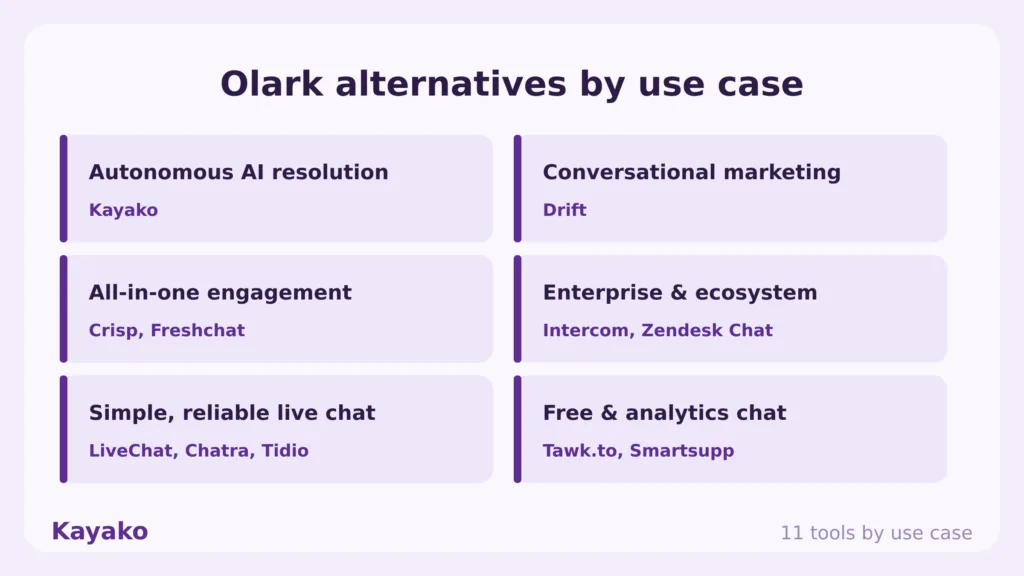
Each tool below is rated for a specific job. Match the platform to your bottleneck, not to the longest feature list.
1. Kayako: Best for autonomous customer support at scale
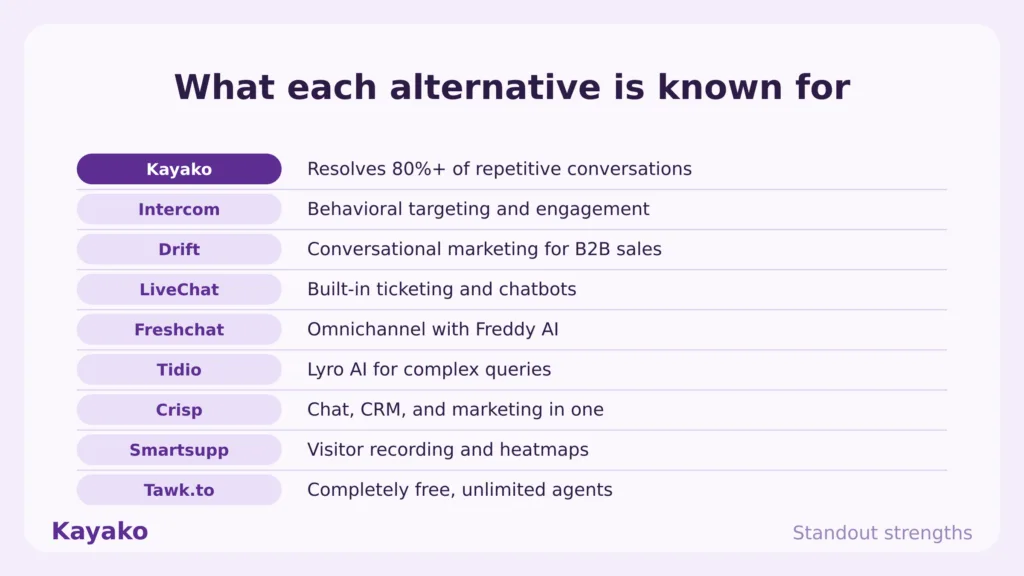
Kayako is the number one pick for teams that outgrew Olark because chat volume, not widget setup, became the real bottleneck. It pairs an AI chatbot with Agent Kay, which resolves conversations across every channel instead of routing each one to a live agent.
Key features
- Autonomous resolution. Agent Kay targets 80% and above resolution across email, live chat, voice, and social.
- Every conversation carries a unified customer timeline, deeper than a chat transcript.
- AI Triage. Auto-classifies, prioritizes, and routes conversations through automation workflows.
- Built-in knowledge. A knowledge base and integrations feed consistent answers and resolution.
Pros
- Built for autonomous resolution, so it closes routine chats rather than putting a human on every one. A team leaving Olark for more than a widget feels that on day one.
- Kayako is deployed for you, not handed over as a setup project, and there are no PowerUps to stack on top, so the price does not creep as you add capability.
- Per-resolution pricing ties cost to outcomes, and a Backlog Breakthrough Guarantee returns your fee if there are no measurable results, lowering the risk of switching.
Cons
- Kayako is built for support operations, so a one-person site that only wants a simple chat box on a landing page will use a fraction of the platform.
- The autonomous engine earns its return at real conversation volume, so very light traffic will not show the full payback.
Pricing: A 90-day pilot from $15K including platform and services, then $79 per seat plus $1 per AI-resolved ticket. See Kayako pricing.
Rating: 4.7/5 from 100+ G2 reviews.
Versus Olark: Olark answers chats with a person. Kayako resolves them with AI and escalates only what needs a human. If your pain is rising chat volume, basic automation, and PowerUp costs that keep stacking, Kayako is the direct upgrade, and you can see the head-to-head on the Compare Kayako page.
Scale support without new headcount
2. Tidio: Best for e-commerce live chat and chatbots
Tidio pairs a clean live chat widget with chatbots and its Lyro AI agent, which makes it a favorite for Shopify and WooCommerce stores that want chat and automation in one place. It is the most direct upgrade for an Olark user who wants real AI without leaving the SMB price band.
Key features
- Lyro AI agent. Answers recurring questions from your own content and automates up to two thirds of chats.
- Visual Flows builder. Drag-and-drop chatbot automation with templates, which Olark lacks.
- E-commerce integrations. Native Shopify, WooCommerce, and BigCommerce support.
- Live typing preview. See what a visitor types before they send, for faster replies.
Pros
- It gives an Olark user the missing piece, a real visual chatbot and AI agent, while staying easy enough to launch in a day.
- The core support plan does not charge per agent, so a small team can add operators without the per-seat math that Olark forces.
Cons
- Billing splits across billable conversations, Lyro AI conversations, and flow triggers, so the effective monthly cost is harder to forecast.
- The plan ladder jumps from Growth at $59 straight to Plus at $749 with a 10-seat cap on self-service plans, so scaling teams can hit a wall.
Pricing: Free; Starter $29/mo, Growth $59/mo, Plus from $749/mo, with the Lyro AI add-on from $39/mo. See Tidio pricing.
Rating: 4.6/5 across 1,800+ G2 reviews.
Versus Olark: Tidio gives you the chatbot and AI that Olark never built, at a comparable SMB price. Olark is simpler to run, however it cannot automate the way Lyro does.
3. LiveChat: Best for bundled live chat without add-ons
LiveChat is the closest like-for-like upgrade from Olark, with the features Olark charges extra for built into the plan. It ships native mobile apps, which removes Olark’s single most common complaint.
Key features
- Polished widget. Deep customization plus a built-in chat rating system.
- Native mobile apps. Full iOS and Android apps so agents stay reachable, unlike Olark.
- Near-omnichannel inbox. Web chat, email, SMS, Messenger, and WhatsApp on the Business plan.
- App marketplace. Broad integrations and ticketing built into the tiers.
Pros
- The features Olark sells as PowerUps, like an unbranded widget and richer customization, come inside the plan, so the price does not stack the same way.
- Native iOS and Android apps fix the mobile gap that Olark reviewers complain about most, so agents can answer away from a desk.
Cons
- Automation is a separate purchase. The AI chatbot lives in the sibling ChatBot product, so real bot deflection means a second subscription.
- Seat-based billing means cost rises with every agent you add, and the deepest analytics sit on higher tiers.
Pricing: Starter from $19/seat/mo, Team $49/seat/mo, Business $79/seat/mo on annual billing, with ChatBot sold separately. See LiveChat pricing.
Rating: 4.5/5 on G2.
Versus Olark: LiveChat is the natural step up for an Olark team that wants the same simplicity with native mobile apps and bundled features. Add ChatBot if you need real automation.
4. Intercom: Best for product-led support with AI
Intercom blends a support inbox, in-app messaging, and its Fin AI agent into one platform. It fits product-led teams that want AI to close repetitive chats rather than answer each one by hand.
Key features
- Fin AI agent. Resolves conversations autonomously and connects to existing help desks.
- In-app messaging. Guide users through onboarding and adoption inside your product.
- Unified inbox. Chat, email, and in-app messages with strong segmentation.
- Workflow automation. Multi-step procedures and routing for common paths.
Pros
- Fin genuinely resolves tickets, with public case studies citing 50% to 67% automation, which is a different league from Olark’s basic auto-responses.
- The Messenger experience is polished and customers engage with it, so more issues reach the AI in the first place.
Cons
- Cost compounds in a way that surprises teams. Seats run $29 to $132 each, then every Fin resolution adds $0.99 on top, and reviewers repeatedly flag unpredictable spend at volume.
- Useful analytics sit behind a higher Pro add-on, and annual contracts can lock you in for twelve months, which is a big jump from Olark’s simplicity.
Pricing: Essential from $29/seat/mo, Advanced $85/seat/mo, Expert $132/seat/mo, plus $0.99 per Fin resolution with a 50-resolution monthly minimum. See Intercom pricing.
Rating: 4.5/5 on G2.
Versus Olark: Intercom adds AI resolution and product messaging that Olark does not attempt. The trade is a usage bill that climbs with every Fin resolution, so model your volume first.
5. Crisp: Best for a flat-rate all-in-one inbox
Crisp folds live chat, a shared inbox, a chatbot builder, and a knowledge base into one platform at a flat price. For an Olark user tired of PowerUp add-ons, the unlimited-conversation pricing is the draw.
Key features
- Unified inbox. Chat, email, and social messages in a single interface.
- Visual chatbot builder. Condition blocks, multichannel deployment, and API access, which Olark lacks.
- Flat-rate pricing. Unlimited conversations on paid plans, no per-conversation meters.
- Knowledge base. Built-in self-service to deflect repeat questions.
Pros
- Flat unlimited-conversation pricing is a relief after Olark’s stacking PowerUps, so the bill stays steady as volume rises.
- It includes a real chatbot builder and a knowledge base in the box, which gives a small team automation Olark cannot match.
Cons
- AI depth trails Intercom, Zendesk, or Kayako, so it suits straightforward support more than complex resolution.
- It is built for SMB scale, so the routing, SLAs, and reporting that larger operations need are thinner here.
Pricing: Free plan; Pro from about $25/mo and Unlimited from about $95/mo, with unlimited conversations. See Crisp pricing.
Rating: 4.5/5 across 180+ G2 reviews.
Versus Olark: Crisp gives you a chatbot, a knowledge base, and unlimited chats at a flat rate, where Olark charges add-ons for less. Olark is simpler, however Crisp does far more for the money.
6. Tawk.to: Best for genuinely free live chat
Tawk.to is the budget answer. The core live chat, ticketing, and knowledge base are free with unlimited agents, chats, and websites, and the company makes money on optional add-ons and hired agents instead of subscriptions.
Key features
- Free core platform. Unlimited agents, chats, and properties at no cost.
- Visitor monitoring. Real-time visitor tracking, page views, and location.
- Add-ons when needed. Branding removal, AI Assist, and video or voice, billed per property.
- Hired agents. Outsourced chat coverage from $1 per hour if you do not want to staff it.
Pros
- The free core is genuinely free with no agent or volume caps, so a budget-conscious team gets professional live chat at zero subscription cost, which undercuts Olark outright.
- Add-ons turn on only when you need them, so you control where you spend rather than paying for a bundle.
Cons
- Reviewers flag notification delays and a clunky mobile app, so busy teams sometimes miss incoming chats.
- The AI is basic without a proper chatbot builder, and branding removal, video, and voice are paid add-ons billed per website, so costs return as you scale.
Pricing: Free core; add-ons from $19/mo (branding removal) and $29/mo (AI Assist or video), with hired agents from $1/hour. See Tawk.to pricing.
Rating: 4.5/5 on G2.
Versus Olark: Tawk.to is the free alternative to Olark’s paid Standard plan, with unlimited agents at no cost. Olark feels more polished, though it cannot match free.
7. Freshchat: Best for omnichannel messaging on a budget
Freshchat, from Freshworks, takes you beyond a single widget into web, mobile, and social messaging, with a generous free tier and tight links to the rest of the Freshworks suite.
Key features
- Freddy AI. Context-aware bots and an agent copilot across channels.
- Omnichannel inbox. Chat, email, WhatsApp, Instagram, and Messenger in one view.
- Proactive messaging. Behavior-based triggers to engage at the right moment.
- Freshworks fit. Clean ties to Freshdesk and Freshsales for a fuller stack.
Pros
- The free plan covers up to 10 agents, which is rare and lets a real team start without spend, then grow into omnichannel as needed.
- Per-agent pricing is simple to explain, and the move from a single widget to several channels happens without changing tools.
Cons
- The all-in cost is not just the seat fee, since Freddy AI agent sessions bill on usage, so automation-heavy teams should track session volume.
- AI depth and reporting trail Intercom and Zendesk, so larger operations can outgrow it once support gets complex.
Pricing: Free for up to 10 agents; Growth from $19/agent/mo, Pro from $49/agent/mo, Enterprise from $79/agent/mo on annual billing, plus Freddy AI usage. See Freshchat pricing.
Rating: 4.4/5 across 490+ G2 reviews.
Versus Olark: Freshchat moves you from web-chat only into real omnichannel messaging with a free starting tier, which Olark cannot match. It is heavier to set up than a simple widget.
8. Zendesk: Best for enterprise support and ticketing
Zendesk is the mature help desk choice for teams that have outgrown a chat widget entirely and need ticketing, routing, and automation at scale, now with outcome-based AI resolution.
Key features
- Deep ticketing. Custom views, macros, triggers, SLAs, and multi-brand support.
- AI agents. Automated Resolutions confirm a fix after 72 hours of inactivity before billing.
- Omnichannel inbox. Chat, email, phone, and social in one agent workspace.
- Large marketplace. Over 1,500 integrations for complex stacks.
Pros
- Support depth is the standout. Granular SLA management, reliable routing, and reporting hold up at large volume, which is far beyond what a chat widget offers.
- The bot-to-agent handoff keeps context intact, so escalations do not force the customer to repeat themselves.
Cons
- AI cost is layered. The real automation lives in an Advanced AI add-on at $50 per agent per month, then automated resolutions bill $1.50 to $2.00 each.
- Setup and administration are heavy, so a small team coming from Olark’s five-minute install will feel the jump, with larger rollouts taking months.
Pricing: Suite Team from $55/agent/mo up to Enterprise $169/agent/mo, plus the Advanced AI add-on at $50/agent/mo and automated resolutions at $1.50 to $2.00 each. See Zendesk pricing.
Rating: 4.3/5 on G2.
Versus Olark: Zendesk gives you a full help desk where Olark gives you a widget. Budget for the AI add-ons separately, and expect a heavier setup in exchange for depth.
9. HubSpot: Best for CRM-native chat and chatbots
HubSpot’s conversational tools shine when you already use its CRM, because every chat becomes part of the customer record across marketing, sales, and support.
Key features
- CRM-native context. Chats personalize against full HubSpot contact and deal data.
- Free chatflows. A rule-based chatbot and live chat on the free tier.
- Breeze customer agent. AI resolution on higher Service Hub tiers, billed on resolution.
- Cross-team reporting. Track a customer from marketing touch to support ticket in one system.
Pros
- If your stack is already HubSpot, the value is immediate because chat, CRM, and reporting share one data layer, which Olark cannot do.
- The free chatflow builder lets a small team start without spend, and Breeze adds outcome-based AI only when you need it.
Cons
- Value concentrates inside HubSpot, so outside it you pay for integration depth you cannot use, and Professional jumps to $90 per seat plus a $1,500 onboarding fee.
- The inbox is tickets-first, so a team that just wants a fast, friendly chat widget may find it heavier than needed.
Pricing: Free chatflows; Service Hub Starter ~$15/seat/mo, Professional $90/seat/mo plus a $1,500 onboarding fee, Enterprise $150/seat/mo with a 10-seat minimum. See HubSpot pricing.
Rating: 4.4/5 on G2.
Versus Olark: HubSpot ties your chat to a full CRM, which Olark does not. It is the better fit for HubSpot shops and a heavier, pricier choice for everyone else.
10. Help Scout: Best for friendly, email-first support
Help Scout is a customer-first help desk that adds email and a knowledge base to live chat while keeping support feeling personal. It suits an Olark team that wants more than chat without a steep learning curve.
Key features
- Shared inbox. Email and chat in one collaborative inbox with assignments and notes.
- Docs knowledge base. A self-service site that cuts repeat questions and chat volume.
- In-app help and proactive messaging on your site or product.
- AI drafting and Answers. AI-drafted replies, summaries, and customer-facing resolution.
Pros
- It adds email, a knowledge base, and a softer support experience on top of chat, so a team gets a real help desk without the complexity of Zendesk.
- A genuine free plan for up to five users lets a small team start without spend, which Olark no longer offers.
Cons
- Advanced reporting and workflow depth sit behind higher tiers, so growing teams hit upgrade walls as needs mature.
- AI Answers bills on usage at roughly $0.75 per resolution, so heavy automation raises the bill beyond the headline seat price.
Pricing: Free for up to 5 users; paid from $20 to $65 per user per month, plus usage-based AI Answers. See Help Scout pricing.
Rating: 4.4/5 across 420+ G2 reviews.
Versus Olark: Help Scout adds email support and a knowledge base that Olark lacks, with a free tier to start. It is lighter on live chat polish than a chat-first tool, so weigh which channel leads for you.
Kayako vs Olark: a feature-by-feature comparison
Since Kayako is the top pick for teams that outgrew Olark, here is the head-to-head.
|
Feature |
Olark |
Kayako |
|
Primary use case |
Simple website live chat |
Autonomous customer support resolution |
|
Core model |
A person answers each chat in real time |
AI resolves chats and escalates the rest |
|
AI |
Basic; AI Copilot only on custom Pro tier |
Agent Kay resolution included in the model |
|
Chatbot |
No visual chatbot builder |
AI chatbot plus autonomous resolution |
|
Channels |
Web chat first, no native mobile app |
Email, live chat, voice, social, and your help desk |
|
Knowledge base |
Limited |
Built in, feeds AI resolution |
|
Add-on costs |
PowerUps stack (cobrowse $99, unbranded $59, and more) |
One platform, per-resolution pricing, no add-ons |
|
Free plan |
No (14-day trial) |
No |
|
Best fit |
Small teams wanting a no-frills chat widget |
Mid-market teams scaling support without headcount |
The takeaway is simple. Olark gives a person a tidy place to answer chats. Kayako resolves the chats for you and improves with each one.
Cut your live chat costs Book Session >
Reviews: what real users say
Where reviewers praise these tools
Across G2 and Capterra, reviewers praise Tidio and Crisp for easy chatbots, LiveChat and tawk.to for clean reliable chat, Freshchat for omnichannel value, and Zendesk for support depth. Kayako reviewers single out the done-for-you deployment and the measurable drop in backlog and cost per ticket.
Where reviewers raise concerns
The complaints rhyme across the category. Add-on PowerUps and usage-based AI surprise teams as volume grows, simple widgets run thin on automation, and enterprise tools carry steep setup. These themes track the broader data, since 73% of consumers are turned off by slow replies. Speed and resolution, not widget polish, decide satisfaction.
How to switch from Olark without losing momentum
Migrating off Olark is straightforward when you sequence it. Use this checklist.
- List the PowerUps you actually use. Note which add-ons you pay for, since a bundled tool may include them for less.
- Export chat history and contacts. Keep your transcripts and customer context intact for the new platform.
- Pick by job, not by hype. Use the at-a-glance table to match the tool to your bottleneck, simple chat or resolution.
- Reinstall the widget and reconnect channels. Swap the chat snippet, then link email, social, and your CRM.
- Rebuild only what earns its place. Recreate canned responses and high-value automations first, then expand.
- Run both in parallel briefly. Validate results, then remove the Olark widget to avoid double chats.
How to choose the right Olark alternative
The best tool removes your biggest bottleneck. Be honest about which job you are replacing.

- Primary goal. Resolving chat volume points to Kayako, Intercom, or Crisp. Simple, cheaper live chat points to LiveChat, Tidio, or tawk.to.
- Existing stack. HubSpot and Freshworks shops get the smoothest path from their own ecosystem tools.
- Automation needs. If a real chatbot matters, Tidio’s Lyro, Crisp’s builder, or Intercom’s Fin go far beyond Olark.
- True cost at scale. Watch add-ons and usage-based AI. Kayako’s per-resolution model and Crisp’s flat rate stay the most predictable as volume grows.
Which Olark alternative should you pick
Start with the job, not the feature list. The right answer depends on what is actually driving you off Olark.
- Customer support at scale. Choose Zendesk if you need heavy enterprise ticketing.
- E-commerce chat with AI. Tidio for Shopify and WooCommerce stores that want Lyro.
- Same simplicity, more polish. LiveChat for bundled features and native mobile apps.
- Tightest budget. to for genuinely free live chat, Crisp for flat-rate all-in-one.
- More than chat. Help Scout or Freshchat to add email, knowledge base, and omnichannel.
The bottom line
Olark built a simple, reliable chat widget, and for a small team that wants exactly that, it still does the job. In 2026, the reasons people leave are the add-on PowerUps that stack the cost, the lack of a free tier, the basic automation with no chatbot builder, and the missing native mobile app. The job most teams leaving Olark actually need filled is resolving chat volume, not staffing every conversation.
For the same simplicity with more polish, LiveChat and Tidio are the cleanest moves. For the tightest budget, tawk.to and Crisp go further for less. For teams that want chats resolved rather than only answered, Kayako is the strongest answer, because it closes conversations end to end and aligns cost with outcomes. Pick the tool that removes your bottleneck, then move.
Start a 90-day Kayako pilot Book Session >
Frequently asked questions
What is the best Olark alternative in 2026?
It depends on the job. For autonomous customer support at scale, Kayako is the strongest alternative. For simple SMB live chat with real AI, Tidio and LiveChat lead.
Does Olark have a free plan?
No. Olark runs a single Standard plan at $29 per agent per month, with no permanent free tier and a 14-day trial. If a free plan matters, tawk.to is free, and Tidio, Crisp, Freshchat, HubSpot, and Help Scout all offer free tiers.
Why do teams leave Olark?
The common reasons are PowerUp add-ons that stack the cost, basic automation with no visual chatbot builder, a dated-looking widget, and the lack of a native mobile app. The AI Copilot also sits on a custom Pro plan rather than the standard tier.
What is the cheapest Olark alternative?
Tawk.to is the cheapest, with a genuinely free core platform and unlimited agents. Crisp’s flat-rate plans and Tidio’s free tier are also strong value for small teams.
Does Kayako replace Olark?
For customer support, yes. Kayako pairs an AI chatbot with autonomous resolution across email, live chat, voice, and social, so it resolves conversations rather than putting a human on each one. For a one-page site that only needs a basic chat box, a lighter tool like tawk.to may fit better.
Ready to transform your customer support with AI?
Join hundreds of support teams using Kayako to resolve tickets faster, raise CSAT, and scale without scaling headcount.
Move off Olark cleanly, with Kayako
Related reading
- Olark vs Intercom Compared
- Top Zendesk Alternatives
- Top Intercom Alternatives
- Top Help Scout Alternatives
- Compare Kayako