Tidio puts a clean live chat widget and a chatbot on your store, and for a small Shopify or WooCommerce shop, that is often enough. The platform reports use across major brands and holds a sizable slice of the live chat market.
Then the store grows. A campaign drives a traffic spike, the conversation counter fills up, and the bill arrives sooner than planned. The free plan stops at 50 conversations a month, Lyro AI sits behind a separate add-on, and the next real tier up is a long way from the last one.
That is when teams start searching for a Tidio alternative. Some want a deeper e-commerce help desk. Some want an open-source tool they can host themselves. Many want something Tidio was never built to do, which is to resolve customer support at scale without a meter running on every message.
As the VP of customer support, I have watched teams hit this wall more than once. So I put the work in. I signed up, built real bots, connected integrations, and measured each tool against the jobs people actually hire Tidio for.
The direction of travel is clear. 75% of CX leaders expect 80% of customer interactions to be resolved without a human agent within the next few years, according to Zendesk CX Trends research. The tool you pick now should be ready for that, not capped at a monthly quota.
See Kayako resolve tickets autonomously Book Session >
How I tested these Tidio alternatives
I did not just read pricing pages. I ran trials, built flows, connected a store, and checked each claim against G2, Capterra, Trustpilot, and the vendor’s own pricing page. I scored every platform on six things:
- Core functionality. How well it handles live chat, chatbots, and multichannel support.
- Ease of use. How fast a non-technical team gets value.
- Whether it connects to the stack you already run, especially your store and CRM.
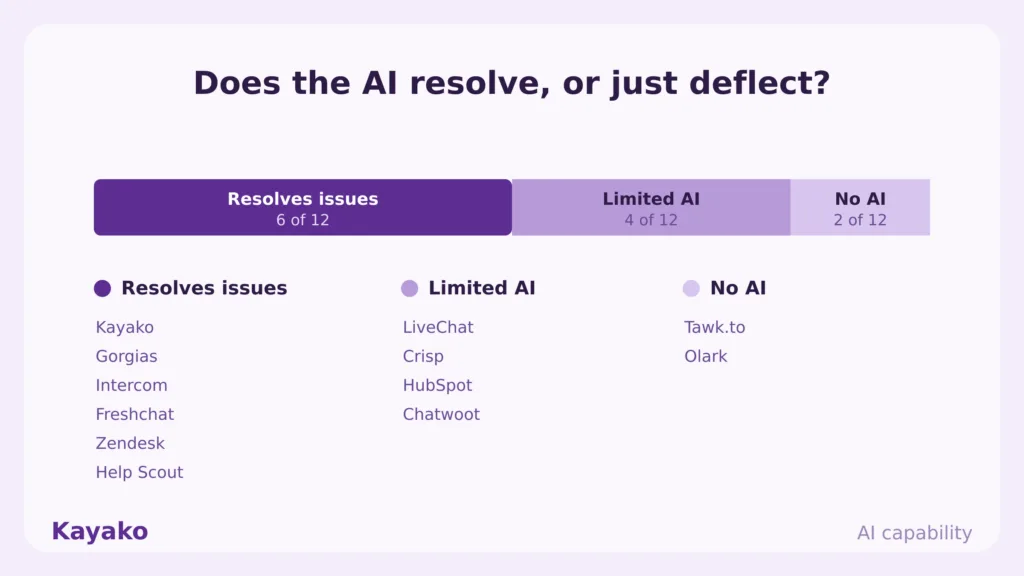
- Automation and AI. Whether the AI resolves issues or just deflects them into a form.
- How useful the analytics are for cutting cost per contact.
- Pricing transparency. Where the real bill lands once add-ons and overages are counted.
I weighted pricing transparency heavily, because hidden per-conversation costs were the most common complaint across Tidio reviews.
Tidio alternatives at a glance
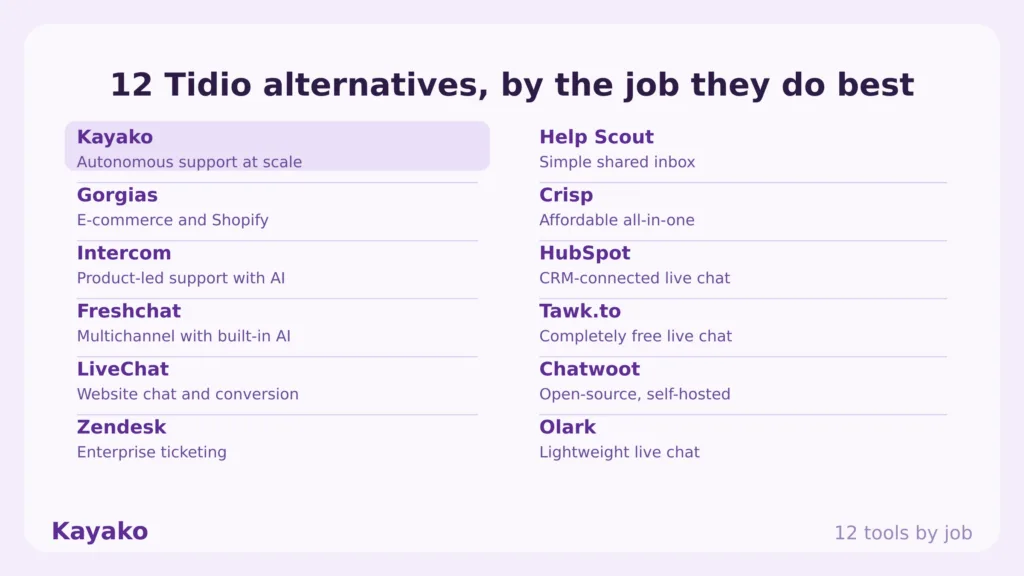
Here is the shortlist before the in-depth reviews. Kayako leads because it solves the problem most teams hit when they outgrow Tidio, which is rising support volume and a bill that climbs with every conversation.
|
Tool |
Rating |
Best for |
Starting price |
Free plan |
AI |
|
Kayako |
4.7 |
Autonomous support at scale |
$79/seat + $1 per resolved ticket |
No |
Yes |
|
Gorgias |
4.6 |
E-commerce and Shopify support |
From $10/mo, AI Agent extra |
Trial |
Yes |
|
Intercom |
4.5 |
Product-led support with AI |
$29/seat + $0.99 per Fin resolution |
Trial |
Yes |
|
Freshchat |
4.4 |
Multichannel support with built-in AI |
From $19/agent/mo |
Trial |
Yes |
|
LiveChat |
4.5 |
Website chat and sales conversion |
From $20/agent/mo |
Trial |
Limited |
|
Zendesk |
4.3 |
Enterprise ticketing and omnichannel |
From $55/agent/mo |
Trial |
Yes |
|
Help Scout |
4.4 |
Simple shared inbox for small teams |
Free, then from $25/user |
Yes |
Yes |
|
Crisp |
4.5 |
Affordable all-in-one for SMBs |
Free, then from €45/mo |
Yes |
Limited |
|
HubSpot |
4.4 |
CRM-connected live chat |
Free, then from $20/mo |
Yes |
Limited |
|
Tawk.to |
4.6 |
Completely free live chat |
Free |
Yes |
No |
|
Chatwoot |
4.3 |
Open-source, self-hosted |
Free self-hosted, cloud from $19 |
Yes |
Limited |
|
Olark |
4.3 |
Lightweight, no-frills live chat |
From $29/mo |
Trial |
No |
Why look for a Tidio alternative
Tidio is a capable live chat tool. It also has clear limits that push growing stores to look elsewhere.
- Conversation caps punish growth. The free plan stops at 50 conversations a month and Starter at around 100, so one good campaign can hit the ceiling and trigger an upgrade you did not plan for. Sources: eesel, Chatarmin.
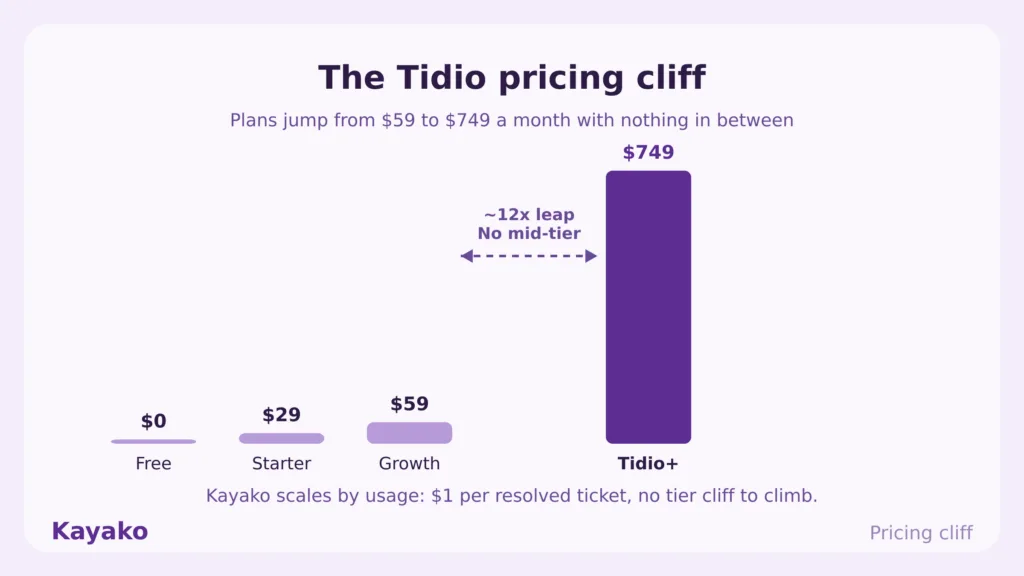
- The pricing cliff. Plans jump from Growth at $59 to Tidio+ at $749, a roughly 12x leap with nothing in between, which strands mid-size teams. (Chatarmin)
- AI costs extra on every tier. Lyro is a separate add-on from about $39 a month for 50 conversations, and Flows bill separately again, so you track three meters at once. (Chatsy)
- Seat ceiling. Self-serve plans cap at 10 seats, so a larger team is pushed toward enterprise pricing.
- Website-first reach. Tidio is strong on the store widget. However, it is thinner on voice and on the deep ticketing that bigger support teams need.
Customer expectations are moving the other way. 64% of shoppers expect a response within one hour, and brands that answer live chat within a minute convert 15% higher than those that take five. Live chat also carries the highest satisfaction of any digital channel at 73%, well above email and phone. A quota that throttles those conversations leaves money on the table.
What real users say about Tidio
This is drawn from public reviews on the Shopify App Store (4.7 across 1,150+ reviews), G2, Trustpilot, and threads across Reddit and the Shopify Community.
The bill climbs with traffic
The recurring complaint is the conversation meter. A Shopify App Store reviewer wrote that the monthly conversation limit feels constricting, and write-ups that aggregate Reddit and Shopify Community threads note that scaling from 100 to 300 AI conversations can more than double the monthly bill, because overages force a tier upgrade rather than metering gently.
AI and branding are separate purchases
Another Shopify App Store review put it bluntly, saying removing the Tidio branding costs more per month than using the tool itself, and that welcome bots and automation flows push a small store past its Shopify bill. Reviewers expected Lyro included and found it gated behind an add-on on every plan.
Great until you scale
On G2 and the Shopify App Store, Tidio earns praise for an easy setup and a clean widget. The frustration shows up later, when volume and the $59-to-$749 gap collide and there is no mid-tier to land on.
The 12 best Tidio alternatives in 2026
Each tool below is rated for a specific job. Match the tool to your bottleneck, not to the longest feature list.
1. Kayako: Best for autonomous customer support at scale
Kayako is the top pick for teams that outgrew Tidio because support volume, not website chat, became the bottleneck. It is not a chat widget. It is an autonomous resolution platform that deploys into your existing help desk and clears tickets across every channel, so the bill does not climb with each extra conversation.
Key features
- Agent Kay resolves tickets autonomously across email, live chat, voice, and social.
- SingleView gives every conversation a unified customer timeline, not just contact fields.
- AI Triage auto-classifies, prioritizes, and routes tickets through automation workflows.
- Omnichannel support that includes social and e-commerce.
- A knowledge base and integrations that keep answers consistent across channels.
Pros
Pricing tracks resolved tickets, so cost follows value instead of rising with every conversation the way Tidio’s quotas do. It is deployed for you, so a team without an automation specialist is not left to build flows alone. The AI targets 80% and above autonomous resolution, which keeps headcount flat as volume grows.
Cons
It is built for support operations with real ticket volume, so a two-person store sending a handful of chats a week will not see the payback. There is no perpetual free tier, unlike Tidio, so it suits mid-market teams running a pilot rather than hobby stores.
Pricing
A 90-day pilot from $15K including platform and services, then $79 per seat plus $1 per AI-resolved ticket. A Backlog Breakthrough Guarantee returns your fee if there are no measurable results. See pricing.
Rating
4.7/5 from 100+ G2 reviews.
Verdict vs Tidio
Tidio manages conversations and bills you per conversation. Kayako removes the repetitive ones, so the bill does not scale with your traffic. Compare it directly on the Compare Kayako page.
Scale support without adding headcount Talk to Expert >
2. Gorgias: Best for e-commerce and Shopify support
Gorgias is the closest like-for-like move for a Tidio store on Shopify. It centralizes email, chat, social, and SMS, and its AI Agent can edit orders, manage subscriptions, and recommend products inside the ticket.
Key features
- Native Shopify, Magento, and BigCommerce integrations.
- AI Agent that takes real order actions, not just canned replies.
- Ticket-based pricing instead of per-seat licensing.
- 70+ integrations across e-commerce, shipping, and messaging.
- Macros and intent detection for high-volume stores.
Pros
Ticket-based pricing rather than per-seat means the whole team can log in without seat math, and reviewers single this out as the reason cross-team work got easier. The Shopify depth matters too, because editing an order or cancelling a subscription happens inside Gorgias, so agents stop bouncing between Shopify Admin and the help desk.
Cons
The AI Agent is a separate paid layer on top of the plan, and its bills are hard to predict because automated resolutions are metered, so even fans say it gets expensive once AI is on. A 3-day attribution window credits the AI for sales the shopper may have decided on elsewhere, which can make ROI read higher than reality. Reporting is also limited, and you cannot save certain filtered inbox views.
Pricing
Starter $10/mo, Basic $60/mo, Pro $360/mo, Advanced $900/mo ($750 annual for 5,000 tickets), Enterprise custom. AI Agent priced separately. Sources: Capterra, Gorgias pricing.
Rating
4.6/5 on G2, 4.5 on Capterra, 4.1 on Trustpilot.
Verdict vs Tidio
Both target stores. However, Gorgias goes deeper on order actions, while Tidio leans on its widget and Lyro. Gorgias bills per ticket, and Tidio bills per conversation plus AI add-ons.
3. Intercom: Best for product-led support with AI
Intercom suits product-led SaaS teams that want in-app messaging alongside a strong AI agent. Fin resolves conversations on its own and only charges when it closes one.
Key features
- Fin AI agent with published resolution rates between 42% and 67%.
- In-app messaging for onboarding and adoption.
- Omnichannel inbox with advanced segmentation.
- Copilot that drafts replies for human agents.
Pros
Fin is one of the most capable resolution agents on the market, so high-volume teams see real deflection. The outcome-based model reads cleanly because you pay $0.99 only when Fin actually resolves a conversation.
Cons
The headline price hides the stack. You still pay seats from $29 to $132, Copilot at $29 to $35 per seat, and channel usage on top of Fin, and one tracker found teams spend 60 to 80% above base seat cost once everything is counted. Analytics also sit behind a $99 a month Pro tier, which reviewers flag as paywalling reporting they expected included. On top of that, a large share of entry-plan users upgrade within six months, so the starting price rarely holds.
Pricing
Essential $29, Advanced $85, Expert $132 per seat per month on annual billing. Fin is $0.99 per resolution with a 50-resolution monthly minimum. Sources: Fin pricing on G2, Intercom pricing.
Rating
4.5/5 on G2.
Verdict vs Tidio
Intercom is the heavier, pricier platform with stronger AI and in-app reach. Tidio is simpler and cheaper at entry, though it caps conversations and gates Lyro behind add-ons. See our Intercom alternatives guide for a closer look.
4. Freshchat: Best for multichannel support with built-in AI
Freshchat pairs live chat with Freddy AI and folds into Freshdesk for ticketing. It fits teams that want omnichannel support without bolting AI on as a separate product.
Key features
- Freddy AI across self-service, agent Copilot, and analytics.
- Unified inbox for chat, email, and social.
- Proactive campaigns at key lifecycle moments.
- Visual bot builder and Freshdesk ticketing.
Pros
Setup runs in days, not the months some Zendesk rollouts need, which matters for teams without a dedicated admin. Freddy AI is built into the platform rather than sold as a wholly separate product, and the suite rates above 4 of 5 across several thousand reviews.
Cons
The free tier shrank to 2 agents for 6 months, so it now reads as a trial rather than a long-term free plan. Freddy bot replies are session-based at roughly $49 per 100 sessions, and a single visitor’s day of messages counts as one session, so a busy widget runs up cost during peaks. Value also weakens at the Pro tier, where features that competitors include lower down start to cost more.
Pricing
Freshdesk Growth $19, Pro $55, Enterprise $89 per agent per month; Omni tiers $29, $79, $119. Freddy Copilot add-on $29 to $35 per agent. Sources: Freshdesk pricing on G2, Freshworks
Rating
4.4/5 on G2 across 3,700+ reviews.
Verdict vs Tidio
Freshchat brings deeper ticketing and an AI suite Tidio lacks at the low tiers. However, its session billing carries the same watch-the-meter caution that Tidio’s quotas do.
5. LiveChat: Best for website chat and sales conversion
LiveChat is a polished, sales-leaning widget with 200+ integrations and proactive triggers. It fits teams that treat chat as a conversion channel first.
Key features
- Advanced routing by skill, availability, and workload.
- Customizable widgets and 200+ native integrations.
- Proactive invitations timed to high-intent moments.
- Goal tracking that ties chats to revenue.
Pros
The widget and reporting are mature, and proactive triggers fire when buyers are closest to deciding, which is why sales teams favor it. The 200+ native integrations cover most stacks without middleware.
Cons
The chatbot is sold separately as ChatBot, and ticketing needs HelpDesk, so the live chat price is only part of the real bill. The Starter plan also caps you at one agent, which forces an upgrade the moment a second person joins.
Pricing
Starter about $20/agent, Team $41, Business $59 on annual billing. ChatBot and HelpDesk are priced separately. Source: LiveChat pricing.
Rating
4.5/5 on G2 across 800+ reviews, 4.6 on Capterra.
Verdict vs Tidio
LiveChat is the stronger sales-chat tool with broader integrations. Tidio bundles bots and chat in one place at a lower entry point, though with conversation caps.
6. Zendesk: Best for enterprise ticketing and omnichannel
Zendesk is the enterprise standard for ticketing, with chat folded into a broad suite. It fits teams that need depth and can absorb the cost.
Key features
- Unified ticketing across email, chat, voice, and self-service.
- AI agents and an AI Copilot for agents.
- 1,200+ integrations and deep analytics.
- Trigger-based engagement and an agent workspace.
Pros
The reporting and integration breadth are best in class, so large teams get analytics depth Tidio cannot match. One suite covers email, chat, voice, and self-service, which cuts tool sprawl for bigger operations.
Cons
Suite plans start at $55 per agent, and the AI Copilot is an extra $50 per agent with no option to buy it for only some users, so costs climb fast. Implementation can also run far longer than lighter tools, which is overkill for a small store leaving Tidio.
Pricing
Suite Team $55, Growth $89, Professional $115+ per agent per month on annual billing; AI Copilot $50 per agent; AI Agent priced by outcome. Source: Zendesk pricing.
Rating
4.3/5 on G2.
Verdict vs Tidio
Zendesk is the enterprise step up in depth and price. Tidio is the SMB tool, and most teams move to Zendesk only when ticket complexity, not chat volume, is the problem. See our Zendesk alternatives guide.
7. Help Scout: Best for a simple shared inbox for small teams
Help Scout is a clean shared inbox with a built-in knowledge base. It fits small teams that want email-first support without enterprise complexity.
Key features
- Shared inbox with collaboration tools.
- Docs knowledge base included on every plan.
- Beacon live chat and AI features.
- Reporting and a 15-minute setup.
Pros
The interface is among the easiest to adopt, so teams are productive within a day, and channels are included in every paid plan rather than gated by tier. A free tier for 5 users and an included help center make it cheaper to start than many rivals.
Cons
It is email-first, and WhatsApp is inbound only, so brands that want chat-led or social-led support will find it thin. AI resolutions are billed at $0.75 each on top of the seat price, so heavy automation adds a variable line to the bill.
Pricing
Free for 5 users; paid plans from $25 to $75 per user per month; AI at $0.75 per resolution. Sources: Help Scout pricing, G2.
Rating
4.4/5 on G2.
Verdict vs Tidio
Help Scout wins for email-led teams and simplicity. Tidio wins for live chat and store widgets. They sit at different front doors.
8. Crisp: Best for an affordable all-in-one for SMBs
Crisp bundles chat, a shared inbox, and a chatbot at an SMB-friendly price. It fits small teams that want multichannel basics without per-seat math.
Key features
- Shared inbox across email, Messenger, Instagram, and Telegram.
- Chatbot, CRM, and proactive campaigns.
- 2-minute widget install.
- Rich customer profiles for context.
Pros
Flat plan pricing rather than per-seat keeps small teams cheap, and the widget installs in minutes. Reviewers single out responsive support and a tidy multichannel inbox.
Cons
The Essentials plan caps you at 10 agents, and each brand needs its own workspace, which complicates multi-brand setups. AI also sits in higher tiers and add-ons, so the affordable entry point thins out once you automate.
Pricing
Free for 2 agents; Mini about €45/mo; Essentials about €95/mo with a 10-agent cap; Plus about €295/mo. Source: Crisp pricing.
Rating
4.5/5 on G2 across 220+ reviews, 4.5 on Capterra.
Verdict vs Tidio
Crisp matches Tidio’s SMB positioning with flat pricing instead of conversation quotas, though its AI depth is lighter.
9. HubSpot: Best for CRM-connected live chat
HubSpot’s chat shines when you already run HubSpot, because every conversation lands in the CRM automatically. It fits teams that want chat tied to marketing and sales data.
Key features
- Native CRM with automatic chat logging.
- Chat routing and a no-code bot builder.
- Conversations inbox shared across teams.
- Reporting tied to the wider HubSpot stack.
Pros
The free tier includes live chat, ticketing, a basic bot, and a CRM with unlimited users, which is hard to beat if you already live in HubSpot. Every chat becomes part of the contact record, so sales and support work from the same history.
Cons
The real value only lands inside the HubSpot ecosystem, so as a standalone widget it is weaker than purpose-built rivals. Service Hub’s higher tiers also climb quickly, so a free start can lead to a steep upgrade.
Pricing
Free tier; paid plans from $20 per month; Service Hub Professional around $90 per seat. Source: HubSpot Service pricing.
Rating
4.4/5 on G2.
Verdict vs Tidio
HubSpot connects chat to a full CRM, while Tidio runs as a standalone store widget. The right pick depends on whether your data already lives in HubSpot.
10. Tawk.to: Best for completely free live chat
Tawk.to is the most-installed free chat tool. It fits budget-conscious teams that need a working widget at zero software cost.
Key features
- Free live chat with unlimited agents.
- Visitor monitoring and customizable widget.
- Mobile apps and transcripts.
- Triggers for proactive engagement.
Pros
It is genuinely free with unlimited agents, so a startup can run real chat without a line item, and removing branding costs only $29 a month. The feature set covers the basics most small sites need, including transcripts and triggers.
Cons
AI is thin, and the free model is partly funded by an optional paid human-agent service, so deeper automation is not the point. Support and polish trail paid tools, which shows once volume grows.
Pricing
Free; $29 per month to remove branding; optional paid hired-agent add-ons. Source: Tawk.to pricing.
Rating
Around 4.6/5 on G2, basic by design.
Verdict vs Tidio
Tawk.to wins purely on price. Tidio adds a cleaner experience and Lyro AI, but charges for conversations and automation.
11. Chatwoot: Best for open-source, self-hosted support
Chatwoot is the open-source pick for technical teams that want to own their support stack. Self-host it for unlimited agents at no license cost.
Key features
- Open-source shared inbox you can self-host.
- Live chat, email, social, and WhatsApp.
- Automation and the Captain AI add-on.
- Full code-level customization.
Pros
Self-hosting removes per-agent license fees entirely, and the code is yours to extend, which technical teams value. A cloud option exists for teams that want the product without running servers.
Cons
Self-hosting means you own maintenance, updates, infrastructure, and messaging costs, so free carries real engineering time. The free cloud plan is also bare-bones and deletes data after 30 days, so it works as a test, not a workflow.
Pricing
Open-source self-hosted at no software cost; cloud plans from $19 to $99 per agent per month; Captain AI add-on.
Source: Chatwoot pricing.
Rating
Around 4.3/5 on G2.
Verdict vs Tidio
Chatwoot trades convenience for control. Tidio is turnkey, while Chatwoot is yours to run and shape, if you have the engineering to do it.
12. Olark: Best for lightweight, no-frills live chat
Olark is a simple, dependable widget for small teams that want to talk to visitors and little more. It fits sites that do not need AI or automation.
Key features
- Quick setup and customizable widget.
- Canned responses and visitor data.
- Triggers and popular integrations.
- Team management for small groups.
Pros
It does one thing well and installs fast, so a small team is live quickly. Pricing is straightforward without the quota juggling Tidio requires.
Cons
It lacks the AI, automation, and omnichannel depth that are now table stakes, so growing teams outgrow it. There is also no perpetual free tier, only a 14-day trial.
Pricing
From about $29 per month, with AI features as add-ons. Source: Olark pricing.
Rating
Around 4.3/5 on G2.
Verdict vs Tidio
Olark is simpler than Tidio with no conversation caps. However, Tidio’s chatbot and Lyro give it more room to grow.
Kayako vs Tidio: a feature-by-feature comparison
Since Kayako is the top pick for teams that outgrow Tidio on support volume, here is the head-to-head.
|
Feature |
Tidio |
Kayako |
|
Primary use case |
E-commerce live chat and chatbots |
Autonomous customer support resolution |
|
Pricing model |
Per conversation, plus Lyro and Flows add-ons |
$1 per AI-resolved ticket, no quota juggling |
|
Conversation limits |
50 free, about 100 on Starter, caps per tier |
No conversation caps |
|
AI |
Lyro, billed as a separate add-on |
Agent Kay, targets 80%+ autonomous resolution |
|
Customer context |
Contact fields and chat history |
SingleView unified customer timeline |
|
Channels |
Website chat first, social secondary |
Email, live chat, voice, social, existing help desk |
|
Implementation |
Self-serve flow building |
Done-for-you deployment |
|
Seat ceiling |
10 seats on self-serve plans |
No per-seat lock-in on AI resolutions |
|
Best fit |
Small stores starting with chat |
Mid-market teams scaling support without headcount |
The takeaway is simple. Tidio meters every conversation and charges more as your store grows. Kayako resolves the repetitive ones for you and learns from each one, so cost tracks results.
Reset your support cost curve Get Started >
Reviews: what real users say
Ratings and quotes below come from public review platforms, linked at each mention: G2, Capterra, Trustpilot, the Shopify App Store, and Reddit.
Where reviewers praise these tools
On G2 and the Shopify App Store, reviewers praise Tidio and Crisp for an easy setup, Gorgias for its Shopify depth (4.6 on G2, 4.5 on Capterra), Intercom for Fin’s resolution quality, Help Scout for a clean inbox, and LiveChat for a mature widget. Kayako reviewers highlight the done-for-you deployment and the measurable drop in backlog and cost per ticket.
Where reviewers raise concerns
The complaints follow a pattern. Conversation and session meters surprise teams as traffic grows, a theme documented across Reddit and the Shopify Community. AI agents arrive as separate paid layers, so the real bill lands higher than the sticker price. Enterprise tools carry steep learning curves. These themes line up with the broader data, since 73% of consumers are turned off by slow replies and more than half have abandoned a purchase because of lagging responses. Speed and resolution, not quota size, decide satisfaction.
How to switch from Tidio without losing momentum
Migrating off Tidio is straightforward when you sequence it. Use this checklist.
- Map your active flows. List every automation that drives a real outcome, and retire the rest.
- Export contacts and conversation history, so your audience and context stay intact.
- Pick by job, not by hype. Use the table above to match the tool to your bottleneck.
- Reconnect your channels. Link your store, email, chat, and social.
- Rebuild only what earns its place. Recreate high-value flows first, then expand.
- Run both in parallel briefly. Validate results, then sunset Tidio to avoid double messaging.
How to choose the right Tidio alternative
The best tool is the one that removes your biggest bottleneck. Use this quick mapping.
- You need to resolve support volume at scale. Choose Kayako.
- You run a Shopify store and want deep order actions. Choose Gorgias.
- You are product-led and want a strong AI agent. Choose Intercom.
- You want email-first support and simplicity. Choose Help Scout.
- You want an affordable all-in-one for an SMB. Choose Crisp.
- You need free chat on a tight budget. Choose Tawk.to.
- You want to own and self-host your stack. Choose Chatwoot.
- You need enterprise ticketing depth. Choose Zendesk.
Which Tidio alternative should you pick?
Start with your use case, not a feature list. The right tool depends on what you are actually trying to do.
- Customer support at scale. Pick Freshchat or Intercom if your support is product-led and in-app.
- E-commerce and Shopify. Gorgias for order actions, Tidio if you want to stay on a simple widget.
- Small teams and email-first. Help Scout for a clean inbox, Crisp for multichannel basics.
- Free or open-source. to for zero cost, Chatwoot if you can self-host.
- Enterprise depth. Zendesk if you can absorb the cost, HubSpot if your data already lives there.
Start with a 90-day pilot with Kayako
The bottom line
Tidio is good at what it was built for, which is a clean live chat widget for a small store. It was never built to resolve support at scale, and its pricing model gets in the way once your traffic climbs.
For Shopify order actions, look at Gorgias. For product-led AI, look at Intercom. For email-first simplicity, look at Help Scout. For free or open-source, look at Tawk.to or Chatwoot. For enterprise depth, look at Zendesk.
For the problem most growing teams actually face, which is rising support volume and a bill that climbs with every conversation, Kayako is the clear number one. Pick the tool that removes your bottleneck, then move.
Frequently asked questions
What is the best Tidio alternative in 2026?
It depends on the job. For autonomous customer support at scale, Kayako is the strongest alternative. For Shopify stores, Gorgias leads, and for product-led AI, Intercom is the pick.
What is the best free Tidio alternative?
Tawk.to is free with unlimited agents, and HubSpot offers a free tier with a CRM. Chatwoot is free to self-host. Help Scout and Crisp also offer free plans to start.
What is the best Tidio alternative for Shopify?
Gorgias is built for e-commerce, with native Shopify actions and an AI Agent that can edit orders and manage subscriptions inside the ticket.
Why do teams leave Tidio?
The most common reasons are conversation caps that punish growth, a pricing gap between the $59 Growth plan and the $749 Tidio+ plan, and Lyro AI being a separate add-on on every tier.
Does Kayako replace Tidio?
For customer support, yes. Kayako resolves tickets across email, live chat, voice, and social without a per-conversation meter. For a basic store widget on a tiny budget, a simpler chat tool may fit better.
Is there a Tidio alternative without conversation limits?
Yes. Kayako prices by resolved ticket rather than conversation volume, and ticket-based or agent-based tools like Gorgias, Help Scout, and Chatwoot avoid per-conversation caps.