Learn what live chat is, how it works, and why businesses use it to provide instant customer support, increase engagement, and boost conversions.
Email makes customers wait.
The phone puts them on hold.
Live chat answers them now while they’re still on the page, still in the moment, still ready to buy or stay. That’s not a minor advantage. It’s a structural one.
87% of live chat conversations receive a positive customer satisfaction rating, making it one of the highest-rated support channels available. And the live chat software market, worth $1.1 billion in 2024, is projected to nearly double to $2.17 billion by 2033. Businesses aren’t adopting live chat because it’s a trend. They’re adopting it because it works.
This guide covers what live chat is, why it matters, how to run it well, how AI is raising the bar, and the common pitfalls to avoid.
What Is Live Chat?
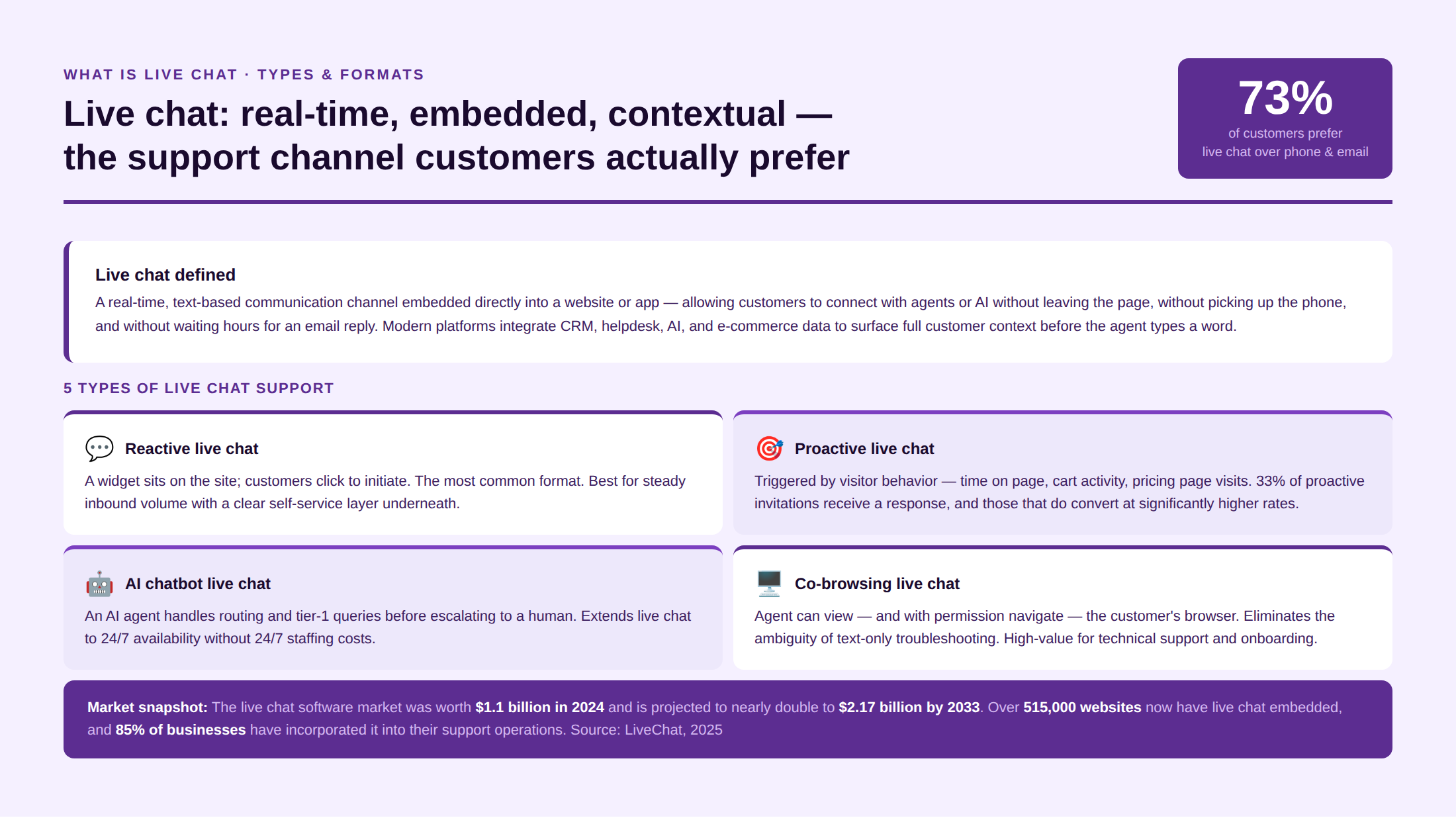
Live chat is a real-time, text-based communication channel embedded directly into a website or mobile application, allowing customers to connect with support agents or AI-powered chatbots without leaving the page they’re on or picking up the phone. Unlike email, which is asynchronous, live chat operates in the moment: a customer types a question, an agent reads it and responds, and the conversation resolves, typically in minutes.
The technology has matured significantly. Modern live chat platforms integrate with CRM systems, helpdesk software, e-commerce platforms, and AI engines to give agents customer context before they type a single word. They support file sharing, co-browsing, screen sharing, and proactive chat triggers, so a chat window is no longer just a text box. It’s a full-service support interface.
Related Read: Best live chat software: A customer service leader’s guide
Types of live chat support
Not all live chat deployments are the same. The format you use should match your support volume, team structure, and customer expectations.
- Reactive live chat. The most common format. A chat widget sits on the site; customers click to initiate. The agent responds when contacted. Best for teams with steady inbound volume who want a low-friction escalation path from self-service.
- Proactive live chat. The system triggers a chat invitation based on visitor behavior, such as time on page, pages visited, cart activity, or browsing a pricing page. Instead of waiting for the customer to ask, the agent (or bot) reaches out first. 33% of proactive chat invitations receive a response, and those that do convert at significantly higher rates.
- AI chatbot live chat. An AI agent handles the initial interaction like routing, FAQs, and basic issue resolution before escalating to a human if needed. The chatbot doesn’t replace the live chat; it extends its reach to 24/7 availability and absorbs tier-1 volume.
- Co-browsing live chat. The agent can view and, with permission, navigate the customer’s browser alongside them, removing the ambiguity of trying to troubleshoot a UI problem through text alone. High value for technical support and onboarding.
- Video live chat. Some platforms offer video escalation from text chat for complex, high-stakes interactions where tone and non-verbal communication matter. Less common but growing in financial services and healthcare contexts.
Live Chat vs. Chatbot vs. AI Agent
Live chat, chatbots, and AI agents get grouped together because they all live in the same chat window. They do different jobs, however, and using the wrong one for a task is a common reason chat underperforms.
Live chat is a real-time conversation with a human agent. It is the right choice for complex or sensitive issues, where judgment and empathy decide the outcome. Its limit is capacity, because a person can hold only a handful of conversations at once and only during staffed hours.
A chatbot follows a script. It answers set questions with set replies, and it works well for predictable, repetitive requests. However, the moment a customer asks something outside the script, a rule-based bot stalls. Customers notice the dead end quickly.
An AI agent sits between the two. It reads the actual question rather than matching a keyword, pulls the answer from your knowledge base, and resolves the request in natural language. When it reaches the edge of what it can handle, it escalates to a human agent with the full conversation attached. So it covers the volume a chatbot would drop, without pulling a person into every routine question.
Here is how the three compare on the things that matter most when you decide what handles a conversation first.
| Type | Handled by | Best for | Availability | Questions outside a script |
| Live chat | A human agent | Complex or sensitive, high-value issues | Staffed hours | Yes, judgment included |
| Chatbot | Scripted rules | Predictable, repetitive questions | 24/7 | No, it stalls |
| AI agent | AI reading intent | Common questions at any hour | 24/7 | Yes, within what the knowledge base covers |
Most strong support operations run all three together. The AI agent takes the first touch and resolves what it can. Narrow scripted flows still suit a chatbot. Live chat agents take the conversations where a human changes the result. Matched to the right task, they reduce each other’s workload instead of competing for it.
Live Chat vs. Email vs. Phone
Live chat earns its place by sitting between email and phone, with strengths neither one has. It is synchronous like a phone call, yet it leaves a written record like email. Seeing the three side by side makes it clear where each channel fits in a support operation.
| Channel | Speed | Written record | Agent concurrency | Best for |
| Live chat | Seconds | Yes | 4 to 6 at once | Quick questions while the customer is on your site |
| Hours to days | Yes | Many, but slow | Detailed, non-urgent issues with attachments | |
| Phone | Immediate once connected | Only if recorded | One at a time | Emotional or complex issues that need a voice |
Live chat combines the immediacy of a phone call with the written trail of an email, which is why customers reach for it first on a website. Still, live chat works best when it sits alongside the other channels rather than replacing them. Send each type of issue to the channel that resolves it best, then carry the context across when a conversation moves from one to another.
Why Is Live Chat Important for Customer Support?
Live chat is not a convenience feature. It’s a revenue, retention, and satisfaction lever if deployed correctly.
1) Customers prefer live chat
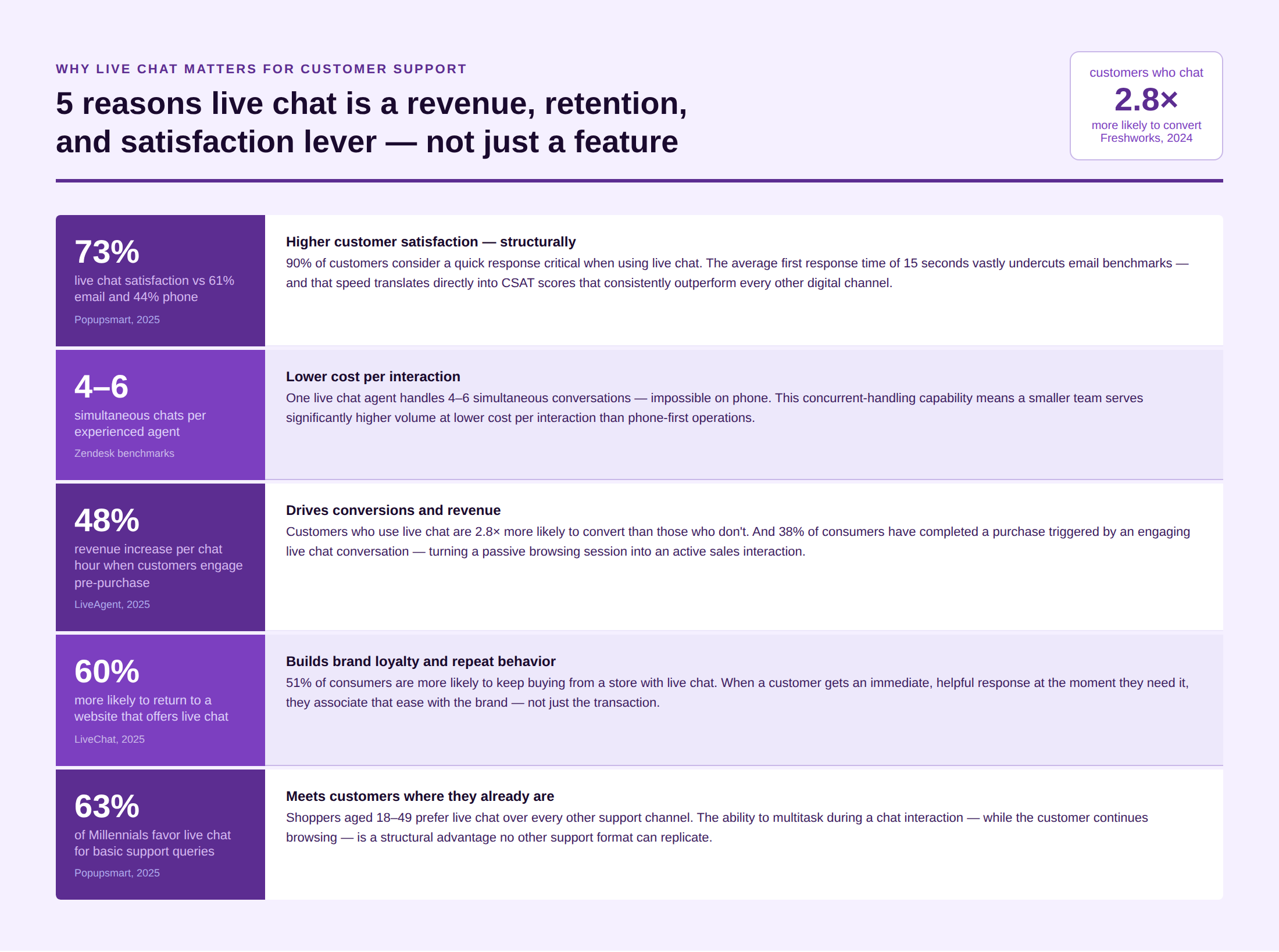
73% of customers say live chat is their preferred support channel, above phone at 44% and email at 61%, primarily because of its immediacy and the ability to multitask during the interaction (Zoho SalesIQ,). Among Millennial and Gen Z customers specifically, the preference is even stronger. 63% of Millennials favor live chat over traditional channels for basic support queries.
2) It reduces operational costs
An experienced live chat agent can handle 4–6 simultaneous conversations, something impossible on a phone call or structured email response. This concurrent-handling capability means a smaller team can serve significantly higher volume at lower cost per interaction than phone-first operations.
3) It drives conversions and revenue
Customers who engage in a chat before purchase can elevate revenue by as much as 48% per chat hour (LiveAgent). And customers who use live chat are 2.8× more likely to convert than those who don’t. Live chat turns a passive browsing session into an active sales conversation.
4) It builds brand loyalty
60% of customers say they’re more likely to return to a website that offers live chat. 51% of consumers are more likely to keep buying from a store with live chat support. When a customer gets an immediate, helpful response at the moment they need it, they associate that ease with the brand and not just the transaction.
It increases customer satisfaction
Live chat satisfaction consistently outperforms email and traditional channels. Live chat delivers 73% customer satisfaction, compared to 61% for email and 44% for phone (Popupsmart). And speed is the primary driver: 90% of customers consider a quick response critical when using live chat, and the average live chat response time of 15 seconds vastly undercuts email benchmarks. See the full picture in Kayako’s guide on customer service live chat trends.
See how Kayako’s live chat connects to your full customer history; before the agent types a word.
How Does Live Chat Work?
Here is a step by step breakdown of how a live chat works:
- The chat window a customer sees is the visible part of live chat. Behind it sits a process that decides how fast they get help and whether the right person handles it. Here is what happens from the moment a customer opens a chat to the moment it closes.
- It starts with the entry point. A chat widget loads on the page, usually in the corner. The customer clicks to start a conversation, or the system opens one first based on behavior like time on a pricing page or items left in a cart. Reactive chat waits for the customer. Proactive chat reaches out before they ask.
- Next comes deflection. Before a request reaches an agent, many live chat systems try to resolve it on the spot. They surface a relevant help article, or let an AI agent answer common questions like order status and password resets. Simple requests close here, which keeps the queue clear for the conversations that actually need a person.
- If the request needs a human, routing takes over. The system reads the message, the page the customer is on, and the topic, then sends the conversation to the right queue or agent. Rules based on skill, availability, and workload decide who picks it up, so nobody has to triage by hand.
- Then the conversation happens with context. Before the agent types a word, a good live chat tool shows them the customer’s account, past tickets, recent pages, and purchase history. So the agent opens with a useful reply instead of asking the customer to repeat themselves. Typing indicators, read receipts, and saved replies keep the exchange quick and make it feel live.
- When the issue is solved, the chat resolves. If it cannot be solved in chat, the agent escalates it to phone, email, or a specialist, and carries the full context across so the customer does not start over. Either way, the conversation gets logged. The transcript is saved to your helpdesk or CRM as a record, attached to the customer’s history for whoever handles them next.
That full path, from widget to logged transcript, is what separates a real live chat operation from a chat box that simply collects messages. Moreover, it is the part buyers tend to overlook when they compare tools on price alone.
What Are the Best Practices During Live Chat?
A great live chat is not just fast live chat. It’s contextual, personal, and well-structured. The following best practices cover what separates high-performing live chat operations from those that drive customers toward competitors.
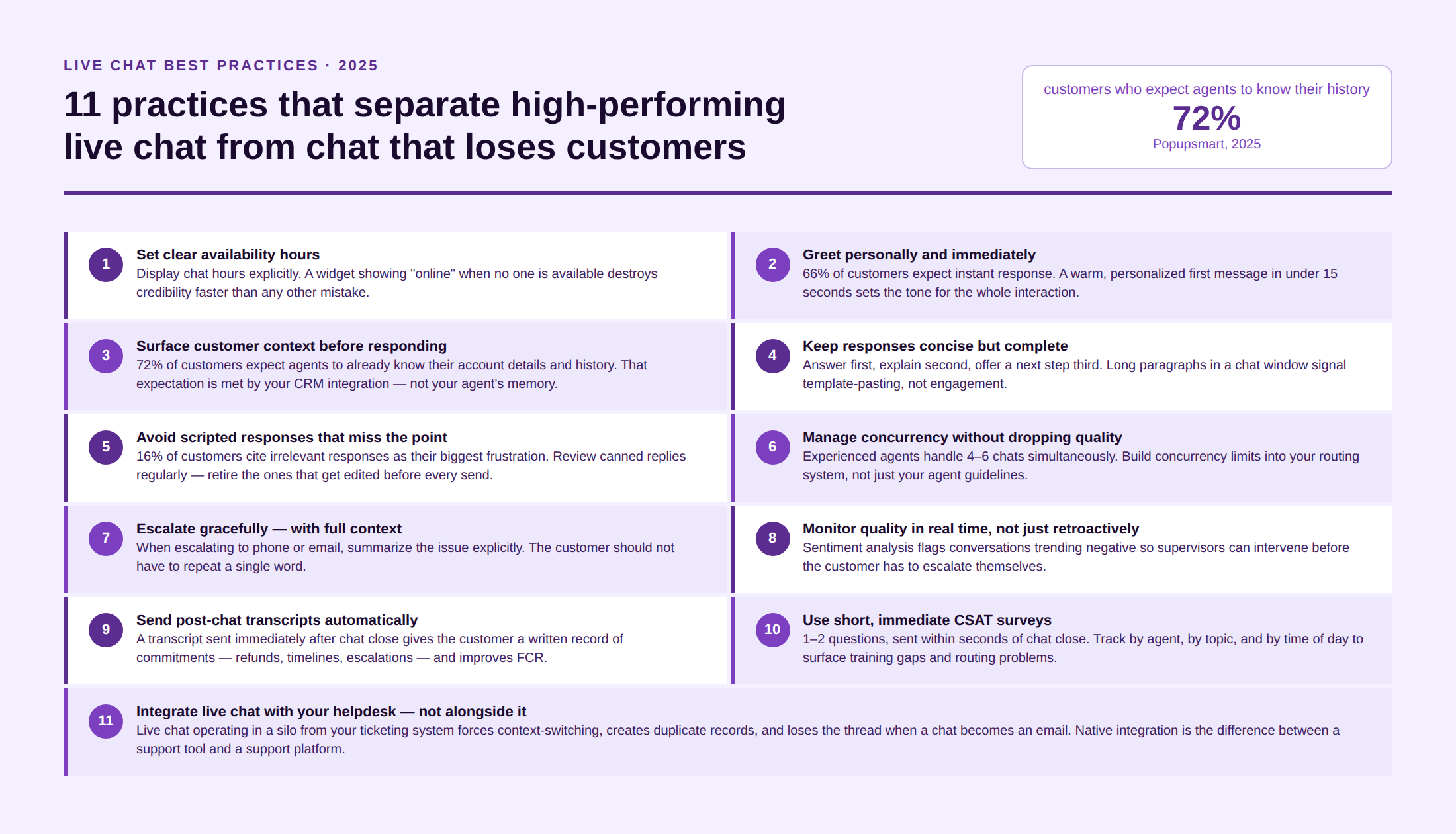
1. Set clear availability expectations and keep them
Nothing damages live chat credibility faster than a chat widget that’s “online” when no one is available. Display your live chat hours explicitly. If you’re not staffed 24/7, say so, and make it easy for customers to leave a message or switch to email. Customers accept limited hours far better than they accept unexplained waiting.
If you use an AI bot for after-hours coverage, be transparent about it. 62% of customers prefer interacting with a human agent over a chatbot, but most will accept a bot if they know it’s a bot. The frustration comes when they discover it unexpectedly.
2. Greet personally and immediately
The first message sets the tone. “Hi! How can I help you today?” is forgettable. “Hi Sarah, I can see you’ve been looking at our enterprise plan. What questions can I answer for you?” is a conversation that has already started from a position of value.
Proactive personalization requires CRM integration, but even without it, a warm, human greeting in under 15 seconds is the baseline, and the first-message response time is the single metric most correlated with live chat CSAT.
3. Use a unified customer view before responding
An agent who has to ask “Can you give me your order number?” to a repeat customer who just spent three minutes finding the chat widget is starting the interaction with friction. Before the agent types anything, they should see: the customer’s account history, previous tickets, recent pages visited, purchase records, and any CRM notes.
72% of customers expect the live chat agent to already know their contact details and purchase history (Popupsmart). That expectation is met by the tool and not by the agent’s memory. Kayako’s SingleView™ surfaces this context automatically before the conversation begins.
4. Keep responses concise but complete
Live chat is not email. Long paragraphs in a chat window are hard to read and signal that the agent has pasted a template rather than engaged with the question. Aim for short, direct responses that answer the question fully and chunk longer explanations into 2–3 sentence blocks with natural break points.
One effective structure: answer first, explain second, offer a next step third. This keeps the customer moving rather than waiting for the agent to finish a long message before they can respond.
5. Avoid scripted responses that don’t address the actual question
Canned responses save time but only when they’re deployed accurately. A response that technically addresses the category of question but not the actual question is worse than a slower, accurate one. The customer knows immediately when they’ve been given a generic response. 16% of customers say being given irrelevant responses is their biggest live chat frustration (Nextiva).
Review your canned response library regularly. Retire the ones that agents never use. Refine the ones that frequently get edited before sending.
6. Manage multiple chats without letting quality slip
An experienced agent can handle 4–6 simultaneous chats, but that ceiling depends on the complexity of the conversations, the quality of the knowledge base, and whether the CRM surfaces the right context at the right time. Start new agents on 1–2 concurrent chats. Increase as quality metrics improve.
The risk of over-multitasking is latency creep: customers notice when response times within a conversation start stretching past 60 seconds, even if the first response was fast. Build your live chat best practices framework around concurrent chat limits that are enforced by your routing system, not just your guidelines.
7. Escalate gracefully and with context
Not every issue belongs in live chat. Complex billing disputes, detailed technical troubleshooting, or emotionally sensitive interactions are often better handled on a call. When escalation is needed, the handoff must carry context.
When escalating from chat to phone or email, summarize the issue explicitly: “I’ve noted that your payment of $240 on March 15th wasn’t applied correctly. I’m escalating this to our billing team with this context, and they’ll reach out within 2 hours.” The customer knows what happens next. That predictability reduces frustration even in the presence of an escalation.
8. Monitor chat quality proactively, not just retroactively
CSAT surveys at the end of a chat catch satisfaction, but they don’t tell you why a conversation went well or badly. Real-time monitoring of active chats with supervisor override capability while allowing intervention before a conversation deteriorates. Sentiment analysis tools flag conversations that are trending negative so supervisors can assist without the customer having to escalate themselves.
9. Send a post-chat transcript automatically
A chat transcript sent to the customer’s email immediately after the conversation closes has two functions: it gives the customer a record of what was agreed, and it dramatically improves first-contact resolution by confirming next steps in writing. This is especially important for conversations involving commitments such as refunds, replacements, callbacks, or escalation timelines.
10. Close the feedback loop with short, immediate CSAT surveys
Post-chat CSAT surveys with 1–2 questions, sent within seconds of the chat closing, generate the highest response rates and the most accurate data. Longer surveys trigger abandonment. Delayed surveys trigger memory bias. The goal is a signal, not a study.
11. Integrate live chat with your helpdesk, not alongside it
Live chat that operates in a separate silo from your ticketing system forces agents to context-switch, creates duplicate records, and loses the conversation thread when a chat becomes an email or a call. A helpdesk that natively captures live chat conversations as tickets with the full transcript, customer history, and agent notes attached gives the next agent who touches the account everything they need without asking the customer to re-explain.
How Does AI Improve Live Chat Performance?
AI doesn’t replace the human agent in live chat. It changes what the human agent has to do and raises the ceiling on what’s possible.
24/7 coverage without 24/7 staffing
The most immediate impact of AI in live chat is availability. A well-trained AI chatbot handles tier-1 queries like order status, password resets, policy questions, and basic troubleshooting at any hour, without wait time. When the query is outside the bot’s scope, it escalates with a full summary to the human agent who handles it in the next available window.
Companies using AI in live chat report a 37% reduction in first response times (HubSpot). At scale, that reduction translates directly into CSAT improvement and lower abandonment rates.
Context surfacing before the first response
AI connected to CRM and helpdesk data can surface the customer’s purchase history, previous chat transcripts, and relevant knowledge base articles before the agent has typed a word. This is the difference between “What seems to be the problem?” and “I can see your last order arrived on Thursday — is that what you’re reaching out about?”
Response drafting and real-time suggestions
AI tools suggest draft responses in real time based on the customer’s message and the knowledge base. 79% of support agents believe having an AI copilot supercharges their abilities and enables better customer service (Zendesk). For more, see how AI in customer service creates compounding returns across the support stack.
Sentiment analysis and escalation flags
AI monitors conversation tone in real time, flagging interactions trending toward frustration or hostility. This allows supervisors to intervene before the customer escalates — or before the agent says something that makes the situation worse. 64% of consumers say they’re more likely to trust AI-driven support if it exhibits human-like traits (Gartner). Sentiment detection is how AI learns to recognize when those human traits are most needed in the human agent.
What Are the Challenges of Live Chat Support and How Do You Solve Them?
Live chat is powerful but not passive. Poorly run live chat drives customers away faster than no live chat at all.
Challenge: Long wait times despite the expectation of immediacy
Live chat creates an implicit promise: you’ll get a response now. When that promise isn’t kept because of understaffing, poor routing, or too many concurrent chats, customer frustration peaks faster than it would in email, because the expectation was different.
Solution: Set routing rules that enforce concurrent chat limits. Use AI bots to acknowledge and begin the interaction while a human becomes available. Display wait times honestly if they exceed 30 seconds. An honest wait time is better than a misleading “connecting you now” message that sits for 3 minutes.
Challenge: Agents asking for information that the system already has
The single most-reported live chat frustration is being asked to provide information like account numbers, previous ticket details, and purchase history that the customer reasonably believes the company already has. 74% of businesses say customers are most frustrated by having to repeat themselves in chat.
Solution: CRM integration and a unified customer view are the only structural fixes. Canned-response training and agent coaching address the symptom; integration addresses the cause.
Challenge: Unanswered or dropped chats
21% of live chat support requests go unanswered (SuperOffice, cited in Popupsmart). Unanswered chats are more damaging than slow responses, as the customer has actively reached out and been ignored. Missed chats also don’t generate CSAT data, which means they don’t show up as a problem in your metrics until the customer churns.
Solution: Implement a routing failsafe that prevents chats from sitting in an agent’s queue without acknowledgment for more than 60 seconds. Build an auto-response that triggers if no agent is available, offers to take a message, and commits to a follow-up timeframe.
Challenge: Inconsistent quality across agents
Live chat quality varies by agent in ways that phone calls, which are often recorded and reviewed, sometimes do not. Without chat transcript review and regular QA, the gap between your best and worst agents can be significant.
Solution: Schedule regular transcript reviews. Build a scoring rubric that evaluates response accuracy, empathy, efficiency, and resolution rate. Use customer service coaching practices to target individual development rather than generic training sessions.
Challenge: Keeping up with volume during peak periods
Product launches, seasonal peaks, and public incidents can multiply chat volume overnight. Teams sized for average load get overwhelmed. CSAT drops. Abandonment rates climb. The queue visualization that reassured customers during normal operations becomes a public embarrassment.
Solution: AI chatbots provide the elastic capacity that human teams cannot. Tier-1 automation during peak periods keeps the queue moving while human agents handle complexity. Pre-build responses for predictable peak scenarios, such as product launch FAQs, seasonal shipping policies, and known incident updates, so that agents aren’t improvising at volume.
Live Chat in Practice: Real-World Examples
The best live chat deployments have a few things in common: they’re contextual, proactively helpful, and tightly integrated with the rest of the customer experience stack.
E-commerce: Zappos
Zappos uses live chat as an extension of its famously generous customer service philosophy. Agents are empowered to resolve issues on first contact — no escalation required for refunds, replacements, or shipping upgrades. The result is a live chat experience where customers know they’ll get a resolution, not a referral.
SaaS: Intercom’s own support
Intercom uses its own platform to deliver proactive chat invitations to users who show behavioral signs of struggle — like repeatedly clicking the same button or spending extended time on a billing page. The trigger is behavioral, the intervention is contextual, and the resolution happens before the customer has to ask.
Financial services: Capital One’s Eno
Capital One’s AI assistant Eno handles chat queries across mobile and web, flagging unusual charges, explaining transactions, and resolving basic account questions. When queries exceed Eno’s scope, the context is passed seamlessly to a human agent. It’s a clean example of the AI-plus-human model working at scale.
Healthcare: Patient communication portals
Healthcare providers increasingly use live chat to handle appointment scheduling, prescription refill requests, and insurance queries, which reduces call volume while keeping patients connected. In this context, live chat must handle context sensitivity with particular care: clarity, empathy, and HIPAA-compliant data handling are non-negotiable.
Key Features of Live Chat Software
A live chat tool is more than a text box in the corner of a screen. The features around the conversation decide whether agents move fast and whether customers feel understood. These are the ones that matter when you evaluate a platform.
- Proactive chat triggers. Open a chat based on behavior, like time on a pricing page or an abandoned cart, so you reach high-intent visitors before they leave.
- Visitor monitoring. See who is on your site, which page they are on, and how long they have been there, so agents can prioritize and personalize.
- Routing and assignment. Send each conversation to the right agent or queue by topic, page, skill, or workload, with no manual triage.
- Canned responses. Insert and edit saved replies for common questions, which keeps responses fast without sounding generic.
- Co-browsing and screen sharing. View and, with permission, guide the customer’s screen, which removes the guesswork from troubleshooting a problem through text.
- File sharing. Let customers and agents exchange screenshots, documents, and logs inside the conversation.
- Typing indicators and read receipts. Show that someone is there and responding, which is what makes the exchange feel live.
- Offline message capture. Collect a message and set a follow-up expectation when no agent is available, so an after-hours visitor is not met with silence.
- Chat transcripts. Save the full conversation, send it to the customer, and attach it to their record for the next agent.
- Knowledge base and CRM integration. Surface help articles inside the chat and pull customer history into view, so the conversation starts with context.
- Reporting and analytics. Track response times, satisfaction, and conversion, so you can see what is working and where chats stall.
No single feature makes live chat work on its own. However, the ones that connect the conversation to customer context, like CRM integration and saved transcripts, are what separate a helpful chat from a frustrating one. Weight those highest when you compare tools.
Live Chat Metrics to Track
Live chat generates more real-time data than any other support channel, which makes it easy to measure and easy to misread. A handful of metrics tell you whether your chat is fast, whether it resolves, and whether it pays for itself.
- First response time. How long a customer waits for the first reply after starting a chat. This is the metric most tied to live chat satisfaction, and the bar is seconds, not minutes.
- Average response time within the chat. The wait between replies once the conversation is going. Latency that creeps past a minute frustrates customers even when the first response was fast.
- Resolution time and first-contact resolution. How long the chat takes to close, and how often it closes without a follow-up. Together they show whether chat is solving problems or just deferring them.
- The satisfaction score from the short survey after a chat. It is the clearest read on how the conversation felt to the customer.
- Missed and abandoned chat rate. The share of chats that went unanswered, or that the customer left before resolution. Missed chats rarely generate survey data, so they hide in your reporting until the customer churns.
- Average concurrency. How many chats an agent handles at once. It is a capacity and quality signal, because pushing concurrency too high is what causes response times to slip.
- Chat-to-conversion rate. For sales-oriented chat, the share of conversations that end in a purchase or a booked meeting. This is how chat proves revenue, on top of its support value.
Read these together rather than one at a time. A fast first response means little if half your chats go abandoned, and high concurrency looks efficient right up until satisfaction drops. The healthy pattern is quick first replies and steady resolution, with a satisfaction score that holds as volume climbs.
Did You Know? The Live Chat Numbers That Will Make You Rethink Your Support Strategy
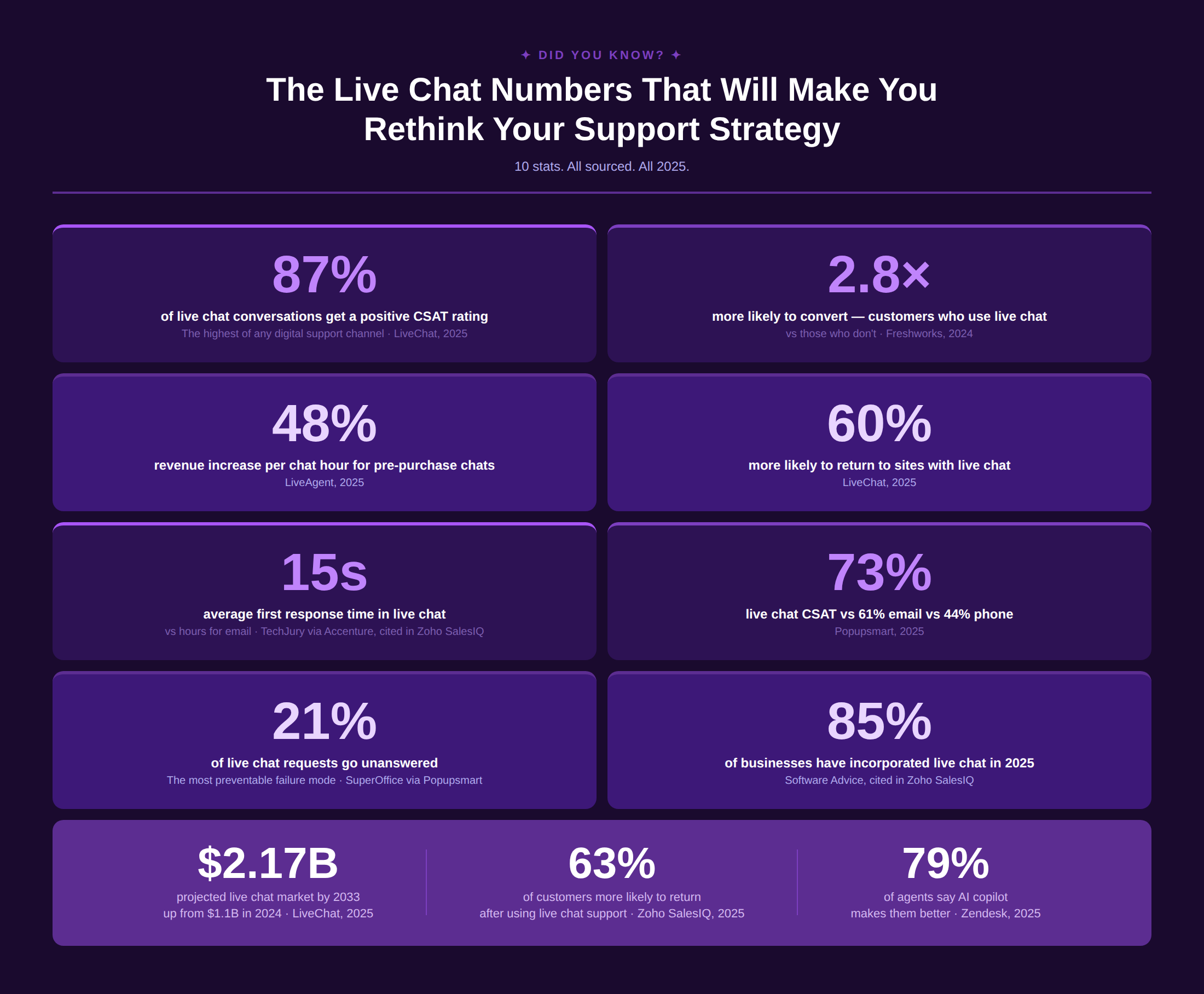
Live chat is one of the strongest suites of companies that have been rated well in customer experience. While it has the advantage of speed and quantity, the quality is a metric that still needs humans alongside. So, a perfect blend of tech with lived-in human expertise improves the validity of responses while gaining the trust of customers at a massive scale.
FAQs
1. What are some of the most well-known live chat software platforms?
A. The most widely used live chat platforms in 2026 are: Kayako (AI-native, SingleView™, outcome-based pricing), Intercom (SaaS-focused, strong proactive engagement), Zendesk (enterprise, broad integration marketplace), Freshdesk (mid-market, accessible pricing), LiveChat (dedicated live chat with strong analytics), HubSpot Service Hub (best for HubSpot CRM users), and Drift (B2B, revenue-focused chat). Each has a different strength profile and the right choice depends on your volume, existing tech stack, and whether you need live chat as a standalone tool or as part of an integrated helpdesk.
2. How is live chat different from other omnichannel support channels?
A. Live chat is synchronous and embedded as the customer stays on the website or app while the conversation happens. Email is asynchronous; phone is synchronous but requires voice; social is public-facing; SMS is mobile-first. Live chat occupies a unique position: it combines the immediacy of phone with the written record of email and the low-friction entry of a digital channel. In an omnichannel contact center strategy, live chat typically handles the middle tier but complex enough queries needing a person or an AI, simple enough to resolve without a call.
3. Can AI improve live chat responses?
A. Yes, in several distinct ways. AI reduces first response time by providing instant acknowledgments and draft responses. It improves accuracy by surfacing relevant knowledge base articles in real time. It extends coverage to 24/7 through chatbots that handle tier-1 queries. And it flags emotional escalation through sentiment analysis so human agents can intervene before a conversation deteriorates. 79% of support agents say AI makes them better at their job, not by replacing them, but by removing the friction that slows them down.
4. What are the key benefits of live chat customer support?
A. Live chat delivers five core business benefits: higher customer satisfaction (73% vs 61% for email), lower cost per interaction (through concurrent handling), higher conversion rates (2.8× more likely to convert), stronger customer loyalty (60% more likely to return), and 24/7 coverage when paired with AI. For a detailed breakdown of the live chat advantages and disadvantages — including the most common failure modes — see Kayako’s dedicated guide.