Help Scout Pricing 2026: Plans, Costs, Features, and Is It Worth It?
Pricing tells you what Help Scout costs. Use cases tell you whether it is worth paying for. This guide covers both.
| Help Scout pricing in 2026 is per user again, after a 2024 move to contact-based billing was walked back. Paid plans are Standard $25, Plus $45 and Pro $75 per user per month on annual billing, all with unlimited contacts, plus a free tier and an AI Answers add-on at $0.75 per resolution. This guide covers which plan fits your team and whether Help Scout is worth it.
Key takeaways
|
Help Scout pricing went through a public reversal, which is the first thing to get right. In 2024 the company dropped per-seat pricing for a contacts-based model, drew heavy criticism for unpredictable bills, and in 2026 returned to per-user pricing with unlimited contacts. A fresh buyer today is quoted per user, and most competing pages still get this wrong.
This guide covers what each plan is built for, what really drives the bill, and when Help Scout is worth it against when a resolution-priced tool would do the same job. It ends with a decision tree and a scenario table so you can place your own team.
1. Help Scout pricing at a glance
Help Scout returned to per-user pricing in 2026 — Standard $25, Plus $45, and Pro $75 per user on annual billing, with unlimited contacts and AI Answers billed on top. The 2024 contacts-based model is now legacy and closed to new accounts.
Here are the current Help Scout plans on annual billing. Treat them as the entry point, because AI Answers and a few add-ons sit on top.
| Plan | Price per user (annual) | Built for |
|---|---|---|
| Free | $0 (up to 5 users) | Tiny teams trialing a shared inbox |
| Standard | $25 / month | Small teams moving off plain email |
| Plus | $45 / month | Growing teams needing workflows and CRM |
| Pro | $75 / month | Scale and governance, with a 10-user minimum |
Note. Help Scout returned to per-user pricing in 2026, with unlimited contacts on paid plans; the 2024 contacts-based model is now legacy and visible only inside existing accounts. AI Answers is billed separately per resolution, Pro has a ten-user minimum, and annual billing is about 16 percent cheaper than monthly.
That table is the easy part. Before breaking down what moves the number, it helps to hear from the teams already paying it.
2. What people say about Help Scout on G2, Capterra, and Reddit
Help Scout scores around 4.4 on G2 and 4.6 on Capterra, strongest on ease of use. Reviewers praise the clean inbox, fast onboarding and collaboration, and flag basic reporting, limited routing and a cost curve that bites small teams.
Help Scout holds strong ratings, around 4.4 out of 5 on G2 from roughly 430 reviews and 4.6 on Capterra, with ease of use its highest sub-score. The themes behind the scores tell the buying story.
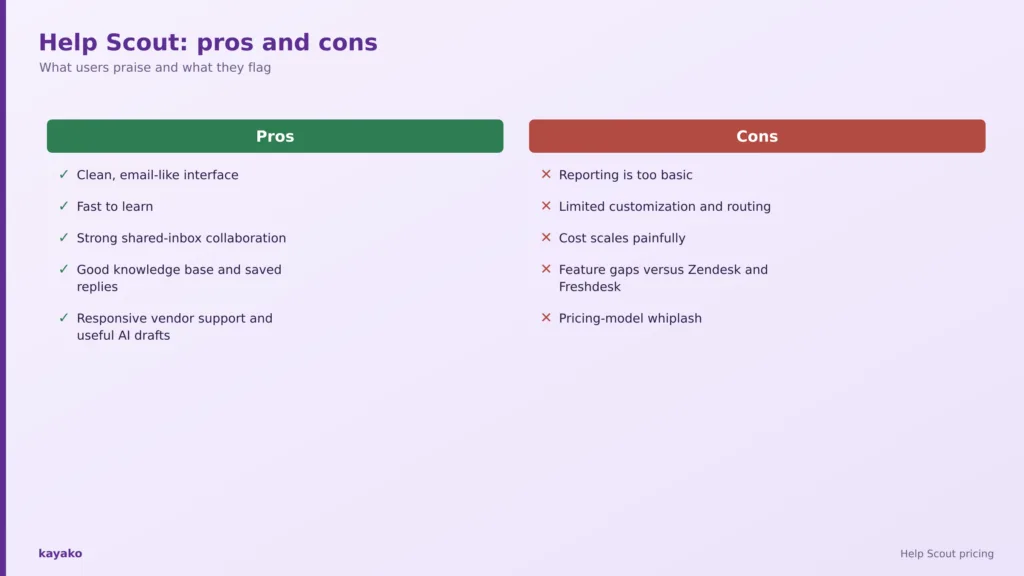
What people praise
- Clean, email-like interface. Simple and uncluttered, and it does not feel like a ticketing system to the customer.
- Fast to learn. New reps get productive quickly, with low onboarding friction.
- Strong shared-inbox collaboration. Internal notes, collision detection and assignments keep teams aligned.
- Good knowledge base and saved replies. Docs and canned responses deflect volume and speed answers.
- Responsive vendor support and useful AI drafts. Both are praised in recent reviews.
What people flag
- Reporting is too basic. The single most common gripe; mid-market teams export data to build the metrics they need.
- Limited customization and routing. It feels restrictive as volume and complexity grow, with no enterprise-grade routing logic.
- Cost scales painfully. The Standard-to-Plus step and Pro’s ten-user minimum penalize small teams, a point raised across Reddit and review sites.
- Feature gaps versus Zendesk and Freshdesk. No native phone or voice, and thinner enterprise tooling.
- Pricing-model whiplash. The 2024 contacts-based switch drew heavy criticism for unpredictability before the 2026 reversal.
None of these are vague grumbles. They trace back to how the Help Scout bill is assembled, which is worth breaking down next.
|
3. What actually determines your Help Scout cost?
Seats set the bill, and two steps catch teams out: the jump from Standard to Plus nearly doubles the per-user rate, and Pro carries a ten-user minimum. On top sits AI Answers at 75 cents per resolved conversation.
Help Scout is billed per user again, so seats are the first lever: Plus at $45 across fifteen users is $8,100 a year. The step that catches small teams is the jump from Standard to Plus, which nearly doubles the per-seat cost for workflows, CRM integrations and the AI drafting features.
Pro adds the next surprise. It carries a ten-user minimum, so even a six-person team that only wants SSO or HIPAA pays for ten seats, a floor of about $750 a month on annual billing. For a small, security-conscious team, that minimum is often the deciding cost.
On top of seats sits AI Answers, the customer-facing resolution bot, billed at seventy-five cents per resolved conversation and charged only when the AI resolves without escalation. A thousand resolutions a month is $750 on top of your seats, though monthly spend caps are available. Extra inboxes at ten dollars and extra Docs sites at twenty round out the bill. Stack these together and a plan that looked cheap per seat can carry a meaningful usage and add-on layer, which is why the next question matters more than the price list: which plan does your team genuinely need?
It is worth being precise about what counts as a user, because that is now the whole basis of the bill. Every person who needs to send replies, manage conversations or build workflows needs a paid seat, while light users, who can leave internal notes and view conversations without replying, are included in limited numbers on Plus and Pro. For a team with a few frontline agents and several occasional contributors, that distinction can keep the cost reasonable.
The legacy contacts-based plans still exist for accounts that adopted them in 2024 and 2025, billed on a trailing three-month average of helped contacts, but they are closed to new customers and cannot be returned to once left. For a fresh buyer in 2026 the only place contacts still drive cost directly is the free plan’s hundred-contact cap, so the per-user figures above are the ones to plan around.
Annual billing is the last lever, saving about sixteen percent over monthly in exchange for locking your seat count for the year. For a stable team that is an easy saving, and for one that scales up and down, the flexibility of monthly can be worth the premium, since you are not paying for seats you are not using.
| Cost layer | What it adds to the bill |
|---|---|
| Seats x users | Plus $45 x 15 users = $8,100 / yr |
| + Pro minimum | Pro requires 10 users, a floor of $750 / mo on annual billing |
| + AI Answers | $0.75 per AI-resolved conversation; 1,000 a month = $750 |
| + Add-ons | Extra inboxes $10, Docs sites $20, HIPAA and SSO on higher plans |
4. Which Help Scout plan makes sense for you?
Free covers a tiny team or trial; Standard is the first real paid plan off a shared inbox; Plus suits a growing multi-channel team; Pro adds SSO and HIPAA but with a ten-seat floor. Pick by the shape of your support, not the feature list.
The right plan follows the shape of your support work, not the length of the feature list. Four patterns cover most teams.
A tiny team or trial: Free
The free plan covers up to five users with one inbox and one Docs site, capped at a hundred helped contacts a month. It suits a tiny team or a trial, though it drops API access and data export.
- Scenario. A three-person startup trying a shared inbox before committing.
A small team moving off email: Standard
Standard at $25 adds a full shared inbox, a knowledge base and unlimited contacts. It is the natural first paid plan for a team graduating from a plain inbox.
- Scenario. An eight-person team replacing a shared Gmail account with real support tooling.
A growing multi-channel team: Plus
Plus at $45 adds advanced workflows, CRM integrations like Salesforce and HubSpot, and the AI drafts and summarize features. The step up pays off once your process outgrows a simple inbox.
- Scenario. A growing team that needs routing, integrations and AI-assisted replies.
Scale and governance: Pro
Pro at $75, with a ten-user minimum, adds SSO and SAML, HIPAA, unlimited workflows and a customer success manager. The value appears when you genuinely need the security and scale.
- Scenario. A regulated team of fifteen that needs SSO and HIPAA across the board.
If you are comparing the category, it is worth reading our rundown of the best shared inbox tools alongside this, since Help Scout sits squarely in that shared-inbox space.
Knowing which plan fits is half the decision. The other half is knowing when the spend is justified.
5. When does Help Scout pricing actually make sense?
Help Scout is worth it when you want a clean, email-like experience, fast onboarding, strong shared-inbox collaboration, and a solid knowledge base, without needing heavy reporting or enterprise-grade routing.
Help Scout earns its price when several of these are true at once.
- You want support that feels human. The email-like experience keeps conversations personal, not ticket-like.
- Your team is small to mid-size. Fast onboarding and clean collaboration suit teams that value simplicity.
- Email and knowledge base are your main channels. Help Scout is strongest where those carry the load.
- You want unlimited contacts. The per-user model removes the per-ticket anxiety of the old scheme.
- You will use AI Answers selectively and cap the spend. Usage-based resolution stays affordable when it is bounded.
Put plainly, Help Scout is worth it when simplicity is the priority. The reverse case matters too, because a few recurring gaps change the picture as teams grow.
|
6. When might Help Scout be more than you need?
It may fall short if you need deep reporting, advanced routing, or native phone and voice — or if the Standard-to-Plus jump and Pro’s ten-user minimum price your small team out.
The better test is complexity, not company size. Help Scout may be more or less than you need when several of these hold true.
- You need deep, customizable reporting, the top complaint.
- You need advanced routing or enterprise workflow logic.
- You are a small team forced into Pro’s ten-user minimum for SSO or HIPAA.
- You need native phone or voice rather than integrations.
- Your priority is autonomous AI resolution rather than a shared inbox.
When most of your volume is repetitive and your goal is resolution, paying per seat plus a separate per-resolution add-on is a roundabout way to buy AI. A platform built around autonomous resolution and priced on resolved tickets charges for the outcome directly, which reframes the buying question by scenario.
7. Help Scout pricing by company scenario
From a trial team to a growing multi-channel operation, each scenario maps to a likely Help Scout plan and how well it fits. The final row is the AI-first team weighing per-resolution pricing instead.
Find the row that sounds most like your team, then read across. The last row is the one most pricing pages leave out.
| Company scenario | What you probably need | Help Scout fit |
|---|---|---|
| Tiny team or trial | Shared inbox basics | Free |
| Small team off email | Shared inbox and knowledge base | Standard |
| Growing multi-channel team | Workflows and AI drafts | Plus |
| Scale with governance | SSO, HIPAA, workflows | Pro |
| AI-first resolution | Autonomous ticket resolution | Compare alternatives |
Seeing yourself in a row is useful, but a buying decision usually comes down to a direct comparison with a leaner, AI-first option.
8. Help Scout vs Kayako
Help Scout wins on simplicity and a clean inbox; Kayako resolves tickets autonomously with Agent Kay at one dollar per resolved ticket. Per-user tiers reward adding seats, while per-resolution pricing ties the bill to outcomes.
This is not a full feature teardown, just the short version of where each platform fits.
Help Scout
Help Scout’s strength is simplicity: a clean, email-like interface, fast onboarding, strong shared-inbox collaboration and a solid knowledge base. It fits small-to-mid teams that want human-feeling support without a heavy ticketing system.
Kayako
Kayako is a focused AI support platform. Agent Kay resolves tickets autonomously, SingleView gives agents one screen of context, and pricing is one dollar per resolved ticket rather than per user plus a separate AI add-on, so the AI that does the work is folded into the price of the outcome.
Per-user pricing plus a usage-based AI add-on rewards seats and resolutions separately; Kayako’s per-resolution model ties cost to the result.
A head-to-head helps, but the final call comes down to your own numbers. For a wider view, it is worth reading our guide to the best shared inbox tools, and a short checklist turns the pricing question into a decision.
|
9. What should you actually consider before buying Help Scout?
Before buying, count the users who truly need seats, check whether you will hit the Standard-to-Plus jump or Pro’s ten-user floor, estimate your AI Answers volume, and weigh how much reporting and routing you really need.
Swap the question of which plan is cheapest for a short set of questions about your own operation.
- How many people need paid seats?
- Do we need the Standard features, or the workflows and AI on Plus?
- Do we need SSO or HIPAA, and can we justify Pro’s ten-user minimum?
- How much reporting depth do we actually need?
- How many conversations could AI Answers resolve, and at what cost?
- Do we need native phone or voice?
- What will it cost when the team doubles?
That last question is the one that catches teams out. Pricing today is not the same as cost at scale. It is also worth weighing how much of your volume is automatable, since research from Gartner found only 14 percent of customer service issues are fully resolved in self-service, which shows how much room modern AI resolution still has to take load off paid seats.
With those answers in hand, the decision becomes straightforward. The tree below turns them into a single recommendation.
Is Help Scout worth it for you? A quick decision table
Match your team’s main need — a trial, a first paid inbox, multi-channel growth, or SSO and HIPAA — to the right Help Scout plan, or to a leaner alternative if autonomous resolution is the goal.
| If this is you | Then |
|---|---|
| Tiny team or just trialing? | Free. |
| Small team moving off email? | Standard. |
| Growing, need workflows and AI drafts? | Plus. |
| Need SSO, HIPAA and scale? | Pro. |
| Mainly want autonomous AI resolution? | Compare Kayako. |
A tree like this is more useful than another pricing table, because it moves you from what Help Scout costs to whether it is worth paying for.
How Kayako helps
Kayako takes a different approach: Agent Kay resolves repetitive tickets end to end and SingleView gives agents one screen of customer context, with pricing tied to resolved tickets rather than seats.
Kayako is an AI customer support platform built around autonomous resolution. Agent Kay resolves repetitive tickets end to end, and SingleView gives agents the full history of every customer on one screen for the conversations that still need a human. Because pricing is one dollar per resolved ticket rather than per user plus an AI meter, cost rises only when the platform does the work.
Case study: Contently. Contently reached 68 percent autonomous resolution with Kayako, cut first response from 6.4 hours to 91 seconds, and avoided $1.8M in costs.
|
Conclusion
Help Scout pricing in 2026 is per user again: a free tier, then Standard $25, Plus $45 and Pro $75, with AI Answers metered on top. The reversal from contacts-based billing is good news for predictability, but the Standard-to-Plus jump and Pro’s ten-user minimum are the costs to model. For small-to-mid teams that value a simple, human-feeling inbox, it remains a strong pick.
So read the price list, then read your own operation. Pricing tells you what Help Scout costs. Your use case tells you whether it is worth it, and whether a simpler, outcome-based platform would get you more resolution for less.
Frequently asked questions
1. How much does Help Scout cost?
Help Scout costs nothing on the free plan for up to five users, then $25 per user per month for Standard, $45 for Plus and $75 for Pro on annual billing. Paid plans include unlimited contacts, and AI Answers is billed separately at seventy-five cents per resolution.
2. Is Help Scout priced per user or per contact?
As of 2026, Help Scout is priced per user again, with unlimited contacts on paid plans. The contacts-based model it introduced in 2024 is now legacy, closed to new signups, and visible only inside accounts that adopted it.
3. What is the cheapest Help Scout plan?
The free plan is the cheapest, covering up to five users with one inbox and one Docs site, capped at a hundred helped contacts a month. Among paid plans, Standard at $25 per user per month is the lowest.
4. How much does Help Scout AI cost?
Help Scout includes AI Assist, and AI drafts and summarize on Plus and Pro. The customer-facing AI Answers bot is a usage add-on at seventy-five cents per resolved conversation, charged only when it resolves without escalation, with optional monthly spend caps.
5. Does Help Scout have a user minimum?
The Pro plan requires a minimum of ten users, so even a smaller team pays for ten seats to access SSO, HIPAA and unlimited workflows. Standard and Plus have no such minimum, which is why small teams often stay on Plus.
6. Is Help Scout worth it?
Help Scout is worth it for small-to-mid teams that want a clean, email-like inbox and fast onboarding. Teams that need deep reporting, advanced routing or autonomous AI resolution may find it limiting, and a resolution-priced platform could deliver more.
7. Is Help Scout good for small businesses?
Yes, small businesses are its core audience, drawn to the simple interface and quick setup. The costs to watch are the Standard-to-Plus jump and Pro’s ten-user minimum, which can make governance features expensive for a small team.
8. What is the best Help Scout alternative?
The best alternative depends on your needs. For teams wanting AI-first autonomous resolution priced on outcomes, Kayako is a strong fit; for shared-inbox simplicity, the leading options are worth comparing by use case.
9. Is Kayako cheaper than Help Scout?
It depends on volume. Help Scout is priced per user plus AI usage, while Kayako charges one dollar per resolved ticket, so teams with repetitive volume that automates well often pay less overall while getting autonomous resolution.
10. Is there a free version of Help Scout?
Yes. Help Scout’s free plan covers up to five users with one shared inbox and one Docs knowledge base site, capped at a hundred helped contacts a month. It is a genuine way to trial the product, though it removes API access and data export, which pushes most teams onto Standard before long.
11. What is Help Scout AI Answers?
AI Answers is Help Scout’s customer-facing AI that resolves conversations automatically. It is a usage-based add-on at seventy-five cents per resolution, charged only when the AI resolves a conversation without escalating to a human, with at most one charge per conversation and optional monthly spend caps to keep it predictable.
12. Did Help Scout change its pricing?
Yes. Help Scout moved to a contacts-based model in 2024, drew criticism for unpredictable bills, and reverted to per-user pricing in 2026 with unlimited contacts on paid plans. The contacts-based plans are now legacy and closed to new signups.
13. Does Help Scout have phone support?
Help Scout does not offer a native phone or voice channel; teams add voice through an integration such as Aircall. It is strongest on email, chat and knowledge base, so a team that needs built-in telephony may find it a gap.
14. Is Help Scout good for small teams?
Yes, small-to-mid teams are Help Scout’s core audience, drawn to the clean inbox and quick onboarding. The costs to watch as you grow are the Standard-to-Plus jump and Pro’s ten-user minimum, which can make governance features expensive for a small team.
15. How does Help Scout compare with Zendesk?
Help Scout is simpler, cleaner and usually cheaper for small teams, while Zendesk offers deeper enterprise tooling, native voice and more advanced routing. Teams that value a human, email-like experience tend to prefer Help Scout; those needing heavy configuration tend to prefer Zendesk.