HubSpot Service Hub makes sense in one specific situation, which is when your team already lives in HubSpot CRM. Tickets attach to the contact record, marketing and sales see the same history, and the handoffs feel smooth. For a team running the full HubSpot stack, that unified view is the whole point. The reason people keep searching for a Service Hub alternative in 2026 is that support was not where HubSpot started, and it shows.
HubSpot built its name on marketing and sales. Service Hub came later, so the ticketing feels basic next to a dedicated help desk, the AI resolves a smaller share of tickets than purpose-built tools, and the value concentrates inside the ecosystem rather than standing on its own. Then there is cost. Service Hub starts attractive on the free tier, however the move from Starter near $20 per seat to Professional near $100 per seat is a 5x jump, Professional carries a one-time onboarding fee, and the features a scaling support team actually needs sit on the higher tiers.
I have spent years inside support teams choosing tools like this, so I ran trials, migrated test tickets, and read recent reviews on G2 and Capterra to separate the demo from daily use. This guide is organized the way buyers shop, by use case, so you can jump straight to the tool that fits your bottleneck.
Try Kayako $1 per resolution AI
How I tested these HubSpot Service Hub alternatives
I did not grade off marketing pages. I ran trials, built workflows, tested the AI, and read recent G2 and Capterra reviews to see how each tool behaves in daily use. Every tool below is scored on the same six factors.
- Support and ticketing depth. Whether the help desk stands on its own, not just as a CRM add-on.
- AI and automation. Real resolution rates, not basic chatflows and canned replies.
- Channels and self-service. Email, chat, social, voice, knowledge base, and portals.
- Integrations and lock-in. How well it connects to your stack without forcing one CRM.
- Pricing transparency. Whether the headline seat price survives onboarding fees, tier jumps, and AI usage.
- Setup effort. Days to value versus a long configuration project.
HubSpot Service Hub alternatives at a glance
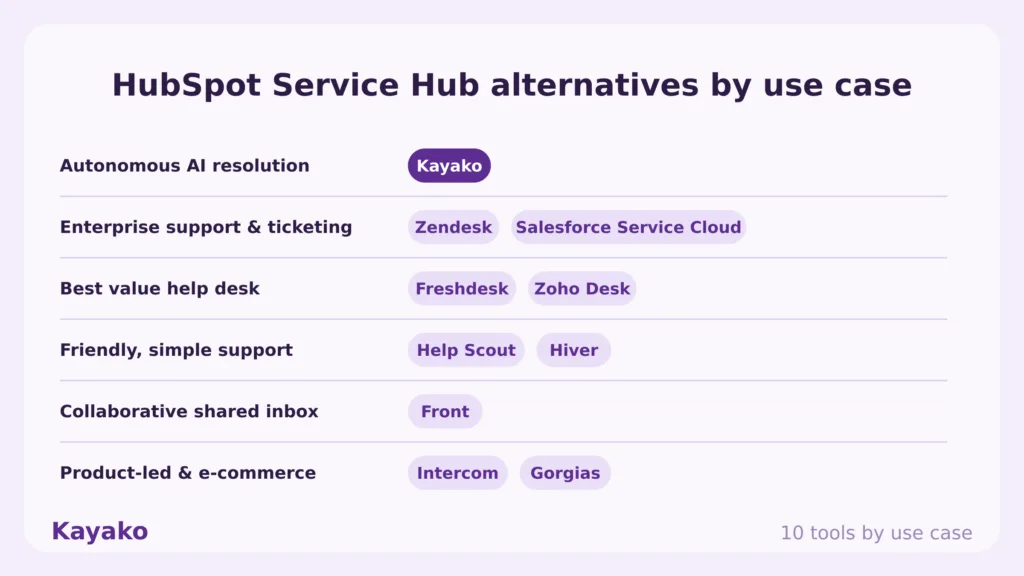
Here is the shortlist before the in-depth reviews. Kayako leads because it solves the problem most teams hit after Service Hub, which is resolving support volume with AI rather than organizing tickets inside a CRM.
|
Tool |
Rating |
Best for |
Starting price |
Free plan |
AI |
|
Kayako |
4.7 |
Autonomous customer support at scale |
$79/seat + $1 per resolved ticket |
No |
Yes |
|
Zendesk |
4.3 |
Enterprise support and ticketing |
From $55/agent/mo |
Trial |
Yes |
|
Freshdesk |
4.4 |
Budget multichannel help desk |
Free; from $15/agent/mo |
Yes |
Yes |
|
Intercom |
4.5 |
Product-led support with AI |
From $29/seat/mo + $0.99/resolution |
Trial |
Yes |
|
Zoho Desk |
4.4 |
Value help desk with CRM |
Free; from $7/agent/mo |
Yes |
Yes |
|
Help Scout |
4.4 |
Friendly email-first support |
Free; from $20/user/mo |
Yes |
Yes |
|
Front |
4.6 |
Collaborative shared inbox |
From $25/seat/mo |
Trial |
Yes |
|
Salesforce Service Cloud |
4.4 |
Enterprise CRM-native support |
From $25/user/mo |
Trial |
Yes |
|
Gorgias |
4.6 |
E-commerce and Shopify support |
From $10/mo |
Trial |
Yes |
|
Hiver |
4.6 |
Gmail-native shared inbox |
Free; from $24/user/mo |
Yes |
Yes |
Ratings reflect public G2 and Capterra scores at the time of writing. Verify live pricing on each vendor page before publishing.
Why look for a HubSpot Service Hub alternative in 2026
Service Hub still works well for HubSpot-native teams. The pressure to move comes from three places, and they compound as support scales.
- Pricing escalates fast. The free tier is generous, however the jump from Starter near $20 per seat to Professional near $100 per seat is roughly 5x, Professional adds a one-time onboarding fee, and the service features a growing team needs sit on the higher tiers.
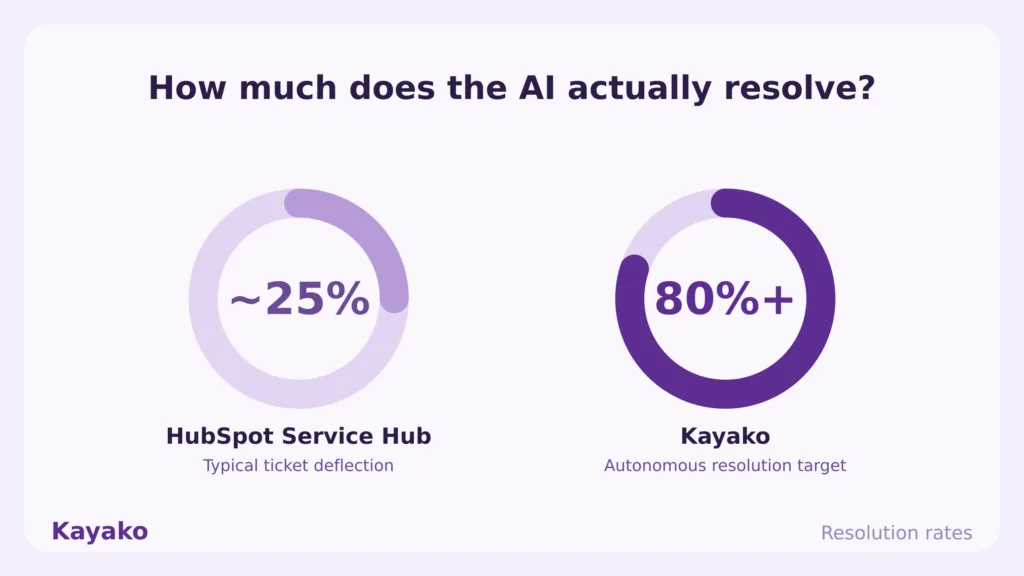
- Support depth came second. HubSpot built marketing and sales first, so dedicated help desks beat Service Hub on ticketing depth and AI, with traditional resolution rates of 15% to 25% against 50% and above from AI-first tools.
- Value lives inside the ecosystem. Service Hub’s main draw is HubSpot integration, so if you are not all-in on HubSpot CRM, you are paying for a whole ecosystem when you just need a help desk, and the support tool loses most of its appeal.
Customer expectations push the same way. 73% of consumers are turned off by slow replies, so resolution speed, not CRM proximity, decides satisfaction.
What real users say about HubSpot Service Hub
Three themes repeat across recent Service Hub reviews on G2 and Capterra.
- Great inside the ecosystem, costly outside it. Reviewers praise the CRM integration and unified view, then flag price. On G2, cost is among the most cited cons, with reviewers noting the price climbs quickly as you add users or need advanced features.
- Ticketing and email feel fused and basic. On Capterra, a verified reviewer describes helpdesk email and tickets as fused in a way that stops either from working well, and another calls the support ticketing UX poor and behind the curve on AI.
- The Starter tier feels limiting. Several reviewers say ticketing was about all they could do on Starter for the price, and that real service capability only arrives once you make the steep jump to Professional.
The 10 best HubSpot Service Hub alternatives in 2026
Each tool below is rated for a specific job. Match the platform to your bottleneck, not to the longest feature list.
1. Kayako: Best for autonomous customer support at scale
Kayako is the number one pick for teams that outgrew Service Hub because support, not CRM proximity, became the priority. It pairs an AI shared inbox with Agent Kay, which resolves tickets across every channel instead of organizing them inside a marketing platform.
Key features
- Autonomous resolution. Agent Kay targets 80% and above resolution across email, live chat, voice, and social.
- A unified customer timeline that does not depend on running one CRM.
- AI Triage. Auto-classifies, prioritizes, and routes tickets through automation workflows.
- Built-in knowledge. A knowledge base and integrations feed consistent answers and resolution.
Pros
- Built for autonomous resolution, so it closes routine tickets rather than logging them against a contact record. Where Service Hub deflects 15% to 25%, Kayako targets 80% and above.
- It is a dedicated support platform that stands on its own merits, with no CRM lock-in, so the value does not depend on running the rest of HubSpot.
- Kayako is deployed for you, not configured by you behind a paid onboarding fee, and per-resolution pricing ties cost to outcomes with a Backlog Breakthrough Guarantee.
Cons
- Kayako is built for support, not for marketing campaigns or sales pipelines, so a team that wants one tool across all three will still pair it with a CRM.
- The autonomous engine earns its return at real ticket volume, so a very small team with light volume will not see the full payback.
Pricing: A 90-day pilot from $15K including platform and services, then $79 per seat plus $1 per AI-resolved ticket. See Kayako pricing.
Rating: 4.7/5 from 100+ G2 reviews.
Versus HubSpot Service Hub: Service Hub organizes tickets inside the HubSpot ecosystem. Kayako resolves them with AI and stands on its own. If your pain is thin support depth, low AI resolution, and a price that jumps as you scale, Kayako is the direct upgrade, and you can see the head-to-head on the Compare Kayako page.
Scale support without new headcount, with Kayako AI
2. Zendesk: Best for enterprise support and ticketing
Zendesk is the mature help desk choice, built from day one around ticketing, routing, and large-scale support automation, which is exactly the depth Service Hub adds on top of a CRM.
Key features
- Deep ticketing. Custom views, macros, triggers, SLAs, and multi-brand support.
- AI agents. Automated Resolutions confirm a fix after 72 hours of inactivity before billing.
- Omnichannel inbox. Email, chat, phone, and social in one agent workspace.
- Large marketplace. Over 1,500 integrations, including HubSpot CRM if you stay on it.
Pros
- Support depth is the standout, with granular SLA management and reliable routing that hold up at large volume, which is where Service Hub’s marketing-first ticketing strains.
- It connects to HubSpot CRM through the marketplace, so you can keep your CRM and still run a purpose-built help desk.
Cons
- AI cost is layered. The real automation lives in an Advanced AI add-on at $50 per agent per month, then automated resolutions bill $1.50 to $2.00 each.
- Setup and administration are heavier than Service Hub, so larger rollouts can take months without a dedicated admin.
Pricing: Suite Team from $55/agent/mo up to Enterprise $169/agent/mo, plus the Advanced AI add-on at $50/agent/mo and automated resolutions at $1.50 to $2.00 each. See Zendesk pricing.
Rating: 4.3/5 on G2.
Versus HubSpot Service Hub: Zendesk gives you a dedicated help desk where Service Hub gives you support inside a CRM. Budget for the AI add-ons separately, and expect a heavier setup in exchange for depth.
3. Freshdesk: Best for a budget multichannel help desk
Freshdesk is one of the cheapest ways to leave Service Hub for a proper, standalone help desk. It pairs multichannel support with mature routing automation and a forever-free starting tier.
Key features
- Multichannel ticketing. Email, chat, phone, and social in one ticket view.
- Workflow automation. Rule-based routing, SLAs, and assignment at scale.
- Freddy AI. Agent copilot and customer-facing AI agent, billed on usage.
- Knowledge base. Self-service portal and community forums to deflect repeat questions.
Pros
- A forever-free plan and a low entry tier make it far cheaper than Service Hub Professional, with no $1,500 onboarding fee to start.
- The routing automation is mature, so high-volume queues sort themselves once configured, which Service Hub’s marketing-first rules handle less gracefully.
Cons
- It is workflow-driven, so the initial setup and ongoing rule maintenance take real time as categories and teams change.
- Freddy AI agent sessions and copilot bill on top of seats, so automation-heavy teams should track session costs.
Pricing: Forever-free tier; paid from $15 to $79 per agent per month, plus Freddy AI usage. See Freshdesk pricing.
Rating: 4.4/5 across 3,600+ G2 reviews.
Versus HubSpot Service Hub: Freshdesk delivers dedicated ticketing depth at a lower entry price than Service Hub Professional, with no CRM lock-in. Expect more configuration up front in exchange for stronger automation.
4. Intercom: Best for product-led support with AI
Intercom blends a support inbox, in-app messaging, and its Fin AI agent into one platform. It fits product-led teams that want AI to close repetitive tickets, which is where Service Hub’s resolution rates lag.
Key features
- Fin AI agent. Resolves conversations autonomously and connects to existing help desks.
- In-app messaging. Guide users through onboarding and adoption inside your product.
- Unified inbox. Chat, email, and in-app messages with strong segmentation.
- Workflow automation. Multi-step procedures and routing for common paths.
Pros
- Fin genuinely resolves tickets, with public case studies citing 50% to 67% automation, far beyond Service Hub’s typical deflection.
- The Messenger experience is polished and customers engage with it, so more issues reach the AI in the first place.
Cons
- Cost compounds in a way that surprises teams. Seats run $29 to $132 each, then every Fin resolution adds $0.99 on top, and reviewers repeatedly flag unpredictable spend at volume.
- Useful analytics sit behind a higher Pro add-on, and annual contracts can lock you in for twelve months.
Pricing: Essential from $29/seat/mo, Advanced $85/seat/mo, Expert $132/seat/mo, plus $0.99 per Fin resolution with a 50-resolution monthly minimum. See Intercom pricing.
Rating: 4.5/5 on G2.
Versus HubSpot Service Hub: Intercom delivers AI resolution and product messaging that Service Hub cannot match on rates. The trade is a usage bill that climbs with every Fin resolution, so model your volume first.
5. Zoho Desk: Best for a value help desk with CRM
Zoho Desk is one of the cheapest full help desks available, and it answers the same CRM-native pitch as Service Hub at a fraction of the price if you run the Zoho suite.
Key features
- Omnichannel ticketing. Email, chat, social, and phone from one interface.
- Zia AI. AI assistant for reply suggestions and ticket deflection on higher tiers.
- Blueprint automation. Process automation for assignment, SLAs, and escalation.
- Zoho CRM integration. Native link to customer and sales data across the Zoho suite.
Pros
- It is one of the lowest-cost full help desks on the market, and inside the Zoho ecosystem it gives the unified view Service Hub charges far more for.
- The five-tier ladder starts near free and adds capability gradually, so you avoid Service Hub’s steep Starter-to-Professional jump.
Cons
- The useful pieces, Zia AI, advanced analytics, and deep customization, sit on higher tiers, so the headline price understates a fully featured setup.
- Phone support needs a separate Zoho Voice subscription, and the interface is busier than a focused help desk.
Pricing: Free for up to 3 agents; paid from about $7 to $50 per agent per month. See Zoho Desk pricing.
Rating: 4.4/5 on G2.
Versus HubSpot Service Hub: Zoho Desk matches Service Hub’s CRM-native pitch at a far lower price, with more ticketing depth. The interface is busier, and channels like phone cost extra.
6. Help Scout: Best for friendly, email-first support
Help Scout is the pick when Service Hub feels like overkill. It keeps support personal, with email-style replies rather than ticket jargon, and it is far cheaper than Service Hub Professional.
Key features
- Shared inbox. Email, chat, and social in one collaborative inbox with assignments and notes.
- Docs knowledge base. A self-service site that cuts repeat questions and ticket volume.
- In-app help and proactive messaging on your site or product.
- AI drafting and Answers. AI-drafted replies, summaries, and customer-facing resolution.
Pros
- The experience is clean and human, so agents actually enjoy using it, and a team escapes Service Hub’s cluttered, marketing-first interface.
- A genuine free plan for up to five users and lower paid tiers make it a clear saving when switching from Service Hub.
Cons
- Advanced reporting and workflow depth sit behind higher tiers, so growing teams hit upgrade walls as needs mature.
- AI Answers bills on usage at roughly $0.75 per resolution, so heavy automation raises the bill beyond the headline seat price.
Pricing: Free for up to 5 users; paid from $20 to $65 per user per month, plus usage-based AI Answers. See Help Scout pricing.
Rating: 4.4/5 across 420+ G2 reviews.
Versus HubSpot Service Hub: Help Scout is simpler, friendlier, and cheaper than Service Hub for email support, with a free tier to start. It is lighter on cross-team CRM reporting, which only matters if you needed the ecosystem.
7. Front: Best for a collaborative shared inbox
Front is the choice when your team works one queue together and wants the inbox, not tickets, as the operating surface. Teams coming from Service Hub’s ticket-first view often find it more fluid.
Key features
- Shared inbox. Assign, comment, and reply on email, SMS, and social in one workspace.
- Internal comments and drafts on every conversation.
- Automation rules. Routing and tagging, with caps that rise by tier.
- Team performance and SLA reporting on higher plans.
Pros
- The inbox-first experience feels more natural than Service Hub’s tickets-first view for teams that live in a shared queue.
- It blends support with general ops and email, so customer-facing and internal work share one tidy workspace.
Cons
- There is no free plan and a two-seat minimum, and AI features sit behind paid add-ons on lower tiers, so the cost can climb like Service Hub’s.
- It is a shared inbox first, so deep ticketing, SLAs, and reporting are thinner than a dedicated help desk.
Pricing: Starter from $25/seat/mo, Professional $65/seat/mo, Enterprise $105/seat/mo, with a two-seat minimum. See Front pricing.
Rating: 4.6/5 across 2,400+ G2 reviews.
Versus HubSpot Service Hub: Front gives you a smoother collaborative inbox than Service Hub’s ticket view. It is lighter on deep ticketing and, like Service Hub, charges extra for AI.
8. Salesforce Service Cloud: Best for enterprise CRM-native support
Salesforce Service Cloud, now Agentforce Service, is the answer when you are leaving HubSpot’s CRM as well and want support and CRM under one enterprise roof. It is the heavyweight CRM-native alternative to Service Hub.
Key features
- Case management. Powerful, highly customizable case handling at enterprise scale.
- Omni-channel routing. Route work across channels by skill and availability.
- Agentforce AI. AI agents and Einstein, billed separately on top of the license.
- Deep customization. Extensive configuration and a vast AppExchange ecosystem.
Pros
- Case management and automation are genuinely enterprise-grade, with the customization depth Service Hub cannot reach, and a complete view of the customer inside Salesforce.
- If your company is standardizing on Salesforce CRM, it keeps support and CRM on one platform, the same logic that makes Service Hub appealing inside HubSpot.
Cons
- Setup is complex and the learning curve is steep, so smaller teams often need a consultant, which Service Hub buyers rarely do.
- Cost runs high. List prices reach $165 per user on Enterprise and $330 on Unlimited, billed annually, with Agentforce AI charged on top.
Pricing: Per user per month, billed annually: Starter Suite $25, Pro Suite $100, Enterprise $165, Unlimited $330, with Agentforce AI billed separately. See Service Cloud pricing.
Rating: 4.4/5 across 7,200+ G2 reviews.
Versus HubSpot Service Hub: Service Cloud is the enterprise CRM-native alternative for teams leaving HubSpot CRM too. It is far deeper than Service Hub and far heavier to run, with a price and learning curve to match.
9. Gorgias: Best for e-commerce and Shopify support
Gorgias is the e-commerce specialist. It reads and edits Shopify orders directly inside tickets, which is the workflow Service Hub never built for online retail.
Key features
- Deep Shopify integration. View and edit orders, refunds, and subscriptions inside the ticket.
- Unified helpdesk. Email, chat, and social with macros tied to store data.
- Automation and AI. Auto-responses and an AI agent for common store questions.
- Revenue tracking. Ties support replies to sales, which retail teams value.
Pros
- The Shopify integration is the deepest in the category, so agents resolve order questions without leaving the ticket, which a general CRM-led tool like Service Hub cannot match for retail.
- Setup is fast and the interface is intuitive, and small stores start at a low entry price.
Cons
- It is built for e-commerce, so it is a poor fit for B2B SaaS or internal support where Service Hub’s CRM ties matter more.
- Pricing is ticket-volume based, so a busy season can push you into a higher tier, and reviewers note AI can feel like an extra cost.
Pricing: From $10/mo on Starter, then ticket-volume tiers, with a free trial. See Gorgias pricing.
Rating: 4.6/5 across 540+ G2 reviews.
Versus HubSpot Service Hub: Gorgias beats Service Hub for online stores because it works natively inside Shopify orders. For B2B or non-retail support, Service Hub’s CRM ties are the better fit.
10. Hiver: Best for Gmail-native shared inboxes
Hiver turns Gmail into a shared support desk without a new interface, which suits a Google Workspace team that found Service Hub heavier than the job required.
Key features
- Gmail-native inbox. Shared inboxes, assignments, and status tracking inside Gmail.
- SLAs and automation. Rules, round-robin assignment, and SLA tracking on shared addresses.
- Included AI. AI drafting and summaries bundled into the plan tier.
- Multi-channel. Email, chat, WhatsApp, and voice channels with analytics.
Pros
- It lives inside Gmail, so a Google Workspace team adopts it in a day with no new interface to learn, a sharp contrast with Service Hub’s setup.
- AI is included in the plan tier rather than billed as a separate add-on, so the price stays predictable.
Cons
- The Gmail-native model is both its strength and its ceiling, since teams that need a full multi-brand help desk eventually outgrow it.
- It does not offer the CRM-wide reporting that was Service Hub’s main draw, so cross-team visibility is thinner.
Pricing: Free plan; paid from about $24/user/mo (Growth) up to roughly $59/user/mo (Elite). See Hiver pricing.
Rating: 4.6/5 across 1,200+ G2 reviews.
Versus HubSpot Service Hub: Hiver is lighter and cheaper than Service Hub for Gmail teams, with AI bundled in. It trades the CRM-wide view for speed and simplicity.
Kayako vs HubSpot Service Hub: a feature-by-feature comparison
Since Kayako is the top pick for teams that outgrew Service Hub, here is the head-to-head.
|
Feature |
HubSpot Service Hub |
Kayako |
|
Primary use case |
Support inside the HubSpot ecosystem |
Autonomous customer support resolution |
|
Core model |
Tickets attached to the CRM record |
AI resolves conversations, escalate the rest |
|
AI resolution |
Typically 15% to 25% deflection |
Agent Kay targets 80% and above |
|
Ticketing depth |
Came after marketing and sales, feels basic |
Purpose-built ticketing and AI Triage |
|
Best value |
Only when you run HubSpot CRM |
Stands on its own, no CRM lock-in |
|
Pricing model |
Free to ~$150/seat, 5x Starter-to-Pro jump, onboarding fee |
$79 per seat plus $1 per AI-resolved ticket |
|
Implementation |
Configure it yourself, paid onboarding on Pro |
Done-for-you deployment |
|
Best fit |
Teams all-in on HubSpot CRM |
Mid-market teams scaling support without headcount |
The takeaway is simple. Service Hub keeps tickets tidy next to your CRM. Kayako resolves the tickets for you and improves with each one.
How to switch from HubSpot Service Hub without losing momentum
Migrating off Service Hub is straightforward when you sequence it. Use this checklist.
- Decide whether you are keeping HubSpot CRM. If yes, pick a help desk with a strong HubSpot integration. If no, the field opens up.
- Export tickets, contacts, and knowledge base articles. Zendesk, Freshdesk, and Zoho Desk publish documented HubSpot migration paths.
- Pick by job, not by hype. Use the at-a-glance table to match the tool to your bottleneck, depth, value, or AI.
- Rebuild your highest-value workflows first. Recreate routing, SLAs, and macros that drive real outcomes, then expand.
- Reconnect channels and your CRM. Link email, chat, social, and HubSpot if you kept it.
- Run both in parallel briefly. Validate results, then sunset Service Hub to avoid split queues.
How to choose the right HubSpot Service Hub alternative
The best tool removes your biggest bottleneck. Be honest about which job you are replacing.
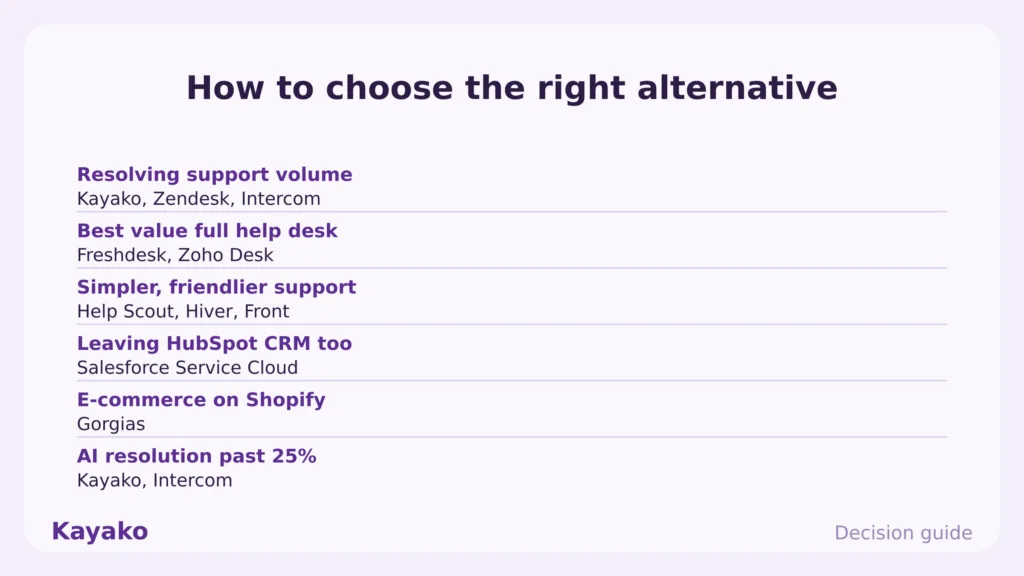
- Primary goal. Resolving support volume points to Kayako, Zendesk, or Intercom. Simpler, friendlier support points to Help Scout, Hiver, or Front.
- CRM plans. Staying on HubSpot CRM means picking a help desk with a clean HubSpot integration. Moving to Salesforce points to Service Cloud.
- Freshdesk, Zoho Desk, and Gorgias undercut Service Hub Professional, often with no onboarding fee.
- AI ambition. If you want resolution past the 15% to 25% range, Kayako and Intercom go well beyond Service Hub.
Which HubSpot Service Hub alternative should you pick
Start with the job, not the feature list. The right answer depends on what is actually driving you off Service Hub.
- Customer support at scale. Choose Zendesk for heavy enterprise ticketing.
- Best value. Freshdesk or Zoho Desk for a full help desk well below Service Hub Professional.
- Simpler and friendlier. Help Scout, or Hiver if you live in Gmail.
- Leaving HubSpot CRM too. Salesforce Service Cloud for an enterprise CRM-native platform.
- E-commerce support. Gorgias for Shopify stores that need order context in the ticket.
The bottom line
HubSpot Service Hub earns its place for teams that run the full HubSpot stack and want tickets next to the CRM. In 2026, the reasons people leave are the support depth that came second to marketing and sales, the AI that resolves a smaller share than purpose-built tools, the value that depends on the ecosystem, and the price that jumps 5x from Starter to Professional. The job most teams leaving Service Hub actually need filled is resolving support volume, not organizing it inside a CRM.
For the best value, Freshdesk and Zoho Desk go further for less. For enterprise depth, Zendesk and Salesforce lead. For teams that want tickets resolved rather than only tracked, Kayako is the strongest answer, because it closes conversations end to end, stands on its own without CRM lock-in, and aligns cost with outcomes. Pick the tool that removes your bottleneck, then move.
Start a 90-day Kayako pilot
Frequently asked questions
What is the best HubSpot Service Hub alternative in 2026?
It depends on the job. For autonomous customer support at scale, Kayako is the strongest alternative. For best value, Freshdesk and Zoho Desk lead, and for enterprise depth, Zendesk and Salesforce Service Cloud.
Why do teams leave HubSpot Service Hub?
The common reasons are support depth that came after marketing and sales, low AI resolution compared with dedicated tools, value that depends on running HubSpot CRM, and pricing that jumps roughly 5x from Starter to Professional, plus a one-time onboarding fee.
Is there a cheaper alternative to HubSpot Service Hub?
Yes. Freshdesk and Zoho Desk both offer free tiers and full help desk features well below Service Hub Professional, and Help Scout offers a free plan for up to five users. None charge a Professional onboarding fee.
Can I keep HubSpot CRM and switch only the help desk?
Yes. Most modern help desks, including Zendesk, Freshdesk, Zoho Desk, and Kayako, integrate with HubSpot CRM, so you can keep your CRM and run a dedicated support platform alongside it.
Does Kayako replace HubSpot Service Hub?
For customer support, yes. Kayako resolves tickets across email, live chat, voice, and social with autonomous AI, and it stands on its own without CRM lock-in. For marketing campaigns and sales pipelines, you would still keep a CRM alongside it.
Ready to transform your customer support with AI?
Join hundreds of support teams using Kayako to resolve tickets faster, raise CSAT, and scale without scaling headcount.
Move off Service Hub cleanly, with Kayako