Zoho Desk is a serious help desk. I would not tell a small Zoho One customer to rip it out for sport.
It does the basics well: email ticketing, SLAs, automation, knowledge base, customer portals, social support, and Zia AI on higher plans. For a small team already living inside Zoho CRM, Zoho Books, Zoho Analytics, and Zoho Projects, that bundle can be hard to beat.
However, support leaders do not search for “Zoho Desk alternatives” when everything is calm.
They search when ticket volume keeps climbing, agents are still doing too much manual triage, AI is helping around the edges but not clearing the queue, and the team has outgrown a help desk that mainly organizes work instead of reducing it.
I have seen that pattern too many times. The support team buys a help desk to get control. A year later, the tool has become another system the team has to feed. Tickets still pile up. Customers still wait. Managers still explain backlog to the board.
This guide compares the best Zoho Desk alternatives by the job they actually do best.
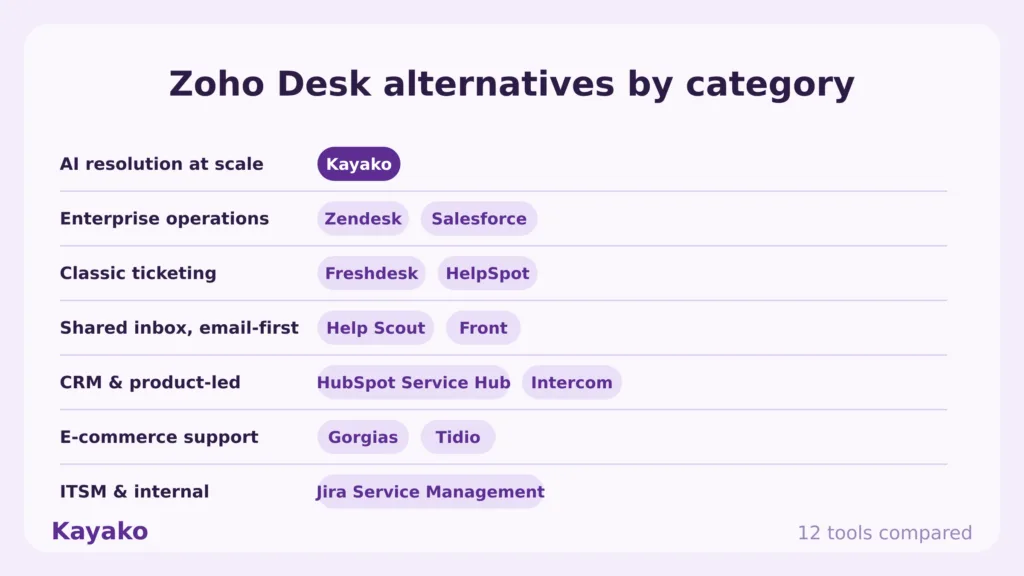
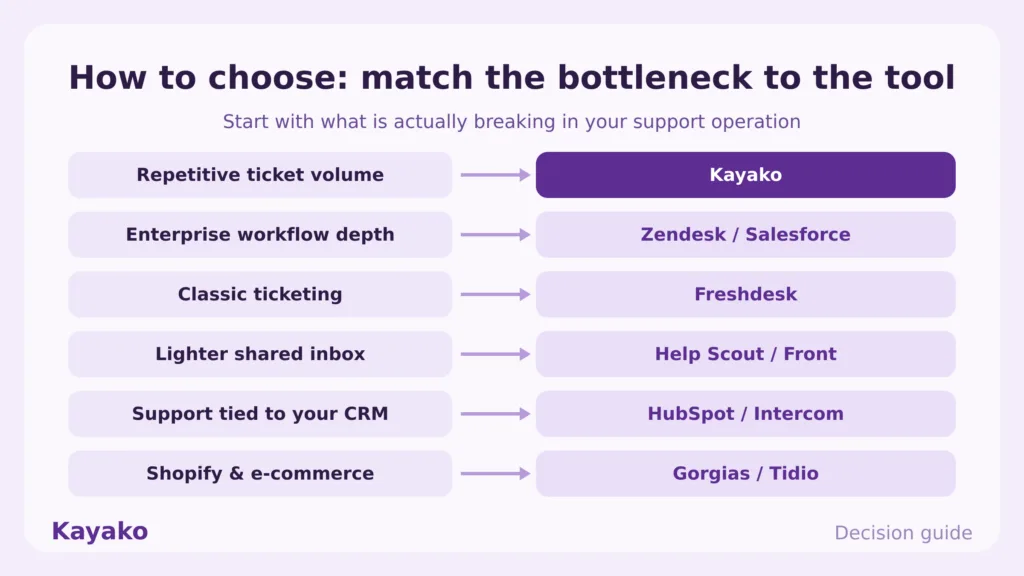
If your bottleneck is repetitive support volume, start with Kayako. If you need enterprise workflow depth, compare Zendesk and Salesforce. If you want a classic ticketing tool, Freshdesk is the obvious Zoho Desk competitor. If you want a lighter shared inbox, Help Scout or Front may fit better.
The right answer depends on what is breaking inside your support operation.
Book a Kayako strategy session to see how AI can clear one support queue before you commit to a full help desk change.
How I evaluated these Zoho Desk alternatives
I did not treat this as a feature checklist.
Feature checklists are how support teams end up buying software that looks complete in procurement and creates more work after launch.
I evaluated each Zoho Desk alternative around the questions a support leader would ask before moving a live queue:
-
Can this tool reduce ticket volume, or does it only organize tickets better?
-
How much work does implementation require from my team?
-
Does AI resolve issues, or does it only summarize and suggest replies?
-
Can agents see the customer history without hunting through tabs?
-
What happens when support spans email, chat, social, voice, and e-commerce?
-
Does pricing scale with value, or does every new agent and add-on increase the bill?
-
What do real users complain about after the sales demo is over?
-
Which team should choose this tool, and which team should avoid it?
I also looked at official product pages, pricing pages, third-party review sites, Reddit threads, and competitor comparison pages. The goal was to separate useful alternatives from tools that only rank because they have a long list of features.
Zoho Desk alternatives at a glance
| Tool | Best for | Starting price | Free plan | AI strength | Main tradeoff |
|---|---|---|---|---|---|
| Kayako | AI resolution for high-volume support teams | Pilot-first pricing, then $1 per AI-resolved ticket | No | Strong | Best for teams with meaningful ticket volume |
| Zendesk | Enterprise support operations | From $19 per agent/month | No | Strong | Costs rise with seats, AI, and add-ons |
| Freshdesk | Classic ticketing with broad feature coverage | Free plan, paid tiers vary | Yes | Moderate to strong | Omnichannel and AI may push teams into higher tiers |
| HelpSpot | Teams tired of feature gating | From $18.33 per agent/month annually | Trial | Moderate | Smaller ecosystem than Zendesk or Freshdesk |
| Help Scout | Email-first support teams | From $25 per user/month | Trial | Basic to moderate | Lighter for complex routing |
| Front | Collaborative inboxes across customer-facing teams | From $25 per seat/month | Trial | Moderate | Full omnichannel support needs higher tiers |
| HubSpot Service Hub | Support tied to CRM, sales, and marketing | Free tools, paid tiers vary | Yes | Moderate | Best value inside HubSpot |
| Intercom | Product-led SaaS support | From $29 per seat/month plus AI outcome pricing | Trial | Strong | Chat-first, not always help-desk-first |
| Salesforce Service Cloud | Large enterprises on Salesforce | Paid enterprise tiers | No | Strong | Heavy implementation and admin work |
| Jira Service Management | ITSM and internal service teams | Free tier available | Yes | Moderate | Too IT-heavy for many CX teams |
| Gorgias | Shopify and e-commerce support | From $10/month | No | Strong for commerce | Narrower fit outside retail |
| Tidio | SMB live chat and website chatbots | Free plan, paid tiers vary | Yes | Strong for SMB chat | Less suited to mature help desk operations |
Why look for a Zoho Desk alternative?
Zoho Desk is not a bad tool. The issue is fit.
Most teams start comparing Zoho Desk competitors for one of six reasons.
1. Your team needs AI to resolve tickets, not decorate them
Zoho’s Zia can help agents with sentiment, summaries, knowledge suggestions, and answer assistance. That helps.
However, agent assist is not the same as autonomous resolution.
If your queue is full of order status, refund status, password resets, billing questions, account access issues, onboarding questions, and repeat product questions, your team does not need another AI summary. It needs fewer tickets reaching agents in the first place.
That is why tools like Kayako AI support and Ticketing AI deserve a different evaluation than classic help desks. The question is not whether AI exists. The question is whether AI can close a ticket accurately, learn from the result, and escalate cleanly when a human needs to step in.
2. Zoho works best when you are already bought into Zoho
Zoho Desk is strongest inside the Zoho ecosystem. That is a real advantage for Zoho One customers.
However, the same advantage can become friction when your stack expands beyond Zoho. Support teams often need commerce data, product usage data, CRM context, subscription data, bug status, shipping data, and payment history in one place.
When the team has to stitch that together with brittle integrations, agents start doing expensive detective work. That cost rarely shows up in the software line item, but it shows up in average resolution time.
3. Setup gets heavier as workflows mature
Zoho Desk gives teams a lot of configuration room. That is useful if someone owns it.
However, many support teams do not have a full-time help desk admin. The manager configures SLAs between escalations. Agents create tags inconsistently. Automations grow over time and nobody wants to touch them because one broken rule can flood the queue.
A good Zoho Desk alternative should reduce operational drag. It should not create another part-time admin job.
4. Support leaders need better cost control
Per-agent pricing looks simple until the support team grows.
You add agents. Then you add AI. Then you add reporting. Then you add workforce tools. Then you add implementation help because the internal team is already stretched.
For support leaders, the better question is cost per resolved ticket.
That is why Kayako’s $1 per AI-resolved ticket model deserves attention. It ties cost to resolved work rather than seats alone. For teams under pressure to scale support without scaling headcount, that is a much cleaner conversation.
Read more: customer service costs
5. Omnichannel support needs one customer record
Customers do not care which channel they used last time. They expect the agent to know.
Email, chat, social, voice, SMS, and e-commerce tickets need to land against the same customer record. Otherwise, agents waste time asking customers to repeat themselves.
If your team is building workarounds to understand one customer across five systems, you have outgrown basic ticketing.
Read more: omnichannel customer support
6. Reporting must show what to fix next
Ticket counts are useful. They are not enough.
Support leaders need to know which queues are burning agent hours, which topics AI should handle first, which workflows are slowing down resolution, which knowledge base gaps create repeat tickets, and which customers keep coming back for the same issue.
That is how you move from reporting activity to improving operations.
Read more: customer support metrics
What real users say about Zoho Desk: Reddit and community sentiment
Reddit sentiment around Zoho Desk is mixed, which is useful because mixed is usually closer to reality.
The praise is consistent. Users like the value, the Zoho One fit, the customization, and the fact that Zoho Desk can handle many support workflows without enterprise pricing.
The complaints are also consistent:
-
Setup can take patience, especially when workflows get more advanced.
-
The UI can feel cluttered or dated to some users.
-
Support experiences vary. Some users report good enterprise support, while others complain about slow or frustrating responses.
-
Integrations can require extra care, especially when teams rely on Microsoft, Teams, SharePoint, telephony, or custom workflows.
-
Some users describe Zoho Desk as slower than Freshdesk in day-to-day use.
That tells me Zoho Desk is often fine for small teams that accept the Zoho way of working. It becomes less attractive when speed, admin simplicity, AI resolution, and cross-stack context become board-level priorities.
The best Zoho Desk alternatives in 2026
1. Kayako: Best for AI resolution at scale
Kayako is the best Zoho Desk alternative for teams where support volume has become the business problem.
Zoho Desk helps teams manage tickets. Kayako is built to reduce how many repetitive tickets agents handle at all.
That distinction matters.
When a support queue is growing, the old answer is to add headcount, tighten SLAs, create more macros, and ask agents to work faster. That buys time, then breaks again. Kayako takes a different approach: pick one high-volume queue, deploy AI with expert help, measure results, then expand once the model proves itself.
That is the right way to introduce AI into support. Start with a contained queue. Measure first contact resolution, total resolution time, CSAT, backlog reduction, and cost per ticket. Then roll out to the next queue.
Key features
-
AI support agent for repetitive ticket resolution
-
Ticketing AI for triage, routing, summaries, and suggested replies
-
AI shared inbox for team visibility
-
Knowledge base tied to consistent answers
-
Integrations with support, CRM, and customer systems
-
Omnichannel AI support across email, chat, social, voice, and connected channels
-
Done-for-you implementation through Kayako experts
-
90-day AI Agent Pilot for one support queue
-
$1 per AI-resolved ticket pricing after pilot
Pros
Kayako is built around the metric support leaders care about: resolved tickets.
The one-queue pilot lowers risk. Your team does not have to replace the whole help desk on day one. If Zoho Desk is still working in some areas, Kayako can be evaluated against the queue causing the most pain.
Moreover, Kayako’s implementation model matters. Most support teams do not fail with AI because they lack ambition. They fail because nobody defines the queue, the data, the escalation rules, and the success metrics clearly enough.
Cons
Kayako is best for teams with enough repetitive support volume to justify AI resolution. A five-ticket-a-day team may not need this level of help.
It is also support-first. If your real need is CRM-wide sales and marketing alignment, HubSpot or Salesforce may fit better.
Pricing
Kayako uses a pilot-first model. The 90-day AI Agent Pilot focuses on one support queue, expert implementation, KPI tracking, and measurable backlog reduction. After that, Kayako’s pricing centers on $1 per AI-resolved ticket.
See Kayako pricing and book a strategy session for details.
Kayako vs Zoho Desk
Zoho Desk is a help desk with AI features. Kayako is an AI support agent and modern help desk model built to reduce ticket load.
Choose Kayako if your real problem is backlog, repeat tickets, rising support cost, or pressure to scale without adding agents.
Related reads:
CTA: Start with one queue. Book a Kayako strategy session.
2. Zendesk: Best for enterprise support operations
Zendesk is the safest Zoho Desk alternative for large teams that need mature service operations, deep workflow control, analytics, routing, support channels, and a large app marketplace.
It is also a tool that needs ownership. Zendesk works best when someone has the time and authority to configure it properly.
Key features
-
Omnichannel ticketing
-
Advanced routing and SLAs
-
Help center and community
-
Large app marketplace
-
AI agents and agent assist
-
Reporting through Zendesk analytics tools
Pros
Zendesk is mature, flexible, and widely adopted. Enterprise teams can build complex support processes around it.
Cons
Zendesk can become expensive once you add seats, AI, reporting, workforce tools, voice, and admin requirements. Smaller teams may buy more system than they can operate.
Pricing
Zendesk pricing starts at $19 per agent/month, with higher tiers and AI options available on paid plans.
Zendesk vs Zoho Desk
Zendesk is stronger for enterprise support complexity. Zoho Desk is usually more affordable for smaller teams already using Zoho.
Choose Zendesk when your team needs a full enterprise support system and has the admin maturity to run it.
Related read: Zendesk alternatives
3. Freshdesk: Best direct Zoho Desk competitor
Freshdesk is the most obvious side-by-side comparison for Zoho Desk.
It has ticketing, automation, SLAs, knowledge base, reporting, and AI features. The interface is often easier for teams to adopt, and Freshworks has built a broad customer service suite around it.
Key features
-
Ticketing and shared inbox
-
SLA management
-
Knowledge base
-
Workflow automation
-
Freddy AI features
-
Freshworks ecosystem
-
Omnichannel options through Freshdesk plans
Pros
Freshdesk is familiar, approachable, and broad enough for many growing support teams. It is often the first tool teams compare against Zoho Desk because the categories overlap so clearly.
Cons
Pricing gets harder to judge when you need full omnichannel support, advanced AI, or multiple Freshworks products.
Pricing
Freshdesk has a free plan and paid tiers. Check the official Freshdesk pricing page before publishing final plan details, since plan names and AI packaging change.
Freshdesk vs Zoho Desk
Freshdesk often wins on ease of adoption and interface. Zoho Desk wins when the business already runs heavily on Zoho apps.
Related reads:
4. HelpSpot: Best for teams tired of feature gating
HelpSpot takes a different route from many help desk vendors. Its positioning is simple: one price, all core features, cloud or self-hosted.
That makes it useful for teams that like Zoho Desk’s affordability but hate discovering that important features sit behind higher tiers.
Key features
-
Email ticketing
-
Automation
-
SLAs
-
Custom reporting
-
Knowledge base
-
Unlimited mailboxes
-
Cloud or self-hosted deployment
-
Professional onboarding
Pros
HelpSpot is straightforward. It can be attractive for teams that want less pricing complexity and more control.
Cons
The ecosystem is smaller than Zendesk, Freshdesk, or Salesforce. If your team needs a broad app marketplace, check integrations carefully.
Pricing
HelpSpot lists annual pricing from $18.33 per agent/month.
HelpSpot vs Zoho Desk
HelpSpot is a good fit for teams that want predictable packaging and fewer upgrade traps. Zoho Desk is better for teams committed to the Zoho suite.
5. Help Scout: Best for email-first support teams
Help Scout is a strong Zoho Desk alternative for teams that want a simpler support experience.
It feels less like enterprise software and more like a polished shared inbox with docs, workflows, and customer context. That can be exactly right for SaaS startups, content businesses, agencies, and service teams that do not need heavy routing.
Key features
-
Shared inbox
-
Docs knowledge base
-
Live chat
-
Basic workflows
-
Customer profiles
-
AI inbox assistant
-
SLA features on paid tiers
Pros
Help Scout is easy for agents to learn. The product is clean, and support teams can move quickly without a large admin function.
Cons
Teams with complex routing, multiple brands, advanced reporting needs, or high-volume omnichannel operations may outgrow it.
Pricing
Help Scout pricing starts at $25 per user/month.
Help Scout vs Zoho Desk
Help Scout wins on simplicity and agent experience. Zoho Desk wins on broader built-in configuration and Zoho ecosystem fit.
Related read: Help Scout alternatives
6. Front: Best for collaborative customer inboxes
Front is useful when support is not the only team touching the customer.
Sales, account management, finance, operations, and support can work from a shared customer communication layer. That makes Front attractive for B2B businesses where customer conversations need internal collaboration.
Key features
-
Shared inbox
-
Team collaboration
-
Omnichannel support on higher tiers
-
Rules and automation
-
Analytics
-
AI add-ons
Pros
Front is strong when customer conversations need collaboration across teams. It can reduce internal forwarding and Slack chaos.
Cons
Front is not always the best fit for classic ticket-heavy support operations. Full omnichannel and advanced automation can require higher plans.
Pricing
Front pricing starts at $25 per seat/month, with Professional and Enterprise tiers for advanced automation and omnichannel work.
Front vs Zoho Desk
Front is better for collaborative inbox workflows. Zoho Desk is better for traditional support ticketing.
Related read: Front alternatives
7. HubSpot Service Hub: Best for CRM-connected support
HubSpot Service Hub is strongest when support needs sales and marketing context.
If your company already runs HubSpot CRM, Service Hub can help customer-facing teams work from the same customer record. That matters for teams where support conversations influence retention, upsell, onboarding, or account health.
Key features
-
Ticketing
-
Customer portal
-
Knowledge base
-
Live chat
-
Surveys
-
CRM connection
-
Reporting
Pros
HubSpot connects support to sales and marketing context better than most standalone help desks.
Cons
The value depends heavily on whether your team already uses HubSpot. Outside that ecosystem, it may feel like too much platform for support alone.
Pricing
HubSpot offers free service tools and paid Service Hub tiers. Check the official pricing page before final publication.
HubSpot Service Hub vs Zoho Desk
HubSpot is better for CRM-connected service. Zoho Desk is better for teams already operating inside Zoho.
Related read: HubSpot Service Hub alternatives
8. Intercom: Best for product-led SaaS support
Intercom is a strong Zoho Desk alternative for SaaS companies that support users inside the product.
It combines messenger-based support, help center content, ticketing, automation, and Fin AI. Product-led companies like it because support, onboarding, and customer communication can happen in the same interface.
Key features
-
Messenger
-
Shared inbox
-
Ticketing
-
Help center
-
Fin AI Agent
-
Workflows
-
Product tours and proactive messages
Pros
Intercom has one of the strongest product experiences in the category. It is especially good for in-app support and SaaS teams.
Cons
It can get expensive as seats, AI outcomes, and automation needs grow. It is also chat-first, which may not fit teams that think in queues, SLAs, and ticket operations.
Pricing
Intercom starts at $29 per seat/month, with Fin AI priced per outcome.
Intercom vs Zoho Desk
Intercom is better for product-led support and in-app customer communication. Zoho Desk is better for more traditional help desk operations.
Related reads:
9. Salesforce Service Cloud: Best for large Salesforce teams
Salesforce Service Cloud is the enterprise answer for companies already committed to Salesforce.
It can handle complex case management, service workflows, field service, CRM data, AI, analytics, and large-scale operations. However, it is not a casual help desk purchase.
Key features
-
Case management
-
Service console
-
Knowledge management
-
Omni-channel routing
-
Einstein and Agentforce AI capabilities
-
Salesforce CRM integration
-
Enterprise reporting
Pros
Salesforce is powerful when service, sales, revenue, and customer data already live inside Salesforce.
Cons
Implementation can be heavy. Admin work, consulting cost, and governance matter more here than the license price alone.
Pricing
Salesforce Service pricing varies by edition and region. Confirm the current Service Cloud plan before publishing.
Salesforce Service Cloud vs Zoho Desk
Salesforce is stronger for enterprise CRM-led service. Zoho Desk is lighter and more affordable for small and midsize teams.
Related read: Zendesk vs Salesforce Service Cloud
10. Jira Service Management: Best for IT and internal service teams
Jira Service Management is a strong Zoho Desk alternative if your “customers” are mostly employees, IT requesters, developers, or internal teams.
It is built for ITSM, incident management, change management, request portals, SLAs, and asset-linked workflows.
Key features
-
Request portals
-
Incident management
-
Change management
-
SLA tracking
-
Automation
-
Confluence knowledge base connection
-
Atlassian ecosystem integration
Pros
Jira Service Management is excellent for IT, engineering, DevOps, HR, and internal service workflows.
Cons
It can feel too process-heavy for customer support teams that simply need fast, human customer replies.
Pricing
Jira Service Management has a free tier and paid agent-based plans.
Jira Service Management vs Zoho Desk
Jira wins for internal service management. Zoho Desk is better for external customer support.
11. Gorgias: Best for Shopify-heavy e-commerce teams
Gorgias is built for e-commerce support, especially Shopify brands.
If your agents spend all day handling WISMO, returns, refunds, product questions, discount codes, subscription changes, and order edits, Gorgias should be on the shortlist.
Key features
-
Shopify integration
-
Order context inside support
-
Macros and automation
-
AI Agent features
-
Revenue tracking
-
Social and chat support
-
Ticket-volume-based pricing
Pros
Gorgias is purpose-built for commerce. Agents can handle many order-related tasks without leaving the help desk.
Cons
It is less compelling for SaaS, B2B, internal IT, or non-commerce support teams.
Pricing
Gorgias starts at $10/month for 50 tickets, with higher tiers based on ticket volume.
Gorgias vs Zoho Desk
Gorgias is better for Shopify and e-commerce support. Zoho Desk is broader, but less commerce-native.
Related reads:
12. Tidio: Best for SMB live chat and website chatbots
Tidio is a good Zoho Desk alternative for smaller teams that want live chat, chatbots, and AI support on their website without a heavy help desk rollout.
It is especially useful for e-commerce and SMB teams that care more about chat conversion and simple support than advanced ticket operations.
Key features
-
Live chat
-
Lyro AI Agent
-
Chatbots and flows
-
Website widget
-
Shopify and WordPress integrations
-
Multichannel inbox
-
Helpdesk features
Pros
Tidio is easy to launch and friendly for non-technical teams.
Cons
Mature support teams may outgrow it when they need deeper queue management, SLAs, reporting, and routing.
Pricing
Tidio has a free plan, a free trial, and paid customer service and AI plans.
Tidio vs Zoho Desk
Tidio is better for website chat and SMB automation. Zoho Desk is better for broader ticketing and help desk workflows.
Related read: Tidio alternatives
Kayako vs Zoho Desk: feature-by-feature comparison
| Feature | Zoho Desk | Kayako |
|---|---|---|
| Primary use case | Traditional help desk ticketing | AI support resolution and modern help desk operations |
| Best fit | Zoho ecosystem teams | Teams scaling support without adding headcount |
| AI role | Zia assists agents with summaries, sentiment, answers, and insights | Kay resolves repetitive tickets and escalates complex cases |
| Implementation | Mostly self-serve configuration | Expert-led pilot on one queue |
| Pricing model | Per-agent plans | Pilot-first, then $1 per AI-resolved ticket |
| Queue strategy | Manage tickets across departments | Start with one queue, prove ROI, expand |
| Support channels | Email, social, chat, phone, and help center depending on plan | Email, chat, voice, social, and existing help desk workflows |
| Customer context | Strong inside Zoho ecosystem | Unified customer context across connected systems |
| Reporting focus | Ticket and help desk reporting | CSAT, first contact resolution, total resolution time, backlog, and cost per ticket |
| Best reason to choose | You already run Zoho and need affordable ticketing | You need fewer repetitive tickets reaching agents |
The takeaway is simple. Zoho Desk helps teams structure support work. Kayako helps teams reduce the amount of support work humans need to do.
If your team is drowning in repeat tickets, the better move is not another dashboard. Start with one queue and prove whether AI can clear it.
Scale support without scaling headcount
Reviews: what real users say
Where users praise Zoho Desk
Users often praise Zoho Desk for value, customization, automation, and Zoho One fit. For businesses already committed to Zoho, that matters. The product covers a lot for the price.
Where users raise concerns
The concerns follow a pattern: setup takes patience, UI complaints show up repeatedly, support quality varies, and integrations can require extra work. In some Reddit discussions, users also compare Freshdesk as easier day to day, although Freshdesk has its own support and pricing complaints.
That is why this decision should not be framed as “Zoho bad, alternative good.” That is lazy.
The better question is: what constraint are you trying to remove?
If the constraint is Zoho ecosystem coverage, stay with Zoho.
If the constraint is agent workload, backlog, and cost per ticket, evaluate Kayako.
If the constraint is enterprise workflow depth, evaluate Zendesk or Salesforce.
If the constraint is email simplicity, evaluate Help Scout.
If the constraint is e-commerce order handling, evaluate Gorgias.
How to switch from Zoho Desk without breaking support
Do not migrate everything at once unless you absolutely have to.
Use this sequence:
-
Pull the last 90 days of ticket data from Zoho Desk.
-
Identify the top five ticket drivers by volume.
-
Pick one queue that is repetitive, measurable, and painful.
-
Export macros, tags, workflows, SLAs, knowledge base articles, and customer records.
-
Clean the knowledge base before migration. Bad articles make bad AI.
-
Define success metrics before launch: CSAT, first contact resolution, total resolution time, backlog size, and cost per resolved ticket.
-
Run a short overlap period so agents can compare outcomes.
-
Route only the chosen queue first.
-
Review escalations weekly.
-
Expand only after the first queue proves itself.
This is the support leader’s way to reduce risk. One queue. One measurable win. Then the next queue.
Read more:
How to choose the right Zoho Desk alternative
Choose based on the bottleneck.
-
You need to resolve repetitive support volume at scale. Choose Kayako.
-
You need an enterprise help desk with deep workflows. Choose Zendesk.
-
You want the closest classic Zoho Desk competitor. Choose Freshdesk.
-
You want all features without heavy feature gating. Choose HelpSpot.
-
You want a simple email-first support tool. Choose Help Scout.
-
You need collaboration across support, sales, and operations. Choose Front.
-
You already run your CRM in HubSpot. Choose HubSpot Service Hub.
-
You run product-led SaaS support. Choose Intercom.
-
You are already deep in Salesforce. Choose Salesforce Service Cloud.
-
You need internal IT or employee service workflows. Choose Jira Service Management.
-
You run Shopify-heavy e-commerce support. Choose Gorgias.
-
You need simple live chat and SMB automation. Choose Tidio.
Be honest about the real constraint. The wrong tool usually wins when teams buy for a feature list instead of an operational problem.
The bottom line
Zoho Desk is a strong value help desk, especially for Zoho One customers.
However, the best Zoho Desk alternative depends on what is breaking.
Freshdesk is the closest classic help desk competitor. Zendesk is the enterprise choice. Help Scout and Front are better for lighter shared inbox workflows. HubSpot and Salesforce make sense when CRM context is the center of the support operation. Gorgias is stronger for Shopify support. Jira Service Management belongs in internal service workflows.
For support teams dealing with backlog, repeat tickets, rising cost, and pressure to scale without adding agents, Kayako is the strongest first test.
Start small. Pick one support queue. Measure CSAT, first contact resolution, total resolution time, backlog, and cost per ticket. Then expand only after the numbers prove the case.
FAQs
What is the best Zoho Desk alternative?
Kayako is the best Zoho Desk alternative for teams that need AI to resolve repetitive tickets and reduce backlog. Freshdesk is the closest classic ticketing alternative, while Zendesk is better for enterprise support teams.
Is Kayako better than Zoho Desk?
Kayako is better when the goal is to reduce support volume and cost per resolved ticket. Zoho Desk is better for teams already committed to Zoho that mainly need affordable ticketing and workflow management.
What is the best free Zoho Desk alternative?
Freshdesk, HubSpot Service Hub, Jira Service Management, and Tidio all offer free options. Free plans are useful for testing, but growing support teams usually need paid plans for automation, reporting, AI, and routing.
Is Freshdesk better than Zoho Desk?
Freshdesk can be easier for teams that want a familiar, polished ticketing system. Zoho Desk can be better for companies already using Zoho CRM, Zoho Books, Zoho Analytics, and other Zoho products.
Is Zendesk better than Zoho Desk?
Zendesk is better for enterprise support teams that need advanced workflows, reporting, integrations, and admin control. Zoho Desk is usually more affordable and easier to justify for smaller Zoho-based teams.
Why do teams leave Zoho Desk?
Teams usually leave because they need stronger AI resolution, cleaner omnichannel context, simpler admin work, better integrations outside Zoho, or a support system that reduces ticket volume instead of only managing tickets.
What is the best Zoho Desk alternative for e-commerce?
Kayako is strong for e-commerce teams that want AI to resolve repetitive tickets across channels. Gorgias is also a strong choice for Shopify-heavy brands that need order actions inside the support desk.
What is the best Zoho Desk alternative for small teams?
Help Scout, Freshdesk, Tidio, and HubSpot Service Hub are good small-team options. Kayako is better when a small team has high ticket volume and needs AI to reduce workload.
Can I migrate from Zoho Desk without losing data?
Yes. Export tickets, contacts, tags, macros, workflows, SLAs, and knowledge base content before migration. For lower risk, start with one queue instead of moving the entire support operation at once.
What should I check before replacing Zoho Desk?
Check your top ticket drivers, current backlog, agent workload, cost per ticket, CSAT, first contact resolution, average resolution time, and integration needs. Those numbers will tell you whether you need a new help desk, AI resolution, or cleaner workflows.