
Zendesk vs HelpScout
Here's the thing nobody tells you about the Zendesk vs HelpScout debate: it's not really about features.
Zendesk vs HelpScout: Why Your Team Size Decides Everything
Here's the thing nobody tells you about the Zendesk vs HelpScout debate: it's not really about features. It's about whether you need a Ferrari or a Tesla.
Zendesk is the Ferrari—engineered for enterprise speed with every bell, whistle, and customization option you could dream of. HelpScout is the Tesla—clean, intuitive, gets you where you need to go without the complexity.
If your organization demands enterprise-scale omnichannel support with deep automation, surgical routing, executive-level analytics, and an integration ecosystem that connects to everything, Zendesk consistently delivers. If you want a platform that feels human, deploys in days not months, keeps pricing sane, and doesn't require a manual thicker than a phone book, HelpScout often wins the day-to-day experience battle.
This Zendesk vs HelpScout breakdown cuts through the marketing noise to show you exactly where each platform dominates. Every section follows the same format: Platform wins at specific capability so you can scan for what matters most and make the right call for your team.
Research Methodology
To write the most honest Zendesk vs HelpScout comparison possible, we combined multiple research approaches:
Product testing: We built trial instances, configured workflows across email and chat, tested automation and routing, set up roles and permissions, and created sample dashboards in both platforms.
Documentation deep-dive: We explored official docs, feature changelogs, and marketplace ecosystems to understand native capabilities and extensibility.
Real user insights: We analyzed feedback patterns across G2, Capterra, and Reddit communities, focusing on time-to-value, admin overhead, analytics depth, and scaling challenges.
Use-case mapping: We compared how each platform handles enterprise omnichannel operations, multi-brand support, SMB onboarding, team collaboration, and reporting requirements.
Pricing reality checks: We modeled how each platform's pricing structure affects total cost of ownership for different organization sizes.
Pricing: The Make-or-Break Reality Check
Let's be brutally honest—most Zendesk vs HelpScout decisions get made right here, before you even dig into features.
HelpScout's approach: Transparent, SMB-friendly pricing where essential features live in core plans. No surprise add-ons, no hidden fees, no discovering that the feature you assumed was standard costs extra. Budget planning actually works.
Zendesk's model: Tiered plans with optional add-ons that can stack up fast. You get enterprise power, but accessing that full power across your entire team can get expensive quickly—especially when voice, advanced analytics, or premium automation enter the picture.
The reality: HelpScout keeps costs predictable. Zendesk offers more capability but at a price that can escalate as you grow and need more features.
Before committing to either pricing model, consider platforms that deliver enterprise functionality without enterprise complexity or unpredictable scaling costs.
While Zendesk locks you into tiered bundles that climb with every add-on, and Intercom’s modular model can spiral as usage grows, Kayako keeps things simple. You get enterprise-grade omnichannel, automation, and analytics without surprise costs or bloated licensing fees. No need to budget for endless third-party tools or worry about scaling penalties - Kayako delivers predictable value that actually grows with your team instead of against it.
Main Platform Comparison
HelpScout Wins at Productivity Without the Admin Nightmare
Because HelpScout is lean by design, teams spend less time managing software and more time helping customers. Agents make fewer navigation errors, admins spend less energy configuring fields, roles, and flows. The platform just works for common support scenarios immediately.

Zendesk's breadth can be an asset, but often requires governance, documentation, and ongoing tuning to keep experiences streamlined. If you prefer tools that perform well with minimal tinkering, HelpScout's out-of-the-box productivity is compelling.
HelpScout Wins at Changes That Don't Break Everything
When handling account changes or migrations, HelpScout's straightforward architecture minimizes disruptions. Teams report fewer issues with data integrity, context continuity, and re-training during transitions. This matters if you anticipate frequent changes—adding mailboxes, adjusting workflows, or reassigning ownership across teams.
One Reddit commenter admits that Zendesk migration is not an easy task:

Zendesk absolutely supports changes at scale, but moves and migrations can feel heavier due to platform complexity and interdependent components. HelpScout's simplicity reduces risk and downtime during transitions.
Zendesk Wins at Omnichannel That Actually Unifies Everything
Zendesk natively weaves email, chat, voice, and social messaging into one agent workspace that doesn't make you want to throw your laptop out the window. This matters because enterprises can't afford to have agents juggling twelve different tools while customers wait.
The platform keeps context intact regardless of how customers reach you. Start with email, escalate to voice, follow up via chat—agents see the full story without archaeological expeditions through multiple systems.
A G2 review highlights this point:

Zendesk's API ecosystem and app marketplace strengthen this omnichannel foundation. You can extend and customize workflows with confidence they'll still feel unified, not like digital Frankenstein's monster.
HelpScout centers on email and chat with limited native support for voice and social. For organizations running comprehensive omnichannel strategies at enterprise volumes, Zendesk's foundational design wins decisively.
HelpScout Wins at Interfaces That Don't Require a PhD
HelpScout's interface is clean and deliberately minimal. Navigation mimics email in ways that feel familiar and natural. Agents focus on conversations, not software mechanics. This translates to faster onboarding, fewer clicks to common actions, and less cognitive load.
As one G2 feedback line shows:

Zendesk's power introduces complexity, particularly for smaller teams or those new to help desk software. While you can configure Zendesk to be friendlier, it requires time and admin effort. HelpScout's design philosophy helps teams be productive from day one.
Zendesk Wins at Automation That Actually Thinks
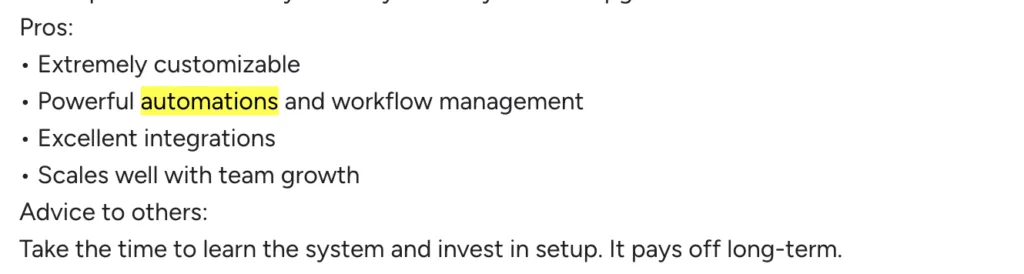
Zendesk's automation engine creates multi-step workflows with complex triggers and conditions that would make a process engineer weep with joy. This enables sophisticated queue management, contextual escalation paths, auto-tagging, dynamic assignment—all critical for scaling without losing your mind.
One G2 reviewer puts it simply:
The AI-driven suggestions take this further, helping agents with response recommendations and next-step guidance that reduces handle time without sacrificing quality.
HelpScout offers solid automation for simpler scenarios, but the intentionally lean approach hits walls when you need to orchestrate complex, multi-step processes. As support operations scale and diversify, Zendesk's advanced logic keeps standards high and stress levels manageable.
HelpScout Wins at Setup That Doesn't Take Forever
HelpScout gets you operational quickly. Setup is streamlined, defaults make sense, and the learning curve is gentle. Teams start helping customers and collaborating effectively without lengthy implementation projects. Speed translates to lower downtime and faster ROI realization.
In the words of a Capterra reviewer:

Zendesk can be configured to do almost anything—but that breadth requires more upfront planning, customization, and training. For SMBs or resource-constrained teams, HelpScout's minimal setup accelerates time-to-value and reduces platform change friction.
Zendesk Wins at SLAs and Routing That Don't Suck
If you need granular control over SLAs and routing policies, Zendesk dominates. Define multiple SLA policies tailored to customer segments, contract tiers, regions, or product lines. Advanced routing matches tickets to agents with specific skills, balances workloads based on real-time availability, or factors in customer history and priority.
As one G2 review phrases it:

These features optimize resource allocation and first-contact resolution in complex environments where close enough isn't good enough.
HelpScout offers basic SLA tracking and routing that work great for straightforward operations but lack the depth and flexibility enterprises need when managing multiple teams, specialties, or brands.
HelpScout Wins at Support That Feels Human, Not Robotic
HelpScout builds around conversations, not tickets. The shared inbox encourages natural, personable exchanges and internal collaboration without overwhelming automation. Support feels human—customers see ongoing email-style threads rather than case numbers with robotic responses.
One Capterra comment captures it perfectly:

Many teams find this approach improves satisfaction, tone, and rapport with customers who appreciate feeling heard rather than processed.
Zendesk can be configured for friendly experiences, but its default orientation toward ticketing and workflow standardization can feel transactional. For teams that prize empathetic, human touch, HelpScout's conversation-first approach wins.
Zendesk Wins at Analytics That Tell the Real Story
Zendesk's analytics engine supports real-time dashboards with detailed metrics across channels—ticket volume, backlog, resolution time, agent occupancy, CSAT, SLA adherence, and more. Build multi-dimensional reports that combine fields, segments, and filters to analyze performance by product line, customer cohort, channel, or team.
A G2 review lays it out simply:

Integration with third-party analytics tools expands what you can do with data, letting you blend support metrics with business intelligence for executive-level insights.
HelpScout's reporting focuses on actionable overviews rather than deep segmentation. That's a plus for smaller teams needing clarity without complexity, but when organizations need unified, real-time views across numerous touchpoints with surgical data slicing, Zendesk's depth becomes the differentiator.
HelpScout Wins at Collaboration That Just Works
HelpScout's shared inbox provides private notes, tagging, collision detection, and effortless handoffs in a single view. Collaboration stays simple, quick, and unobtrusive. Agents don't switch between modules or apps to loop in teammates or document context.
A verified G2 reviewer put it clearly:

While Zendesk offers strong collaboration features at scale, power often comes with complexity and heavier reliance on additional apps. HelpScout's built-in collaboration keeps workflow focused and helps agents move faster without friction.
Zendesk Wins at Integration Ecosystem That Actually Connects Everything
Zendesk's app marketplace offers 1,000+ third-party integrations connecting your help desk with CRMs, marketing platforms, data warehouses, telephony systems, QA tools, and more. This breadth isn't just convenience—it's how large organizations align service with sales, finance, product, and marketing without manual data gymnastics.
As one Reddit commenter writes about ZIS Zendesk integration service:

HelpScout's integration approach stays more streamlined and less extensive. Ideal for teams preferring fewer moving parts, but for large operations that evolve constantly, Zendesk's ecosystem makes adaptation easier without custom code at every junction.
HelpScout Wins at Personal Touch That Builds Real Loyalty
HelpScout emphasizes warm, human support experiences. Agents see customer profiles, history, and context directly beside conversations, making empathetic responses easier. This personal touch often translates into higher CSAT and stronger relationships.
While Zendesk can be configured to surface context and maintain friendly tones, its feature-dense interface can encourage transactional interactions if teams aren't deliberate. Organizations competing on service quality and personal relationships may find HelpScout better aligns with their brand.
HelpScout Wins at Integration Focus Without App Overload
HelpScout's integration strategy favors focused, essential connections. Teams benefit from unified inboxes and simple integrations that cut down tool-switching. For many SMBs, this hits the sweet spot: enough connectivity to be effective without maintaining sprawling tech stacks.
In a Capterra reviewer's own words:

Zendesk's marketplace is unmatched for breadth, valuable for complex operations. But for teams wanting to stay nimble, HelpScout's lighter-weight approach minimizes overhead and avoids the more apps, more problems trap.
Zendesk Wins at Multi-Brand Management That Makes Sense
Supporting multiple brands, sub-brands, or regions? Zendesk's multi-brand capabilities are robust. Maintain distinct help centers, email addresses, SLAs, automations, and workflows while centralizing management for efficiency. Agents work across brands with appropriate permissions, leadership gets cross-brand reporting clarity.
HelpScout supports multiple mailboxes and Docs sites, but organizations frequently report relying on workarounds for deeper brand segregation. For teams requiring clean separation at scale—especially where branding and regulatory needs vary—Zendesk's multi-brand architecture simplifies operations.
HelpScout Wins at Collaboration That Just Works
HelpScout's shared inbox provides private notes, tagging, collision detection, and effortless handoffs in a single view. Collaboration stays simple, quick, and unobtrusive. Agents don't switch between modules or apps to loop in teammates or document context.
While Zendesk offers strong collaboration features at scale, power often comes with complexity and heavier reliance on additional apps. HelpScout's built-in collaboration keeps workflow focused and helps agents move faster without friction.
Zendesk Wins at Admin Controls That Actually Control
Zendesk allows admins to create surgical roles controlling who can view, edit, assign, export, or administer particular data and workflows. Segment by brand, team, or function, and lock down sensitive information with precision.
As one G2 reviewer mentioned:

This granular control is essential in regulated industries or large organizations where least-privilege access isn't optional—it's survival.
HelpScout's permission model stays simpler, often forcing broader access than complex environments prefer. While this aligns with HelpScout's ease-of-use philosophy, enterprises need Zendesk's fine-grained controls for governance and risk management.
HelpScout Wins at Pricing That Won't Shock You Later
HelpScout's pricing stays straightforward with fewer surprise add-ons and upsells. Essential features live in core plans, making budgeting predictable for small and midsize businesses. Teams avoid the frustration of discovering hidden fees for capabilities they assumed were standard.
Zendesk's tiered plans and optional add-ons can add up. You get extensive power, but the full cost of that power can be significant—especially if you need advanced features across the entire team. For SMBs wanting to plan with confidence, HelpScout's transparency wins.
HelpScout Wins at Automation Without the Headaches
HelpScout's automation and rules are easier to set up and manage. Create meaningful workflows—auto-tagging, simple triage, routing to specific mailboxes—without mastering a complex builder. This simplicity reduces time spent configuring and maintaining automations.
One Capterra testimonial makes it clear:

Zendesk's automation engine offers more power but requires more involvement. For many teams, HelpScout's lean approach streamlines operations without introducing administrative overhead or complexity creep.
HelpScout Wins at Reporting Managers Actually Understand
HelpScout's reporting focuses on clarity and actionability. Managers track volume, response times, resolution times, and CSAT without wading through configuration labyrinths. Data aligns with how teams naturally communicate—conversations rather than abstract tickets—making insights easier to interpret.

Zendesk's analytics are deeper and more customizable, invaluable for enterprises. But for teams needing quick, trustworthy snapshots and trends, HelpScout's simplicity accelerates decision-making and avoids analysis paralysis.
Explore Kayako for essential integrations without integration overload.
HelpScout Wins at Knowledge Base and Chat That Actually Work Together
HelpScout's Docs knowledge base and Beacon chat complement the email-first workflow. The experience feels cohesive and minimal, helping teams deliver answers fast without toggling through heavy modules. Ideal for organizations wanting consistent, customer-friendly experiences across self-service and live support.
Zendesk's help center and chat offerings are highly capable, but depth of options can lead to more configuration and oversight. HelpScout's cohesive approach makes maintaining clean, consistent experiences easier with less effort.
Zendesk Wins at Enterprise Scale Without Everything Breaking
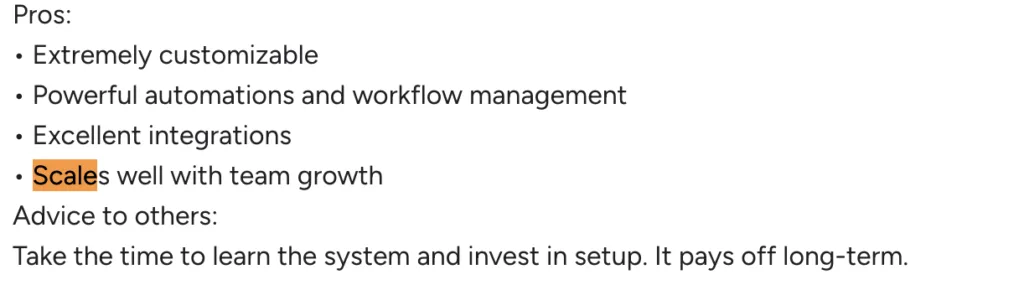
For enterprises handling high volumes, multiple channels, rigorous SLAs, and cross-functional workflows, Zendesk's platform design, automation, analytics, and ecosystem combine to reduce fragmentation. It consolidates operations without losing granularity needed for governance, optimization, and continuous improvement.
Here is what G2 commenter mentions:
HelpScout can scale, especially for growing SMBs, but optimizes for simplicity rather than complexity. If your roadmap includes multi-brand expansion, global SLAs, voice and social at scale, and deep analytics, Zendesk's architecture better suits enterprise support demands.
HelpScout Wins at Agent Focus Without the Overwhelm
Because HelpScout eliminates clutter and prioritizes clarity, agents stay focused on customer problems instead of software mechanics. Result: less fatigue, fewer errors, more consistent quality in day-to-day interactions. This advantage compounds over time, especially in smaller teams where each agent wears multiple hats.
Zendesk's depth is powerful but can distract if not curated carefully. Admins can tune interfaces and workflows to reduce noise, but that requires ongoing effort. HelpScout's opinionated design bakes in simplicity from the start.
Zendesk Wins at Executive Visibility Across Everything
When leadership needs holistic views of support across email, chat, voice, and social—plus across brands or regions—Zendesk's omnichannel reporting, dashboarding, and data exports shine. Identify bottlenecks, track adherence, compare teams, and tie support outcomes to business KPIs with precision.
HelpScout's reports are easier to consume but less likely to satisfy executive demands for multi-channel, real-time operations oversight. For organizations using support data as strategic levers across departments, Zendesk gives you more to work with.
HelpScout Wins at Costs That Stay Predictable
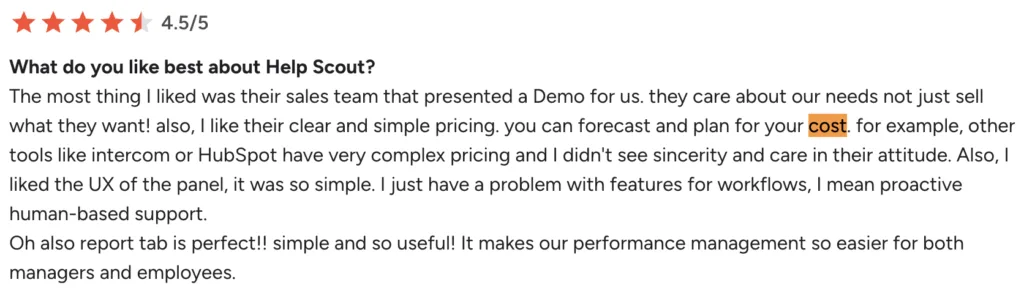
A recurring pain point with large platforms is discovering must-have features sit behind additional tiers or add-ons. HelpScout keeps more essentials inside core plans, making budget creep avoidance easier. This predictability matters when managing growth carefully.
Here is what G2 commenter mentions:
Zendesk offers enormous capability but can involve layered add-ons to reach ideal setups. For teams sensitive to incremental costs—or who prefer fewer procurement conversations—HelpScout's model is easier to manage.
How to Choose Between Zendesk vs HelpScout
Both platforms excel—but for different priorities. Use this decision guide to align your choice with what matters most:
Team Size and Complexity
- Choose Zendesk if you run large or multi-team operations with complex SLAs, multi-brand needs, and multiple channels including voice and social
- Choose HelpScout if you're a small to mid-sized team valuing simplicity, fast onboarding, and clean daily workflows
Channels and Omnichannel Strategy
- Choose Zendesk if voice and social messaging are critical and you need everything unified natively
- Choose HelpScout if your primary channels are email and chat and you want an email-first experience
Automation and Routing
- Choose Zendesk if you need multi-step workflows, skill-based routing, AI-assisted suggestions, and granular SLA policies across segments
- Choose HelpScout if your workflows are straightforward and you want automations that are quick to set up and maintain
Analytics and Reporting
- Choose Zendesk for deep analytics, real-time dashboards, multi-dimensional reporting, and executive-level visibility
- Choose HelpScout for straightforward, conversation-centric reports that managers can use without data analysts
Integrations and Extensibility
- Choose Zendesk if you want access to 1,000+ apps and robust APIs to connect support with CRM, data, telephony, QA, and marketing at scale
- Choose HelpScout if you prefer fewer, focused integrations covering essentials without tech sprawl
Multi-Brand and Governance
- Choose Zendesk for managing multiple brands with distinct help centers, workflows, and granular roles and permissions
- Choose HelpScout if you support fewer brands and prefer lighter-weight controls
Time to Value and Administration
- Choose Zendesk if you can invest in setup to gain long-term power and flexibility
- Choose HelpScout if you need to go live fast with minimal training and administrative overhead
Budget, Pricing, and Predictability
- Choose Zendesk if ROI from enterprise features justifies higher, sometimes add-on-driven costs
- Choose HelpScout if you want transparent, SMB-friendly pricing avoiding surprise fees and keeping TCO predictable
Culture and Customer Experience
- Choose Zendesk if standardization and rigorous workflows are key to your brand promise
- Choose HelpScout if you prioritize personal, human-centered support style and agent happiness
Quick Scenario Reality Check
Fast-growing e-commerce brand operating in multiple countries, wanting to centralize email, chat, voice, and social DMs across three brands, enforce SLAs by region and tier, and feed data into BI tools? Zendesk wins.
25-person B2B SaaS company that mainly supports customers via email and chat, wants to deploy in days, keep costs predictable, and maintain warm, conversational tone? HelpScout wins.
The Bottom Line
The Zendesk vs HelpScout decision isn't about which platform is best—it's about which platform is best for your goals, channels, data needs, and team culture.
Zendesk clearly dominates enterprise-scale omnichannel support, advanced automation and AI, granular SLAs and routing, deep analytics, vast integration ecosystems, multi-brand management, and fine-grained permissions. It was engineered for scale and complexity—and it shows.
HelpScout stands out by keeping support simple, human, and effective. Its clean, intuitive interface reduces learning curves and boosts daily productivity. The email-first, conversation-centric model encourages personalized support that customers notice. Pricing stays transparent and SMB-friendly, automations are easy to implement, collaboration is built-in, and reporting is straightforward.
If you require comprehensive, customizable, enterprise-ready omnichannel platforms, Zendesk is superior. If you want streamlined, personable tools that deliver value immediately with fewer surprises, HelpScout is hard to beat.
Align your selection with your top priorities—channels, analytics, governance, speed, and budget—and you'll end up with a platform that fits today's needs while supporting the kind of support organization you want to build tomorrow.