Ada Review 2026: Pricing, Pros, Cons, and Is It Worth It?
An honest look at Ada, the enterprise AI customer service platform: what it does well, where it frustrates, and who should actually buy it.
| Ada review: Ada is an enterprise AI agent that resolves support conversations across channels on top of your help desk. It is quote-based, built for 300,000+ annual conversations, and usually costs five to six figures a year. Support admins rate it 4.6 on G2 while end customers rate it 1.7 on Trustpilot. This review covers pricing, real pros and cons, and who it fits.
Key takeaways
|
An Ada review has to answer two separate questions, because Ada is sold to enterprise support leaders but experienced by their customers, and the two groups rate it very differently. On the review sites where admins post, Ada scores among the best AI agents available. On the sites where end customers post, it scores near the bottom.
This review works through what Ada is, how it is priced, what the ratings actually say, and the pros and cons reviewers raise most, with each point linked to its source. It closes with a feature-by-feature verdict and an honest read on who should buy it.
Ada review: what it is and who it is for
Ada, from Toronto-based Ada Support, is an enterprise AI customer service platform that resolves conversations autonomously across chat, voice, email, SMS and social. Its no-code Playbooks turn written procedures into multi-step agent workflows, aimed at large, high-volume teams.
Ada, from the Toronto company Ada Support, is an enterprise AI customer service platform that deploys autonomous AI agents to resolve support conversations across voice, web chat, email, SMS and social channels in more than sixty languages. Rather than replacing your help desk, it sits on top of one such as Zendesk, Salesforce or Freshdesk and handles the resolution layer.
Its center is a unified reasoning engine that orchestrates several third-party models, paired with no-code Playbooks that turn written procedures into multi-step agent workflows for tasks like refunds and order changes. Ada measures itself on automated resolution rather than deflection, and reports more than five billion interactions handled. The target buyer is a large enterprise, with named customers including Square, Canva, Verizon and Shopify.
Ada sits in the enterprise AI agent category alongside a handful of competitors, and it is usually chosen by teams that have already outgrown a help desk’s native bot and want a dedicated resolution layer. It is not a help desk itself, so it assumes you already run one, and it is not aimed at small teams, which matters for how the rest of this review reads.
How I evaluated Ada
Ada rates 4.6 on G2 and 4.7 on Capterra, but nearly all recent reviews are incentivized or vendor-invited, while a 1.7 on Trustpilot comes from end customers. This review leans on Reddit, organic reviews and independent testing for the critical points.
This review draws on Ada’s ratings across four sites and on independent testing. On G2 Ada holds 4.6 from about 174 reviews, on Capterra 4.7 from 15, on TrustRadius a 9 out of 10 that rests on a single review, and on Trustpilot just 1.7 from 21 end-customer reviews.
One caution shapes how to read those numbers. Nearly every recent G2 and Capterra review carries an incentivized or vendor-invited label, so the glowing admin scores are vendor-influenced. The more independent signal comes from Trustpilot, Reddit and the handful of non-incentivized reviews, which is where this review puts its weight for the critical points.
Taken together, the honest reading is to trust the admin ratings for how capable the tooling is, trust the independent sources for how it feels to a customer, and treat any single-review score, like the TrustRadius figure, with caution. That weighting runs through the pros and cons below.
Ada pricing
Ada publishes no pricing and routes buyers to sales, positioned for companies above 300,000 annual conversations. Independent estimates run from about $30,000 to over $300,000 a year, on a usage-based, quote-gated model.
Ada does not publish pricing. Its own pricing page lists no numbers and routes buyers to a sales call, and the platform is positioned for companies with more than 300,000 annual support conversations, which screens out most smaller teams. There is no self-serve trial.
Independent estimates give a rough shape: an entry point around $30,000 a year on one marketplace listing, a median near $70,000, and large deployments above $300,000, figures echoed by a Reddit user who cited paying around that much. Ada now promotes conversation-based pricing, where you can be charged even when the AI does not resolve the issue, with resolution-based options for some enterprises, and reported per-resolution costs of roughly one to three and a half dollars. The honest summary is that pricing is opaque and enterprise-gated, so budget for a five to six figure annual commitment and a procurement cycle.
Because nothing is published, the practical advice is to treat any figure you see as an estimate and to budget for a formal procurement process. Expect an annual commitment, a usage component whose definition you will want to pin down in the contract, and a negotiation in which the reported average discount of around 16 percent is a starting point rather than a floor.
|
Ada ratings: what the scores actually say
The scores split by who is rating: admins who build the AI score it highly, while end customers who hit a misconfigured Playbook rate it poorly. The gap between a 4.6 on G2 and a 1.7 on Trustpilot is the story of this review.
The headline scores look excellent until you separate who is doing the rating. Admins who build and run the AI rate Ada highly; the customers who hit it when a Playbook is not configured for their issue rate it poorly.
| Review site | Reviews | Score |
|---|---|---|
| G2 | 174 reviews | 4.6 / 5 |
| Capterra | 15 reviews | 4.7 / 5 |
| TrustRadius | 1 review | 9 / 10 |
| Trustpilot | 21 end-user reviews | 1.7 / 5 |
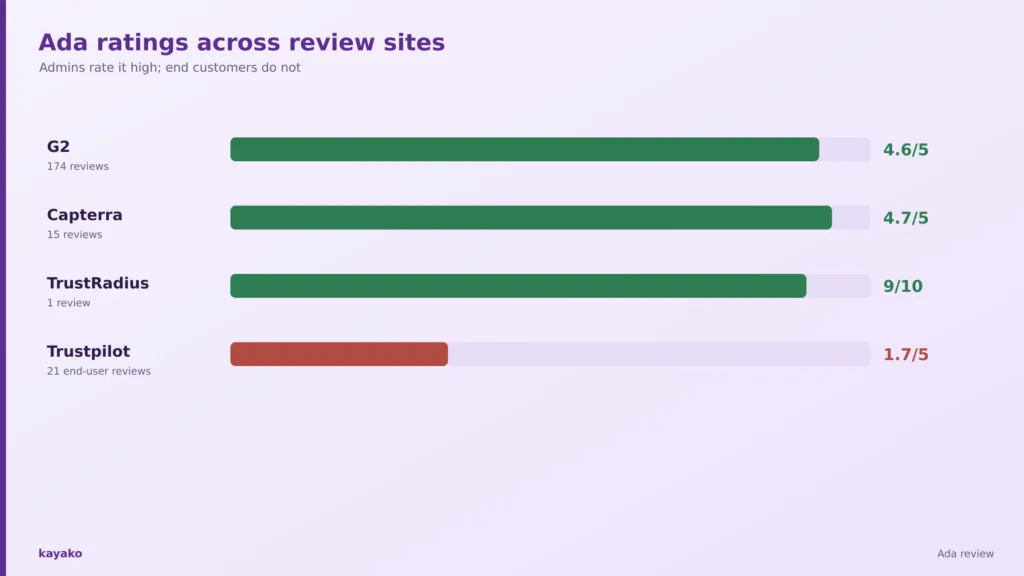
That gap is the story of this review. A 4.6 on G2 reflects support leaders who value the automation, the onboarding, and the Playbooks. A 1.7 on Trustpilot reflects end customers describing loops, forced menu choices, and no clear way to reach a human. Both are real, and a buyer should read the admin scores as a measure of how good the tooling is to operate, and the end-customer scores as a warning about what happens when the knowledge base is thin or the flows are incomplete.
The TrustRadius 9 out of 10 is worth discounting, since it rests on a single review. Weighted honestly, Ada is a capable platform that rewards heavy configuration and punishes light configuration, which the next sections show point by point.
For a buyer, the useful read is that Ada’s score is really two scores, and the one that matters to you depends on whether you are judging the build experience or the customer experience. Both are covered in the sections that follow.
What users praise about Ada
Reviewers single out the no-code builder that non-technical staff can run, standout onboarding with a dedicated CSM, broad channel and language coverage, and genuine enterprise readiness backed by strong security certifications.
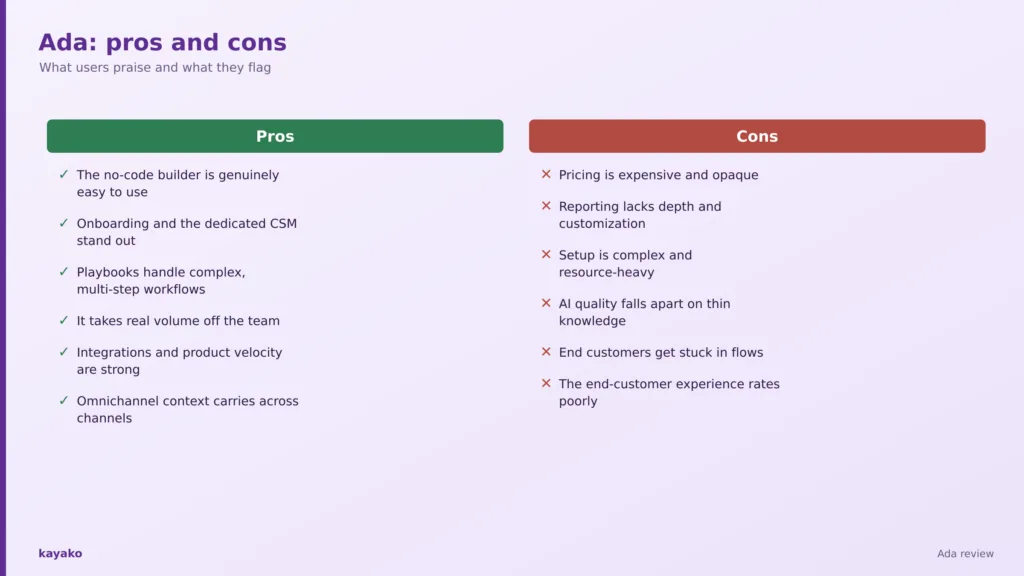
- The no-code builder is genuinely easy to use. Admins repeatedly describe drag-and-drop flows that non-technical staff can build and change. Several reviewers single it out as the reason non-engineers can own the bot. The G2 reviews make this point consistently.
- Onboarding and the dedicated CSM stand out. The most-praised item is Ada’s hands-on onboarding team and hyper-care support during launch. It is the item that shows up most often in the five-star reviews.
- Playbooks handle complex, multi-step workflows. Reviewers turn written procedures for refunds, authentication and order edits into working agent flows. The plain-language approach means process owners, not just developers, can maintain them. You will see the same in the G2 reviews.
- It takes real volume off the team. Users report cutting response time and handling repetitive inquiries at scale, freeing agents for complex cases. For high-volume teams, that deflection is where the return on the contract appears.
- Integrations and product velocity are strong. Robust APIs and connectors to Zendesk, Salesforce, and Freshdesk, with frequent updates, draw praise. The breadth of connectors reduces the glue code a technical team would otherwise write.
- Omnichannel context carries across channels. The single reasoning engine keeps context consistent as a customer moves from chat to voice to email. That continuity is harder to achieve when separate bots run each channel. The Capterra write-ups return to it often.
|
What users flag about Ada
The recurring complaints are opaque, expensive pricing, thin reporting and customization, a setup that runs as a multi-month project, and an end-customer experience that falls apart when the knowledge base is thin.
- Pricing is expensive and opaque. The most common complaint, raised even in positive reviews, is that pricing is high and hard to pin down. Without a public rate card, comparing it against rivals means running a full sales process first.
- Reporting lacks depth and customization. Admins cannot build the custom reports they want in the portal, and volume tagging is weak. For leadership metrics, teams often rebuild the view in a separate analytics tool.
- Setup is complex and resource-heavy. Adding channels or features is described as a project needing real time and a dedicated team. The effort scales with how fragmented your existing knowledge is. You will find the same complaint on Capterra.
- AI quality falls apart on thin knowledge. Independent testing found the bot looping and repeating answers when the knowledge base is incomplete. The failure mode is most visible on long or unusual conversations. It is a steady theme across Reddit.
- End customers get stuck in flows. Once a customer is inside a Playbook they can be trapped in it, with no easy path to a human. A clear escalation path to a human is the fix reviewers ask for most. Reviewers raise this most sharply on G2.
- The end-customer experience rates poorly. On Trustpilot, customers describe it as unable to understand context and no better than an early chatbot. It is the clearest signal that configuration quality, not the engine, drives the experience. The independent testing threads keep returning to it.
Ada feature by feature
Across automation, the no-code builder, setup, analytics, integrations, channels, enterprise readiness and pricing transparency, Ada is strongest on usability and security and weakest on reporting and price clarity.
Automation and resolution quality. Ada markets 80 percent-plus automated resolution, but its own calculator uses a 40 percent baseline and independent benchmarks put typical deployments at 30 to 50 percent, depending on knowledge quality. Strong when well-fed, brittle when not. In practice, the number that matters is your own resolution rate on a sample of real tickets, not the marketing headline.
No-code builder. A genuine strength. Drag-and-drop flows and plain-language Playbooks are the most-praised usability feature, and non-technical admins can build and coach agents. Coaching tools let admins correct the agent over time, which is part of why the operate experience rates so well.
Setup and implementation. Sales-led and demo-first. Ada claims a fast launch, but user data shows about two months on average, and reviews describe a full configuration project rather than plug-and-play. Budget for a cross-functional project with knowledge-base cleanup, not a weekend setup.
Analytics and reporting. The most consistent weakness, even among fans. It tracks resolution, CSAT and handle time, but in-portal custom reporting is limited. Teams that need board-level metrics often pipe the data out to their own analytics stack.
Integrations. Around two dozen prebuilt connectors plus APIs and an agent-management interface. Knowledge ingestion is the weak spot, since non-standard sources need custom work. The agent-management interface and MCP support are a genuine plus for technical teams.
Channel coverage. Broad: voice, web chat, email, SMS, social and in-app across sixty-plus languages, with context held across channels. Non-English rollout is reported as slower. Voice has matured into a first-class channel rather than an afterthought.
Enterprise readiness. Strong. SOC 2 Type II, GDPR, HIPAA and PCI, plus an AI-safety certification Ada helped author, with zero data retention and regional residency options. The compliance posture is a real reason enterprises in regulated sectors shortlist it.
Pricing transparency. Weak. No public pricing, no self-serve trial, sales-gated, and ambiguity over what counts as a resolution. The single most-cited structural drawback. Pin down what counts as a billable conversation or resolution before you sign.
| Feature | Verdict | Notes |
|---|---|---|
| Automation and resolution | Good | Strong when well-fed, brittle on thin knowledge |
| No-code builder | Strong | The most-praised usability feature |
| Setup and implementation | Mixed | Sales-led, about two months on average |
| Analytics and reporting | Weak | Limited in-portal custom reporting |
| Integrations | Good | Two dozen connectors; weak knowledge ingestion |
| Channel coverage | Strong | 60+ languages, context held across channels |
| Enterprise readiness | Strong | SOC 2, HIPAA, PCI, AI-safety certification |
| Pricing transparency | Weak | No public pricing, sales-gated, usage ambiguity |
Is Ada worth it in 2026?
Ada is worth it for a well-resourced enterprise with clean knowledge and a dedicated automation team; for everyone else, the 300,000-conversation minimum and opaque pricing make the value case hard to justify.
Whether Ada is worth it depends almost entirely on scale and resourcing. For an enterprise handling hundreds of thousands of conversations a year, a platform that resolves a meaningful share of them autonomously can pay back a five- or six-figure contract quickly, and Ada’s automation, onboarding, and omnichannel reach are strong enough to deliver that when the knowledge base is well maintained.
For everyone else, the value case is harder. The 300,000-conversation minimum and the opaque, usage-based pricing mean a smaller team cannot easily trial the product or predict the bill, and the end-customer ratings show what happens when the flows are not carefully tuned. If you cannot commit a dedicated automation function to the platform, the cost tends to outrun the benefit.
Who Ada is best for, and who should look elsewhere
Best for large enterprises above 300,000 annual conversations with a dedicated automation function; small and mid-market teams are screened out by the conversation minimum and the five-to-six-figure pricing.
Best for. Ada fits large enterprises with more than 300,000 annual conversations and high repetitive volume, in sectors like financial services, telecom, retail and travel. It rewards teams with a dedicated automation function to build, coach and audit the AI, and a well-maintained help center as its knowledge source. It also suits buyers comfortable with quote-based procurement and a multi-month rollout. In short, it is an enterprise tool that rewards an enterprise commitment.
Look elsewhere if. Small and most mid-market teams are screened out by the conversation minimum and the five to six figure pricing. It is a poor fit for budget-conscious teams, anyone needing transparent pricing, teams wanting fast self-serve value, and operations with fragmented knowledge that cannot resource continuous tuning, where resolution quality and the customer experience both suffer. For these teams, the fit problem is structural rather than a matter of the right plan.
Ada alternatives by use case
Teams rule Ada out over the enterprise minimum, the opaque pricing, or the end-customer experience, and look either to other enterprise agents or to more accessible, resolution-first platforms depending on the blocker.
Teams that rule Ada out usually do so for one of three reasons: the enterprise minimum, the opaque pricing, or the end-customer experience. If scale is the blocker, other enterprise AI agents compete directly and are worth a structured bake-off against your own tickets. If pricing transparency is the issue, platforms that publish per-resolution rates let you model the bill before you buy.
If the concern is resolution quality and the customer experience, the answer is less about the vendor and more about the knowledge base behind it, though a platform that is easier to trial and tune on real tickets lowers the risk. For mid-market teams that want autonomous resolution without a 300,000-conversation floor, a transparent, per-resolution option such as Kayako is the usual starting point.
How Kayako compares with Ada
Kayako offers autonomous resolution without an enterprise minimum or an opaque quote: Agent Kay resolves tickets from your knowledge base, priced per resolved ticket. Trilogy reached 76 percent autonomous resolution and cut ticket age from 17.6 hours to under two minutes.
For teams that want autonomous resolution without an enterprise minimum or an opaque quote, Kayako is a more accessible alternative. Agent Kay resolves tickets using your knowledge base and history, SingleView gives agents one screen of context, and pricing is a transparent one dollar per resolved ticket rather than a custom five to six figure contract. Where Ada is built for 300,000-conversation enterprises, Kayako serves the mid-market and up without the procurement cycle, and it is worth understanding how AI agents differ from basic chatbots when you compare the two. For teams that fit Ada’s profile it remains a serious option, and for the rest a transparent alternative is the safer first call.
Case study: Trilogy. Trilogy reached 76 percent autonomous resolution with Kayako, cut average ticket age from 17.6 hours to under two minutes, and saved five million dollars within 90 days, with transparent per-resolution pricing rather than an enterprise quote.
|
The verdict on Ada
Ada is a capable enterprise AI agent that does its best work in the hands of a well-resourced team with clean knowledge and a dedicated automation function. For that buyer, the Playbooks, the onboarding and the omnichannel reach are genuinely strong, and the admin ratings reflect it.
The caveats are real, though. Pricing is opaque and high, reporting is thin, setup is a project, and the end-customer experience falls apart when the knowledge base is not maintained, which the 1.7 Trustpilot score makes plain. Shortlist Ada if you are an enterprise that can feed and tune it. If you want transparent pricing and autonomous resolution without the minimums, compare a more accessible platform first. Either way, go in with a clear view of your conversation volume and your knowledge-base quality, because both decide whether Ada delivers.
|
|
Frequently asked questions
1. What is Ada?
Ada is an enterprise AI customer service platform from Ada Support that deploys autonomous AI agents to resolve support conversations across chat, voice, email, SMS and social, in more than sixty languages. It sits on top of an existing help desk rather than replacing it, and targets large, high-volume enterprises.
2. How much does Ada cost?
Ada does not publish pricing. It is quote-based and built for companies with more than 300,000 annual conversations. Independent estimates range from about $30,000 to over $300,000 a year, with reported per-resolution costs of roughly one to three and a half dollars, so budget for a five to six figure commitment.
3. Is Ada worth it?
Ada is worth it for large enterprises with high repetitive volume, clean knowledge and a dedicated automation team to build and tune it. For smaller teams, budget-conscious buyers, or anyone wanting transparent pricing and fast self-serve value, it is usually more than the fit justifies.
4. Why are Ada’s ratings so different across sites?
Admins who build the AI rate Ada highly on G2 and Capterra, where many reviews are also vendor-incentivized. End customers who interact with the bot rate it poorly on Trustpilot, describing loops and no path to a human. The gap reflects how much Ada depends on careful configuration.
5. What do users say about Ada?
Reviewers praise the no-code builder, onboarding, Playbooks and omnichannel reach, and flag opaque high pricing, thin reporting, heavy setup, and an end-customer experience that degrades on incomplete knowledge. The pros come mostly from admins, the sharpest cons from end customers and independent testing.
6. What are the best Ada alternatives?
For enterprises, other AI agent vendors compete directly. For teams wanting autonomous resolution with transparent, per-resolution pricing and no conversation minimum, Kayako is a strong alternative, and comparing AI agents against basic chatbots helps frame the choice.
7. Is Kayako an alternative to Ada?
Yes. Kayako offers autonomous AI resolution through Agent Kay at a transparent one dollar per resolved ticket, without Ada’s 300,000-conversation minimum or custom enterprise quote, which makes it accessible to mid-market teams that Ada’s model screens out.
8. Does Ada replace my help desk?
No. Ada sits on top of an existing help desk such as Zendesk, Salesforce or Freshdesk and handles the AI resolution layer, rather than replacing your system of record. You keep your help desk and add Ada as the autonomous agent in front of it.
9. How long does Ada take to implement?
Ada markets a fast launch, but user data points to around two months on average, and reviewers describe a configuration project with a dedicated internal team. The timeline depends heavily on how clean and complete your knowledge base is before you start.