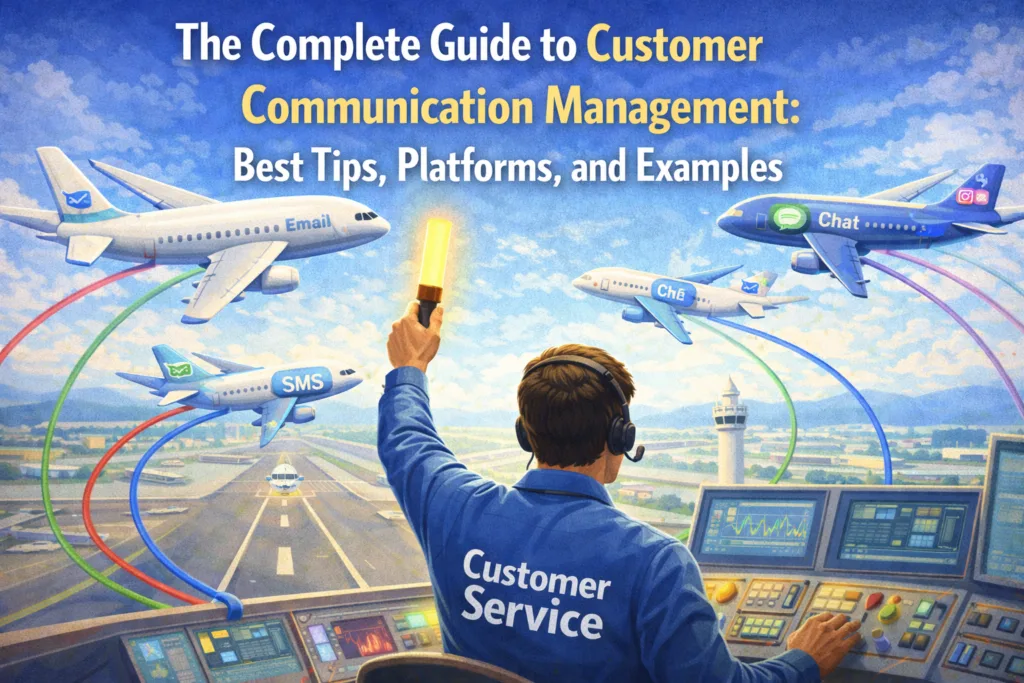
The Complete Guide to Customer Communication Management: Best Tips, Platforms, and Examples
Most businesses think they communicate well with customers. Most are wrong. People now engage across an average of nine different channels with a single company, and yet 81% of brands say the experience would be dramatically better if those conversations lived in one place (Nextiva). Meanwhile, 55% of customers will stop doing business with a company the moment wait times get too long on any channel (Freshworks).
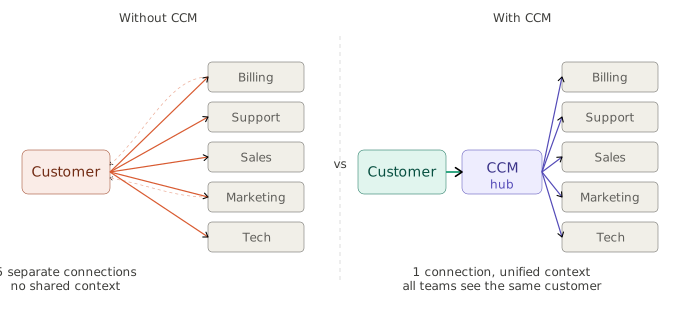
Customer communication management (CCM) is the system that prevents this. It governs every interaction like email, chat, SMS, voice, and social with consistency, personalization, and purpose. This guide covers everything you need: the definition, core principles, the best platforms, and how to improve your approach today.
What Is Customer Communication, and Why Is It Important for CX?
Customer communication is every touchpoint your business has with a customer. The onboarding email. The billing notice. The live chat response. Each interaction shapes how the customer perceives your brand and whether they trust you with the next purchase.
CCM is the strategy and system that makes those interactions consistent and effective at scale. It covers the creation, delivery, storage, and retrieval of communications across every channel — from email to in-app messages to printed statements.
| 70% of customers
expect anyone they interact with to have their full context, regardless of which channel they’re on or which agent they’re speaking to. When that context breaks, trust breaks with it. Source: Zendesk Benchmark Data |
The connection to customer experience is direct: CX is the sum of every interaction across the customer journey, and communication is the delivery mechanism for that experience. When it’s consistent and timely, customers trust you. When billing says one thing and support says another, churn follows. 93% of customers are likely to make repeat purchases from companies with excellent customer service (Hiver Research).
Communication channels to manage
→ Email — highest ROI for transactional and relationship communication
→ Live chat — instant support at the moment of need
→ SMS — 98% open rates and direct reach
→ Voice — high-touch for complex or sensitive issues
→ Social media — public-facing, where brand tone is most exposed
→ Self-service portals and knowledge bases — empowering customers to find answers independently
Choosing the right channel strategy matters as much as the quality of what you say.
Core Principles of Customer Communication Management
Before any tool decision, get the principles right. CCM that runs on these five fundamentals outperforms CCM that starts with software selection.
- Customer-centricity
Start with what the customer needs to hear, not what’s operationally convenient to send. Every CCM decision should trace back to a customer need.
- Consistency across channels
A customer switching from live chat to email shouldn’t feel like they’ve switched companies. Omnichannel consistency with the same tone, same information, same quality is what separates fragmented support from genuine CX.
- Personalization at scale
71% of consumers expect personalized interactions, and 76% express frustration when they don’t receive them (McKinsey). Using purchase history, support history, and lifecycle stage to tailor communication isn’t a differentiator; it’s the baseline. Context in customer service is what separates a generic reply from a genuinely helpful one.
- Timeliness
The right message at the wrong time is the wrong message. Proactive communication, such as shipping updates, renewal reminders 30 days ahead, is what separates reactive from proactive organizations.
In auto repair shops, AutoLeap data shows automated reminders alone cut no-show rates from 50% to 10%.
- Compliance and auditability
In regulated industries, every customer communication is a compliance event. Centralized approval workflows, locked regulatory language, and full audit trails tied to clearly defined SLAs are non-negotiable.
The 7 Cs of effective communication
Apply these to every message your team produces. They work as both a writing framework and a quality checklist.
| The C | What it means | Quick example |
| Clear | One idea. Plain language. No jargon. | “Pay here” > “utilize our remittance infrastructure.” |
| Concise | Nothing surplus to requirement. | Cut “as per our records, please be advised.” |
| Concrete | Specific facts over vague estimates. | “$24 refund in 3–5 days” > “soon.” |
| Correct | Zero errors in names, figures, and policy. | One wrong amount destroys trust immediately |
| Coherent | Single, logical thread throughout. | Don’t pivot mid-email from billing to a promo |
| Complete | Everything needed to act. No follow-up required. | What happened. What it means. What’s next? |
| Courteous | Warm and professional — even under pressure. | “We still need a few details” > “you failed to provide.” |
Top 7 Customer Communication Management Software Platforms
The right CCM platform turns principles into operations. Here are the seven platforms worth.
| 1. Kayako: AI-native resolution, not just AI assistance |
| Best for: Support teams that need to reduce ticket volume, not just process it faster.
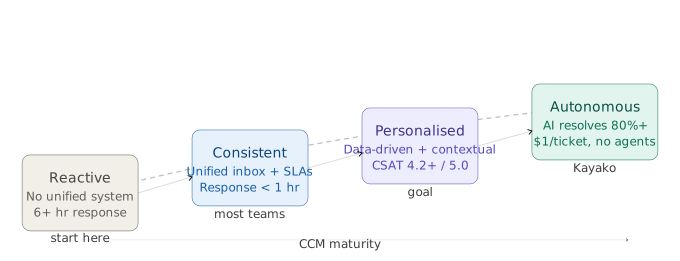
• Kay AI agent resolves tickets end-to-end, like password resets, billing queries, and order status, without human intervention • Autonomous resolution reaches 80%+ on repetitive categories; you pay $1 per resolved ticket, nothing if nothing resolves • Plugs into any existing helpdesk via API in one agent seat, requiring no platform migration, resulting in no disruption • Intelligence layer builds self-updating knowledge base, customer profiles, and resolution patterns over time • Integrated omnichannel inbox with full conversation history across every channel Pricing: $1 per resolved ticket*. Zero cost if zero tickets are resolved. Kayako’s take: The only platform on this list where you pay for resolution, not access. For teams stuck between volume growth and a flat headcount budget, Kayako is the structural answer. |
| 2. Zendesk: The enterprise standard |
| Best for: Mid-to-large enterprises that need deep customization and broad integration coverage.
• Unified omnichannel inbox across email, chat, voice, social, and messaging • AI-powered routing, macros, and suggested replies via the Zendesk/Ultimate layer • 1,000+ integrations including Salesforce, Slack, Jira, and Shopify • Robust reporting with custom dashboards and SLA performance tracking Pricing: From $19/agent/month (Suite Team) to $115+/agent/month (Enterprise). Annual billing. Kayako’s take: A decade of product maturity. The most battle-tested platform in the market. |
| 3. Intercom: Conversational-first with serious AI resolution via Fin |
| Best for: SaaS companies prioritizing in-product communication and proactive lifecycle messaging.
• Fin AI agent resolves at 67%+ resolution rate • Proactive in-product messaging and onboarding flows based on user behavior and attributes • Custom chatbot builder for qualification, routing, and self-service flows • Deep CRM and product data integrations for contextual, personalized conversations Pricing: $0.99/resolution (Fin AI) + platform subscription. Self-serve onboarding available. Kayako’s take: Best for SaaS teams that want marketing and support in one platform. |
| 4. Freshdesk: Full-featured, accessible, great value for growing teams |
| Best for: SMBs and mid-market teams needing a complete platform without enterprise overhead.
• Freddy AI Copilot assists with suggested replies, ticket summaries, and CSAT predictions • Unified inbox across email, phone, chat, WhatsApp, and social media • Free plan for up to 10 agents; scales cleanly through Growth, Pro, and Enterprise tiers • 1,000+ integrations and a mature ecosystem, including Freshcaller and Freshchat Pricing: Free for up to 10 agents. Paid plans from $15/agent/month. Kayako’s take: Excellent value at every price point. |
| 5. Front: Relationship-driven communication for complex accounts |
| Best for: Customer success and account management teams handling high-value, ongoing client relationships.
• Collaborative shared inbox with internal comments, shared drafts, and collision detection • Automated quality assurance flags messages based on SLA, content, or timing • Full customer history visible to every team member, regardless of previous handler • Salesforce and HubSpot integrations bring account-level context into every thread Pricing: From $25 (Starter) to $105/person/month (Enterprise). Kayako’s take: Purpose-built for high-touch relationships where every message is a relationship touchpoint. Not optimized for high-volume transactional support. |
| 6. Hiver: CCM built inside Gmail |
| Best for: Google Workspace teams that want support functionality without adopting a new interface.
• Shared inbox, ticket assignment, SLA management, and collision detection inside Gmail • AI automation for ticket categorization, assignment, and auto-close on inactivity • Live chat with AI and a customer portal for self-service access • Custom Objects pull external CRM or spreadsheet data into workflow automations Pricing: From $0/user/month (Lite) to $85/user/month (Elite). 7-day free trial. Kayako’s take: The frictionless entry point for Google-native teams. Adoption is near-instant. The ceiling is lower than Zendesk or Intercom, but the time-to-value is dramatically faster. |
| 7. Zoho Desk: Deep CRM integration for Zoho ecosystem users |
| Best for: Businesses already using Zoho CRM who want support and relationship data on one platform.
• Zia AI handles sentiment analysis, ticket tagging, anomaly detection, and reply suggestions • Full Zoho CRM profile — deal stage, account value, contact history — visible within every ticket • Blueprint visual workflow builder enforces process consistency across complex resolutions • Native integration across the Zoho suite and 500+ third-party tools Pricing: Zia Agents are free, as you only pay for LLM Usage. Kayako’s take: The richest CRM-CCM context of any platform here if you’re already in Zoho. |
Key Benefits of Customer Communication Management
Lower support costs, structurally
Automated customer service powered by AI can resolve 60–80% of repetitive tickets without human involvement. Companies using AI chatbots for customer service report a 30% reduction in support costs on average (IBM).
Better CX and higher retention
Consistent, timely, contextual communication is what drives customer satisfaction and long-term loyalty. Brands that excel at personalization are 71% more likely to report improved customer loyalty (Deloitte).
Faster agent onboarding and less burnout
Standardized templates and workflows reduce ramp time dramatically. Tracking agent productivity shows that agents spending more time on complex, high-value work report higher job satisfaction and lower turnover.
Compliance confidence in regulated industries
Centralized content governance, approval workflows, and full audit trails reduce the risk of non-compliant communications going out at volume.
Compounding institutional knowledge
Every resolved ticket is a learning opportunity. Platforms like Kayako auto-generate knowledge base articles from resolved conversations. 91% of customers say they’d use an online knowledge base if it were tailored to their needs (Zendesk).
CCM vs. CRM: What’s the Difference?
The simplest distinction: CRM manages who your customers are. CCM manages what you say to them. Both are essential. Neither replaces the other.
| Dimension | CCM | CRM |
| Primary focus | Creating and delivering personalized outbound communications | Managing relationships, data, and pipeline across the lifecycle |
| Core function | Document generation, multichannel delivery, templates, and compliance | Contact management, sales tracking, lead scoring, opportunity pipeline |
| Who uses it | Support, compliance, ops, and communications teams | Sales, marketing, and account management teams |
| Data direction | Outbound (customer-facing messages and documents) | Inbound and outbound (all customer interaction data) |
| Output | Emails, statements, notices, chat replies, SMS, letters | Reports, forecasts, pipeline views, customer profiles |
| Compliance role | Enforces regulatory language, audit trails, and communication records | Limited — primarily data governance and consent management |
| Best together | Use CCM to deliver the right message at the right moment | Use CRM to know who to send it to and why |
Used together, they close the loop. CRM feeds CCM with the context needed to personalize at scale. Track both through a unified set of customer support metrics to understand the combined impact.
How to Improve Your Customer Communication Management
Most CCM improvements fail because they start with tools. Start with inventory instead.
Audit your current communication landscape
List every type of message your business sends. Ask which are inconsistent, which take too long, and which generate the most follow-up. That list becomes your roadmap.
Centralize channels before optimizing them
Fragmented channels make consistency structurally impossible. With customers engaging across an average of nine channels per company, managing those across five separate tools guarantees inconsistency. Consider your omnichannel strategy before investing in individual channel improvements.
Define standards before buying software
Tone of voice guidelines. Response time standards per channel. Escalation thresholds. Clear SLA definitions. Standards without tools still beat tools without standards.
Separate the repeatable from the complex
Build automation for what follows a predictable pattern. Protect agent time for judgment, empathy, and expertise. Sharper email management alone can recover hours per agent per week.
Measure, then iterate
62% of CX leaders say they feel behind on delivering instant experiences that customers now expect (Zendesk). Track first response time, resolution rate, and escalation accuracy. Use support metrics as hypotheses to test, not benchmarks to admire.
Invest in self-service
67% of consumers prefer self-service over speaking to a representative for simple inquiries. Every query your knowledge base answers is a query your agents don’t have to.
Customer Communication Templates
Templates aren’t scripts; they’re structured starting points. Every effective template answers three questions: what happened, what it means for the customer, and what happens next. For deeper guidance, see Kayako’s guides on customer service email and apology letter formats.
Template 1 — First response to a support ticket (all sectors)
| Subject: We’ve received your request — here’s what happens next
Hi [First Name], Thanks for reaching out. We’ve received your request, and it’s with the right team. Here’s a summary of what you shared: [One-sentence restatement of the issue] Your reference is [#TICKET ID]. We’ll follow up by [DATE/TIME]. If urgent, reply here or chat with us at [link]. [Agent name] | [Team] | [Company] |
Template 2 — Proactive order update (e-commerce)
| Subject: Your order [#ORDER ID] has shipped
Hi [First Name], Good news — your order is on its way. What you ordered: [Product name and quantity] Estimated delivery: [DATE] to [Address] Track it here: [LINK] Questions? Reply here or reach us on chat — we typically respond within [X minutes]. |
Template 3 — Escalation handoff (B2B / SaaS)
| Subject: Your case has been escalated — [Agent name] is taking over
Hi [First Name], I’m [Agent name] from [team]. I’ve been fully briefed on your case. My understanding: [One to two sentence summary of the issue and what’s been tried] My next step: [Specific action]. You’ll have an update from me by [DATE/TIME]. You don’t need to resend anything — I have your full history. Reply here if you need me before then. |
Template 4 — Billing error (financial services)
| Subject: An update on your account — action on our part
Hi [First Name], We want to be upfront: we identified an error affecting your account. What happened: [Plain language description] What we’ve done: [Specific corrective action — refund issued, account adjusted, etc.] What you need to do: [Nothing / or specific step if required] We’re sorry this happened. If you’d like to walk through the details, reply here or call [number]. |
Just like any other function, there are nuances to how customer communication can be improved. Be it through a centralized repository of data, through some essential guidelines, or through a CCM platform that streamlines the best mechanism to keep elevating your customers’ experience. Companies that proactively treat the communication pillar as a key ingredient to their success find themselves in the upper echelon of conversion rate, leaving their competitors behind. So, if you are pondering over the best way ahead towards a CCM platform, keep this guide handy.
FAQs
What are the important things to keep in mind for omnichannel customer communication?
Consistency is non-negotiable. A customer should receive the same quality of experience whether they reach you on chat, email, or phone. That requires a centralized platform where every agent sees the full conversation history regardless of channel. Beyond that: honor channel preference. Not every customer wants to chat, so let them choose, then meet them there reliably. 74% of consumers find it frustrating to repeat their story to different agents.
When does inadequate customer communication occur?
It typically happens when teams operate in silos with no shared view of the customer, when there’s no defined escalation path so tickets stall, when agents are measured on speed rather than quality, or when the knowledge base is outdated, and agents improvise. The common thread is the absence of a system.
How do you tell the difference between CCM and CRM?
CRM answers: who are our customers, where are they in the journey, and what have they bought? CCM answers: What should we say to them right now, through which channel, in what format?
What are the important benefits of CCM?
→ Structural cost reduction through AI-powered autonomous ticket resolution
→ Improved CSAT and NPS through consistent, contextual, timely communication
→ Faster agent onboarding via standardized templates and workflows
→ Regulatory compliance through centralized governance and audit trails
→ Compounding institutional knowledge from auto-generated knowledge base articles
→ Competitive differentiation, as most businesses still communicate reactively