Customers increasingly want to solve their own problems quickly, without a phone call, without being put on hold, and without repeating themselves to an agent who has no context. 61% of customers would rather find their own answer than speak to a live agent. That preference is not a signal that customers don’t want service. It’s a signal that they want effortless service, and a well-designed customer self-service portal delivers it.
The business case is equally clear. Self-service channels cost $1.84 per contact compared to $13.50 for assisted channels (Fullview, 2025). Well-designed portals deflect 40–60% of incoming customer queries. At scale, that deflection rate transforms support from a cost center into a competitive asset without degrading the experience for customers who need a human agent.
This guide covers what customer self-service is, the six types, how to design a portal that actually works, how AI is changing the picture, and the metrics that tell you whether your investment is performing.
Defining Customer Self-Service and Why It Matters
Customer self-service is any mechanism that allows customers to find answers, resolve issues, and complete support tasks independently without direct interaction with a human agent. This includes knowledge bases, FAQ pages, chatbots, community forums, self-service portals, and automated workflows that handle predictable requests like password resets, order tracking, or subscription changes.
The importance of customer self-service is structural, not incidental. Support teams face a fundamental scaling problem: as a customer base grows, ticket volume grows with it, but headcount cannot grow proportionally without unsustainable cost. Self-service is the mechanism that breaks that proportional relationship.
80% of high-performing service organizations offer a self-service solution, compared to only 56% of low performers (Salesforce). That gap is not coincidental. High-performing teams use self-service to absorb routine volume, freeing agents to handle complexity, escalations, and the high-empathy interactions that actually require a human.
For customers, self-service reduces effort, and reduced effort is the strongest driver of loyalty available to support teams. Harvard Business Review’s research on customer effort consistently shows that low-effort experiences create more loyalty than delight. A customer who resolved their issue in 90 seconds through a knowledge base article doesn’t give it a second thought, except to come back.
What Are the Types of Customer Self-Service?
Customer self-service is not one format. It’s a spectrum of tools, each suited to different query types, customer preferences, and business contexts.
1. Knowledge base
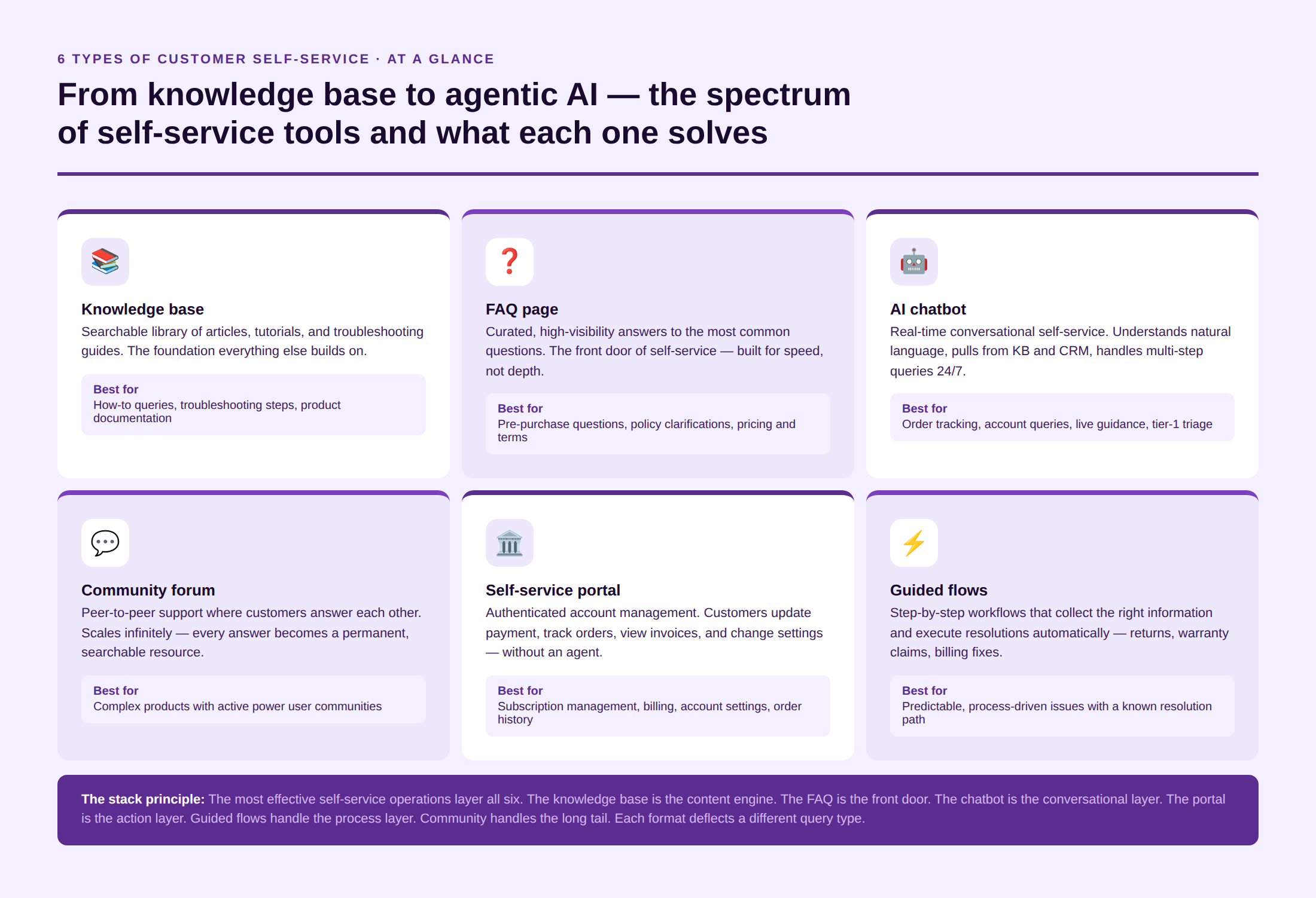
The knowledge base is the foundation of any customer self-service portal with a searchable library of articles, tutorials, troubleshooting guides, and how-to-dos. Done well, a knowledge base surfaces the right answer in the first result. Done poorly, it generates a search result page full of slightly related articles that don’t answer the actual question.
The difference is quality over quantity. A knowledge base with 50 accurate, well-structured articles outperforms one with 500 outdated or vague ones. See Kayako’s guide on knowledge base best practices for the structure and maintenance principles that keep KB content performing.
2. FAQ page
A curated list of the questions customers most frequently ask with concise, direct answers. FAQs are not substitutes for a knowledge base. They are the high-visibility front door: the immediate answers to the most common questions, structured for speed rather than depth.
Effective FAQ pages are organized by category, searchable, and updated in response to actual ticket patterns, not what a product team guessed customers would ask. FAQ page design matters more than most teams realize: the structure, labeling, and search behavior of an FAQ page determine whether customers find what they need or give up and open a ticket.
3. AI chatbot
A chatbot is the real-time layer of customer self-service. Modern AI chatbots go well beyond scripted decision trees as they understand natural language, pull from knowledge bases and CRM data, and handle multi-step queries like order changes, refund eligibility checks, and appointment rescheduling.
AI agents now deflect over 45% of incoming customer queries, with retail and travel companies seeing rates above 50% (Freshworks, 2025). Critically, when a chatbot escalates to a human agent, the context must carry over — the customer should not have to re-explain. See the conversational AI guide for how this escalation handoff works at its best.
4. Community forum
A peer-to-peer support community where customers answer each other’s questions, share tips, and report bugs. Community forums scale infinitely, with every answer posted becoming a permanent, searchable resource. They are particularly effective for complex products where power users have deeper product knowledge than tier-1 support agents.
The challenge of community forums is moderation and quality control. An unanswered question in a public forum is a public failure. An incorrect answer in a public forum is worse. Community self-service requires active community management and a clear policy for which questions get escalated to official answers.
5. Customer self-service portal
A structured, authenticated digital environment where customers manage their own accounts, like updating payment details, tracking orders, submitting requests, viewing invoices, and changing subscription settings. Unlike a knowledge base (which answers questions), a customer self-service portal executes transactions.
Portal features that drive the highest usage: single sign-on, mobile-responsive design, order and ticket history in one view, and proactive status updates that reduce the need for customers to ask. See our breakdown of customer self-service portal features for the full implementation list.
6. Guided self-service flows and automated workflows
Pre-built decision flows that walk customers through resolving a specific issue step by step. Common examples: a warranty claim wizard that collects the right information and generates a return label automatically; a billing dispute flow that checks the account, flags the discrepancy, and credits the account without agent intervention.
Guided flows work best for predictable, process-driven issues where the resolution path is known and consistent. They break down when the issue falls outside the flow’s scope, which makes a clear “talk to a human” escape hatch essential at every step.
Kayako’s AI helpdesk connects self-service tools to a unified customer record — so every self-service interaction has context. See Kayako
Best Practices and Features for Designing a Customer Self-Service Portal
The most common reason self-service portals fail is not technology. Its design. The following practices separate portals that deflect tickets from portals that frustrate customers into opening more of them.
Make search the first interaction, not a menu
Customers arrive with a specific question. A portal that opens to a category menu forces them to guess the right path before they can find an answer. A prominent, intelligent search bar, one that suggests articles as the customer types and understands synonyms, is the single highest-impact design decision in a customer self-service build.
Structure articles for scanners, not readers
Customers in a support context are not reading; they are scanning for the answer to their specific situation. Articles that open with a definition paragraph, then a history, then a disclaimer, before finally arriving at the answer, lose 80% of readers before they reach the solution. The structure that works: answer first, context second, detail third. Use headers, numbered steps, and code blocks. Keep paragraphs to 2–3 sentences.
Connect your knowledge base to your ticketing system
When a customer opens a ticket on a query that has a published knowledge base article, that article should surface automatically both to the customer before they submit and to the agent after they receive it. This creates a feedback loop: knowledge base management improves when the system tracks which articles were helpful and which led to ticket escalation despite being viewed.
Build for mobile from the start
More than half of all customer support interactions now originate on mobile devices. A portal that works on desktop but requires pinching, zooming, or horizontal scrolling on mobile will see high abandonment.
Add AI to enhance, not replace, the knowledge base
AI enhances customer self-service in four specific ways: (1) it answers questions in conversational language using knowledge base content as its source; (2) it proactively suggests related articles during a ticket submission flow; (3) it identifies knowledge gaps by tracking what customers searched for but didn’t find; and (4) it personalizes results based on the customer’s account context showing product-specific articles rather than generic ones. 47% of enterprise companies using AI are automating self-service answers and actions (Freshworks, 2025). AI doesn’t replace the knowledge base; it makes it findable.
Design a clear escalation path
A self-service portal that doesn’t offer a clear route to a human agent when self-service fails creates a worse experience than no self-service at all. The customer who can’t find their answer and also can’t reach a person is the most frustrated customer you will encounter. Every self-service touchpoint should include a visible, low-friction path to live support, with the context of what the customer already tried passed along automatically.
Test your portal the way customers use it, not the way you built it
Internal teams test documentation by searching for keywords they know. Customers search using natural language, misspellings, and product-specific terminology that teams often don’t anticipate. Regular user testing, such as watching real customers attempt to find answers without guidance, is the most reliable method for identifying the gaps that metrics miss.
The Benefits of Customer Self-Service
When customer self-service is designed and maintained well, the business benefits compound across cost, satisfaction, and revenue.
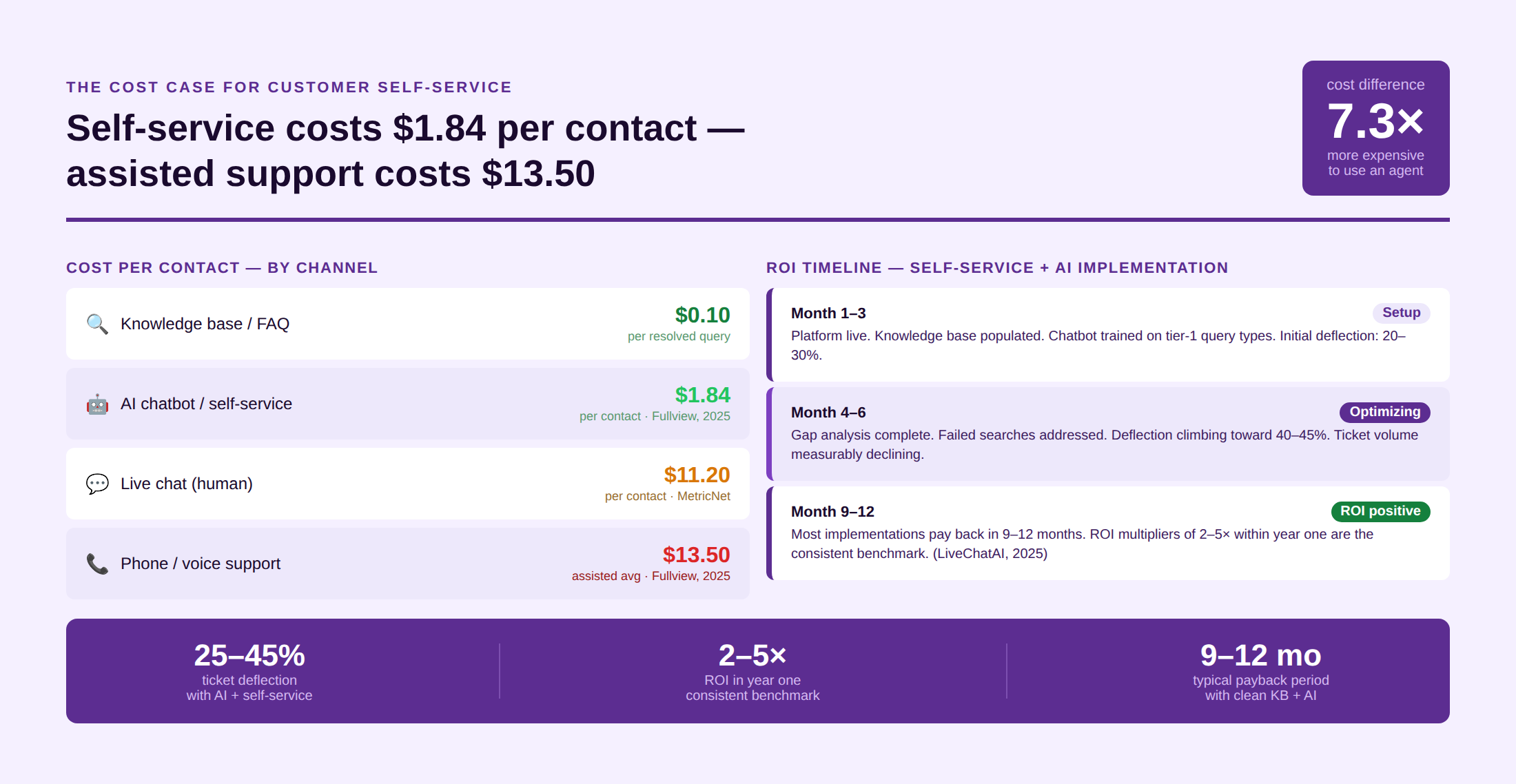
- Lower cost per interaction. $1.84 per self-service contact vs. $13.50 for assisted support (Gartner). Companies adopting AI and self-service see 25–45% ticket deflection and ROI multipliers of 2–5× within the first year (LiveChatAI, 2025).
- 24/7 availability without 24/7 staffing. A knowledge base article answers at 3 am at the same quality as it does at 3 pm. AI chatbots extend that availability to conversational queries, reducing the overnight and weekend volume that would otherwise require on-call staffing or queue buildup.
- Faster resolution for routine queries. Customers who can resolve a password reset, order change, or billing query in 90 seconds through a portal get a better experience than customers who wait 12 minutes in a chat queue to do the same thing. Speed is the primary driver of satisfaction for routine queries.
- Agent capacity freed for complexity. Every ticket deflected by self-service is a ticket that does not consume agent time. Agents redirect to complex, emotionally sensitive, and high-value interactions, where their judgment and empathy actually matter. 80% of high-performing service organizations use this model to scale without proportional headcount growth.
- Improved customer loyalty. A customer who resolved an issue quickly and without friction is satisfied. That satisfaction doesn’t require a standout agent; it just requires a system that worked. Consistent, low-effort customer experiences compound into retention.
- Richer support data. Every self-service interaction generates data: what was searched, what was found, what led to escalation, and what was resolved without contact. That data informs knowledge base gaps, product issues, and training needs in ways that ticket data alone cannot.
How to Measure the Success of Customer Self-Service
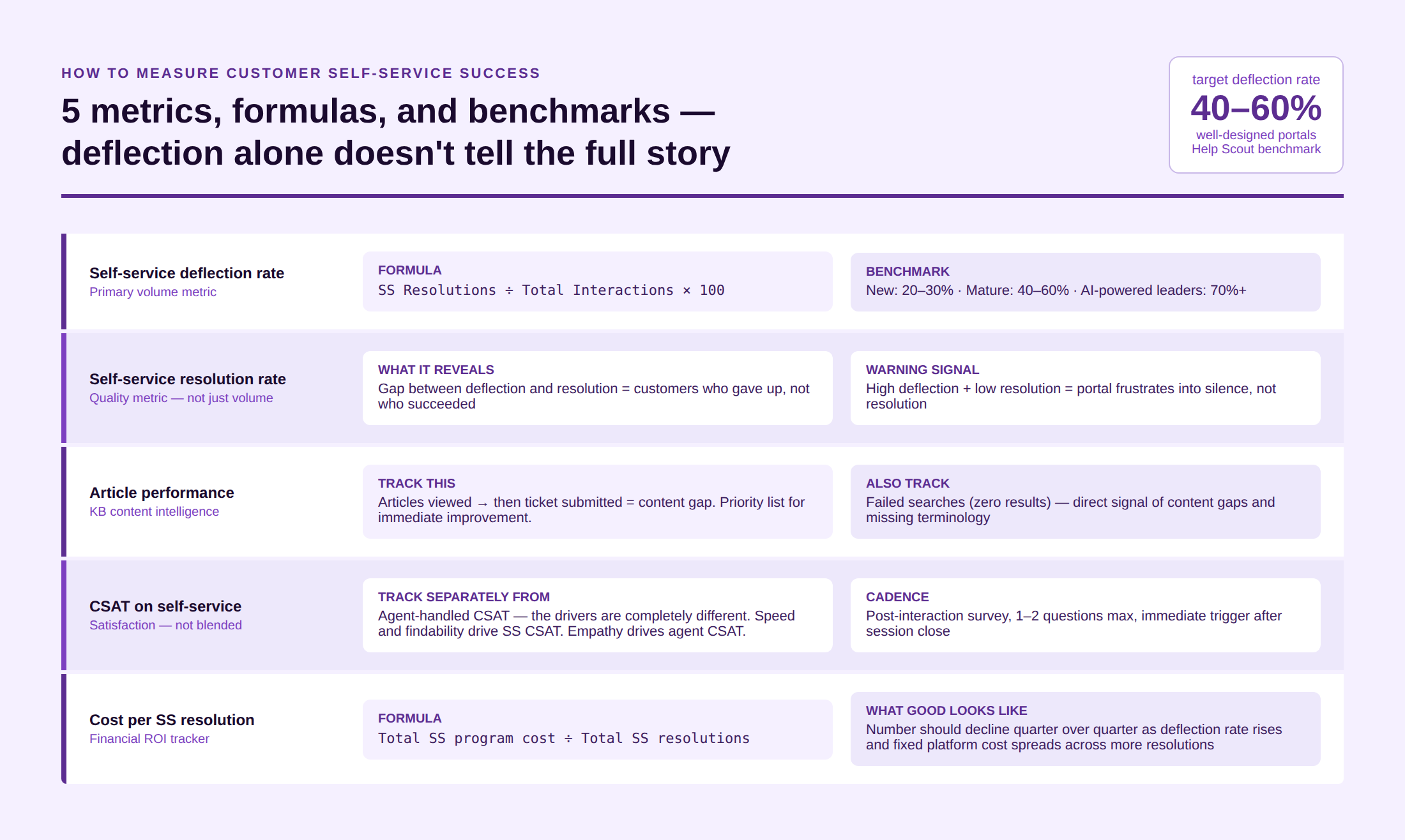
Self-service success is not just about how many tickets it deflects. It’s about whether it resolved the customer’s actual issue. Deflection without resolution is worse than no self-service — the customer has wasted time and is now more frustrated than before.
Self-service deflection rate
The percentage of support interactions resolved without human agent involvement. Formula: (Self-service resolutions ÷ Total support interactions) × 100. The benchmark range for well-designed portals is 40–60% (Help Scout). AI-powered chatbots in leading implementations hit 70%+ containment. Teams new to self-service should target 20–30% initially and improve from there.
Self-service resolution rate
Deflection rate measures how many customers used self-service. Resolution rate measures how many actually got their issue resolved through it. The gap between these two numbers reveals how much of your deflection is genuine resolution versus customers who gave up after self-service failed. A high deflection rate with a low-resolution rate means your portal is frustrating customers into silence, not solving their problems.
Knowledge base article performance
Which articles are viewed most? Which are viewed and then followed by a ticket submission? The second group is your priority list for content improvement; these are the articles customers found, but that didn’t answer their question. Knowledge base audits run quarterly reveal exactly which content is doing the work and which is occupying space.
CSAT on self-service interactions
Post-interaction satisfaction surveys on knowledge base visits and chatbot conversations provide a direct signal on self-service quality. Track this separately from agent-handled CSAT as the drivers of satisfaction are different. For self-service, speed and findability are the primary levers. For agent-handled interactions, empathy and resolution quality dominate.
Cost per self-service resolution
Total self-service program cost (platform, content creation, maintenance) divided by total self-service resolutions. This gives you the true cost basis for comparison against assisted support. As your deflection rate improves, this number should decline as the fixed cost of the platform is spread across more resolutions.
Challenges of Customer Self-Service and How to Solve Them
Outdated content that gives customers wrong answers
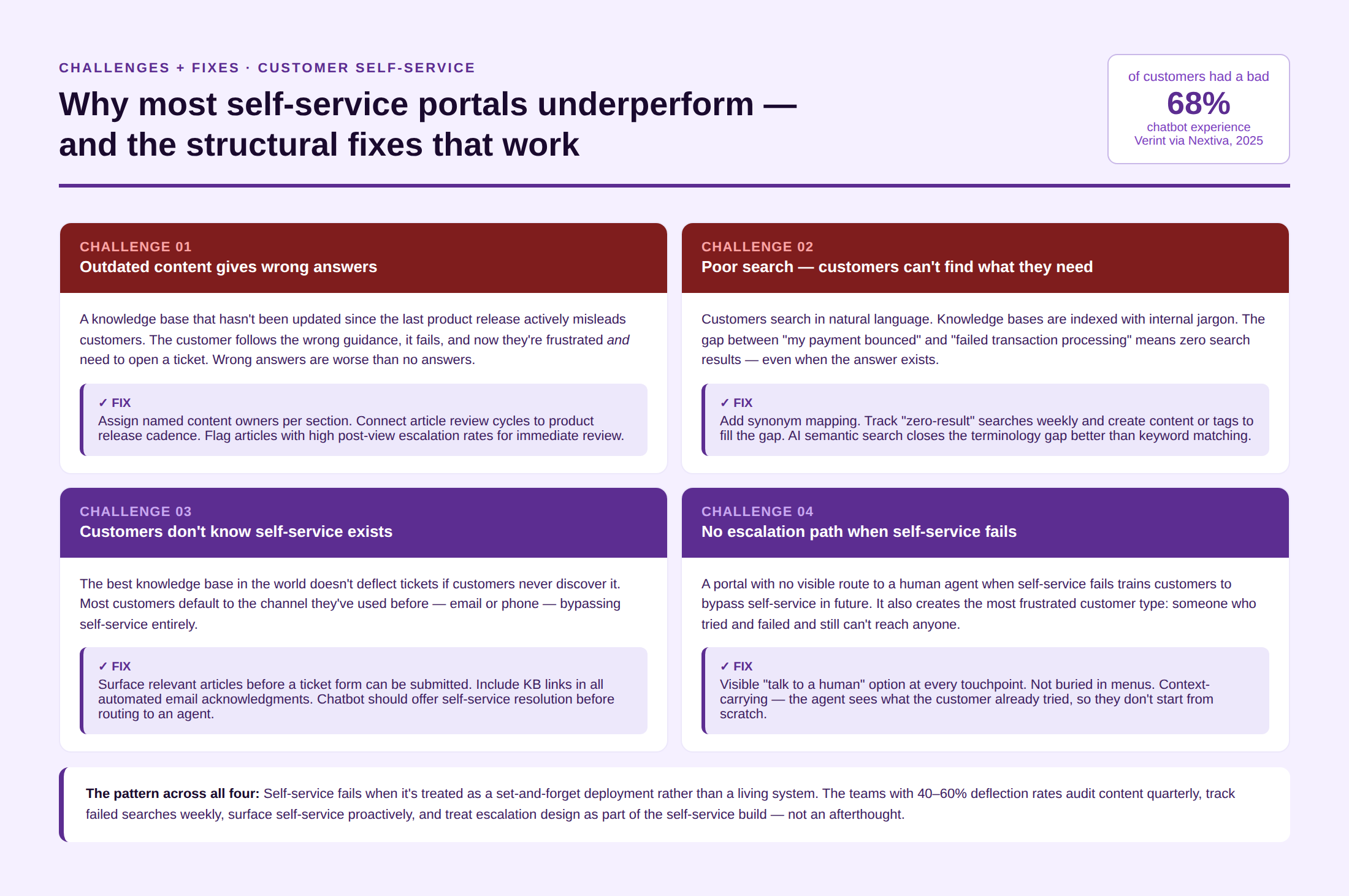
Challenge: A knowledge base that hasn’t been updated since the last product change actively misleads customers. Wrong answers from self-service are worse than no answers. The customer follows the guidance, it doesn’t work, and now they’re frustrated and need to contact an agent anyway.
Solution: Assign content ownership. Every knowledge base section should have a named owner responsible for updates. Connect article review cycles to product release cadence. Flag articles that receive negative feedback or high escalation rates for immediate review.
Poor search and findability
Challenge: Customers search using language that doesn’t match the internal terminology in your articles. 68% of customers have had a bad chatbot experience precisely because it couldn’t understand what they needed (Verint, cited in Nextiva, 2025). The same applies to knowledge base search.
Solution: Add synonym mapping to your search configuration. Track failed searches and the terms customers entered with zero results, and use them to create new content or improve tagging. AI-powered semantic search closes the gap between natural language and indexed keywords better than keyword matching alone.
Customers don’t know self-service exists
Challenge: The best knowledge base in the world doesn’t deflect tickets if customers never discover it. Most customers default to the channel they’ve used before, typically email or phone.
Solution: Surface self-service proactively. During ticket submission, show relevant knowledge base articles before the form can be submitted. In automated email responses, link directly to the relevant article. In chatbot interactions, offer knowledge base resolution before routing to an agent.
Self-service with no escalation path
Challenge: A portal that offers no way to reach a human when self-service fails doesn’t just frustrate customers, it trains them to call or email directly rather than try self-service at all.
Solution: Make human escalation visible at every self-service touchpoint. Not hidden behind three menus. Present, easy, and context-carrying, so the agent receives what the customer already tried before they speak.
Top 7 Customer Self-Service Software Platforms in 2026
1. Kayako
Best for: Teams that want self-service tightly integrated with live support, AI triage, and a unified customer record. Kayako’s AI helpdesk connects knowledge base, chatbot, and ticketing into one platform, so every self-service interaction has full customer context, and every escalation carries that context to the agent. Outcome-based pricing at $1 per resolved ticket.
2. Zendesk
Best for: Enterprise support operations with complex knowledge management needs. Guide (Zendesk’s knowledge base product) has strong content workflow features, multi-brand support, and AI-powered article recommendations. Deep integration with the Zendesk Suite.
3. Freshdesk
Best for: Mid-market teams wanting self-service with Freddy AI built in. Self-service portal, community forum, and AI-powered bot in one platform. Strong omnichannel coverage; well-documented implementation guides for teams new to self-service.
4. Intercom
Best for: SaaS companies prioritizing in-product self-service and proactive customer education. Fin AI handles complex self-service queries; Articles powers the knowledge base. Strong product tour and onboarding integration alongside traditional support and self-service.
5. Salesforce Service Cloud
Best for: Enterprises running the full Salesforce ecosystem. Einstein AI powers self-service answer recommendations, knowledge base surfacing, and case deflection. The most powerful platform for connecting self-service to CRM data, and the most complex to configure.
6. Help Scout
Best for: Small and mid-market teams wanting clean, simple knowledge base software without enterprise overhead. Beacon (Help Scout’s self-service widget) embeds knowledge base search directly into the website or product. Intuitive to manage; limited in AI capability compared to enterprise alternatives.
7. Zoho Desk
Best for: SMBs and international operations needing self-service in multiple languages. Guided conversation builder, community forum, and knowledge base with Zia AI assistance. Strong multi-language support and accessible pricing for growing teams.
Kayako’s self-service and AI layer deflects routine queries before they reach your team. Book a Demo
Customer Self-Service Trends for 2026
AI-generated knowledge base content
AI tools now draft knowledge base articles from support ticket patterns, product documentation, and conversation transcripts. 75% of CX leaders expect 80% of customer interactions to be resolved without a human agent within the next few years (Zendesk, 2025). AI-generated content accelerates knowledge base coverage, but human review for accuracy remains essential before publication.
Predictive self-service
Rather than waiting for customers to ask, predictive self-service uses behavioral signals like learning page visits, account status, and usage patterns to surface relevant articles or trigger proactive chatbot interventions before a question is even formed. This is the proactive customer service model applied to self-service.
Self-service that takes action, not just answers questions
The next evolution is agentic self-service; AI tools that don’t just answer “how do I cancel?” but execute the cancellation, apply the retention offer, and update the account record, all without human intervention. Agentic AI capable of multi-step task execution is the 2026 frontier for customer self-service portals, and the gap between early adopters and laggards is widening.
Customer Self-Service Examples
Amazon: self-service as the default
Amazon’s customer portal is one of the most widely studied self-service examples. Customers can track any order, initiate a return with an automatically generated label, process a refund, update payment methods, and report a delivery issue, all without speaking to anyone. The support interaction that would take 8 minutes on the phone takes 45 seconds in the portal. Amazon doesn’t just make self-service available; it makes it the path of least resistance.
Uber: real-time issue resolution in the app
Uber embedded self-service directly into the trip history. Customers tap on a completed trip and see a contextual menu of the most common issues for that trip type (wrong charge, driver issue, lost item). The issue context is pre-populated from the trip data, so the customer selects a category and the resolution workflow begins automatically. No call. No chat. The app already knows what went wrong.
A customer likes to feel empowered, and providing instant tools to resolve their queries is a step in that direction. A customer self-service-oriented company increases the chances of not only faster resolution but also of ensuring brand loyalty and peak satisfaction scores. So, the next time you’re slightly under the radar, pondering whether the investment is worth it, know that self-service will only catalyze the enterprise’s success.
FAQs
1. What is the difference between good and bad customer self-service?
A. Good self-service answers the customer’s actual question in the first interaction, requires minimal effort to find, and offers a clear escalation path if it fails. It is accurate, searchable, and maintained. Bad self-service surfaces related-but-wrong content, uses internal jargon customers don’t recognize, provides no escalation path, and hasn’t been updated since the last product change. Bad self-service doesn’t deflect tickets; it frustrates customers and sends them to the phone instead.
2. How do you track customer self-service performance?
A. The five metrics that matter: (1) Deflection rate — what percentage of support contacts are resolved without an agent; (2) Resolution rate — what percentage of self-service sessions actually solved the problem (not just reduced ticket submission); (3) Article performance — which knowledge base articles are viewed and still lead to tickets; (4) Self-service CSAT — satisfaction measured specifically on self-service interactions, not blended with agent-handled ones; and (5) Cost per self-service resolution — total program cost divided by resolutions, tracked over time to confirm the investment is compounding.
3. What are the best features of a customer self-service portal?
A. The features that drive the highest usage and resolution rates: prominent, intelligent search with synonym matching; mobile-responsive design; authenticated access to account-specific information; integration with ticketing so article views and ticket submission share context; AI chatbot layer for conversational queries; proactive article suggestions during ticket submission; clear human escalation path at every touchpoint; and usage analytics that identify knowledge gaps from failed searches.
4. How does AI improve customer self-service?
A. AI enhances self-service in four ways: it makes knowledge base content findable through natural language search (instead of keyword matching); it handles conversational self-service through chatbots that understand intent, not just keywords; it identifies gaps by tracking what customers searched for and didn’t find; and it personalizes results using customer account context — showing product-specific or account-specific articles rather than generic content. Companies adopting AI and self-service see deflection rates of 25–45% and ROI multipliers of 2–5× in year one (LiveChatAI, 2025).