Zoho Desk Review 2026: Pricing, Pros, Cons, and Is It Worth It?
An honest look at Zoho Desk, the low-cost, feature-rich help desk: what it does well, where it frustrates, and who should buy it.
| Zoho Desk review: Zoho Desk is a low-cost, feature-rich help desk, strongest inside the Zoho ecosystem. Editions run $0 to $40 per agent per month, with AI bundled rather than sold as a paid add-on. Reviewers praise the value and automation but flag Zoho’s own support and a dated interface. This review covers pricing, real pros and cons, and who it fits.
Key takeaways
|
A Zoho Desk review usually comes down to a trade. You get more help desk features per dollar than almost anywhere else, and in return you accept a dated interface and Zoho’s own support, which is the most common complaint reviewers raise. Whether that trade is worth it depends on what you value, and this review works through it.
This review covers what Zoho Desk is, how it is priced, what the ratings say, and the pros and cons reviewers raise most, with each point linked to its source. It closes with a feature-by-feature verdict and an honest read on who should buy it.
Zoho Desk review: what it is and who it is for
Zoho Desk is the customer support product in the wider Zoho suite, a cloud help desk that captures tickets across email, social, web forms, live chat and messaging, and routes them through automation, SLAs and a knowledge base. It ranges from a free plan for three agents up to an Enterprise edition with live chat, IVR and multi-brand support.
Its defining trait is value inside an ecosystem. Zoho Desk is markedly cheaper per agent than Zendesk or Freshdesk at comparable tiers, and it integrates tightly with Zoho CRM and Zoho One, so teams already on Zoho get a unified view of support and sales. The audience skews toward small and mid-market teams, including many managed service providers, that want capability on a budget.
Zoho Desk competes with the likes of Zendesk, Freshdesk and Help Scout, and its pitch is almost always value: similar capability at a lower price, especially for teams willing to stay inside the Zoho world. It is a full help desk rather than a lightweight inbox, which shapes who it suits and how the rest of this review reads.
How I evaluated Zoho Desk
This review draws on Zoho Desk’s ratings across three sites plus community sentiment. On G2 Zoho Desk holds 4.4 from nearly 8,000 reviews, on Capterra 4.5 from about 2,200, and on TrustRadius 8.3 out of 10 from roughly 145.
One caution shapes how to read those scores. The high-volume boards carry many short, incentivized five-star reviews from Zoho’s review drives, so the detailed written reviews and the more critical Reddit threads carry more weight here, especially on support quality, where the community is notably harsher than the star averages suggest.
With the incentivized reviews discounted, the signal is steady across sources, and the pros and cons below reflect where the written feedback and the community agree, rather than where the star counts pile up.
Zoho Desk pricing
Zoho Desk is billed per agent per month: free for up to three agents, then Express at $7, Standard at $14, Professional at $23, and Enterprise at $40 on annual billing. Monthly billing costs roughly a third to a half more on the mid-tiers, and light agents, for occasional users, run about six dollars each, with fifty included free on Enterprise.
The thing to watch is tier gating rather than the seat price. Single features sit one or two plans up: the answer bot starts on Standard, the Zia AI assistant and Blueprint automation on Professional, and live chat and IVR on Enterprise. Unlike some rivals, Zoho bundles its AI by tier instead of charging a separate per-agent fee, with a generous generative-AI token allowance, though cost beyond that allowance is not disclosed. For the full breakdown, our dedicated guide to Zoho Desk pricing runs the numbers tier by tier.
The practical point is that the seat price is not where Zoho Desk gets expensive; tier gating is. Before committing, list the specific features you need and check which plan each one sits on, because a single Enterprise-only feature can lift your whole team to the Enterprise rate, which changes the value calculation entirely.
| Resolve tickets with Kayako, priced per resolution not per tier. |
Zoho Desk ratings: what the scores actually say
The scores are consistently solid across the aggregator sites, which is what you would expect from a mature, widely used product. The nuance is in who is reviewing and how.
| Review site | Reviews | Score |
|---|---|---|
| G2 | ~7,989 reviews | 4.4 / 5 |
| Capterra | ~2,216 reviews | 4.5 / 5 |
| TrustRadius | ~145 reviews | 8.3 / 10 |
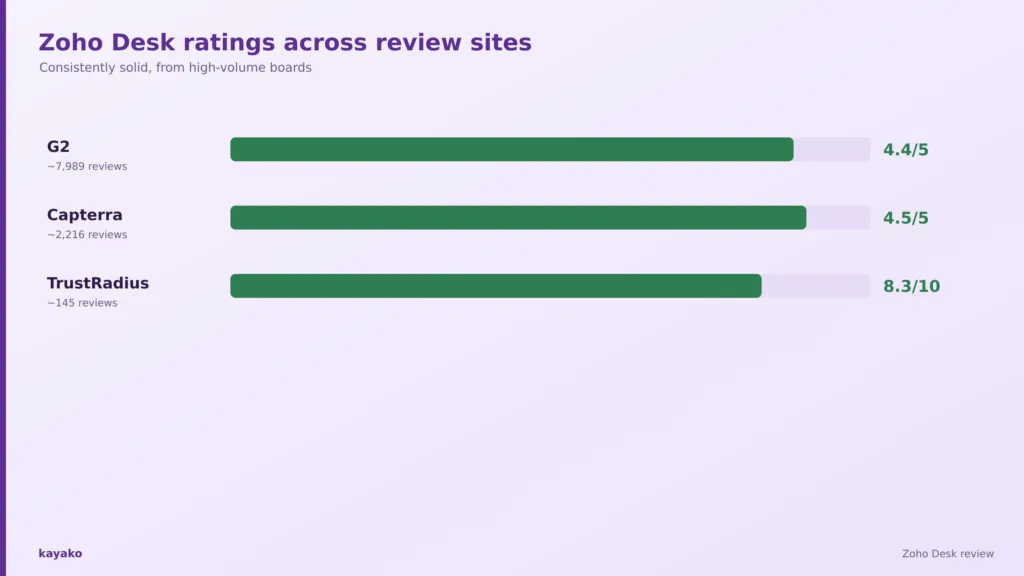
A 4.4 on G2 from nearly eight thousand reviews and a 4.5 on Capterra reflect broad satisfaction with a capable, cheap product. The lopsided review counts, though, next to around 145 on TrustRadius, point to heavy review solicitation on the mass-market sites, so the averages run a little rosier than the detailed feedback.
Read the written reviews and the Reddit threads together, and a clear pattern appears: people like the product and its price, and they dislike the support experience and the aging interface. That pattern holds across the pros and cons below.
For a buyer, the takeaway is to trust the value and automation praise, and to treat the support and interface complaints as the real risks to test during a trial, which the sections below make concrete.
What users praise about Zoho Desk
This section covers what reviewers consistently credit, with each point linked to the review it comes from.
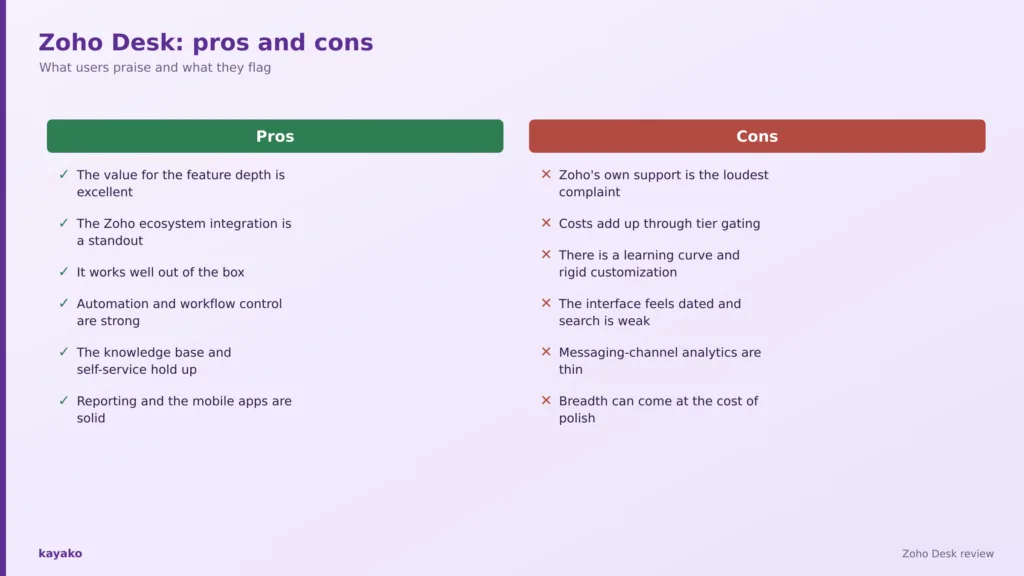
- The value for the feature depth is excellent. Reviewers repeatedly call it well-priced for what you get, especially next to Zendesk. At comparable tiers, it undercuts Zendesk and Freshdesk noticeably.
- The Zoho ecosystem integration is a standout. Teams on Zoho CRM or Zoho One get support and sales data unified in one place. For a team standardized on Zoho, the single pane of glass is a real draw.
- It works well out of the box. Core ticketing is ready without heavy configuration, which small teams appreciate. Small teams get a working help desk without a configuration project. This comes through in the Reddit reviews.
- Automation and workflow control are strong. Blueprint process automation, SLAs and auto-assignment handle real routing logic. Blueprint is the feature power users point to most. This comes through in the TrustRadius reviews.
- The knowledge base and self-service hold up. The help center works well for internal and external FAQs and for deflecting volume. A well-built help center takes measurable load off the queue.
- Reporting and the mobile apps are solid. Standard dashboards track the KPIs teams need, and the Android and iOS apps are well-regarded. The mobile apps make it workable for distributed or on-call teams.
|
|
What users flag about Zoho Desk
- Zoho’s own support is the loudest complaint. Standard-tier support is described as slow and unhelpful, with Enterprise support rated better. It is the single issue the community raises more than any other. You can see this in the Reddit reviews.
- Costs add up through tier gating. Features are locked to higher plans, so upgrades feel forced for small businesses. One needed feature can lift the whole team to a pricier plan.
- There is a learning curve and rigid customization. Settings are hard to locate, and chat-widget and canned-reply customization is limited. Finding the right setting is often the hardest part of a change.
- The interface feels dated, and search is weak. The UI looks old, icons are unclear, and finding tickets can be slow, with no desktop app. A visual refresh is the most common feature request.
- Messaging-channel analytics are thin. Reporting on WhatsApp and other IM channels is limited for scaled teams. Scaled teams on WhatsApp feel the reporting gap most. It is commonly highlighted in the Reddit reviews.
- Breadth can come at the cost of polish. Some users feel the wide feature set is capable but under-refined in places. The feeling is of a capable product that is spread a little thin.
Zoho Desk feature by feature
Ticketing. The product’s backbone and genuinely strong: multichannel capture, parent-child and split tickets, work modes and SLAs. Reliable day-to-day. Parent-child and split tickets handle the messy, real-world cases well.
Omnichannel. Email, social and web forms from Express, live chat and messaging from Standard, SalesIQ chat and IVR at Enterprise. Breadth is good, but IM-channel analytics are weak. Adding a channel is straightforward, but the analytics behind messaging lag the rest.
Automation and workflows. A standout. Blueprint process automation, round-robin and skill routing, macros and escalations, though Blueprint needs Professional or above. Round-robin and skill-based routing cover most mid-market routing needs.
Reporting and analytics. Good standard dashboards and KPIs, with custom reports from Standard. Weaker on advanced filtering and messaging-channel depth. Custom reports exist, but advanced filtering by working hours or custom ranges is limited.
AI, through Zia. Capable and bundled with no add-on fee, but gated to Professional and above, and it needs substantial data to be useful. Because Zia leans on your historical data, it is strongest once you have volume to learn from.
Ease of use and setup. Fast out of the box for the basics, but with a real learning curve for advanced configuration and a dated interface with weak search. A modern refresh is the single change most reviewers ask for.
Integrations. Best-in-class within Zoho, across CRM, SalesIQ and Analytics. Third-party integrations and data transfer are weaker spots. Stepping outside the Zoho world is where integration effort rises.
Value for money. The headline strength. Materially cheaper per agent than Zendesk or Freshdesk at comparable tiers, with tier gating and telephony as the catches. For teams that can live with the trade-offs, little else matches the capability at this price.
| Feature | Verdict | Notes |
|---|---|---|
| Ticketing | Strong | Reliable backbone, multichannel capture |
| Omnichannel | Good | Broad reach; messaging analytics thin |
| Automation and workflows | Strong | Blueprint automation is a standout |
| Reporting and analytics | Good | Good standard dashboards and KPIs |
| AI, through Zia | Good | Bundled by tier; gated to Professional and up |
| Ease of use and setup | Mixed | Dated interface and a learning curve |
| Integrations | Good | Best-in-class within the Zoho suite |
| Value for money | Strong | Materially cheaper per agent than rivals |
Is Zoho Desk worth it in 2026?
Whether Zoho Desk is worth it is rarely about the features, which are plentiful, and almost always about the trade you are willing to make. The price is genuinely low, the automation is strong, and for a team already in the Zoho ecosystem, the integration is hard to replicate elsewhere, so the value on paper is excellent.
The cost shows up in the experience rather than the invoice. You accept a dated interface, a learning curve on advanced settings, and support that the community rates poorly on standard tiers. If those are acceptable in exchange for the price and capability, Zoho Desk is one of the best-value options available; if responsive support and a modern interface matter more, the saving may not be worth it.
Who Zoho Desk is best for, and who should look elsewhere
Best for. Zoho Desk fits teams already using Zoho CRM or Zoho One, any team wanting the most features per dollar, support groups that need strong workflow automation like Blueprint on a mid-market budget, and small or managed-service-provider teams with straightforward ticketing. For that buyer, little else matches the capability at the price. For that buyer, the value is genuinely hard to beat.
Look elsewhere if. Look elsewhere if responsive vendor support is critical, since Zoho’s own support is the top complaint; if you want a polished, modern interface with fast search; if you need deep messaging or WhatsApp analytics; if you dislike tier gating that forces a full upgrade for one feature; or if your priority is autonomous AI resolution rather than configuring a capable suite. For these teams, the saving may not be worth the trade.
Zoho Desk alternatives by use case
This section points to where teams that rule out Zoho Desk tend to look, matched to the reason they move on.
Teams that pass on Zoho Desk usually do so for support quality, interface, or a preference for autonomous AI. If vendor support is the deal-breaker, rivals with stronger reputations for responsiveness are worth a look, even at a higher seat price. If the interface is the issue, a cleaner, more modern help desk tends to win on day-to-day experience.
If the goal is resolving tickets with AI rather than configuring a suite, the comparison moves away from feature-rich help desks toward resolution-first platforms. For teams that want outcomes over breadth and transparent per-resolution pricing, Kayako is the alternative that usually comes up against Zoho Desk.
How Kayako compares with Zoho Desk
For teams drawn to Zoho Desk’s price but worried about support and autonomous resolution, Kayako is a focused alternative. Agent Kay resolves tickets autonomously, SingleView gives agents one screen of context, and pricing is one dollar per resolved ticket rather than per agent across gated tiers. Where Zoho Desk is a broad, configurable suite, Kayako concentrates on resolving tickets with AI, and it helps to understand how AI agents differ from basic chatbots when comparing their automation. For a value-first team in the Zoho world, Zoho Desk is a strong pick, and for an outcome-first team, the comparison favors a resolution platform.
Case study: Aurea. Aurea saved about $20,000 per agent with Kayako across a phased rollout spanning more than fourteen products, by letting AI resolve the repetitive volume rather than adding seats to manage it.
|
The verdict on Zoho Desk
Zoho Desk is one of the best-value help desks on the market. For teams already in the Zoho ecosystem, or any team that wants maximum capability on a tight budget, the automation, the integration and the price are hard to argue with, and the broad satisfaction in the ratings reflects that.
The trade-offs are consistent and worth taking seriously. Zoho’s own support is the most common complaint, the interface feels dated, and tier gating pulls single features up a plan. Shortlist Zoho Desk if value and the Zoho ecosystem matter most to you. If responsive support or autonomous AI resolution matters more, compare a focused alternative first. Either way, trial the support and the interface, since those, rather than the feature list, are what reviewers end up regretting.
|
Frequently asked questions
1. What is Zoho Desk?
Zoho Desk is the customer support product in the Zoho suite, a cloud help desk that captures tickets across email, social, web forms, chat and messaging, and routes them through automation, SLAs and a knowledge base. It ranges from a free plan to an Enterprise edition and integrates tightly with Zoho CRM.
2. How much does Zoho Desk cost?
Zoho Desk is free for up to three agents, then $7 per agent per month for Express, $14 for Standard, $23 for Professional and $40 for Enterprise on annual billing. Light agents are about $6 each, and the AI is bundled by tier rather than charged as a separate add-on.
3. Is Zoho Desk worth it?
Zoho Desk is worth it for teams wanting the most features per dollar, especially those already on Zoho CRM or Zoho One, with strong automation through Blueprint. Teams that need responsive vendor support, a modern interface or autonomous AI resolution may find a focused platform a better fit.
4. Is Zoho Desk good?
Zoho Desk is a capable, mature help desk with strong automation, deep Zoho integration and excellent value, which is why it rates 4.4 on G2 and 4.5 on Capterra. Its weak points are Zoho’s own support quality and a dated interface, which the community raises more often than price.
5. What do users complain about with Zoho Desk?
The most common complaints are Zoho’s own customer support, described as slow on standard tiers, tier gating that forces upgrades, a dated interface with weak search, and thin analytics on messaging channels. Reviewers still rate the value and automation highly despite these.
6. What are the best Zoho Desk alternatives?
The best alternative depends on your use case. For teams wanting AI-first autonomous resolution without tier gating, Kayako is a strong fit; for easiest setup a different suite may suit, and comparing the leading ticketing systems by scenario helps shortlist.
7. Is Kayako an alternative to Zoho Desk?
Yes. Kayako offers autonomous AI resolution through Agent Kay at one dollar per resolved ticket, without Zoho’s tier gating, and concentrates on resolving tickets rather than configuring a broad suite, which suits teams that want outcomes over breadth.
8. Is Zoho Desk easy to use?
Zoho Desk is fast to set up for core ticketing, but advanced configuration has a learning curve and the interface feels dated, with weak in-app search. Reviewers consistently praise the capability and price while asking for a modern refresh.
9. Does Zoho Desk include AI?
Yes. Zoho Desk bundles AI by tier rather than charging a separate per-agent fee: the answer bot is included from Standard and the Zia assistant from Professional, with a generative-AI token allowance. It needs a reasonable amount of historical data to be genuinely useful.
10. Is Zoho Desk better than Freshdesk?
Zoho Desk tends to win on price and workflow automation, especially for teams in the Zoho ecosystem, while Freshdesk is often praised for a cleaner interface and smoother onboarding. The right pick depends on whether value or user experience matters more to you.
11. Does Zoho Desk integrate with Zoho CRM?
Yes, and it is one of the main reasons to choose it. Zoho Desk integrates tightly with Zoho CRM and the wider Zoho One suite, giving support and sales a shared view of the customer, which is harder to match with a help desk from outside the Zoho world.