
A knowledge base is a centralized, searchable library of articles that lets customers and employees find answers on their own. Learn the types, see real examples, and follow a step-by-step build process.
A knowledge base is a centralized, searchable collection of articles, guides, and documentation that helps customers and employees find answers without asking a person. It powers self-service help centers, gives support agents a single source of truth, and supplies the grounding content that AI support agents draw on to resolve tickets accurately.
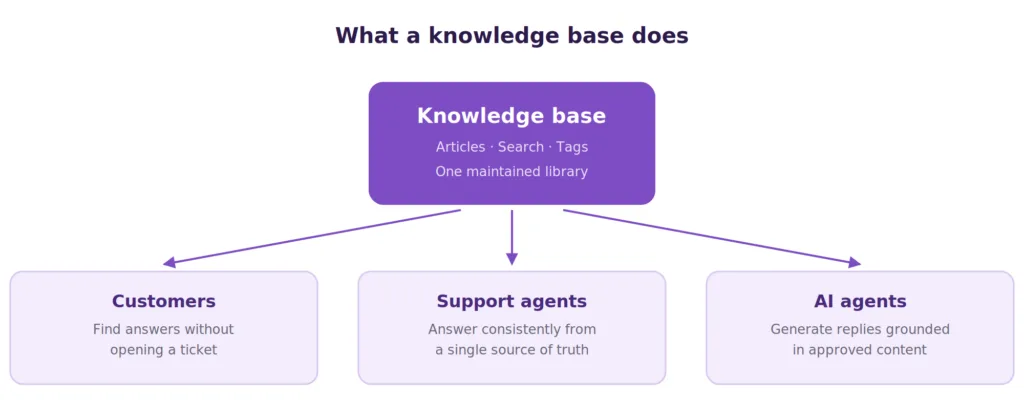
Diagram defining a knowledge base as a central repository serving customers, support agents, and AI agents
What Is a Knowledge Base?
A knowledge base is a structured, searchable repository of information built so that people and software can retrieve a specific answer quickly. It typically holds how-to guides, troubleshooting steps, product documentation, policies, and frequently asked questions, organized into categories that make the right article findable in seconds.
The defining characteristic is retrievability. A shared drive stores documents. A knowledge base stores answers, tagged, categorized, and indexed so a search returns the one article that resolves the question rather than forty files that mention it. That difference in design is what turns stored information into a working support asset.
Knowledge bases serve three audiences at once. Customers use them to solve problems without opening a ticket. Support agents use them to answer consistently without memorizing every policy. AI support agents use them as the source material they generate answers from, which makes the knowledge base the ceiling on how well any AI deployment performs.
Knowledge base vs knowledge graph
The two terms get used interchangeably, and they describe different structures. A knowledge base stores human-readable articles meant to be read or summarized. A knowledge graph stores machine-readable facts about entities and the relationships between them, so software can reason across connections rather than retrieve a document. Most support teams need the first. Search engines and recommendation systems run on the second.
How a Knowledge Base Works
Underneath a simple search box sits a layered system. Content goes in, structure organizes it, retrieval surfaces it, and governance keeps it accurate. Each layer determines how well the next one performs.
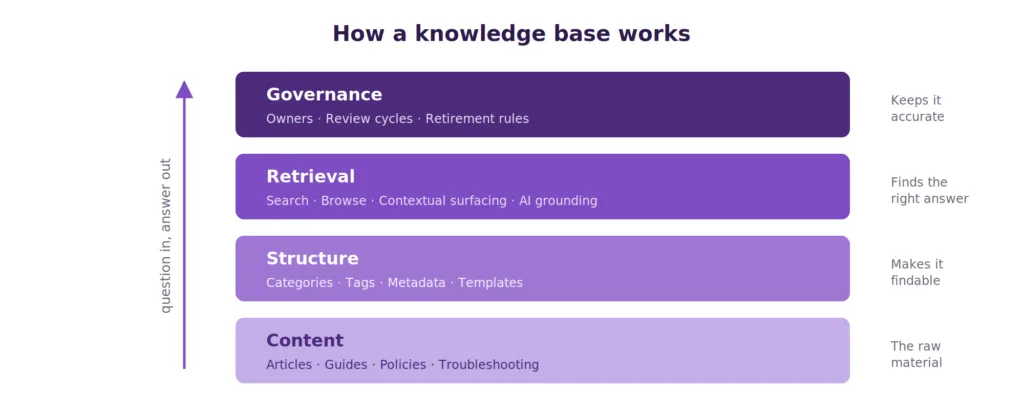
Diagram of the four knowledge base layers: content, structure, retrieval, governance
Core components
Every functioning knowledge base includes a handful of components, whether it runs on dedicated software or a help desk module.
– Search: Keyword and natural-language search that returns specific articles rather than a document list.
– Categories and subcategories: A browsable structure for people who prefer to explore rather than search.
– Tags and metadata: Labels that power filtering, related-article suggestions, and AI retrieval.
– An editor with workflow: Drafting, review, and approval so published content stays accurate.
– Permissions: Control over who reads and who edits, which matters most when internal and external content live in one system.
– Analytics: Reporting on searches, article views, and failed searches, which is where content gaps surface.
Advanced systems add AI-assisted authoring, automatic detection of outdated articles, and semantic retrieval that matches meaning rather than exact wording.
Retrieval in practice
Retrieval is where a knowledge base either earns its keep or gets abandoned. Good systems support several paths to the same answer: typed search, category browsing, and contextual surfacing that pushes a relevant article into a chat widget or ticketing system before a customer finishes describing the problem. Weak search is the most common reason a well-stocked knowledge base goes unused.
Types of Knowledge Bases
Knowledge bases divide first by audience, then by delivery method. Getting the audience split right shapes everything downstream, from tone to permissions.
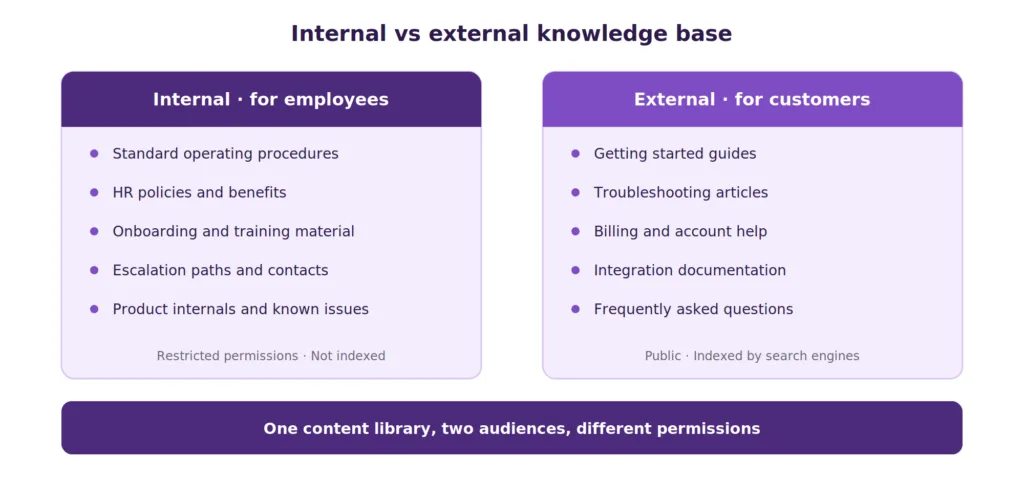
Comparison diagram of internal versus external knowledge bases
Internal knowledge base
An internal knowledge base serves employees. It holds standard operating procedures, HR policies, onboarding material, escalation paths, product internals, and the answers agents need while a customer waits on the line.
This is the type most organizations underinvest in and most benefit from. Support teams lose measurable time re-asking colleagues questions that were answered last month. New hires reach productivity faster when the process they need is documented rather than passed along verbally. When a senior agent leaves, their accumulated knowledge either lives in a system or leaves with them.
Internal knowledge bases usually need tighter permissions, because content includes commercial terms, security procedures, and escalation contacts that should not be public. They also tolerate rougher writing, since the audience already knows the product.
External knowledge base
An external knowledge base serves customers and prospects. It contains getting-started guides, troubleshooting articles, billing and account help, integration documentation, and answers to the questions your support queue receives most.
External content carries a higher writing bar. Readers arrive frustrated, often on mobile, with no product vocabulary. Articles need plain language, short steps, and screenshots. External knowledge bases are also indexed by search engines, so they double as an acquisition channel when the articles answer questions people search for.
By delivery method
Beyond audience, knowledge bases differ in how the content reaches people.
– Help center: A branded, public site with search and categories. The most common external format.
– In-app or widget-based: Articles surfaced inside the product at the moment of confusion, which reliably outperforms a separate site.
– Agent-facing panel: Content displayed alongside the ticket so agents answer without switching tabs.
– Chatbot or AI knowledge base: Content indexed for machine retrieval so an AI agent can generate grounded answers.
Most mature teams run several of these against one content library rather than maintaining separate copies.
What Is a Knowledge Base in AI?
An AI knowledge base is a knowledge base whose content has been indexed for machine retrieval, usually as vector embeddings, so an AI agent can find the relevant passage and generate an answer grounded in approved source material rather than in whatever the underlying model absorbed during training.
This matters more than most buyers expect. Salesforce reports that 66% of service organizations were running AI agents in 2026, up from 39% the year before, and 89% of service professionals say conversational AI increases self-service resolution rates. Adoption is no longer the question. Whether the deployment works is.
Knowledge base quality sets the ceiling on AI performance
Here is the finding that should reshape how teams sequence an AI rollout. According to Gartner’s 2025 AI Implementation Survey, 62% of underperforming AI customer service projects trace back to data preparation problems rather than model limitations, with technology constraints accounting for under 15%.
The mechanism is straightforward. Retrieval-augmented generation pulls passages from your content and asks the model to answer from them. When an article is stale, the AI repeats the stale answer with complete confidence. When coverage has a hole, the AI either hedges or invents. No model upgrade fixes either problem, because both originate in the library rather than the reasoning.
There is a second reason to care about accuracy. Gartner finds that AI deflects more than 45% of queries while only about 14% of issues reach full resolution through self-service. Much of that gap is content quality. Customers who follow instructions that no longer match the product escalate anyway, arriving more frustrated than when they started.
What AI-ready content looks like
Content built for human readers needs adjustment before an AI agent can use it well.
– One question per article, so retrieval returns a passage that fully answers rather than a document that partly covers.
– Explicit context in the body rather than implied by the page it sits on, since retrieval strips surrounding navigation.
– Consistent terminology, because two names for the same feature split retrieval across both.
– Timestamps and owners on every article, so volatile content can be reviewed on a schedule.
– Clear statements of what is not supported, which prevents the model from filling gaps with plausible invention.
Why a Knowledge Base Matters
The business case rests on three effects that compound as the library grows.
Cost per contact
Self-service resolves questions at a fraction of the cost of an agent conversation. Gartner puts the median cost of a self-service contact near $1.84 against roughly $13.50 for an agent-assisted one. Every question the knowledge base answers removes a contact from the queue at a seventh of the price, and the article keeps working after it is written.
There is more detail on how support costs break down if you want the full arithmetic.
Consistency and speed
When agents answer from one vetted source, customers get the same answer regardless of who picks up the ticket. That consistency reduces escalations caused by conflicting information, and it shortens handle time because agents stop composing explanations from scratch. New agents reach competence faster because the documented answer is available while they learn.
Institutional memory
Knowledge that lives in individual heads walks out the door during turnover. A maintained knowledge base converts personal expertise into organizational capability, which is what lets a support team scale without every new hire needing a senior mentor for six months.
Gartner has also signaled where customer expectations are heading, ranking self-service and live chat as set to surpass traditional channels by 2027. Teams building the content library now will be ready for that demand.
Knowledge Base Examples
Looking at working knowledge bases is faster than reading about principles. These represent distinct approaches worth studying.
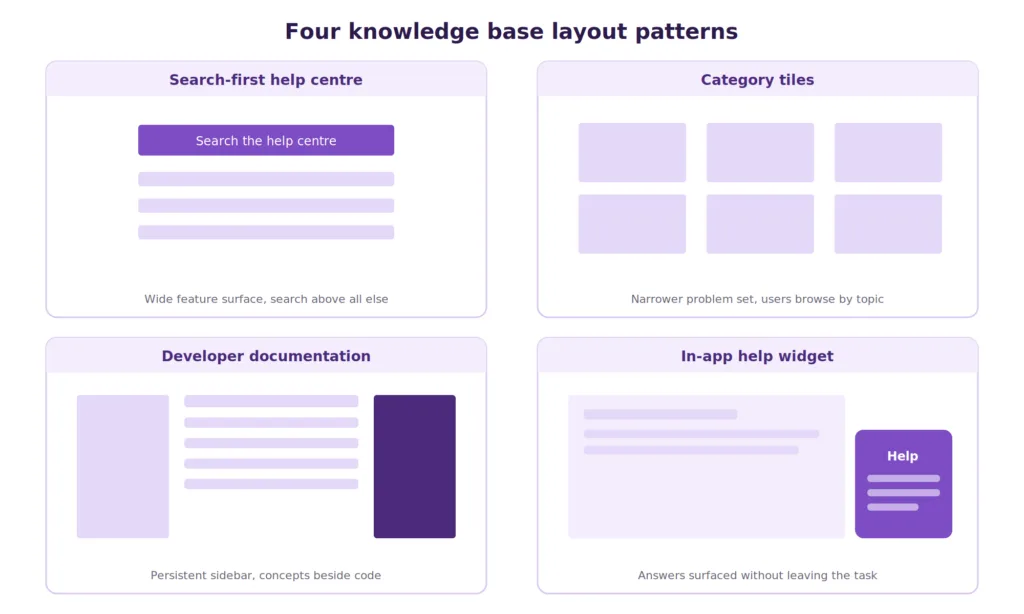
Grid of four knowledge base layout examples showing search-first, category-led, and in-app patterns
Search-first help centers. Products with wide feature surfaces, such as Slack and Notion, put a prominent search box above everything else and keep categories secondary. This suits libraries where browsing would take too long.
Category-led help centers. Consumer services with narrower problem sets, such as Spotify and Airbnb, lead with visual category tiles for account, billing, and troubleshooting. This suits users who do not know the right search term.
Developer documentation. Stripe and Twilio pair conceptual explanation with runnable code and a persistent sidebar. The pattern applies to any product with a technical audience.
In-app knowledge. Products that surface articles inside the interface at the point of confusion consistently outperform equivalent content on a separate site, because the reader never has to leave the task.
For a closer look at layout and structure decisions, see these help center examples.
Knowledge Base Software: What to Look For
Most teams start with a shared document and outgrow it. Dedicated software becomes worthwhile once content maintenance is someone’s actual responsibility rather than an occasional task.
The evaluation checklist
– Search quality: Test with real customer phrasing, including misspellings and colloquial wording. This is the single feature that determines adoption.
– Authoring workflow: Draft, review, approve, publish, and retire, with roles attached to each step.
– Content health reporting: Failed searches, zero-result queries, articles nobody opens, and articles that have not been reviewed in a defined period.
– AI grounding: Whether the AI answers from your content and reports which articles it used, or generates from the base model.
– Resolution reporting: Whether the platform reports what the AI actually closed rather than only how many conversations it entered.
– Permissions: Separate internal and external visibility within one library, so content is written once.
– Delivery surfaces: Public site, in-app widget, agent panel, and chat, all from the same content.
– Import and export: How content gets in, and how it gets out if you leave.
Pricing structures to check before signing
Support platforms price AI differently, and the differences compound at volume. Some charge per conversation the AI enters, some per action it takes, and some per conversation it actually resolves. Model your busiest month rather than your average one, because a per-conversation meter turns a good month into an expensive one.
If your knowledge base is meant to power AI resolution, Kayako’s knowledge base software pairs search and analytics with AI that answers from your content and flags where coverage falls short.
How to Build a Knowledge Base
A knowledge base built from a content calendar tends to answer questions nobody asked. A knowledge base built from ticket data answers the questions already arriving. Follow the second approach.
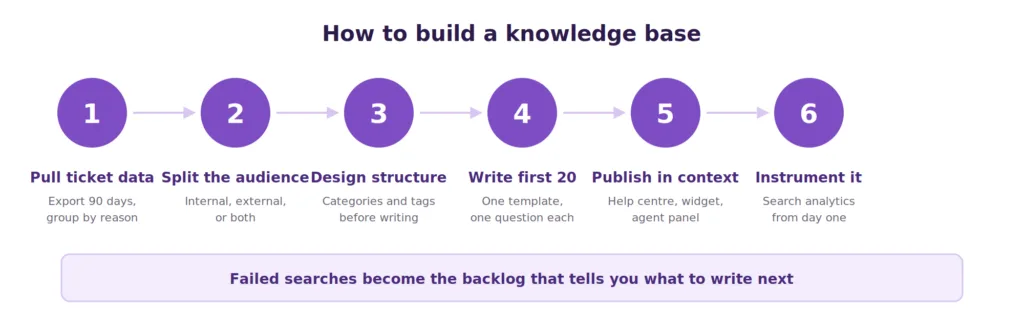
Six-step process diagram for building a knowledge base
Step 1: Pull your top questions from ticket data
Export the last ninety days of tickets and group them by reason. The top twenty drivers typically account for most of your volume, and they are your first twenty articles. Add your top search queries and any question that a customer asks more than once a week.
Resist writing from imagination. What the team assumes customers struggle with rarely matches what the queue shows.
Step 2: Decide audience and scope for each article
Sort your list into internal and external. Some topics need both versions, written differently: the customer-facing article explains the fix, and the internal one explains the underlying cause and the escalation path.
Step 3: Choose the structure before writing
Agree on categories, naming conventions, and the tag taxonomy up front. Retrofitting structure onto two hundred existing articles is significantly more work than deciding it at twenty. Keep the hierarchy shallow, since deep nesting makes browsing harder and adds little for search.
There is more guidance on knowledge base structure if you are designing this from scratch.
Step 4: Write the first twenty articles
Use one template for every article so readers learn the pattern. Assign each to whoever actually solves that problem today rather than to a writer who will need to interview them.
Step 5: Publish where people already are
Put the articles on a public help center, then surface them inside your product and inside the support conversation. Content that requires a customer to leave what they are doing and find a separate site gets used far less than content that appears in the widget.
Step 6: Instrument it from day one
Turn on search analytics before launch. Failed searches are the highest-value input you will get, because each one is a customer telling you exactly which article is missing.
How to Write a Knowledge Base Article
Article quality determines whether the library gets used a second time. A consistent structure helps more than good prose.
The template
- Title as the question a customer would type. “Why is my card being declined” outperforms “Payment troubleshooting.”
- A one-sentence answer at the top. Readers who need only confirmation stop here, and AI retrieval extracts this cleanly.
- Prerequisites, if any. Permissions, plan level, or setup required before the steps work.
- Numbered steps. One action per step, with the interface element named exactly as it appears.
- Screenshots for anything visual. Annotated, and recaptured when the interface changes.
- What to do if it did not work. The escalation path, which prevents a failed article from becoming a frustrated ticket.
- Related articles. Two or three, chosen deliberately rather than generated automatically.
Keep one question per article. Combined articles rank worse in search, retrieve worse for AI, and get skimmed past by readers who cannot find their specific case.
Further detail on formatting and voice sits in this guide to writing a knowledge base article, and a shared style guide keeps contributors consistent as the team grows.
How to Maintain a Knowledge Base
Most knowledge bases fail after launch rather than during it. Content ages, the product changes, and nobody owns the review.
Assign ownership per article
Every article needs a named owner and a review interval. Volatile content such as pricing, integrations, and policies needs quarterly review. Stable content such as core concepts can go a year.
Use failed searches as your backlog
Zero-result searches and searches that return results nobody clicks are a ranked list of missing or badly titled content. Working that list weekly is the highest-return maintenance habit available.
Retire aggressively
Outdated articles are worse than missing ones, because a customer who follows wrong instructions escalates with a second problem. Archive anything the product has outgrown rather than leaving it published.
Review after every product change
Tie documentation review to your release process so shipping a feature triggers a content check. Without that link, drift accumulates quietly until an AI agent starts quoting a workflow that no longer exists.
A periodic knowledge base audit catches what routine review misses, and there is more on ongoing knowledge base management covering governance in depth.
Knowledge Base vs Wiki vs FAQ vs Database
These four terms overlap enough to cause real confusion during software selection.
| Knowledge base | Wiki | FAQ page | Database | |
|---|---|---|---|---|
| Primary purpose | Resolve specific questions | Collaborative documentation | Answer common questions briefly | Store structured records |
| Who writes it | Owners with review workflow | Anyone with access | Usually marketing or support | Applications |
| Structure | Categories, tags, templates | Free-form, link-driven | Single page, question list | Tables, fields, relations |
| Search | Central to the design | Often weak | Page search only | Query language |
| Governance | Owners, review cycles, retirement | Light or none | Rarely reviewed | Schema and access control |
| Best for | Support at scale | Internal team knowledge | Ten to twenty questions | Transactional data |
The practical distinction: a wiki optimizes for contribution; a knowledge base optimizes for retrieval. Teams that adopt a wiki for customer support usually find search and governance become the constraint within a year. An FAQ page works well below roughly twenty questions and stops scaling above it.
How to Measure Knowledge Base Performance
Page views measure traffic rather than usefulness. These metrics measure whether the library is working.
– Search success rate: The share of searches that end in an article view rather than abandonment.
– Zero-result searches: Direct evidence of content gaps, ranked by frequency.
– Self-service resolution rate: Sessions that ended without a ticket being created, which is the number that justifies the investment.
– Ticket deflection by topic: Which article categories correlate with falling ticket volume in the same category.
– Article helpfulness: Thumbs-up rate, read alongside the ticket rate for the same topic.
– Content freshness: The percentage of articles reviewed within their defined interval.
– AI resolution rate: For teams running AI, the share of conversations the agent closed without escalation, and which articles it drew from.
Track deflection and resolution separately. The gap between them, which Gartner data puts at more than 30 percentage points across the industry, is usually a content quality problem rather than a technology one.
A knowledge base earns its value through maintenance rather than through launch. The library that resolves questions in year two is the one with named owners, a review cadence tied to product releases, and a weekly habit of reading failed searches.
That discipline matters more now than it did before AI entered support workflows. When an AI agent answers from your content, every stale article becomes a confidently wrong answer delivered at scale, which is why data preparation rather than model selection explains most underperforming deployments. Teams that treat the knowledge base as infrastructure rather than as a documentation project get compounding returns from it, and they get an AI layer that works when they turn it on.
Frequently Asked Questions
What is a knowledge base in simple terms?
A knowledge base is a searchable library of articles that answers questions about a product, service, or process, so customers and employees can find solutions without asking a person.
What is an internal knowledge base?
An internal knowledge base serves employees rather than customers. It holds standard operating procedures, HR policies, onboarding material, and escalation paths, with permissions restricting access to the team.
How do you build a knowledge base?
Start by exporting ninety days of ticket data and grouping it by reason. Write articles for the top twenty drivers, agree on categories and tags before writing, publish where customers already are, and turn on search analytics from day one so failed searches guide what to write next.
How do you create a knowledge base for employees?
Follow the same process using internal tickets and repeated questions in team channels rather than customer tickets. Prioritize onboarding content and escalation procedures, since those carry the highest cost when undocumented.
What is a knowledge base article?
A knowledge base article answers one specific question. It opens with a one-sentence answer, lists prerequisites, gives numbered steps with screenshots, and ends with what to do if the steps did not resolve the problem.
What is knowledge base software?
Knowledge base software provides authoring, categorization, search, permissions, and analytics for a content library, usually with delivery to a public help center, an in-app widget, and an agent panel. Most modern platforms add AI that answers directly from the content.
What is a knowledge base in AI?
An AI knowledge base is content indexed for machine retrieval, typically as vector embeddings, so an AI agent can ground its answers in your approved material rather than in the model’s training data. Content quality determines answer accuracy.
Why is a knowledge base important?
It lowers cost per contact substantially, keeps answers consistent across agents, preserves institutional memory through turnover, and supplies the grounding content that determines whether an AI support deployment succeeds.
What are the benefits of having a knowledge base?
Lower support cost, faster resolution, consistent answers, faster onboarding, reduced repeat questions, searchable institutional memory, and organic search traffic from customer-facing articles.
How do you manage a knowledge base?
Assign a named owner and review interval to every article, work failed searches as a weekly backlog, retire outdated content rather than leaving it published, and tie documentation review to your product release process.
Is a knowledge base a good SEO idea?
A public knowledge base often ranks well, because articles target specific long-tail questions with direct answers. Keep customer-facing articles indexable, write titles as the questions customers type, and avoid duplicating the same content across internal and external versions.
What is the difference between a knowledge base and a database?
A knowledge base stores human-readable articles meant to be read or summarized. A database stores structured records designed to be queried by software. The first holds explanations; the second holds data.