ManyChat Pricing 2026: Plans, Costs, and Is It Worth It?
Pricing tells you what ManyChat costs. Your use case tells you whether it is the right tool at all. This guide covers both.
| Quick answer. ManyChat pricing in 2026 is contact-based. There is a free tier for 25 contacts, Essential from about $14 a month for 250 contacts with no AI, Pro from about $29 a month on annual billing for 2,500 contacts with AI included, Business from $69, and Advanced from $139, each rising as your contact count grows. The headline price is not what most people pay, because the bill scales with active contacts and WhatsApp messages carry Meta’s own fees. And ManyChat is built for chat marketing, so the real question behind ManyChat pricing is whether it fits what you are actually trying to do.
Key takeaways
|
ManyChat pricing is not a simple ladder, because the number you pay depends on how many active contacts you have, which channels you use, and whether you need AI. ManyChat renamed its plans in 2026, cut the free tier sharply, and keeps pricing tied to contacts rather than usage, so two accounts on the same plan can pay very differently.
This guide breaks down what each plan is built for and what really drives the bill. It is also honest about fit: ManyChat is a chat-marketing and automation tool, not a customer-support platform, so part of the buying decision is whether it matches the job you have. It ends with a decision tree and a use-case table so you can place yourself.
1. ManyChat pricing at a glance
Here is the ManyChat ladder on annual billing. Month-to-month costs more, and every paid tier scales with your contact count on top of the base price.
| Plan | Price per month (annual) | Built for |
|---|---|---|
| Free | $0 (25 contacts) | Testing basic comment and DM automation |
| Essential | ~$14 (250 contacts) | Solo creators wanting unlimited flows, no AI |
| Pro | ~$29 (2,500 contacts) | Creators and SMBs needing AI and WhatsApp |
| Business | ~$69 (7,500 contacts) | Growing teams at higher volume |
| Advanced | ~$139 (25,000 contacts) | High-volume operators and agencies |
Note. Prices are annual-billing monthly equivalents; month-to-month costs more. ManyChat renamed its plans in 2026 to Free, Essential, Pro, Business and Advanced, and pricing scales with monthly active contacts, so the base figure is a floor rather than the real cost.
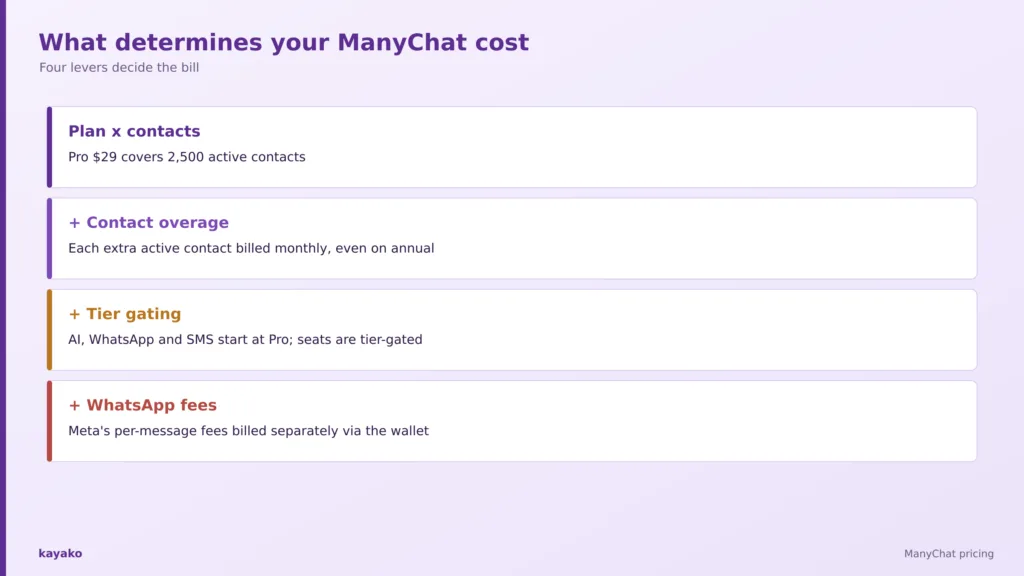
The ManyChat tiers. Contact overage and WhatsApp message fees sit on top of these base prices.
That table is the easy part. Before breaking down what moves the number, it helps to hear from the people already paying it.
2. What people say about ManyChat on G2, Capterra, and Reddit
ManyChat holds strong ratings, around 4.5 out of 5 on G2 from roughly 165 reviews and 4.6 on Capterra, though its lowest sub-score is customer service. The standout themes tell you where it shines and where it strains.
What people praise
- Best-in-class social DM automation. Turning Instagram and Messenger comments into automatic DMs and lead-magnet delivery is the standout use case.
- Easy no-code builder. Drag-and-drop flows and ready templates get non-technical creators live fast.
- A useful free tier to test. Low friction to try paid features, even after the free plan was trimmed.
- Broad channel reach. Instagram, Messenger, WhatsApp, TikTok, Telegram, SMS, and email from one tool, with official platform partner status.
What people flag
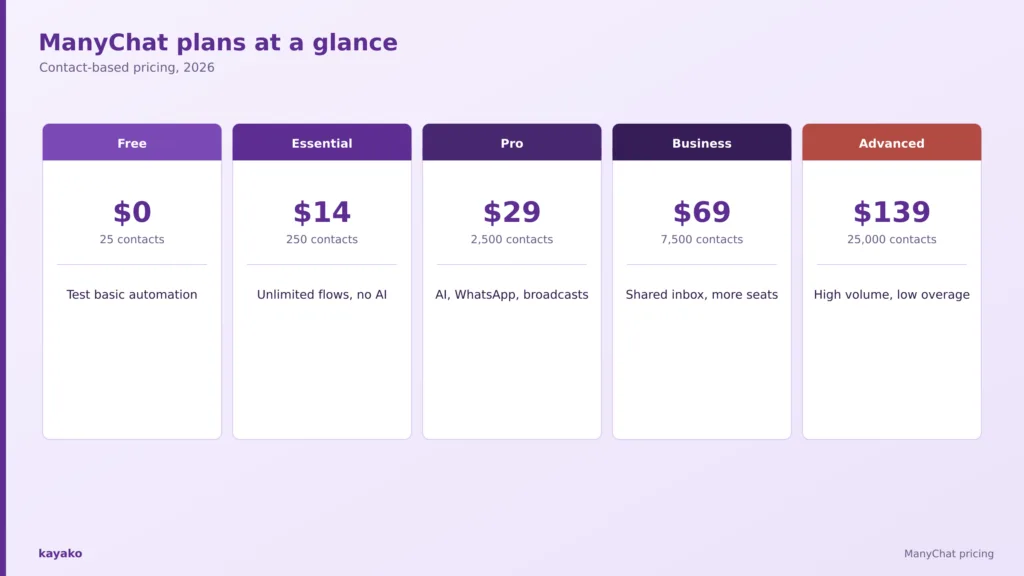
- Contact-based pricing climbs unpredictably. The dominant complaint: you pay for contacts, not usage. On Reddit, users note the entry price is misleading because a list of a few thousand contacts can reach several hundred dollars a month.
- AI and key channels are gated behind Pro. There is no AI on Free or Essential, and WhatsApp and SMS also start at Pro, so the entry tier feels thin.
- Support quality is the lowest-rated area. Slow replies, with priority help reserved for higher tiers.
- Meta and Instagram ban risk. A recurring, high-anxiety theme when automation gets flagged as spam and accounts are restricted.
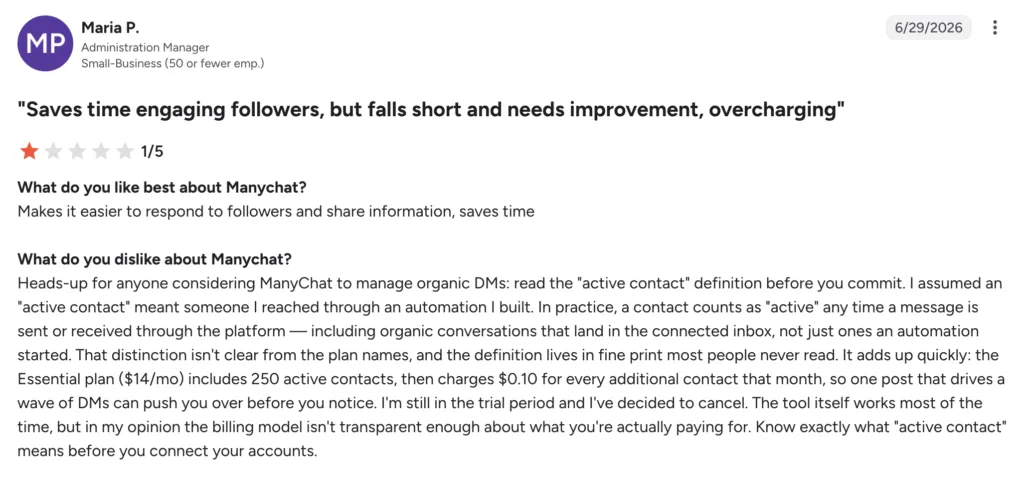
- The free plan was cut sharply. The 2026 change dropped it to 25 active contacts, which long-time users called a bait-and-switch.
- The AI is marketing AI, not support AI. It answers only from a short, manually pasted knowledge library, so it does not read your help docs or ticket history.
None of these are vague grumbles. They trace back to how the ManyChat bill is assembled, and to what the tool is for, which is worth breaking down next.
|
|
3. What actually determines your ManyChat cost?
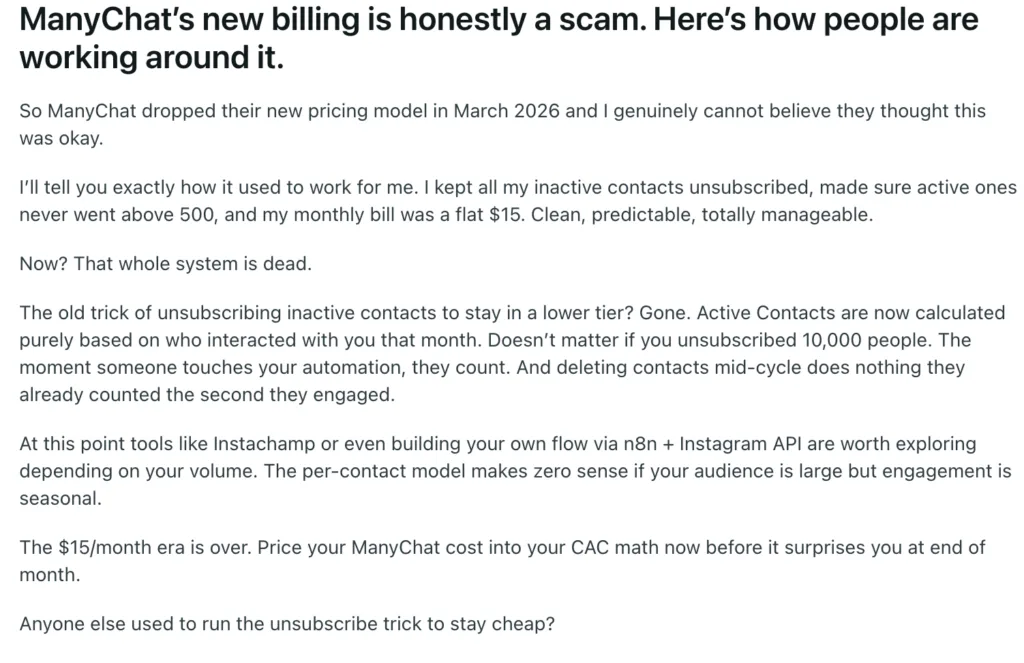
ManyChat is billed by monthly active contacts, which is the lever that makes bills unpredictable. An active contact is any unique person you message or automate to in a billing month, counted once no matter how many messages pass. Pro at about $29 covers 2,500 active contacts; beyond that, you pay per extra contact, even on annual billing, so a Pro account at 5,000 contacts can run well over a hundred dollars a month.
Two more levers shape the bill. The tier you are on sets not just the base price but the overage rate, which falls sharply as you move up, so scaling means both bigger base fees and cheaper marginal contacts. And channels are gated: Free and Essential cover two channels with no WhatsApp, SMS, or AI, while Pro adds a third channel plus AI, and the higher tiers add seats. On top of the subscription, WhatsApp marketing messages carry Meta’s own per-message fees, billed separately through the ManyChat wallet.
The AI is worth a separate note, because it shapes whether ManyChat fits at all. From Pro upward, AI is bundled with no extra metering, but it answers only from a knowledge library you paste in by hand, capped at a few hundred thousand characters, and it does not learn from existing help docs or past tickets. That is marketing-conversation AI, not a resolution engine, which points to the real question: is ManyChat the right tool for your job?
Four levers decide the real ManyChat bill: plan, contact overage, tier gating and WhatsApp message fees.
|
4. Which ManyChat plan makes sense for you?
The right plan follows your goal and your audience size, not the length of the feature list. Three patterns cover most users.
Testing automation on one account: Free or Essential
These tiers cover comment-to-DM flows on a small list, without AI. They are a low-cost way to try the builder before committing.
- Scenario. A solo creator automating lead-magnet delivery from Instagram comments on a small following.
Creators and SMBs wanting AI and WhatsApp: Pro
Pro is the entry AI tier, adding AI replies, broadcasts, and a third channel including WhatsApp. It is where most paying marketers land, and where contact-based costs start to matter.
- Scenario. A small brand running AI-assisted DMs and broadcasts across Instagram and WhatsApp.
Higher-volume teams: Business or Advanced
The upper tiers add a shared inbox, more seats, and a much lower per-contact overage rate for teams running multi-channel marketing at scale.
- Scenario. An agency managing large audiences across every channel with several team members.
If your real need is answering customer questions rather than marketing to them, compare this with an AI chatbot built for support and the best live chat software.
Knowing which plan fits is half the decision. The other half is knowing when ManyChat is the right spend at all.
5. When does ManyChat pricing actually make sense?
ManyChat earns its price when several of these are true at once.
- Your goal is marketing automation. Instagram, Messenger, WhatsApp, or TikTok flows are exactly what it is built for.
- You turn social comments into DMs. Comment-to-DM lead capture is its standout strength.
- You run broadcasts and nurture flows. Reaching a defined audience with sequences is a core job.
- You want a no-code builder. The visual flow builder gets campaigns live fast.
- Your contact list is stable. Contact-based pricing stays predictable when your audience is not growing explosively.
Put plainly, ManyChat is worth it when the job is marketing automation. The reverse case is just as important, because for a support team it is the wrong tool rather than an expensive one.
|
|
6. When might ManyChat be more than you need?
The clearest signal is not team size but the job itself. ManyChat is the wrong fit when several of these hold true.
- You need to resolve customer support issues, not run marketing flows.
- You want AI that answers from your help docs and ticket history.
- Your audience grows fast, so contact-based pricing climbs unpredictably.
- You need a shared inbox and SLAs for a support team.
- You want one tool for support across email and web, not just social DMs.
When the real job is resolving customer issues, a platform built around AI agents rather than basic chatbots and priced on resolved tickets does a different job than a marketing automation tool, which reframes the decision by use case.
7. ManyChat pricing by company scenario
Find the row that sounds most like your goal, then read across. The last row is the one where ManyChat is the wrong tool rather than the wrong tier.
| Company scenario | What you probably need | ManyChat fit |
|---|---|---|
| Solo creator testing flows | Comment-to-DM automation | Free or Essential |
| Creator or SMB marketing | AI replies, WhatsApp, broadcasts | Pro |
| Higher-volume marketing team | Shared inbox and more seats | Business or Advanced |
| Enterprise brand | Custom volume and support | Book a demo |
| Customer support team | Ticket resolution and help-doc AI | Use a support platform |
Match your goal to the plan. A support team is a different job, not a different tier.
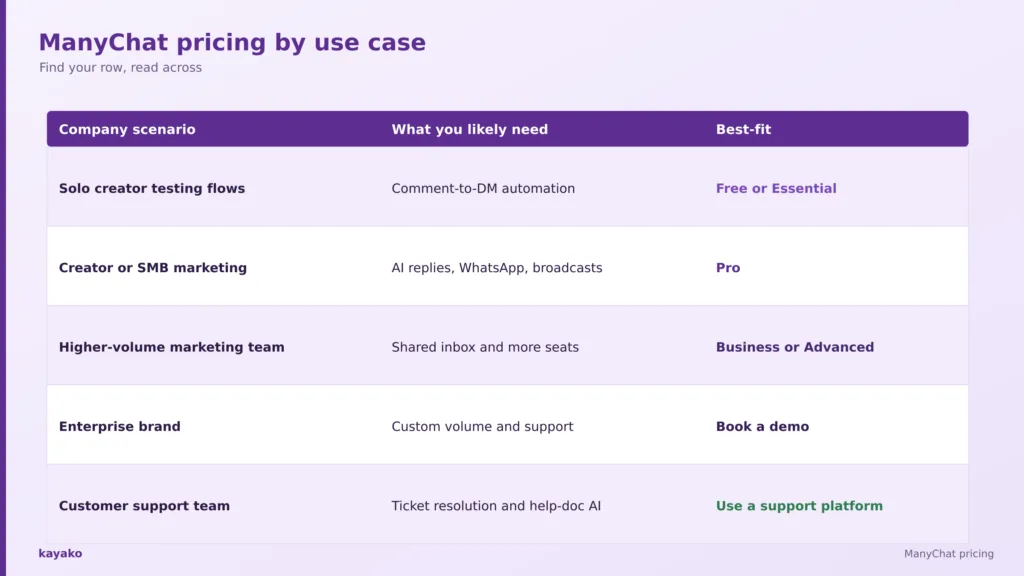
Seeing yourself in a row is useful, but for many teams the decision comes down to whether they need marketing automation or customer support.
8. ManyChat vs Kayako
This is not a full feature teardown, and the two tools do different jobs, which is the point.
ManyChat
ManyChat is strong at chat marketing: best-in-class Instagram and Messenger comment-to-DM automation, a no-code flow builder, broad channel reach across social and messaging, and official Meta and TikTok partner status. It fits marketers running audience automation.
Kayako
Kayako is a customer-support platform, a different job. Agent Kay resolves support tickets autonomously using your knowledge base and history; SingleView gives agents one screen of context across email and web; and pricing is one dollar per resolved ticket. Where ManyChat automates marketing conversations, Kayako resolves support ones.
These tools answer different questions. If you are driving marketing engagement, ManyChat fits; if you are trying to resolve customer issues at scale, a support platform does.
A head-to-head helps, but the final call comes down to the job you have. For a wider view, our guide to ManyChat alternatives lays out the options by use case, and a short checklist turns the decision into a clear one.
|
|
9. What should you actually consider before buying ManyChat?
Swap the question of which plan is cheapest for a short set of questions about what you are actually doing.
- Is my goal marketing automation or customer support?
- How many active contacts will I have, and how fast will that grow?
- Which channels do I actually need?
- Will WhatsApp message fees add up?
- Do I need AI that reads my help docs?
- Do I need a shared inbox and SLAs?
- What will the bill be at double the contacts?
That last question is the one that catches teams out. Pricing today is not the same as cost at scale. The distinction that matters most, though, is marketing versus support. Research from Gartner found only 14 percent of customer service issues are fully resolved in self-service, which is a reminder that resolving customer problems is a specialized job, and a marketing automation tool is not built for it.
With those answers in hand, the decision becomes straightforward. The tree below turns them into a single recommendation.
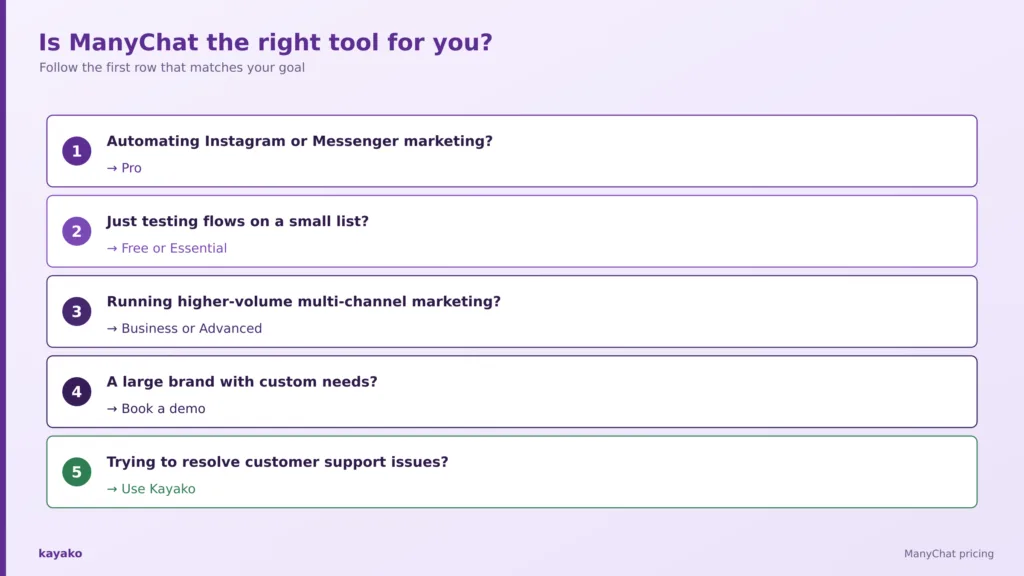
Is ManyChat worth it for you? A quick decision tree
- Automating Instagram or Messenger marketing? Pro.
- Just testing flows on a small list? Free or Essential.
- Running higher-volume multi-channel marketing? Business or Advanced.
- A large brand with custom needs? Book a demo.
- Trying to resolve customer support issues? Use Kayako.
Follow the first row that matches your goal. A support need points to a support platform, not a tier.
A tree like this is more useful than another pricing table, because it moves you from what ManyChat costs to whether it is the right tool for your job.
How Kayako helps
If the real job is customer support, Kayako is built for it. Agent Kay resolves repetitive tickets end to end using your knowledge base and history, and SingleView gives agents the full history of every customer on one screen. Pricing is one dollar per resolved ticket, so cost tracks resolution rather than audience size.
Case study: Contently. Contently reached 68 percent autonomous resolution with Kayako, cut first response from 6.4 hours to 91 seconds, and avoided $1.8M in costs, the kind of support outcome a marketing tool is not built to produce.
|
|
Conclusion
ManyChat pricing in 2026 is contact-based: a small free tier, then Essential, Pro, Business and Advanced rising with your audience, plus WhatsApp message fees on top. For marketing automation on social and messaging, it is a capable, easy tool, and the price pays back when the job is audience engagement.
So read the price list, then read your own goal. Pricing tells you what ManyChat costs. Your use case tells you whether it is even the right tool, and if your real need is resolving customer issues, a support platform priced on outcomes will serve you better.
Frequently asked questions
How much does ManyChat cost?
ManyChat is contact-based. There is a free tier for 25 contacts, Essential from about $14 a month for 250 contacts, Pro from about $29 for 2,500, Business from $69 for 7,500, and Advanced from $139 for 25,000, on annual billing. Costs rise with your active contact count, and WhatsApp messages carry Meta’s own fees.
Is ManyChat free?
ManyChat has a free tier, but in 2026 it was cut to just 25 active contacts with limited channels and no AI. It is enough to test basic comment and DM automation on a very small account, but most real use quickly needs a paid plan starting at Essential or Pro.
How does ManyChat contact-based pricing work?
You pay by monthly active contacts, meaning any unique person you message or automate to in a billing month is counted once. Each plan includes an allowance, and beyond it you pay per extra contact, even on annual billing, so bills rise with audience size rather than message volume.
Does ManyChat include AI?
AI is included from the Pro tier upward with no separate metering, but it answers only from a knowledge library you paste in by hand and does not read help docs or past tickets. Free and Essential have no AI. It is built for marketing conversations, not support resolution.
Why did my ManyChat bill go up?
Most increases come from contact growth, since pricing scales with active contacts rather than usage. Adding WhatsApp or SMS, moving up a tier for AI or seats, and Meta’s per-message WhatsApp fees can also raise the total beyond the headline plan price.
Is ManyChat worth it?
For marketing automation on Instagram, Messenger, WhatsApp, and similar channels, ManyChat is worth it and easy to run. For customer support, it is the wrong tool rather than an expensive one, because its AI and workflows are built for marketing, not resolving customer issues.
Is ManyChat good for customer support?
Not really. ManyChat is a chat-marketing tool: its AI answers from a short pasted knowledge base, it has no proper ticketing or SLAs, and pricing scales with contacts. Teams that need to resolve customer issues are better served by a dedicated support platform.
What is the best ManyChat alternative?
It depends on the job. For marketing automation, alternatives compete on channels and contact pricing; for customer support, a resolution-focused platform like Kayako is a different and better fit. Our guide to ManyChat alternatives compares options by use case.
Can Kayako do what ManyChat does?
Kayako and ManyChat do different jobs. ManyChat automates marketing conversations on social and messaging; Kayako resolves customer support tickets with AI across email and web. If your need is support rather than marketing, Kayako is the right tool, priced per resolved ticket.