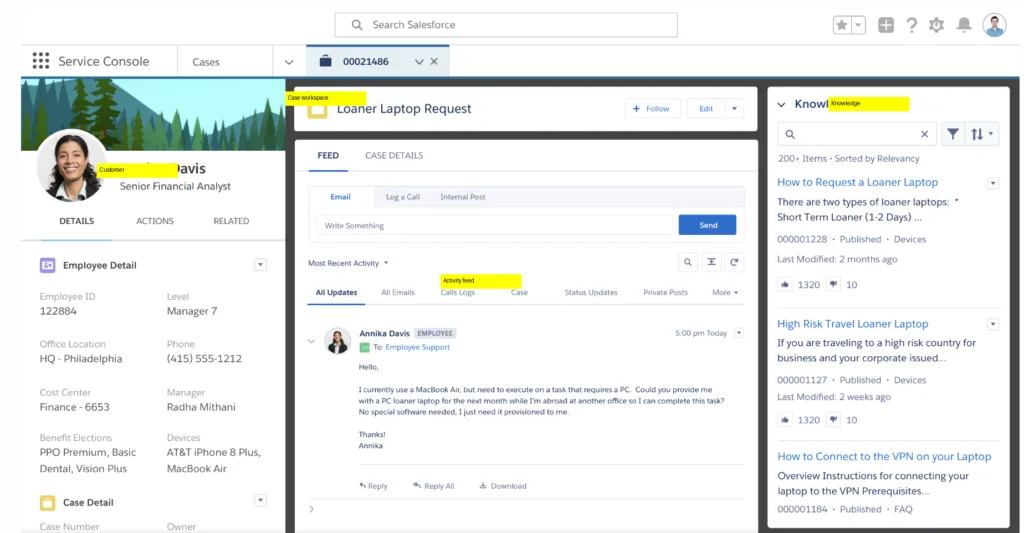
Salesforce Service Cloud is the customer service application built on the Salesforce platform. Cases arrive from email, web forms, chat, phone, messaging and social, land in a configurable agent console beside the customer’s CRM record, and move through queues, assignment rules, escalation logic and SLA milestones. Around that sit a knowledge base, omni-channel routing that distributes work by agent capacity, reporting, Field Service, and an AI layer now branded Agentforce. It is sold to mid-market and enterprise organizations, priced per user per month across five editions from $25 to $550, with AI usage metered separately on top.
This review is written by Colin Guilfoyle, SVP of Customer Support at Trilogy, who has spent roughly a decade leading support functions and buying the platforms that run them. He has not run a Service Cloud implementation end to end, and nothing here is presented as bench testing. What follows is built from Salesforce’s own published pricing and edition matrix, read firsthand and dated, and from a deep read of what practitioners describe across four review platforms. Where there is an opinion, it comes from that experience of operating support organizations. Where the evidence disagrees with the opinion, the evidence wins.
The number that prompted this piece is the widest gap I have seen in this format. Service Cloud scores 4.4 out of 5 on G2 and 1.4 out of 5 on Trustpilot. Three full stars, same vendor, same year. Some of that is an artifact worth explaining rather than a scandal, and the explanation turns out to be the most useful thing on this page. What follows reads all four platforms against each other, unpicks what the Agentforce rebrand actually changes commercially, prices the thing honestly from Salesforce’s own page, grades it feature by feature, and names the alternatives worth a look.
How I evaluated Salesforce Service Cloud
Enterprise platforms are judged across a renewal cycle and a reorganization, not a trial. Six criteria, in the order they matter.
Hands-on use. I did not implement Service Cloud and will not claim otherwise. What I examined directly is the published pricing page and edition comparison, read on 5 August 2026, including which capabilities gate at which tier and what the top edition includes by way of AI usage.
User reviews, at volume and in depth. G2, Capterra, Trustpilot and Reddit. The r/salesforce community is unusually valuable here, because it is full of administrators and consultants describing production behavior rather than buyers describing a purchase.
Depth and breadth of features. Whether the platform covers a full support surface. Service Cloud does, and the interesting question is what that costs.
Scalability. Multibrand, residency, governor limits, deployment, and behavior when volume arrives suddenly.
Pricing and forecastability. The bill you cannot predict. With three metering models running in parallel, this became the center of the research.
Support the vendor gives you. The fairest test a company selling customer service software can face, and the one that produced the sharpest material.
Two standing exclusions. Employer-review content from Glassdoor and AmbitionBox is dropped, because it measures the company as a workplace rather than as a vendor. Every Reddit source was checked for commercial interest, which matters more here than usual, since Salesforce posts its own promotional threads in the community.
What you are actually buying in 2026
Service Cloud is being renamed. The G2 profile now reads Agentforce Service, with Salesforce Service Cloud in brackets after it, and the same prefix has landed on Sales Cloud and Commerce. Marc Benioff has publicly floated renaming the whole company Agentforce. Salesforce also bought Regrello in late 2025 and rebranded it Agentforce Operations, and it is acquiring Contentful to feed cleaner content to the agents.
The naming matters less than what travels with it. Practitioners in r/salesforce read the rebrand as cosmetic on the surface and consequential underneath, because the Agentforce prefix arrives attached to consumption billing rather than seat licensing. Several noted the same release quietly making platform features free, which reads less like generosity than like clearing the path to a metered turnstile.
There is a second, more practical version of the problem. One administrator described trying to add click-to-call and finding Sales Dialer deprecated into Service Cloud Voice, Service Cloud Voice renamed Salesforce Voice, and a separate Agentforce Contact Center, without establishing whether those were synonyms or separate SKUs.
Budget for the rename tax. Not the license, the hours your team spends working out which product they are actually being sold.
The ratings disagree, and the audiences explain most of it
Here is where Service Cloud sits across the four platforms as of August 2026.
|
Platform |
Score |
Reviews |
What the audience is |
|---|---|---|---|
|
G2 |
4.4 / 5 |
7,357 |
Admins, developers, agents using the product |
|
Capterra |
4.5 / 5 |
816 |
Business buyers, many reviews incentivized |
|
Trustpilot |
1.4 / 5 |
635 |
Anyone, largely contract and billing experiences |
|
|
No score |
Thousands of threads |
Administrators and consultants, plus the vendor |
Capterra’s sub-scores are the most informative artifact. Functionality sits at 4.4 and Customer Service at 4.3, while Ease of Use trails everything at 4.1. That ordering matches the G2 theme counts exactly, where complexity draws 697 mentions, steep learning curve another 583 and 474, and expensive pricing 425.
The Trustpilot figure needs a caveat most competing articles skip. It is the profile for Salesforce the company, not Service Cloud the product, so it captures contract disputes, renewal uplifts, billing failures, and account management across the whole portfolio. It is not a product score and should not be read as one. What it is, with 84% of reviewers at one star, is a brutal measurement of what dealing with Salesforce commercially feels like, and that is a real part of ownership.
Read together, the pattern is consistent rather than contradictory. People who use the product rate it well. People who administer it rate it well with reservations about complexity. People who deal with the company rate the company badly.
That is the last score in this review. Everything after this comes from what people described.
What users actually say about Salesforce Service Cloud
Five themes recur, ordered by how often they came up.
The unified record genuinely changes how fast a case gets resolved
This is the most consistent praise, and it is specific. Reviewers describe agents no longer piecing together billing, order history, and past contacts across four tabs, escalation rules catching SLA breaches before they land, and knowledge articles surfacing inside the case. A collections specialist described the single case timeline as the thing that makes the job possible under time pressure.
The complexity is not a learning curve; it is a staffing decision
Reviewers repeatedly describe needing a dedicated administrator or an external consultant permanently, not just for the build. One described three weeks to implement automation rules even with a consultant engaged. Another noted that changing a case layout or adding a picklist value requires admin rights, so ordinary process changes queue behind someone else’s backlog.
Consumption pricing is the thing people cannot forecast
Naampreet K., a developer, described the Flex Credits model draining faster than expected when an agent loops or traffic spikes, and said keeping costs predictable means strict guardrails in Agent Builder, including limiting how many turns a session can run. On Capterra, Vershley J. put the same point commercially, describing it as a good system for large enterprises that can afford the interesting features.
Salesforce’s own support is the most common complaint about Salesforce
The irony is not lost on reviewers, and several name it directly. Descriptions include multi-day waits on weekday issues, and one r/salesforce member paying $33,000 for a Premier Support plan and still being routed through an AI assistant that repeatedly insisted they were not logged in before handing off to a human anyway. Clive Churchward, a twenty-year customer writing on Trustpilot, described three consecutive failed payment collections followed by disconnection of the service.
The AI is real, and it is not yet what the keynote says
Practitioners split cleanly. Some report real value in case summarization and suggested replies. Others describe deflection landing at 20% to 30%, useful rather than transformational. The most common blocker named is data quality: the agent reads whatever is in your knowledge base, so stale articles produce confidently wrong answers, and most teams face a cleanup project before launch.
A note on sourcing. Capterra explicitly labels many Service Cloud entries as incentivized, so treat its aggregate as the friendliest number of the four. On Reddit, Salesforce runs its own promotional AMA threads in r/salesforce, and I have not used any vendor-posted content as user sentiment. Worth noting that one such AMA on deploying Agentforce sits at zero points with over two hundred comments, which is its own kind of signal.

Salesforce Service Cloud pros and cons
|
Pros |
Cons |
|---|---|
|
Best case management engine in the category |
Needs a permanent admin or consultant |
|
Complete customer context in one console |
Everyday config changes queue behind admin rights |
|
Omni-channel routing by capacity, not round robin |
Three AI meters running in parallel |
|
Deep integration surface and mature APIs |
Chat, bots and knowledge gate at a high tier |
|
Genuinely useful case summarization |
Reporting frustrates the people who need it most |
|
Scales to enterprise volume and complexity |
Vendor support is slow at every price point |
|
Ecosystem and training material are unmatched |
Consumption spend can start without your consent |
What Salesforce does better than anyone
Handling genuinely complicated service operations. Multiple brands, regulated processes, field service tied to cases, sales and support sharing one customer record, thousands of agents under different rules. Nothing else does that as completely, and organizations at that size are not really choosing between Service Cloud and a help desk. They are choosing between Service Cloud and a systems integration project.
What you will be living with
An operating cost that is not the license. Administrator salaries, consultant retainers, a deployment process with test coverage requirements, and now a metered AI layer whose spend is not fully under your control. Those are structural properties of the platform rather than problems awaiting a release.
Feature by feature, based on the reviews
Pricing, and the three meters running at once
The seat license is the easy part. Per Salesforce’s own pricing page, Starter Suite is $25 per user per month, Pro Suite $100, Enterprise $175, Unlimited $350, and Agentforce 1 Service $550, the last including 2.5 million Flex Credits per org each year.
Where the tiers sit matters more than what they cost. Chat and bots, and Salesforce Knowledge, both begin at Unlimited. Enterprise, at $175, is marketed as including AI for customer service. So the tier selling you AI sits below the tier selling you the knowledge base that AI needs to ground its answers in, which is the exact configuration that produces confidently wrong replies.
Then the AI meters. Flex Credits run at $500 per 100,000, with a standard action costing 20 credits and a voice action 30, so roughly $0.10 and $0.15. The alternative is a Conversations model at about $2 per conversation, where a conversation is a 24-hour session. The two cannot run in the same org at once. Under Conversations, a one-line FAQ deflection costs the same $2 as a twenty-turn resolution, so your cheapest wins subsidize your hardest ones. Under Flex Credits, you pay per action rather than per outcome, which means a session that loops and fails costs more than one that succeeds.
Put that beside the guardrails practitioners describe and the trap closes. The recommended way to keep spend predictable is to cap turns per session. Capping turns caps how much the agent is allowed to attempt, so budget control is purchased directly with resolution quality.
Work out your cost per resolved case under both meters at your real volume before you let anyone quote you a seat price.
The Service Console and the daily agent experience
The console is the reason people stay. It is genuinely configurable; it puts the whole customer on one screen, and omni-channel routing distributes by capacity rather than round robin, which reviewers credit with fixing the morale problem where the fastest agent gets buried.
The costs are ergonomic, and they accumulate hour after hour. Lightning record pages loaded with components go sluggish, and reviewers describe that lag as the thing that quietly grinds on agents moving through a queue. Click depth is the other complaint: logging a disposition or a promise-to-pay can take more screens and validation steps than the conversation allows for. A collections specialist framed it precisely, saying the frustration is not whether it works but how it feels under time pressure.
The structural one is admin dependency. Changing a case layout, adding a picklist value, or adjusting a routing rule requires permissions most support managers do not hold, and changes to live processes need testing and deployment steps. A support operation that wants to tune its own process weekly cannot, and that friction never appears in a demo.
Budget an internal admin before you budget the seats, because without one the console degrades into whatever it was configured as on day one.
Agentforce and AI capability
There are two things here doing different jobs. Assistive AI summarizes cases, drafts replies and recommends articles, and this is where the concrete praise sits, with reviewers reporting hours saved weekly on categorization alone. Autonomous agents answer and act on their own, and this is where the evidence thins.
The failure shapes practitioners’ names are specific. Agents freeze when two Topics have overlapping keywords, which they describe as decision paralysis requiring hours in the Reasoning Log to diagnose. Answers are inconsistent across similar questions, which is the thing that stops teams putting it in front of customers. And the whole layer inherits your data debt: articles not updated since 2021 get quoted to customers with full confidence, so a content cleanup usually precedes launch rather than following it.
The dependency nobody quotes is Data Cloud, which grounds the agents and carries its own substantial cost. There is also a language multiplier, with non-English conversations reported to raise token cost by at least half.
Treat the assistive half as ready and the autonomous half as a funded project with a cleanup phase, not a feature you switch on.
Case management, knowledge and reporting
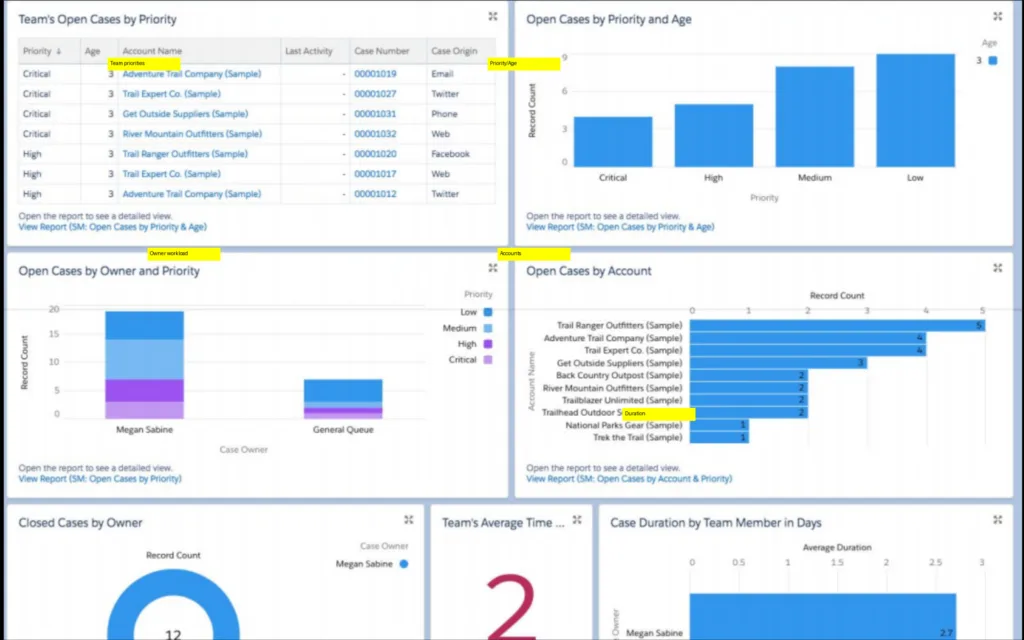
Case management is the strongest thing in the product and the reason the category benchmark exists. Queues, assignment rules, escalation, milestones and entitlements all work, and reviewers describe SLA breaches being caught rather than reported afterward.
Reporting is where the operator complaints concentrate, and they come from precisely the people who need it. One support leader described being unable to shape data the way their executive team wanted, limiting the dashboards they could share upward. Building a specific report is described as effort rather than a task. That matters because reporting is how a support function defends its budget.
Knowledge has an odd second-order problem. The knowledge base grounds the AI, and the community search teams use to find Salesforce’s own documentation is described by reviewers as a constant source of complaints. A platform that struggles to make its own knowledge findable is asking you to trust the same machinery with yours.
Get a named report built during the evaluation, not a demo dashboard.
Vendor support
Support tiering is a purchase decision before it is a service question. The Premier Success Plan arrives at the Unlimited edition at $350 per user per month, so the difference between waiting and being helped is a $175 per seat upgrade.
The failure shapes are consistent across platforms and years. Multi-day waits on weekday tickets. Escalations that route back through an AI assistant. Billing states the platform cannot recover from unaided, including subscriptions that failed to collect and then disconnected a long-tenured customer. Reviewers also describe features arriving in production under-tested, and one enterprise architect said plainly that being first to market should not cost the customer their own reputation.
The compounding version is worth stating. You are buying customer service software from a vendor whose customer service is the most common complaint about it, and you will be pointing at that vendor’s SLA when your own is missed.
Get response-time commitments written into the contract rather than assumed from the plan name.
Scale, governor limits and getting work deployed
Service Cloud scales further than almost anything else, and the constraints are architectural rather than volumetric. Multi-tenancy imposes governor limits, and developers describe hitting the 100 SOQL query ceiling mid-transaction through recursive triggers, which forces defensive coding. Deploying Apex requires 75% test coverage, good discipline that makes a hotfix slow.
The organizational risk is configuration sprawl. Reviewers describe orgs where UI-built automations conflict and engineers spend their time untangling rules nobody owns. That is what happens when a platform lets many people automate, and nobody governs it.
One finding deserves its own line, because it is the sharpest thing in this review. An administrator reported Agentforce Coworker switched on across their org overnight by Salesforce, showing as off in setup, with no permissions assigned, no documented way to disable it, and users consuming Flex Credits the whole time. Consumption billing and vendor-controlled feature activation in the same platform means your spend is not entirely yours to govern.
Set a hard cap in the Digital Wallet on day one and check it weekly, because the alternative is discovering the number at the end of the month.
Salesforce Service Cloud alternatives, by what you are solving for
You want AI resolution priced by outcome rather than by action
Kayako prices AI around resolved conversations, so a session that loops and fails does not cost more than one that works, and you are not tuning session length to protect a budget. You give up the depth of the Salesforce platform and its CRM integration. Test it by pricing one month of real conversations under both models, including the ones that ended badly.
You need an AI agent without replacing the helpdesk you already run
If Service Cloud is working as a case system and only the AI layer is the problem, Kayako’s agent runs on top of an existing helpdesk without a migration and reports on what it actually closed. You give up native platform integration and the Data Cloud grounding story. Test it against a fixed sample of transcripts and grade the outcomes yourself.
You want most of the capability with a fraction of the administration
Zendesk covers routing, SLAs, knowledge, and multibrand with configuration a support manager can do without a certified admin. You give up deep CRM unification and heavy customization. Test it by listing the ten changes you made last quarter and asking who could make each one in the new tool.
Your support is mid-market, and the Salesforce bill has outgrown the value
Freshdesk and Zoho Desk both cover ticketing, automation, and knowledge at a materially lower total cost, including the staffing you will not need. You give up enterprise governance and the ecosystem. Test it by pricing three years, including admin salary, not one year of licenses.
You are product-led, and support is part of the customer relationship
Intercom is built around in-product messaging and self-serve resolution rather than case lifecycle. You give up the formal SLA and entitlement machinery that regulated operations depend on. Test it by checking whether anyone has ever asked you for an SLA in writing.
You want a small team to feel fast again
Help Scout strips the platform back to a shared inbox with light automation and a knowledge base. You give up reporting depth, routing sophistication, and everything enterprise. Test it by counting how many of your Service Cloud features were used at all last quarter.
Three numbers decide this for any option: cost per resolved case at your real volume, the content and data hours needed before the AI performs, and the fully loaded renewal at double volume including the people required to run it.
Verdict
Service Cloud is the most capable customer service platform available, and it is not close. If your operation has multiple brands, regulated processes, field service, or sales and support sharing a customer record, the case management engine underneath this product is worth the difficulty, and the enthusiasm from administrators and developers is earned rather than manufactured. Nobody gets fired for this choice, and mostly they should not.
What has changed is that the pricing question is now harder than the product question. Three AI meters run in parallel, the cheapest way to control spend is to constrain what the agent may attempt, the knowledge base that grounds the AI sits a tier above the AI itself, and at least one team has reported the vendor switching on a metered feature they could not turn off. On Monday, I would do two things. Model your annual cost per resolved case under both the Flex Credits and Conversations meters using last quarter’s actual volumes, including the conversations that failed. Then open your Digital Wallet, set a hard usage cap, and put a weekly reminder in someone’s calendar to look at it, because on this platform the bill is now something you have to actively govern rather than something you agree once.
Salesforce Service Cloud FAQ
How much does Salesforce Service Cloud actually cost?
Seats run from $25 to $550 per user per month across five editions. AI usage is metered separately at roughly $0.10 per standard action under Flex Credits or about $2 per 24-hour conversation, and Data Cloud carries its own cost. Model the total, because the seat price is the smallest part for most teams.
Is Salesforce Service Cloud now called Agentforce Service?
Increasingly, yes. G2 already lists the product as Agentforce Service with the old name in brackets, and the same prefix has landed across Sales and Commerce. The underlying case management product is the one you have always known.
Do I need a dedicated Salesforce admin?
For anything beyond the smallest deployment, treat it as required rather than optional. Reviewers consistently describe routine changes needing admin rights and complex work needing a consultant, so put that headcount in the business case up front.
How good is Agentforce at actually resolving cases?
Assistive features like case summarisation and suggested replies get consistent praise. Autonomous resolution gets more mixed reports, with practitioners describing deflection in the 20% to 30% range and answers that vary across similar questions. Clean knowledge content is the single biggest determinant.
Can I cap what Agentforce spends?
Partly. The Digital Wallet tracks usage, and you can set thresholds and session guardrails, and capping turns per session is the commonly recommended control. Note that limiting turns also limits what the agent can resolve, so the cap trades cost against outcomes.