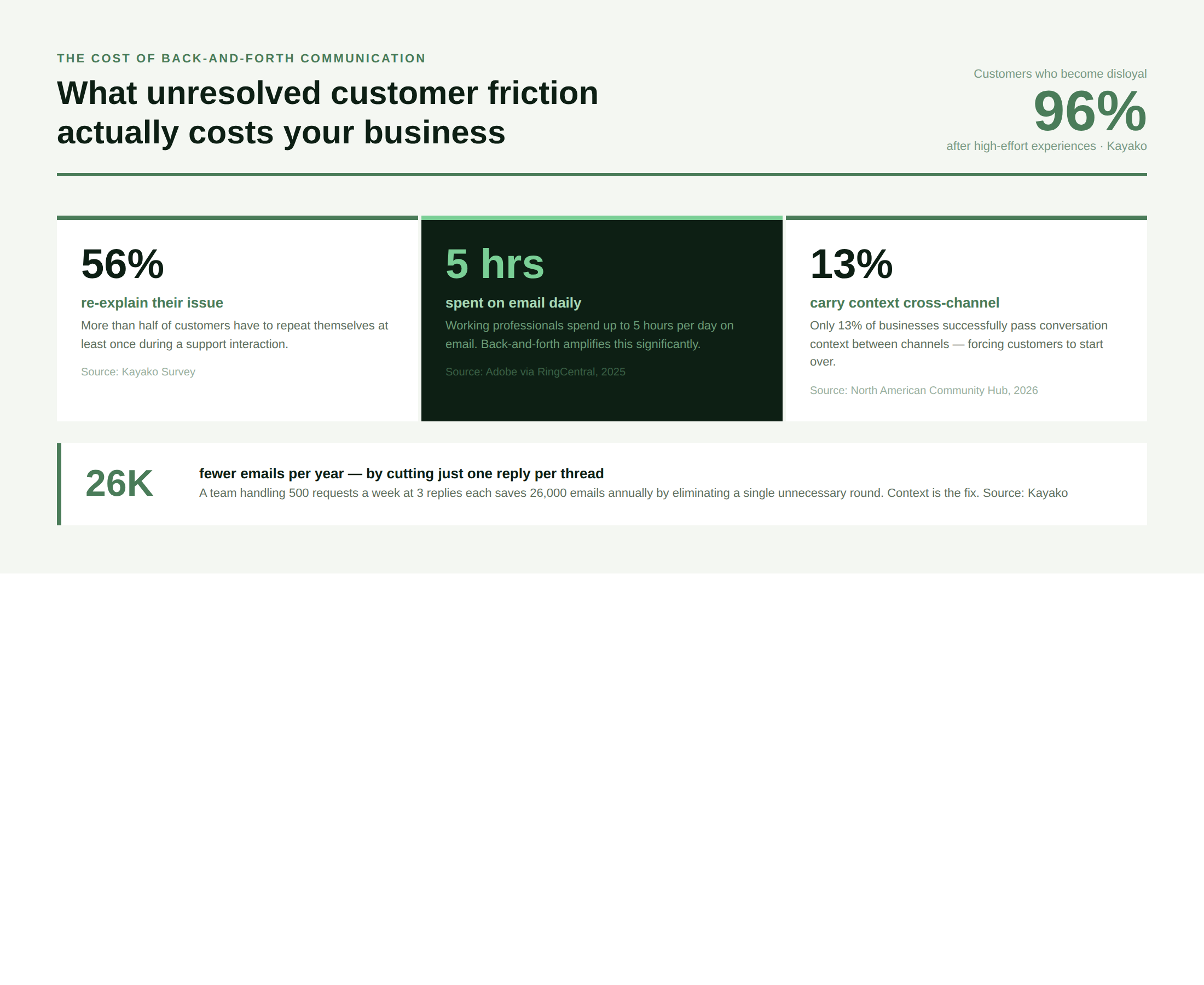
Your customers already know what they want. They just can’t get it without a fight. 56% of customers report having to re-explain their issue at least once, and 96% become disloyal to a business because of high-effort experiences. The culprit, in most cases, is unresolved back-and-forth communication: repeated emails, transferred calls, and chat threads that ask the same questions a helpdesk already has the answer to.
This is a structural problem, not a people problem. When your CRM doesn’t talk to your helpdesk, when your live chat is disconnected from your ticketing system, and when your chatbot can’t see a customer’s purchase history, back-and-forth is the inevitable output. Here’s how to diagnose and fix it, across every channel.
What Is Back-and-Forth Communication in Customer Service?
Back-and-forth communication in customer service is any exchange that requires multiple rounds of contact to resolve what should be a single interaction.
- It’s the email chain that goes five replies deep to answer one billing question.
- It’s the live chat where the agent asks for an order number that the platform already has.
- It’s the chatbot that escalates to a human, who then asks the customer to start over.
The operational cost is real: workers spend up to 5 hours per day on email alone (Adobe research, cited in RingCentral, 2025). In a support context, every unnecessary round of communication delays resolution, inflates handle time, and drains agent capacity that should be spent on harder problems.
Back-and-forth isn’t caused by customers who give vague requests. It’s caused by systems that give agents no context when customers arrive.
Back-and-Forth Communication Across Every Customer Service Channel
The problem looks different depending on the channel, but the root cause is always the same: context gaps. Here’s how it manifests across each one.
Email: the original back-and-forth trap
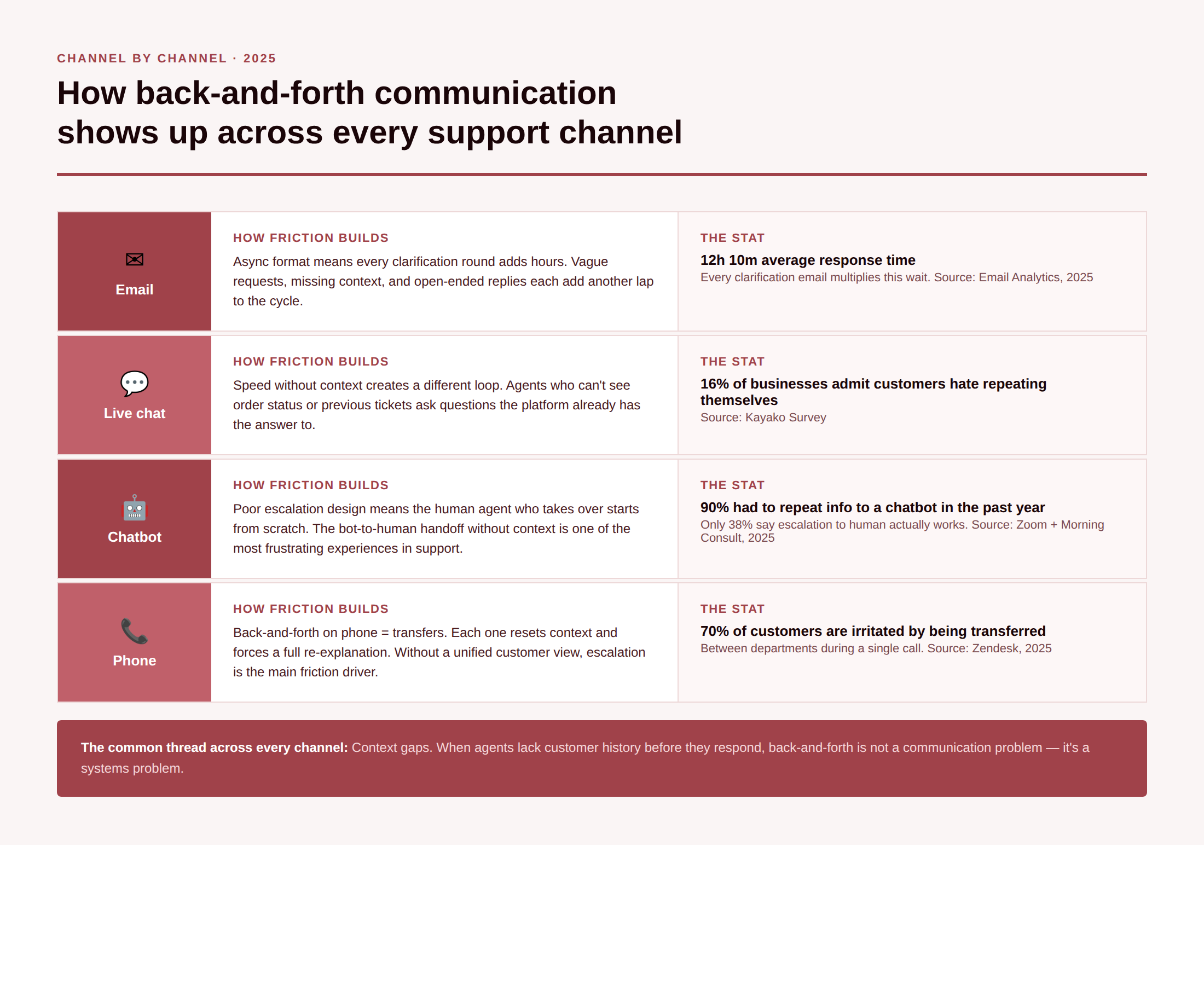
Email is asynchronous by design, which means every round of clarification adds hours to sometimes days to resolution time. The average company takes 12 hours and 10 minutes to respond to a support email (Email Analytics, 2025). Each additional clarification email extends that wait multiplicatively.
The most common causes of email back-and-forth in customer service: vague initial requests, agents missing customer context (purchase history, previous contacts), unclear or incomplete replies, and open-ended closers like “let me know if you have any questions” that actively invite unnecessary replies.
The business case for fixing it is compelling: if a team handles 500 email requests a week at an average of 3 replies each, cutting one reply saves 26,000 emails per year. That’s not a marginal efficiency gain; it’s a material reduction in agent workload.
Live chat: speed without context creates a different kind of friction
Live chat is fast, with an average first response under 46 seconds, but speed without context creates its own back-and-forth loop. An agent who can’t see a customer’s order status, browsing history, or previous tickets asks clarifying questions that a unified platform would have answered automatically. 16% of businesses acknowledge their customers are most frustrated by having to repeat themselves in chat (Nextiva).
The channel split compounds this: only 13% of businesses successfully carry conversation context between channels (North American Community Hub, 2026). A customer who starts on chat and escalates to email or phone loses all previous context, and the cycle restarts again.
Chatbots: escalation is where most implementations fail
90% of customers had to repeat information to chatbots within the past year (2025 U.S. survey, cited in North American Community Hub, 2026). 81% of consumers expect bots to escalate to a human when needed — but only 38% report this happens consistently (Zoom + Morning Consult, 2025). The chatbot-to-human handoff, without context, is one of the most frustrating experiences in customer service.
Chatbots that can’t see CRM data, order history, or previous interactions are not reducing back-and-forth; they’re adding a loop before the real resolution begins. The fix is integration, not intelligence.
Phone support: transfers are the back-and-forth equivalent
On the phone, back-and-forth takes the form of transfers. Nearly 70% of customers are irritated when their call is transferred from department to department (SEMrush). Each transfer resets context and forces customers to repeat issue details. Without a unified customer view accessible to every agent, escalation is the main driver of phone-based friction.
Social media and messaging: the public repetition problem
Customers who contact brands via social media expect fast, contextual responses. A generic “DM us your order number” response when that information should already be accessible signals exactly the kind of disconnected infrastructure that drives back-and-forth. 70% of customers worldwide prefer brands that offer service across multiple channels, yet most platforms still silo data by channel (North American Community Hub, 2026).
How to Reduce Back-and-Forth Communication: 8 Proven Steps
These steps work across all channels. The first three are structural; the rest are operational.
1. Front-load every initial response with context
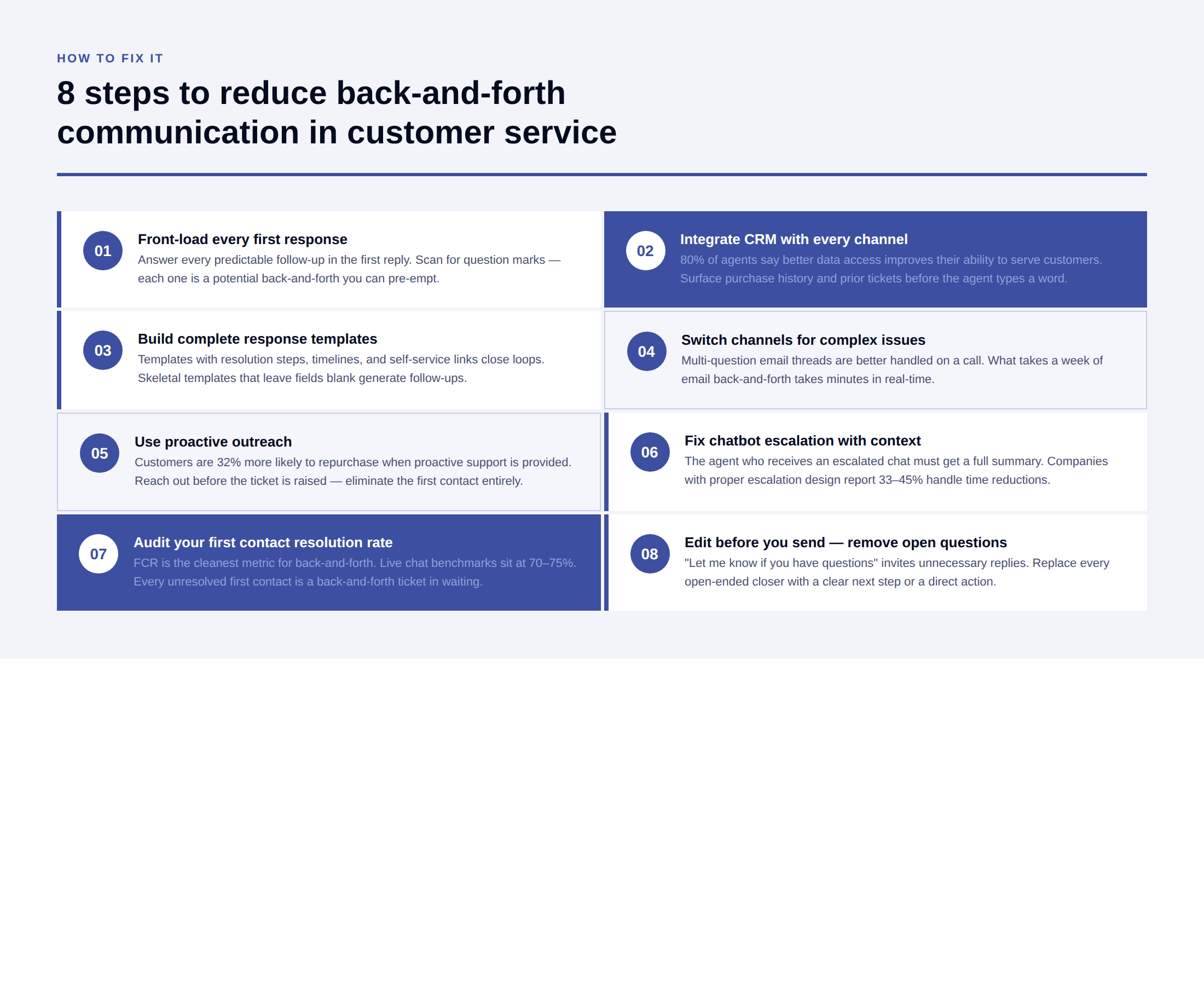
The most common cause of back-and-forth is an incomplete first response. Whether it’s an email, a chat reply, or a ticket update, the first response should answer every predictable follow-up. RingCentral’s research identifies “scanning for question marks” as the single most effective editing habit: if your message contains a question, ensure it’s specific, not open-ended, and that you’re not soliciting an unnecessary confirmation reply.
2. Integrate CRM with every support channel
Agents need customer history before they respond – not after three follow-ups. CRM integration with helpdesk software, live chat, and chatbot platforms surfaces purchase history, previous ticket context, and account status automatically. 80% of support agents say better access to cross-departmental data would improve their ability to serve customers (Salesforce, 2025).
3. Build complete message templates, not skeletal ones
Templated responses that leave key fields blank generate follow-ups. Templates that include specific resolution steps, next-action timelines, and relevant self-service links reduce them. See Kayako’s guide on customer service email templates for the formats that close loops rather than open them.
4. Switch channels when email is the wrong tool
Some problems are too complex for asynchronous communication. A thread with five replies and four questions is almost always better handled on a call. RingCentral’s guidance is direct: if an email contains several questions each requiring a complex answer, jump on a call. What takes a week via email can be sorted in minutes. Internally, move complex cross-team issues to Slack, Teams, or your project management tool, just not email threads.
5. Use proactive outreach to pre-empt the contact
88% of customers are more likely to repurchase from businesses that provide proactive support.
Proactive outreach, triggered by CRM events, failed payments, or usage patterns, is the highest-leverage way to eliminate back-and-forth before it starts.
6. Implement smart chatbot escalation with context handoff
The escalation from chatbot to human agent must be seamless. This means: the agent receives a full summary of the chatbot conversation, the customer’s CRM data, and the issue context, so they don’t ask a single question the bot already answered. Companies using AI chatbots report 33–45% reductions in average handle time when escalation is properly designed (Fullview, 2025).
7. Audit your first contact resolution rate
First contact resolution (FCR) is the cleanest metric for back-and-forth. Every unresolved first contact is a back-and-forth ticket waiting to happen. FCR benchmarks for live chat sit between 70–75% (Nextiva). If your rate is lower, root-cause analysis on the open tickets will surface exactly where context gaps are forcing follow-ups.
8. Trim your email habits, scan for question marks before sending
On the writing side, ProofHub’s guidance recommends starting every response with comprehensive details, avoiding open-ended questions, and using numbered lists for multi-part answers. The goal is a reply that can be read once and acted on, not one that prompts a clarification.
How Collaboration Tools Help Reduce Back-and-Forth Communication
The right tools eliminate the structural causes of back-and-forth. Here’s what each category does and doesn’t solve.
Unified helpdesk and CRM platforms
The most impactful intervention. A unified platform that connects CRM, ticketing, live chat, and email into a single customer view eliminates the context gap that causes most back-and-forth. Kayako’s SingleView™ gives agents the full customer timeline with every ticket, every purchase, every previous contact , giving full context before typing a response.
Real-world impact: Kayako customer Trilogy cut average ticket age from 18 hours to under 5. Tivian’s VP described issue resolution as moving from hours to minutes. Both results flow directly from eliminating the back-and-forth that comes from agents lacking context.
Shared inbox tools
Tools like Hiver, Front, and Kayako’s shared inbox prevent the internal back-and-forth that slows customer resolution. Agents get to ask each other for context, reassign tickets without notes, or leave customers waiting while internal clarification happens over separate channels.
Scheduling and intake tools
For teams that handle consultation-heavy workflows, scheduling tools (Calendly, Acuity) move back and forth about availability entirely out of email. Client intake forms (Typeform, Jotform, Kayako’s portal) collect all necessary information upfront, so the first agent response has everything it needs to resolve the issue.
Internal messaging platforms
Slack and Teams move internal clarifications out of email, reducing internal back-and-forth that delays customer response. CKEditor’s research frames this clearly: in-person or real-time communication handles complexity better than asynchronous email. For support teams, this means agent-to-specialist escalations should happen in real-time messaging and not email threads that slow down the customer-facing response.
AI-assisted response drafting
AI tools that draft responses from customer context, like pulling in purchase history, previous tickets, and suggested resolutions, reduce the agent’s thinking time, which leads to incomplete first responses. Kayako’s AI-suggested responses cut handling time without cutting quality, because the draft is already contextual.
The Benefits of Reducing Back-and-Forth Communication
The gains compound across every metric that matters.
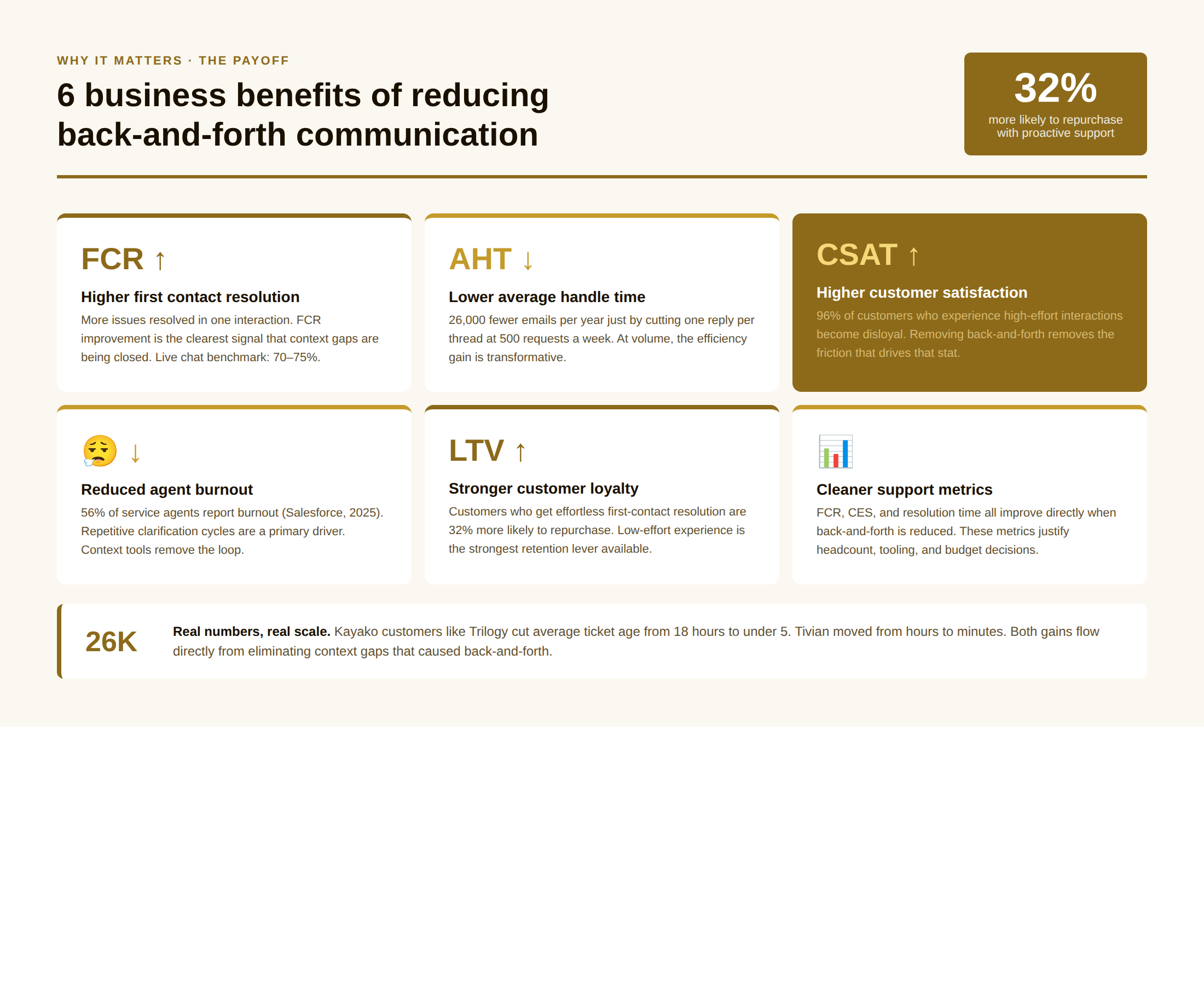
- Higher first contact resolution. Fewer back-and-forth exchanges mean more issues resolved in one interaction. FCR improvement is the most direct indicator that context gaps are being closed.
- Lower average handle time. Every eliminated clarification email or follow-up chat reduces the time per ticket. At volume, this is significant: 26,000 fewer emails a year for a team handling 500 requests a week at 3 replies each.
- Higher CSAT scores. Asking the customer less directly reduces frustration. The inverse is also true: 96% of customers who experience high-effort interactions become disloyal, as cited earlier. Removing back-and-forth removes the friction that drives that stat.
- Reduced agent burnout. Repetitive clarification cycles are one of the most draining parts of support work. 56% of service agents report experiencing burnout (Salesforce, 2025). Eliminating unnecessary back-and-forth directly reduces that load.
- Stronger customer loyalty. Customers who receive effortless, context-rich resolution on the first contact are more likely to repurchase. The relationship between low-effort experiences and retention is one of the most consistent findings in customer service research.
- Cleaner support metrics. Resolution time, first contact resolution rate, and customer effort score all improve directly when back-and-forth is reduced. These are the metrics that justify headcount, budget, and tooling decisions.
Customers love it when they are understood. Anything less miffs them to a point where they just start looking out for an option. To avoid that churn, a company must know the basic do’s and don’ts of not putting customers off – and sidelining back and forth communication is one such way. The less the same information is asked of a customer, the better it yields productive output and customer satisfaction.
FAQs
1. What causes back-and-forth communication in customer service?
A. The primary cause is context gaps: when agents don’t have access to the customer’s CRM data, purchase history, or previous ticket context at the start of an interaction. Secondary causes include vague customer requests (which are often a symptom of poor self-service resources) and incomplete agent responses that invite clarification.
2. How do you reduce back-and-forth emails in customer support?
A. Front-load every response with complete information, remove open-ended questions from replies, integrate CRM data into your email platform, and switch to phone or messaging for complex multi-question issues. The goal is a first response that can be acted on without a follow-up.
3. Which tools are most effective for reducing back-and-forth?
A. Unified helpdesk platforms with CRM integration (like Kayako) address the root cause most directly. Shared inboxes, AI-assisted drafting tools, and client intake forms address specific workflow gaps. Scheduling tools eliminate back-and-forth about availability entirely. The highest-leverage investment is always the one that gives agents customer context before they respond.
4. How does back-and-forth communication affect customer loyalty?
A. 96% of customers become disloyal after high-effort experiences. Back-and-forth is the most common form of high-effort experience. Conversely, customers who get their issue resolved on first contact, with no repetition required, are significantly more likely to stay, repurchase, and recommend the brand to others.