Best Omnichannel Customer Support Platforms in 2026: Rated by Customer support leader
Explore the top omnichannel customer support platforms for 2026 and learn how they help businesses deliver seamless customer experiences across every channel.
Omnichannel customer support means a customer can contact you through email, chat, phone, or social, and the next agent who handles them, regardless of channel, sees the complete history of every previous interaction.
The channel is transparent. The conversation is continuous.
This is distinct from multichannel support, which offers multiple contact points but keeps each channel in a separate queue with separate data. For a full breakdown, see Kayako’s omnichannel customer service guide.
How We Chose These 12 Platforms
Inclusion required all five of the following:
- G2 rating of 4.2 or above with 500 or more verified reviews on G2 or Capterra
- Support for four or more channels with a unified customer profile, not just a shared inbox with no cross-channel history
- Active Reddit community discussion within the last 12 months in r/CustomerService, r/SaaS, r/CustomerSuccess, or r/Shopify
- Public pricing or pricing accessible via a standard demo request, no “contact for quote” only
- No paid placement. Kayako is listed first as the publisher. All other platforms are ranked by overall G2 score and review volume
Quick Comparison Table
| Platform | Best for | Channels | G2 rating | Starts at | Free trial |
| Kayako | Unified shared inbox + AI | Email, chat, social, in-app | 4.3/5 | $1/resolved ticket | Yes |
| Zendesk | Enterprise teams | Email, chat, voice, social, SMS | 4.3/5 | $19/agent/mo | 14 days |
| Freshdesk | Mid-market value | Email, chat, voice, social, WhatsApp | 4.4/5 | Free tier / $15/agent/mo | 21 days |
| Intercom | Product-led / in-app | In-app, email, chat, WhatsApp | 4.5/5 | $29/seat/mo | 14 days |
| Salesforce Service Cloud | Salesforce-native enterprise | Email, chat, voice, social, SMS | 4.4/5 | $25/user/mo | 30 days |
| HubSpot Service Hub | HubSpot-stack teams | Email, chat, calls, social | 4.4/5 | Free / $15/seat/mo | Free tier |
| Help Scout | SMB simplicity | Email, chat, in-app, social | 4.4/5 | $22/user/mo | 15 days |
| Gorgias | E-commerce / Shopify | Email, chat, social, SMS, voice | 4.6/5 | $10/mo (ticket-based) | 7 days |
| Front | B2B shared inbox | Email, chat, SMS, social, voice | 4.7/5 | $19/seat/mo | 7 days |
| Zoho Desk | Budget-conscious / Zoho stack | Email, chat, social, voice, WhatsApp | 4.4/5 | Free / $14/agent/mo | 15 days |
| Kustomer | High-volume retail/consumer | Email, chat, social, voice, SMS, WhatsApp | 4.4/5 | $89/user/mo | No |
| Sprinklr Service | Social-first / large enterprise | 30+ channels incl. social, email, voice | 4.3/5 | $199/seat/mo | No |
The 12 Platforms in Detail
1. Kayako: Best for unified shared-inbox support with AI assist
Overview
Kayako is an AI-powered helpdesk built around SingleView, a unified customer timeline that consolidates every email, chat, and social interaction into one record before the agent reads a word. Its differentiator is not the channel count but the context depth: agents start every interaction knowing the full history of the customer they are about to serve. Kayako is designed for teams that want a clean omnichannel without the enterprise overhead of Zendesk or Salesforce.
Channels supported
Email, live chat, social media (Twitter/X, Facebook), in-app messaging, AI chatbot.
Standout strengths
SingleView customer profile consolidates cross-channel history automatically. Outcome-based pricing at $1 per resolved ticket removes per-seat costs that compound at scale. AI triage routes and responds to tier-1 volume without human intervention. Kayako customers consistently report CSAT improvement alongside ticket-age reduction: Trilogy went from 18-hour average ticket age to under 5 hours, and CSAT moved from 76% to 90%.
Where it falls short
Voice and phone are not natively supported; teams with high voice volume will need a separate telephony integration. The platform is best suited to SaaS and digital-native support operations rather than traditional contact-center deployments.
Pricing
$1 per resolved ticket, plus $15,000 onboarding. No per-seat licensing. Free trial available.
Best for
SaaS support teams, digital-native brands, and any operation where per-seat licensing is compressing margins. Teams that want outcome-based pricing aligned with the actual support value delivered.
What users say
“We weren’t buying a new interface. We were buying a cost reset.” — Colin Guilfoyle, SVP Customer Support, Trilogy
2. Zendesk Support SuiteL: Best for established enterprise teams
Official site · Pricing · G2 reviews
Overview
Zendesk is the default choice for enterprise support operations. It holds the number-one G2 ranking for Best Software Products in customer service and serves over 100,000 customers across every industry and team size. Its strength is breadth: more than 1,300 integrations, advanced automation, comprehensive reporting, and native omnichannel across voice, email, chat, social, and SMS. The tradeoff is cost and configuration complexity, which surfaces consistently in both G2 reviews and Reddit threads.
Channels supported
Email, live chat, voice, social (Facebook, Twitter/X, Instagram), SMS, WhatsApp, messaging apps.
Standout strengths
Deepest integration ecosystem in the category (1,300+ apps). Mature automation and workflow engine. Strong native AI with Copilot across all tiers. Comprehensive reporting and analytics that most competitors cannot match. Best-in-class compliance and security certifications for regulated industries.
Where it falls short
Per-seat pricing compounds quickly at scale; a 100-agent team on the Suite Professional plan crosses $20,000 per month before AI add-ons. Configuration requires significant admin investment. G2 reviews consistently flag the complexity of initial setup and the cost of add-ons. Reddit threads in r/CustomerService show teams switching away specifically to reduce cost at growth stages.
Pricing
Suite Team from $19/agent/month. Suite Professional from $55/agent/month. Enterprise on request. AI Copilot is an add-on at $50/agent/month.
Best for
Mid-market and enterprise teams are already embedded in the Zendesk ecosystem, regulated industries needing deep compliance, and operations that require the widest possible integration surface.
What users say
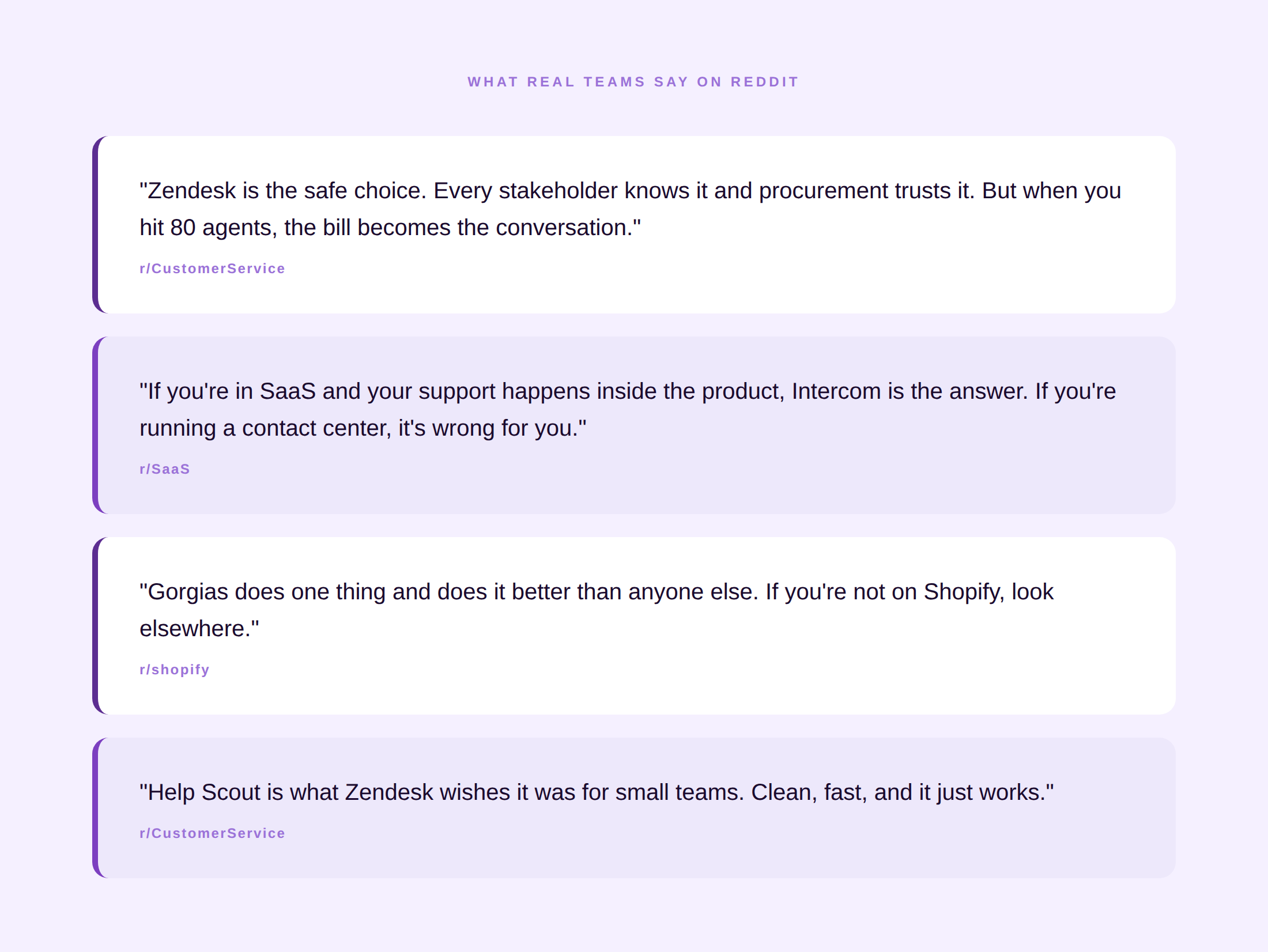
“Zendesk is the safe choice. Every stakeholder knows it, procurement trusts it, and it does everything. But when you hit 80 agents, the bill becomes the conversation.” — r/CustomerService
3. Freshdesk (Freshworks): Best mid-market omnichannel value
Official site · Pricing · G2 reviews
Overview
Freshdesk delivers 225% ROI, a 95% omnichannel first-contact resolution rate, and up to 80% AI resolution rates according to G2-verified data. It is the closest competitor to Zendesk on features, while consistently undercutting on entry price. The Freddy AI engine handles categorization, prioritization, and response drafting. The main caveat: omnichannel capability (WhatsApp, social, chat) lives in the separate Freshdesk Omni product from $29/agent, not the base plan.
Channels supported
Email, live chat, voice, social media, WhatsApp (via Freshdesk Omni add-on), SMS.
Standout strengths
Strong free tier for very small teams. Freddy AI automates categorization and response drafting. Gamification module (Arcade) reduces agent burnout in high-volume environments. Fastest-to-deploy omnichannel in this category according to multiple G2 reviews.
Where it falls short
True omnichannel (WhatsApp, all social channels, chat unified) requires Freshdesk Omni at an additional $29/agent on top of the base plan. AI Copilot is a further $29/agent/month add-on. A 10-person team on Pro with Copilot pays approximately $780/month before omnichannel channels are added. The base tier lacks configurable workflow automation.
Pricing
Free tier (up to 10 agents, email only). Growth from $15/agent/month. Pro from $49/agent/month. Freshdesk Omni (full omnichannel) from $29/agent/month additional.
Best for
Mid-market teams that want Zendesk-level feature depth at a lower entry price. Operations that can live with omnichannel as a modular add-on rather than a native default.
What users say
“Freshdesk starts cheap and looks like a bargain. Then you realize omnichannel is a separate product and AI is another add-on, and your quote triples.” — r/SaaS
4. Intercom: Best for product-led or in-app omnichannel
Official site · Pricing · G2 reviews
Overview
Intercom pioneered the messaging-first approach to customer support. Its Fin AI agent is widely regarded as the strongest AI chatbot in the category, capable of autonomous resolution, workflow execution, and clean handoff to human agents. Intercom is the natural fit for SaaS companies where most support happens inside the product and where AI deflection is a primary business objective. Its 4.5/5 G2 rating across 3,600 or more reviews reflects consistent satisfaction with the product itself, though pricing unpredictability is a recurring friction point.
Channels supported
In-app messaging, email, live chat, WhatsApp, SMS, phone (via add-on).
Standout strengths
Fin AI resolves conversations and executes workflows, not just routes them. Best-in-class in-product messaging with targeting logic based on user behavior. Strong product tours and onboarding sequences that reduce support volume proactively. Clean API for custom integrations.
Where it falls short
Actual costs run 60 to 80% above base price according to G2 reviews. Fin AI is priced at $0.99 per resolution, which creates unpredictable monthly costs as deflection scales. 12-month contracts are standard. Less suited to high-volume transactional support than to low-to-medium volume with complex product queries.
Pricing
Base AI access from $29/month on all plans. Starter from $39/month. Pro and Premium on custom pricing. Fin AI at $0.99 per resolution.
Best for
SaaS companies with strong product-led growth motions, where in-app support, proactive messaging, and AI deflection are the primary use cases.
What users say
“If you’re in SaaS and want the best AI chatbot, Intercom is it. Just budget carefully because Fin resolutions add up faster than you expect.” — Ringly.io
5. Salesforce Service Cloud: Best for Salesforce-native enterprise operations
Official site · Pricing · G2 reviews
Overview
Service Cloud is the natural extension of the Salesforce platform into customer support. For organizations already running sales, marketing, and CRM on Salesforce, Service Cloud provides a seamless data model where every support case ties directly to the account, contact, opportunity, and contract record. Einstein AI adds chatbots, predictive routing, and automated suggestions on top of the CRM data layer. Implementation complexity and cost are the consistent barriers for teams without a dedicated Salesforce administrator.
Channels supported
Email, live chat, voice, social media, SMS, WhatsApp, messaging apps, video.
Standout strengths
Deepest CRM integration in the category, every case links to the full Salesforce account record. Einstein AI operates on the richest customer data of any platform in this list. Best-in-class omnichannel for organizations where sales and support share a customer record. Strong compliance and enterprise security certifications.
Where it falls short
Implementation typically takes 2 to 6 months and requires a dedicated Salesforce administrator. Entry price of $25/user/month scales rapidly with add-ons. Teams without existing Salesforce infrastructure will find the setup cost and complexity disproportionate to the benefit versus alternatives. G2 reviewers consistently flag complexity as the primary drawback.
Pricing
Starter from $25/user/month. Professional from $80/user/month. Enterprise from $165/user/month. Implementation costs are high and separate.
Best for
Large enterprises already running on Salesforce CRM where support case data needs to feed directly into the sales and account management workflow.
What users say
“If you’re already in Salesforce, Service Cloud is the obvious answer. If you’re not, the implementation cost alone will make you reconsider.” — r/salesforce
6. HubSpot Service Hub: Best for teams already on the HubSpot stack
Official site · Pricing · G2 reviews
Overview
HubSpot Service Hub draws its primary value from integration with HubSpot CRM, Marketing Hub, and Sales Hub. For teams already on the HubSpot platform, adding Service Hub gives support agents access to the full contact and deal record without a separate CRM integration. As a standalone support platform, it is functional but ranks lower than most alternatives on omnichannel depth and ticket automation. The free tier is genuinely useful for small teams getting started.
Channels supported
Email, live chat, calling, Facebook Messenger, WhatsApp (Professional and above).
Standout strengths
Native HubSpot CRM integration means agents see the full marketing and sales history of every contact. The free tier includes shared inbox, basic ticketing, and live chat with no time limit. Strong knowledge base tools. Good reporting for teams primarily measuring customer health alongside support metrics.
Where it falls short
G2 reviewers consistently note that the most valuable features, automation, full omnichannel, and detailed reporting, are gated behind Professional at $90/seat/month. The Service Hub has the lowest average G2 score among HubSpot products. Teams using it as a standalone platform rather than an extension of HubSpot CRM find it underwhelming relative to dedicated alternatives at similar price points.
Pricing
Free tier available. Starter from $15/seat/month. Professional from $90/seat/month. Enterprise from $130/seat/month.
Best for
Teams already using HubSpot CRM for sales and marketing who want to avoid a separate CRM integration for support. Not recommended as a standalone platform for support-first operations.
What users say
“Having everything in one place is also the most daunting feature when you first start.” — G2 reviewer
7. Help Scout: Best for small and SMB teams that want clean simplicity
Official site · Pricing · G2 reviews
Overview
Help Scout is built around the premise that support should feel human and that agents should be able to start working without a week of onboarding. It is consistently the most praised platform on Reddit for teams under 20 people that want clean email-based support with a knowledge base and live chat without the configuration overhead of Zendesk or Freshdesk. Recent pricing changes have shifted it to a per-conversation model, which works well for low-volume teams but can surprise teams as contact volume grows.
Channels supported
Email (shared inbox), live chat (Beacon), in-app messaging, and social via integrations.
Standout strengths
Fastest time-to-value of any platform on this list. Clean interface that requires minimal agent training. Excellent knowledge base builder included in all plans. Strong focus on human-feeling responses with features like private notes and collision detection. Well-regarded customer support from Help Scout itself.
Where it falls short
Voice and phone are not natively supported. Per-conversation pricing can become expensive for high-volume teams. Social media management is limited compared to Zendesk, Kustomer, or Sprinklr. Not suited to enterprise operations with complex routing and SLA requirements.
Pricing
From $22/user/month (up to 25 users). Plus from $44/user/month. Pro from $65/user/month. 15-day free trial.
Best for
Small and SMB teams (under 25 people) where email is the primary channel, simplicity matters as much as features, and rapid time-to-value is more important than configurability.
What users say
“Help Scout is what Zendesk wishes it was for small teams. Clean, fast, and it just works.” — r/CustomerService
8. Gorgias: Best for e-commerce and Shopify-led brands
Official site · Pricing · G2 reviews
Overview
Gorgias has the highest G2 rating on this list at 4.6/5 across 540 reviews, a reflection of how well it serves its target market. It is purpose-built for e-commerce, with native integrations that let agents manage refunds, shipping updates, and order edits directly inside the helpdesk without switching to the Shopify admin. For Shopify brands with high support volume around order-related queries, no other platform comes close to workflow depth and automation specificity.
Channels supported
Email, live chat, social media (Facebook, Instagram, Twitter/X), SMS, voice, WhatsApp.
Standout strengths
Native Shopify, BigCommerce, and Magento integrations with order management actions inside the ticket. Ticket-based pricing (not per-seat) is cost-effective for brands with many part-time support agents. AI automates order status, return initiation, and shipping updates without human intervention. 4.6/5 G2 rating is the highest in this comparison.
Where it falls short
Not designed for non-e-commerce use cases. Limited customization for complex B2B workflows. Some G2 reviewers flag that the knowledge base and reporting tools lag behind Zendesk and Freshdesk at the same price point.
Pricing
Starter from $10/month (50 tickets included). Basic from $60/month (300 tickets). Pro from $360/month (2,000 tickets).
Best for
E-commerce brands on Shopify or BigCommerce, where the majority of support volume is order-related and where deep e-commerce workflow automation is more valuable than broad CRM integration.
What users say
“Gorgias is Shopify support done right. If you’re not on Shopify, look elsewhere.” — r/shopify
9. Front: Best for collaborative shared inboxes across B2B teams
Official site · Pricing · G2 reviews
Overview
Front has the highest G2 rating among shared-inbox platforms at 4.7/5. It is not a traditional ticketing system but rather a collaborative workspace built around email, SMS, and social — designed for teams where support, sales, and operations all need to work from the same inbox without creating tickets. It excels in B2B services, consulting, logistics, and financial services contexts where a human, relationship-led interaction model is more appropriate than automated queue management.
Channels supported
Email, SMS, voice, social media, WhatsApp, live chat.
Standout strengths
Best collaborative inbox experience in this category. Clean team assignment, internal comments, and SLA tracking without the complexity of a full ticketing system. Strong Salesforce and HubSpot CRM integrations. 4.7/5 G2 rating is the highest on this list. Good fit for teams where handover between support and account management happens frequently.
Where it falls short
Not as feature-rich for high-volume transactional support as Zendesk or Freshdesk. AI capabilities are less mature than Intercom or Zendesk. Not ideal for companies that need complex ticket routing logic or large-scale automation workflows.
Pricing
Starter from $19/seat/month. Growth from $59/seat/month. Scale from $99/seat/month. Enterprise on request. 7-day free trial.
Best for
B2B service businesses, agencies, logistics, and financial services teams where a relationship-led collaborative inbox model fits better than a traditional helpdesk ticketing approach.
What users say
“Front is what you use when your team needs to work in email together like humans, not process tickets like machines.” — r/CustomerService
10. Zoho Desk: Best low-cost omnichannel for teams on the Zoho stack
Official site · Pricing · G2 reviews
Overview
Zoho Desk is the most cost-effective, fully featured omnichannel helpdesk on this list. It starts at $14/agent/month for the Standard plan and includes a free tier with three agents. For organizations already using Zoho CRM, Zoho Analytics, or other Zoho products, the integration depth is a significant advantage. Zia, Zoho’s AI assistant, handles response suggestions and sentiment analysis from the Enterprise tier. G2 reviewers consistently praise the value but flag the UI as dated and certain features as hard to navigate.
Channels supported
Email, live chat, voice, social media (Facebook, Twitter/X, Instagram), WhatsApp, web forms.
Standout strengths
The lowest price point for full omnichannel with a free tier on this list. Deep integration with the Zoho ecosystem (CRM, Analytics, SalesIQ). Zia AI assistant is included at the Enterprise tier. Strong SLA management and automation workflows. 15-day free trial on all paid plans.
Where it falls short
UI has not kept pace with newer platforms. Some features are only available at higher tiers. AI capabilities are less mature than Intercom, Freshdesk, or Zendesk. Knowledge base search functionality receives consistent negative mentions in G2 reviews. Not recommended as a standalone platform for teams outside the Zoho ecosystem.
Pricing
Free (3 agents). Standard from $14/agent/month. Professional from $23/agent/month. Enterprise from $40/agent/month.
Best for
Budget-conscious teams already on Zoho CRM or other Zoho products, and small operations that need full omnichannel at the lowest possible price point.
What users say
“Zoho Desk does everything you need at a price that’s hard to argue with, as long as you can live with the interface.” — G2 reviewer
11. Kustomer: Best for high-volume retail and consumer brands
Official site · Pricing · G2 reviews
Overview
Kustomer, now owned by Meta, is designed for high-volume consumer support operations. Its core differentiator is a CRM-first architecture: every customer interaction writes to a unified customer timeline that gives agents full purchase history, previous tickets, order status, and lifetime value data in a single view. For retail and direct-to-consumer brands handling thousands of contacts per day across email, chat, social, and SMS, Kustomer’s workflow automation and unified record reduce handle time significantly.
Channels supported
Email, live chat, social media (Facebook, Instagram, Twitter/X, WhatsApp), SMS, voice.
Standout strengths
CRM-first architecture gives agents the richest customer context in the consumer support category. Strong workflow automation that handles complex, multi-step processes without manual routing. WhatsApp native integration. Shopify, Magento, and commerce platform integrations for order data in the ticket.
Where it falls short
At $89/user/month, Kustomer is the most expensive per-seat platform on this list outside of Sprinklr. No free trial. Configuration complexity is significant. Better suited to enterprise consumer brands than SMBs or SaaS operations.
Pricing
Enterprise from $89/user/month. Ultimate from $139/user/month. Custom pricing for larger deployments.
Best for
High-volume retail, DTC, and consumer brand support operations where the richness of the customer record and workflow automation depth justify the premium price point.
What users say
“Everything being in one timeline, it shows older tickets and integrates well with Shopify. AI features are great for summarizing long messages.” — G2 reviewer
12. Sprinklr Service
Tagline: Best for social-first and large-volume enterprise customer engagement
Official site · Pricing · G2 reviews
Overview
Sprinklr Service is built for enterprise organizations where customer engagement happens at scale across social, digital, and voice channels simultaneously. It handles 30 or more channels in a unified agent desktop with AI-powered routing, sentiment analysis, and automated case management. At $199/seat/month on the self-serve plan, it is the premium tier of this list and is priced accordingly. Sprinklr is the default choice for large consumer brands, media companies, and financial institutions where social listening and engagement at volume are primary requirements.
Channels supported
30+ channels, including social media (all major platforms), email, live chat, voice, SMS, WhatsApp, in-app, and community forums.
Standout strengths
Widest channel coverage in this comparison at 30-plus. Strong AI-powered routing and sentiment analysis. Unified agent desktop handles social, digital, and voice without tool switching. Best-in-class for organizations where social listening and customer engagement are inseparable from support.
Where it falls short
At $199/seat/month, it is out of reach for most SMB and mid-market operations. Configuration and onboarding are enterprise-scale commitments. Enterprise pricing is entirely custom. Over-engineered for operations where social is not a primary support channel.
Pricing
Self-Serve from $199/seat/month. Enterprise pricing custom.
Best for
Large consumer enterprises, financial institutions, media companies, and any organization where social listening and customer engagement at volume are core to the support operation.
What users say
“Sprinklr does what it says for big brands. If you’re not handling tens of thousands of social interactions, you’re paying for capability you will never use.” — r/socialmedia
Honourable Mentions
LiveAgent — strong voice and chat coverage for SMBs, particularly good for call-center-adjacent teams that want a single platform for phone and digital.
Dixa — conversation-led architecture built for the European market with strong GDPR compliance and omnichannel routing without traditional ticketing.
Tidio — chatbot and live chat hybrid best suited to SMBs wanting AI deflection without the complexity or cost of a full omnichannel platform.
Re:amaze — e-commerce oriented with strong Shopify integration, a lower-cost alternative to Gorgias for brands that do not need Gorgias’s workflow depth.
Talkdesk — CCaaS and voice-first for contact centers where voice remains the dominant channel, and digital is secondary.
Genesys Cloud CX — an enterprise contact center platform for large-scale operations requiring workforce management, quality monitoring, and multi-channel routing at significant volume.
How to Choose the Right Omnichannel Customer Support Platform for Your Business
By team size
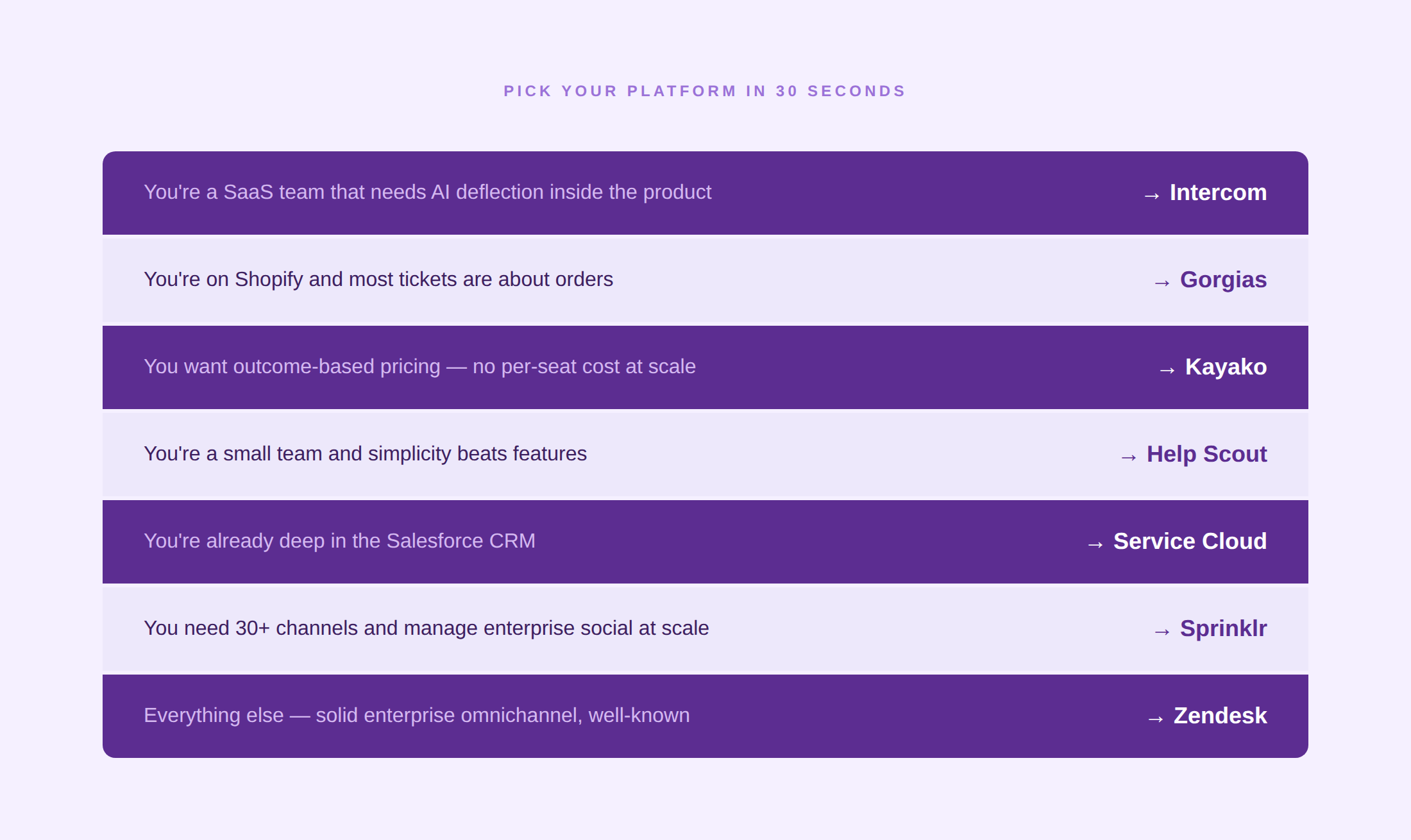
- 1 to 10 agents: Help Scout (email-first simplicity), Zoho Desk free tier, or Kayako (if outcome-based pricing fits the model). Avoid Zendesk, Salesforce, and Sprinklr; the configuration overhead is disproportionate.
- 10 to 50 agents: Kayako, Freshdesk, Intercom, or HubSpot Service Hub, depending on channel mix and stack. This is the range where omnichannel matters most and per-seat costs start to add up.
- 50 to 250 agents: Zendesk, Freshdesk Pro, Kustomer, or Salesforce Service Cloud for Salesforce shops. At this scale, routing logic, SLA management, and reporting become differentiators.
- 250 or more agents: Zendesk Enterprise, Salesforce Service Cloud Enterprise, Kustomer Ultimate, or Sprinklr for social-heavy brands. Enterprise procurement, compliance, and security requirements typically narrow the shortlist quickly.
By the primary channel
- Email-first: Help Scout, Front, or Freshdesk base. All three are built around email-first workflows.
- Chat-first: Intercom for product-led SaaS. Kayako or Freshdesk Omni for multi-channel with chat as primary.
- Voice-first: Talkdesk, Genesys, or Zendesk with voice enabled. Most platforms on this list treat voice as an add-on.
- Social-first: Sprinklr Service or Kustomer for enterprise volume. Gorgias for e-commerce brands where Instagram and Facebook drive contact.
By industry
- SaaS: Intercom (product-led), Kayako (context-first), or Zendesk (enterprise SaaS with complex routing).
- E-commerce/retail: Gorgias (Shopify-native), Kustomer (high-volume DTC), or Freshdesk Omni (mid-market e-commerce).
- Financial services: Salesforce Service Cloud or Zendesk Enterprise. Both have the compliance certifications that regulated industries require.
- Professional services and B2B: Front (relationship-led), Kayako (context-first), or HubSpot Service Hub (HubSpot-stack teams).
What Real Teams Say Online
The most consistent pattern across r/CustomerService, r/SaaS, and r/CustomerSuccess in the last 12 months: Zendesk is the safe enterprise choice, but scale changes the value calculation. Multiple threads in r/CustomerService document teams switching away from Zendesk at the 50 to 100 agent mark, primarily citing per-seat costs and add-on pricing for AI that made the total bill significantly higher than the base plan implied. The phrase “we outgrew the value” appears across multiple discussions for teams moving from Zendesk to Freshdesk, Kayako, or Help Scout.
In r/SaaS, the Intercom position is consistent: “If you’re in SaaS and your support happens inside the product, Intercom is the answer. If you’re running a contact center, it’s wrong for you.” Fin AI gets specific praise for resolution quality, but consistent warnings about per-resolution costs that compound faster than expected when deflection scales. Several SaaS founders report Intercom bills that tripled in the first three months as AI resolution counts grew.
In r/shopify, Gorgias is essentially uncontested for Shopify-native support. The recurring sentiment: “Gorgias does one thing and does it better than anyone else. If you’re not on Shopify, there are better options.” Re:amaze is the most-mentioned alternative for smaller Shopify stores that find Gorgias’s ticket-based pricing expensive at low volume. Kustomer appears in discussions from larger DTC brands, particularly those with high social engagement, with consistent praise for the unified customer timeline and consistent concerns about the $89/user starting price.
So, there you have it, the best omnichannel platform laid out for you in accordance to your purposes. See what fits you in accordance with your operation and back it up with some research to finalize your decision.
FAQs
What is the best omnichannel customer support platform?
There is no universal answer because the best platform depends on team size, industry, primary channel, and stack. For SaaS teams wanting context-first omnichannel without per-seat licensing, Kayako.
Established enterprise teams with complex routing needs, Zendesk. For e-commerce brands on Shopify, Gorgias.
For product-led SaaS with strong AI deflection requirements, Intercom. For teams on the HubSpot stack, use the HubSpot Service Hub. The decision framework in this guide maps each option to team size and use case.
How is omnichannel customer service different from multichannel?
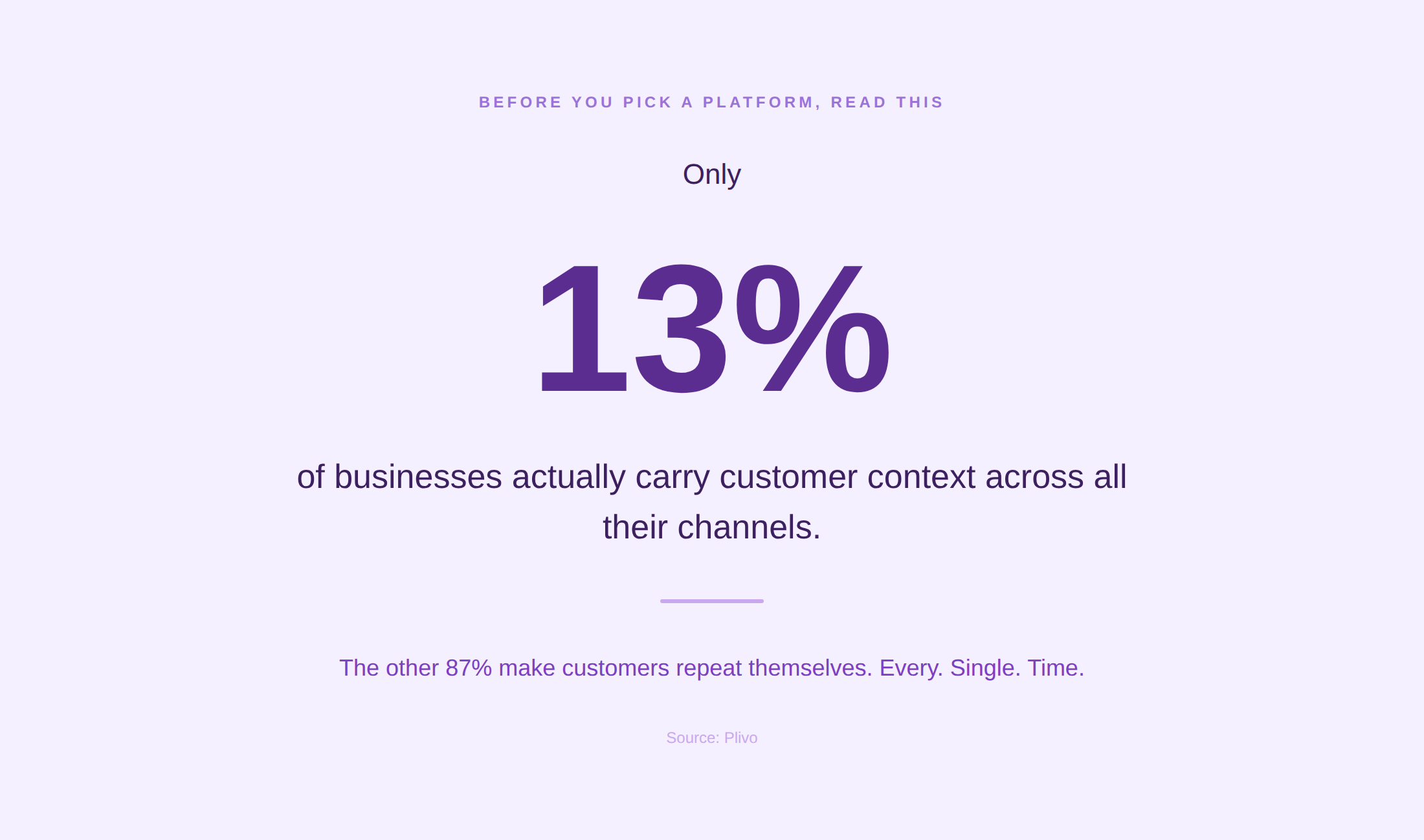
Multichannel means offering multiple ways to contact support. Omnichannel means customer context follows them across every channel they use. A multichannel customer who emails on Tuesday and calls on Wednesday has to reintroduce themselves to the phone agent. An omnichannel customer’s phone agent already sees the Tuesday email. The CSAT difference between the two approaches is 67% (omnichannel) versus 28% (disconnected multichannel), according to Plivo. See the full breakdown in Kayako’s omnichannel guide.
How many channels should an omnichannel platform support?
The number matters less than the quality of context continuity between them. A platform that supports 5 channels with genuine cross-channel history is more valuable than one that supports 30 channels, where each operates in its own silo. For most support operations, 4 to 6 channels (email, chat, voice, one social channel, and in-app or SMS) cover the majority of contact volume. Add channels only when your platform can carry context across all of them.
What features are essential in an omnichannel support tool?
Five non-negotiables: (1) a unified customer timeline that consolidates history from every channel in one view; (2) a shared inbox or queue that routes contacts across all channels without requiring agents to switch tools; (3) a maintained knowledge base accessible to both agents and self-service customers; (4) SLA management with response-time tracking by channel; and (5) reporting that measures first-contact resolution at the customer level rather than the channel level. AI is increasingly expected but not universally required.
How does AI fit into modern omnichannel support?
AI in omnichannel works best when it operates on unified data. Intelligent routing assigns contacts to agents based on skill and history. Agent-assist AI surfaces relevant knowledge base articles and resolution suggestions in real time. AI deflection handles tier-1 volume through self-service before it reaches the queue. The failure mode is AI deployed on siloed data or without human escalation paths. Most platforms on this list have native AI; the quality varies from Intercom’s Fin (best-in-class) to add-on copilots that require separate licensing.
What does omnichannel support software typically cost?
Ranges across this list: free tiers are available from Zoho Desk, HubSpot Service Hub, and Freshdesk for small operations. Paid plans start at $10/month for Gorgias (ticket-based), $14/agent/month for Zoho Desk, $15/agent/month for Freshdesk, and $19/agent/month for Zendesk and Front. Kayako charges $1 per resolved ticket plus $15,000 onboarding, no per-seat cost. Enterprise platforms like Kustomer ($89/user/month) and Sprinklr ($199/seat/month) carry premium price tags that reflect enterprise-scale capability. See Kayako pricing for the outcome-based model in detail.