Best Knowledge Base Software in 2026: Real Pricing Compared
A buyer’s guide to knowledge base software with verified pricing for 14 tools, split by customer help center, internal wiki, and free options. Includes what each tool actually costs at scale.
Knowledge base software creates, organizes, and serves a searchable library of articles for customers or employees. Tools split into three groups: customer help centers that deflect tickets, internal wikis that hold company knowledge, and free or open-source options for teams under ten people. Entry prices in 2026 run from $0 to roughly $149 a month, though the tier most teams actually land on costs considerably more than the advertised one.
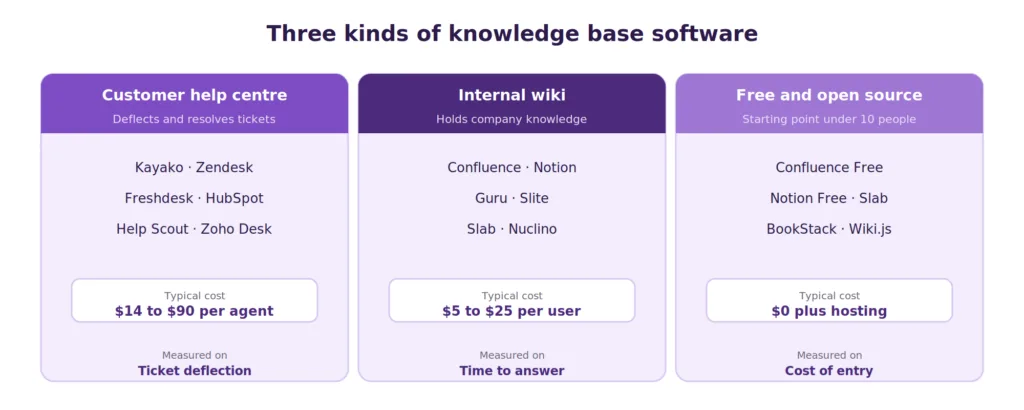
Diagram showing the three categories of knowledge base software and who each serves
What Knowledge Base Software Is
Knowledge base software is a platform for creating, organizing, and serving a searchable library of articles, guides, and documentation. It handles the authoring workflow, the categorization, the search, the permissions, and the analytics that turn a folder of documents into something people rely on.
The category divides into three groups that solve genuinely different problems. Customer help centers are measured on ticket deflection and increasingly on AI resolution. Internal wikis are measured on how fast a colleague finds a trustworthy answer. Free tools trade depth for cost and suit small teams that need something working this week.
Buying across those lines is the most common expensive mistake. A tool tuned to deflect customer tickets rarely satisfies an engineer looking for a runbook, and a flexible team workspace rarely makes a good public help center. The economics justify getting it right, since Gartner puts the cost of a self-service contact near $1.84 against roughly $13.50 for an agent-assisted one. For the underlying concepts, there is a fuller explanation of what a knowledge base is.
How We Evaluated These Tools
Pricing was checked directly against vendor pricing pages and independent comparisons in August 2026. Every figure below is annual-billing entry pricing unless stated otherwise, and where a vendor publishes no price, that is noted rather than estimated.
Four criteria carried the most weight.
Published, checkable pricing. Tools that hide pricing behind a sales call are marked as such, because that is itself a buying signal for a small team.
The tier teams actually land on. Entry pricing is frequently not the tier that contains the features people need. Where the practical tier differs, both are listed.
Search quality. The single feature that determines whether a knowledge base gets used twice.
AI grounding and how it is billed. Per seat, per resolution, or per session, since those three models behave very differently as volume grows.
Kayako is included in the customer help center group, in its own lane, and the honest limits are stated alongside everything else.
All 14 Tools Compared on Price
Pricing verified August 2026 against vendor pages and independent comparisons. Annual billing where offered.
| Tool | Group | Entry price | Free plan | Practical tier |
|---|---|---|---|---|
| Kayako | Help center | Per resolution | Trial | Per resolution |
| Zendesk | Help center | $19/agent/mo | No | $55/agent/mo |
| Freshdesk | Help center | $19/agent/mo | 2 agents, 6 months | $55/agent/mo |
| HubSpot Service Hub | Help center | $15/user/mo | 2 users | $90/user/mo |
| Help Scout | Help center | $25/user/mo | 5 users | $45/user/mo |
| Zoho Desk | Help center | $14/agent/mo | 3 agents | $23/agent/mo |
| Document360 | Standalone KB | Custom quote | 14-day trial | Custom quote |
| Helpjuice | Standalone KB | $249/30 users/mo | No | $249/mo |
| Confluence | Internal wiki | $5.42/user/mo | 10 users | $5.42/user/mo |
| Notion | Internal wiki | $10/seat/mo | Generous | $10 to $15/seat |
| Guru | Internal wiki | $15/user/mo | 30-day trial | $15 to $25/user |
| Slite | Internal wiki | $10/user/mo | Removed 2026 | $20/user/mo |
| Slab | Internal wiki | Around $8/user/mo | Up to 10 users | $8/user/mo |
| Nuclino | Internal wiki | $6/user/mo | 50 items | $6/user/mo |
Two patterns are worth noticing before reading further. Internal wikis are dramatically cheaper per seat than help centers, because they do not carry ticketing, routing, or AI resolution. And among help centers, the gap between the advertised tier and the one teams end up on is consistently three to six times.
Customer Help Center Software
These tools sit next to your support channels. Their value is measured in tickets that never reach an agent.
Kayako
A customer support platform with a built-in help center, built around autonomous resolution rather than article suggestion. Agent Kay reads your articles and answers customers directly; SingleView keeps full history on one record, so answers carry context, and billing is per resolved ticket rather than per seat.
That pricing model matters most as automation improves. Under per-seat billing, a knowledge base that deflects well still costs the same. Under per-resolution billing, deflection that works reduces the bill. The trade-off is scope: this is a support platform, so teams looking primarily for an engineering wiki should read the internal group below. Details sit on the help desk with a knowledge base page.
Best for: support teams that want self-service to close cases rather than surface links.
Zendesk
Zendesk Guide pairs with the broadest support suite in the category and the deepest integration ecosystem. For large teams already inside Zendesk, it is the low-friction answer.
The pricing deserves attention. Support Team is advertised at $19 per agent per month, but the tier most teams land on is Suite Team at $55, with Suite Professional at $115 and Suite Enterprise at $169. Advanced AI adds roughly $50 per agent per month on top, so a twenty-person team can pass $3,000 monthly before configuring an automation. There is more detail in this comparison of Zendesk alternatives.
Best for: larger teams already committed to the ecosystem.
Freshdesk
The closest feature match to Zendesk at a lower price. Growth runs $19 per agent per month, Pro $55, Enterprise $89, with a free tier covering two agents for six months.
The AI is where the bill assembles. Freddy AI Copilot adds around $29 per agent per month, and the customer-facing AI Agent sells in session packs at roughly $49 per hundred with no rollover. Channels beyond email require Freshdesk Omni, which starts at $29 rather than $19. See Freshdesk alternatives for the fuller picture.
Best for: mid-market teams wanting Zendesk-class capability at lower entry cost.
HubSpot Service Hub
The knowledge base sits on the same customer record as sales and marketing, which removes the seam most integrations never quite close. Free covers two users, Starter is $15, Professional $90, and Enterprise $150 per user per month.
Two things to model. The knowledge base worth using begins at Professional, and Professional carries a required one-time onboarding fee. AI runs on credits that expire monthly. Compare against HubSpot alternatives if CRM unification is not the deciding factor.
Best for: teams already running HubSpot as their system of record.
Help Scout
Docs is the cleanest help center in this group, and the surrounding product is deliberately simple. Free covers five users, Standard is $25, Plus $45, and Pro $65 per user per month with a ten-user minimum.
AI Answers bills per resolution at roughly $0.75 on top of seats, which is a fairer structure than per-session billing and grows as deflection improves. Worth knowing: the company moved to contact-based pricing in 2025 and reversed after customers left, so two billing models now run in parallel. Help Scout alternatives covers the comparison.
Best for: small teams wanting an email-like experience with minimal configuration.
Zoho Desk
The best value in this group if you already run other Zoho products, with a free tier for three agents and paid plans from roughly $14 per agent per month. The knowledge base is competent rather than remarkable, and the value comes from the connected suite. See Zoho Desk alternatives.
Best for: cost-conscious teams inside the Zoho ecosystem.
Document360 and Helpjuice
Two dedicated knowledge base platforms rather than help desks. Document360 offers a strong editor, versioning, and analytics, and no public entry price, which slows procurement for smaller teams. Helpjuice publishes clearly at $249 a month for thirty users, rising to $799 for unlimited.
Both suit teams whose knowledge base is the product rather than an attachment to a ticket queue, such as documentation-heavy software companies.
Best for: structured standalone documentation with versioning requirements.
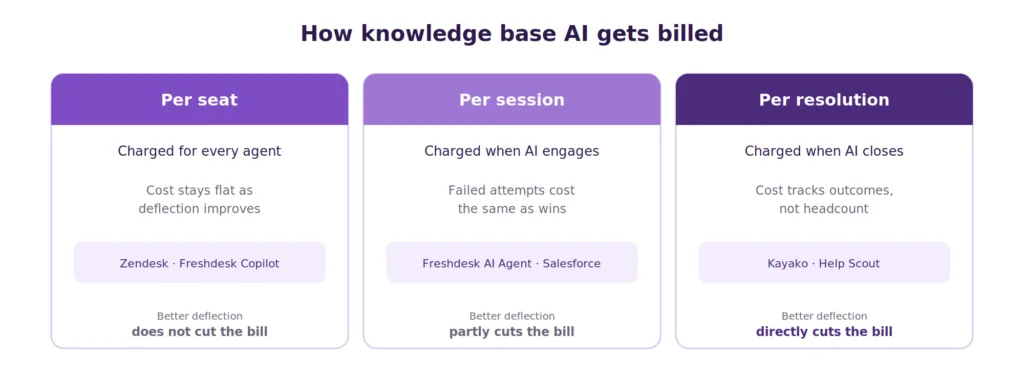
Comparison of how knowledge base AI is billed across per-seat, per-session, and per-resolution models
Internal Wiki Software
These hold company knowledge for employees. Flexibility and search quality matter more than deflection, and the per-seat prices are far lower because there is no ticketing underneath.
Confluence
Atlassian’s team wiki, and the strongest option for engineering organizations already running Jira. Free covers ten users, and Standard is around $5.42 per user per month, which makes it the cheapest credible option at scale.
Depth is the draw, and weight is the cost. Smaller teams wanting quick documents often find it heavier than the job requires. Rovo, Atlassian’s AI layer, adds credit-based costs and indexed-object limits that vary by tier.
Best for: engineering teams and larger organizations inside Atlassian.
Notion
A flexible workspace that doubles as a wiki, with a genuinely generous free tier and paid plans from roughly $10 per seat per month. The adaptability is why so many teams default to it.
At scale, search and permissions become harder to manage, and the free tier limits team blocks and caps uploads at 5 MB. Zero-retention AI handling requires the enterprise plan, which matters for regulated teams.
Best for: companies wanting one flexible home for documents, notes, and projects.
Guru
Surfaces verified knowledge inside the tools people already use, with a browser extension and Slack integration plus a verification workflow that expires stale cards. Pricing runs from around $15 per user per month, with higher tiers nearer $25.
The verification model is the differentiator, and the reason support and sales teams choose it. It is internal by design and does not serve as a customer help center.
Best for: in-workflow enablement where content freshness is the problem.
Slite, Slab, Nuclino and Tettra
Four lighter options for teams that want a wiki without a project. Slite pairs clean documents with AI answers at around $10 per user per month, though its free plan was removed in June 2026. Slab offers strong search and integrations near $8 per user with a free tier up to ten users. Nuclino is the cheapest at roughly $6. Tettra is Slack-native and turns questions asked in chat into documented answers.
Best for: small teams that want simple, searchable company documents.
Free and Open-Source Options
This is the segment most buyer guides skip, and it carries real demand. Several tools have genuine $0 tiers rather than trials.
Confluence Free covers ten users with unlimited pages and 2 GB of storage, which is the most capable free tier for an internal wiki.
Notion Free gives unlimited pages and blocks for individuals and small teams, with limits on team blocks and a 5 MB upload cap.
Slab Free covers up to ten users and is the simplest path to a working internal wiki in an afternoon.
Nuclino Free allows 50 items, which suits a very small documentation set.
Zoho Desk Free covers three agents with a basic customer help center, making it the most usable free option for customer-facing content.
Open-source options such as BookStack, Documize, and Wiki.js cost nothing in license fees and real money in hosting and maintenance. They suit teams with engineering capacity who want full control over data residency.
The honest limit on all of these: free tiers are sized for a team under ten, and none of them include AI resolution of the kind that changes support economics. They are a good place to start and a poor place to stay if ticket volume is growing.
What Knowledge Base Software Costs at Scale
Entry pricing is misleading in this category because the tier containing the features people need is usually several steps up. Modeled at fifteen users on annual billing:
| Tool | Advertised entry | Realistic monthly at 15 users |
|---|---|---|
| Confluence | $5.42/user | $81 |
| Notion | $10/seat | $150 |
| Guru | $15/user | $225 to $375 |
| Zoho Desk | $14/agent | $345 |
| Help Scout | $25/user | $675 plus AI per resolution |
| Freshdesk | $19/agent | $825, plus $435 if Copilot added |
| Zendesk | $19/agent | $825, plus $750 if Advanced AI added |
| HubSpot Service Hub | $15/user | $1,350 plus onboarding fee |
Three things follow from that table. Internal wikis stay cheap as they grow. Help centers do not. And AI is the line item that moves most, because per-seat AI charges scale with headcount rather than with how much work the AI does. Worth weighing against that cost: 89% of service professionals say conversational AI increases self-service resolution rates.
That last point is the argument for per-resolution pricing. When AI is billed per seat, improving deflection does not reduce cost. When it is billed per resolution, the two move together. This is the same logic behind tracking customer support metrics at the resolution level rather than the ticket level.
Features That Separate Good Tools From Abandoned Ones
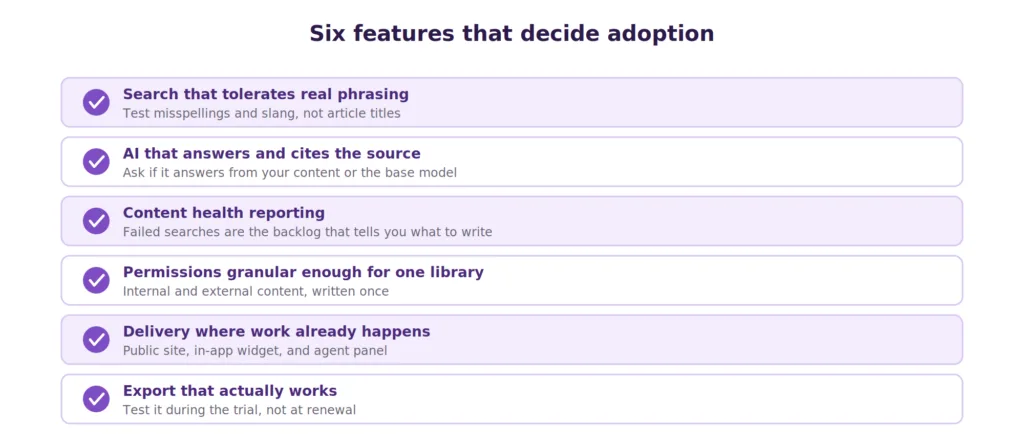
Checklist diagram of the six features that determine knowledge base adoption
Search that tolerates real phrasing. Gartner finds that AI deflects more than 45% of queries while only about 14% of issues reach full self-service resolution, and weak search is a large part of that gap. Test with misspellings and colloquial wording rather than exact article titles.
AI that answers and cites. The stronger tools return an answer with its source rather than a list of links. Ask specifically whether the AI answers from your content or from the base model.
Content health reporting. Failed searches, zero-result queries, and articles nobody opens are the backlog that tells you what to write next. Tools without this reporting leave you guessing.
Permissions granular enough for one library. Internal and external content should live in one system with different visibility, so nothing gets written twice.
Delivery where work happens. A public site, an in-app widget, and an agent panel from the same content. Content requiring a customer to leave the task gets used far less.
Export that works. Check how content leaves before you commit, since knowledge bases accumulate years of work.
One feature deserves extra weight in 2026. Gartner’s 2025 AI Implementation Survey found that 62% of underperforming AI customer service projects trace to data preparation rather than model limitations. The knowledge base is the ceiling on AI performance, which reframes this purchase as an AI infrastructure decision rather than a documentation one. Real examples of AI in customer service show the same pattern.
How to Choose
Four questions in order, and the shortlist usually writes itself.
Which group are you in? Customer deflection, internal knowledge, or a free starting point. This removes most of the list immediately.
Do you want answers or articles? If the goal is closing cases, weight AI resolution heavily. If it is a reference library, weight structure and search.
How does the price behave at your scale? Take your expected headcount in twelve months and price the tier that contains your must-have features, adding the AI line separately.
Does it survive your hardest question? Load five of your genuinely difficult customer questions into a trial and see what comes back. This predicts adoption better than any feature list.
Gartner also ranks self-service and live chat as set to surpass traditional channels by 2027, and Salesforce reports that 66% of service organizations were running AI agents in 2026, up from 39% the year before. The question is no longer whether to include AI in the evaluation. It is whether the AI answers are based on content you control.
Where Kayako Fits
Kayako sits in the customer support group, and the difference is resolution rather than suggestion. The knowledge base feeds Agent Kay, which reads the articles and answers customers directly, closing routine questions without an agent. SingleView keeps the full customer history on one record, so answers carry context, and the AI works across email, chat, and the help center as one support platform.
Because billing is per resolved ticket rather than per seat, content work compounds rather than adding license cost. The articles your team writes become the material the AI resolves with.
Trilogy provides the clearest example. After moving to Kayako, the team eliminated 80% of ticket volume, reached 76% autonomous resolution, and cut ticket age from 17.6 hours to under two minutes, saving $5 million during a 90-day rollout.
The honest limit: this is a customer support platform. Teams whose main need is an internal engineering wiki should look at Confluence or Guru instead, and many organizations run one of each.
Knowledge base software splits into three groups solving different problems, and picking the group correctly matters more than picking the tool within it. Customer help centers deflect tickets and increasingly resolve them. Internal wikis hold company knowledge cheaply and scale well on price. Free tiers are a reasonable start for teams under ten and a poor place to remain once volume grows.
The pricing lesson runs through all three. Advertised entry prices in this category rarely describe what teams pay, and the AI line is where the difference concentrates. Model the tier that holds your must-have features at next year’s headcount, then decide whether you want AI billed by how many people you employ or by how much work it actually does. Run your five hardest questions through whatever survives, because a tool that cannot answer them in a trial will not answer them in production.
Frequently Asked Questions
What is knowledge base software?
Knowledge base software is a platform for creating, organizing, and serving a searchable library of articles, guides, and documentation. It handles authoring workflow, categorization, search, permissions, and analytics, and modern tools add AI that answers questions directly from your content.
How much does knowledge base software cost?
Internal wikis run roughly $5 to $15 per user per month. Customer help centers advertise from $14 to $25 per agent, but the tier most teams land on runs $45 to $90. Standalone platforms range from $249 a month to custom quotes. AI is usually priced separately, per seat, per session, or per resolution.
What is the best free knowledge base software?
Confluence Free is the most capable for internal use, covering ten users with unlimited pages. Notion Free suits flexible documentation. Zoho Desk Free is the most usable free option for a customer-facing help center, covering three agents. Open-source options like BookStack cost nothing in licensing but require hosting.
What is the best knowledge base software for customer support?
The strongest option is one that resolves questions rather than suggesting articles. Kayako, Zendesk, Freshdesk, HubSpot Service Hub, Help Scout, and Zoho Desk compete here, differing on AI billing model, ecosystem fit, and how much the practical tier costs above the advertised one.
What is the best internal knowledge base software?
Confluence for engineering teams already using Jira, Notion for flexible all-purpose documentation, and Guru where content freshness is the problem and its verification workflow earns its cost. Slab and Nuclino suit smaller teams wanting something lighter.
Is knowledge base software the same as help desk software?
No. Knowledge base software publishes self-service articles. Help desk software manages tickets and conversations. Several platforms include both, which is usually the more economical route for a support team.
Does knowledge base software need AI?
AI is close to standard in 2026, and it depends entirely on content quality to work. Gartner attributes most underperforming AI support projects to data preparation rather than model limitations, so audit your articles before evaluating AI features.
What is the difference between an internal and external knowledge base?
An external knowledge base is a public help center measured on ticket deflection. An internal knowledge base holds employee knowledge and is measured on how quickly a colleague finds a trustworthy answer. Most tools are built for one, though several support both with permissions.
How do I migrate between knowledge base tools?
Check export format before committing. Most platforms export to Markdown or HTML, though category structure, tags, and article metadata frequently do not survive. Run a test export during the trial rather than at renewal.
What should I look for in a knowledge base search function?
Test with misspellings, colloquial phrasing, and synonyms rather than exact titles. Check whether search results rank by relevance or recency, and whether the tool reports zero-result queries, since that report is the most useful maintenance input you will get.