Top 7 Helpdesk Automation Tools for 2026: An Unbiased Customer Support Leader’s Guide
Discover the top 7 helpdesk automation tools for 2026. Compare features, AI capabilities, and workflows to streamline support and improve customer service.
Customer expectations are higher than ever. Support teams must respond faster, handle more tickets, and deliver consistent service across multiple channels. Manual processes can slow teams down and make scaling difficult.
Helpdesk automation tools solve this challenge. They automate tasks like ticket routing, categorization, responses, and follow-ups. In 2026, the best platforms also use AI to improve efficiency, reduce agent workload, and help teams deliver better customer experiences. In this guide, we explore the top 7 helpdesk automation tools leading the market today.
What Helpdesk Automation Actually Means
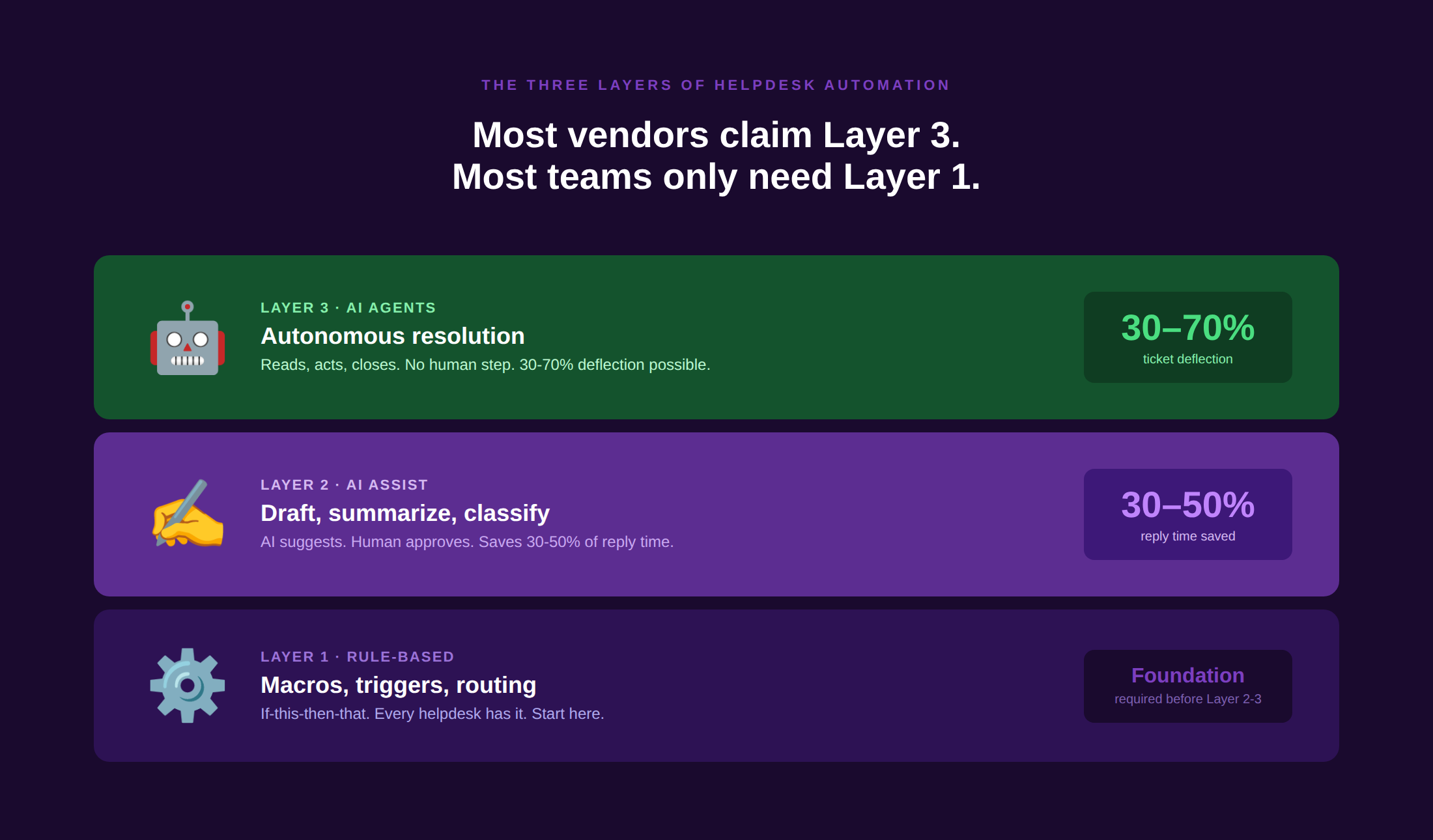
Most buyers use “helpdesk automation” to mean everything from a canned response macro to a fully autonomous AI agent. The three layers are meaningfully different, and the tool you need depends on which layer you are at:
- Layer 1: Rule-based automation. Macros, triggers, SLA timers, tag-based routing, and auto-assignments. Every modern helpdesk has this. It handles the if-this-then-that logic that removes manual steps from predictable ticket types. This is where most teams start.
- Layer 2: AI assist. Drafted replies, ticket summarization, intent classification, and sentiment detection. AI reads each ticket, suggests a response, and surfaces the relevant knowledge base article. The agent still clicks send. This is the “co-pilot” model.
- Layer 3: AI agents. Fully autonomous resolution. The AI reads the ticket, retrieves the relevant information, takes action inside connected systems (updating an order, issuing a refund, resetting a password), and closes the ticket without a human step. This is where deflection rates of 40 to 80% are achievable.
The distinction matters because pricing, integration requirements, and implementation effort differ significantly across layers. A team that needs Layer 1 should not buy a Layer 3 platform. See how AI customer support works across all three layers in practice.
How We Chose These 7 Tools
- G2 rating of 4.2 or above with 300 or more verified reviews on G2 or Capterra
- Published automation feature set with verifiable customer outcomes, not marketing claims
- At least one of: AI-drafted replies, autonomous AI agents, rule-based workflow automation, or intelligent routing
- Active community discussion on Reddit within the last 12 months from practitioners
- No paid placement — Kayako is listed last as publisher; all others ranked by G2 score and review volume
Quick Comparison Table
| Tool | Best for | Automation type | G2 rating | Starts at | Free trial |
| Zendesk + AI | Enterprise breadth | Rules + AI assist + AI agent | 4.3/5 | $19/agent/mo | 14 days |
| Freshdesk + Freddy | Mid-market value | Rules + AI assist + AI agent | 4.4/5 | Free / $15/agent/mo | 21 days |
| Intercom + Fin | SaaS / product-led AI | AI agent (autonomous) | 4.5/5 | $29/seat + $0.99/res | 14 days |
| Ada | High-volume contact centers | AI agent (autonomous) | 4.5/5 | Custom (demo required) | No |
| Forethought | Ticket-heavy triage | AI assist + triage | 4.5/5 | Custom | No |
| Help Scout + AI | SMB simplicity | Rules + AI assist | 4.4/5 | $22/user/mo | 15 days |
| Kayako | Per-ticket AI resolution | AI agent + rules + AI assist | 4.3/5 | $1/resolved ticket | Yes |
The 7 Helpdesk Automation Tools in Detail
1. Zendesk + Zendesk AI Agents: Best established helpdesk with the broadest AI surface area
Official site · Pricing · G2 reviews
Overview
Zendesk serves over 100,000 businesses and holds the number-one G2 ranking for customer service software. Its AI layer spans three modes: Advanced AI for intelligent triage and intent classification, Copilot for agent-assist drafting and summarization, and AI Agents for autonomous ticket resolution. The 2026 acquisition of Forethought adds specialist triage capability on top of the native AI stack, making Zendesk’s automation surface area the widest in this comparison.
Automation capabilities
Intelligent Triage classifies every incoming ticket by intent, sentiment, and language. Copilot drafts replies and summarizes ticket history in the agent view. AI Agents handle tier-1 volume autonomously. Sunshine Conversations enables WhatsApp and messaging automation. Macros, triggers, and SLA automation cover the rule-based layer comprehensively.
Where it shines
Broadest integration ecosystem (1,300 or more apps). Mature rule-based automation with years of enterprise refinement. Native reporting covers deflection rates, resolution rates, and sentiment trends across every automation layer. Fin AI works directly on top of Zendesk if you want to add autonomous resolution without changing platforms.
Where it falls short
Per-seat pricing compounds quickly. Advanced AI is a $50/agent/month add-on on top of Suite Professional at $115/agent/month. A 32-agent team that migrated to Freshdesk in Q1 2025 saved over $50,000 in year one while achieving a higher deflection rate (34.1% vs Zendesk’s 30.8%) on Freddy AI. G2 reviews consistently flag the cost of add-ons and the complexity of initial configuration.
Pricing
Suite Team from $19/agent/month. Suite Professional from $115/agent/month. AI Copilot $50/agent/month add-on. Advanced AI $50/agent/month add-on.
Best for
Mid-market and enterprise teams already embedded in the Zendesk ecosystem that want the widest possible automation surface without adding a second vendor.
What users say
“Zendesk AI works, and the reporting is excellent. But by the time you add Copilot, Advanced AI, and WhatsApp, the number on the invoice looks nothing like the pricing page.” — r/CustomerService
2. Freshdesk + Freddy AI: Best mid-market value for AI-led automation
Official site · Pricing · G2 reviews
Overview
Freshdesk delivers 225% ROI, a 95% omnichannel first-contact resolution rate, and up to 80% AI resolution with Freddy AI agents according to G2-verified data. Freddy operates across three modes: Freddy Self-Service (AI agent for customer-facing deflection), Freddy Copilot (agent-assist for drafting and knowledge retrieval), and Freddy Insights (analytics and coaching). In independent testing, Freddy deflected 34.1% of tickets without agent touch, beating Zendesk Advanced AI in the same workload at a lower price.
Automation capabilities
Freddy AI categorizes, prioritizes, and routes tickets automatically. Freddy Self-Service resolves tier-1 queries end-to-end. The Copilot drafts replies, summarizes ticket history, and suggests knowledge base articles in the agent view. Native rule-based automation handles SLA management, assignment, and escalation.
Where it shines
Best deflection-to-cost ratio of any platform with AI agents in this list. Freddy Copilot outperformed Zendesk Copilot in at least one published benchmark. Freddy is included in the Freshdesk suite without requiring a separate platform purchase. Strong AI automation for teams that want outcomes without enterprise-scale implementation.
Where it falls short
True omnichannel (WhatsApp, all social) requires Freshdesk Omni at an additional $29/agent/month on top of the base plan. Freddy AI Copilot is a further $29/agent/month. The base tier lacks the configurable workflow automation that mid-market teams typically need. G2 reviewers note that costs triple quickly once add-ons are layered.
Pricing
Growth from $15/agent/month. Pro from $49/agent/month. Freddy Copilot $29/agent/month add-on. Freshdesk Omni (full omnichannel) from $29/agent/month additional.
Best for
Mid-market teams that want Zendesk-level AI capability at a lower total cost, particularly those willing to accept omnichannel as a modular add-on.
What users say
“Freddy is fine for L1. It classifies fast, and the deflection numbers are real, not inflated. Just do the math on the total bill before you sign.” — r/CustomerService
3. Intercom + Fin AI Agent: Best AI agent for product-led and SaaS support
Official site · Pricing · G2 reviews
Overview
Intercom’s Fin AI is widely regarded as the best-in-class AI agent in the support software category. Fin resolves conversations autonomously, executes actions inside connected systems, and hands off to human agents with full context preserved. In independent testing, Fin deflected 37.4% of tickets without any agent touch, the highest autonomous deflection rate of any platform tested. Setup takes approximately one hour, and Fin works on top of existing Zendesk, Salesforce, HubSpot, and Freshdesk deployments without requiring a platform switch.
Automation capabilities
Fin AI resolves conversations end-to-end, not just deflects them. Fin can take actions inside your product (process refunds, update accounts, reset passwords) rather than just retrieving answers. Native Procedures allow Fin to follow multi-step resolution workflows. Strong proactive messaging and onboarding automation for SaaS products. Works as a standalone AI agent layer on top of your existing helpdesk.
Where it shines
Fastest AI agent setup in the category (approximately one hour). Highest autonomous resolution rate in independent benchmark testing. Fin runs on top of competitors’ helpdesks, making it the most platform-agnostic AI agent in this list. Strong for SaaS teams where in-product support and proactive engagement are primary use cases.
Where it falls short
Per-resolution pricing at $0.99 per resolved conversation creates unpredictable monthly costs as deflection scales. G2 reviews and Reddit threads consistently warn that Fin bills triple within three months for teams that underestimate resolution volume. Voice support requires workarounds. Not suited to high-volume transactional contact centers where per-resolution pricing becomes prohibitive.
Pricing
Base AI access from $29/month. Starter from $39/month. Fin AI at $0.99 per resolved conversation. Minimum 50 resolutions per month.
Best for
SaaS and product-led teams that want the highest autonomous resolution rate available and can accurately forecast resolution volume to manage cost predictability.
What users say
“Fin is genuinely impressive. It resolved 37% of our tickets without any human involvement in the first week. Just budget carefully because the per-resolution invoice surprised us.” — getomnichannel.com
4. Ada: Best AI-first automation platform for high-volume contact centers
Official site · Pricing · G2 reviews
Overview
Ada is an AI-first automation platform built for high-volume contact centers that want to automate 70 to 80% of tier-1 interactions without a traditional helpdesk underneath. It operates independently from most helpdesk platforms and connects to Salesforce, Zendesk, and Freshdesk via API. Ada’s AI agents handle the full conversation lifecycle including action execution, and its no-code conversation builder allows non-technical teams to configure resolution flows without engineering support.
Automation capabilities
Autonomous AI agents that handle end-to-end resolution across chat, email, and voice. No-code conversation builder for configuring complex resolution workflows. AI-powered intent classification and entity extraction. Integration with CRM and order management systems for action-taking (not just information retrieval). Multilingual support across 50 or more languages.
Where it shines
Best suited to organizations where the majority of support volume is predictable, process-driven, and amenable to automation. No-code builder means CS ops can configure and iterate without waiting for engineering cycles. Strong enterprise security and compliance certifications. G2 rating of 4.5/5 reflects consistent satisfaction among high-volume contact center deployments.
Where it falls short
Custom pricing requires a sales conversation, as there is no public pricing page and no free trial to start with. Implementation requires more planning than plug-in platforms like Fin or Freddy. Less well-suited to SaaS support, where queries are highly varied and less process-driven.
Pricing
Custom pricing requires a demo. No free trial. Enterprise-focused.
Best for
High-volume contact centers in retail, financial services, telecom, and e-commerce, where the majority of contacts are process-driven, and AI resolution rates of 70 to 80% are achievable.
What users say
“Ada is pricey, but if you’re handling 50,000 contacts a month and 70% of them are the same 20 question types, the math justifies itself within 90 days.” — r/CustomerService
5. Forethought: Best AI triage and agent assist for ticket-heavy teams
Official site · Pricing · G2 reviews
Overview
Forethought specializes in AI triage and agent-assist for Zendesk and Salesforce-heavy stacks. Its four-module architecture (Solve for deflection, Triage for classification, Assist for agent drafting, and Discover for analytics) addresses the full automation stack within existing helpdesk environments. Forethought was acquired by Zendesk in 2026, which means it will increasingly be integrated into the native Zendesk AI layer rather than operating as a standalone platform.
Automation capabilities
Solve handles autonomous resolution of tier-1 queries before they enter the agent queue. Triage classifies intent, sentiment, and language on every incoming ticket and routes accordingly. Assist with surface-relevant knowledge base articles and draft replies in the agent view in real time. Discover provides AI-powered analytics on deflection rates, knowledge gaps, and agent performance.
Where it shines
Best-in-class triage precision on Zendesk and Salesforce deployments. Mature enterprise references in financial services and technology. The Discover module generates actionable insights about knowledge gaps and query patterns that most native AI tools do not produce. G2 rating of 4.5/5.
Where it falls short
Custom pricing and no free trial make it a significant procurement commitment. Following the Zendesk acquisition in 2026, its roadmap as a standalone product is less clear. Less value for teams not running Zendesk or Salesforce. Reddit mentions are sparse compared to Zendesk and Freshdesk, limiting community support resources.
Pricing
Custom pricing. No free trial. Enterprise-focused.
Best for
Enterprise teams on Zendesk or Salesforce stacks that want specialized AI triage precision and knowledge analytics beyond what the native platform AI provides.
What users say
“Forethought’s triage is genuinely better than Zendesk’s native intent detection. The Discover module showed us knowledge gaps we didn’t know existed.” — G2 reviewer
6. Help Scout + AI Drafts and AI Summaries: Best simple and effective automation for SMBs
Official site · Pricing · G2 reviews
Overview
Help Scout is built for teams under 25 people that want clean, fast email-based support without the configuration overhead of enterprise platforms. Its AI features (Drafts and Summaries) are Layer 2 (AI assist) rather than Layer 3, meaning the AI suggests rather than acts. For SMBs where the primary automation need is reducing the time agents spend drafting responses and reviewing long ticket threads, Help Scout delivers more value per dollar than any other platform on this list.
Automation capabilities
AI Drafts generates reply suggestions based on the ticket content and your knowledge base. AI Summaries condense long email threads into a one-paragraph brief for agents picking up a conversation mid-thread. Rule-based workflows handle assignment, SLA management, and tag-based routing. Beacon (the embeddable widget) deflects contacts through in-context knowledge base articles before a message is sent.
Where it shines
Fastest time-to-value of any platform on this list. No configuration overhead. AI features are genuinely useful for the SMB use case they serve. The knowledge base builder is strong and directly feeds the AI Drafts feature. G2 rating of 4.4/5 with consistently positive sentiment from small teams.
Where it falls short
No autonomous AI agents — Help Scout is Layer 1 and Layer 2 only. Not suitable for teams that need 40 to 80% ticket deflection from AI agents. Voice and phone are not natively supported. Per-conversation pricing at higher tiers can surprise fast-growing teams.
Pricing
From $22/user/month (up to 25 users). Plus from $44/user/month. AI features are included in paid plans.
Best for
SMB teams under 25 people where email is the primary channel, simplicity and speed of adoption matter more than autonomous AI resolution, and agent-assist drafting is the primary automation need.
What users say
“Help Scout’s AI Drafts saves us 20 minutes per agent per day. It’s not autonomous, but it’s fast, clean, and it doesn’t require a dedicated admin to maintain.” — r/CustomerService
7. Kayako: Best for AI-resolved tickets at a predictable per-ticket cost
Overview
Kayako is an AI-powered helpdesk built around SingleView. It’s a unified customer timeline that gives agents complete cross-channel history before they type a word. It also comes with Agent Kay, an AI agent that resolves tier-1 tickets autonomously. Its pricing model is structurally different from every other platform on this list: $1 per AI-resolved ticket with no per-seat licensing. That model aligns cost directly with value delivered, making total spend predictable in a way that per-seat and per-resolution models are not.
Automation capabilities
Agent Kay handles autonomous tier-1 resolution using the customer’s full history, your knowledge base, and connected system data. AI triage classifies and routes every incoming ticket by intent and priority. SingleView builds a unified customer profile across every channel automatically, giving agents the context they need before the first message. Rule-based automation handles SLAs, assignments, and escalations. AI-assisted reply drafting supports agents on complex tickets.
Where it shines
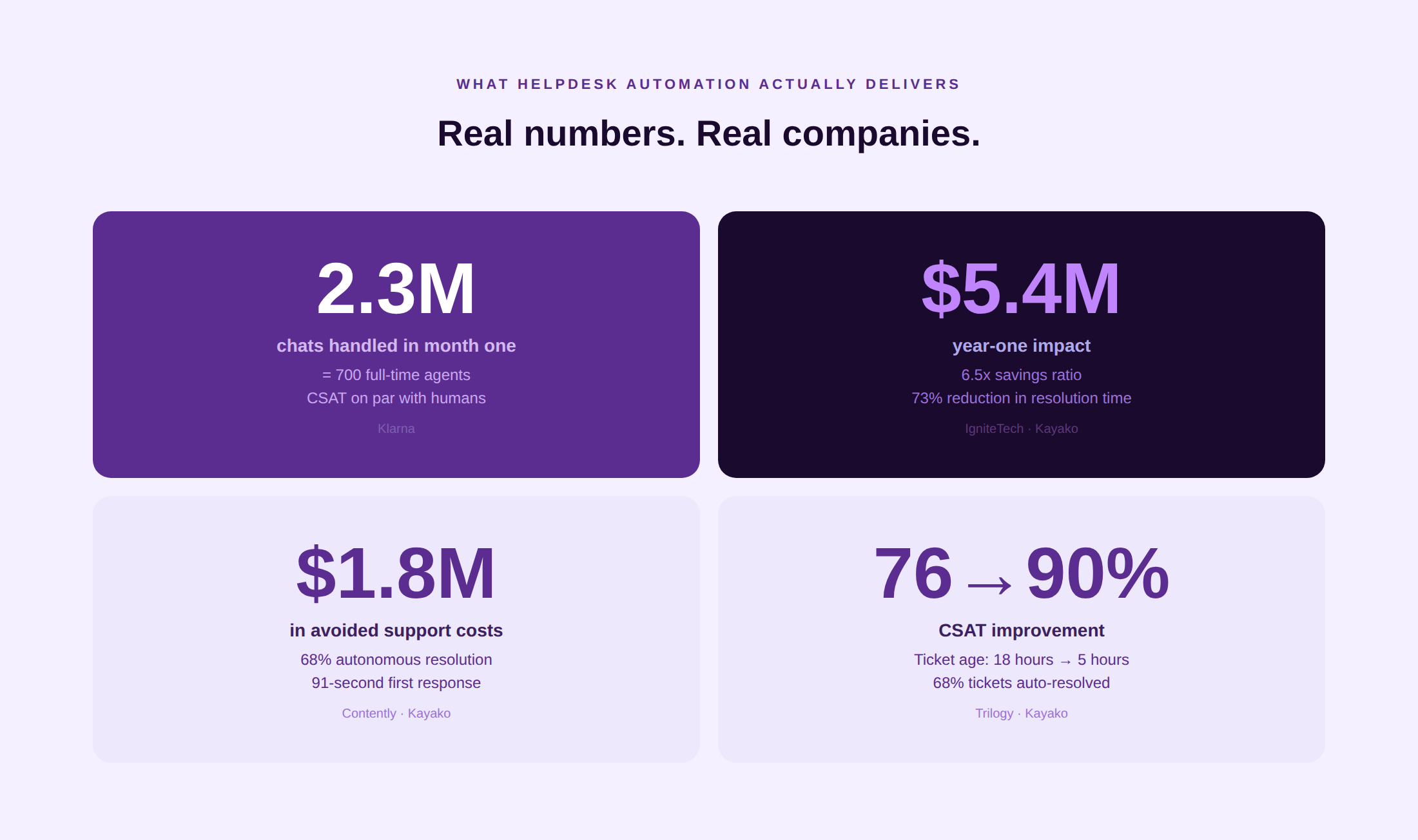
Outcome-based pricing ($1 per AI-resolved ticket) is the most transparent cost model in this list. Kayako customers have reported consistent improvements in resolution time and CSAT: Trilogy reduced ticket age from 18 hours to under 5 hours, with CSAT moving from 76% to 90%. Contently achieved 68% autonomous resolution, 91-second first response time, and $1.8 million in avoided costs. IgniteTech reported $5.4 million in year-one impact with a 6.5x savings ratio. No per-seat cost means scaling headcount does not directly inflate the support platform bill.
Where it falls short
Voice and phone are not natively supported. Best suited to digital-native and SaaS support operations rather than traditional contact-center deployments. The $15,000 onboarding cost is a meaningful upfront commitment for very small teams.
Pricing
$1 per AI-resolved ticket. $15,000 onboarding. No per-seat licensing. Free trial available.
Best for
SaaS and digital-native support teams where per-seat licensing is compressing margin, AI resolution rate is a primary business objective, and total cost of ownership over the contract period matters more than headline entry price.
What users say
“The per-ticket model is the most honest pricing in the market. You pay for outcomes, not for seats that may or may not use the AI features.” — G2 reviewer
Honourable Mentions
Hiver — Gmail-based shared inbox with strong rule-based automation, best for teams already working natively in Google Workspace.
Salesforce Service Cloud + Einstein — deepest CRM-integrated automation for organizations already running the full Salesforce platform.
Zoho Desk + Zia AI — most cost-effective AI assist for teams on the Zoho ecosystem. Zia handles classification and response suggestions from the Enterprise tier.
HubSpot Service Hub AI — the strongest choice for teams using HubSpot CRM for sales and marketing who want automation without an additional platform.
Aisera — enterprise AI service desk purpose-built for IT and HR use cases where ITSM integration matters more than customer support channel breadth.
Yellow.ai — conversational AI agents with strong multilingual support, particularly well-suited to APAC and Middle East deployments.
See how Kayako’s Agent Kay resolves tier-1 tickets autonomously while building a unified customer timeline for every interaction. See Kayako in Action
How to Choose the Right Helpdesk Automation Tool
By automation maturity
- Just starting with automation: Help Scout or Freshdesk Growth. Focus on rule-based workflows and AI-assisted drafting before committing to AI agents. Clean data and a maintained knowledge base are prerequisites for any Layer 3 deployment.
- Scaling rule-based automation: Zendesk or Freshdesk Pro. Both have mature workflow engines and enough AI assist capability to extend what rule-based automation can reach.
- Ready for AI agents: Intercom Fin, Ada, Kayako, or Forethought, depending on volume, stack, and pricing model preference. These are Layer 3 deployments that require clean knowledge base content and defined escalation paths before launch.
According to ticket volume per month
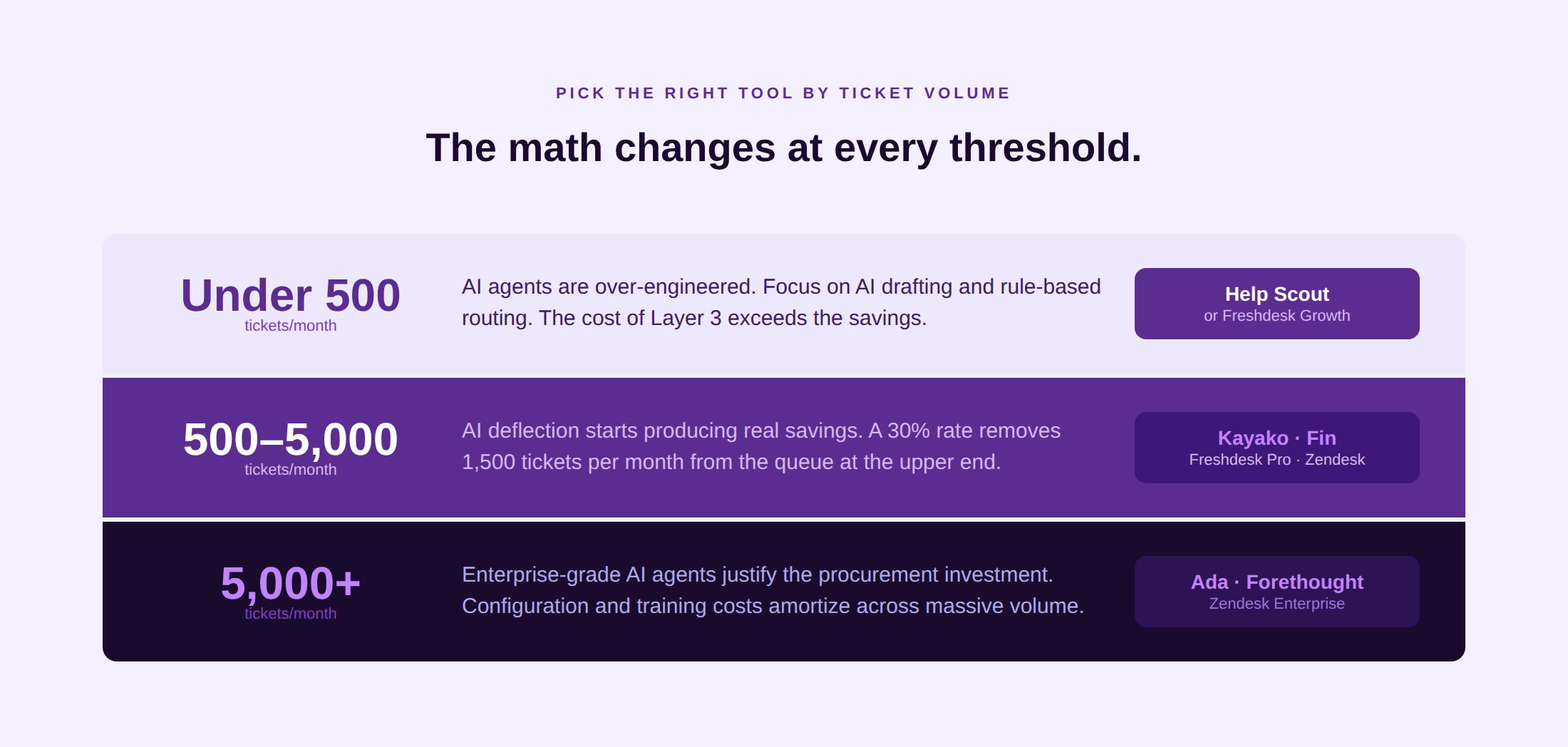
- Under 500 tickets: Help Scout or Freshdesk Growth. Layer 3 AI agents are over-engineered for this volume. Focus on AI drafting and rule-based routing.
- 500 to 5,000 tickets: Freshdesk Pro, Zendesk Suite, Intercom, or Kayako. This is the volume range where AI agent deflection starts to produce meaningful cost savings and where the per-resolution and per-ticket pricing models become competitive with per-seat alternatives.
- 5,000 or more tickets: Zendesk Enterprise, Ada, Forethought, or Kayako. At this volume, a 30% deflection rate from AI agents removes 1,500 or more tickets from the agent queue every month. The ROI calculation changes materially, and the procurement investment in configuration and training becomes justified.
By the pricing model preference
- Per seat: Zendesk, Freshdesk, and Intercom base plans. Predictable monthly cost, but cost scales linearly with headcount even when AI handles more volume.
- Per resolution: Intercom Fin ($0.99/resolution). Aligns cost with AI outcomes but creates unpredictable bills when deflection scales faster than projected.
- Per AI-resolved ticket: Kayako ($1/resolved ticket). Aligns cost with AI outcomes at a fixed per-ticket rate. The total cost is predictable once the resolution rate is established.
What Real Teams Say on Reddit
The most consistent pattern across r/CustomerService and r/SaaS in the last 12 months: teams are satisfied with AI assist (drafting, summarization, classification) across most platforms, but frustrated by the pricing complexity of AI agents. Multiple threads document teams who selected Intercom Fin on the strength of its deflection rate and then received month-two bills that were two to three times their month-one projection as resolution volume grew. The recurring advice: model your expected AI resolution volume at 3x your initial estimate before signing.
On Zendesk AI, the pattern is consistent: “It works, and the reporting is excellent, but by the time you add Copilot and Advanced AI, the number on the invoice looks nothing like the pricing page.” Several practitioners in r/CustomerService documented migrations from Zendesk to Freshdesk specifically to reduce AI add-on costs while maintaining comparable deflection rates. The Freddy AI benchmark showing 34.1% deflection versus Zendesk Advanced AI’s 30.8% in the same production workload has circulated in multiple threads as evidence that switching cost is lower than it appears.
Kayako’s per-ticket model appears in several discussions specifically as a counterexample to the unpredictability problem: “You pay for outcomes, not for seats that may or may not use the AI. It’s the most honest pricing structure in the market.” Ada and Forethought are mentioned primarily in enterprise-scale discussions, where the consistent view is that the custom pricing is justified at 50,000 or more monthly contacts but hard to evaluate for teams below that volume without committing to a sales process.
How Much Can Helpdesk Automation Actually Save?
The case-study evidence in 2026 is specific enough to be credible and varied enough to be instructive:
- Klarna: An AI assistant (built on OpenAI, deployed via Klarna’s support platform) handled 2.3 million customer service chats in its first month, equivalent to the work of 700 full-time agents. Customer satisfaction was on par with human agents and repeat inquiry rates dropped 25%.
- Kayako customer Contently: 68% autonomous resolution rate, 91-second first response time, $1.8 million in avoided support costs. First contact resolution was the primary driver: fewer repeat contacts meant both lower cost and higher CSAT.
- Kayako customer IgniteTech: $5.4 million year-one impact, 6.5x savings ratio, 73% reduction in resolution time. Customer churn rate declined as resolution speed improved, demonstrating the direct connection between support quality and retention.
- Kayako customer Trilogy: Ticket age dropped from 18 hours to under 5 hours. CSAT moved from 76% to 90%. Net Promoter Score and CSAT are the downstream metrics that move when helpdesk automation reduces friction at scale.
- Intercom Fin (independent test): 37.4% of tickets resolved without any agent touch in a B2B SaaS production workload, the highest autonomous deflection rate in published benchmark testing (GetOmnichannel.com, 2026). Average handle time dropped proportionally as the agent queue reduced.
All the platforms mentioned in the list make a certain case on how, with a consistent pattern, deflection rates of 30 to 70% are achievable in 2026 when the knowledge base is clean, the AI agent has action capabilities (not just answer retrieval), and the escalation path to a human agent is smooth. Teams that deploy AI on top of stale content or without clear escalation logic achieve 10 to 20% deflection, the same as a well-tuned rule-based system. Which only goes to show that it’s not just about investment in a helpdesk tool, but also how well you integrate it.
FAQs
What is helpdesk automation?
Helpdesk automation refers to technology that reduces or eliminates manual steps in the support workflow. It operates across three layers: rule-based automation (macros, triggers, SLA timers, routing rules), AI assist (drafted replies, ticket summarization, classification), and AI agents (autonomous resolution without human involvement). Most modern platforms offer all three, but the depth and reliability at each layer vary significantly.
What is the best AI helpdesk tool?
For SaaS teams that want the highest autonomous resolution rate: Intercom Fin and Kayako.
Enterprise teams already on Zendesk: Zendesk AI + Forethought (now Zendesk-native).
For mid-market value: Freshdesk Freddy and Kayako. Outcome-based pricing with no per-seat cost: Kayako.
For high-volume contact centers: Ada. For SMBs that want AI assistance without AI agents: Help Scout. The right answer depends on ticket volume, stack, and pricing model tolerance.
What is the difference between rule-based and AI helpdesk automation?
Rule-based automation executes predefined if-then logic: if a ticket contains the word “refund” and the customer tier is Gold, assign it to the billing team. Fast and predictable, but brittle — it fails when the input does not match the rule. AI automation understands intent regardless of wording, can handle novel query types, and improves over time. AI assist requires human review before sending; AI agents act autonomously. The right layer depends on your ticket volume, query variety, and how much manual oversight you want on each resolution.
How much does an AI helpdesk cost?
Entry points range from $0 (Freshdesk free tier, Zoho Desk free tier) to $199/seat/month (Sprinklr). For AI-specific capability: Zendesk AI Copilot adds $50/agent/month to the base Suite plan. Intercom Fin charges $0.99 per resolved conversation. Kayako charges $1 per AI-resolved ticket with no per-seat cost. Ada and Forethought are enterprise-priced with no public rates. The total cost of ownership over 12 months frequently diverges significantly from the headline entry price, so it’s a good idea to always model at your expected volume, not the vendor’s benchmark.
Does helpdesk automation reduce average handle time?
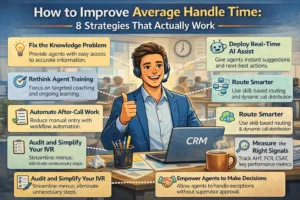
Yes, through two mechanisms. AI-assisted drafting reduces the time agents spend composing replies (typically 30 to 50% of AHT in email-heavy queues). AI agents remove tickets from the queue entirely, reducing the aggregate AHT by reducing the share of tickets that need human handling at all. Kayako’s Trilogy customer reduced the average ticket age from 18 hours to under 5 hours. See Kayako’s guide to improving average handle time for the operational levers beyond AI.
How do AI agents differ from chatbots?
An AI chatbot matches customer queries to predefined answers or knowledge base articles. It deflects questions. An AI agent understands intent in natural language, reasons across your knowledge base and connected systems, takes actions (processing a refund, updating an account, resetting a password), and closes the ticket without a human step. Chatbots handle FAQ deflection. AI agents handle end-to-end resolution. Most platforms in the 2026 market themselves as AI agents but deliver chatbot-level capability. The benchmark is whether the tool can take action inside your systems or only retrieve and display information.