What Are the Top 7 Social Media Customer Service Platforms for 2026?
Discover the top 7 social media customer service platforms for 2026. Compare features, AI capabilities, pricing, and support tools to find the best fit for your team.
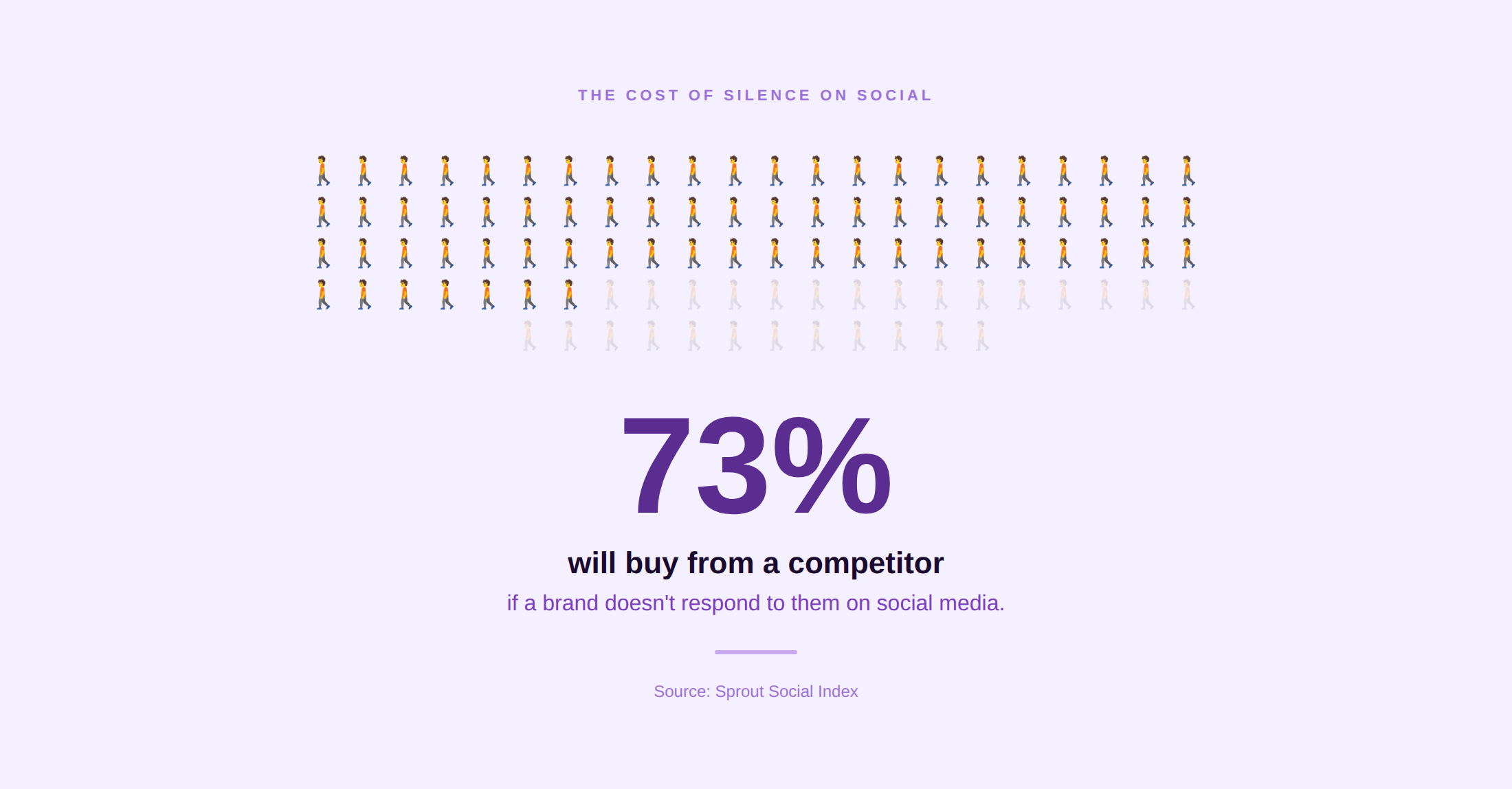
73% of social media users say that if a brand does not respond to them on social, they will buy from a competitor.
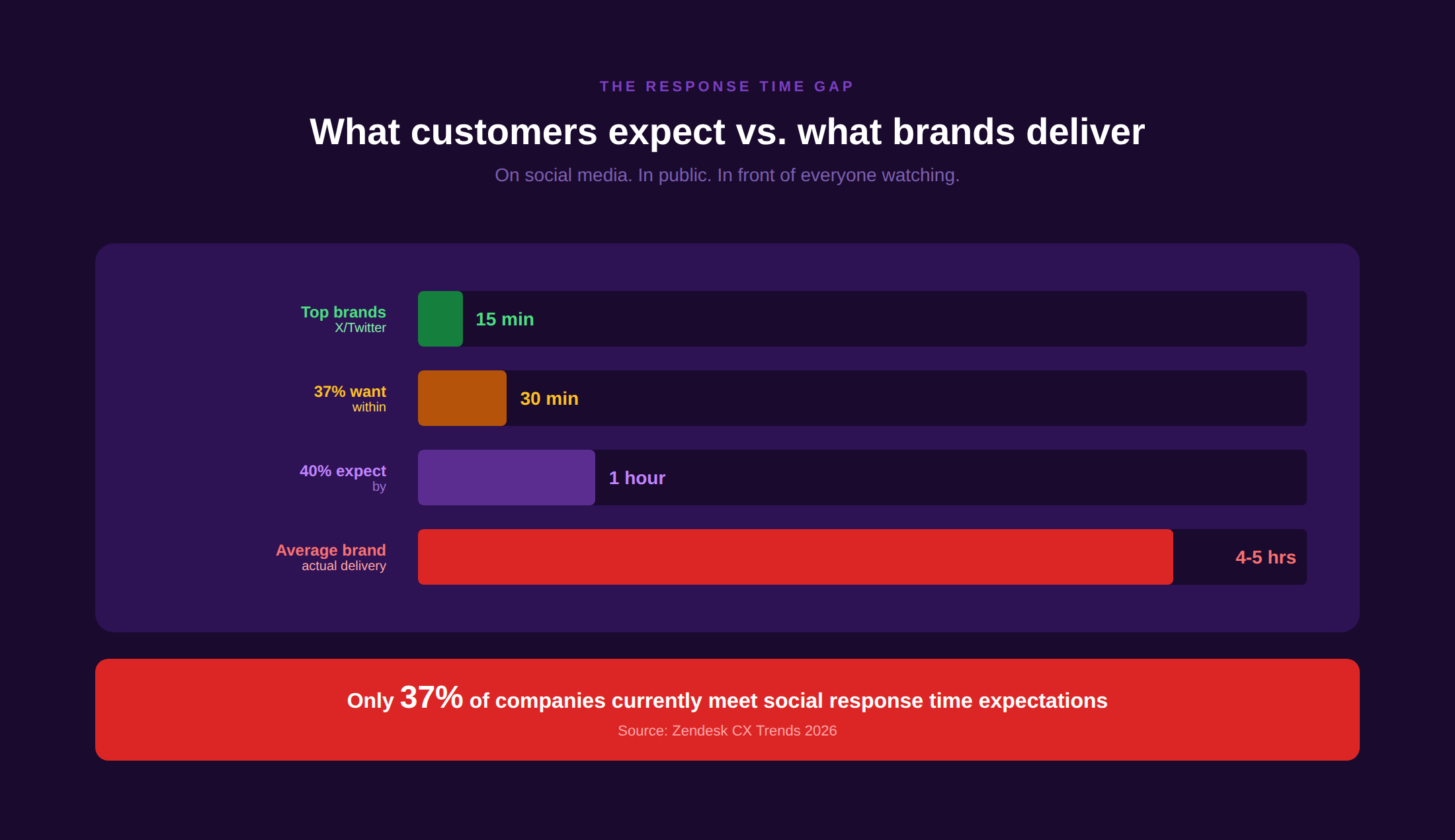
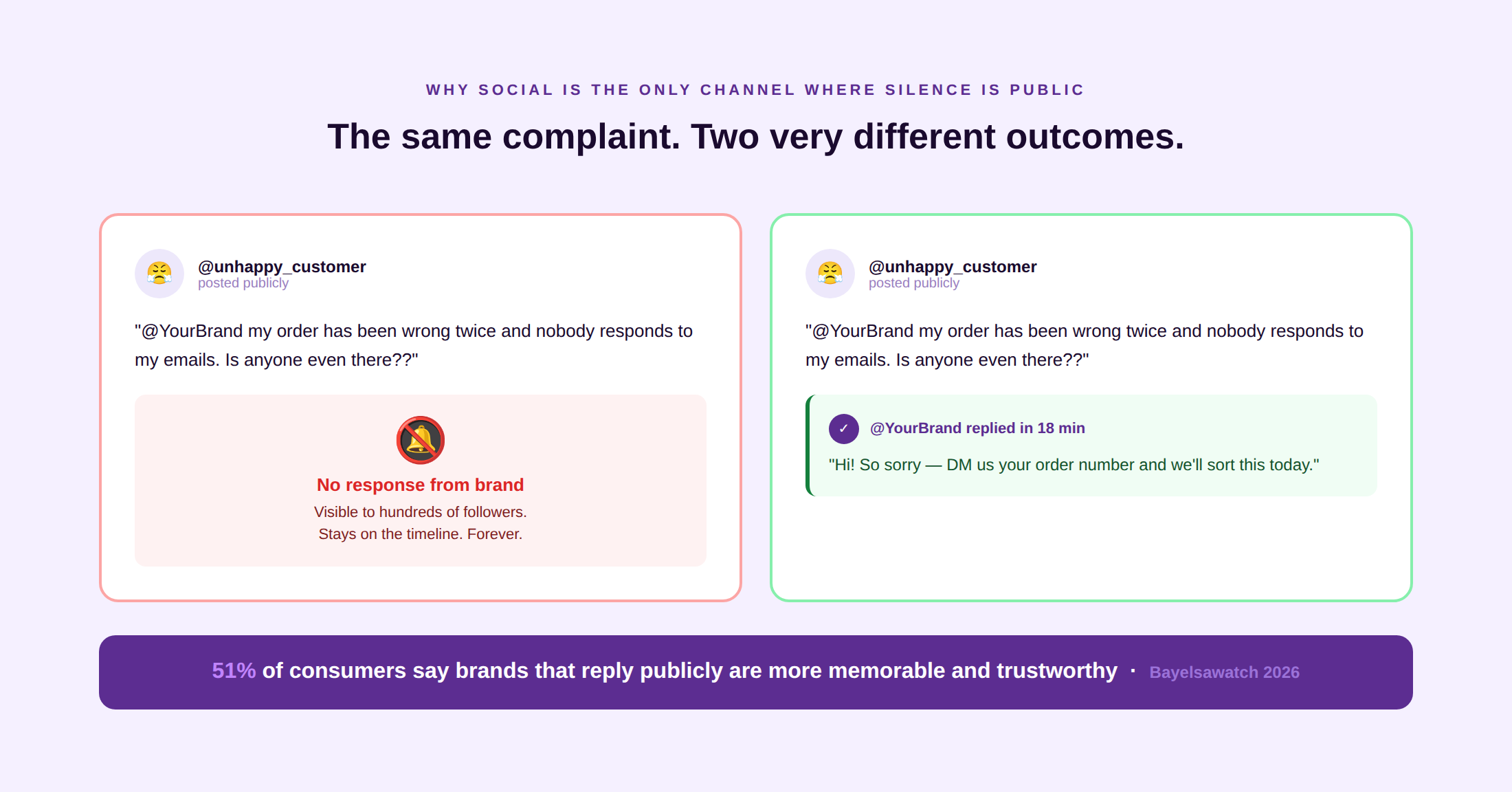
On the other hand, 78% of customers who complain on X expect a response within one hour, while the average brand takes four to five hours. That gap between expectation and delivery is where brand reputation is lost in public, in front of everyone watching.
Social media customer service is not just another support channel. It is the only channel where your response — or your silence — is visible to every future customer who searches your brand. This guide covers the seven best social media customer service platforms for 2026, evaluated against consistent criteria, with real G2 and Reddit data alongside the decision framework that maps each option to team size, channel mix, and budget.
Why Social Media Customer Service Needs Its Own Platform
Email and chat support run on private queues. Social media runs in public. Those two sentences explain why social customer service requires different tooling, different workflows, and different SLA structures than any other support channel.
The public-by-default problem
A customer who posts a complaint on Instagram, X, or Facebook is not filing a ticket. They are making a public statement that is visible to their followers, your other customers, and anyone who searches your brand name. The comment does not disappear when the agent responds. It stays, alongside your reply, as a permanent record of how your brand treats people. A well-handled public complaint builds visible trust. A poorly handled one, or no response at all, compounds the original problem.
The SLA compression problem
40% of customers expect a reply on social media within one hour. 37% expect one within 30 minutes (Electroiq). Those expectations do not adjust for business hours, time zones, or weekends. Brands that handle social support natively, through the X app or the Instagram inbox, cannot maintain those SLAs at any meaningful volume without dedicated tooling and structured agent workflows.
The routing and ownership problem
A product complaint in an Instagram comment touches the support team. A PR crisis in a Twitter thread touches communications. A campaign question in a Facebook post touches marketing. Social customer service does not belong cleanly to any one department, and in most organizations, the question of who responds to what is answered inconsistently, slowly, and sometimes not at all. A dedicated platform with routing rules and assignment workflows is the structural fix.
The cost efficiency opportunity
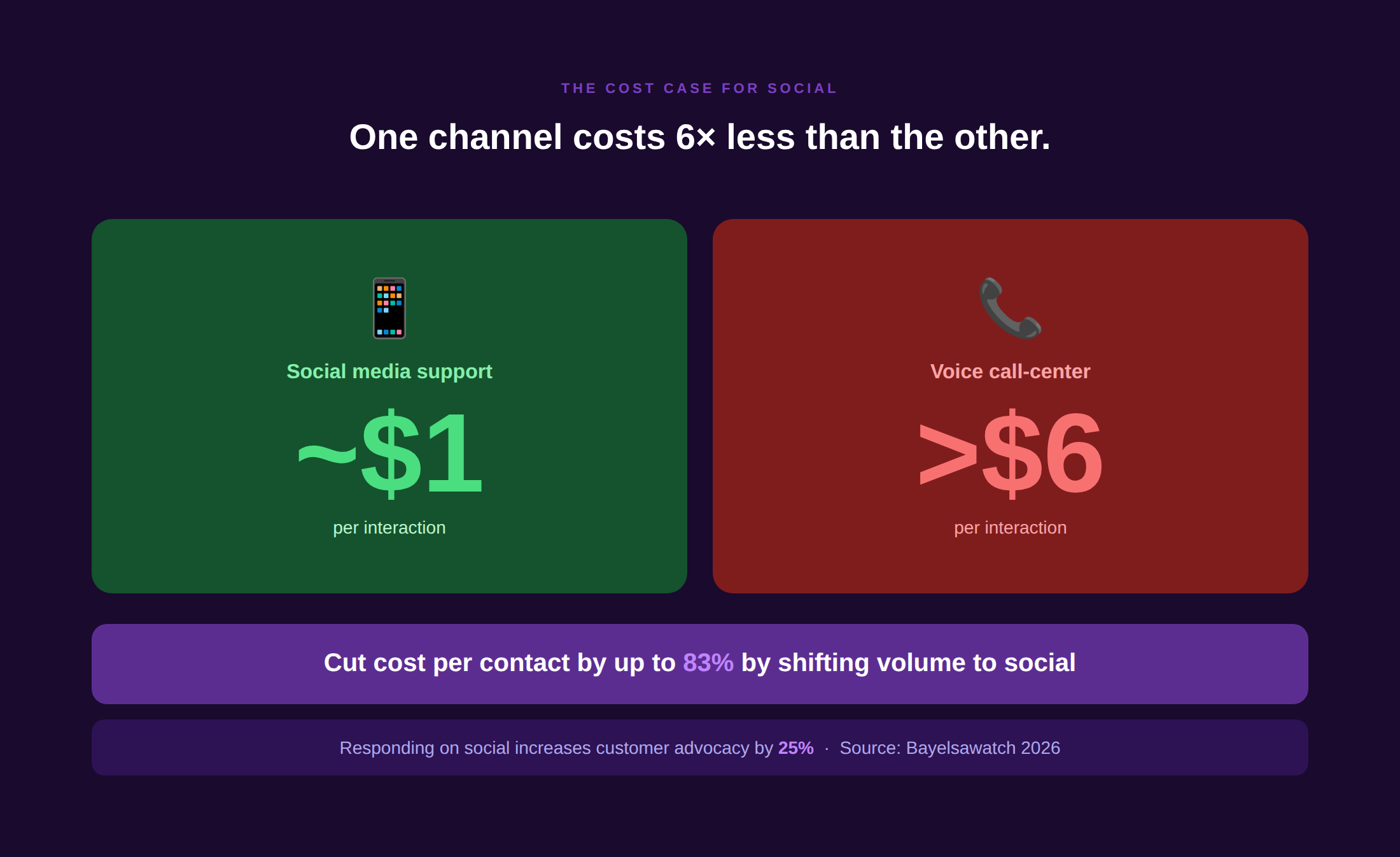
Social media interactions cost approximately $1 versus more than $6 for voice call-center support (Bayelsawatch). Responding to complaints on social media can increase customer advocacy by up to 25%. The combination of lower cost and higher advocacy makes social customer service the highest-ROI support channel available when it is handled with the right tooling.
See how omnichannel customer service connects social media to email, chat, and voice in a unified customer timeline so that social interactions do not become orphaned records disconnected from the rest of the customer’s history.
How We Chose These 7 Platforms
- G2 rating of 4.2 or above with 200 or more verified reviews on G2 or Capterra
- Native support for at least four social channels with a unified inbox across DMs, mentions, comments, and reviews
- Agent collaboration features: assignment, collision detection, internal notes, and SLA reporting
- Integration with at least one helpdesk or CRM, so social interactions can be connected to the customer’s full history
- No paid placement. Kayako appears sixth as the publisher of this guide. All others ranked by G2 score and review volume
Quick Comparison Table
| Platform | Best for | Channels | G2 rating | Starts at | Free trial |
| Sprinklr Modern Care | Large enterprise social CX | 30+ channels | 4.3/5 | $199/seat/mo | No |
| Sprout Social | Mid-market social management + care | X, FB, IG, LinkedIn, TikTok, YouTube, Pinterest | 4.4/5 | $249/seat/mo | 30 days |
| Hootsuite + Sparkcentral | Omnichannel social + messaging | X, FB, IG, LinkedIn, TikTok, YouTube, WhatsApp | 4.2/5 | $99/mo | 30 days |
| Khoros Care | Enterprise community + social service | X, FB, IG, LinkedIn, YouTube, community forums | 4.2/5 | Custom | No |
| Zendesk Social Messaging | Zendesk-stack teams | X, FB, IG, WhatsApp, LINE, WeChat | 4.3/5 | $19/agent/mo (base) | 14 days |
| Kayako | Unified social + email + chat inbox | Twitter/X, Facebook, Instagram, email, chat | 4.3/5 | $1/resolved ticket | Yes |
| Agorapulse | SMB social inbox + reporting | X, FB, IG, LinkedIn, TikTok, YouTube | 4.6/5 | Free / $79/mo | 30 days |
The 7 Social Media Customer Service Platforms in Detail
1. Sprinklr Modern Care: Best for large-volume enterprise social CX
Official site · Pricing · G2 reviews
Overview
Sprinklr Modern Care is the enterprise default for large consumer brands managing customer engagement at volume across 30 or more channels simultaneously. It combines social listening, AI-powered routing, sentiment analysis, and a unified agent desktop in a single platform that handles X, Facebook, Instagram, TikTok, YouTube, WhatsApp, email, voice, and dozens of additional channels without tool switching. For organizations where social listening and customer engagement are inseparable from crisis management and brand reputation, Sprinklr is purpose-built for that complexity.
Channels supported
X (Twitter), Facebook, Instagram, LinkedIn, TikTok, YouTube, WhatsApp, Pinterest, Reddit, email, voice, SMS, and 20 or more additional channels. Widest channel coverage in this comparison.
Standout strengths
Widest coverage on this list at 30-plus channels. AI-powered routing and sentiment analysis across all channels simultaneously. Unified agent desktop prevents context loss when conversations move between platforms. Best-in-class for large consumer brands, financial institutions, and media companies where social listening and response volume require enterprise infrastructure. Strong crisis management workflows and escalation routing.
Where it falls short
At $199/seat/month on the self-serve plan, Sprinklr is the premium tier of this comparison. Custom enterprise pricing adds complexity to procurement. Configuration and onboarding are significant investments that most SMBs and mid-market teams cannot justify. G2 reviewers consistently flag the learning curve and the cost of capabilities that smaller teams will never use.
Pricing
Self-Serve from $199/seat/month. Enterprise pricing custom. No free trial.
Best for
Large consumer brands, financial institutions, telecoms, and media companies managing 10,000 or more monthly social interactions, where the breadth of channel coverage and enterprise routing are primary requirements.
What users say
“Sprinklr does what it says for big brands. If you’re not handling tens of thousands of social interactions a month, you’re paying for capability you’ll never activate.” — r/socialmedia
2. Sprout Social: Best balance of social management and customer care for mid-market
Official site · Pricing · G2 reviews
Overview
Sprout Social is the most widely cited mid-market platform that combines social media management (publishing, scheduling, analytics) with a strong customer care layer (Smart Inbox, assignment, SLA tracking). Its 4.4/5 G2 rating across 4,000 or more reviews reflects consistent satisfaction across both functions. For teams that need to manage both organic social content and customer service responses from the same interface, Sprout is the most capable integrated option in this comparison. It does not require a separate helpdesk integration to function as a service tool.
Channels supported
X (Twitter), Facebook, Instagram, LinkedIn, TikTok, YouTube, Pinterest, and Facebook Messenger. WhatsApp is available on higher tiers.
Standout strengths
Smart Inbox consolidates all DMs, mentions, and comments from every connected platform into a single prioritized queue. Strong SLA tracking with response time reporting by channel. Excellent analytics covering both content performance and care metrics in the same dashboard. Bot Builder for automated response flows. Case management and assignment workflows. The 30-day free trial is one of the most generous in this list.
Where it falls short
At $249/seat/month on the Standard plan, Sprout is priced for teams with meaningful social volume. G2 reviewers consistently note that entry-level pricing makes it expensive for small teams relative to what they use. Khoros and Sprinklr are more capable at very high enterprise volumes. WhatsApp native support requires Professional or higher.
Pricing
Standard from $249/seat/month. Professional from $399/seat/month. Advanced from $499/seat/month. 30-day free trial available.
Best for
Mid-market brands (5 to 50 social agents) that need both social publishing and customer care in one platform. Marketing and support teams that share responsibility for social and do not want separate tools for each function.
What users say
“Sprout’s Smart Inbox is the best social care tool I’ve used at this price point. It does both publishing and service without needing two platforms.” — G2 reviewer
3. Hootsuite (with Sparkcentral): Best omnichannel social and messaging for established brands
Official site · Pricing · G2 reviews
Overview
Hootsuite is the most recognized social media management platform globally, and its Sparkcentral acquisition adds enterprise-grade customer engagement capability. Sparkcentral connects X, Instagram, Facebook Messenger, WhatsApp, SMS, and live chat into a unified agent desktop with intelligent routing, SLA tracking, and helpdesk integration. Where Hootsuite’s base is a social publishing platform, Hootsuite with Sparkcentral is a genuine omnichannel social customer service operation. Its 4.2/5 G2 rating reflects consistent satisfaction from a very broad user base across both use cases.
Channels supported
X (Twitter), Facebook, Instagram, LinkedIn, TikTok, YouTube, WhatsApp (via Sparkcentral), SMS, and live chat.
Standout strengths
Most widely adopted social management platform globally. Sparkcentral adds WhatsApp Business, intelligent routing, and SLA management on top of the base platform. Strong content calendar and scheduling tools alongside the care features. Broad integration library connects to Salesforce, Zendesk, and Dynamics 365. 30-day free trial on all paid plans.
Where it falls short
G2 reviews flag that Sparkcentral is a separate product from the base Hootsuite platform, and the integration between the two can feel disconnected. Enterprise pricing for Sparkcentral is not publicly listed. Reddit discussions note that Hootsuite’s pricing has increased significantly in recent years, with some long-term users reporting 40 to 60% increases at renewal.
Pricing
Professional from $99/month (10 social profiles). Team from $249/month. Enterprise custom. Sparkcentral pricing separate.
Best for
Established brands that already use Hootsuite for social publishing and want to add WhatsApp and structured customer service workflows without switching to a new platform entirely.
What users say
“Hootsuite is the tool most social teams already know. Sparkcentral turns it into a real customer service operation. The integration could be cleaner, but the capability is there.” — r/socialmedia
4. Khoros Care: Best for the enterprise community and social service combined
Overview
Khoros Care is the specialized care module within the broader Khoros customer engagement platform. Its differentiator is the combination of social channel management with brand-owned community forums, giving enterprise brands a single platform to manage both inbound social interactions and the community spaces where customers help each other. For large technology companies, financial institutions, and telecoms with both active social and active community forums, Khoros connects those two channels in a way that most competitors cannot.
Channels supported
X (Twitter), Facebook, Instagram, LinkedIn, YouTube, Google My Business, Apple Business Chat, WhatsApp, and brand-owned community forums.
Standout strengths
Strongest combination of social care and branded community management in this comparison. AI-powered routing with intent classification. Strong SLA management and compliance reporting for regulated industries. Deep integration with Salesforce, ServiceNow, and enterprise CRM platforms. Well-established enterprise customer base in technology, financial services, and telecoms.
Where it falls short
Custom pricing requires a full enterprise sales process. No self-serve pricing or free trial. Implementation is a significant commitment, measured in months rather than weeks. G2 reviews flag complexity and cost consistently as the primary barriers, particularly for teams that do not need the community forum component. Not suited to SMB or mid-market operations.
Pricing
Custom pricing. No public rates. No free trial.
Best for
Large enterprises managing both social customer service and branded community forums, such as technology companies, financial services, and telecoms, with active user communities alongside high social care volume.
What users say
“Khoros is the right choice if you need both community and social care in one platform. If you only need social, there are cheaper options.” — G2 reviewer
5. Zendesk (Social Messaging Add-On): Best for support teams already on Zendesk
Official site · Pricing · G2 reviews
Overview
Zendesk’s Social Messaging integration connects X, Facebook, Instagram, WhatsApp, LINE, WeChat, and other messaging channels directly into the Zendesk agent workspace via the Sunshine Conversations layer. For teams already running Zendesk for email and phone support, adding social messaging means agents work from one interface with full customer history across every channel. No separate platform purchase, no new vendor relationship, and no context loss between channels. The tradeoff is that Zendesk’s social care capability is an extension of a helpdesk rather than a purpose-built social tool, which means it lacks the content publishing and social analytics that Sprout Social or Hootsuite provide.
Channels supported
X (Twitter), Facebook Messenger, Instagram DMs and comments, WhatsApp Business, LINE, WeChat, Telegram, and email within the same unified inbox.
Standout strengths
Full context continuity across social and non-social channels, a customer’s X DM and their email ticket appear in the same Zendesk timeline. No additional vendor or platform overhead for teams already on Zendesk. AI Copilot and automated workflows apply to social tickets the same way they apply to email. Strong SLA management and reporting. 1,300 or more integrations, including the full Zendesk ecosystem.
Where it falls short
Social Messaging is a paid add-on on top of the base Zendesk Suite plan, creating additional cost complexity. Not suited to teams that need social publishing, content scheduling, or brand monitoring alongside service, those capabilities are not in Zendesk. G2 reviews note that Instagram comment management has less functionality than dedicated social tools.
Pricing
Base Suite Team from $19/agent/month. Social Messaging (Sunshine Conversations) pricing is usage-based. Advanced AI is a $50/agent/month add-on.
Best for
Support teams already running Zendesk for email, phone, and chat who want to add social channels without introducing a second platform or a separate vendor relationship.
What users say
“Zendesk social messaging is not the best standalone social tool. It’s the best social tool if you’re already on Zendesk and want one unified view.” — r/CustomerService
6. Kayako: Best for unifying social with email, chat, and voice in one shared inbox
Overview
Kayako is an AI-powered helpdesk that unifies social media interactions, email, chat, and voice into a single shared inbox via SingleView, a unified customer timeline that consolidates every interaction in chronological order before the agent reads a word. Social DMs and mentions from X (Twitter), Facebook, and Instagram feed into the same queue as email and chat tickets, with the full customer history visible in one panel. Agent Kay handles tier-1 resolution autonomously. Outcome-based pricing at $1 per AI-resolved ticket removes per-seat cost that compounds at scale.
Channels supported
X (Twitter), Facebook, Instagram, email, live chat, in-app messaging, and social media DMs across connected platforms.
Standout strengths
SingleView gives agents the complete customer history across every channel — social, email, and chat — before the first message. AI triage routes social contacts by intent and priority alongside all other ticket types. Agent Kay resolves tier-1 social queries autonomously. Outcome-based pricing ($1 per AI-resolved ticket, no per-seat cost) is the most transparent cost model in this comparison. Kayako customers report consistent CSAT improvement: Trilogy moved from 76% to 90%, Contently achieved 68% autonomous resolution, and $1.8M in avoided costs.
Where it falls short
Not a standalone social media management or publishing platform, teams that need content scheduling and social analytics require a separate tool for those functions. Voice support is not natively included. Best suited to digital-native operations where social is one of several channels rather than the primary one.
Pricing
$1 per AI-resolved ticket. $15,000 onboarding. No per-seat licensing. Free trial available.
Best for
SaaS and digital-native support teams that want social interactions unified with email and chat in a single customer timeline, without per-seat licensing that compounds as headcount grows.
What users say
“Having everything in one inbox — social, email, chat — with the full customer history visible before you respond. That’s what makes Kayako different.” — G2 reviewer
7. Agorapulse: Best SMB-friendly social inbox with strong reporting
Official site · Pricing · G2 reviews
Overview
Agorapulse holds the highest G2 rating on this list at 4.6/5 across 900 or more reviews. It’s a consistent reflection of how well it serves its target audience of small and mid-sized social teams. Its Social Inbox consolidates DMs, comments, mentions, and reviews from X, Facebook, Instagram, LinkedIn, TikTok, and YouTube into a single queue with assignment, labeling, and response time tracking. The free tier makes it accessible to very small teams. It is not an enterprise social care platform, but for teams under 10 people managing 5 or fewer profiles, it is the most value-dense option on this list.
Channels supported
X (Twitter), Facebook (pages, groups, ads, comments), Instagram, LinkedIn, TikTok, YouTube, and Google My Business reviews.
Standout strengths
Highest G2 rating in this comparison at 4.6/5. Free tier available for very small teams. Clean interface that requires minimal onboarding. Strong reporting covering response time, agent performance, and message volume by channel. Content calendar and publishing tools are included alongside the social inbox. 30-day free trial on all paid plans.
Where it falls short
Not suited to enterprise volumes or complex routing requirements. No native WhatsApp integration. Less AI automation capability than Sprinklr, Sprout, or Kayako. Reporting depth lags dedicated analytics platforms at higher volumes. No native helpdesk integration in the base tier.
Pricing
Free (1 user, 3 profiles). Standard from $79/month. Professional from $119/month. Advanced from $149/month.
Best for
Small and mid-sized social teams (1 to 10 people) managing a limited number of profiles where inbox consolidation, response time tracking, and value-for-money matter more than enterprise-scale routing or AI automation.
What users say
“Agorapulse is the tool I recommend to every small brand that asks me what to use for social customer service. It’s clean, it’s affordable, and it just works.” — r/socialmedia
See how Kayako unifies social, email, and chat into one customer timeline so no interaction starts from zero. See Kayako in Action
Honourable Mentions
Brandwatch (including Falcon.io legacy) — enterprise-scale social listening combined with engagement, best for brands where monitoring volume and competitive intelligence sit alongside customer care.
Meltwater Engage — PR-led social customer care for communications teams where media monitoring and social response management are managed by the same team.
Statusbrew — mid-market social customer service alternative with competitive pricing and strong multi-profile management, particularly popular among agencies and multi-brand operations.
Zoho Social — best-value social inbox for teams already using Zoho CRM, Zoho Desk, or other Zoho products. Not suited as a standalone social care platform.
Buffer — primarily a content publishing tool with light engagement features. Not recommended for teams with meaningful customer service volume on social.
Freshdesk Social — for Freshworks-stack teams that want to add X and Facebook to the Freshdesk queue without a separate platform. Less capable than dedicated social tools for high social volume.
Why Dedicated Social Customer Service Tools Beat Using the Native App
The most common mistake in social customer service is assuming that the native X or Instagram interface is sufficient. It is, until it is not — and by the time it fails, you are managing a crisis with tools built for casual posting rather than structured service operations.
- No SLA reporting. The native X and Instagram interfaces do not measure response time by agent, by issue type, or by priority. Without that data, you cannot improve what you cannot see.
- No multi-agent triage. Native tools are designed for one person. A team of three agents working the same X account from the native app will generate duplicate responses, missed mentions, and no clear ownership. Dedicated platforms provide collision detection, assignment, and conversation locking.
- No audit trail. In a regulated industry or a brand crisis, you need a complete record of who responded to what, when, with what message. Native apps do not provide that. Dedicated platforms do.
- No cross-channel context. An agent handling a Facebook DM with no visibility into the same customer’s email ticket from last week is starting from zero. Dedicated platforms that integrate with your helpdesk carry that context forward.
- No crisis management workflows. When a brand mention goes viral for the wrong reasons, you need routing rules, escalation paths, and approval workflows. The Instagram app has none of these. A dedicated platform has all of them.
Real-World Social Customer Service: Case Studies
JetBlue: the social-first apology playbook
JetBlue pioneered social customer service as a reputation-building tool rather than a crisis-response tool. After the 2007 ice storm stranded passengers on planes for hours, then-CEO David Neeleman published a personal video apology and announced a Customer Bill of Rights with specific compensation commitments. JetBlue has since maintained a dedicated social support team that responds to mentions within minutes during operational hours. It’s a model that is studied as a template for proactive customer service done visibly in public.
Slack: transparent outage communications
Slack manages service outages through a combination of X posts, status page updates, and direct responses to affected users. The pattern is consistent: acknowledge early, update frequently, explain what happened, and confirm when resolved. The result is that Slack outages, despite being technically failures, consistently produce positive social media commentary because the communication approach converts frustration into trust. The lesson: a bad experience handled transparently on social media produces better brand outcomes than a bad experience with no public communication.
Kayako customer: Contently
Contently deployed Kayako to unify social, email, and chat interactions into a single customer timeline, with AI triage handling routing and tier-1 resolution across all channels. The result was 68% autonomous resolution across all channels (including social), 91-second first response time, and $1.8 million in avoided support costs. The social channel improvement came specifically from agents no longer needing to switch tools between a social platform and the helpdesk: every interaction, regardless of channel, appeared in the same queue with full customer context. See how Kayako’s customer satisfaction score outcomes improved alongside resolution speed.
How to Choose the Right Social Media Customer Service Platform
By team size
- 1 to 5 social agents: Agorapulse (highest G2 rating, most value-dense for small teams) or Kayako (if social is one of several channels and per-ticket pricing fits). Avoid Sprinklr and Khoros; the overhead is disproportionate.
- 5 to 25 agents: Sprout Social or Hootsuite with Sparkcentral. Both handle multi-agent workflows, SLA tracking, and mixed social/messaging channels at this scale without enterprise-level complexity.
- 25 or more agents: Sprinklr for social-first enterprise operations. Zendesk Social Messaging for teams where social is one channel in a larger helpdesk operation. Khoros for organizations with both social and branded community forums.
By channel mix
- Instagram-heavy DTC: Sprout Social or Agorapulse. Both handle Instagram DMs, comments, and story replies cleanly.
- X-heavy SaaS or tech: Sprout Social or Zendesk Social Messaging (if already on Zendesk).
- WhatsApp-primary: Hootsuite with Sparkcentral or Sprinklr. Both have native WhatsApp Business API integrations that Agorapulse and Kayako do not.
- Multi-channel enterprise: Sprinklr covers the widest channel breadth at 30-plus. Khoros adds community forum management for brands that need both.
By budget
- Under $500/month: Agorapulse (Standard at $79/month), Hootsuite Professional ($99/month), or Kayako ($1/resolved ticket with no seat cost).
- $500 to $5,000/month: Sprout Social Standard ($249/seat/month for a small team), Zendesk Social Messaging (add-on to existing Zendesk plan), or Hootsuite Team.
- $5,000 or more/month: Sprinklr, Khoros, or Sprout Social at larger team sizes. At this budget level, evaluate ROI against customer churn rate improvement and NPS lift driven by faster social response times.
A brewing storm on social media can sometimes be too much to handle. Customers need a response, and the legacy methods of responding to each query can be tiresome. In such cases, and for companies that intend to keep running an incremental business revenue model, investment in a legit social media platform is the way to go. With their unified dashboard giving you access to all channels in one go, your teams find it much easier to manage and respond to users in a timely manner. Guaranteeing you a more assured path to a positive customer experience.
FAQs
What is the best social media customer service platform?
For large enterprise brands with 30-plus channels and high volume: Sprinklr. For mid-market teams that need social management and care in one platform: Sprout Social. For SMBs wanting the best value: Agorapulse. For teams already on Zendesk: Zendesk Social Messaging. For brands wanting social unified with email and chat in one inbox: Kayako. For enterprise community plus social: Khoros. The right answer depends on team size, channel mix, and budget.
What features should a social customer service tool have?
Six non-negotiables: (1) a unified inbox that consolidates DMs, comments, and mentions from every connected channel; (2) assignment and collision detection so multiple agents do not respond to the same message; (3) SLA tracking that measures response time by agent, channel, and issue type; (4) internal notes for agent handover context; (5) integration with your helpdesk or CRM so social interactions connect to the customer’s full history; and (6) reporting that shows response time performance, not just volume.
How fast should brands reply on social media?
40% of customers expect a reply within one hour on social media, and 37% expect one within 30 minutes (Electroiq). Top brands on X respond within 15 minutes. The average brand takes four to five hours. That gap is a brand reputation opportunity: teams that hit sub-one-hour response times consistently differentiate visibly from competitors who are slower. The expectation does not adjust for business hours, as social support needs structured after-hours coverage or AI handling to avoid compounding the gap on evenings and weekends.
Can a helpdesk replace a dedicated social platform?
For teams where social is one of several channels (email, chat, phone) and the volume is moderate, Zendesk Social Messaging or Kayako handles social adequately within the helpdesk. For teams where social is the primary channel or where social publishing, content scheduling, and social analytics are also needed, no. A helpdesk handles incoming contacts. A dedicated social platform handles the full social presence, including outbound and monitoring. Most growing brands need both, at different stages.
How does social customer service integrate with email and chat support?
The integration happens at the customer record level. A social DM, an email, and a chat message from the same customer should all appear in the same chronological timeline in the agent’s interface. Kayako’s SingleView technology does this automatically. Zendesk Social Messaging does it within the Zendesk ecosystem. Without that integration, agents handling a social contact have no visibility into the customer’s email history, and the customer has to re-explain their situation. See how omnichannel customer service connects social to every other channel in a unified customer timeline.
Does WhatsApp count as a social media channel for customer service?
Operationally, yes. WhatsApp Business is used by over 200 million businesses globally (Meta), and in most markets outside North America it is the dominant messaging channel for customer service. It requires the same structured workflows, SLA tracking, and agent assignment as any other social channel. The distinction from social media is that WhatsApp conversations are private by default (no public visibility) rather than public, which changes the brand-risk dimension. Platforms that support WhatsApp Business API alongside public social channels like Sprinklr, Hootsuite with Sparkcentral, Zendesk Social Messaging, handle both dimensions in a single interface.
See how Kayako unifies social DMs with email and chat in one customer timeline — so every agent starts from the right place. Book a Demo