Help Scout is a shared inbox and help desk built on one design idea: support should feel like email rather than like a ticketing system. Conversations arrive by email, chat, and a customer portal, land in an inbox with no visible ticket numbers on the customer side, and move through workflows, saved replies, tags, and assignment. Around that sit Docs for knowledge base content, Beacon for in-app help, reporting, and AI Answers, an assistant that resolves routine requests directly. It is sold mainly to small and mid-sized teams, and it is priced per user per month from a free tier up to the mid-seventies.
This review is written by Colin Guilfoyle, SVP of Customer Support at Trilogy, who has spent roughly a decade leading support functions and buying the software that runs them. He has not run Help Scout against a live production queue, and nothing here is bench testing. What follows is built from published pricing and plan documentation, read first-hand and dated, and from a close read of what customers describe across four review platforms. Where there is an opinion, it comes from that experience of operating support teams. Where the evidence disagrees with the opinion, the evidence wins.
Most reviews in this series document a gap between how a product performs and how its billing behaves. Help Scout is the rare case where the company ran that experiment on itself, in public, and reversed it. In 2025, it moved from per-seat pricing to charging by customer contacts; customers left, and the company changed back. The product was never the problem, and the reputational cost has outlasted the policy. What follows reads all four platforms against each other, explains what the current pricing actually is, grades the product feature by feature, and names the alternatives worth a look.
How I evaluated Help Scout
Support software is judged over a renewal cycle, not a trial. Six criteria, in the order they matter.
Hands-on use. I did not run Help Scout against a live queue and will not pretend otherwise. What I examined directly are the published plan and pricing listings, read on 13 August 2026, including the free tier’s contact cap, the per-user tiers, and the AI Answers rate.
User reviews, at volume and in depth. G2, Capterra, Trustpilot, and Reddit, read for what people describe rather than the score they left. Reddit matters unusually here because that is where the pricing reaction played out.
Depth and breadth of features. Whether the product covers a real support surface. Help Scout deliberately covers a narrow one very well.
Scalability. Seat thresholds, forced upgrades, channel coverage, and where growing teams hit walls.
Pricing and forecastability. The bill you cannot predict, and in this case, the bill that changed shape twice.
Support the vendor gives you. The fairest test a company selling customer service software can face.
Two standing exclusions. Employer-review content from Glassdoor and AmbitionBox is dropped because it measures the company as a workplace rather than a vendor. Every source was checked for commercial interest, which matters here because most Help Scout pricing analysis online is published by companies selling alternatives.
What you are actually buying in 2026
The pricing history is the context for everything else, so it goes first.
In 2025, Help Scout moved from charging per seat to charging by contacts helped per month, with unlimited users. The logic was defensible: pay for the customers you serve rather than the people who serve them, and stop penalizing teams for adding a part-time agent. In practice, it made bills volume-linked, which is comfortable in a quiet month and painful in a busy one, and it converted a predictable line item into a variable one. Customers churned, said so publicly, and the company reversed to per-user pricing.
Both models now coexist. New signups see per-user pricing. Existing customers on contact-based plans stay on them as a legacy arrangement. That means two Help Scout customers can be paying in structurally different ways, and any advice you read online may describe either. Check which model your quote uses before comparing it to anything.
The lasting damage is reputational rather than financial. The loudest theme in community discussion is not the price but the reversal itself, and the churn it caused persists in threads well after the policy changed back. Reversing a bad decision is the right call, and it still teaches customers that the billing model is something the vendor may revisit.
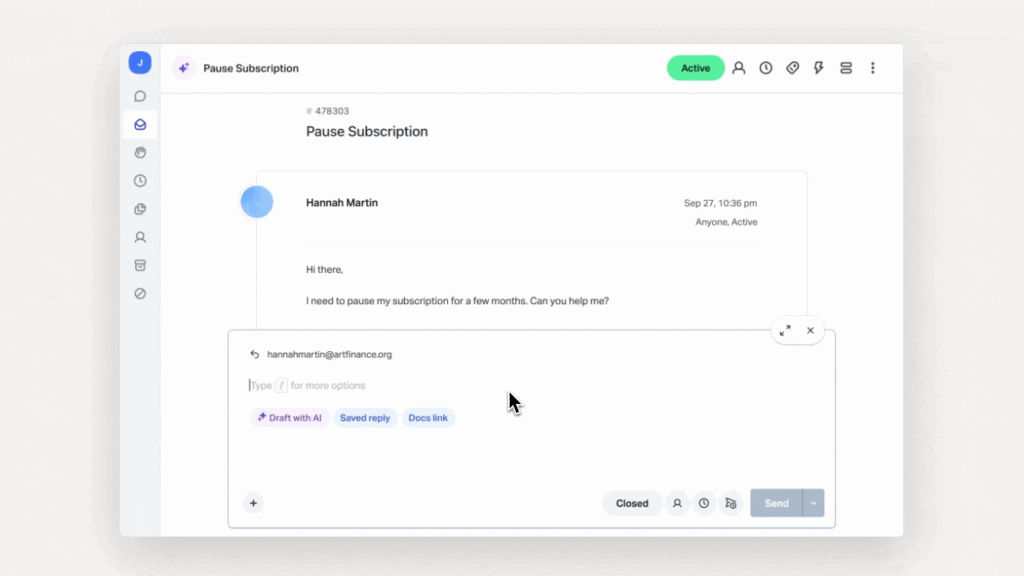
On the product side, the direction is AI. AI Answers is positioned to resolve up to 70% of routine requests, with a three-month free trial, and it is billed per resolution rather than per seat.
The ratings agree on the product and diverge on the company
Here is where Help Scout sits across the four platforms as of August 2026.
|
Platform |
Score |
Reviews |
What the audience is |
|---|---|---|---|
|
G2 |
4.4 / 5 |
423 |
62% small business, product-focused |
|
Capterra |
4.6 / 5 |
200+ |
Small business, some incentivized |
|
Trustpilot |
3.4 / 5 |
42 |
Anyone, very small sample |
|
|
No score |
Active |
Practitioners, pricing-focused |
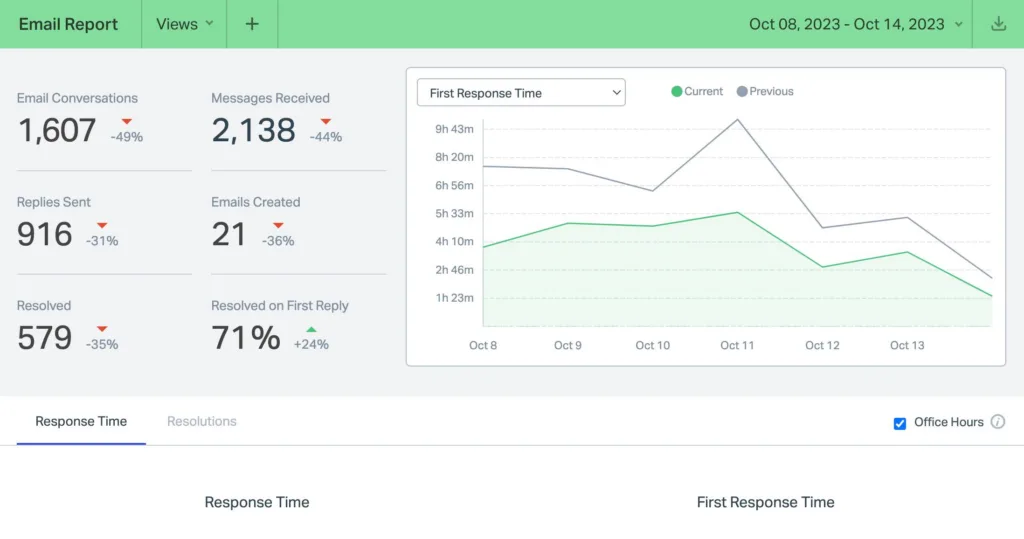
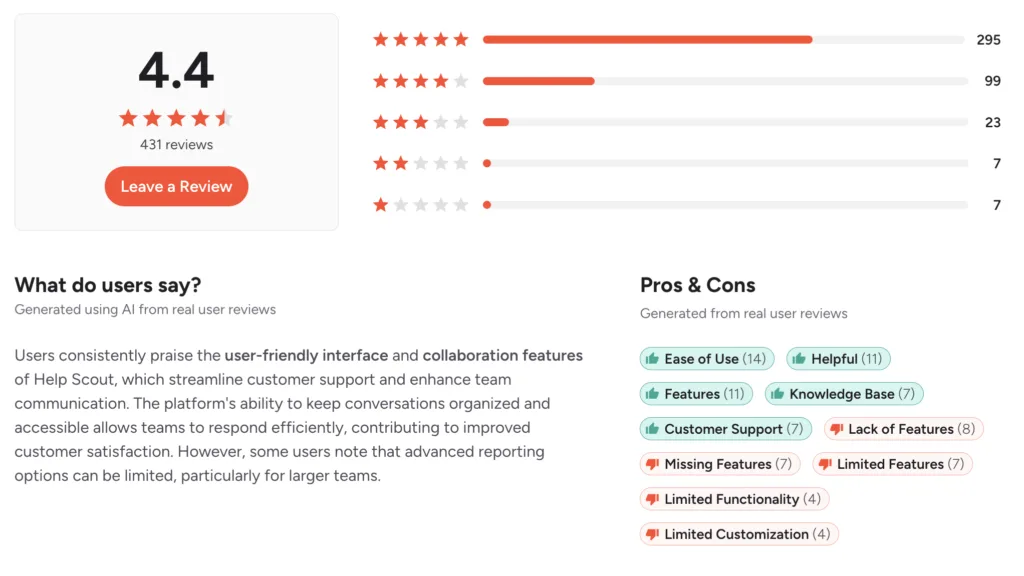
G2’s 4.4 across 423 reviews is a modest sample by this series’ standards but a consistent one, and Help Scout scores higher than Zendesk on ease of use and setup. The clean, email-like inbox is the single most repeated piece of praise, with reviewers describing new agents becoming productive in under an hour.
Trustpilot’s 3.4 needs its sample size stated plainly. At 42 reviews, it is too thin to carry much weight, and I would not build a conclusion on it. It is worth noting only because it sits between the product platforms and the community reaction, which is roughly where the truth appears to be.
Reddit is the platform that matters most here, and it is the reverse of the usual pattern. Where most products in this series have no organic community, Help Scout has an active one, and its dominant subject is the pricing change rather than the software. That is a meaningful signal: practitioners are not debating whether the inbox works; they are debating whether the vendor is predictable.
The split across platforms is therefore cleaner than usual. People rate the product well. People discuss the company warily. Both positions are supported by the evidence.
That is the last score in this review. Everything after this comes from what people described.
What users actually say about Help Scout
Five themes recur, ordered by how often they came up.
The inbox is the best-liked interface in this category
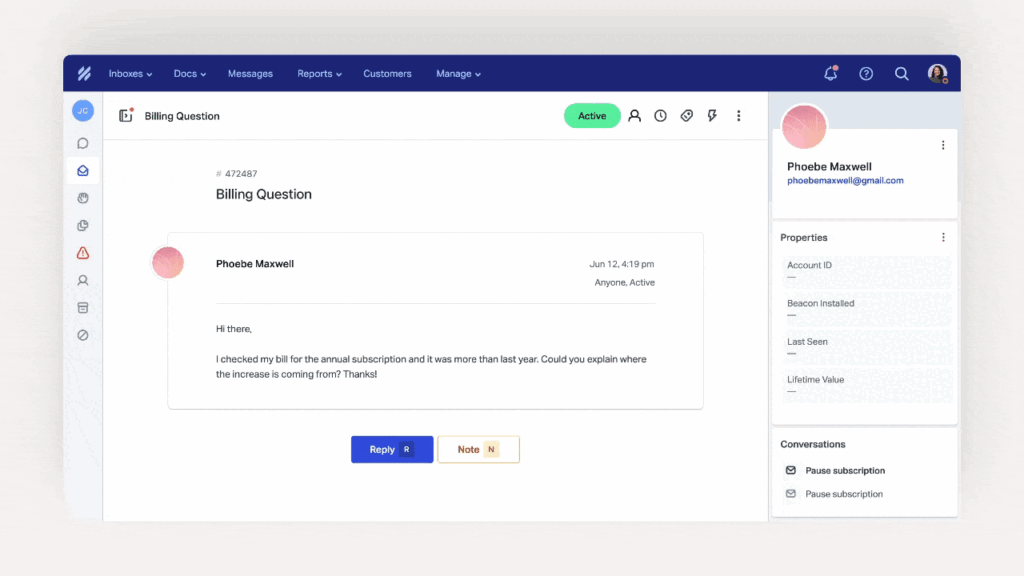
The praise is consistent and specific. Reviewers describe an interface that feels like email rather than software, no ticket numbers facing the customer, and new agents needing under an hour to become useful. Saved replies, tags, workflows, and assignment all work without configuration projects. For a small team, that absence of friction is the entire product.
Docs and Beacon do more than their reputation suggests
The knowledge base and the in-app help widget come up repeatedly as the reason ticket volume falls rather than just gets organized. Reviewers describe customers self-serving through Beacon before reaching a human, and Docs being simple enough that non-technical staff maintains it.
Deflection depends entirely on content maintenance
The most substantive product criticism, and it is a fair one. Help Scout manages the tickets that arrive rather than reducing how many arrive, and both levers for reducing volume, an accurate knowledge base and working AI deflection, depend on your team writing and auditing documentation manually. The moment maintenance slips after a product change, AI Answers starts giving outdated responses, and deflection falls while you are still paying per resolution.
The pricing reversal is the loudest community theme
Covered above, and it dominates practitioner discussion in a way no product complaint does. The specific reaction reported is churn: customers who left during the contact-based period and did not return after the reversal, some moving to open-source alternatives.
Growth triggers hard cost steps
Reviewers and analysts flag a specific threshold. Adding a twenty-sixth agent forces an upgrade from Standard to Plus, which reporting puts at roughly an 80% increase in per-seat cost. A team at twenty-five agents faces a substantial jump from one hire, and the annual billing discount applies only to seats rather than to add-ons.
A note on sourcing. Capterra carries incentivized entries, so treat that aggregate as the friendliest. Trustpilot’s sample is too small to weight heavily. Nearly every detailed Help Scout pricing breakdown online is published by a vendor selling a replacement, several with per-conversation pricing they position directly against AI Answers, so I have relied on figures where multiple independent analyses agree with the published listings.
Help Scout pros and cons
|
Pros |
Cons |
|---|---|
|
Cleanest inbox experience in the category |
Pricing model changed and reversed within a year |
|
New agents productive in under an hour |
AI billed per resolution on top of seats |
|
Docs and Beacon genuinely reduce volume |
Free tier blocks replies at 100 contacts |
|
Higher ease-of-use scores than Zendesk |
Twenty-sixth agent forces a costly upgrade |
|
Per-user pricing restored and predictable |
Two billing models running in parallel |
|
Strong fit for email-led support |
Thin on WhatsApp and deep CRM integration |
|
Three-month AI Answers trial |
Deflection depends on manual content upkeep |
What Help Scout does better than anyone
Making support feel human. The decision to hide ticket numbers from customers and present conversations as email is a small thing that changes how every interaction reads, and no competitor executes it as cleanly. Combined with an interface a new hire learns in an hour, it is the reason small teams who choose Help Scout tend to stay with it.
What you will be living with
A vendor that has demonstrated it will restructure billing, an AI line that scales with success rather than with headcount, and a product that stops fitting once your channels extend past email and chat. The first is a trust question, the second is arithmetic, and the third is a growth ceiling.
Feature by feature, based on the reviews
Pricing, the reversal and the AI line
Current self-serve pricing is per user per month, running from a free tier up to roughly $75 on annual billing or $90 monthly, with the mid tiers in between. All paid plans include unlimited customer contacts, which is the point of the reversal.
Three mechanics deserve modeling. The free tier caps contacts at 100 a month, and past that, Help Scout blocks outgoing replies across email, chat, and AI Answers until the next cycle, which is a harder stop than most free tiers impose. The twenty-sixth agent forces the Standard to Plus upgrade at a substantially higher per-seat rate. And legacy contact-based plans still exist, so a quote you receive may not match a comparison you read.
AI Answers is the swing factor, and it is billed per resolution, reported consistently at around $0.75. Work the arithmetic and the shape becomes obvious. A five-person team on a mid-tier plan pays a few hundred dollars a month in seats, and adding a thousand AI resolutions can more than triple that. At 1,500 resolutions a month, the AI line alone runs into five figures annually.
Seats are the cheap, predictable part of a Help Scout bill. I would model AI resolution volume before modeling headcount, because that is where the number is decided.
The inbox and daily use
This is the strongest part of the product and the reason for the scores. Conversations present as email threads, internal notes stay invisible to customers, saved replies cut repetition, and workflows handle routing without a configuration project. Reviewers describe onboarding new agents faster than on any comparable tool.
The trade is depth. There is no elaborate ticket lifecycle, no entitlement management, and routing sophistication is limited compared to enterprise platforms. Multiple inboxes and Docs sites are chargeable add-ons rather than unlimited, which surprises teams supporting several brands. For the team Help Scout targets, none of that is a problem. For a team growing into multibrand or regulated support, all of it arrives at once.
Docs, Beacon and self-service
Docs is a competent knowledge base, and Beacon puts it in front of customers inside your product, which is the combination that actually reduces inbound volume. Reviewers credit it with real deflection, and the setup is simple enough that support staff maintain it without engineering help.
The dependency is the thing to plan for. Both Docs and AI Answers are only as current as your team keeps them, and the failure mode is quiet: a product change ships, the article goes stale, the AI keeps answering confidently from it, and deflection falls while resolution charges continue. Nothing in the product flags that drift for you.
I would put knowledge base maintenance on someone’s job description before switching AI Answers on, because the cost of stale content here is charged per wrong answer.
AI Answers
AI Answers is positioned to resolve up to 70% of routine requests and comes with a three-month free trial, which is unusually generous and worth using in full.
Two things to weigh. The per-resolution model ties cost to a clean outcome, which is fairer than per-session or per-action billing and rewards a working deployment rather than a chatty one. That is a genuinely better structure than most of this category offers. The flip side is that success is the expensive case, so the better the AI performs, the larger the line becomes, and there is no flat ceiling.
The evidence base is thinner than the marketing. The 70% figure is first-party; the independent review corpus says relatively little about AI Answers specifically, and reported experience depends heavily on content quality. Grade it on your own historical tickets during the three-month trial rather than on the headline.
Channels, integrations and scale
Email, chat, Docs and Beacon are covered well. Beyond that, the surface thins. WhatsApp and deeper CRM integration are recurring gaps in reviewer accounts, and ecommerce sellers describe it as unsuited to running support across multiple marketplaces because it does not pull order data or connect to those channels natively.
That shapes who should buy it. A SaaS or services business handling email-led support will find little missing. A multi-marketplace retailer or a team with regulated channel requirements will hit the ceiling quickly, and reviewers describe migrating outward rather than upgrading.
Vendor support and trust
Product support draws generally positive comment, in line with a company that has built its identity around service quality.
The trust question is separate, and it is the one that lingers. A vendor that restructured billing, saw customers leave, and reversed within a year has demonstrated both that it will experiment on pricing and that it will listen. Reasonable buyers weigh those two facts differently. What I would not do is treat the reversal as closing the matter, because the community discussion suggests customers have not.
If you are signing a multi-year deal, get price-protection language in writing covering the billing model itself rather than just the rate, because the rate was never what changed.
Help Scout alternatives, by what you are solving for
You want AI resolution pricing that does not punish success
Kayako prices AI around resolved conversations within a structure designed to stay predictable as deflection climbs, rather than scaling a per-resolution line indefinitely. You give up Help Scout’s inbox polish. Test it by pricing 1,000 monthly resolutions under both and comparing the annual figure.
You need a knowledge base that does not decay quietly
If stale content is the risk, Kayako grounds AI in your help content with resolution reporting that shows when answers stop working. You give up Docs’ simplicity. Test it by auditing how many of your articles are more than a year old.
Your channels have outgrown email and chat
LiveAgent adds phone with IVR, social channels, and a multi-brand knowledge base at a comparable price. You give up interface polish. Test it by listing every channel a customer could reach you on today.
You need deeper collaboration and routing
Front is the most cited Help Scout alternative for teams wanting stronger internal collaboration and more flexible routing at similar cost. Test it by mapping the three handoffs that currently go wrong.
You are ecommerce across multiple marketplaces
Gorgias pulls order data into conversations and connects to marketplace channels Help Scout does not reach. Test it by counting how many tickets need order data to answer.
You need enterprise governance
Zendesk brings SLAs, entitlements, multibrand, and audit trails, at materially higher cost and complexity. Test it by asking whether anyone has requested something you could not produce.
Three numbers decide this for any option: cost per resolved conversation at your real volume, what happens to the bill at your next headcount threshold, and how many hours of content maintenance the AI requires to keep working.
Verdict
Help Scout builds the nicest support inbox in this category, and it is not particularly close. The email-like design, the hidden ticket numbers, the hour-long onboarding, and the genuine deflection from Docs and Beacon add up to a product small teams love, and the ease-of-use scores against Zendesk are earned rather than marketed. If your support is email-led and your team is under twenty-five people, it belongs on the shortlist and often wins.
Two things need weighing against that. The company restructured its billing model in 2025, lost customers, and reversed it, which is the right response to a mistake and also evidence that the model is something this vendor will revisit. And AI Answers is billed per resolution on top of seats, so the better your deflection gets, the larger that line grows, with the whole thing resting on documentation your team maintains by hand. On Monday, I would do two things. Model AI resolution volume before seat count, because at a thousand resolutions a month the AI line can exceed the human one. Then, if you are committing for multiple years, get written price protection covering the billing structure rather than just the rate.
Help Scout FAQ
How much does Help Scout cost in 2026?
Per-user pricing runs from a free tier to roughly $75 per user per month on annual billing, or about $90 monthly, with unlimited customer contacts on paid plans. AI Answers is billed separately at around $0.75 per resolution.
What happened with the Help Scout pricing change?
In 2025, the company switched from per-seat to per-contact billing; customers churned and said so publicly, and it reversed to per-user pricing. Legacy contact-based plans still exist for customers who were on them, so two billing models run in parallel.
Is the Help Scout free plan usable?
For a very small operation, briefly. It caps contacts at 100 a month, and once you cross that, Help Scout blocks outgoing replies across email, chat, and AI Answers until the next cycle. Treat it as a trial rather than a tier.
Does adding agents ever force an upgrade?
Yes. Adding a twenty-sixth agent moves you from Standard to Plus, which reporting puts at roughly an 80% increase in per-seat cost. Model that threshold if you are near it.
Is AI Answers worth it?
The per-resolution model is fairer than most, since you pay for outcomes rather than attempts. The 70% resolution figure is the vendor’s own, and performance depends on documentation quality. Use the three-month trial against your real ticket history.