HubSpot Service Hub is the customer service layer of the HubSpot platform. Tickets arrive from email, live chat, forms, and calling, land in a help desk workspace attached to the same contact record sales and marketing already use, and move through pipelines with routing, SLAs, and automation. Around that sit a knowledge base, a customer portal, feedback surveys, reporting dashboards and Breeze, HubSpot’s AI layer, whose Customer Agent answers conversations directly. It is sold to small and mid-market companies already on HubSpot, priced per seat from a free tier up to $150, with AI billed separately in credits.
This review is written by Colin Guilfoyle, SVP of Customer Support at Trilogy, who has spent roughly a decade leading support functions and buying the software that runs them. He has not run Service Hub against a live production queue, and nothing here is bench testing. What follows is built from HubSpot’s published pricing and product catalog, read firsthand and dated, and from a close read of what practitioners describe across four review platforms. Where there is an opinion, it comes from that experience of operating support teams. Where the evidence disagrees with the opinion, the evidence wins.
What makes this one interesting is not the ratings gap, though there is a large one. It is the shape of the complaints. On most help desks in this bracket, buyers grumble about cost and complexity. On Service Hub, the most common criticism is that features are missing, and it outranks expense by a clear margin. That is unusual on a mature product from a company this size, and it points to something structural. What follows reads all four platforms against each other, prices the thing properly from HubSpot’s own documentation, grades it feature by feature, and names the alternatives worth a look.
How I evaluated HubSpot Service Hub
Support software is judged over a renewal cycle, not a trial. Six criteria, in the order they matter.
Hands-on use. I did not run Service Hub against a live queue and will not pretend otherwise. What I examined directly is the published pricing page and full plan comparison, read on 5 August 2026, along with the credit allowances, seat rules and onboarding fees. There is a free tier and a 14-day Customer Agent trial, both worth using before committing.
User reviews, at volume and in depth. G2, Capterra, Trustpilot and Reddit, read for what people describe rather than the score they left. The r/hubspot community carries the most operational detail, since it is mostly administrators describing configuration they could not make work.
Depth and breadth of features. Whether the product covers a real support surface. This turned out to be the whole question.
Scalability. Seat rules, permissions, mobile access, API behavior, and what happens when the team outgrows the tier you bought.
Pricing and forecastability. The bill you cannot predict. Here the seat price is honest, and the credit mechanics are where the surprises live.
Support the vendor gives you. The fairest test a company selling customer service software can face, and it produced the sharpest finding here.
Two standing exclusions. Employer-review content from Glassdoor and AmbitionBox is dropped because it measures the company as a workplace rather than a vendor. Every Reddit source was checked for commercial interest, which matters here because HubSpot runs an unusually large partner and champion program.
What you are actually buying in 2026
Service Hub is not a help desk that happens to sync with a CRM. It is a CRM with a support workspace on top, and almost everything good and bad about it follows from that sentence.
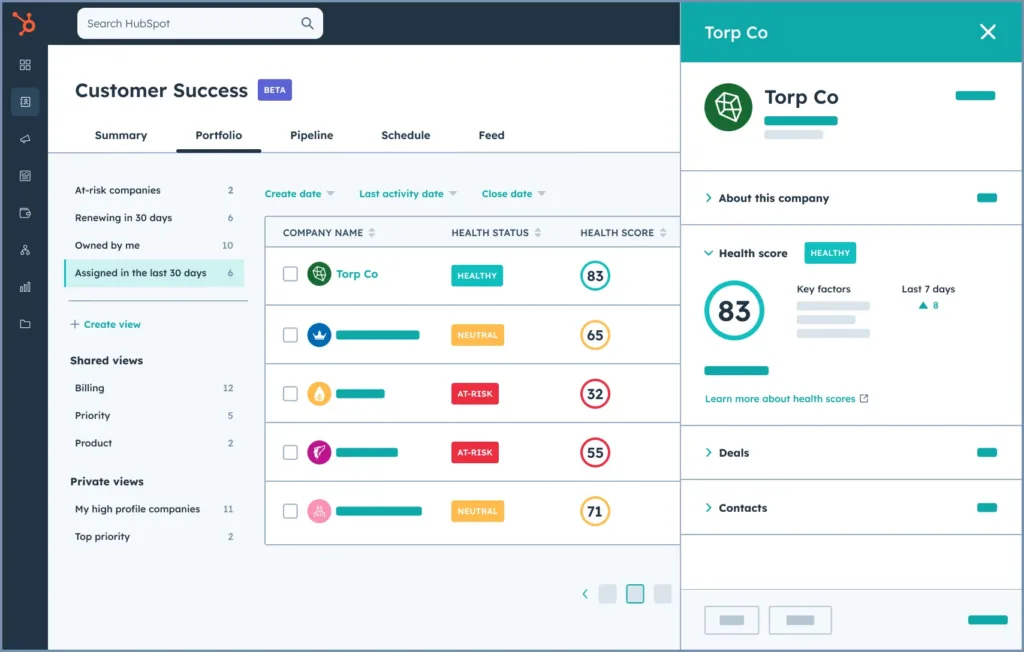
The good part is real. A ticket sits on the same record as the deal, the marketing emails, and the call history, so an agent opens a conversation already knowing what the customer bought and what was promised. Teams migrating from a standalone help desk describe that context as the thing they cannot give up.
Two changes in 2026 matter more than the feature releases. The first is that Breeze Customer Agent moved to outcome-based billing on 14 April 2026, charging 50 HubSpot Credits, roughly $0.50, only when it resolves a conversation. That is one of the more buyer-friendly AI pricing models in the category, and HubSpot deserves credit for it.
The second is quieter. In mid-2026, HubSpot expanded its data program so that enrichment data may be shared with other customers, on an opt-out basis controlled by a super admin rather than a fresh opt-in, with legitimate interest cited as the legal basis. Administrators on Reddit have been asking publicly which toggles actually need changing to fully withdraw, since enrichment, AI model training on sent emails, and tracking-code intent sharing are separate settings. If you are in Europe or handling regulated data, put that on the legal review list before the pilot.
The ratings disagree, and the complaint profile is stranger than the gap
Here is where Service Hub sits across the four platforms as of August 2026.
|
Platform |
Score |
Reviews |
What the audience is |
|---|---|---|---|
|
G2 |
4.4 / 5 |
2,918 |
Product users, large sample |
|
Capterra |
4.4 / 5 |
181 |
Small sample, heavily incentivized |
|
Trustpilot |
1.6 / 5 |
1,148 |
Anyone, mostly contract and billing |
|
|
No score |
Hundreds of threads |
Administrators and partners |
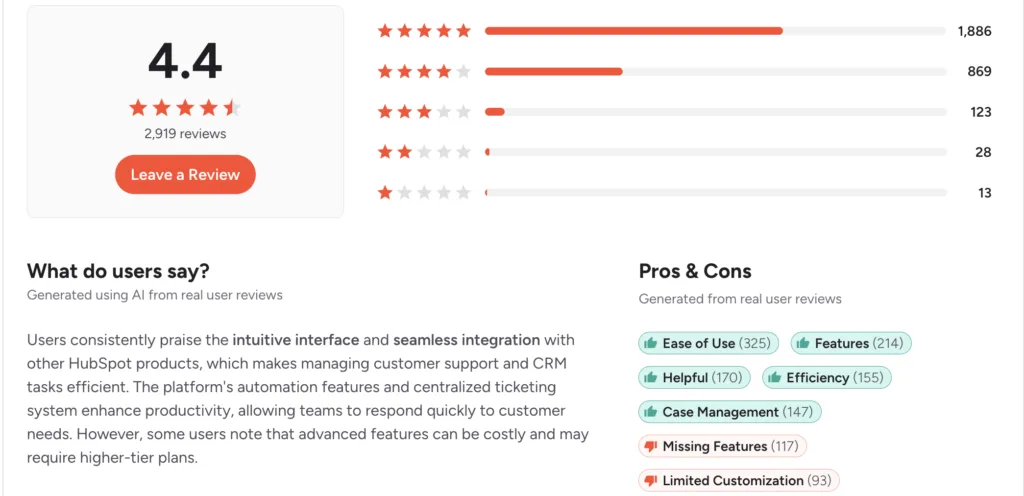
The G2 sample is the one to weight, and its internals are the story. Ease of use draws 325 positive mentions, easily the loudest praise. On the other side, the top four criticisms are all versions of the same complaint: missing features at 117 mentions, limited customization at 93, limited features at 88, and lack of features at 75. Cumbersome ticket management follows at 75, and expense only appears tenth at 56.
I had to read that ordering twice, because it inverts the usual pattern. Buyers are not mainly saying this costs too much. They are saying it does not do enough.
Capterra tells the same story with a much smaller sample and a heavy incentive footprint, with many entries openly marked as vendor-referred with an incentive offered. One reviewer there put the finding plainly, describing the product as very easy to use but a fairly basic toolset, less capable than Freshdesk, Zendesk or Salesforce, and flagging that they might have to move if they needed more control over the support portal or more channels.
The Trustpilot number needs the same caveat I would give any corporate profile. At 1.6, with half of all reviewers at one star, it covers HubSpot the company across every Hub, so I read it as capturing contract disputes, renewal terms, and billing failures rather than the support product. It is not a Service Hub score. It is a fair measurement of what the commercial relationship feels like, which is a genuine part of ownership.
That is the last score in this review. Everything after this comes from what people described.
What users actually say about HubSpot Service Hub
Five themes recur, ordered by how often they came up.
The unified record is the reason people choose it and the reason they stay
Reviewers describe never walking into a customer conversation blind, seeing emails, calls, notes, and open issues on one screen without asking another team, and handing off cleanly between sales and support. Small teams particularly praise how quickly new agents become productive.
It is easy, and easy turns out to mean limited
The most common criticism across every platform. Reviewers describe ticket management as cumbersome, merging as limited, and searching old tickets as harder than it should be. One noted that a customer cannot be searched without applying a filter first, and that a ticket becomes hard to find once its owner changes. Knowledge base customization comes up repeatedly as too shallow for teams that care about branding.
Seats are where the bill actually grows
The per-seat price is not the complaint. The gating is. An administrator on r/hubspot described Help Desk Spaces requiring a Service Seat, which means colleagues in sales, HR, or marketing who occasionally touch a ticket need a paid support seat just to build a filtered view. Philipp K., a product engineering director, described license conditions tightening so that everyone except read-only users needs a paid seat, and Sales and Service seats no longer being interchangeable, so staff working across both functions theoretically need two.
HubSpot’s own support answers with undisclosed AI
This is the sharpest thing in the research, and it comes from the same reviewer. He described submitting a ticket, clicking through the prompts, and receiving a long AI-generated reply that kept him busy without solving the problem, with the disclosure that it was AI appearing only at the bottom. Others describe support answers arriving increasingly from AI rather than a person, needing two or three attempts to reach someone useful. Lynne Cervi, writing on Trustpilot in January 2026, described being sold an Enterprise upgrade and finding afterward that it did not do what she had been told.
The AI is capable, and the credits go quickly
Reviewers like Breeze for drafting replies from knowledge base content. The recurring caveats are that suggestions come out bland enough to need rewriting, that the conversational agent is hard to configure with any specific intent because it only answers from the knowledge sources it is given, and that credits deplete faster than expected.
A note on sourcing. Capterra’s Service Hub listing is small and openly incentivized, so treat it as the friendliest of the four. On Reddit, HubSpot operates a Champion program and a large partner network, and several enthusiastic posts in my results were partners or event promotions rather than users, including a workshop pitch for the Customer Agent. None of that is used here as sentiment.
HubSpot Service Hub pros and cons
|
Pros |
Cons |
|---|---|
|
Ticket and CRM record are the same object |
Ticketing depth trails dedicated help desks |
|
Genuinely fast to learn and roll out |
Mandatory onboarding fee on Professional |
|
Outcome-based AI billing at $0.50 a resolution |
Credits expire monthly with no rollover |
|
Free tier and free view-only users |
Occasional ticket handlers need paid seats |
|
Strong cross-functional reporting |
Advanced reporting sits behind higher tiers |
|
Clean interface agents do not fight |
Config bottlenecks behind super-admin rights |
|
One vendor for marketing, sales and support |
Vendor support answers with undisclosed AI |
What HubSpot does better than anyone
Removing the seam between support and the rest of the company. If support sits in one tool, the customer record in another, and neither team sees what the other promised, Service Hub deletes that problem in a way integrations never quite do. For a growing company already on HubSpot, that is worth more than a longer feature list.
What you will be living with
A help desk that hits its ceiling earlier than its price suggests, a seat model that charges for occasional collaborators, and an AI budget denominated in a currency that expires every month. Those are design decisions rather than defects, which means waiting for a release will not change them.
Feature by feature, based on the reviews
Pricing, seats, and the credit mechanic
The seat ladder is honest and easy to read. Free covers two users, Starter runs about $15 a seat a month on annual billing, Professional $90, and Enterprise $150. What it does not show is the cliff. Professional carries a required one-time onboarding fee of $1,500, and Enterprise $3,500, both confirmed in HubSpot’s product catalogue. There is no middle tier, so the step from Starter to a real help desk is a sixfold per-seat increase plus a four-figure fee in month one.
That step is also where the product becomes a help desk at all. The Help Desk Workspace, the Customer Agent, and the knowledge base worth using all begin at Professional. So the tier that makes it viable for support is the tier carrying the mandatory fee, which is why so many buyers describe the jump as a surprise rather than a decision.
Credits are the part that needs modeling. Breeze runs on HubSpot Credits; Professional includes 3,000 a month, overage bills at roughly $9 per thousand, and unused credits reset monthly without rolling over. At 50 credits per resolved conversation, that pool covers about sixty resolutions a month. A support team resolving a thousand conversations through the agent consumes 50,000 credits, so roughly 47,000 sit outside the allowance, adding something near $423 a month on top of seats.
Two things follow. I read the included allowance as sized for a pilot rather than an operation, and because credits expire, a quiet month wastes allowance while a busy month bills overage. You pay for variance twice.
The $0.50 per resolution rate itself is genuinely good, and better than most of the category. It just sits inside a container that works against you.
The agent workspace and ticketing
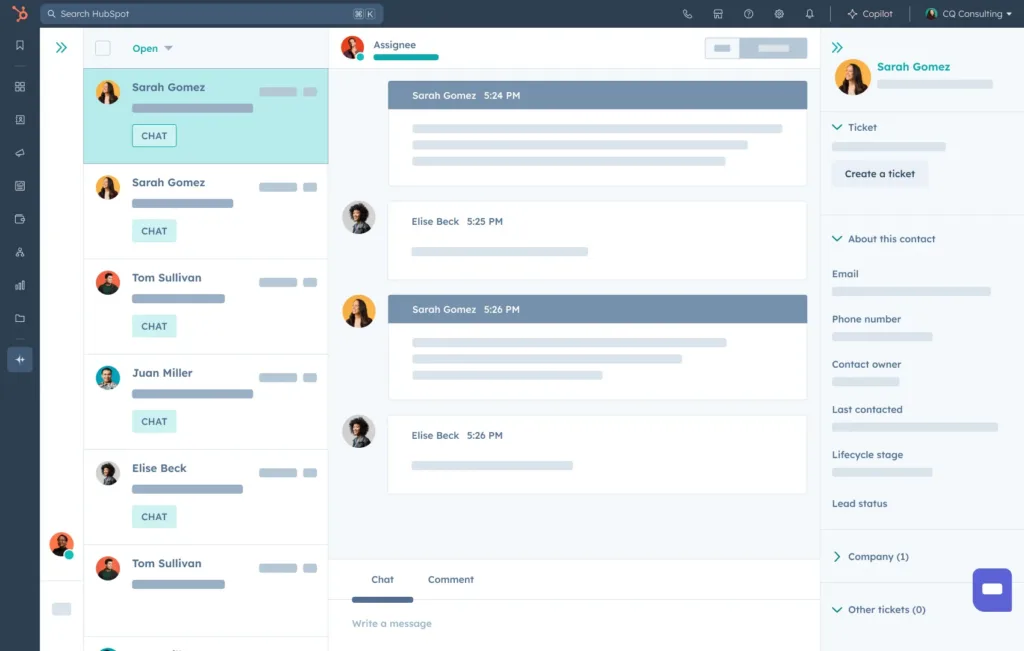
The workspace is quick to learn, which is not a small thing when you hire seasonally. Board views, pipeline stages, assignment automation, and the dashboard showing volume by stage all work, and reviewers running small teams describe real gains in response time within a quarter.
The depth of complaints is specific rather than vague, which makes them credible. Merging is limited, searching historic tickets is awkward, and a contact cannot be found without applying a filter first. Ticket IDs are eleven-digit numbers, which administrators flag as unusable when a customer quotes a reference over the phone, with no supported way to shorten them.
Permissions are the structural constraint. Practitioners describe macros that only update ticket properties, which do not support team-specific view or edit permissions, and a broad set of configuration only a super admin can change. A support manager wanting to adjust their own process weekly cannot, and that queue behind one person is the friction that shows up a year in rather than during evaluation.
SLA handling has a similar edge. Teams report that SLA pausing is available when tickets run through the Help Desk configuration but not when they arrive through the older CRM email flow, so the clock keeps running while a ticket sits with engineering.
Breeze and AI capability
Two capabilities sit under one brand. The assistive layer drafts replies grounded in your knowledge base, and reviewers report real-time savings on repetitive answers. The Customer Agent answers customers directly and only bills when it resolves.
The consistent caveat is control. Practitioners describe the conversational agent as hard to shape with specific intent, answering only from the knowledge sources provided, with little visibility into why it chose a response. One co-founder called it close to a black box. Suggested replies come out generic enough that agents rewrite them, which erodes the time saved.
Everything therefore rests on knowledge base quality, and the knowledge base is one of the areas reviewers say is thin. That circularity is the thing to test: the agent can only be as good as the content in a system several reviewers find limiting to author in.
I would run the 14-day trial against last month’s real conversations and grade the transcripts personally, because the per-resolution price only looks good if the resolutions are ones you would have accepted.
Knowledge base, portal and reporting
The knowledge base and customer portal handle straightforward self-service, and article limits are generous at higher tiers. Customization is where complaints cluster, particularly for teams wanting the help center to look like their product rather than like HubSpot.
Reporting divides sharply by who is asking. Cross-functional reporting is a genuine strength, because support, sales, and marketing data sit together, and leaders describe insight they could not previously assemble. Support-specific reporting draws the opposite reaction, with dashboards described as convoluted, hard to shape into what an executive team asked for, and gated so deeper analysis needs a higher tier.
Mobile is a real gap. Administrators report the newer Services object cannot be viewed or edited in the mobile app, and mobile ticketing remains a standing community request.
Vendor support
Support quality is the most damaging finding, because of who is selling it. Reviewers describe a helpdesk that surfaces prompts before a human, a long AI-generated response with the disclosure placed at the bottom, and follow-ups that end in a suggestion to submit a feature request. Others need several attempts to reach a person.
Access is tiered too. Phone support is unavailable on lower plans, and one operator described a billing dispute over automatically added marketing contacts escalating until the account was shut down, with the only route forward a collections address quoting a three-day response window.
Set that against the product being sold, and I think the problem states itself. You are buying an AI support agent from a vendor whose own AI support agent is the thing customers complain about most.
Scale, permissions, and getting out
Service Hub scales comfortably in volume, and the constraints are organizational. Seats gate collaboration, super-admin rights gate configuration, and higher tiers gate the reporting a growing team needs. Each is individually reasonable, and together I read them as meaning growth arrives as a series of purchase decisions rather than settings changes.
Data portability is decent through the API and a wide integration surface, though some reviewers report API behavior that did not match expectations during integration work. The community’s most upvoted recurring question is simply which plan and seat type a given feature requires, which tells you the licensing model is harder to reason about than the product.
HubSpot Service Hub alternatives, by what you are solving for
You want AI resolution without an expiring credit balance
Kayako prices AI around resolved conversations without routing it through a monthly allowance that lapses, so a quiet month does not waste budget, and a busy one does not trigger overage. You give up the single-vendor CRM unification that is Service Hub’s best feature. Test it by pricing your three highest-volume months under both models rather than an average one.
You need ticketing depth without leaving your CRM behind
If the CRM record is working and the help desk is what runs out of room, Kayako brings merging, macros, granular permissions, and SLA handling that practitioners say Service Hub lacks, and runs alongside what you already own. You give up having one bill and one vendor. Test it by listing the five ticketing tasks your team currently works around.
You want the same simplicity for materially less money
Freshdesk and Zoho Desk both offer a comparable learning curve with deeper native ticketing, no mandatory onboarding fee, and lower per-agent pricing. You give up CRM unification and the HubSpot ecosystem. Test it by pricing three years including the onboarding fee and any extra seats for occasional collaborators.
Your team is small, and you want less product, not more
Help Scout strips things back to a shared inbox, a knowledge base, and light automation, with pricing that does not punish occasional users. You give up reporting depth and cross-functional visibility. Test it by counting how many Service Hub features your team touched last quarter.
You have outgrown SMB tooling and need governance
Zendesk brings multibrand, entitlements, audit trails, and routing sophistication that Service Hub does not attempt. You take on cost and configuration overhead. Test it by asking whether anyone has requested something you could not produce.
Support is part of the product experience
Intercom is built around in-product messaging and self-serve resolution rather than CRM context. You give up the unified record entirely. Test it by checking what share of your conversations start inside your product rather than in email.
Three numbers decide this for any option: cost per resolved conversation at your real volume including every seat, the content hours needed before the AI performs, and the fully loaded renewal when your team grows by half.
Verdict
HubSpot Service Hub is an excellent CRM-attached support workspace and a middling standalone help desk, and which of those sentences matters depends entirely on what you already run. If HubSpot is your system of record, this is the path of least resistance and the unified customer view is worth real money. The praise for how quickly teams learn it is earned, and outcome-based AI billing is a better deal than most competitors offer.
If you are buying a help desk on its merits, I think the picture is harder. The loudest complaint from actual users is that features are missing, which is a rare thing to lead a review corpus, and the constraints reviewers name are ones you feel in year two rather than week two. On Monday, I would do two things. Take last month’s resolved conversation count, multiply by 50 credits, subtract your plan’s allowance, and price the remainder, because that number is usually larger than the seat line people budget for. Then write down the five things your team does in your current tool that involve merging, permissions, or SLA pausing, and confirm each one during the trial rather than after the onboarding fee is paid.
HubSpot Service Hub FAQs
How much does HubSpot Service Hub really cost?
Seats run free, roughly $15, $90, and $150 per seat per month on annual billing. Add a required one-time onboarding fee of $1,500 at Professional or $3,500 at Enterprise, plus credit overage for AI usage beyond your plan’s monthly pool. A ten-seat Professional team lands near $900 a month before AI, with $1,500 due in the first month.
Is the free version of Service Hub usable?
For up to two users handling light volume, yes. It covers a shared inbox, basic ticketing and forms, and reviewers running solo operations report it works well. It is not a help desk for a team, and the features that make it one start at Professional.
Does everyone on my team need a paid seat?
View-only users are free. Anyone taking action needs a paid seat, and some help desk features require a Service Seat specifically, so colleagues outside support who occasionally handle tickets may need one too. I would map that before counting agents.
How good is Breeze Customer Agent?
It bills only on resolution at about $0.50, which is fair, and it drafts competently from knowledge base content. Practitioners describe limited control over how it reasons and replies that often need editing. I would audit your knowledge base first, because that is its ceiling.
Can Service Hub replace a dedicated help desk like Zendesk?
For many small and mid-market teams, yes. For teams that depend on ticket merging, granular permissions, SLA pausing across escalations, or heavily branded self-service, users consistently report hitting limits. Test those specific workflows during the trial.