Salesforce Pricing 2026: Service Cloud Plans, Costs, and Is It Worth It?
Pricing tells you what Salesforce costs. Use cases tell you whether it is worth paying for. This guide covers both.
|
Quick answer. Salesforce pricing for Service Cloud, now marketed as Agentforce Service, runs per user per month: Starter Suite $25, Pro Suite $100, Enterprise $175, Unlimited $350, and Agentforce 1 Service $550 on annual billing, after a price increase in 2025. The license is only the start: most teams add paid modules for digital channels, voice and AI, pay for implementation that often costs more than the first year of licenses, and meter Agentforce AI at about two dollars a conversation. So the real question behind Salesforce pricing is whether a platform this powerful and this involved is worth it for your operation. Key takeaways
|
Salesforce pricing looks like a simple set of editions and is anything but. Service Cloud has been rebranded as Agentforce Service, prices rose about six percent in 2025, and the number on the pricing page is almost never the number you pay, because add-ons, implementation, and AI consumption sit on top of the per-user license.
This guide uses Service Cloud as the lens, since it is the part of Salesforce closest to a support operation. It covers what each edition is built for, what really drives the bill, and when Salesforce is worth it versus when a focused support tool would do the same job without the project. It ends with a decision tree and a scenario table so you can place your own team.
1. Salesforce pricing at a glance
Here are the Service Cloud editions on annual billing. Treat them as the entry point, because meaningful service features and AI start at Enterprise, and add-ons sit on top of every tier.
|
Plan |
Price per user (annual) |
Built for |
|---|---|---|
|
Starter Suite |
$25 / month |
Very small teams wanting basic case management |
|
Pro Suite |
$100 / month |
Small businesses needing more automation |
|
Enterprise |
$175 / month |
Serious service, where routing and AI start |
|
Unlimited |
$350 / month |
Large teams wanting higher limits and deeper AI |
|
Agentforce 1 Service |
$550 / month |
Enterprises wanting everything plus bundled AI |
Note. Salesforce rebranded Service Cloud as Agentforce Service, and the top edition, formerly Einstein 1 Service, is now Agentforce 1 Service. Prices rose about six percent in 2025, so older $165 and $330 figures are stale. Meaningful service features and AI start at Enterprise; the two cheaper suites are lighter bundles.
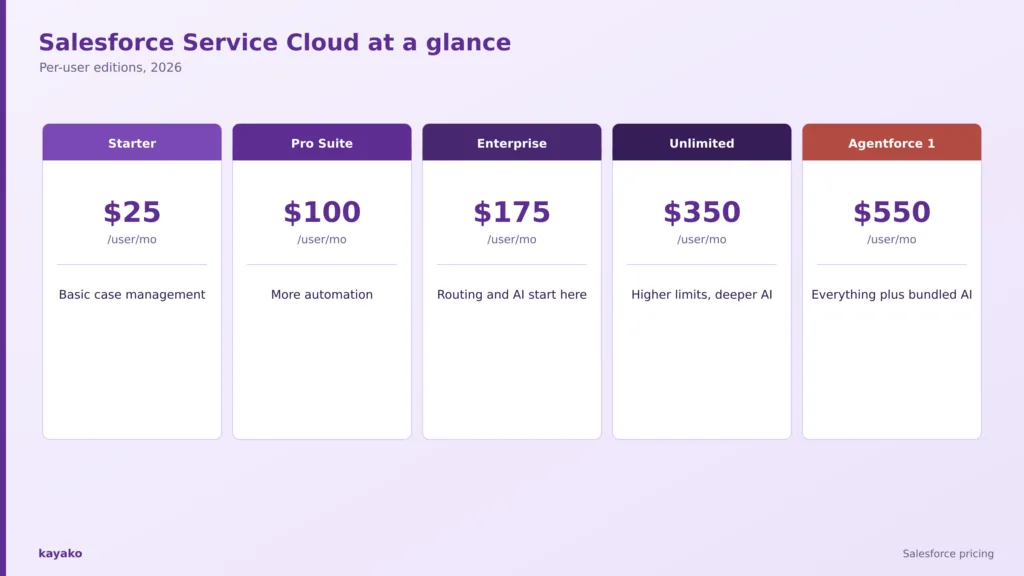
The Service Cloud editions. Add-ons, implementation, and Agentforce AI sit on top of these per-user prices.
That table is the easy part. Before breaking down what moves the number, it helps to hear from the teams already paying it.
2. What people say about Salesforce on G2, Capterra, and Reddit
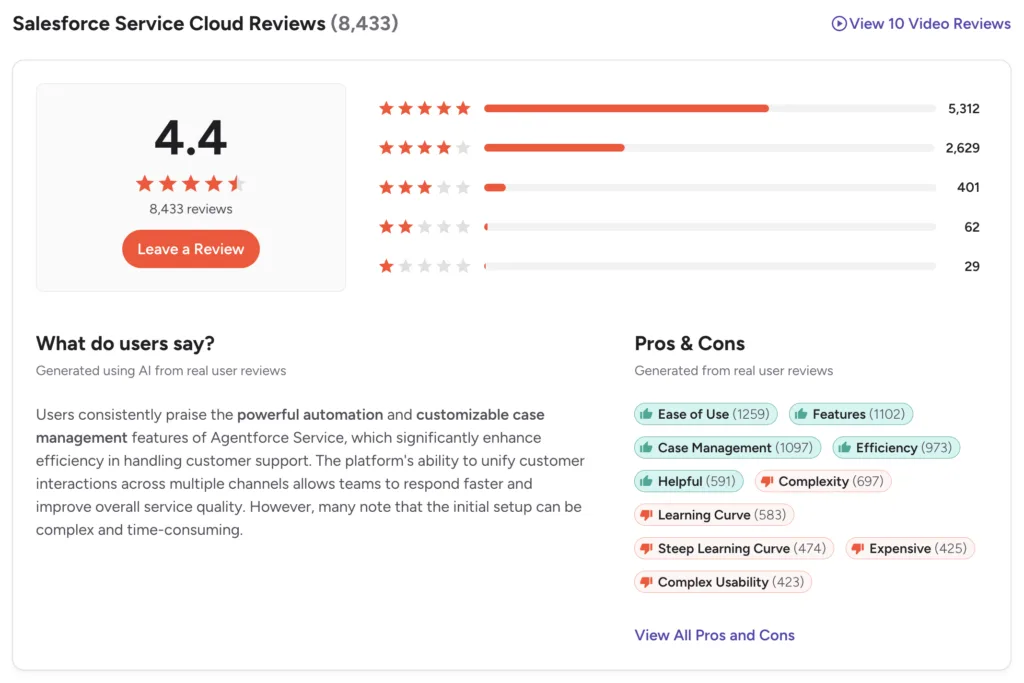
Service Cloud, listed as Agentforce Service, holds strong ratings, around 4.4 out of 5 on G2 from roughly 8,400 reviews and 4.5 on Capterra. The standout themes behind the scores tell the buying story.
What people praise
- Unified customer context. Agents see full history in one console without jumping between systems, repeatedly called the biggest daily win.
- Strong case and SLA management. SLA breaches get flagged before they are discovered after the fact.
- Capacity-based routing. Distributing work by agent capacity rather than round-robin improves balance and morale.
- AI case summaries. Users report hours saved weekly on categorization once Einstein features are on.
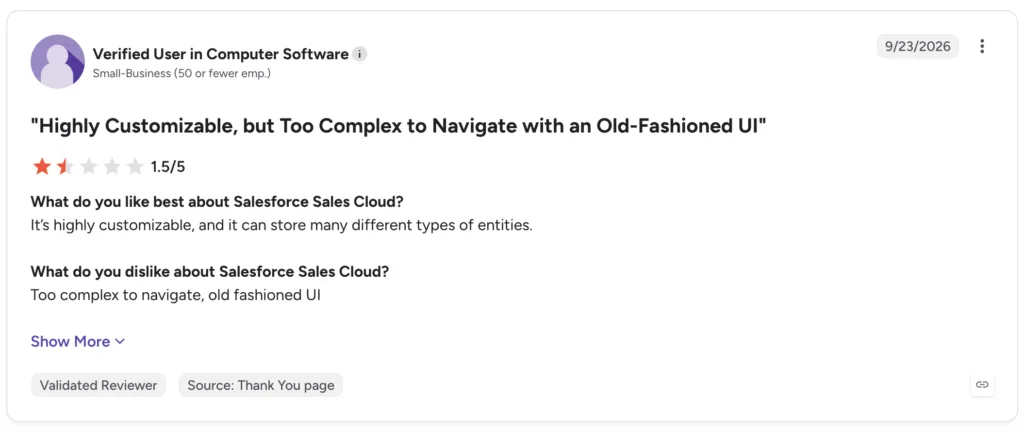
- Deep customization and scale. Flexible and powerful for large, complex organizations, the usual reason enterprises pick it.
What people flag
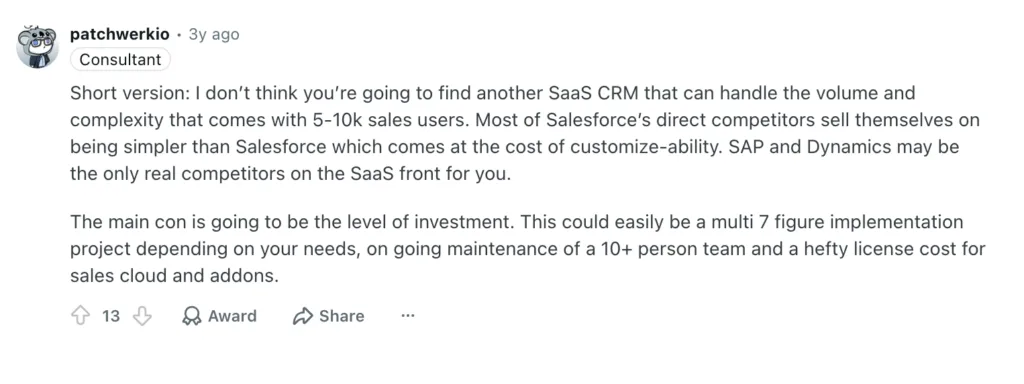
- Powerful but expensive is the dominant theme. The platform is strong, but total cost across seats, add-ons, and implementation is high, and the sticker is never the number.
- Steep learning curve. The interface overwhelms smaller teams expecting out-of-the-box simplicity.
- It needs admins or consultants. Routine config changes require admin rights, creating bottlenecks, and serious use effectively needs a dedicated admin or partner.
- AI costs are hard to predict. On Reddit’s r/salesforce, users warn the two-dollar-per-conversation rate can get expensive fast and that consumption has no hard caps by default, so you must set credit alerts.
- Features gate at the top, and contracts lock in. Core service features sit at the higher editions, above where AI starts, so the real bill climbs past the base, and agreements run annually.
None of these are vague grumbles. They trace back to how the Salesforce bill is assembled, which is worth breaking down next.
|
|
3. What actually determines your Salesforce cost?
The per-user edition is the base lever, and it adds up quickly. A twenty-agent Enterprise deployment is about $42,000 a year in licenses alone, before anything else. For most teams, though, the license is the smallest part of the total.
On top sit paid modules: digital engagement for chat and messaging around $75 a user, Einstein AI around $50, advanced Agentforce for service up to $125, and voice from $75 to $200 a user plus per-minute usage. Then comes implementation. Salesforce effectively requires a partner or in-house admin, and setup commonly runs one and a half to five times the annual license over three to six months, with ongoing admin work as a standing cost. One modeled twenty-five-agent scenario reached about $210,000 in year one once implementation and admin were counted.
AI is its own meter. Agentforce bills roughly two dollars a conversation, or ten cents an action drawn from Flex Credits, and the recurring warning from users is that consumption has no hard caps by default, so a traffic spike or an agent loop can drain credits faster than expected. The top edition bundles a large annual credit pool, but overage bills separately. That is why the next question matters more than the edition list: what does your operation genuinely need?
Four layers decide the real Salesforce bill: editions, add-ons, implementation, and Agentforce AI.
|
4. Which Salesforce plan makes sense for you?
The right edition follows the shape of your operation, not the length of the feature list. Three patterns cover most teams.
A small team testing Salesforce: Starter or Pro Suite
The two cheaper suites give basic case management for small teams already in the Salesforce world. They are light on service depth, so treat them as a starting point rather than a full help desk.
- Scenario. A small team that already uses Salesforce CRM and wants basic cases in the same place.
A serious service operation: Enterprise
Enterprise at $175 a user is the real entry point for service, with full case management, routing, knowledge, and where AI becomes available. The price makes sense once a general queue starts creating bottlenecks.
- Scenario. A fifty-agent operation across billing, technical support, and success that needs routing and SLAs.
High volume and deep AI: Unlimited or Agentforce 1 Service
The top editions add higher limits, more sandboxes, and bundled AI credits for large teams leaning hard on automation. They cost the most and reward heavy, well-governed use.
- Scenario. A large enterprise running Agentforce across high conversation volume with a team to monitor consumption.
If you are weighing the wider toolset, our guides to the best ticketing systems and revenue intelligence platforms put Service Cloud in context.
Knowing which edition fits is half the decision. The other half is knowing when the spend is justified.
5. When does Salesforce pricing actually make sense?
Salesforce earns its price when several of these are true at once.
- You already run Salesforce CRM. Keeping service on the same platform avoids a second system and shares data.
- You need deep customization. Complex, multi-team workflows reward a highly configurable platform.
- You have admins or a partner. The platform assumes dedicated configuration and maintenance.
- You operate at enterprise scale. Governance, permissions, and volume justify moving up the editions.
- You will use Agentforce heavily and can govern it. Consumption pays back when usage is high and monitored.
Put plainly, Salesforce is expensive for a reason when you need its depth and have the team to run it. The reverse is just as important, because the same power becomes overhead for a simpler need.
|
|
6. When might Salesforce be more than you need?
The better test is complexity, not company size. Salesforce may be more platform than you need when several of these hold true.
- You need ticketing and a shared inbox more than a configurable platform.
- You do not have an admin or budget for implementation.
- Your team is small and wants to be live in days, not months.
- Your priority is resolving tickets with AI, not building a bespoke system.
- Uncapped AI consumption makes budgeting hard for your volume.
When most of your volume is repetitive, and your real need is resolution, a platform built around AI agents rather than basic chatbots and priced on resolved tickets avoids the project, the admin, and the uncapped meter, which reframes the buying question by scenario.
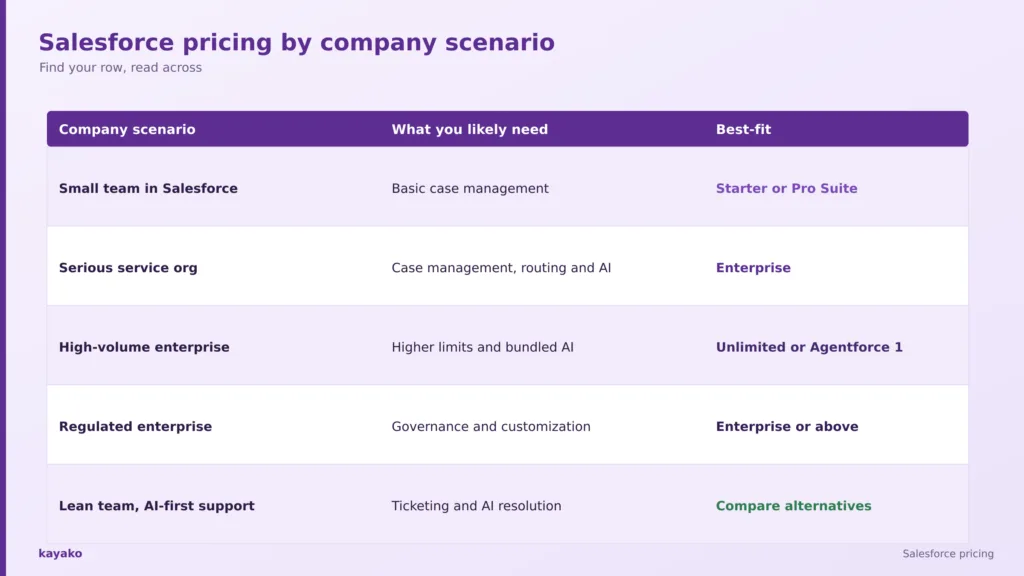
7. Salesforce pricing by company scenario
Find the row that sounds most like your team, then read across. The last row is the one most pricing pages leave out.
|
Company scenario |
What you probably need |
Salesforce fit |
|---|---|---|
|
Small team in Salesforce |
Basic case management |
Starter or Pro Suite |
|
Serious service org |
Case management, routing and AI |
Enterprise |
|
High-volume enterprise |
Higher limits and bundled AI |
Unlimited or Agentforce 1 |
|
Regulated enterprise |
Governance and customization |
Enterprise or above |
|
Lean team, AI-first support |
Ticketing and AI resolution |
Compare alternatives |
Match your scenario to the edition. Lean, AI-first teams are the ones who should price alternatives.
Seeing yourself in a row is useful, but a buying decision usually comes down to a direct comparison with a leaner option.
8. Salesforce vs Kayako
This is not a full feature teardown, just the short version of where each platform fits.
Salesforce
Salesforce Service Cloud is the most configurable, powerful service platform for large, complex organizations: unified customer context, strong case and SLA management, capacity-based routing and near-limitless customization. It fits enterprises with the admins and budget to run it.
Kayako
Kayako is a focused AI support platform. Agent Kay resolves tickets autonomously, SingleView gives agents one screen of context, and pricing is one dollar per resolved ticket rather than per user, so there is no consulting project, no admin overhead, and no uncapped AI meter to police.
Per-user licenses plus add-ons plus implementation plus uncapped AI is the recurring Salesforce pain; per-resolution pricing is predictable and needs no admin.
A head-to-head helps, but the final call comes down to your own numbers. For a leaner starting point, our guide to the best ticketing systems compares simpler options, and a short checklist turns the pricing question into a decision.
|
9. What should you actually consider before buying Salesforce?
Swap the question of which edition is cheapest for a short set of questions about your own operation.
- How many user licenses, and at which edition?
- Do we have an admin or partner to run it?
- What will implementation cost, and how long will it take?
- How much of our volume will Agentforce handle, and can we cap it?
- Which features do we need to gate at higher editions?
- What is the all-in year-one cost, not the license?
- What happens to cost when volume spikes?
That last question is the one that catches teams out. Pricing today is not the same as cost at scale. It is also worth weighing how much of your volume is automatable, since research from Gartner found only 14 percent of customer service issues are fully resolved in self-service, which shows how much room modern AI resolution still has to take load off paid seats.
With those answers in hand, the decision becomes straightforward. The tree below turns them into a single recommendation.
Is Salesforce worth it for you? A quick decision tree
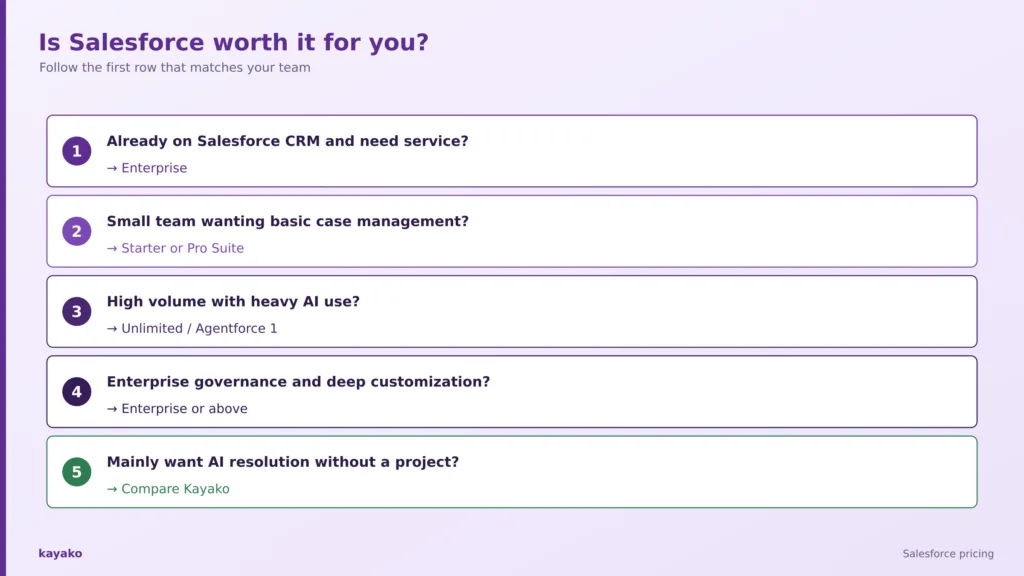
- Already on Salesforce CRM and need service too? Enterprise.
- Small team wanting basic case management? Starter or Pro Suite.
- High volume with heavy AI use? Unlimited or Agentforce 1 Service.
- Need enterprise governance and deep customization? Enterprise or above.
- Mainly want AI resolution without a project? Compare Kayako.
Follow the first row that matches your team to land on the right edition, or a leaner alternative.
A tree like this is more useful than another long pricing table, because it moves you from what Salesforce costs to whether it is worth paying for.
How Kayako helps
Kayako is an AI customer support platform built around autonomous resolution. Agent Kay resolves repetitive tickets end to end, and SingleView gives agents the full history of every customer on one screen for the conversations that still need a human. Pricing is one dollar per resolved ticket rather than per user, so there is no implementation project and no consumption meter to govern.
Case study: IgniteTech. IgniteTech saw $5.4M in first-year value with Kayako, a 6.5 times savings ratio and a 73 percent reduction in resolution time, without a multi-month platform rollout.
|
Conclusion
Salesforce pricing in 2026 is clear enough on paper: Service Cloud from $25 to $550 per user per month, with the real work starting at Enterprise. The harder question is fit. For a large, complex organization with admins and budget, the cost is justified by the power and customization. For a leaner team whose main goal is resolving tickets with AI, the same spend buys a platform, a project, and a consumption meter it does not need.
So read the price list, then read your own operation. Pricing tells you what Salesforce costs. Your use case tells you whether it is worth it, and whether a simpler, outcome-based platform would get you more resolution for less.
Frequently asked questions
How much does Salesforce Service Cloud cost?
Service Cloud costs from $25 per user per month for Starter Suite up to $550 for Agentforce 1 Service on annual billing, with Enterprise at $175 the usual entry point for serious service. Add-ons, implementation, and Agentforce AI are charged on top of the per-user license.
What is the cheapest Salesforce plan?
Starter Suite at $25 per user per month is the cheapest Service Cloud edition. It offers basic case management for very small teams, but lacks the routing, knowledge, and AI that appear at Enterprise, so most serious service teams move up quickly.
Is Salesforce priced per user?
Yes. Salesforce Service Cloud is billed per user per month by edition, so cost scales with team size. Agentforce AI is billed separately by consumption, and add-ons such as digital engagement and voice are also per user.
How much does Agentforce (Salesforce AI) cost?
Agentforce bills roughly two dollars per conversation, or ten cents per action drawn from Flex Credits sold at about $500 per 100,000 credits. Consumption has no hard caps by default, so teams are advised to set alerts to avoid runaway spend during traffic spikes.
Does Salesforce need implementation help?
In practice, yes. Salesforce usually requires a partner or in-house admin, and implementation commonly runs one and a half to five times the annual license over three to six months, with ongoing admin work as a standing cost. This is a major part of the real total.
Is Salesforce worth the cost?
Salesforce is worth it for large, complex organizations that need deep customization, governance and scale, and have the admins to run it. For small teams, or teams whose priority is AI resolution rather than a configurable platform, it is often more than the price justifies.
Is Salesforce good for small teams?
Small teams can start on Starter or Pro Suite, but the platform is built for scale and assumes admin support. Teams that want to be live in days and mainly need to resolve tickets usually get more value from a simpler, resolution-priced support tool.
What is a simpler alternative to Salesforce Service Cloud?
For teams focused on AI-first autonomous resolution without a consulting project, Kayako is a strong fit, charging per resolved ticket rather than per user. Our guide to the best ticketing systems compares simpler options by use case.
Is Kayako cheaper than Salesforce?
Often, yes, for support use cases. Kayako charges one dollar per resolved ticket plus a fixed onboarding fee rather than per user, and avoids implementation projects and uncapped AI consumption, so teams with repetitive volume frequently pay less than the Salesforce all-in total.