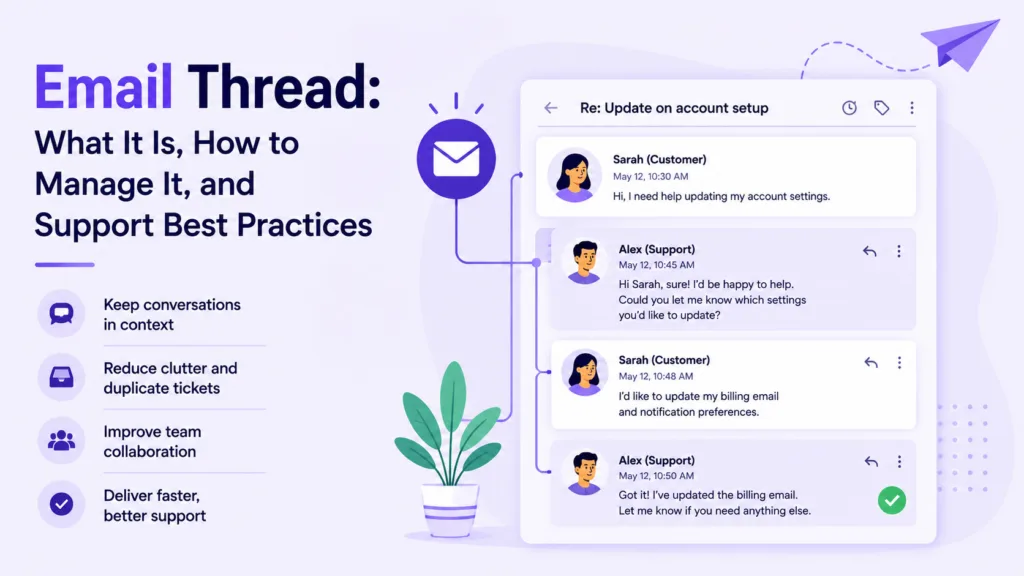
Quick summary: An email thread is a single conversation made up of an original message and all its replies, grouped together so everyone can follow it in order. Threads keep context in one place, but at scale they pile up fast: the average worker faces a flood of daily email, and long threads turn into missed replies and duplicated work. This guide explains what an email thread is, how threading works, the best practices and etiquette that keep threads readable, and how support teams keep customer threads on one tracked record.
An email thread is one of those things everyone uses, and almost no one thinks about, until a thread with twenty replies buries the one answer you needed. A thread is simply a conversation: an original email and every reply and forward that follows, grouped into a single view so the whole exchange reads in order. It keeps context together, which is exactly why it matters and exactly why it breaks down when the volume climbs.
Email is still the backbone of business communication. Around 376 billion emails are sent and received worldwide every day, across more than 4.6 billion users, per figures compiled from Radicati and Statista. At that scale, the difference between a team that manages threads well and one that drowns in them is the difference between fast answers and dropped ones. For support teams especially, an unanswered email thread is not a private inconvenience; it is a customer left waiting, and often a customer who quietly moves on. This guide covers what an email thread is, how threading works, how to keep threads clean, the etiquette that goes with them, and how support teams handle customer threads without losing the plot. By the end, you should be able to keep your own threads tidy and see why support teams treat email as a system to manage rather than an inbox to empty.
What is an email thread?
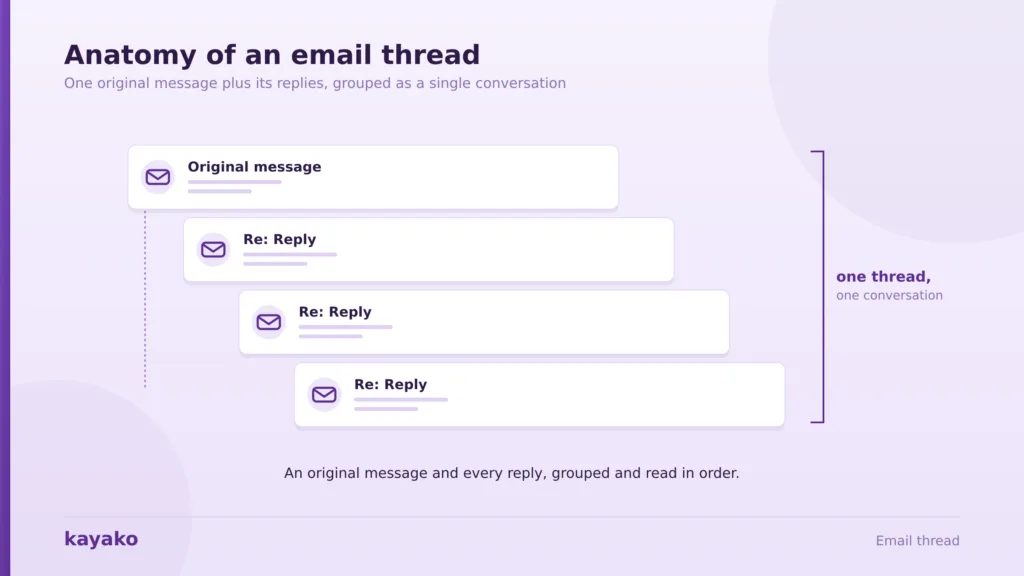
An email thread, sometimes called an email chain or conversation, is a group of related messages tied to a single original email. When someone replies, the reply attaches to the original rather than starting fresh, and each new response joins the same chain. Most modern email clients collapse the whole thread into one entry in your inbox, so a fifteen-message exchange shows up as a single conversation you can expand.
A thread, then, is less a feature than a promise: that a conversation will hold together from the first message to the last. The point of a thread is context. Instead of hunting through your inbox for the message that started an exchange, then the three replies that followed, you see the whole history in order. That is a real advantage for anything that spans more than one message, from a project update to a customer question that takes a few rounds to resolve.
Without threading, that same exchange would scatter into a dozen separate emails, and reconstructing the order would fall to whoever needed the answer most. A thread also creates a record. Every decision, question, and answer stays attached to the same conversation, which makes email one of the few channels where the full history travels with the message. That property is a gift when a conversation gets handed to someone new, and a burden when the history grows so long that the useful part is hard to find. The trouble starts when threads grow long or split, which is easier to understand once you know how threading actually works under the hood.
How email threading works
Threading is not magic. Email clients decide which messages belong together using a few technical signals, and knowing them explains why threads sometimes hold together and sometimes fall apart. Understanding the signals also tells you what you can do to keep a thread intact, and what tends to break one.
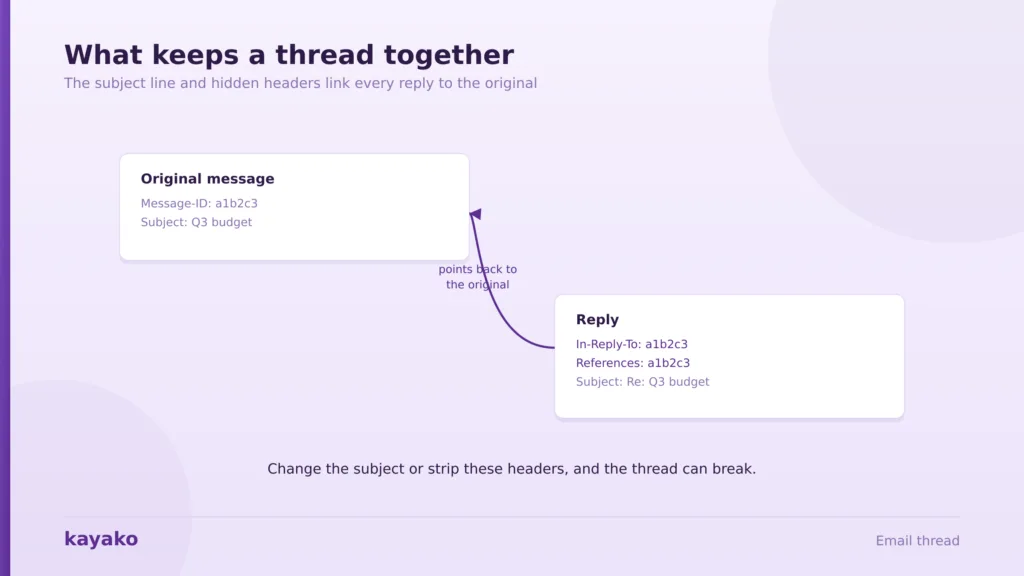
The subject line. The simplest signal is the subject. When you reply, your client keeps the original subject and adds a prefix like Re:, and many clients group messages that share a subject into one thread. It is the least reliable signal on its own, since two unrelated emails with the same subject can get lumped together, and a thread can break the moment someone edits the subject.
Message headers. The stronger signal is hidden in the email headers. Every message carries a unique Message-ID, and replies include In-Reply-To and References headers that point back to the messages they answer. This is how a well-behaved client threads a conversation accurately, even if someone changes the subject line partway through. It is also why forwarding a message into a new email often breaks the chain: the headers that tied it to the original are gone, so the client treats it as a fresh conversation.
A changed subject, a stripped header, or a client that threads differently can all quietly split one conversation into two. Conversation view is what turns those signals into something readable. Gmail groups a thread into a single expandable conversation, and Outlook offers a similar conversation view that you can switch on. Not every client threads the same way, though, which is why a chain that looks tidy in Gmail can appear as scattered, separate emails in another inbox. Those inconsistencies are one reason threads get messy, and volume is the other. A conversation that a customer sees as one continuous exchange can arrive at a support team as several disconnected messages, which is precisely the gap a shared inbox is built to close.
Why email threads get messy at scale
A single clean thread is easy. The problem is that no one deals with a single thread. The math of everyday email is what turns threading from a convenience into a challenge.
Start with volume. The average office worker receives about 121 emails a day, per cloudHQ, and knowledge workers spend roughly 28% of the workweek, about eleven hours, managing email, according to McKinsey figures compiled by Readless. When a large share of those messages are replies landing in active threads, keeping track of which ones still need an answer becomes a job in itself. Multiply that across a team sharing one support address, and the question of who owns which thread turns into a daily source of dropped conversations.
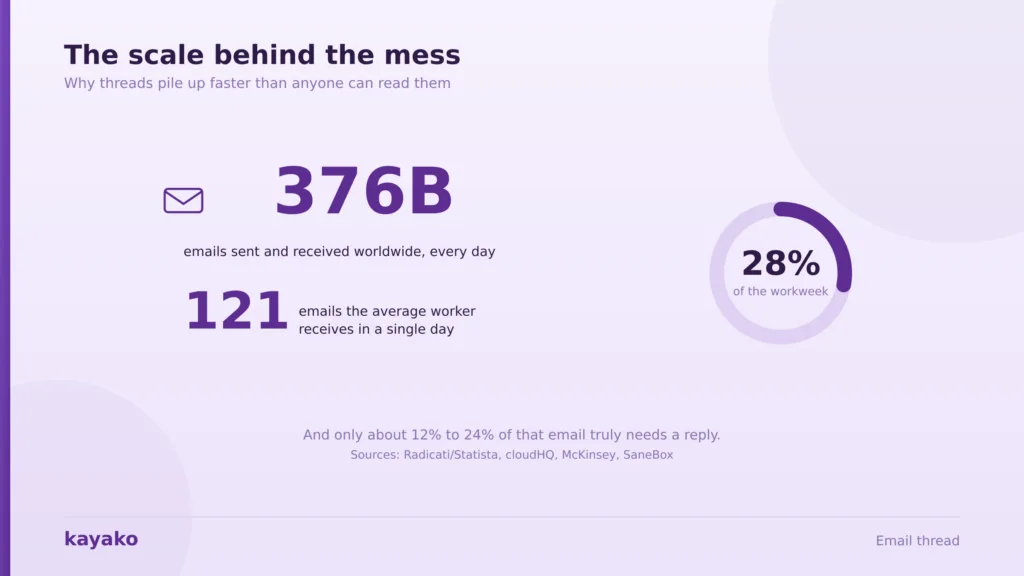
Most of that volume does not even need you. Analyses of inbox behavior suggest only about 12% to 24% of received emails truly require action, with the rest being newsletters, automated notifications, and threads where you were copied unnecessarily, per figures compiled by MailOver. Every one of those still interrupts the same mental queue, so a busy thread hides its important replies among the noise. The cost is not just time; it is the risk that the one reply that needed a fast answer is the one that slips past unnoticed.
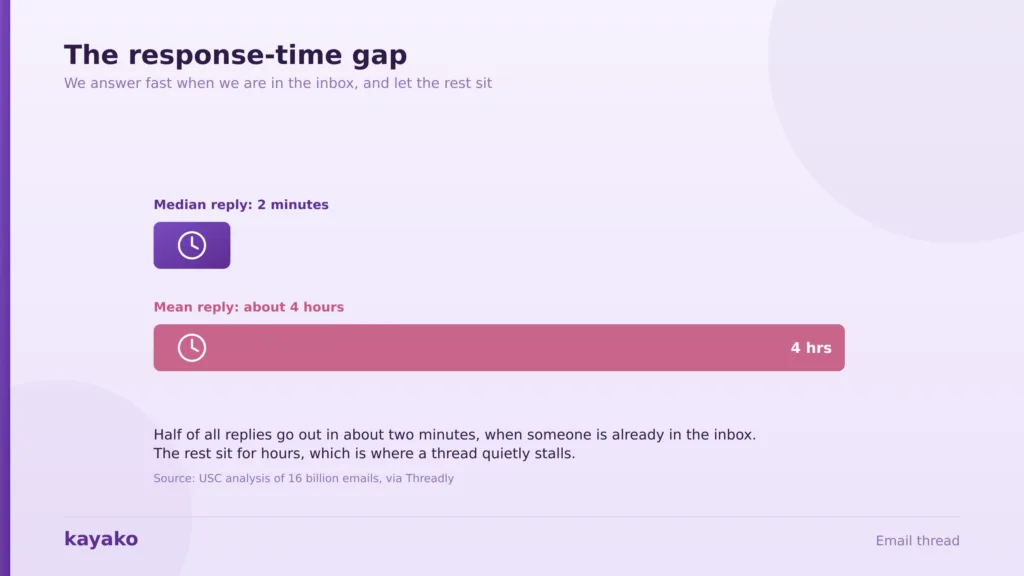
Then there is timing. A USC analysis of 16 billion emails found the median response time is about 2 minutes, but the mean is roughly 4 hours, per Threadly. People answer fast when they are already in the inbox and let everything else sit, so a thread can stall for hours while everyone assumes someone else has it. In a shared mailbox, this ambiguity is structural: with no owner assigned, every thread is simultaneously everyone’s job and no one’s. The always-on habit makes it worse: about 40% of employees check email before 6 a.m., per figures citing Microsoft, yet checking more often does not mean replying more reliably. The fix is not more checking; it is better habits and clearer ownership, starting with a few best practices.
Keep every support email thread on one tracked record with Kayako
Email thread best practices
A few simple habits keep threads readable for everyone on them. None of these requires a new tool; they are discipline more than technology, and they pay off immediately for anyone who sends more than a handful of emails a day.
- Keep one topic per thread. When a new subject comes up, start a new email rather than hijacking an existing chain. Mixing topics in one thread is the fastest way to bury a decision, because the important message ends up sandwiched between two unrelated ones.
- Write a clear, specific subject line. A subject like “Q3 budget approval needed by Friday” threads better and gets found faster than “quick question.” Change the subject only when the topic genuinely changes.
- Trim quoted text. Leave enough of the previous message for context and cut the rest. A reply that drags fifty lines of history behind two new sentences is hard to read on any device.
- Use reply-all with intent. Reply-all keeps everyone in the loop, but it also multiplies noise. Drop people who no longer need the thread, and move side conversations off the main chain. Every extra recipient is another inbox where the thread competes for attention.
- Summarize long threads. When a thread runs long, a short “here is where we landed” recap saves everyone from re-reading twenty messages. Put the recap at the top of your reply, where it is the first thing anyone sees.
A short recap is also the kindest thing you can do for anyone added to a thread late, who would otherwise have to read the entire history to catch up. These habits scale from a two-person exchange to a busy team inbox, and they map neatly onto the wider B2B customer service best practices that keep customer conversations professional. They also connect to how you handle customer conversations, since the same principles underpin strong customer communication management. Good habits keep a thread readable, and good etiquette keeps it professional, which is worth its own section.
Email thread etiquette
Etiquette is what separates a thread people are glad to be on from one they mute. Most of it is common sense that is easy to forget when you are moving fast, yet it is the part of email that shapes reputations quietly over time.
CC and BCC with care. Use CC for people who need visibility and BCC sparingly, usually to protect a list of recipients from seeing each other. Adding a senior name to CC as pressure is a habit worth dropping, and it rarely produces the faster reply people hope for.
Match tone to the reader. Email loses tone of voice, so a message that feels neutral to you can read as curt. A little warmth and a clear ask go a long way, especially with people you do not know well. Reading a message back once before sending catches the lines that could be misread as cold. A single word like “please” or “thanks” changes how an entire thread reads.
Close the loop. A short “thanks, all set” ends a thread cleanly and tells everyone it is done. Silence leaves people wondering whether they still need to act, and it is a common reason threads get re-sent with an anxious “any update?”
Beyond the mechanics, a well-run thread is also a courtesy to everyone reading it. Etiquette matters partly because expectations are misaligned. Most colleagues and clients expect a reply within a few hours during business hours, and only about 11% expect one within fifteen minutes, per survey data compiled by Threadly. Since 86% of professionals still prefer email for business, per cloudHQ, getting the etiquette right is not a small courtesy; it shapes how people experience working with you. Personal etiquette scales to a point, but once a shared inbox is involved, threads need real structure, which is where support teams come in.
Give every agent the full email history on one screen with Kayako
Managing email threads in customer support
In a personal email, a messy thread is an annoyance. In customer support, it is a lost customer. When several agents share one mailbox, a plain email inbox cannot answer basic questions: who is handling this thread, has anyone replied yet, and what did the customer already say? The result is duplicate replies, dropped conversations, and customers repeating themselves. Each of those is a small failure on its own, but together they are the difference between a support team that feels organized and one that feels chaotic to the customer. This is where a shared inbox or help desk changes what a thread can do, by adding the ownership, visibility, and tracking that a personal inbox was never designed to provide.
The difference is stark once you lay it side by side. A plain shared mailbox and a purpose-built support inbox handle the same email thread very differently, and the gap widens with every extra agent and every extra thread.
| Plain shared mailbox | Support inbox/help desk | |
|---|---|---|
| Ownership | Unclear who has it | Assigned to one agent |
| Duplicate replies | Common | Collision detection prevents them |
| Customer history | Scattered or missing | Full history on one record |
| Tracking | No status | Open, pending, resolved, with SLAs |
| Handoffs | Forward and hope | Reassign with context intact |
Assignment and collision detection. A support inbox assigns each thread to one owner and warns agents when someone else is already replying, so two people never answer the same customer. In a plain mailbox, that same coordination depends on people watching each other work, which never holds up under pressure. That single feature removes the most common shared-mailbox failure, and it does so without any extra effort from the agents themselves.
Full context on one record. Every past message, order, and note sits with the thread, so an agent picking it up sees the whole history, and the customer never repeats themselves. That single fact removes the most common source of customer frustration in email support, which is being asked to explain something they already explained. Pulling in a relevant knowledge base article becomes a two-second job rather than a hunt. When the same conversation moves between email, chat, and social, omnichannel support keeps it on one thread instead of splitting it across channels.
Tracking turns a thread into something you can measure and improve, which a plain inbox simply cannot offer. Status and SLAs tell you which threads are waiting and for how long, which feeds directly into customer support metrics like first response time and resolution rate. Those numbers, in turn, are what let a team spot a backlog building before it becomes a wave of complaints. Adding proactive outreach on top means you can get ahead of a thread before the customer has to chase it. All of this is exactly what a modern support platform is built to do, which is where Kayako fits.
How Kayako helps with email threads
Kayako turns email threads into tracked, shared support conversations. Its SingleView keeps the whole thread on one record with the customer’s full history, so any agent can pick up a conversation without asking the customer to repeat themselves. Assignment and collision detection stop duplicate replies, status and SLAs make sure nothing sits unanswered, and its AI shared inbox keeps every message in order. Agent Kay, the AI agent, resolves routine email threads on its own, and its email support AI drafts and sends accurate replies day or night. Because it is priced per resolution rather than per seat, handling more email threads does not mean paying for more inboxes.
The payoff is speed, which is what a customer waiting on a thread actually feels. Case study: Trilogy. After moving to Kayako, Trilogy eliminated 80% of its ticket volume, cut ticket age from 17.6 hours to under 2 minutes, and saved $5 million within a 90-day rollout. For a customer whose email would otherwise sit for hours in a shared mailbox, that is the difference between a thread that resolves itself and one that turns into a complaint. Speed at that level also changes the tone of the whole relationship, since a customer who gets a fast, accurate answer rarely escalates in the first place. That reliability is what turns email from a liability into a dependable support channel.
Turn messy email threads into fast resolutions with Kayako
An email thread is a simple idea with a big footprint. It keeps a conversation coherent by grouping an original message with its replies, and it works beautifully until volume, split threads, and unclear ownership pile up. Good habits and etiquette keep personal threads readable, and a shared support inbox keeps customer threads tracked, owned, and fast. The two are really the same discipline at different scales: give every conversation a clear owner, a clear subject, and a clear record, and it stays manageable no matter how many replies it collects. Email is not going anywhere, so the teams that master the thread are the ones that turn a crowded inbox into an advantage rather than a burden.
The teams that handle email well are not working harder at their inboxes; they have given their threads a real home. Keep one topic per thread, write clear subjects, trim the noise, and for customer email, put every thread on one record with full context. Do that, and email stops being the channel everyone dreads and becomes one of the most reliable ways to help a customer.
Make email your most reliable support channel with Kayako
Frequently asked questions
What is an email thread, and how does it work?
An email thread is a single conversation made up of an original email and all of its replies and forwards, grouped together so you can read the exchange in order. Email clients decide which messages belong to the same thread using the subject line and hidden headers such as Message-ID, In-Reply-To, and References. Most clients then collapse the whole thread into one conversation in your inbox, so a long exchange appears as a single expandable entry rather than dozens of separate emails.
What is the difference between an email thread and an email chain?
There is no real difference; the terms are used interchangeably. Both describe an original message plus the replies that follow, grouped as one conversation that reads in order. Some people use “chain” informally for a long back-and-forth and “thread” for the way an email client groups those messages, but they refer to the same thing. What matters is that all the related messages stay together so the full context is visible in one place.
How do I manage long or messy email threads?
Keep one topic per thread and start a new email when the subject changes. Write clear, specific subject lines so threads are easy to find, trim quoted text so replies stay readable, and use reply-all only when everyone genuinely needs the message. For long threads, post a short recap of where things landed. In a team or support setting, a shared inbox that assigns each thread to one owner and tracks its status prevents duplicate replies and dropped conversations that plague a plain mailbox.
What is proper email thread etiquette?
Use CC for people who need visibility and BCC sparingly, keep your tone warm and your ask clear since email strips out vocal cues, and close the loop with a short confirmation when a thread is done. Avoid mixing unrelated topics into one thread, and do not add senior names to CC as pressure. Since most people expect a reply within a few hours during business hours, a quick acknowledgment, even before you have a full answer, goes a long way.
How do support teams keep email threads organized?
Support teams move customer email out of a plain shared mailbox and into a support inbox or help desk. That gives each thread a single owner, collision detection so no two agents reply at once, full customer history on one record, and status tracking with SLAs so nothing sits unanswered. AI can resolve routine threads automatically and draft accurate replies, which keeps response times low even as email volume grows.