LiveAgent is a help desk and live chat platform built by Quality Unit, a Slovak company that has been shipping it since 2006. Tickets arrive from email, live chat, phone, a customer portal, and social channels, land in a universal inbox, and move through departments, rules, and SLAs. Around that sits a built-in call center with IVR, a multi-brand knowledge base, canned responses, agent gamification, and an AI layer delivered through a sister product called FlowHunt. It is sold mainly to small and mid-sized teams, and it is priced per agent per month from $15 up to $69.
This review is written by Colin Guilfoyle, SVP of Customer Support at Trilogy, who has spent roughly a decade leading support functions and buying the software that runs them. He has not run LiveAgent against a live production queue, and nothing here is bench testing. What follows is built from LiveAgent’s published pricing and plan comparison, read first-hand and dated, and from a close read of what customers describe across four review platforms. Where there is an opinion, it comes from that experience of operating support teams. Where the evidence disagrees with the opinion, the evidence wins.
Something unusual happens when you line the platforms up. Across the reviews I have run in this series, the pattern has been near-universal: strong scores on G2 and Capterra, then a collapse on Trustpilot as billing and cancellation experiences surface. LiveAgent breaks that pattern. It scores well everywhere, including on the platform where vendors usually get punished. That agreement is the most interesting fact about this product, and it deserves scrutiny rather than applause. What follows tests it, prices the thing honestly from the vendor’s own page, grades it feature by feature, and names the alternatives worth a look.
How I evaluated LiveAgent
Support software is judged over a renewal cycle, not a trial. Six criteria, in the order they matter.
Hands-on use. I did not run LiveAgent against a live queue and will not pretend otherwise. What I examined directly is the published pricing page and plan comparison, read on 12 August 2026, including which channels and capabilities are gated at which tier and the terms of the current promotional rate.
User reviews, at volume and in depth. G2, Capterra, Trustpilot and Reddit, read for what people describe rather than the score they left. With a product this consistently praised, the useful work is in the minority reports.
Depth and breadth of features. Whether the product covers a real support surface. LiveAgent covers an unusually wide one for the price, and the question is where the gates sit.
Scalability. Agent counts, performance under load, mobile access, reporting depth and behavior as a small team becomes a medium one.
Pricing and forecastability. The bill you cannot predict. Here the surprise is not complexity but timing.
Support the vendor gives you. The fairest test a company selling customer service software can face, and the area where LiveAgent performs best.
Two standing exclusions. Employer-review content from Glassdoor and AmbitionBox is dropped because it measures the company as a workplace rather than a vendor. Every source was checked for commercial interest, which matters here because a large share of published LiveAgent commentary sits on competitor blogs.
What you are actually buying in 2026
LiveAgent is one of the older products in this category still under independent ownership. Quality Unit has run it for close to two decades without an acquisition, a private equity recapitalization, or a rebrand, and the review corpus contains customers describing seven- and ten-year relationships with it. In a category where the last two years have brought consolidation, sunsets, and consumption billing, continuity is a feature.
The AI story is where the structure gets interesting. LiveAgent’s AI capabilities are delivered through FlowHunt, which is a separate product from the same parent company. Reviewers describe connecting FlowHunt to the knowledge base so it can answer level-one questions in chat, and they report it working. One practitioner also noted that only two AI providers are available, which limits how much you can shape the layer to your own stack.
The current pricing carries a promotion that runs to 1 January 2027, discounting each tier by a third for new users. The important word in that sentence is new. The discounted number is what you pay to start, and list price is what the relationship reverts to. Anyone building a business case should model the undiscounted figure, because that is the renewal.
The ratings agree, and that agreement is the finding
Here is where LiveAgent sits across the four platforms as of August 2026.
|
Platform |
Score |
Reviews |
What the audience is |
|---|---|---|---|
|
G2 |
4.5 / 5 |
1,538 |
Mostly small business, large sample |
|
Capterra |
4.5 / 5 |
1,600+ |
Business buyers, some incentivized |
|
Trustpilot |
4.6 / 5 |
620 |
Anyone, unprompted, mostly organic |
|
|
No score |
Almost nothing |
No meaningful corpus |
The Trustpilot number is the one to sit with. At 4.6 from 620 reviews, with 74% at five stars and only 2% at one, it is the strongest Trustpilot profile in this entire review series by a wide margin. Trustpilot is where people go to complain about invoices and cancellations, so a vendor scoring above its own G2 rating there is telling you something real about how the commercial relationship is run.
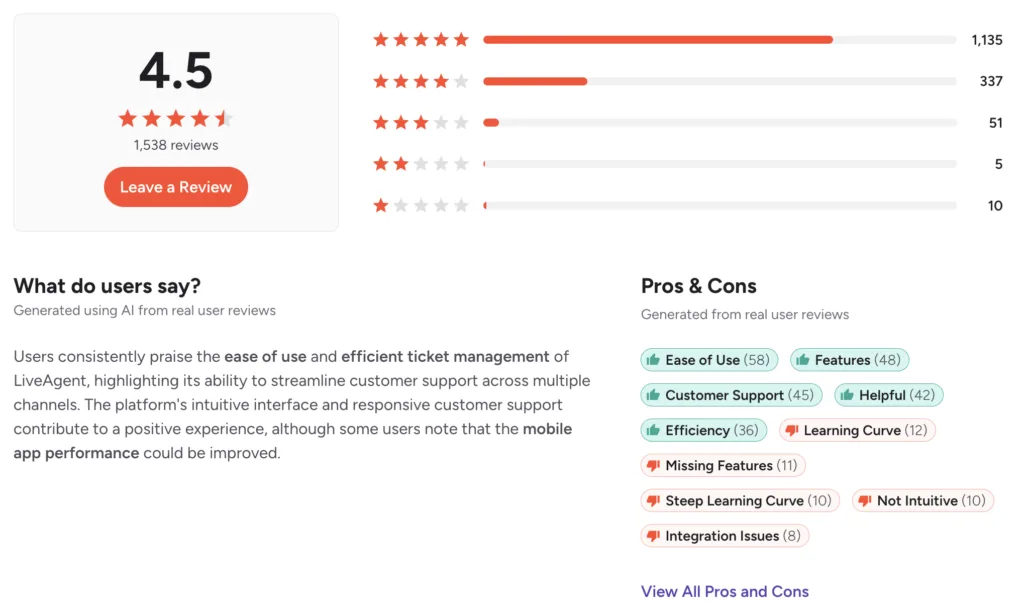
G2’s internals back it up. Ease of use leads the praise at 58 mentions, and the criticisms are notably small in volume: the largest, a steep learning curve, draws just 12 mentions against a 1,538-review base. Compare that with the platform I reviewed last, where the top complaint drew 117. Low complaint density on a large sample is a meaningful signal.
Two caveats keep this honest. Capterra carries entries openly marked as vendor-referred with an incentive offered, so treat that aggregate as the friendliest. And Reddit is effectively empty, which cuts both ways. There is no organic practitioner community discussing this product, so there is also no independent forum where problems surface outside vendor-influenced channels. For a product this widely deployed, that absence is worth noting rather than reading as endorsement.
That is the last score in this review. Everything after this comes from what people described.
What users actually say about LiveAgent
Five themes recur, ordered by how often they came up.
Consolidation is the thing people actually buy it for
The praise is specific and repeated. Reviewers describe abandoning the routine of checking email, social messages, and chat separately, and running everything as tickets in one place. Marketa N., a customer care manager, described being able to launch a new country or brand herself by connecting an inbox and configuring departments, templates, IVR and phone numbers without help from LiveAgent or her own IT team. That self-service capability, on a product at this price, is unusual.
Vendor support is genuinely good, and it is the loudest recurring praise
This is the theme that separates LiveAgent from most of its peers. Reviewers across years describe 24/7 availability, fast chat responses, and help that actually resolves the problem. Several volunteers cite it unprompted as the reason they stayed. Given that the most common complaint about most vendors in this category is their own support, a help desk company that answers its own tickets well is worth noting.
The interface shows its age
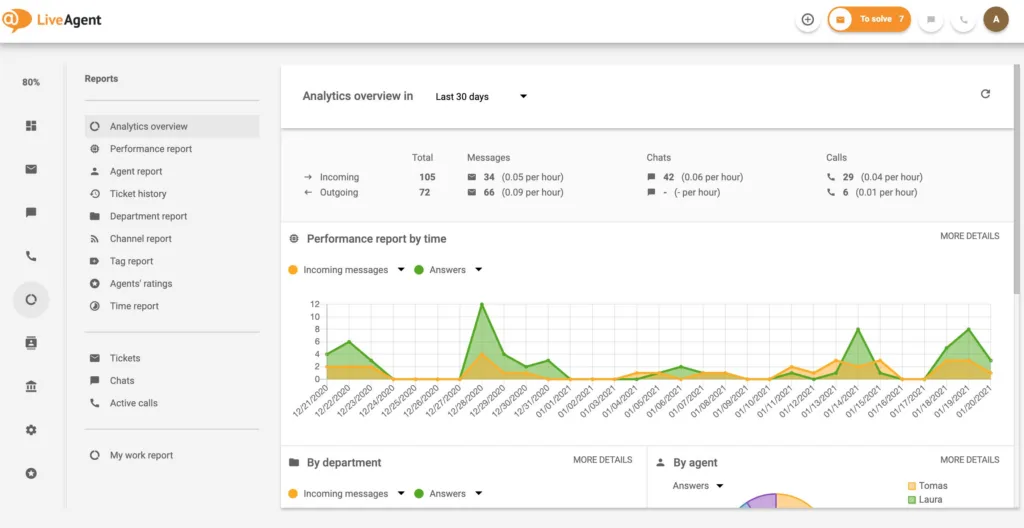
The most consistent criticism. Reviewers describe the control panel as basic, the design as dated, and the platform as harder to move around than newer competitors. Sourabh K., an operations team member of three years, said it took him more than 45 days to become familiar with all the features. Others describe pages loading slowly under high ticket volume and the web app reloading more than it should.
The mobile app is materially weaker than the desktop product
This comes up repeatedly and specifically. Reviewers describe the mobile apps as underdeveloped, some reporting that they had not been updated for current Android versions, leaving certain devices unable to use them at all. One reviewer noted that live chat in particular is difficult to work from a phone. If your agents cover out of hours from mobile, test this before you commit.
Reporting and customization hit a ceiling
Reviewers describe reports as adequate but hard to extract from, with one noting an inability to pull the companies associated with tickets. Others describe customization and branding as inflexible, and the forms system as limited for anything requiring conditional logic or calculation.
A note on sourcing. Trustpilot’s LiveAgent profile is predominantly organic rather than invited, which strengthens it. Capterra’s is partly incentivized, which weakens it. Reddit has no usable corpus, and most non-review web content about LiveAgent sits on competitor blogs comparing it unfavorably with the product they sell. I have not treated any of that as user sentiment.
LiveAgent pros and cons
|
Pros |
Cons |
|---|---|
|
Wide channel coverage at a low entry price |
Interface design is visibly dated |
|
Vendor support answers fast, around the clock |
Mobile apps trail the desktop product badly |
|
Built-in call center and IVR without a second vendor |
Social channels gate at the third tier |
|
Independent ownership and two decades of continuity |
Reporting is hard to extract from |
|
Teams can self-configure new brands and countries |
Steeper learning curve than the price suggests |
|
Multi-brand knowledge base included |
AI runs through a separate sister product |
|
30-day trial with no card required |
Promotional pricing reverts at renewal |
What LiveAgent does better than anyone
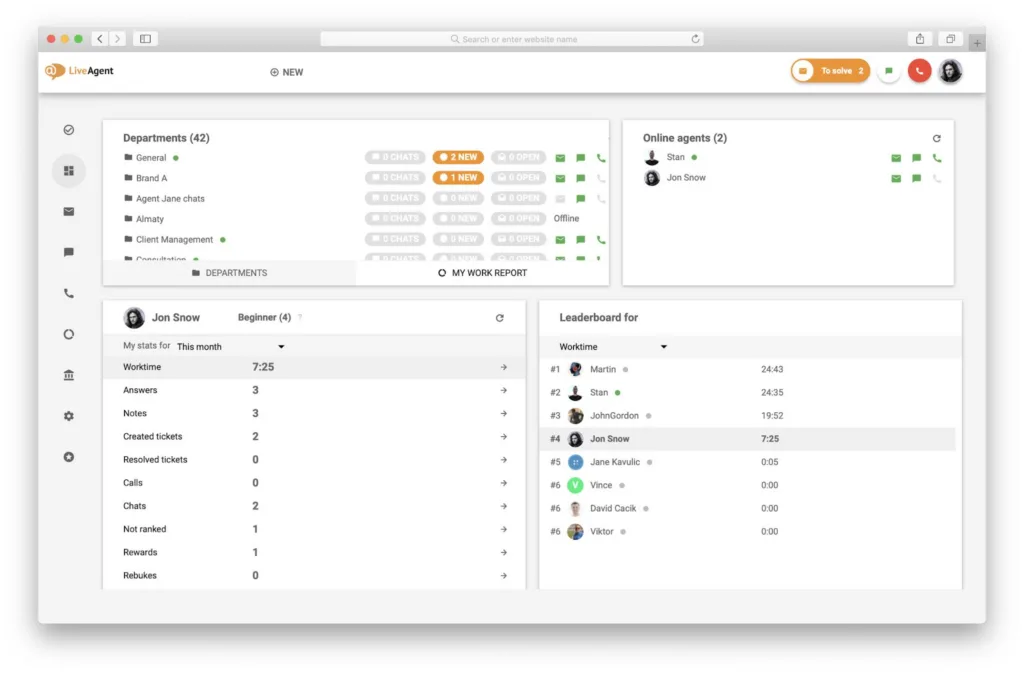
Giving a small team a genuinely complete support surface for the price of a single seat elsewhere. Email, chat, phone with IVR, a knowledge base, and a customer portal, configurable by the team that uses it rather than by an administrator or a consultant. Nothing else in the category packs that much capability under $30 a seat, and the reason customers stay a decade is that it keeps working.
What you will be living with
An interface your agents will describe as old, a mobile experience you should not rely on, reporting that will frustrate whoever presents to the board, and a channel mix that costs more than the headline tier if social matters to you. None of those is a defect. They are the shape of the trade you are making.
Feature by feature, based on the reviews
Pricing and where the channels sit
The ladder is honest: $15 a month per agent for Small business, $29 for Medium, $49 for Large and $69 for Enterprise, currently discounted by a third for new users until 1 January 2027. There is a 30-day trial with no card required, which is longer than most.
Where features sit matters more than the prices. Ticketing, live chat, the knowledge base, the customer portal and automation rules all start on the $15 tier, which is genuinely generous. SLAs, SSO, custom roles, reports, the call center and IVR begin at $29. And the social channels, WhatsApp, Facebook, Instagram, X, Viber and Telegram, all begin at $49.
That last gate is the one to model. A team that thinks of itself as buying omnichannel support at $15 is buying email, chat, and phone. Adding WhatsApp or Instagram means the third tier, so the real entry point for a social-first support operation is more than three times the advertised price. That is not hidden, but it is the most common way this pricing gets misread.
The promotion deserves the same scrutiny. A third off for new users, until a fixed date. Model the list price, because a business case built on the discounted figure will not survive its second year.
The agent workspace and daily use
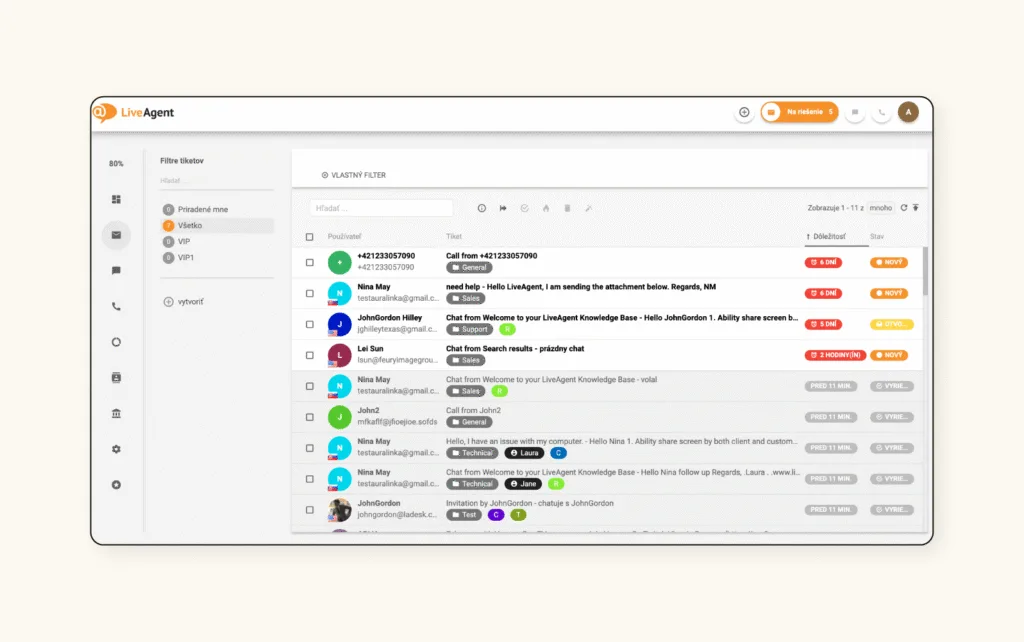
The universal inbox is the core, and it works. Reviewers describe tickets, chats, calls, and social messages arriving in one stream, departments and tags routing them sensibly, and canned responses cutting repetition. Merging multiple tickets into one comes up as a specific favorite, as does the ability to see what a customer is typing before they send it.
The friction is ergonomic, and it accumulates. The reply box covers part of the original ticket. Auto-complete that needs improvement. Pages load slowly when volume is high. Being signed out on idle, which one reviewer noted also resets their work timer. Individually trivial, collectively the reason people call the interface dated.
The learning curve is the more substantial issue. Multiple reviewers describe needing significant time to become effective, one putting it at more than 45 days, and several recommending that implementation be handled by someone experienced. For a product sold on simplicity and price, that gap between expectation and reality is worth budgeting for.
AI capability
AI arrives through FlowHunt rather than as a native layer, and the practical experience reviewers describe is positive. Stephane U. described connecting the knowledge base to FlowHunt so customers and colleagues could self-resolve, and reported it eliminating many level-one inquiries, with the whole installation completed in fifteen days.
Three limits are worth naming. Only two AI providers are supported, which constrains how much you can shape the layer. One reviewer in financial services reported that the AI function runs on a US-based model, making it impossible for them to process personally identifiable information through it, which is a hard blocker for European regulated teams rather than an inconvenience. And because the capability sits in a separate product, several reviewers asked for the two to be packaged together, which suggests the commercial seam is visible from the customer side.
If AI resolution is central to your plan, confirm the data residency position in writing before you sign, because that is the constraint most likely to stop a deployment.
Call center, channels and integrations
The built-in call center is a genuine differentiator at this price. IVR, call routing, recording and callback all sit inside the product rather than requiring a separate telephony vendor, and reviewers running 24/7 service lines describe it as the reason they chose LiveAgent.
The caveats are practical. Telephony requires a SIP setup, which one reviewer found disappointing when they expected to connect a handset and start. Integration complaints cluster around WhatsApp Business API behavior and around Magento, with reviewers describing internal triggers not interacting cleanly with WhatsApp delivery. Contact modeling has a specific limit too: a contact can belong to only one company, which breaks for agencies whose clients operate several entities.
Reporting, data and scale
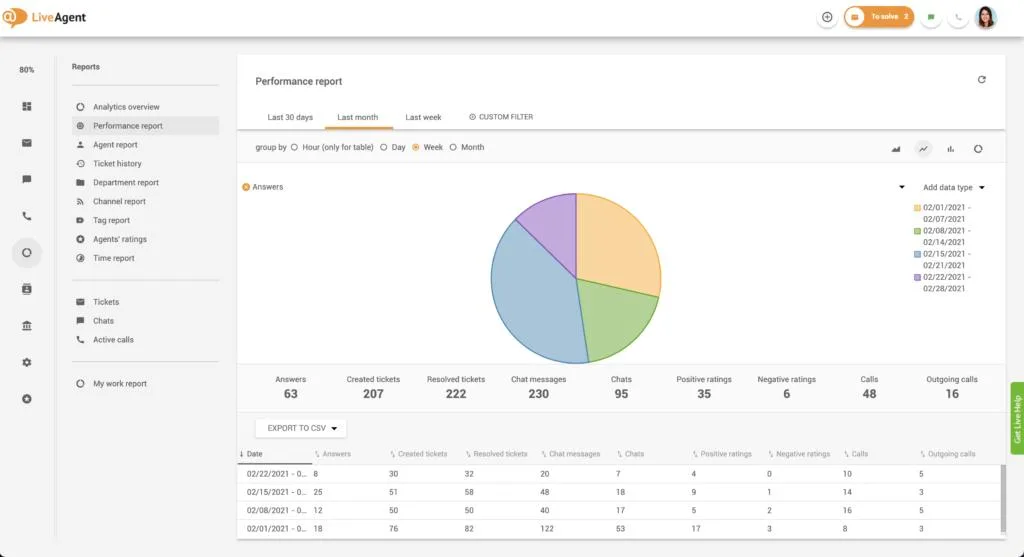
Reporting is adequate rather than strong. Standard dashboards on ticket volume, response time, and agent performance are present from the $29 tier, and reviewers use them, but extraction is where the complaints sit. One described being unable to pull the companies associated with tickets, and others describe wanting more flexible dashboards than the product offers.
Performance under load recurs enough to take seriously. Several reviewers describe slow page loads during high traffic, and one mid-market user described the platform feeling sluggish with many tickets open. Migration has an edge case worth checking: one customer moving roughly 42,000 tickets found they all carried the migration date rather than their original timestamps, which destroys historical reporting.
I would run a volume test during the 30-day trial rather than a feature test, because features are not where this product strains.
Vendor support
This is where LiveAgent is strongest, and it is the inverse of most vendors in this category. Support is available 24/7 through chat and email, and reviewers consistently describe fast, useful responses from people rather than deflection through a bot. The vendor also responds publicly to reviews across platforms, including critical ones, with specific rather than templated replies.
The one gap reported is structural rather than a failure. A dedicated account manager is not standard on lower tiers, so smaller customers deal with general support rather than a named contact, and one long-term customer asked for exactly that. For most teams at this price point, fast general support is the better trade.
LiveAgent alternatives, by what you are solving for
You want AI resolution with a defensible number behind it
Kayako prices AI around resolved conversations and reports on what was actually closed, which is the number a finance director will ask for at renewal. You give up LiveAgent’s built-in telephony and its very low entry price. Test it by taking a month of transcripts and grading which resolutions you would have accepted.
You need a modern agent experience your team will not complain about
If the dated interface is the objection your agents keep raising, Kayako’s shared inbox offers a contemporary workspace with mobile parity, which is where LiveAgent is weakest. You give up the call center and IVR bundling. Test it by asking three agents to work a full day in each and report back.
You want deeper ticketing at a similar price
Freshdesk and Zoho Desk both offer stronger reporting and a more modern interface in the same bracket, though Freshdesk gates omnichannel and AI behind add-ons. Test them by rebuilding your three most-used automation rules in each.
Your team is tiny, and you want less product
tawk.to is free with unlimited agents and covers basic chat and ticketing. You give up telephony, polish, and any expectation of depth. Test it by running both widgets on different sections of your site for a fortnight.
You are ecommerce and need chat that understands orders
Tidio is built for online retail, with a modern widget and AI aimed at product questions. You give up the call center and multi-brand knowledge base. Test it by tagging a week of chats and counting how many need order data.
You have outgrown SMB tooling and need governance
Zendesk brings multi-brand, entitlements, audit trails, and routing sophistication at several times the cost. Test it by asking whether anyone has requested something you could not produce.
Three numbers decide this for any option: cost per resolved conversation at your real volume, what the renewal looks like once promotional pricing lapses, and how much of your channel mix sits above the tier you were planning to buy.
Verdict
LiveAgent is the most quietly reliable product I have reviewed in this series, and the ratings agreement across all four platforms is earned rather than manufactured. Independent ownership, two decades of continuity, 24/7 support that customers volunteer as their reason for staying, and a genuinely complete channel surface starting at $15 a seat add up to something rare: a vendor whose commercial behavior does not undermine its product. For a small or mid-sized team that needs email, chat, phone, and a knowledge base without a platform project, this is a straightforwardly good choice.
What you are trading is modernity. The interface looks its age, the mobile apps trail the desktop badly enough that several reviewers call them unusable, reporting frustrates anyone building an executive dashboard, and the social channels most teams now consider essential sit two tiers above the advertised price. On Monday, I would do two things. Price your real channel mix against the tier that actually contains it, at list rather than promotional rates, because that number is often triple the one people quote. Then spend the 30-day trial loading volume and working from a phone rather than clicking through features, because performance and mobile are where this product strains and neither shows up in a demo.
LiveAgent FAQs
How much does LiveAgent really cost?
List pricing is $15, $29, $49 and $69 per agent per month. A promotion running until 1 January 2027 cuts each by a third for new users, so budget the list figure for renewal. There is a 30-day trial with no card required.
Does LiveAgent include WhatsApp and social channels?
Not on the entry tiers. WhatsApp, Facebook, Instagram, X, Viber, and Telegram all begin on the Large business plan at $49 per agent per month. Email, chat, and phone are available lower down.
Is LiveAgent’s AI good enough to deflect tickets?
Reviewers report real level-one deflection when FlowHunt is connected to a well-maintained knowledge base. Two constraints matter: only two AI providers are supported, and at least one customer reported the model’s US location preventing them from processing personal data through it.
Is the mobile app usable?
It is the weakest part of the product. Reviewers describe it as materially behind the desktop version, with some reporting it is unsupported on newer Android releases. Test it during the trial if out-of-hours mobile coverage matters.
Is LiveAgent good for large support teams?
It scales further than its price suggests, and enterprise customers do use it. The constraints are performance under high ticket volume and reporting depth, both of which reviewers raise more often as team size grows.