Quick summary: Canned responses are saved replies triggered by a shortcut, ideal for repetitive questions. The best ones stay short, use the customer’s name through merge tags, and match your brand voice. Bookmark the 35 templates below by scenario, personalize them, and reserve human effort for the complex cases. Around 20 well-built templates can cover the bulk of a typical support queue.
Canned responses are the quiet workhorses of a fast support team. They are the saved, reusable replies your agents drop into a conversation in one click, so a common question gets a clear answer in seconds instead of five minutes of retyping. Used well, they cut response times and keep every reply consistent. Used badly, they make a customer feel like they are talking to a wall.
This guide hands you 35 ready-to-steal templates, sorted by the scenarios support teams hit every day, from first hello to final follow-up. Around them, you get the how and the why: what a canned response actually is, when to use one, how to keep it human, and how AI is changing the whole practice in 2026. Copy what fits, adjust the wording to your brand, and put the time you save back into the conversations that need a person.
What is a canned response?
A canned response is a pre-written reply that an agent can insert into a conversation with a keystroke or a quick menu pick. Some tools call them macros, others call them saved replies or quick replies, but the idea is the same: write the answer once, then reuse it whenever the same situation comes up.
It helps to separate a canned response from an automated one. An auto-reply fires on its own, with no agent involved, like the message confirming a ticket was received. A canned response is chosen by a person, so it keeps a human in the loop while still saving them the typing. That difference matters, because the goal is speed without losing the judgment only an agent brings.
Most modern tools also let a canned response carry dynamic fields, so a template can pull in the customer’s name, the ticket number, or the agent’s name automatically. That single feature is what turns a generic script into a reply that reads as though it were written just now. So the definition is simple, and the payoff, which the next section covers, is anything but small.
Why canned responses matter
Canned responses matter because speed and consistency are where most support teams either win trust or lose it. A customer who waits ten minutes for a simple answer starts to doubt the whole company, whereas a clear reply in under a minute builds confidence before the real conversation even begins.
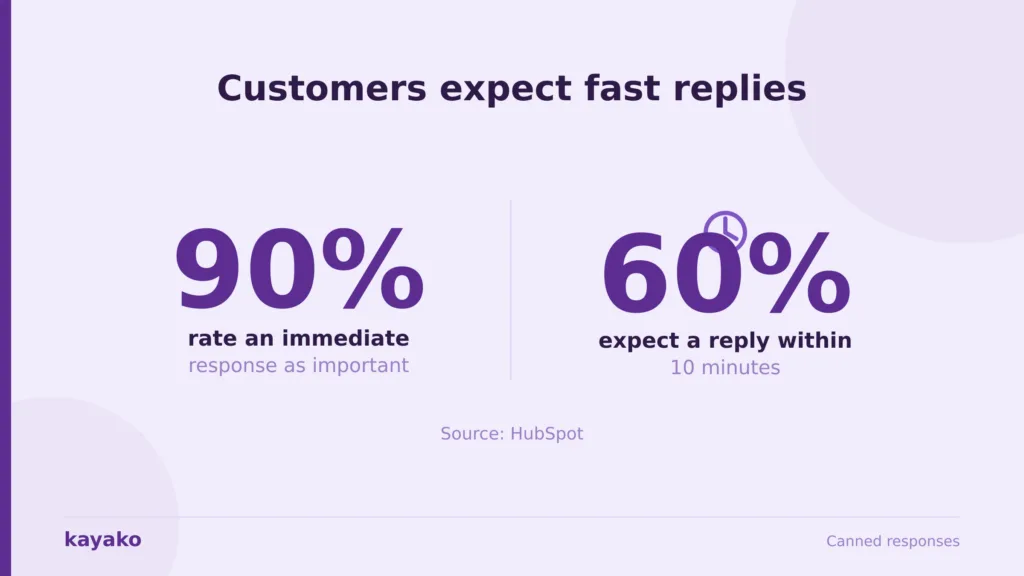
The expectation for speed is steep. HubSpot research finds that 90% of customers rate an immediate response as important when they have a question, and 60% of them define immediate as ten minutes or less. Canned responses are one of the few levers that move first-reply time that sharply without adding headcount. Teams that lean on them well have been shown to respond roughly 50% faster on common issues.
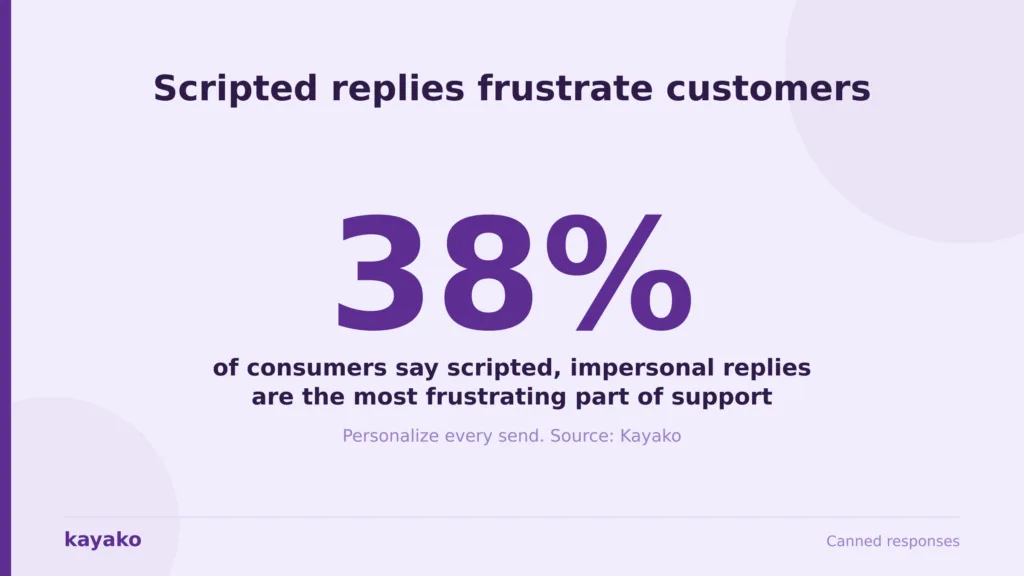
Consistency is the second payoff, and it protects the brand. When ten agents answer the same billing question ten different ways, customers notice, and some of those answers will be wrong. There is a catch, though. Kayako’s own research on canned responses found that 38% of consumers and 43% of businesses say scripted, impersonal replies are the most frustrating part of support. So the value is real, and it depends entirely on using templates as a starting point rather than a finished answer.
There is a training benefit too. New hires ramp faster when the best answers to the top questions are already written down, vetted, and one click away. In practice, a small library does most of the work, since around 20 well-chosen templates tend to cover the majority of a support queue. That leaves your team free for the hard conversations, which is exactly where they add the most value. First, though, it helps to see how these replies actually work under the hood.
Put repetitive replies on autopilot and free your team for the hard cases with Kayako
How canned responses work
A canned response works in three moves: create it once, trigger it fast, and personalize it on the way out. Getting each move right is what separates a library your team loves from one they ignore.
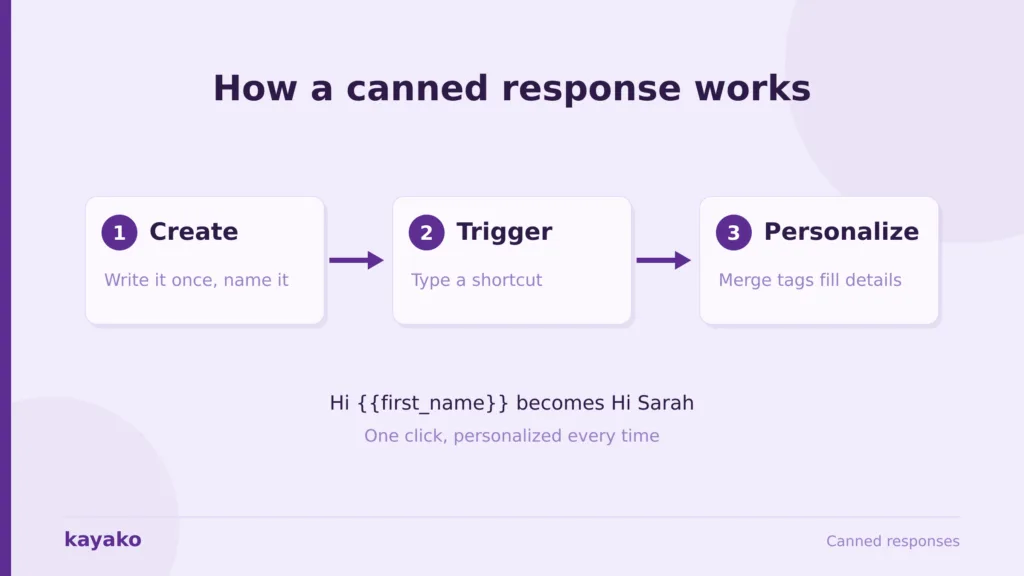
Creation is where you write and name the reply. Most teams give each template a short shortcut, so an agent types something like /refund or picks it from a menu instead of hunting through a folder. The naming convention is worth a few minutes of planning, because a library that nobody can search quickly stops getting used.
Triggering is the click itself. Inside the conversation, the agent fires the shortcut, and the full reply drops in, ready to send or edit. The best tools make this instant and searchable, so the right template surfaces even when an agent half-remembers its name.
Personalization is the finishing move. Dynamic fields, sometimes called merge tags, pull live details into the template automatically, so Hi {{first_name}} becomes the customer’s actual name and the ticket number fills itself in. That keeps a reusable reply from reading like a form letter. With the mechanics clear, here are the templates worth bookmarking.
35 best canned response templates to steal, by scenario
The templates below are grouped by the moments support teams handle most. Each one is a starting point, so swap in your brand voice and trim anything that does not fit. Merge tags appear in double braces, which your help desk fills in automatically.
Greetings and welcome
A warm opener sets the tone for everything after it. These work for the first reply on chat or email, when the goal is to acknowledge the person quickly and signal that help is on the way.
/welcome Hi {{first_name}}, thanks for reaching out. I would be glad to help with this. Give me one moment to pull up your account.
/chat-hello Hi {{first_name}}, you are through to {{agent_name}}. Tell me a little about what is happening and I will take it from here.
/returning Welcome back, {{first_name}}. Good to hear from you again. What can I help you sort out today?
Acknowledging a request
When a customer sends something that needs work, a fast acknowledgement buys you time and lowers their anxiety. These confirm you have the request and set a clear next step.
/received Thanks, {{first_name}}. I have your request on ticket {{ticket_id}} and I am looking into it now. I will follow up as soon as I have an update.
/looking-into Good question. I want to get this right for you, so I am checking the details now and will come back within the hour.
Asking for more information
Half of slow resolutions come from missing details. These templates request what you need without making the customer feel interrogated, and they explain why the detail matters.
/need-info To get to the bottom of this quickly, could you share {{detail}}? That lets me check the exact record rather than guess.
/screenshot A screenshot would help a lot here, {{first_name}}. If you can capture what you are seeing, I can match it to your account and move faster.
/steps So I can reproduce this, could you walk me through the steps you took just before it happened? Even small details help.
Status updates and holding messages
Silence is what turns a patient customer into an anxious one. A short holding message keeps them informed while you work, and it prevents the follow-up chase.
/still-on-it Quick update, {{first_name}}: I am still working on this and have not forgotten you. I expect to have an answer by {{time}}.
/escalated-hold Thanks for your patience. I have passed the technical detail to our specialists and I am tracking it for you. I will share the moment I hear back.
Refunds, billing, and pricing
Money questions are sensitive, so plain wording and warmth matter more here than anywhere. These handle the common outcomes without sounding cold or evasive.
/refund-approved Good news, {{first_name}}. Your refund of {{amount}} is approved and on its way. It usually lands in three to five business days depending on your bank.
/refund-info I would like to help with this refund. Could you confirm the order number so I can check what options are available on your account?
/billing-explained Happy to walk through this charge. It covers {{item}} for the current period. If anything still looks off, tell me and I will dig deeper.
Technical troubleshooting
For technical issues, a calm, step-by-step reply reassures the customer that the problem is understood. These give first steps while keeping the door open for escalation.
/first-steps Let us try a couple of quick things first, {{first_name}}. Please refresh and sign back in, then tell me whether the issue is still there.
/bug-logged Thanks for flagging this. I have logged it with our engineering team as {{ticket_id}} and I will let you know the moment there is a fix.
/known-issue You have spotted a known issue we are actively fixing. I have added you to the update list, so you will hear from us as soon as it is resolved.
Apologies and complaint handling
When something has gone wrong, the reply needs to own it plainly and move to a fix. These avoid defensiveness and focus on making it right.
/apology I am sorry this happened, {{first_name}}. That is not the experience we want for you. Here is what I am going to do to fix it right now.
/service-recovery You are right to be frustrated, and I appreciate you telling me. Let me put this straight and make sure it does not happen again.
Feature requests and feedback
Customers who suggest ideas are engaged customers, so the reply should make them feel heard, even when the answer is not yet. These acknowledge the input and set honest expectations.
/feature-logged Thank you for the idea, {{first_name}}. I have shared it with our product team and added your vote. It genuinely helps us prioritize.
/feedback-thanks I really appreciate you taking the time to tell us this. Feedback like yours is how the product gets better, so thank you.
Follow-ups and check-ins
A good follow-up closes the loop and shows you remember. These reopen a quiet thread or confirm a fix landed, without nagging.
/follow-up Hi {{first_name}}, just checking in on the issue from earlier. Is everything working the way you expected now?
/still-there I have not heard back, so I wanted to make sure you were not stuck. Reply whenever suits you and I will pick it straight up.
Out-of-office and offline
When your team is away, a clear offline message manages expectations and points to self-service. These keep trust intact until the agent is back.
/offline Thanks for your message, {{first_name}}. Our team is offline right now and will reply first thing tomorrow. For quick answers, our help center is open anytime.
/after-hours You have reached us after hours. I have logged your request as {{ticket_id}} and an agent will be in touch when we reopen at {{time}}.
Closing and escalation
How you end matters as much as how you start. These wrap a solved conversation warmly, or hand a hard one to the right person cleanly.
/resolved Glad we got that sorted, {{first_name}}. I will close this out, but reply anytime if anything else comes up and it will reopen straight to me.
/escalate This needs a specialist to do it justice, so I am handing it to our {{team}} team with all the context. They will reach out shortly, so you will not need to repeat anything.
/csat Thanks for your patience today, {{first_name}}. If you have a moment, a quick rating on this conversation helps us keep improving.
That is the full set. Save the ones that fit, group them under clear shortcuts, and connect them to your helpdesk automation so the routine replies practically send themselves. Templates only work when they still sound human, though, which is the next thing to get right.
Give every agent the right reply in one click with Kayako
Best practices: make canned responses sound human
The difference between a template that helps and one that annoys comes down to a few habits. Get these right, and customers will not know they read a saved reply at all.
Personalize every send. Use merge tags for the name and details, and add one specific line about the customer’s actual situation before you hit send. That single sentence signals a person is present. Keep the copy short, because a wall of scripted text reads as effort avoidance, not care.
Match your brand voice, so the templates feel like your company rather than a stock library. Update them on a schedule, since a reply that references an old policy or a retired feature does more harm than none. And know when not to use one at all, which the best practices for B2B customer service point to as well: an emotional complaint or a high-value account usually deserves a reply written from scratch.
The rule of thumb: a canned response is a strong first draft, never the finished answer. If a reply could go to anyone, it is not ready to send to someone.
One more habit keeps quality high. Review which templates get used and which get skipped, then rewrite or retire the weak ones. A living library beats a big one. Even so, some mistakes show up again and again, so they are worth naming directly.
Keep every reply fast and personal at scale with Kayako
Common canned response mistakes to avoid
Most canned-response failures trace back to the same handful of errors. Naming them makes them easy to sidestep.
The first is sending a template verbatim, with no name and no context, so it reads as a brush-off. The second is answering a question the customer did not ask, which happens when an agent grabs a near-match template in a hurry. The third is tone drift, where a cheerful greeting template lands on an angry complaint and makes things worse.
A fourth mistake is letting the library go stale, so templates quote prices, policies, or features that no longer exist. A fifth is overloading agents with too many near-identical options, which slows the very click the template was meant to speed up. The fix for all five is the same discipline: fewer, sharper templates, personalized on every send, and reviewed often. Handle those, and the next move toward AI becomes an advantage rather than a risk.
How AI is changing canned responses in 2026
AI has moved canned responses from a static folder toward a live assistant. Instead of an agent hunting for the right template, the system reads the conversation, understands the intent, and surfaces the best reply automatically, already personalized to the customer in front of them.
Three changes stand out. Suggested replies now appear in real time, so the agent confirms rather than searches. Tone matching adjusts a template to the mood of the thread, softening a standard answer for a frustrated customer. And full resolution is now possible, where an AI support agent handles the entire repetitive question end-to-end, drawing on the same approved answers your team wrote.
This does not remove the human. It moves people toward the conversations that need judgment, empathy, or a decision, while the routine replies handle themselves. The teams getting the most from it treat their canned library as the training material for the AI, so the machine sounds like the brand rather than a generic bot. To reach that point, the library has to live somewhere built for it.
Let Kayako suggest and personalize the right reply in real time
How to set up canned responses in your help desk
Setting up a canned-response library is less about the writing and more about the structure around it. A little planning here pays back every day.
Start by listing your top 20 recurring questions, since those cover most of the queue. Write one clean template for each, give it a memorable shortcut, and group them by scenario the way this guide does. Store them where every agent can reach them instantly, ideally alongside your knowledge base, so self-service answers and agent replies stay in sync.
Then decide what should be automated versus agent-triggered. Simple confirmations can send on their own, while anything needing judgment stays a one-click assist. The right customer service tool makes both easy from the same place. Review usage monthly, prune the dead weight, and keep the wording current. Do that, and the library keeps earning its place, which is exactly what Kayako is built to support.
Build a smart, self-updating reply library inside Kayako
How Kayako helps you reply faster without sounding canned
Fast, human replies depend on one thing: the agent seeing the whole customer while they type. Kayako’s SingleView brings a customer’s history, orders, and past conversations into one screen, so even a templated reply can carry the one specific detail that makes it feel personal. The shared inbox keeps the whole team working from the same approved answers, which is how consistency is maintained as you scale.
Automation is where the real time is won. Agent Kay resolves the repetitive questions on its own, using the same answers your team trusts, so canned replies stop being a manual task and become a system. Case study: Trilogy. After moving to Kayako, Trilogy eliminated 80% of its ticket volume, cut ticket age from 17.6 hours to under 2 minutes, and saved $5 million within a 90-day rollout. Read as a canned-response story, that is the routine work answering itself while people handle what matters.
Canned responses are one of the highest-return habits in support, as long as you treat them as a starting point rather than a script. Steal the templates that fit, personalize every send, keep the library short and current, and let the fast, repetitive replies clear the way for the conversations that need a human.
The teams that win are not the ones with the most templates. They are the ones whose customers never realize a reply was saved at all. Build a small, sharp library, wire it into your tools, and put the time you save back into the people who need you most.
Resolve repetitive tickets automatically and reply faster with Kayako
Frequently asked questions
What is a canned response?
A canned response is a pre-written, reusable reply that an agent inserts into a customer conversation with a shortcut or a quick menu pick. Tools also call them macros or saved replies. Unlike an automated reply, which sends on its own, a canned response is chosen by a person, so it saves typing while keeping human judgment in the conversation.
What are the best canned responses for customer service?
The most useful templates cover the scenarios teams hit daily: greetings, acknowledgments, requests for more information, status updates, refunds and billing, troubleshooting, apologies, feature feedback, follow-ups, offline messages, and escalation. Start with one strong template per scenario, personalize each on send, and expand only when a real recurring need appears rather than collecting templates for their own sake.
How do you write a canned response that does not sound robotic?
Keep it short, use merge tags for the name and details, and add one specific line about the customer’s actual situation before sending. Match your brand voice, avoid corporate filler, and never send a template verbatim. The test is simple: if the reply could go to anyone, it is not ready to send to someone.
How many canned responses should a support team have?
Fewer than most teams expect. Around 20 well-built templates tend to cover the large majority of a typical support queue, because a small set of questions drives most of the volume. A tight, well-maintained library beats a sprawling one, since agents can find the right reply faster and the wording stays current.
Are canned responses good or bad for customer service?
They are good when used as a fast first draft and bad when used as a lazy final answer. Kayako research found that scripted, impersonal replies are the single most frustrating part of support for many customers, so the practice lives or dies on personalization. Handled well, canned responses speed up replies and keep them consistent while people focus on the cases that need real attention.