I have rolled out or ripped out most of the tools on this list. I have watched a team buy a shiny messaging platform and find six months later that tickets still landed in a separate inbox nobody owned. I have sat through the renewal call where the per-seat bill had quietly tripled because we hired. And I have seen the other version, where the stack clicks and the queue stops growing faster than the team.
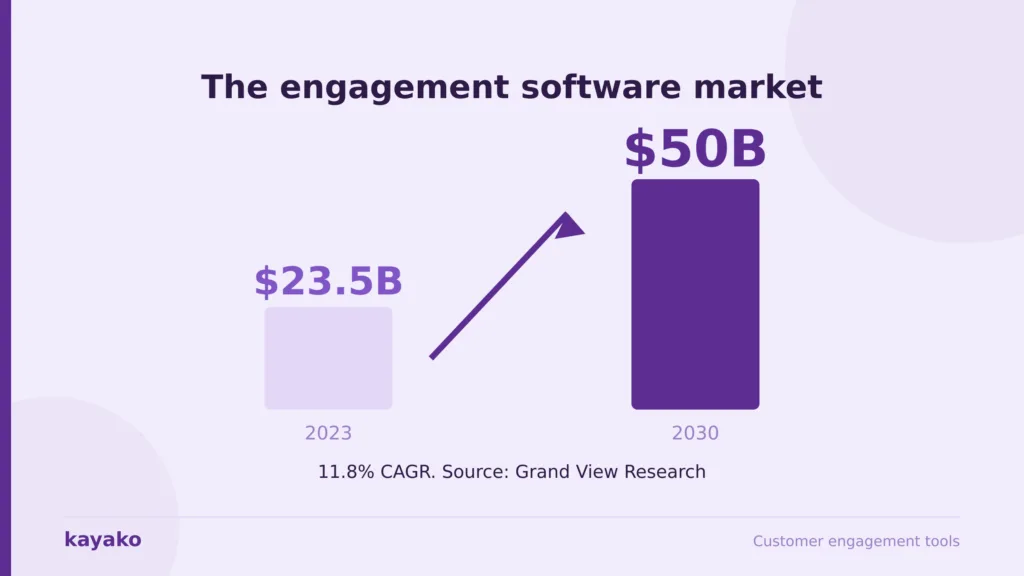
This is not a feature matrix. Customer engagement tools look similar on a comparison page and behave nothing alike in production, so what follows is my assessment of what these seven do once real customers are using them, and what they really cost. The category is large and growing: Grand View Research puts customer engagement solutions at roughly $23.5 billion in 2023, heading toward $50 billion by 2030 at an 11.8% growth rate. Plenty of that spending gets wasted on tools that never get adopted.
How I evaluated these customer engagement tools
I do not evaluate software by clicking through a demo the vendor built to look good. These are the criteria I use when advising CX leaders, and every tool below is judged against them.
- Resolution, not just conversation. Does the AI close cases without a human, or answer one question and pass the rest along? Deflection dashboards look busy while the queue stays exactly as long.
- Context across channels. When a customer moves from chat to email, does history follow, or does the next agent start from zero? This is where most omnichannel claims fall apart.
- Deployment reality. How long to genuinely go live, including migration and integrations? I have seen a three-week implementation stretch to five months.
- Total cost at your volume. Not the headline seat price, but seats plus AI add-ons plus channel fees plus admin hours.
- Integration honesty. Does it share a record with your CRM, or recreate the silo you were removing?
Two disclosures. I work in this category, so treat my Kayako section as informed rather than neutral, which is why I have listed its real limitations rather than a token caveat. And pricing moves constantly: every figure below was checked against vendor pricing at the time of writing, so confirm your own quote at checkout.
Not sure which layer of your stack is actually broken? I will map it with you in 45 minutes, no pitch.
1. Kayako: the engagement tool that resolves instead of routing
I recommend Kayako first to mid-market leaders tired of AI that promises resolution and delivers a better FAQ widget. Most vendors sell a platform and leave the AI configuration to you. Kayako implements the agent for you, trains it on your data, and prices per resolved ticket rather than per seat, so the vendor only earns when the automation works.
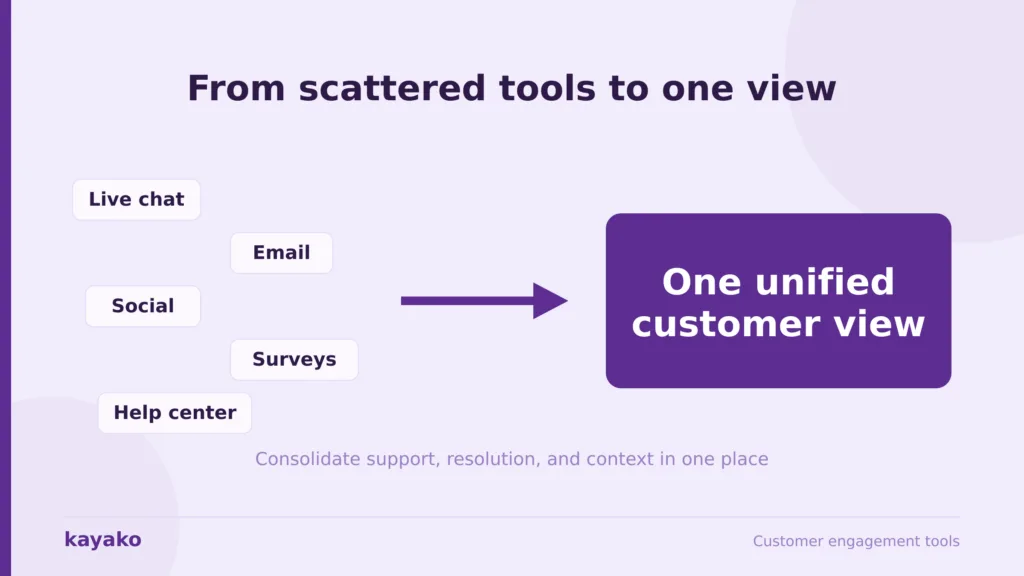
Agent Kay resolves routine tickets end-to-end across email, chat, social, and the help center, while SingleView keeps a full history on one record. Practically, an agent never opens four tabs to answer one question, and a customer who has contacted you three times does not explain it a fourth. It sits in the omnichannel and knowledge layers, alongside a proper knowledge base.
Kayako pros
- AI that closes cases, not just triages them. Trilogy eliminated 80% of ticket volume and cut ticket age from 17.6 hours to under 2 minutes in a 90-day rollout, saving $5 million.
- Per-resolution pricing inverts the usual math. Automation lowers your bill instead of raising your license count. Every other tool here charges more as the team grows.
- Expert implementation is included. You are not handed documentation and wished luck, which is why deployments succeed here and stall elsewhere.
Kayako cons
- It is not a lifecycle marketing tool. If your main need is outbound campaigns, push, and SMS, Kayako does not do it, and you will want Braze or similar alongside. It handles inbound engagement and resolution.
- Not self-serve. If you want to sign up with a card and configure it yourself this afternoon, this is the wrong tool. It is an expert engagement model, which suits some teams and irritates others.
- Custom pricing means you cannot benchmark without a call. There is no public price list to compare against Zendesk’s, a legitimate procurement frustration.
- Over-engineered for very small teams. Under roughly 500 tickets a month, the implementation is hard to justify. Freshdesk serves you better and costs less.
Kayako pricing
$1 per resolved ticket, with expert implementation included and pilot-first custom pricing. The entry point is a 90-day AI Agent pilot on one queue with agreed KPIs. At 5,000 tickets a month, that is $5,000 tied to outcomes. Enterprise pricing on request, no public self-serve tier.
Want to see what per-resolution pricing looks like against your actual ticket volume? I will run the math with you.
2. Intercom: the AI-first messenger, if you can model the bill
Intercom earned its reputation on the in-product messenger and pushed hard into AI resolution with Fin. For product-led teams whose customers live in the app, it is excellent, and Fin is one of the few AI agents that resolve rather than deflect. My reservation is the pricing, which has two layers that behave very differently and catch teams out at renewal.
Intercom pros
- Best in-product messenger in the category. Nothing else feels as native inside an app.
- Fin genuinely resolves. It closes conversations without a human and knows when not to answer, which is rarer than it sounds.
Intercom cons
- Two cost layers that compound. Seats plus $0.99 per Fin resolution. The better the AI performs, the higher that line climbs, so your reward for good automation is a bigger bill.
- The Essential to Advanced jump is nearly 3x. Much of what it adds is basic automation, so the practical entry price for a real setup is Advanced, not Essential.
- Agent-side AI costs extra again. Copilot is a separate per-seat add-on on top of seats and Fin.
Intercom pricing
- Essential: $29 per seat per month (annual), around $39 monthly.
- Advanced: $85 per seat per month (annual), around $99 monthly.
- Expert: $132 per seat per month (annual), around $139 monthly.
- Fin AI: $0.99 per resolution, on top of every plan. Copilot is roughly $29 per seat per month extra.
Worth knowing before you sign. In June 2026, Salesforce announced a definitive agreement to acquire the company, now branded Fin, for around $3.6 billion, with the deal expected to close near the end of Salesforce’s fiscal 2027. Pricing is unchanged for now, but if you are about to commit to a multi-year contract, that is the context you want. Verify the current status before publishing or purchasing.
3. Zendesk: the enterprise benchmark, with an admin tax
If you have worked in support for five years, you have used Zendesk. It is the category reference: every channel in one workspace with the deepest app marketplace here. My take after running two Zendesk implementations is that it is excellent if you have the admin resources to run it properly. Without a dedicated admin, you pay for roughly double what you use. Compare it against Zendesk alternatives.
Zendesk pros
- Genuine omnichannel breadth. Every channel, one workspace, and it rarely runs out of room.
- Explore analytics. One of the strongest reporting suites in the category.
Zendesk cons
- The bill compounds. Add AI, voice, and WFM, and you are routinely at two to three times the headline price.
- AI is an add-on, not the core. The resolution layer is bought on top, and it shows.
- Admin-heavy. Complex workflows sit half-configured without someone owning them full-time.
- Dated interface. Agents notice, and it affects adoption.
Zendesk pricing
- Suite Team: $55 per agent per month (annual).
- Suite Growth: $89 per agent per month.
- Suite Professional: $115 per agent per month.
- Suite Enterprise: custom. 14-day trial. AI, voice, and WFM are add-on costs.
Paying for Zendesk seats you do not use? Kayako can sit alongside your existing desk or replace it cleanly.
4. HubSpot Service Hub: excellent if you already live in HubSpot
Service Hub makes sense for one reason: if marketing and sales already run on HubSpot, service on the same record is genuinely valuable. If you do not run HubSpot, the value thins fast, and you are buying an ecosystem to justify one product. Note: Service Hub is priced per seat, unlike most HubSpot hubs.
HubSpot Service Hub pros
- One record across marketing, sales, and service. Nothing else here matches that if you are already on the CRM.
- Free view-only seats. You pay only for agents who work on tickets.
HubSpot Service Hub cons
- Mandatory onboarding fees. Roughly $1,500 on Professional and $3,500 on Enterprise, on your first invoice.
- The Starter to Professional jump is steep. Roughly $15 to $90 per seat, and Professional is where support teams need to be.
- Credits create bill uncertainty. AI runs on metered credits, so the total moves with usage.
- Weak value outside the ecosystem. Off the CRM, you pay a premium for continuity you will not use.
HubSpot Service Hub pricing
- Free: $0 for up to 2 users.
- Starter: around $15 to $20 per seat per month. HubSpot runs promotions here, so confirm the live rate.
- Professional: $90 per seat per month (annual), plus a one-time $1,500 onboarding fee.
- Enterprise: $150 per seat per month, 10-seat minimum, plus a one-time $3,500 onboarding fee.
5. Freshdesk: the value pick that punches above its price
When a leader needs solid multichannel ticketing without a Zendesk budget, Freshdesk is my first call. It is intuitive, the free tier is genuinely useful, and I have seen teams live in under a day. It shows limits at scale: complex SLA hierarchies strain above roughly 100 agents. A brilliant SMB tool, not an enterprise one. See Freshdesk alternatives here.
Freshdesk pros
- Best value in the SMB segment. Free for 10 agents, paid from $15.
- Fastest time to value here. Live in a day is not hyperbole.
- Freddy AI does real triage work. Categorization and predictive assignment cut manual routing.
Freshdesk cons
- Enterprise ceiling is real. Reporting and SLA depth show gaps above roughly 100 agents.
- AI depth trails the leaders. Good triage, weak autonomous resolution. High-volume teams outgrow it.
- Mobile app is weak. Remote agents get a noticeably degraded experience.
Freshdesk pricing
- Free: $0 for up to 10 agents.
- Growth: $15 per agent per month.
- Pro: $49 per agent per month.
- Enterprise: $79 per agent per month. 14-day trial. Freshworks has been restructuring these plans into Omni bundles, so confirm the current lineup.
Freshdesk hitting its ceiling on volume? Kayako’s AI layer can extend what you have or replace it cleanly.
6. Front: the best shared inbox, priced per seat forever
Front is what leaders love when engagement is relationship-heavy and email-centric, such as account management and client services. Email, chat, and SMS become a shared workspace where a team can assign, comment, and reply together, and replies feel personal rather than ticketed. The catch is that Front AI is assist-first, so it makes agents faster without reducing how many you need.
Front pros
- Best collaborative inbox experience. Nothing else makes a team feel like one mailbox this cleanly.
- Replies feel human. For relationship-led support that beats automation depth.
Front cons
- AI is almost entirely add-on. Copilot, Smart QA, and Smart CSAT each stack per seat. Run all three on Professional, and you pay more than Enterprise, which bundles them.
- Hard seat caps. Starter caps at 10 seats and one channel. Professional caps at 50. You upgrade for capacity, not features.
- Autopilot is metered separately. Roughly $0.89 per resolution by third-party breakdowns, on top of the rest.
- Stale pricing everywhere. Front moved from four plans to three in 2026. If you see Starter, Growth, Scale, Premier at $19 to $229 quoted, that is the old model.
Front pricing
- Starter: $25 per seat per month (annual). Single channel type, 10-seat cap.
- Professional: $65 per seat per month. Omnichannel, 50-seat cap.
- Enterprise: $105 per seat per month. Bundles Copilot, Smart QA, and Smart CSAT.
- Add-ons: Copilot $20 per seat, Smart QA $20 per seat, Smart CSAT $10 per seat. 14-day trial, no free plan.
7. Braze: lifecycle messaging at enterprise scale
Braze sits on the marketing side, orchestrating push, email, SMS, and in-app messages timed to behavior. Consumer brands with millions of users run it well. It is a messaging engine rather than a support tool, so it complements a help desk rather than replacing one. I include it because plenty of teams searching for engagement tools need this layer rather than a ticketing one.
Braze pros
- Best-in-class lifecycle orchestration. Canvas Flow handles genuinely complex behavioral flows.
- Priced on engagement, not seats. Your whole team works in it without a per-head penalty.
Braze cons
- No published pricing at all. Every deal is a sales conversation and an annual contract.
- Entry cost rules out most teams. Procurement data puts entry contracts in the low five figures a year. No free plan, no month-to-month.
- It does not do support. No ticketing, no resolution. Pair it with a help desk.
- Needs engineering resource. MAU and data-point billing reward teams who instrument properly.
Braze pricing
No public pricing. Quote-only annual contracts priced on monthly active users, message volume, and flexible credits across Platform Editions. Third-party procurement data puts entry contracts around $30,000 to $60,000 a year, mid-tier around $100,000 to $250,000, and enterprise deployments from $250,000 into seven figures. Treat those as directional and get your own quote.
All 7 customer engagement tools: pricing compared
A quick reference across the seven. As always, the list price is never the total cost. Factor in AI add-ons, channel fees, onboarding, and the admin hours before you commit.
| Tool | Best for | Entry price | AI resolution | Free tier |
|---|---|---|---|---|
| Kayako | AI-first resolution, mid-market | $1 per resolved ticket | Native, implemented for you | 90-day pilot |
| Intercom | In-app AI messaging | $29/seat/mo + $0.99/resolution | Native (Fin) | 14-day trial |
| Zendesk | Enterprise omnichannel | $55/agent/mo | Paid add-on | 14-day trial |
| HubSpot Service | Teams already on HubSpot | ~$15/seat/mo (+onboarding) | ~$0.50/resolution (Breeze) | Free, 2 users |
| Freshdesk | SMB value | Free, then $15/agent/mo | Add-on, triage-led | Free, 10 agents |
| Front | Shared-inbox collaboration | $25/seat/mo | Add-on, assist-first | 14-day trial |
| Braze | Lifecycle messaging at scale | Quote only, ~$30k+/yr | Not applicable | None |
Pricing checked against vendor pages at the time of writing and changes often. Verify directly before purchasing.
How to build your engagement stack without the sprawl
I rarely recommend a single tool. Most teams need two or three connected layers, and the sequence matters more than the logos.
Start where it actually hurts
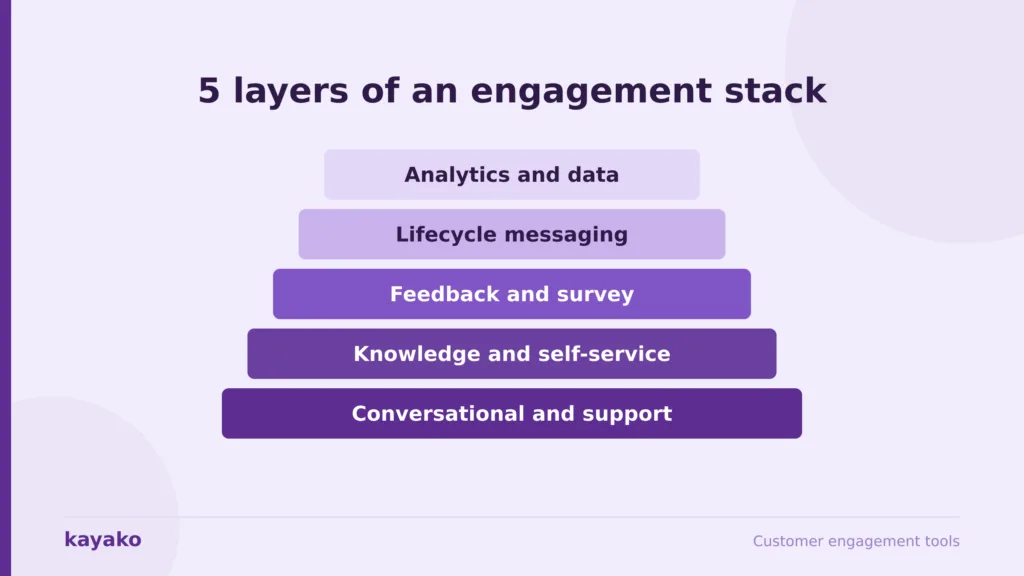
Engagement splits into layers: conversational support, knowledge and self-service, feedback, lifecycle messaging, and analytics. Most teams already own three of them badly. Start where customers feel friction, which for most is support and resolution, since that is where the volume and the frustration sit. A billing problem is where loyalty is spent or saved. A newsletter is not. Fix the resolution before you buy a survey tool. Once autonomous resolution handles the routine load, add feedback to track whether CSAT is climbing, then lifecycle messaging to re-engage inactive users.
Test integration before features
Two tools that do not share data recreate the silo you were removing. The first question about any tool is not what it does alone but what it does with data you already hold. This is where I have seen the most money wasted: three tools that each work and together produce a customer who repeats themselves three times.
Model the real cost over 36 months
List price is never true cost. Include seats, AI add-ons, channel fees, onboarding, admin hours, and exit costs. A twenty-agent team on Zendesk Suite Professional is $27,600 a year in licenses before AI, voice, or analytics. Run that math across your shortlist, and the picture changes fast, which is the point of cost reduction that comes from deflection rather than headcount.
Want me to map these seven against your channels, volume, and budget, and give you a shortlist?
Which customer engagement tool should you choose?
The short version, based on the situations I encounter most.
- AI-first resolution, mid-market, outcome pricing: Kayako, my first call for any leader whose queue grows faster than the team.
- In-app messaging for product-led teams: Intercom, if you model the Fin bill before signing.
- Enterprise omnichannel with admin resource: Zendesk, excellent if you can staff it.
- Already on HubSpot CRM: HubSpot Service Hub, for the shared record. Not otherwise.
- SMB on a budget: Freshdesk, best value in the segment.
- Relationship-led, email-centric teams: Front, the best shared inbox, if you accept assist-first AI.
- Consumer lifecycle messaging at scale: Braze, if you have the budget and the engineers.
The best customer engagement tool is not the one with the longest feature list. It is the one that closes your biggest gap and shares a record with everything around it. Favor consolidation over sprawl and integration over feature count, because the customer experiences the whole stack, not the parts.
Ready to see what autonomous resolution does to your actual queue? Let’s design your 90-day pilot.
Frequently asked questions
What are customer engagement tools?
Customer engagement tools are platforms that help companies create, deliver, and measure interactions with customers across email, live chat, social, and in-app messaging. They centralize conversations, add automation and personalization, and provide analytics. The category spans help desk tools, knowledge bases, feedback tools, lifecycle messaging, and the data platforms connecting them.
What is the difference between a customer engagement platform and a CRM?
A CRM stores customer data and manages the pipeline, so it tells you who the customer is. An engagement platform acts on that data to run the conversations, so it is how you talk to, help, and retain them. Most teams run both, connected, so the engagement tool works from the CRM record.
What is the best customer engagement tool in 2026?
It depends on your biggest gap. For autonomous resolution and a single customer view, Kayako leads, with per-resolution pricing that rewards automation. Intercom suits AI-first in-app support, Zendesk fits enterprise suites with admin resource, HubSpot works for teams already on its CRM, Freshdesk serves SMBs, Front excels at shared-inbox collaboration, and Braze handles lifecycle messaging at scale.
How much do customer engagement tools cost?
Entry pricing ranges widely. Freshdesk is free for up to 10 agents, then $15 per agent. Front starts at $25 per seat, Intercom at $29 per seat, Zendesk at $55 per agent, and HubSpot Service Hub Professional at $90 per seat plus onboarding. Braze is quote-only, typically from the tens of thousands a year. Kayako prices per resolved ticket at $1. Compare the model, not the sticker price: per-seat costs rise as you grow, per-resolution costs fall as automation improves.
How many customer engagement tools does a team need?
Most teams need two or three connected tools rather than one of everything. A platform covering support, resolution, and knowledge handles the core, and many add a feedback tool and lifecycle messaging. The number matters less than the integration, since a smaller stack sharing one record beats a larger one that fragments the data.