Key takeaways
- Linear is a fast, keyboard-driven issue tracker and product development system built for engineering teams, used by more than 40,000 companies.
- For ticketing, Linear is excellent at engineering work: issue tracking, triage and routing, sprint planning, and tracking feature requests by customer.
- It is not a customer support ticketing system by design. It has no customer email thread, no shared inbox, no SLA timers, and no knowledge base.
- The setup that works is a dedicated support platform in front of Linear: customers stay in the support tool, engineering issues sync into Linear.
- Kayako handles the customer-facing side Linear deliberately leaves out, then escalates bugs and feature requests into Linear for the engineering team.
Linear has become one of the most loved tools in software, and for good reason. It is fast, elegant, and focused on helping engineering teams plan and ship. As more teams live inside it, a natural question follows: if engineering runs on Linear, could customer support run there too? This guide answers that honestly. It explains what Linear ticketing actually covers, what it does brilliantly, where it falls short for customer support, and the setup that lets you keep the parts Linear is great at without forcing it to be something it is not.
The question is worth taking seriously because customer support is expensive to get wrong. Qualtrics estimated that poor customer experiences put roughly $3 trillion at risk globally in 2025 as people cut back or leave after bad interactions (Forbes), and the 2025 National Customer Rage Survey found that 77% of people hit a product or service problem in the past year (via 19pine). Handling that volume of frustrated customers well takes tooling designed for them, which is the lens to judge Linear through.
What is Linear, and what does “Linear ticketing” mean?
Linear is an issue tracking and product development platform founded in 2019, originally as a fast, streamlined alternative to Jira. By 2026, it had grown into a broader development system used by more than 40,000 companies, from early-stage startups to large enterprises, and it holds strong ratings on review sites, around 4.6 on G2 and 4.3 on Capterra. Its core job is helping software teams plan work, track issues, and ship product.
“Linear ticketing” usually means one of two things. The first is using Linear to manage engineering tickets, which is exactly what it is built for. The second is the bigger question of whether Linear can double as a customer support ticketing system, handling the emails, chats, and requests that come from customers. Those are very different jobs, and the difference is the whole point of this article.
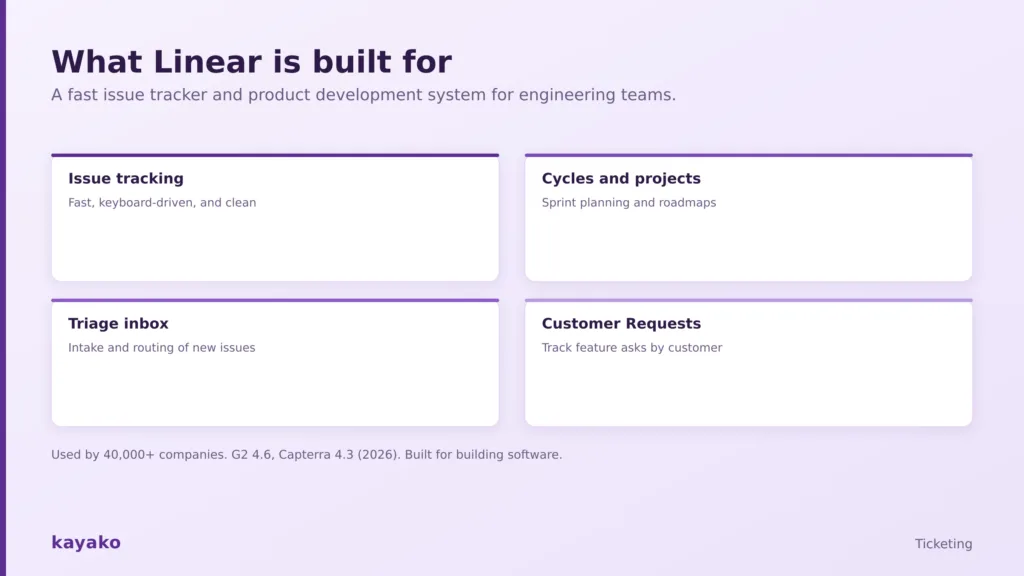
Linear is built for building software: issue tracking, sprints, triage, and feature-request tracking.
To judge whether it fits support, it helps to separate what Linear does genuinely well from what it was never designed to do.
What Linear does well for ticketing
For engineering issue tracking, Linear is outstanding, and its strengths are real reasons teams love it.
- Speed. Actions register instantly. The single most common praise from users is that daily ticket work simply feels fast, with no lag between intent and result.
- A keyboard-first workflow. Nearly everything has a shortcut, which makes creating, updating, and navigating issues remarkably quick once a team learns it.
- Triage and routing. New issues from integrations like Slack and Sentry land in a Triage inbox to be accepted, declined, merged, or escalated. That intake and routing is genuinely half of what any ticketing system does.
- Cycles and projects. Time-boxed sprints and structured projects keep engineering work organized and moving, with unfinished items rolling forward automatically.
- Customer Requests. Linear can attach feature requests to specific customers and sync attributes like tier or revenue from a CRM, so product teams can prioritize by demand.
That last feature is worth noting, because it shows Linear does care about customer input. It captures what customers want built. What it does not do is manage the conversation with those customers, which is a different discipline entirely, closer to conversations than tickets. That gap is where the trouble starts.
It is worth being fair to Linear here. None of these strengths are accidental, and none of them are compromised by trying to also be a help desk, precisely because Linear does not try. The team has been deliberate about staying an engineering tool, and that focus is why the issue-tracking experience stays fast and uncluttered. The cost of that focus is simply that the customer-facing half of support has to live somewhere else.
Where Linear falls short as a customer support ticketing system
Linear is a poor place for customer conversations, and this is by design rather than an oversight. A customer support ticketing system needs a specific set of things that Linear deliberately does not include.
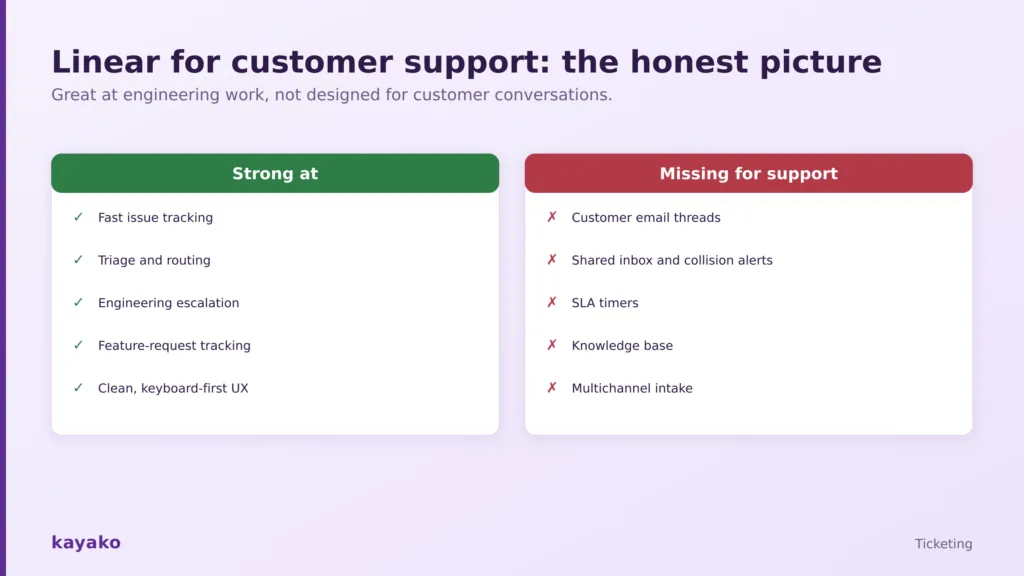
Linear is strong at engineering work and, by design, missing what customer support needs.
- No customer-facing thread. Customers cannot email Linear, and there is no place to hold the back-and-forth of a support conversation. Issues are for the team, not the customer.
- No shared inbox or collision detection. Agents cannot see who is already replying to whom, so a shared support queue is not something Linear can run without help.
- No SLA timers. There is no built-in way to track response and resolution deadlines, which are the backbone of any support operation. Our guide to how SLAs make customer delight a business policy explains why that matters.
- No knowledge base. Linear has no customer-facing help center, so it cannot deflect repetitive questions through self-service the way a smarter knowledge base does.
- No multichannel intake. Support arrives by email, chat, and social. Linear was built for issues created by a team, not messages arriving from many channels.
In day-to-day terms, these gaps show up fast. A customer replies to a thread, and there is nowhere for that reply to land. Two agents pick up the same issue because neither can see the other. A response deadline passes with nothing to flag it. A question that a help center could have answered instead becomes a manual ticket. Each gap is survivable once, but at the volume of a real support operation, they compound into missed replies and frustrated customers, which is the kind of friction a purpose-built tool is designed to remove.
|
Given those gaps, the teams who succeed with Linear do not try to force support into it. They set things up differently.
How teams actually use Linear for customer support
The pattern that works is simple: put a dedicated customer support platform in front of Linear, and let each tool do the job it is built for. Customers interact with the support platform, which handles email, chat, SLAs, and history. When a ticket needs engineering, an integration turns it into a Linear issue, carrying the context across without copy-pasting.
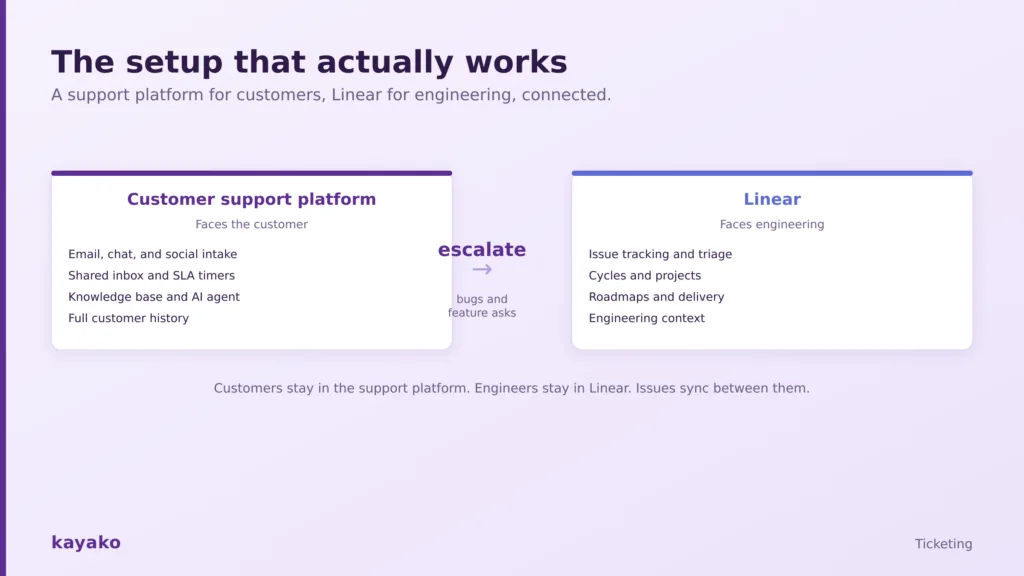
The setup that works: a support platform for customers, Linear for engineering, connected by escalation.
This is not a workaround; it is the intended architecture. Linear’s own customer experience team runs support through a dedicated tool and uses an integration to create Linear issues from it, and Linear offers built-in integrations with the major support platforms, including Intercom, Zendesk, Front, and Salesforce Service Cloud, with others like Help Scout and Plain building their own. Choosing which support platform sits in front is the real decision, and our roundup of shared inbox tools for customer support is a useful starting point. To make that choice well, it helps to compare the two categories directly.
Linear vs a dedicated customer support platform
Linear and a support platform are not competitors so much as two halves of a whole. One faces engineering, the other faces customers. The table below shows why most teams that touch customers need both.
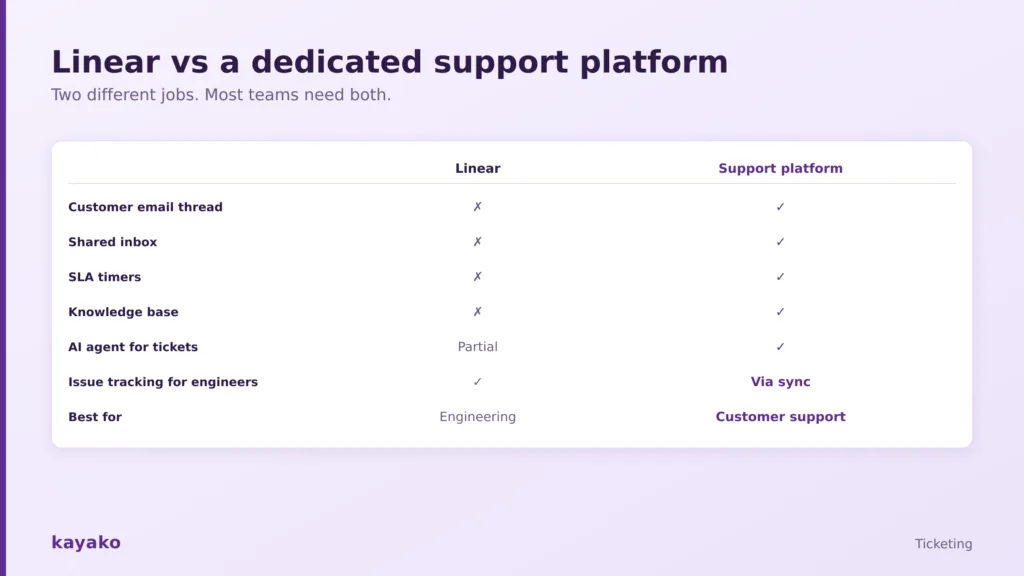
Two different jobs. Most teams that serve customers end up needing both.
The pattern is clear. Linear owns engineering issues and, through sync, receives escalations. A support platform owns the customer email thread, the shared inbox, SLA timers, the knowledge base, and an AI agent for tickets. Trying to cover the support column with Linear alone means rebuilding a help desk by hand, which is exactly the effort a dedicated tool removes. If you are weighing options, our guide to choosing the best help desk software walks through the criteria that matter.
|
How Kayako works alongside Linear
Kayako is the customer-facing half of this setup. It is a customer support platform built to handle exactly what Linear leaves out, so your engineering team keeps the tool it loves while your support team gets one designed for customer conversations.
Think of it as a clean division of labor. Anything a customer says or asks belongs in the support platform. Anything an engineer needs to build or fix belongs in Linear. The integration between them is what keeps the two in sync without anyone copying text between tabs, and it means a support agent never has to open Linear and an engineer never has to read a customer email thread.
In practice, customers reach your team through Kayako by email, chat, or social, and every message becomes a tracked ticket with SLA timers and full history in one view. Kayako’s SingleView shows each customer’s complete history on one screen, its shared inbox lets agents work a queue without stepping on each other, and its knowledge base deflects the repetitive questions that would otherwise pile up. Its AI agent, Agent Kay, resolves routine tickets automatically, which is the kind of support automation Linear does not attempt. When a ticket turns out to be a bug or a feature request, it escalates into Linear as an issue, so engineers get clean, contextual work in the tool they prefer. You can see the customer-facing side on Kayako’s ticketing software and AI for customer support pages, and connect the two through help desk integrations. The result keeps customers in a tool built for them and engineers in Linear, with nothing lost in between.
|
When to use Linear, a support platform, or both
The right answer depends on who you are serving.
- Use Linear alone if the only “tickets” you handle are internal engineering issues, bugs, and feature work with no customer conversation attached.
- Use a dedicated support platform if you field customer emails, chats, or calls and need SLAs, a shared inbox, and a knowledge base, which is to say, if you run real customer support.
- Use both, connected, if you have customers and an engineering team, which covers most software companies. Support lives in the platform, engineering lives in Linear, and issues sync between them.
For any team that serves customers, that last option is almost always the right one, because it lets each tool be excellent at its own job instead of mediocre at both.
|
Linear is a superb engineering issue tracker, and Linear ticketing works beautifully for the job it was built for: helping software teams plan, triage, and ship. It is not a customer support ticketing system, and it is not trying to be one, which is why forcing customer conversations into it creates more friction than it removes. The setup that works keeps Linear for engineering and puts a dedicated support platform in front of it for customers. Handle the customer side in a tool like Kayako, escalate the engineering side into Linear, and both teams get software that fits the work they actually do.
Frequently asked questions
Can Linear be used as a ticketing system?
Yes for engineering tickets, no for customer support tickets. Linear is an excellent issue tracker for bugs, tasks, and feature work, with fast triage and routing. It is not built to manage customer conversations, because it lacks a customer-facing email thread, a shared inbox, SLA timers, and a knowledge base. For customer support, teams pair Linear with a dedicated support platform.
Does Linear have a customer support feature?
Linear has a Customer Requests feature that lets teams attach feature requests to specific customers and prioritize by demand, and it offers integrations with major support tools. It does not, however, include the core components of a help desk, such as customer email intake, a shared inbox, or SLA tracking. It captures what customers want built, not the conversation with them.
What is the difference between Linear and a help desk?
A help desk faces customers: it takes in emails and chats, manages a shared queue with SLAs, and provides a knowledge base. Linear faces engineering: it tracks issues, plans sprints, and manages product delivery. The two solve different problems, which is why most software companies run a help desk for support and Linear for engineering, connected by an integration.
How do you connect Linear with customer support?
Put a dedicated support platform in front of Linear and use an integration to turn customer tickets into Linear issues when engineering work is needed. The support platform holds the customer conversation, SLAs, and history, while Linear receives clean, contextual issues for the engineering team. This keeps customers and engineers each in the tool designed for them.
Is Linear good for customer support teams?
Linear is good for the engineering escalation part of support, where bugs and feature requests need to reach developers, and its Customer Requests feature helps prioritize those. It is not suited to running frontline support on its own. Support teams get the best results by working in a dedicated platform that escalates into Linear rather than living inside Linear itself.