
| Martech (marketing technology) is the software marketers use to plan, run, measure, and optimize their work. Tools fall into six categories, from advertising and content to data and management. The best picks by category include HubSpot for automation, Salesforce for CRM, Klaviyo for e-commerce email, Segment for customer data, and Semrush for SEO. The 2026 landscape holds about 15,505 tools, so the skill is assembling a focused few that share data. |
Key takeaways
|
The number of martech tools a team owns has almost no relationship to how well its marketing works. A four-tool stack that shares data beats a twenty-tool one that fragments it. This guide defines what martech is, lays out its categories, and reviews the best tool in each, with a best-for verdict, key features, four to five honest pros and cons, and real pricing, so you can build a stack without the sprawl.
What is martech?
Martech, a blend of marketing and technology, is the software marketers use to plan, execute, manage, and measure their work across channels. It spans everything from the CRM that stores customer records to the email platform that runs campaigns to the analytics that show what worked. What distinguishes martech from advertising technology, or adtech, is its focus on owned customer relationships across the full lifecycle, rather than paid media buying, though the two increasingly overlap.
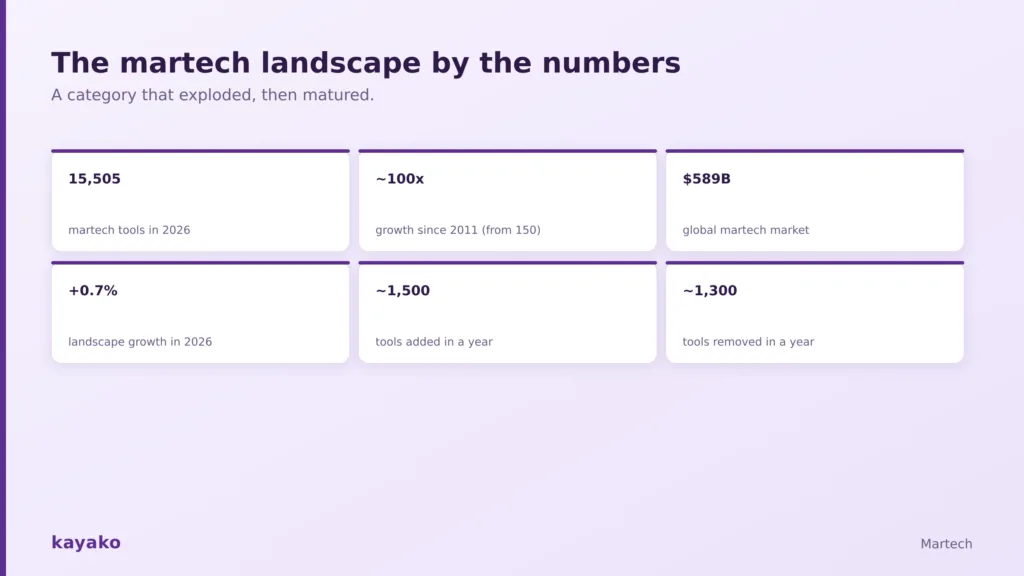
A category that exploded, then matured.
The scale is daunting. The landscape counted about 150 tools in 2011 and roughly 15,505 in 2026, a near hundredfold rise, according to Chief Martec’s annual census, and the global martech market now sits near $589 billion (Grand View Research, via TechBullion). No team needs anywhere near all of it.
The 6 categories of martech
Scott Brinker, who has tracked the landscape since 2011, groups martech into six categories. Almost every tool fits under one, and some span several. This is the clearest way to map the space before choosing tools.
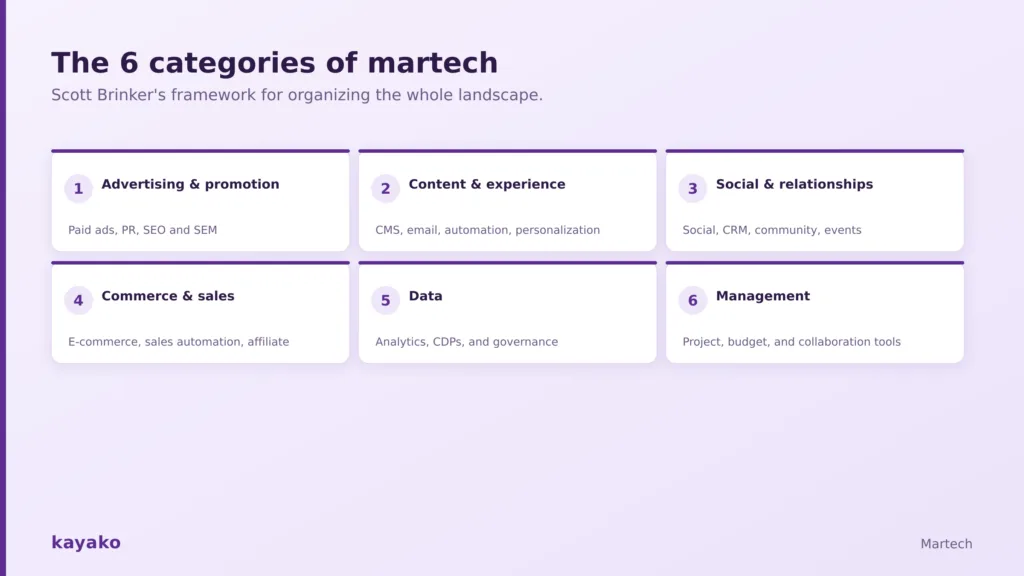
Scott Brinker’s framework for organizing the whole landscape.
- Advertising and promotion. Paid ads, PR, search, and display, including SEO and SEM tools.
- Content and experience. Content management, email, marketing automation, and personalization.
- Social and relationships. Social media management, CRM, community, and events.
- Commerce and sales. E-commerce platforms, sales automation, and affiliate tools.
- Data. Analytics, customer data platforms, and business intelligence.
- Management. Project management, budgeting, and collaboration.
The best martech tools by category
Below is the strongest tool in each core category, with a best-for verdict, four to five pros and cons, and a few alternatives worth a look. Pricing is approximate and changes often, since most martech bills on contacts, seats, or usage.
Marketing automation
HubSpot Marketing Hub – Best for larger teams already on HubSpot CRM
HubSpot Marketing Hub is the polished all-in-one for B2B marketing, running campaigns, nurturing, and lifecycle messaging in one place. It shines for teams that want marketing, sales, and service on a single record, and real automation lives on the Professional tier.
Key features:
- Visual workflow automation and lead nurturing
- Landing pages, forms, and email in one builder
- Reporting tied to the HubSpot CRM record
Pros:
- ✓ Unified platform: marketing, sales, and service on one record
- ✓ Easy to adopt: scales from SMB to enterprise
- ✓ Generous free tools: start at no cost
- ✓ Strong automation builder: visual and intuitive
Cons:
- ✗ Gated automation: real power needs Professional or above
- ✗ Contact-based cost: climbs as your lists grow
- ✗ Pricey enterprise tier: steep at the top
- ✗ Add-ons: some advanced features cost extra
Pricing: free tools, then Professional from about $890 per month (G2 reviews).
Also consider: ActiveCampaign for value-priced automation, Adobe Marketo Engage for enterprises, and Braze or Customer.io for product-led lifecycle messaging.
CRM
Salesforce – Best for enterprises that need deep customization
Salesforce is the endlessly configurable enterprise standard and the system of record most other tools connect to. It handles complex processes, custom objects, and a vast app ecosystem, which is why large organizations standardize on it.
Key features:
- Highly customizable objects, fields, and workflows
- Huge AppExchange integration marketplace
- Deep reporting and forecasting
Pros:
- ✓ Near-limitless customization: model almost any process
- ✓ Vast ecosystem: a connector for nearly everything
- ✓ Deep reporting: and forecasting at scale
- ✓ Enterprise scale: handles the largest orgs
Cons:
- ✗ Admin overhead: needs dedicated staff to run well
- ✗ Expensive: cost accelerates at Enterprise tiers
- ✗ Steep learning curve: real ramp-up for teams
- ✗ Overkill for SMBs: more platform than small teams need
Pricing: from about $25 per user to $165+ at Enterprise (G2 reviews).
Also consider: HubSpot Smart CRM for ease of use, Pipedrive for a visual sales pipeline, and Zoho CRM for tight budgets.
Email and SMS marketing
Klaviyo – Best for e-commerce revenue and Shopify stores
Klaviyo is the e-commerce standard for email and SMS, with deep Shopify integration and revenue attribution that ties campaigns directly to sales. Its segmentation and flows are built around store data, not generic lists.
Key features:
- Deep e-commerce and Shopify integration
- Revenue attribution per campaign and flow
- Advanced segmentation and automated flows
Pros:
- ✓ Best for online stores: built around commerce data
- ✓ Revenue attribution: proof of what each message earns
- ✓ Advanced segmentation: granular audiences
- ✓ Strong prebuilt flows: cart, browse, and win-back
Cons:
- ✗ Scales with profiles: cost climbs as your list grows
- ✗ Commerce-focused: more than non-store teams need
- ✗ Steeper than basic email: a learning curve
- ✗ Deliverability tuning: takes ongoing work
Pricing: free to 250 contacts, then from about $45 per month (G2 reviews).
Also consider: Mailchimp for small teams starting out, Brevo for value, and Attentive for SMS-led programs.
|
Analytics
Google Analytics 4 – Best for a free web-analytics baseline
Google Analytics 4 is the free default that nearly every stack starts from, tracking traffic, conversions, and user behavior across web and app. It integrates with Google Ads and Search Console out of the box.
Key features:
- Free web and app analytics at scale
- Event-based tracking and conversion reporting
- Native Google Ads and Search Console links
Pros:
- ✓ Free at scale: web and app analytics at no cost
- ✓ Native Google links: Ads and Search Console built in
- ✓ Event-based tracking: flexible measurement
- ✓ Ubiquitous: widely supported and documented
Cons:
- ✗ Learning curve: the event model takes adjusting
- ✗ Reporting UI: frustrates many users
- ✗ Data sampling: on very large sites
- ✗ Shallow for product teams: who want deeper analysis
Pricing: free; Google Analytics 360 for enterprises is quote-only.
Also consider: Mixpanel and Amplitude for event-based product analytics, and Heap or Hotjar for behavior and heatmaps.
Customer data platforms
Segment – Best for unifying customer data across your stack
Segment is the best-known customer data platform, collecting events once and routing clean data to every other tool. It is the plumbing that keeps your stack sharing one view of the customer instead of fragmenting it.
Key features:
- Collect customer events once, send anywhere
- Pre-built connectors to hundreds of tools
- Data governance and identity resolution
Pros:
- ✓ Collect once, route anywhere: no duplicate tracking
- ✓ Hundreds of connectors: prebuilt integrations
- ✓ Identity resolution: and data governance
- ✓ Removes silos: one customer record across tools
Cons:
- ✗ Sprawl-dependent value: pays off once your stack grows
- ✗ Costly at volume: pricing scales with events
- ✗ Technical setup: needs engineering resource
- ✗ Overkill for small teams: defer until you need it
Pricing: free tier, then Team from about $120 per month (G2 reviews).
Also consider: Tealium for enterprise-grade governance, and RudderStack or mParticle as alternatives.
Social media management
Sprout Social – Best for teams that need deep social analytics
Sprout Social is the premium social platform, combining scheduling, publishing, and listening with the strongest analytics and reporting in the category. It suits teams that treat social as a measured channel, not an afterthought.
Key features:
- Scheduling and publishing across networks
- Social listening and sentiment tracking
- Rich analytics and shareable reports
Pros:
- ✓ Best-in-class analytics: proves social’s return
- ✓ Social listening: and sentiment tracking
- ✓ Approval workflows: keep larger teams on brand
- ✓ Polished reports: easy to share with leadership
Cons:
- ✗ Premium pricing: among the priciest in the category
- ✗ More than simple needs: overkill for basic scheduling
- ✗ Per-seat cost: adds up for bigger teams
- ✗ Tiered features: some tools on higher plans only
Pricing: from about $199 per seat per month (G2 reviews).
Also consider: Buffer for the simplest, cheapest scheduling, Hootsuite as an all-rounder, and Later for visual planning.
SEO and content
Semrush – Best for all-in-one SEO and content
Semrush is the broad all-in-one for organic visibility, covering keyword research, rank tracking, site audits, and competitor analysis in one platform. It is the default toolkit for most content and SEO teams.
Key features:
- Keyword research and rank tracking
- Technical site audits
- Competitor and backlink analysis
Pros:
- ✓ Widest feature set: SEO and content in one tool
- ✓ Rank and audit tools: keywords, tracking, site health
- ✓ Competitor analysis: strong intelligence
- ✓ Useful for writers and SEOs: templates and briefs
Cons:
- ✗ Learning curve: breadth takes time to master
- ✗ Higher tiers: full access costs more
- ✗ Pricey for small teams: a real budget line
- ✗ Data differences: metrics can vary from other tools
Pricing: from about $139.95 per month (G2 reviews).
Also consider: Ahrefs for backlink and technical depth, and Moz, Surfer, or Clearscope for content optimization. A 2026 note: AI writing and search-visibility tools such as Jasper and Writer now cut across every category.
Martech pricing at a glance
A quick reference across categories, with the best-for verdict. The list price is never the total cost, so price each tool at your real volume.
| Category | Top pick | Best for | Entry price |
|---|---|---|---|
| Automation | HubSpot | Teams on HubSpot CRM | Free to $890+/mo |
| CRM | Salesforce | Enterprise customization | $25 to $165+/user |
| Email and SMS | Klaviyo | E-commerce revenue | Free to $45+/mo |
| Analytics | Google Analytics 4 | A free baseline | Free |
| Customer data | Segment | Unifying data | Free to $120+/mo |
| Social | Sprout Social | Deep social analytics | $199+/seat |
| SEO | Semrush | All-in-one SEO | $139.95+/mo |
How to build a martech stack without the sprawl
Three principles decide whether a stack works, before any tool. Under the flat 2026 tool count sits heavy churn, with roughly 1,500 tools added and 1,300 removed in a single year, per Chief Martec’s census, which tells you how many stacks cycle through tools that never earned their place.
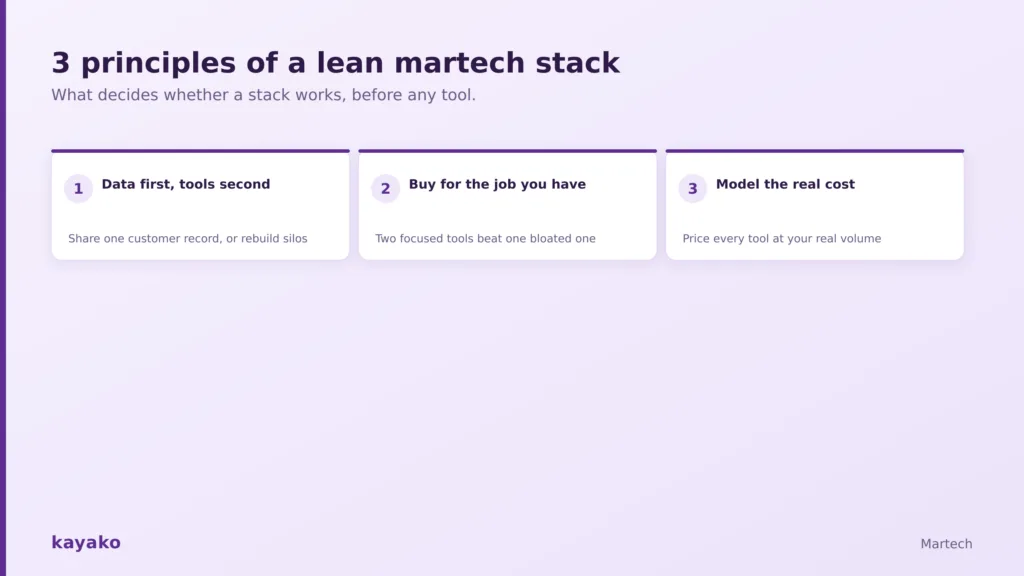
What decides whether a stack works, before any tool.
- Data first, tools second. Integration matters more than any single feature. Start with your data strategy and CRM.
- Buy for the job you have. Two focused tools that connect cleanly beat one all-in-one that does everything adequately.
- Model the real cost. Price each tool at your actual contact or usage volume, not the headline number.
Then add one tool per genuine job, and run an annual audit: list every tool, what it costs, and what it uniquely does, and cut anything that overlaps or goes unused. A smaller stack on shared data beats a larger one that fragments it, every time.
Where customer support fits in the stack
One category rarely appears on a martech diagram and probably should: customer support. Marketing works to acquire and convert, but the customer’s actual experience, and the data it generates, live largely in support. The retention that support drives is what makes acquisition spend pay off, and a customer your marketing worked hard to win, then lost to slow service, is money spent twice.
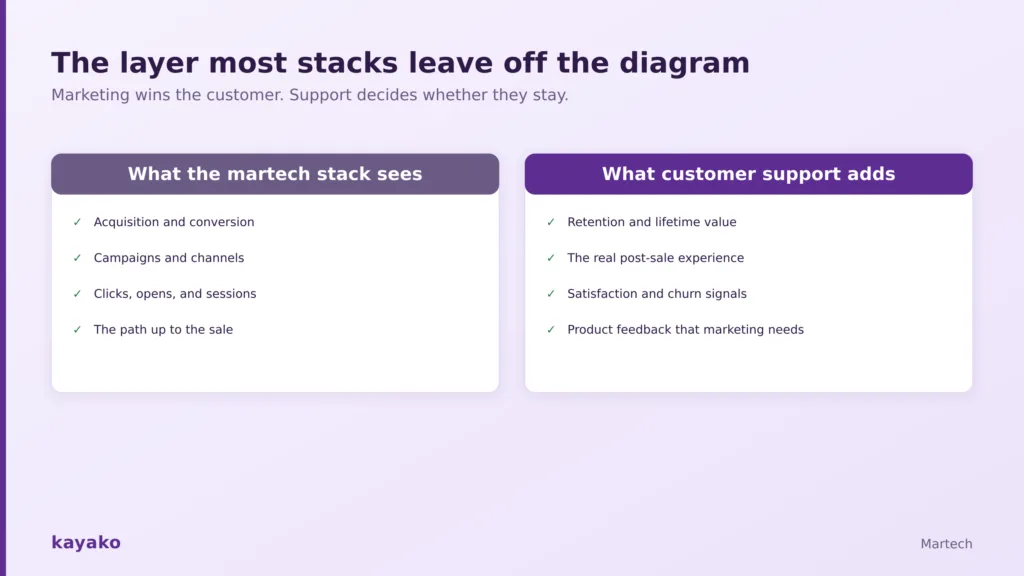
Marketing wins the customer. Support decides whether they stay.
This is the honest, secondary place a support platform like Kayako connects to the martech conversation. It is not a marketing tool and does not belong in the automation or analytics lanes above. What it does is resolve customer issues fast and feed clean signals, satisfaction, churn risk, and product feedback- back into the picture your stack depends on. Track the effect through your customer experience metrics and the lifetime value support protects, which is why more teams now treat support as a revenue function.
|
|
Frequently asked questions
What is martech?
Martech, short for marketing technology, is the software marketers use to plan, execute, manage, and measure their work across channels. It spans categories including advertising, content and email, CRM, analytics, customer data platforms, social media, and SEO. It differs from advertising technology in that it focuses on owned customer relationships across the full lifecycle, rather than paid media buying.
What are the best martech tools?
The best tool depends on the job. By category, strong picks are HubSpot for marketing automation, Salesforce for CRM, Klaviyo for e-commerce email, Google Analytics for analytics, Segment for customer data, Sprout Social for social media, and Semrush for SEO. The right stack is the smallest set of these that covers your jobs and shares one view of the customer.
What are the categories of martech?
Scott Brinker’s framework groups martech into six categories: advertising and promotion, content and experience, social and relationships, commerce and sales, data, and management. Almost every tool fits into one, and some span several. In practical stack terms, most teams organize around jobs like automation, CRM, email, analytics, a customer data platform, social, and SEO.
What is a martech stack?
A martech stack is the collection of tools a marketing team uses together, from acquiring customers to measuring results. A typical stack has a CRM at its center as the system of record, with automation, email, analytics, social, and SEO tools connected around it. The key to a good stack is not the number of tools but how well they share a single view of the customer.
How much does a martech stack cost?
It scales with stage. An early-stage startup can run a capable stack from free to a few hundred dollars a month using free CRM and analytics tiers. A growth-stage SMB typically spends $500 to $2,000 a month once it adds specialized email, SEO, and product analytics tools. Enterprise stacks commonly run five figures a month and up. Always price each tool at your actual volume.