Learn what an AI helpdesk is, how it works, and the benefits it offers. Discover how AI-powered helpdesk software automates support, improves response times, reduces costs, and enhances customer experiences.
The AI customer service market hit $15.12 billion in 2026, and 91% of customer service leaders say they are under pressure to implement AI this year (Ringly.io). That pressure reflects a structural shift in how support operations work, not just a technology upgrade cycle. This guide covers exactly what an AI helpdesk is, how it works, what buyers should look for, and the real-world evidence on what it delivers.
What Is an AI Helpdesk?
An AI helpdesk is a customer service platform where artificial intelligence handles ticket triage, response drafting, conversation summarization, knowledge retrieval, and, in the strongest implementations, autonomous end-to-end resolution without human involvement. It is not a chatbot bolted onto a traditional ticketing system. It is a purpose-built platform where AI operates across every layer of the support workflow from the moment a contact arrives to the moment it closes.
The distinction matters because most “AI helpdesk” marketing describes Layer 2 capability (AI helps agents draft better replies faster) while buyers often expect Layer 3 (AI resolves tickets autonomously so agents handle only the complex minority). Both are valuable. Knowing which layer you are buying is the most important thing to clarify before you sign a contract.
AI Helpdesk vs. Traditional Helpdesk
The six dimensions that matter most to a support operations buyer:
| Dimension | Traditional helpdesk | AI helpdesk |
| Ticket triage | Manual — agent reads and categorizes | Automatic — AI classifies intent, sentiment, priority |
| Response drafting | Agent writes from scratch or uses macros | AI drafts in context of ticket history and knowledge base |
| Resolution speed | Dependent on queue depth and agent capacity | Tier-1 queries resolved in seconds autonomously |
| Knowledge surfacing | Agent searches KB manually mid-ticket | AI retrieves and applies KB content automatically |
| Agent workload | Every ticket requires agent time | AI deflects 40-60% of tier-1 volume |
| Cost per ticket | $7-$15 per agent-handled ticket (average) | $0.62-$1 per AI-resolved ticket |
For a full breakdown of what separates a traditional helpdesk definition from a modern one, see Kayako’s guide to what is a helpdesk.
How an AI Helpdesk Works: The Three-Layer Stack
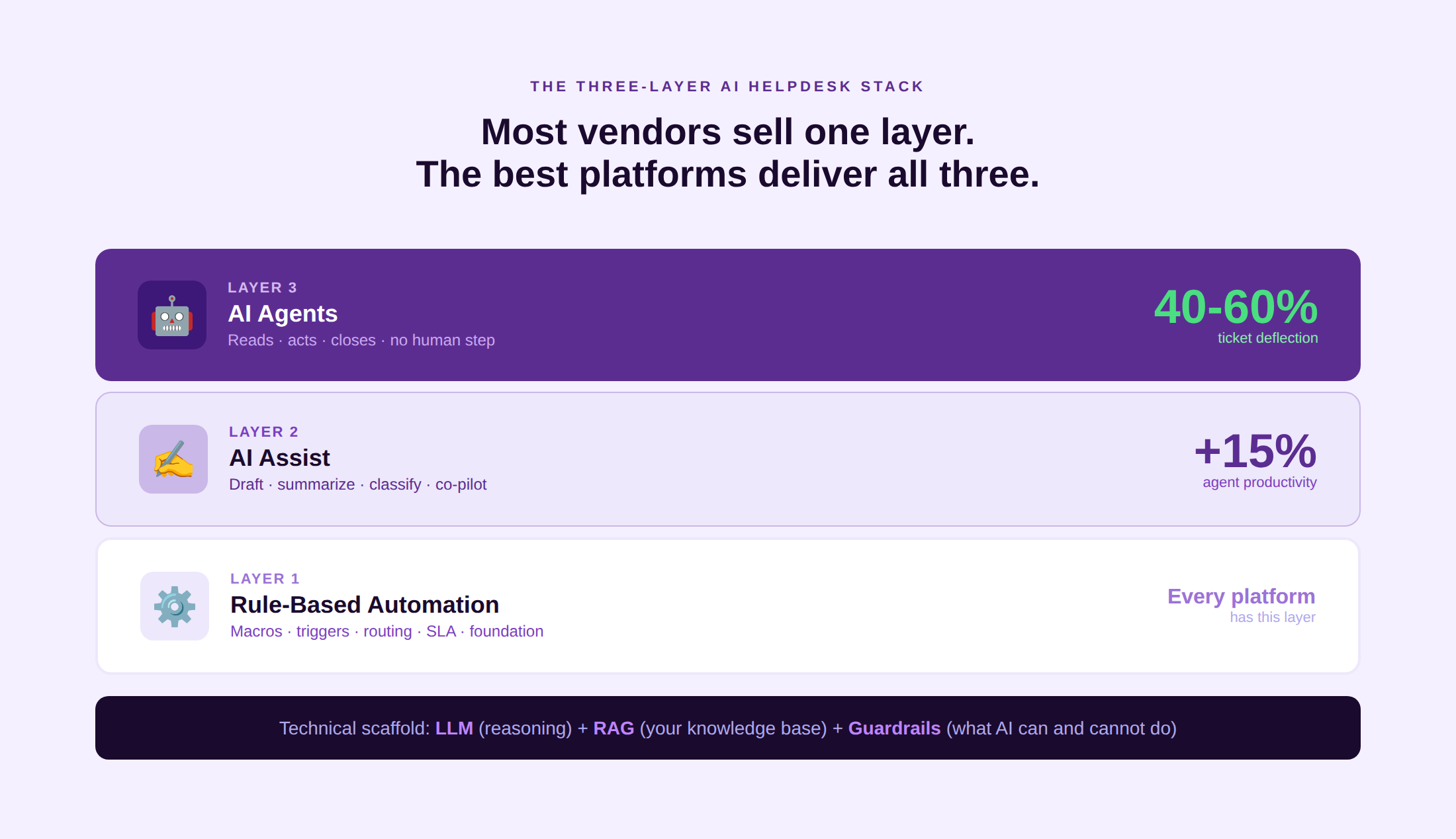
Most AI helpdesks operate across three distinct layers. The buyer’s job is to understand which layers they are actually getting.
Layer 1: Rule-based automation
Macros, triggers, SLA timers, auto-assignment rules. Every modern helpdesk has this layer. It handles the if-this-then-that logic that removes manual steps from predictable ticket types: an email containing “refund” from a Gold-tier account auto-routes to the billing team. Rule-based automation does not understand language; it pattern-matches on keywords and metadata. It is fast, reliable, and a prerequisite for every higher layer.
Layer 2: AI assist (the co-pilot model)
AI reads each incoming ticket, classifies intent and sentiment, drafts a reply grounded in the knowledge base, and surfaces the most relevant articles to the agent in real time. The agent reviews, edits if needed, and clicks send. AI handles the research and structure; the human handles the judgment and empathy. This layer reduces average handle time significantly without removing the agent from the loop.
Layer 3: AI agents (autonomous resolution)
The AI agent reads the ticket, retrieves the answer from your knowledge base using Retrieval-Augmented Generation (RAG), takes action inside connected systems if required (processing a refund, resetting a password, updating an account), and closes the ticket without any human step. Guardrails define what the AI can and cannot do autonomously. Tickets outside those guardrails escalate to a human agent with full context. This is the layer that produces the 40 to 60% deflection rates cited in enterprise benchmarks.
The technical scaffold: A large language model (LLM) serves as the reasoning engine. RAG connects the LLM to your specific knowledge base, policy documents, and help articles, preventing the model from generating responses unsupported by your content. Guardrails set the boundary conditions like what actions are permitted, what confidence threshold triggers escalation, and what topics are always routed to a human.
See how Kayako’s three-layer AI stack delivers autonomous resolution at $1 per ticket with no per-seat cost. See How It Works
Key Features of an AI Helpdesk
Eight features that differentiate a genuine AI helpdesk from a traditional helpdesk with an AI badge on the packaging:
- AI-drafted replies. The AI generates a contextually accurate response based on the ticket content, customer history, and knowledge base. Agents review and send, not compose and research.
- AI summarization. Long email threads, complex phone call transcripts, and multi-day ticket chains compressed into a one-paragraph summary that gives the next agent immediate context without reading everything.
- Intent detection and auto-routing. Classification of every incoming ticket by intent, sentiment, and language before a human reads it. Routing assigns the ticket to the right queue, team, or AI agent automatically.
- Knowledge-grounded answers (RAG). The AI retrieves answers from your specific knowledge base rather than generating from general training data. This is the mechanism that prevents hallucination on product-specific questions.
- Sentiment analysis. Tickets from customers showing frustration, urgency, or escalation signals are flagged and prioritized before they become complaints.
- Deflection and autonomous resolution. The AI resolves eligible tickets end-to-end, including action execution in connected systems, without human involvement.
- Multilingual support. AI handles queries in the customer’s language without requiring a multilingual agent team. Quality varies by language; European languages perform best with current models.
- Human-in-the-loop controls and audit trail. Every AI decision is logged, reviewable, and reversible. Supervisors can see what the AI did and why. Confidence thresholds trigger escalation when the AI is uncertain.
Benefits of an AI Helpdesk: The Data
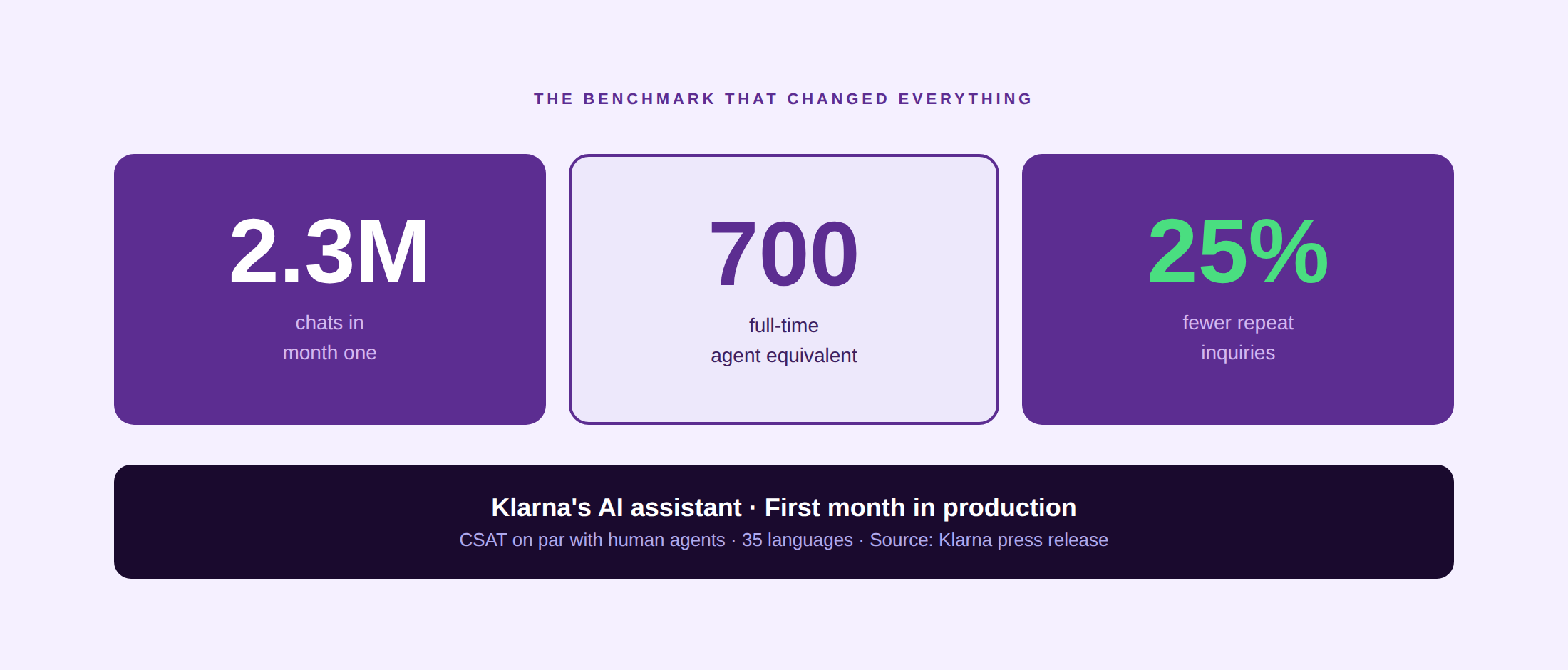
Klarna’s AI assistant, built on OpenAI and integrated with Klarna’s support platform, handled 2.3 million customer service chats in its first month, equivalent to the work of 700 full-time agents. Customer satisfaction was on par with human agents, and repeat inquiry rates dropped by 25% (Klarna press release). That is the high-water mark for AI at scale in customer service. Here is what the data shows more broadly:
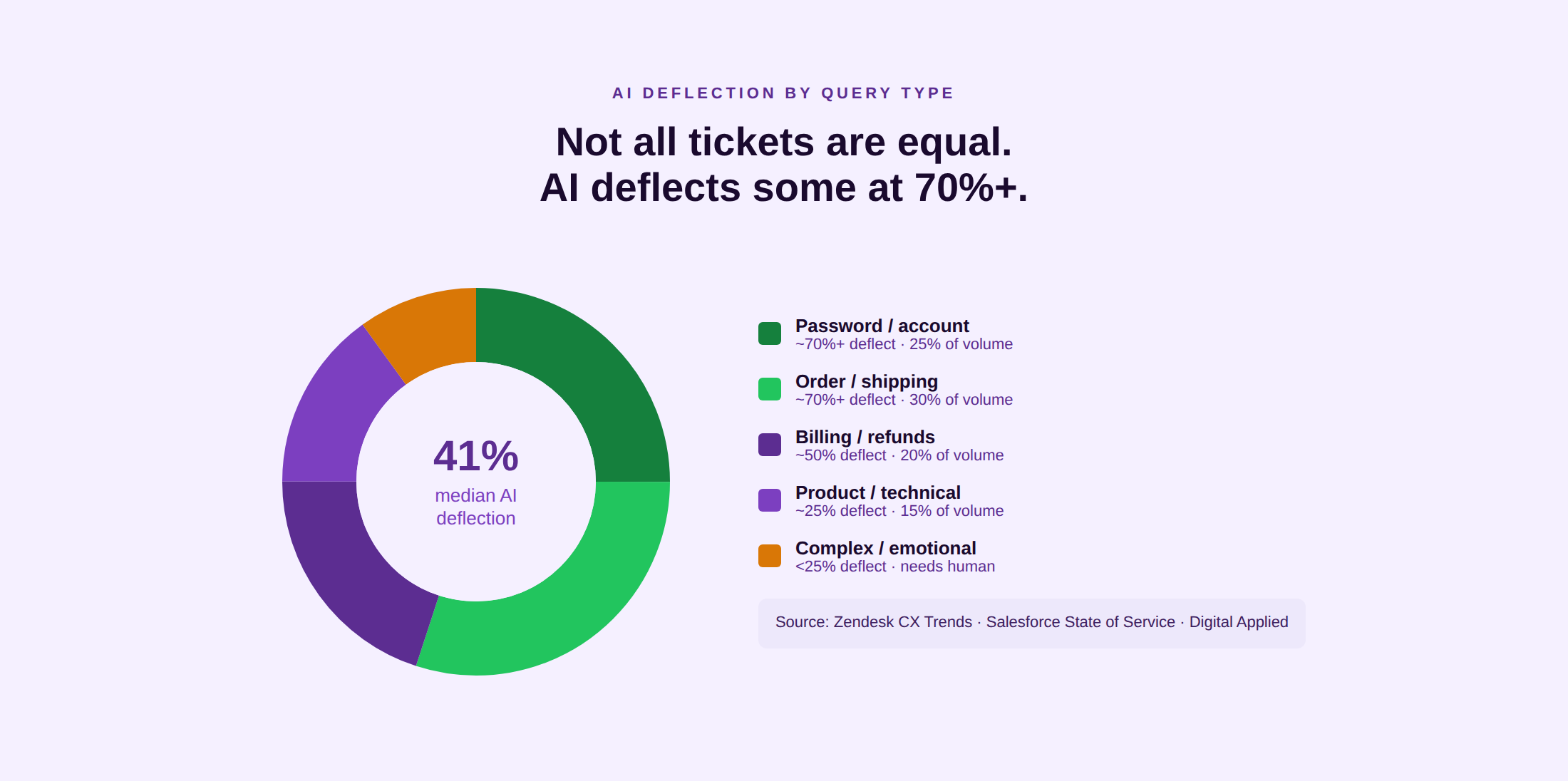
- Deflection of routine tickets. Median tier-1 AI deflection sits at 41.2% across enterprise CX programs, with top-quartile teams reaching 58.7% (Zendesk CX Trends and Salesforce State of Service, cited in Digital Applied). Routine queries (password resets, order status, refund requests) deflect at 70% or above.
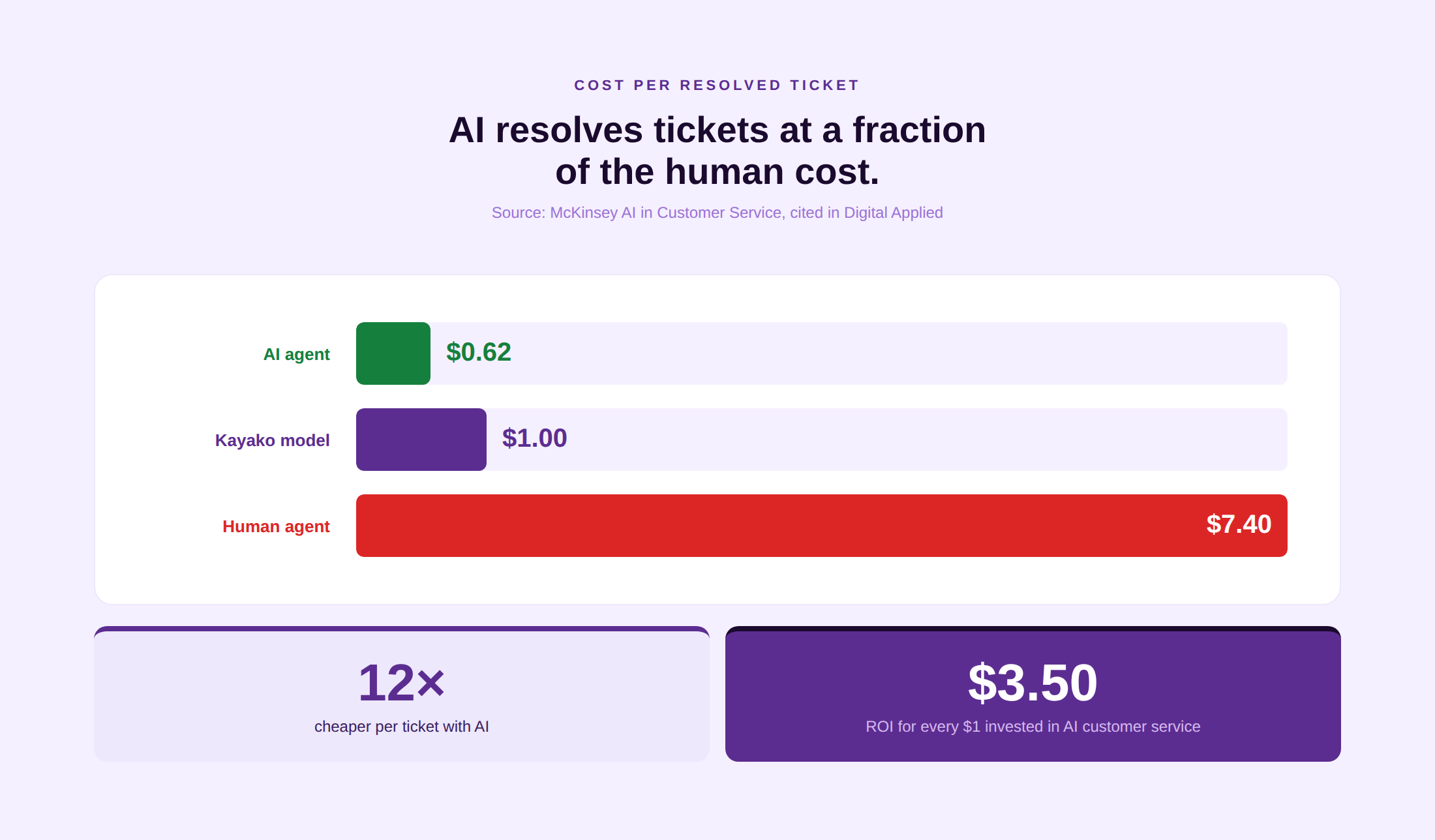
- Cost reduction. AI resolutions average $0.62 versus $7.40 for human-handled tickets (McKinsey AI in Customer Service, cited in Digital Applied). For a team handling 10,000 tickets per month with 40% deflection, that difference is approximately $276,000 in annual savings on AI-eligible volume alone.
- Agent productivity uplift. Agents using AI assistance resolve 15% more issues per shift. AI handling drafting, summarization, and knowledge retrieval gives agents more resolution time per hour.
- Reduced average handle time. ServiceNow’s AI agents reduced the time to handle complex cases by 52%. See Kayako’s guide to improving average handle time for the operational levers beyond AI.
- 24/7 coverage without overnight staffing. AI agents handle the tier-1 volume that would otherwise require overnight human staffing for routine queries. Human agents cover complex interactions in business hours; AI covers the rest.
- Improved CSAT. 92% of businesses report improved customer satisfaction after implementing AI in support. CSAT score improvements are most pronounced for channels where AI eliminates wait time entirely.
Gartner’s macro view: 80% of customer service and support organizations are predicted to integrate generative AI technologies to enhance customer experience (Gartner). That adoption rate is not aspirational in 2026; it is the baseline expectation.
Challenges and Limitations of AI Helpdesks
The benefits are real. So are the failure modes. Teams that ignore these during procurement pay for it during deployment.
Hallucination risk
LLMs generate fluent, confident text even when the underlying facts are incorrect. In a customer service context, a hallucinated response to a refund policy question produces incorrect customer expectations, follow-up contacts, and potential regulatory issues. RAG mitigates this by grounding responses in your specific documentation, but RAG only works as well as the knowledge base it retrieves from. Stale, incomplete, or inaccurate knowledge base content produces stale, incomplete, or inaccurate AI responses.
Knowledge base quality dependency
An AI helpdesk is a multiplier on your knowledge base, not a substitute for it. If your knowledge base does not have the answer, the AI either hallucinates or escalates. Teams that deploy AI on top of a poorly maintained knowledge base achieve 10 to 20% deflection, the same as a well-tuned rule-based system, and conclude incorrectly that AI doesn’t work. AI works when the content it draws on is accurate and current. See Kayako’s customer self-service guide for how to audit and structure knowledge base content before an AI deployment.
Escalation handoff design
The moment AI decides a ticket is outside its capability and escalates to a human, the quality of that handoff determines whether the customer has to repeat themselves. Poor escalation design, where the human agent receives the ticket without the AI’s conversation history or reasoning, eliminates much of the efficiency gain. Handoff quality is a platform design problem, not an AI capability problem.
High-emotion tickets
Customers who are angry, grieving, or dealing with a genuinely consequential issue experience AI resolution as dismissive. A refund processed autonomously in 30 seconds feels efficient for a routine order. A claim handled by an AI during a financial hardship situation feels dehumanizing. The human-in-the-loop design question is not just which tickets can AI resolve, but which tickets should AI resolve.
Multilingual quality gaps
AI performance varies significantly by language. Major European languages and Mandarin perform close to English. Less common languages, regional dialects, and code-switching (switching between two languages mid-sentence, common in markets like India and South Africa) still produce meaningfully lower accuracy. Teams in multilingual markets should test language-specific performance before committing to an AI-first approach for those populations.
Pricing Models: Per-Seat vs. Per-Resolution
The pricing model of your AI helpdesk changes how costs scale and how you should budget. Traditional helpdesks charged per agent seat: a flat monthly cost per user, regardless of how many tickets they handled or how many the AI resolved. That model made sense when every ticket required a human. It makes less sense when AI handles 40 to 60% of the volume.
Three models now dominate the market:
- Per-seat (traditional). Zendesk Suite Professional starts at $115/agent/month. Advanced AI (Copilot) adds $50/agent/month. A 50-agent team with AI Copilot pays roughly $8,250/month regardless of AI resolution volume. Predictable cost; does not scale down as AI deflection rises.
- Per-resolution (usage-based). Intercom Fin charges $0.99 per AI-resolved conversation. Cost scales directly with AI resolution volume, which is unpredictable for teams in their first months of deployment. Teams that underestimate AI resolution volume receive bills 2 to 3 times their projections. Build in a 3x volume buffer when forecasting.
- Per-AI-resolved ticket (Kayako). Kayako charges $1 per AI-resolved ticket with no per-seat licensing. Fixed per-ticket cost makes total spend predictable once resolution rate is established. Kayako pricing aligns cost directly with value delivered rather than with headcount or seat count.
The model that fits your team depends on whether your primary risk is cost overrun (favor per-seat or per-ticket) or per-seat overhead as headcount grows (favor usage-based).
Top AI Helpdesk Software in 2026
Kayako
AI-powered helpdesk built around SingleView (unified customer timeline) and Agent Kay (autonomous tier-1 resolution). $1 per AI-resolved ticket, no per-seat cost. Kayako customers report 68% autonomous resolution (Contently), $5.4M year-one impact (IgniteTech), and CSAT improvement from 76% to 90% (Trilogy).
Zendesk AI Agents
Broadest AI surface area: Copilot for agent assist, Advanced AI for intelligent triage, and native AI agents for autonomous resolution. 1,300 or more integrations. AI add-ons cost $50/agent/month on top of the base Suite plan.
Intercom Fin
Best-in-class AI agent with 37.4% autonomous deflection in independent testing and 67% self-reported across 7,000 or more customers. Per-resolution pricing at $0.99/conversation. Strongest for SaaS and product-led teams.
Freshdesk + Freddy AI
Three-mode Freddy stack: Self-Service (deflection), Copilot (agent assist), Insights (analytics). 34.1% ticket deflection in one benchmark, outperforming Zendesk Advanced AI in the same workload. Copilot is a $29/agent/month add-on.
Salesforce Service Cloud Einstein
Deepest CRM-integrated AI helpdesk. Einstein AI operates on the richest customer data of any platform. Agentforce achieved 84% autonomous resolution across 380,000 or more conversations, with 2% requiring human escalation. Best for Salesforce-native enterprises.
Ada
AI-first platform purpose-built for high-volume contact centers. No-code conversation builder for configuring resolution flows without engineering. Self-reports 70 to 80% deflection at enterprise scale.
Forethought
Specialist AI triage and agent assist for Zendesk and Salesforce deployments. Four modules: Solve (deflection), Triage (classification), Assist (agent drafting), Discover (analytics). Acquired by Zendesk in 2026; roadmap as a standalone product is less certain.
Compare Kayako’s AI helpdesk against your current platform with a live demo and ROI estimate. Book a Demo
How to Choose and Implement an AI Helpdesk
The five decisions that determine whether an AI helpdesk deployment succeeds or stalls:
1. Map your ticket types before you choose a platform
AI delivers the highest ROI on high-volume, low-complexity ticket types: password resets, order status, billing queries, return initiation, FAQ-type product questions. Before evaluating platforms, run a 90-day analysis of your ticket volume by category. Identify the top five categories by volume and the percentage each represents. The total of those five categories is your maximum AI-addressable deflection ceiling. If that ceiling is below 20%, AI deflection will have limited financial impact regardless of which platform you choose.
2. Audit your knowledge base first
The most common reason AI helpdesk deployments underperform is deploying AI on top of a knowledge base that has not been audited. Run a content audit before committing to any platform: identify articles with no views in 90 days (stale), articles generating post-view ticket submissions (inadequate), and topics with no article coverage (gaps). See Kayako’s customer self-service guide for a practical audit framework.
3. Decide your pricing model tolerance
Per-seat pricing is predictable but does not scale down as AI handles more volume. Per-resolution pricing aligns cost with AI output but is unpredictable in early months. Per-AI-ticket pricing (Kayako’s model) is predictable once resolution rate stabilizes. Model your expected AI resolution volume at 3x your initial estimate before making a pricing model decision.
4. Design the human-in-the-loop handover before launch
Define the guardrail conditions that trigger escalation to a human agent, and specify what context the AI must pass to the human at escalation (conversation history, intent classification, confidence score, action history). This design happens before deployment, not after the first customer complains about being handed to an agent who has no context.
5. Pilot on one channel or ticket category before scaling
Launch on your highest-volume, lowest-complexity ticket category. Measure deflection rate, CSAT on AI-handled tickets versus human-handled tickets, and escalation rate at 30 days. Use that data to calibrate knowledge base coverage and guardrail thresholds before expanding to additional categories or channels. See Kayako’s guide to omnichannel customer service for how to expand from a single channel to a unified multi-channel operation.
AI helpdesk implementation checklist
Ticket volume analysis: top 5 categories by volume and AI-addressable percentage
Knowledge base audit: stale articles, coverage gaps, post-view ticket submission rate
Pricing model decision: per-seat / per-resolution / per-AI-ticket trade-off mapped
Escalation design: guardrail conditions and handover context specification complete
Channel and category for pilot: single scope, success metrics defined
CSAT measurement plan: track AI-handled vs. human-handled satisfaction separately
Knowledge base update process: owner assigned, review cadence set
Supervisor review workflow: AI decision audit trail reviewed weekly in first 60 days
Real-World Examples: AI Helpdesks in Production
Klarna: 700-agent-equivalent in month one
Klarna’s AI assistant, powered by OpenAI, handled 2.3 million customer service chats in its first month of operation, equivalent to the work of 700 full-time agents. Customer satisfaction scored on par with human agents. Repeat inquiry rates dropped by 25%. The assistant operated in 35 languages across all of Klarna’s markets simultaneously (Klarna press release). The Klarna case is the most cited AI helpdesk benchmark in 2026 because it demonstrates autonomous resolution at consumer scale, not in a controlled pilot.
Tata Consultancy Services: AI helpdesk for Indian financial institutions
Tata Consultancy Services (TCS), headquartered in Mumbai and one of India’s largest IT services companies, built its Conversational AI Platform specifically to address the limitations of keyword-based chatbots in complex, multilingual customer service environments. The platform handles hundreds of use cases across BFSI, retail, and operations, from account maintenance and originations to IT production support, with graphical flow orchestration that allows business teams to configure conversation flows without engineering involvement. TCS BaNCS for Intelligent Experience (TCS BaNCS IX), launched in January 2025, extends this with GenAI-enabled agents specifically for Indian financial institutions, transforming customer servicing models through autonomous resolution of routine financial queries (TCS press release). The TCS model demonstrates how AI helpdesk deployment in India’s multilingual, multi-product financial sector requires purpose-built configuration rather than off-the-shelf deployment.
Kayako customer: Contently
Contently deployed Kayako to unify its support channels and deploy Agent Kay for autonomous tier-1 resolution. The outcome: 68% autonomous resolution rate, 91-second first response time, and $1.8 million in avoided support costs. The platform change did not require adding headcount; it enabled the existing team to handle the same volume with higher quality and faster speed. See Kayako’s case studies guide for the Contently story and additional AI helpdesk deployment examples.
AI has acted as a strong catalyst to bolster customer service by empowering the helpdesk. From smart routing to knowing when to hand over tickets to a human agent, an AI helpdesk not only accelerates the end-to-end process but also improves the quality of contextual responses. A vital cog in improving customer experience.
FAQs
What is an AI helpdesk?
An AI helpdesk is a customer service platform where AI handles ticket triage, response drafting, conversation summarization, knowledge retrieval, and, in the strongest implementations, autonomous end-to-end resolution without human involvement. It is not a chatbot added to a traditional ticketing system. It is a platform where AI operates across every layer of the support workflow.
How is an AI helpdesk different from a chatbot?
A chatbot matches customer queries to predefined responses or knowledge base articles. It deflects questions. An AI helpdesk agent understands intent in natural language, reasons across your knowledge base and connected systems, takes actions inside those systems (processing a refund, updating an account, resetting a password), and closes the ticket without human involvement. Chatbots handle FAQ deflection. AI helpdesk agents handle end-to-end resolution. The benchmark is whether the tool can take action or only retrieve and display information.
Can an AI helpdesk replace human agents?
Not entirely, and not for every ticket type. AI delivers the highest value on high-volume, low-complexity, process-driven queries: password resets, order status, billing queries, refund initiation, FAQ-type product questions. For complex technical issues, high-emotion situations, and queries requiring judgment outside policy, human agents remain essential. The realistic operating model in 2026 is AI handling 40 to 60% of tier-1 volume autonomously, freeing human agents to focus on the interactions where human judgment matters.
How does an AI helpdesk avoid making things up?
Through Retrieval-Augmented Generation (RAG). Instead of generating a response from general training data, the AI retrieves the relevant content from your specific knowledge base, policy documents, and product documentation, then constructs a response grounded in that content. This mechanism constrains the AI to information you have verified. Hallucination risk drops significantly when RAG is well-implemented, but it does not drop to zero. The guardrail design (what confidence threshold triggers escalation to a human) manages the residual risk.
How much does an AI helpdesk cost?
Three pricing models dominate the market. Per-seat: Zendesk Suite Professional at $115/agent/month plus AI add-ons. Per-resolution: Intercom Fin at $0.99/resolved conversation. Per-AI-resolved ticket: Kayako at $1/AI-resolved ticket with no per-seat cost. Total cost depends heavily on your ticket volume and AI resolution rate. At 10,000 tickets per month with 40% AI deflection, the per-ticket model typically produces lower total cost than per-seat when agent count is above 20.
Which industries benefit most from AI helpdesks?
Telecom leads with 95% AI adoption in customer support, followed by banking at 92% and healthcare at 79% (AllAboutAI, cited in Ringly.io). These industries handle high volumes of predictable, process-driven queries where AI deflection rates are highest. E-commerce and SaaS also see strong results because order-status, return-initiation, and password-reset queries represent the majority of contact volume and are highly amenable to autonomous resolution.
What is a real-world example of an AI helpdesk working at scale?
Klarna’s AI assistant handled 2.3 million customer service chats in its first month, equivalent to 700 full-time agents, with CSAT on par with human performance and a 25% reduction in repeat inquiries (Klarna press release). For B2B SaaS, Kayako customer IgniteTech reported $5.4 million in year-one impact with a 6.5x savings ratio through autonomous tier-1 resolution.
When does AI customer service fail?
AI customer service fails in five predictable scenarios: (1) the knowledge base is stale or incomplete, producing inaccurate responses; (2) the escalation handoff design is poor, leaving human agents without context when they receive a ticket; (3) AI is deployed on high-emotion or complex tickets where customers expect human empathy; (4) multilingual quality is assumed but not tested, producing degraded accuracy in non-English markets; and (5) the AI has no human-in-the-loop override, causing customers with unusual situations to be stuck in an automated loop with no exit. All five are design failures, not AI capability failures.