A layer-by-layer guide to the customer support team tools that actually matter, what to buy at each headcount, and which categories to consolidate before they sprawl.
Customer support team tools fall into nine layers: helpdesk, AI resolution, knowledge base, conversational channels, team collaboration, quality assurance, workforce management, voice of customer, and analytics. Small teams need three of them. Teams past twenty agents need six. The categories most often bought too early are workforce management and standalone QA, and the one most often bought too late is knowledge.
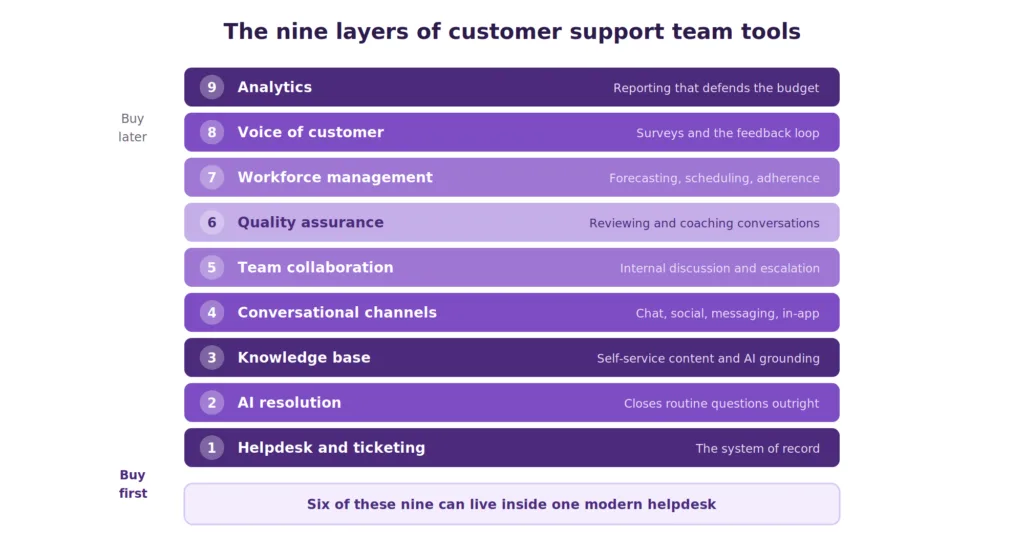
Diagram of the nine layers of customer support team tools
Why Support Tool Stacks Sprawl
Support tooling accumulates rather than gets designed. A team buys a helpdesk, adds a chat widget when the website needs one, bolts on a survey tool after a bad quarter, and inherits whatever project tracker engineering already uses. Three years later, nobody can say what the stack costs or which tools overlap.
The cost of that sprawl is not only license spend. Every additional system is another place customer context lives, and context fragmentation is what produces the transfers and repeated explanations that damage effort scores. Gartner found that 96% of customers who had a high-effort experience became disloyal, compared with 9% of those with a low-effort one, which makes tab-switching a retention problem rather than a productivity one.
Consolidation pressure is now coming from AI as well. Salesforce reports that 66% of service organizations were running AI agents in 2026, up from 39% the year before, and an AI agent can only answer from data it can reach. Tools that hold customer history outside the main platform quietly cap what automation can do.
This guide covers the layers rather than ranking vendors. Where a layer has a full buyer’s guide behind it, the link goes there.
The Nine Layers at a Glance
| Layer | What it does | Buy it when | Consolidation candidate |
|---|---|---|---|
| Helpdesk and ticketing | Holds conversations and case state | Day one | Core, keep |
| AI resolution | Closes routine questions without an agent | Volume passes roughly 500/month | Merge into helpdesk |
| Knowledge base | Feeds self-service and grounds AI | Day one, before AI | Merge into helpdesk |
| Conversational channels | Chat, social, messaging | Customers ask on them | Merge into helpdesk |
| Team collaboration | Internal discussion and escalation | Day one | Company-wide, shared |
| Quality assurance | Reviews and coaching conversations | Past 10 agents | Merge into helpdesk |
| Workforce management | Forecasting and scheduling | Past 25 agents | Standalone |
| Voice of customer | Surveys and feedback | Past 5 agents | Merge into helpdesk |
| Analytics | Reporting across all of it | Day one | Merge into helpdesk |
Six of these nine can live inside a modern helpdesk. That is the single most useful thing to know before buying anything, because the default path of one tool per problem produces a stack nobody can report across.
Layer 1: Helpdesk and Ticketing
The system of record. It holds every conversation, its state, its owner, and its history, and everything else in the stack either feeds it or reads from it.
What good looks like: conversations from every channel in one queue, assignment and routing rules a manager can change without engineering, SLA tracking with escalation, and an API that lets the rest of the stack read customer context.
What to avoid: running support out of a shared mailbox past about five people, and buying a helpdesk whose reporting requires exporting to a spreadsheet.
The buying decision here is covered fully in this guide to the best ticketing systems, with pricing and trade-offs for fifteen platforms.
Layer 2: AI Resolution
The layer that has changed most. An AI resolution agent answers customer questions directly and closes the conversation, as distinct from an assistant that drafts replies for a human.
What good looks like: answers grounded in your own content rather than the base model, a reported resolution rate you can audit, clean handover to a human with full context, and billing tied to outcomes rather than to headcount.
What to check before buying: how the AI is billed. Per-seat AI charges stay flat as deflection improves, which means the tool that works well costs the same as the tool that does not. Per-resolution and per-conversation models behave differently again at volume.
The dependency people miss: Gartner’s 2025 AI Implementation Survey found that 62% of underperforming AI customer service projects trace to data preparation rather than model limitations. Buying this layer before layer three is the most common sequencing mistake in the whole stack.
Options are compared in this review of the best AI helpdesk software.
Layer 3: Knowledge Base
Self-service content for customers and reference material for agents. It is the cheapest layer to build, and the one teams postpone the longest.
What good looks like: search that tolerates real phrasing, one question per article, reporting on failed searches, and the same library serving the help center, the in-app widget, the agent panel, and the AI.
Why it comes before AI: the AI answers from these articles. A stale article becomes a confidently wrong answer delivered at scale, which is worse than no automation. Gartner also finds that AI deflects more than 45% of queries while only around 14% of issues reach full self-service resolution, and content quality explains much of that gap.
Full comparison in this guide to knowledge base software, and the fundamentals of what a knowledge base is.
Layer 4: Conversational Channels
Live chat, social messaging, WhatsApp, and in-app messaging. These are where customers now start conversations, and they carry different expectations from email.
What good looks like: channels feeding the same queue as email rather than a separate inbox, a widget light enough not to damage page performance, and clear routing so an unanswered chat becomes a ticket rather than disappearing.
What to avoid: a separate tool per channel. Every channel bought standalone is another partial customer view, and the consolidation cost rises with each one.
Compared in detail in this review of the best live chat software, with wider channel coverage in omnichannel support platforms.
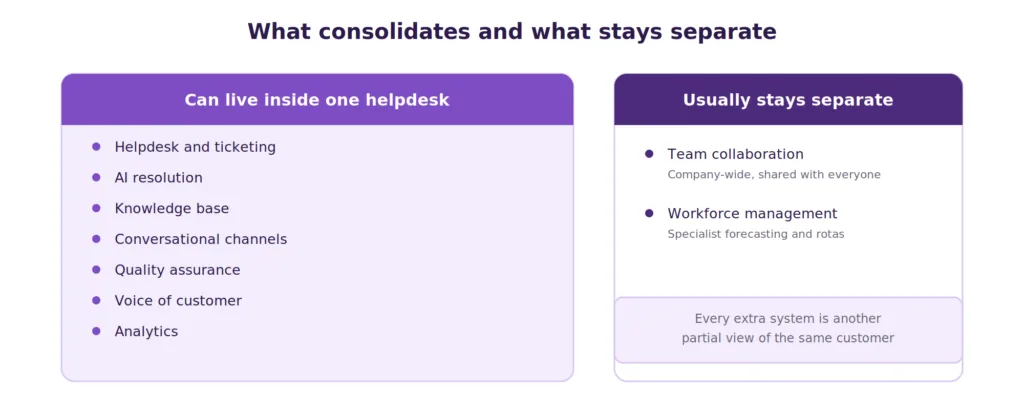
Diagram showing which support stack layers can consolidate into one platform
Layer 5: Team Collaboration
Internal discussion, escalation to engineering, and the handoffs that decide resolution time.
This layer is usually inherited rather than chosen, since support adopts whatever the company already runs. That is generally the right call, because a support-only collaboration tool creates the silo it was meant to remove.
What matters: a channel structure that separates live escalations from general discussion, a documented path from support to engineering with an owner rather than an open channel, and a two-way link between the helpdesk and the issue tracker so a customer-reported bug carries the ticket reference and the fix reaches the customer who reported it.
What to check: whether internal notes live in the helpdesk or in chat. Discussion about a ticket that happens outside the ticket disappears when the person who remembers it leaves.
Layer 6: Quality Assurance and Coaching
Reviewing conversations, scoring them against a rubric, and turning findings into coaching.
Buy it when: you pass roughly ten agents. Below that, a manager reading a sample weekly is enough, and a dedicated tool adds process without adding signal.
What good looks like: a rubric with fewer than eight criteria, sampling that includes escalations and reopened tickets rather than random conversations, and scores that feed coaching sessions rather than performance reviews.
The common failure: scoring for compliance rather than outcome. A conversation that ticked every box and left the customer unresolved should not score well.
Many modern helpdesks now include QA workflows, so check what you already own before buying a standalone tool.
Layer 7: Workforce Management
Forecasting volume, building schedules, and tracking adherence.
Buy it when: you pass roughly twenty-five agents or run genuine round-the-clock rota coverage. Below that, a spreadsheet is honestly sufficient, and this is the layer most often bought too early.
What good looks like: forecasts built from your own historical volume including seasonal and incident spikes, schedule adherence tracking, and intraday re-forecasting when volume deviates.
Where it earns its cost: absorbing volume spikes. If your support load is spiky, this layer prevents the service level collapse that happens exactly when customers are most frustrated.
Layer 8: Voice of Customer
Post-interaction surveys, relationship surveys, and the feedback loop back into the product.
What good looks like: CSAT triggered automatically after resolution, response rates tracked so you know whether the sample is representative, and a documented route from feedback theme to product backlog.
What to avoid: surveying everything. Survey fatigue produces low response rates and biased samples, and a CSAT built on the customers who felt strongly enough to answer is not a measurement of your service. Worth noting that PwC’s 2025 Customer Experience Survey found executives believe loyalty has grown while customers disagree, a gap surveys are meant to catch.
Most helpdesks include basic survey capability. A standalone platform earns its place when you need relationship surveys, multi-touch programs, or text analysis across free-text responses.
Layer 9: Analytics and Reporting
The layer that lets you defend the budget.
What good looks like: resolution reporting rather than volume reporting, segmentation by issue type and channel, and the ability to build the specific report your finance director asked for without exporting to a spreadsheet.
The gap to check: most helpdesk reporting is adequate for operations and thin for executive reporting. Test this during a trial by building one real report your leadership already asks for, rather than admiring a demo dashboard.
If you need the metrics themselves rather than the tool, this guide to customer support metrics covers what to track.
What to Buy at Each Team Size
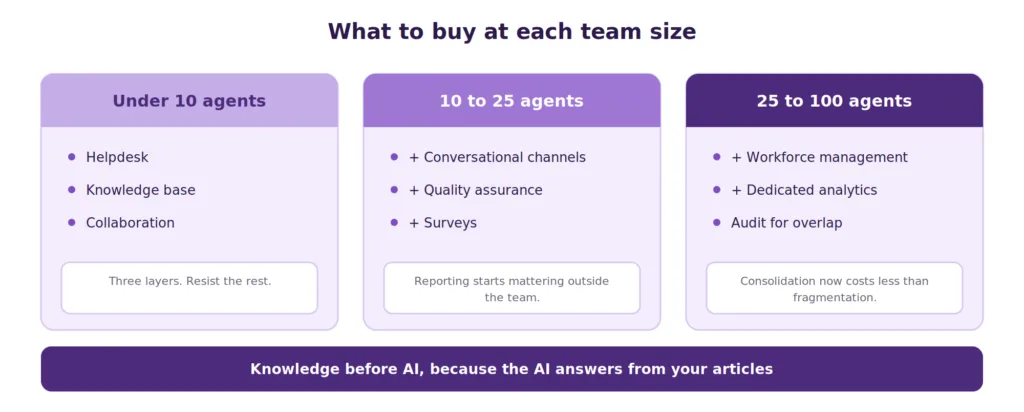
Diagram of recommended support tool layers at three team sizes
Under 10 agents. Helpdesk, knowledge base, and collaboration. That is the whole stack. Add AI resolution once repetitive volume is high enough that the same five questions dominate the queue. Resist everything else, because tooling overhead at this size costs more than it returns.
10 to 25 agents. Add conversational channels properly, quality assurance, and post-interaction surveys. This is where reporting starts mattering to people outside the team, so check that your helpdesk can produce what leadership asks for.
25 to 100 agents. Add workforce management and dedicated analytics. Consolidation becomes urgent here, because the cost of fragmented customer context now exceeds the cost of migration.
Over 100 agents. The question changes from what to add to what to remove. Most organizations at this size are running overlapping tools acquired by different managers, and an audit usually finds two or three that can be retired without loss.
The Integration Question
The stack works or fails on whether customer context reaches the place the work happens.
Three tests are worth running before buying anything new.
Can an agent see the whole customer without switching tabs? Every tab is time and an opportunity to miss something. This is the practical measure of whether your stack is integrated or merely connected.
Can the AI reach the same data an agent can? An automation layer that cannot see order history or account status will escalate cases a human could resolve, and the deflection number will disappoint.
Can you report across the whole thing? If answering a leadership question needs exports from three systems and a spreadsheet, the reporting layer is not doing its job regardless of what each tool shows individually.
Tools Worth Retiring
Two categories are worth auditing out.
Single-purpose tools whose function now sits inside your helpdesk. Standalone survey tools, separate chat widgets, and separate knowledge platforms are the usual candidates. Each removal cuts license cost and consolidates context.
Tools nobody has opened this quarter. Support stacks accumulate trials that became subscriptions. Pull the license list, check last-login data, and cancel what is dormant.
A useful audit rule: any tool that holds customer conversation data but does not sync back to the helpdesk is a candidate for replacement, because it is fragmenting the record that everything else depends on.
Where Kayako Fits
Kayako sits at layers one, two, three, four, and nine, which is the consolidation most teams are trying to reach through integrations.
Agent Kay resolves routine questions directly from your knowledge base rather than suggesting articles. SingleView keeps the full customer history on one record so agents and the AI both answer with context. Channels feed one queue, and billing is per resolved ticket rather than per seat, so improving automation reduces cost instead of leaving it flat.
Trilogy provides the clearest example of what consolidation plus resolution looks like. After moving to Kayako, the team removed 80% of ticket volume, reached 76% autonomous resolution, and cut ticket age from 17.6 hours to under two minutes during a 90-day rollout.
The honest limit: collaboration and workforce management stay outside this, and larger teams will still run a separate tool for each.
A support stack is nine layers, and most teams need far fewer of them than the market suggests. Under ten agents, three layers cover it. The categories bought too early are workforce management and standalone quality assurance. The category bought too late, almost universally, is knowledge, which matters more now because it determines whether the AI layer above it works at all.
Sequence matters more than selection. Knowledge before AI, because the AI answers from your articles. Consolidation before expansion, because every additional system fragments the customer record that automation depends on.
Start with an audit rather than a purchase. List every tool touching a customer conversation, note which ones sync back to the helpdesk, and cancel anything nobody opened last quarter. Most teams find the next improvement in what they already own.
Frequently Asked Questions
What tools does a customer support team need?
At minimum, a helpdesk, a knowledge base, and a team collaboration tool. Past ten agents add conversational channels, quality assurance, and surveys. Past twenty-five add workforce management and dedicated analytics.
What is a customer support tech stack?
The set of connected tools a support team runs on, spanning helpdesk, AI resolution, knowledge, channels, collaboration, quality assurance, workforce management, feedback, and analytics. Six of those nine layers can sit inside a modern helpdesk.
How many support tools should a small team use?
Three is usually enough under ten agents. Tooling overhead at that size costs more than it returns, and every extra system fragments customer context.
Should I buy AI before or after a knowledge base?
After. AI resolution agents answer from your knowledge content, so an AI deployed over thin or stale articles produces confidently wrong answers. Gartner attributes most underperforming AI support projects to data preparation rather than model limitations.
When should a support team buy workforce management software?
Around twenty-five agents, or earlier if you run round-the-clock rota coverage across time zones. Below that, a spreadsheet handles forecasting adequately, and this is the layer most commonly bought too early.
How do I know if my support stack is too fragmented?
Three signs: agents switch tabs to see customer history, your AI escalates cases a human could resolve because it cannot reach the data, and answering a leadership question needs exports from several systems.
What is the difference between a helpdesk and a support stack?
The helpdesk is one layer, the system of record holding conversations and case state. The stack is everything around it. A good helpdesk absorbs several other layers, which is why platform choice determines how many separate tools you end up buying.
Which support tools can be consolidated?
AI resolution, knowledge base, conversational channels, quality assurance, surveys, and analytics can all sit inside a modern helpdesk. Collaboration is normally company-wide and shared, and workforce management usually stays standalone.