What is a helpdesk in customer service? Learn how helpdesk systems streamline customer support, manage tickets, improve response times, and help businesses deliver efficient and consistent customer service.
The word “helpdesk” first appeared in the 1980s as an internal IT function, a dedicated team employees could call when their computer stopped working. In 2026, the customer service helpdesk has moved far beyond its IT origins. Today it is the central nervous system of any support operation: the system that captures every customer issue across every channel, organizes it, assigns it, tracks it through resolution, and generates the data needed to prevent the next one.
Companies that respond to customer issues within one hour are seven times more likely to have a meaningful conversation with a decision maker (Harvard Business Review). A well-designed helpdesk is what makes that response speed structurally possible, not dependent on individual agent heroics.
What Is a Helpdesk in Customer Service?
A customer service helpdesk is a system that captures, organizes, tracks, and resolves customer issues across channels. Every inbound contact, whether it arrives via email, chat, phone, social media, or WhatsApp, becomes a ticket with a unique identifier, an owner, a priority level, and an SLA timer. The helpdesk is not a shared inbox, a chat widget, or a CRM field. It is the operational layer that turns unstructured inbound contact into managed, measurable work.
The modern customer service helpdesk sits at the intersection of communication tool, workflow engine, and analytics platform. It stores every customer interaction in a searchable history, routes work to the right agent or team automatically, tracks SLA compliance in real time, and feeds data into the reporting layer that tells leadership whether support operations are improving or deteriorating.
Helpdesk vs. Service Desk: The Customer-Service Distinction
A service desk is an IT-services concept governed by ITIL frameworks. It handles internal requests from employees: software access, hardware replacement, system incidents. It measures against IT SLAs and reports to the CIO. A customer service helpdesk handles external requests from customers: product issues, billing queries, returns, onboarding problems. It measures against customer experience metrics and reports to the VP of Support or CX. The two systems share vocabulary but serve entirely different functions. This guide covers the customer service variant exclusively. See Atlassian’s service desk definition for the ITSM framing.
How a Customer Service Helpdesk Works: The Ticket Lifecycle
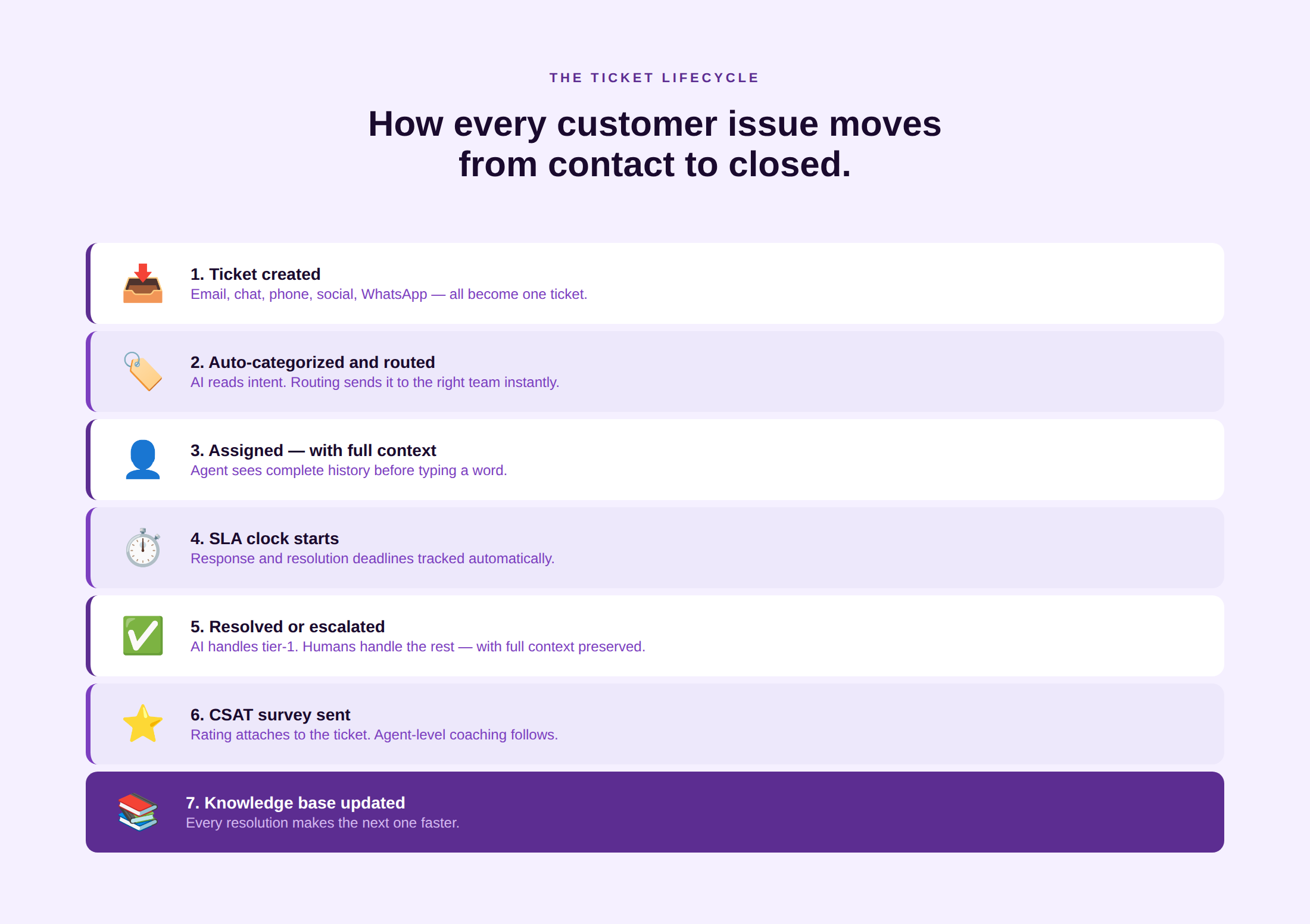
Every helpdesk operates on a ticket lifecycle. Understanding the steps helps teams configure their platform correctly and identify where their current workflow breaks down.
Step 1: Ticket creation across channels
A customer contacts support via email, live chat, phone, social media, or WhatsApp. The helpdesk captures the contact and creates a ticket automatically, regardless of which channel the customer used. The ticket records the customer’s identity (matched against account data where available), the channel, the timestamp, and the message content. See how Kayako’s AI ticketing system handles multi-channel ticket creation with automatic intent detection.
Step 2: Auto-categorization and routing
The helpdesk applies rules (and, in AI-enabled systems, machine learning classification) to categorize the ticket by issue type, product area, and priority. Routing logic then assigns it to the correct queue, team, or individual agent based on skill, availability, and ticket attributes. A billing query from a premium-tier account in Spanish routes to the billing team’s Spanish-language queue, not to the general pool.
Step 3: Assignment to agent or queue
The ticket lands in an agent’s queue with the customer’s full account history visible alongside it. In a well-configured helpdesk, the agent knows the customer’s tier, their previous tickets, the products they use, and any open issues before they type a word. This is the context layer that the best ticketing systems provide as a default, not as a premium add-on.
Step 4: SLA timer and triage
The moment a ticket is created, the SLA clock starts. The helpdesk tracks first-response time, reassignment count, and resolution deadline against the tier-specific SLA. Supervisors can see, in real time, which tickets are approaching SLA breach and intervene before the timer expires. Automated escalation rules trigger when tickets reach threshold thresholds without a response.
Step 5: Resolution or escalation
The agent resolves the issue, or escalates it to a specialist team with full context preserved. In AI-enabled helpdesks, tier-1 resolution may be handled autonomously by an AI agent. Human escalation should carry all ticket history, internal notes, and prior communications so the next agent does not start from zero.
Step 6: Customer confirmation and CSAT
The ticket closes. The helpdesk sends a confirmation to the customer and, after a short delay, a CSAT survey. The survey result attaches to the ticket record, enabling correlation between resolution type, agent, channel, and satisfaction score. A CSAT score of 4 or 5 on a resolved billing dispute tells you something different than a 2 on an unresolved technical issue.
Step 7: Knowledge base contribution
Resolved tickets that required unusual effort or generated a novel solution are flagged for knowledge base contribution. The agent (or, in AI systems, the platform automatically) creates or updates a knowledge base article. That article is then available to agents on future similar tickets and to customers in self-service. The knowledge base grows with every resolved ticket, compounding the helpdesk’s efficiency over time.
See how Kayako’s AI helpdesk handles the full ticket lifecycle with unified customer context and autonomous tier-1 resolution. See It in Action
Core Features of a Customer Service Helpdesk
Eight features define a production-ready customer service helpdesk in 2026:
- Ticketing system. The foundational layer. Every contact becomes a ticket with a unique ID, owner, status, and SLA timer.
- Shared inbox. A unified queue that consolidates email, chat, social, and messaging contacts so agents work from one interface. See how Kayako’s AI shared inbox handles multi-channel triage with AI routing.
- SLA management. Configurable response and resolution time targets by ticket priority and customer tier, with breach alerts and escalation rules.
- Knowledge base. A self-service content library that deflects contacts, speeds agent resolution, and grows with every ticket closed. Kayako’s knowledge base software integrates directly with the agent workspace so article suggestions surface in context.
- Automations and macros. Rule-based workflows that auto-assign, auto-tag, auto-respond, and auto-escalate based on ticket attributes. The difference between a team handling 30 tickets a day and 300.
- Multi-channel intake. Native support for email, live chat, voice, social media (X, Facebook, Instagram), and WhatsApp Business. Each channel feeds the same ticket system with the same data model.
- Reporting and analytics. Dashboards covering first-response time, resolution time, SLA compliance, CSAT, deflection rate, and ticket volume by channel, category, and agent.
- Integrations. CRM (Salesforce, HubSpot, Zoho CRM), e-commerce (Shopify, Magento), telephony, and billing systems. The helpdesk is most powerful when it can read account and order data from adjacent systems without requiring agents to switch tabs.
AI assist is the ninth feature that has moved from optional to expected in 2026. Drafted replies, ticket summarization, intent classification, and autonomous resolution are now standard capabilities in leading platforms, not premium add-ons.
Types of Customer Service Helpdesks
Cloud and SaaS helpdesks
The overwhelming majority of customer service helpdesk deployments in 2026 are cloud-based. SaaS helpdesks deploy in days rather than months, update automatically, scale with team size, and connect to modern API ecosystems. On-premise helpdesk deployments still exist in heavily regulated industries (banking, defense, healthcare) where data residency requirements prevent cloud deployment, but they are a small and declining share of the market.
AI helpdesks
An AI helpdesk adds autonomous resolution capability on top of the standard feature set. AI agents classify incoming tickets, draft replies, retrieve knowledge base articles, take action in connected systems (processing refunds, resetting passwords, updating account details), and close tickets without human involvement for tier-1 query types. AI helpdesks operate across the three-layer stack: rule-based automation at the base, AI assist (co-pilot mode) in the middle, and AI agents at the top. See Kayako’s AI customer support overview for how all three layers work in a single deployment.
CRM-integrated helpdesks
A CRM-integrated helpdesk connects the support ticket system to the customer relationship record so that agents can see account value, renewal date, deal stage, and sales history alongside the ticket. This is the infrastructure that makes customer journey management possible: support interactions inform sales, CS, and renewal conversations because all teams share the same customer record. Salesforce Service Cloud is the most common enterprise CRM-integrated helpdesk. Kayako integrates with Salesforce, HubSpot, and Zoho CRM natively.
How a Helpdesk Improves Customer Satisfaction
The connection between helpdesk quality and customer satisfaction is well-documented. Customers who have their issues resolved on first contact are 35% more likely to renew and expand. A helpdesk improves satisfaction through four structural mechanisms:
- Speed. SLA management and automated routing reduce wait time. Live chat achieves 87% positive CSAT, the highest of any digital channel (Tidio, cited in Unthread), primarily because of response immediacy.
- Context. Agents who have full account history before the first message do not ask customers to repeat themselves. That single improvement has measurable impact on CSAT because 56% of customers say having to repeat themselves is the most frustrating part of a support interaction (Dimensional Research, cited in HubSpot).
- Consistency. Macros and knowledge base integration ensure that every agent gives the same answer to the same question. Inconsistent answers are a primary driver of ticket reopens and repeat contacts.
- Closure. A helpdesk that automatically confirms ticket resolution and requests a CSAT rating closes the loop visibly. Customers who receive a confirmation feel the issue was handled; customers who do not feel their issue disappeared into a void.
AI Helpdesk: What Changed in 2026
The AI helpdesk in 2026 is not a chatbot bolted onto a ticketing system. It is a three-layer stack that changes what each tier of the support operation does:
- Layer 1: Rule-based automation. Macros, triggers, SLA timers, routing rules. Every modern helpdesk has this layer. It removes manual steps from predictable ticket types.
- Layer 2: AI assist. Drafted replies, ticket summarization, intent classification, sentiment detection. The AI reads the ticket and suggests a response. The agent reviews and sends. Agents using AI assist resolve 15% more issues per shift (DevRev, citing Gartner data).
- Layer 3: AI agents. Autonomous resolution. The AI agent reads the ticket, retrieves the answer from the knowledge base, takes action in connected systems if needed, and closes the ticket without human involvement. Median tier-1 AI deflection sits at 41.2% across enterprise CX programs in 2026, with the top quartile reaching 58.7% (Zendesk CX Trends and Salesforce State of Service, cited in Digital Applied).
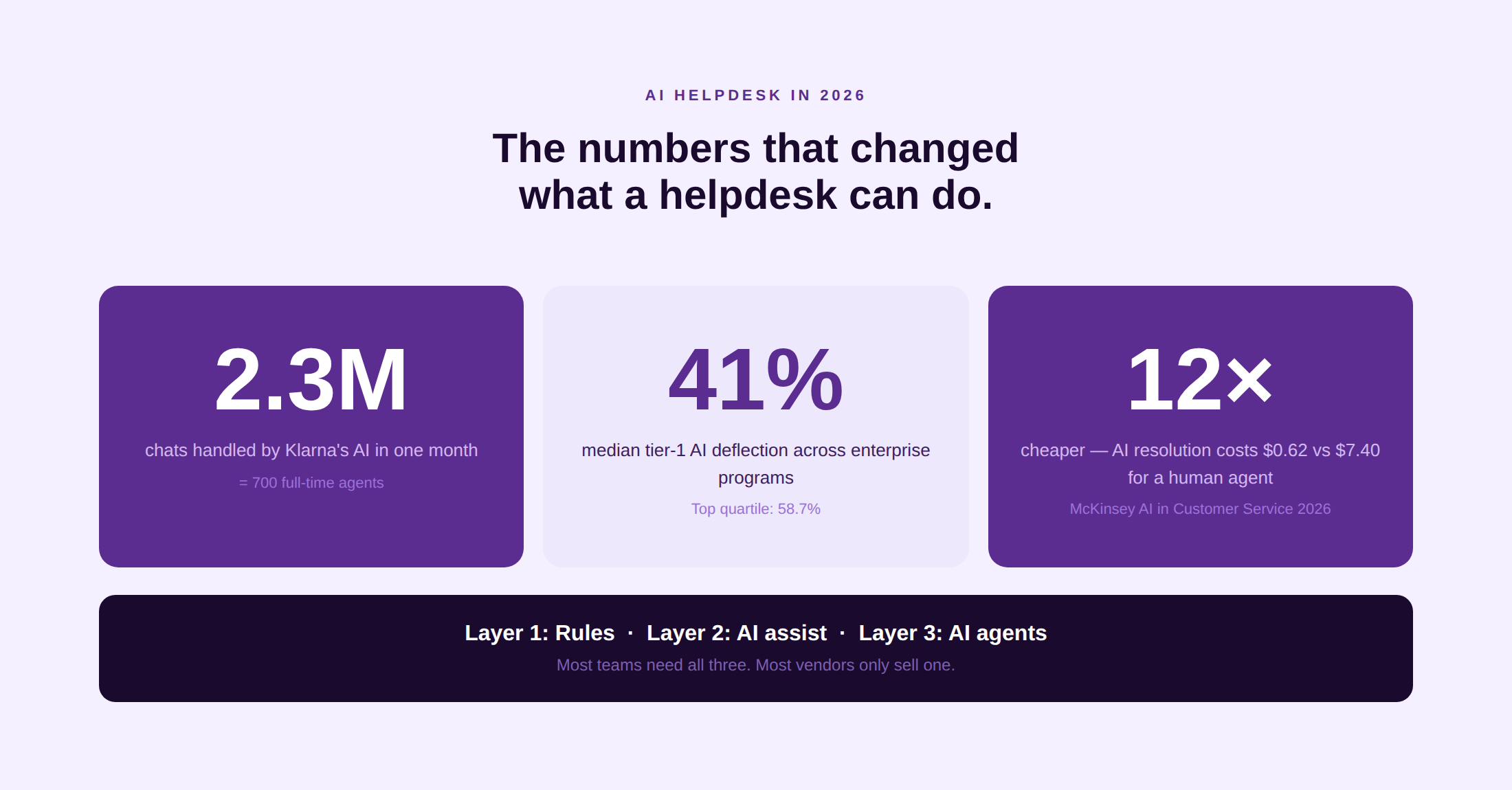
The most cited benchmark for AI at scale is Klarna’s OpenAI-powered assistant, which handled 2.3 million customer service chats in its first month, equivalent to the work of 700 full-time agents, with CSAT on par with human agents and repeat inquiry rates dropping 25% (Klarna press release). The cost implication is significant: AI resolutions average $0.62 versus $7.40 for human-handled tickets (McKinsey AI in Customer Service, cited in Digital Applied).
The pricing model is also shifting. Platforms including Kayako have moved to per-resolved-ticket pricing ($1 per AI-resolved ticket) rather than per-seat licensing. This aligns platform cost directly with value delivered rather than with headcount.
Top Customer Service Helpdesk Software in 2026
Kayako
AI-powered helpdesk built around SingleView, a unified customer timeline that gives agents the full cross-channel history before they respond. Agent Kay handles tier-1 resolution autonomously. Outcome-based pricing at $1 per AI-resolved ticket with no per-seat cost. Kayako customers include Trilogy (ticket age reduced from 18 hours to under 5 hours, CSAT 76% to 90%), Contently (68% autonomous resolution, $1.8M in avoided costs), and IgniteTech ($5.4M year-one impact, 6.5x savings ratio). See how Kayako compares to Zendesk alternatives and Freshdesk alternatives.
Zendesk
The enterprise default with over 100,000 customers and 1,300 or more integrations. Broadest AI surface area in the category via Copilot, Advanced AI, and native AI agents. Per-seat pricing compounds at scale; Advanced AI is a $50/agent/month add-on on top of Suite Professional.
Freshdesk
Strong mid-market value through Freddy AI, which includes self-service agents (deflection), copilot (agent assist), and insights (analytics). 225% ROI and 95% omnichannel FCR rate documented in G2-verified data. Omnichannel requires Freshdesk Omni as a separate add-on.
Intercom
Best-in-class AI agent (Fin) with 37.4% autonomous ticket deflection in independent testing. Per-resolution pricing at $0.99 per resolved conversation. Strong for SaaS and product-led teams. See Intercom alternatives for teams evaluating the category.
Help Scout
Clean, fast helpdesk optimized for small teams (under 25 people). AI Drafts and AI Summaries provide Layer 2 assistance without the configuration overhead of enterprise platforms. Fastest time-to-value in the category.
HubSpot Service Hub
Best for teams already running HubSpot CRM for sales and marketing. Native CRM integration means agents see the full contact and deal record alongside the ticket. Full omnichannel requires Professional at $90/seat/month.
Salesforce Service Cloud
Deepest CRM-integrated helpdesk in the market. Einstein AI operates on the richest customer data of any platform. Best suited to large enterprises already running Salesforce CRM. Implementation typically takes 2 to 6 months.
Zoho Desk
Most cost-effective fully featured helpdesk in the category. Free tier for up to 3 agents. Zia AI assistant for classification and response suggestions from the Enterprise tier. Deep Zoho ecosystem integration. UI lags newer platforms, but the feature-to-price ratio is the best in the mid-market.
See how Kayako’s AI helpdesk delivers autonomous resolution at $1 per ticket with no per-seat cost. Book a Demo
How to Choose the Right Customer Service Helpdesk
By team size
- 1 to 10 agents: Help Scout or Zoho Desk free tier. Avoid over-engineering. A clean shared inbox with basic automations and a knowledge base covers 90% of the need at this scale.
- 10 to 50 agents: Kayako, Freshdesk Pro, or Intercom. This is the range where AI assist starts producing measurable savings and where routing logic, SLA management, and reporting become differentiators.
- 50 to 250 agents: Zendesk Suite, Kayako, or Freshdesk Omni. At this scale, AI agent deflection, skill-based routing, and per-channel reporting are operational requirements, not nice-to-haves.
- 250 or more agents: Zendesk Enterprise, Salesforce Service Cloud, or Kayako at enterprise scale. Procurement, compliance, and security requirements narrow the shortlist quickly.
By primary channel
- Email-led: Any platform on this list handles email. Prioritize shared inbox quality, macros, and knowledge base integration.
- Chat-led: Intercom (SaaS product-led), Kayako, or Freshdesk Omni. All three handle in-app and website chat natively.
- Voice-led: Zendesk (native voice), Salesforce (Einstein Voice), or Freshdesk (Freshcaller). Kayako and Help Scout do not support voice natively.
- Omnichannel: Kayako (unified timeline across all channels), Zendesk (widest channel breadth), or Freshdesk Omni (strong mid-market option).
Helpdesk selection checklist
Channels: Does it support all channels your customers currently use?
Context: Does it unify cross-channel history in one customer record?
AI: Does it offer AI assist today and an AI agent roadmap?
Integrations: Does it connect to your CRM and e-commerce platform?
Pricing: Does the model align with how your business scales (per-seat vs. per-resolution)?
SLA management: Can you configure response and resolution times by priority and tier?
Reporting: Can you measure first-contact resolution, CSAT, and deflection rate out of the box?
Migration: Does it import historical ticket data from your current system?
Metrics That Matter for a Customer Service Helpdesk
Eight metrics cover the operational and customer experience dimensions that a helpdesk should track. Each is paired with a 2026 benchmark range.
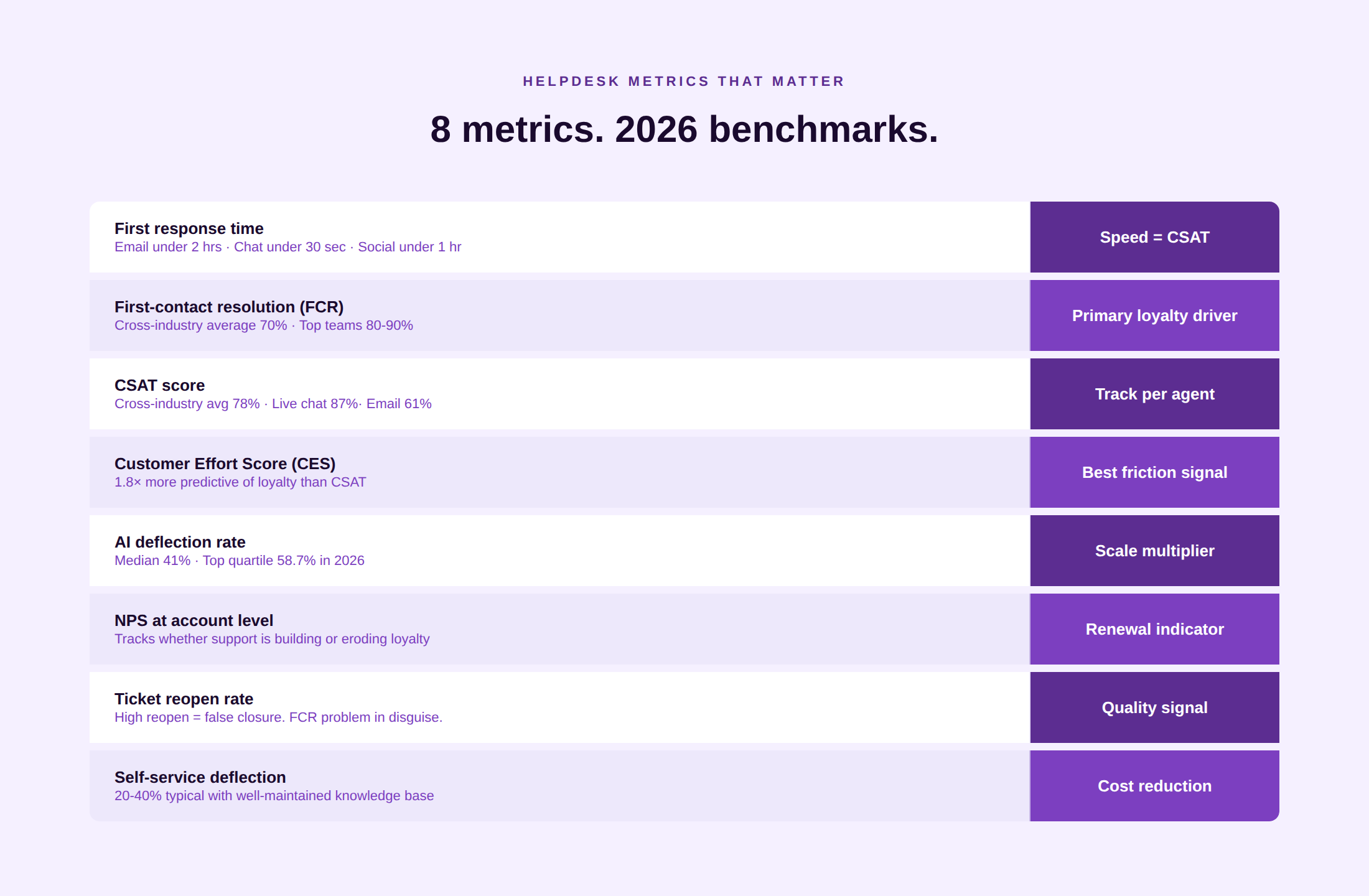
- First-response time. Time from ticket creation to first agent or AI response. Best-in-class email first response is under 2 hours; chat under 30 seconds. Social media under 1 hour (Ringly.io). See Kayako’s guide to average handle time for the full picture.
- Average resolution time. Time from ticket open to ticket close. Varies widely by category; for routine tier-1 queries handled by AI, resolution time approaches zero. For complex tier-3 technical issues, 2 to 5 business days is typical.
- First-contact resolution (FCR). Percentage of tickets resolved without escalation or customer follow-up. The cross-industry FCR average is 70% (SQM Group, cited in Stealthagents). Teams with structured QA and regular coaching loops report 80 to 90%. Every percentage point of FCR improvement reduces repeat contacts proportionally.
- Customer Satisfaction Score (CSAT). Post-interaction survey rating. The cross-industry average sits at 78% (Salesforce, cited in Sobot). Live chat achieves 87% positive CSAT; email averages 61%. Track CSAT at the agent level, not just the aggregate, to enable specific coaching.
- Customer Effort Score (CES). Measures how easy the interaction was. See Kayako’s Customer Effort Score guide for the formula and benchmarks. CES is 1.8 times more predictive of loyalty than CSAT for service interactions.
- Net Promoter Score (NPS) at the account level. Tracks whether support quality is building or eroding long-term loyalty. See Kayako’s NPS guide for how to measure and improve it alongside CSAT.
- Deflection rate. Percentage of potential contacts resolved through self-service or AI without reaching a human agent. Top-quartile AI deflection reached 58.7% in 2026 (Zendesk CX Trends, cited in Digital Applied). Self-service deflection typically runs 20 to 40% in well-maintained knowledge base deployments.
- Ticket reopen rate. Percentage of closed tickets that a customer reopens because the issue was not actually resolved. A high reopen rate signals FCR problems. Improving average handle time without improving resolution quality typically increases the reopen rate.
Real-World Examples and Case Studies
Kayako: Trilogy, Contently, and IgniteTech
Trilogy reduced average ticket age from 18 hours to under 5 hours and CSAT from 76% to 90% after deploying Kayako’s unified helpdesk. Contently achieved 68% autonomous resolution, 91-second first response, and $1.8 million in avoided support costs. IgniteTech reported $5.4 million in year-one impact with a 6.5x savings ratio and a 73% reduction in resolution time. All three outcomes followed the same pattern: unified customer context, AI triage, and autonomous tier-1 resolution replacing manual queue management.
Infosys BPM: helpdesk transformation at enterprise scale
Infosys BPM, one of India’s largest business process management firms, was tasked with something big. They had to overhaul the helpdesk operation of a major multinational consumer goods company that had been experiencing poor resolution turnaround times and fragmented agent workflows. So, they restructured the ticket lifecycle and deployed its iNteract virtual assistant on top of a unified service desk, reducing time to resolution by 33% and cutting calls to the IT service desk by up to 20% through proactive knowledge management (Infosys BPM case study). The case demonstrates a pattern common in large Indian enterprises: fragmented legacy helpdesk infrastructure is the primary constraint, and structured ticket lifecycle redesign delivers faster returns than technology replacement alone.
Quick Heal Technologies: scaling support for a cybersecurity product
Quick Heal Technologies, the Pune-based cybersecurity company serving over 30 million users globally across consumer, enterprise, and government segments, built its helpdesk around the complexity of multi-tier technical support for antivirus and endpoint security products. Customer issues range from simple installation queries to complex enterprise network deployments. The company’s support operation uses a tiered helpdesk model where L1 agents handle common issues with standardized macros and knowledge base articles, with complex incidents escalating to specialized L2 and L3 technical teams. The model allows Quick Heal to maintain a consistent first-response experience at consumer scale while preserving the technical depth required for enterprise accounts.
Disney: empowerment as a helpdesk principle
Disney’s customer service model is studied not for its software but for its cultural architecture: every frontline agent, whether in a park, on the phone, or handling a digital contact, is empowered to resolve issues without managerial approval up to a defined threshold. The practical effect is a dramatic reduction in escalations and a corresponding improvement in first-contact resolution. When this principle is applied inside a modern helpdesk, it translates to configuring the system so that agents have the authority and the tools to close tickets rather than just acknowledge them. See the full framework in Kayako’s customer service case studies guide.
A helpdesk will never go out of fashion. With humans seeking out contact with the first chance they have a query, the scale of resolution, customer satisfaction, and all things revenue will continue to be talked about. In the definition of customer service representation, helpdesk might be the most fundamental pillar. So, whether it’s artificial intelligence helping with faster resolution or human agents upskilling themselves, helpdesk methodology will continue to find ways to evolve. And we’ll be here to cover it.
FAQs
What is a helpdesk?
A helpdesk is a system that captures, organizes, tracks, and resolves customer issues across channels. Every inbound contact, whether by email, chat, phone, social media, or WhatsApp, becomes a ticket with a unique identifier, an owner, a priority level, and an SLA timer. In customer service, a helpdesk is the operational layer that converts unstructured inbound contact into managed, measurable work. In IT, the term refers to an internal employee support function. This guide covers the customer service variant.
What is the difference between a helpdesk and a service desk?
A helpdesk handles external customer requests across product support, billing, returns, and general service. A service desk handles internal IT requests from employees, governed by ITIL frameworks: software access, hardware replacement, system incidents. Both use tickets. Both measure response and resolution time. But they serve different populations and report to different functions. Conflating the two leads to buying ITSM software for a customer service problem, or customer service software for an IT problem.
What is helpdesk software?
Helpdesk software is the technology platform that runs the ticket lifecycle. It captures contacts across channels, creates and routes tickets, tracks SLA compliance, manages the agent workflow, and generates reporting on support performance. Modern helpdesk software adds AI capabilities (classification, drafting, and autonomous resolution) on top of the core ticketing and workflow engine. The category includes cloud platforms like Kayako, Zendesk, Freshdesk, and Help Scout, and CRM-integrated platforms like Salesforce Service Cloud and HubSpot Service Hub.
What is a helpdesk ticketing system?
A helpdesk ticketing system is the mechanism that converts inbound customer contacts into trackable work items called tickets. Each ticket has a unique ID, a status (open, pending, resolved, closed), an SLA timer, an assigned agent or queue, and a full interaction history. The ticketing system is the foundational layer of any helpdesk. See Kayako’s guide to the best ticketing systems for a platform comparison.
What is an AI helpdesk?
An AI helpdesk adds autonomous resolution capability on top of standard helpdesk features. It operates across three layers: rule-based automation (routing, macros, SLA management), AI assist (drafted replies, ticket summarization, classification), and AI agents (autonomous end-to-end resolution without human involvement). Median tier-1 AI deflection across enterprise programs is 41.2% in 2026, with top-quartile teams reaching 58.7%.
Is a helpdesk part of a CRM?
A helpdesk and a CRM are separate systems that work best when connected. The CRM stores the customer relationship record: account details, deal history, contract value, and renewal date. The helpdesk stores the support ticket history: every issue raised, every SLA tracked, every CSAT score recorded. When the two systems share data, agents can see the full customer picture and support interactions can inform sales, renewal, and expansion decisions. Salesforce Service Cloud is the most common combined CRM-helpdesk deployment. Kayako integrates natively with Salesforce, HubSpot, and Zoho CRM.
What is the best customer service helpdesk software?
The best helpdesk depends on team size, primary channel, integration needs, and pricing model. Kayako is best for outcome-based pricing with no per-seat cost and AI-first autonomous resolution. Zendesk is best for enterprise teams needing the widest integration surface. Freshdesk is best for mid-market value. Intercom is best for SaaS product-led teams. Help Scout is best for small teams that prioritize simplicity. Salesforce Service Cloud is best for Salesforce-native enterprises. Zoho Desk is best for the Zoho ecosystem at the lowest price point. G2 ratings, pricing, and a decision framework by team size are covered in detail above.