How to Scale Omnichannel Customer Support (Without Breaking Your Team or Your Brand)
Learn how to scale omnichannel customer support with the right processes, automation, and AI to deliver fast, consistent customer experiences across every channel.
One of the most critical aspects of companies claiming to have omnichannel support teams is that they are, in reality, still multichannel. The difference is not the number of channels. It is whether context follows the customer across them.
56% of customers say they have to repeat themselves during support interactions. That single statistic is the most precise diagnostic for a fragmented support setup. When a customer who emailed yesterday has to re-explain their issue on today’s chat, the problem is not the agent. The problem is the infrastructure. And when the customer base grows, the infrastructure problem compounds faster than the headcount can absorb it.
This guide covers how to scale omnichannel customer support without fragmenting your team or degrading the customer experience. The outline moves from definitions through rollout to org design, metrics, and the pitfalls most teams hit on the way.
P.S- If you’re looking for a complete guide on omnichannel customer support; head here.
What Omnichannel Customer Support Actually Means (And Why It Is Not the Same as Multichannel)
Multichannel support means offering multiple ways for customers to contact you: email, phone, live chat, social, and SMS. Each channel typically has its own queue, its own data, and its own team. The customer can reach you anywhere. But each interaction starts from zero.
Omnichannel support means the context of every previous interaction follows the customer regardless of which channel they use next. A customer who emailed on Tuesday and calls on Wednesday does not reintroduce themselves. The agent already sees the email, the previous ticket history, the account record, and any notes from prior interactions. The channel is transparent. The conversation is continuous.
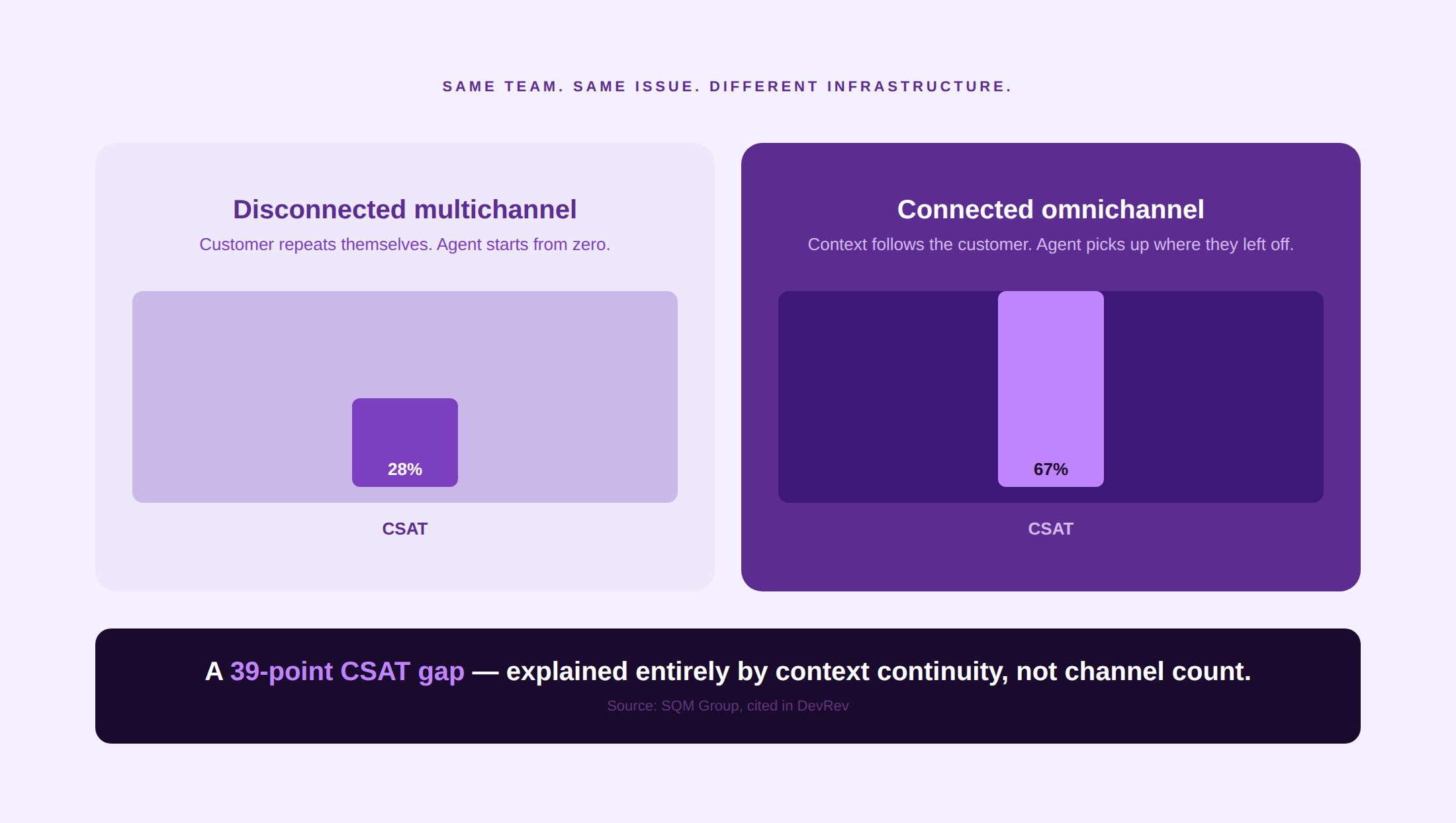
The gap between these two approaches is measurable. Omnichannel support lifts CSAT to 67%, compared to just 28% for disconnected multichannel setups (SQM Group, cited in DevRev). That 39-point CSAT differential is not explained by channel coverage. It is explained by context continuity.
The test for whether a team is actually omnichannel is simple: pick a customer who has contacted you through two different channels in the last 30 days. Open their profile in your support tool. Can you see both interactions in one timeline, in chronological order, with full message content? If not, you are multichannel. The full distinction between omnichannel and multichannel customer service is covered in detail in the Kayako hub page for this topic.
Why Scaling Omnichannel customer support is Non-Negotiable
Fragmented support setups fail gradually, then suddenly. The failure mode is predictable: a team handles 10 tickets a day across three channels with shared context through Slack and good institutional memory. At 50 tickets a day, the informal context-sharing breaks. At 200, the channels have diverged into separate operational silos with different response-time expectations, different agents, and different data.
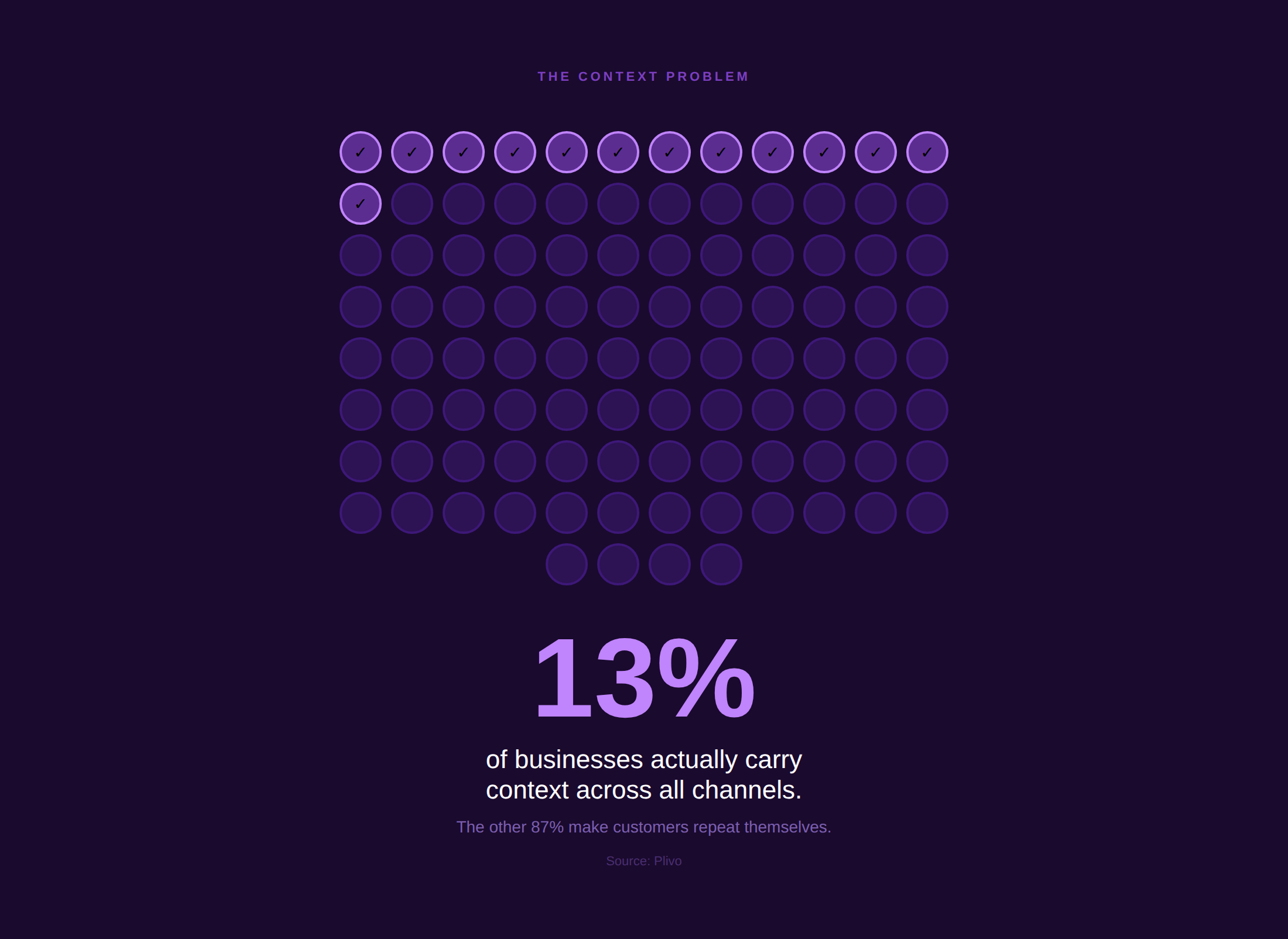
73% of customers engage across multiple channels during their buying or support journey (Marketing LTB, citing UniformMarket). Only 13% of businesses successfully carry customer context across all those channels. The 87% that don’t are generating unnecessary repeat contacts, duplicate tickets, and agent context-gathering overhead that compounds into cost and churn at scale.
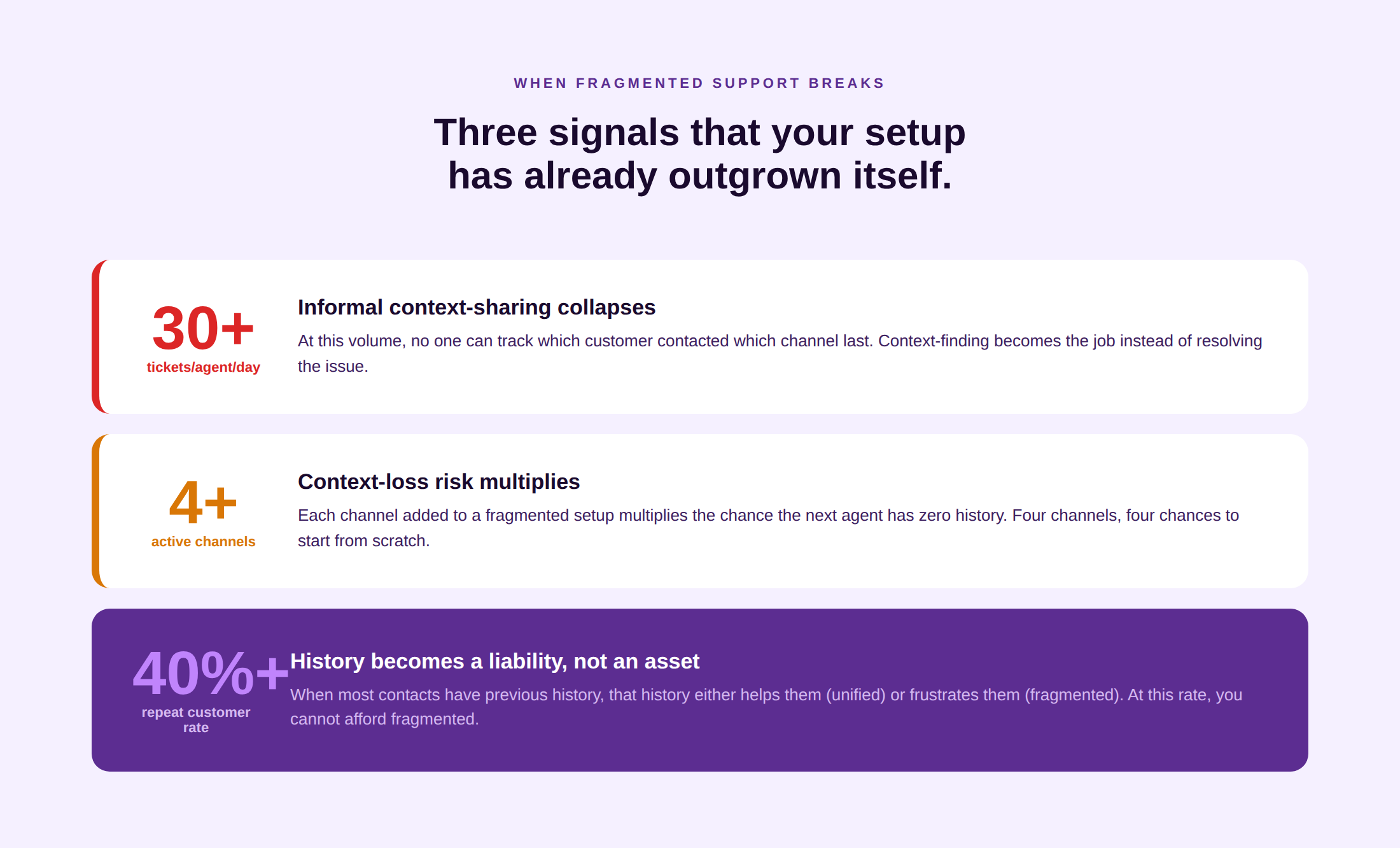
Three operational inflection points signal that a fragmented setup is about to break:
- 30 or more tickets per day per agent. At this volume, informal context-sharing collapses. Agents can no longer keep track of which customer contacted which channel last, and the overhead of finding that context manually consumes the time that should go to resolving the issue.
- Four or more active support channels. Each additional channel multiplies the context-loss risk. A customer who has interacted through four channels, email, chat, phone, and social, generates context spread across four separate queues unless the infrastructure unifies them.
- Repeat customer rate above 40%. When most of your support contacts are from existing customers who have previous interaction history, that history becomes a service asset or a service liability depending on whether agents can access it. See how customer communication management approaches this problem at the platform level.
The Signs You Have Outgrown a Fragmented Support Setup
The symptoms of a fragmented support setup usually appear before the team acknowledges them. They are treated as agent performance problems or volume problems when they are actually architecture problems.
- Agents ask customers to repeat themselves. The most visible symptom. When an agent handling a phone call has no visibility into the customer’s email thread from two days ago, they ask for the account number, the order number, and a description of the issue. The customer has already provided all three. The friction is institutional, not individual.
- Tickets bounce between tools without a clean trail. A ticket that starts in email, gets mentioned in Slack, gets a partial response in the helpdesk, and is then followed up on social has no canonical record. When that ticket escalates, no one can reconstruct the full history without manually hunting across four systems.
- SLAs are missed because no one owns the handover. The most dangerous failure mode in fragmented setups is the ticket that falls through the gap between two channels. The email team thought the chat team picked it up. The chat team thought it was resolved in the email. The customer waited five days and received no response.
- Knowledge is fragmented across Slack, email, and shared documents. When your knowledge base is actually a combination of a Notion doc, a Slack channel called #support-tips, and a Google Sheet of canned responses, agents cannot find answers quickly. Inconsistent information reaches customers, and knowledge gaps are invisible until a customer encounters one.
- CSAT varies significantly by channel rather than by issue type. When your phone CSAT is 85%, and your email CSAT is 55% for the same issue category, the problem is not the resolution quality. It is the channel experience. Disconnected channels produce disconnected customer experiences, and the CSAT variance reveals it.
Kayako’s SingleView unifies every customer interaction across channels into one timeline before the agent types a word. See It in Action
The Four Core Building Blocks of a Scalable Omnichannel Operation
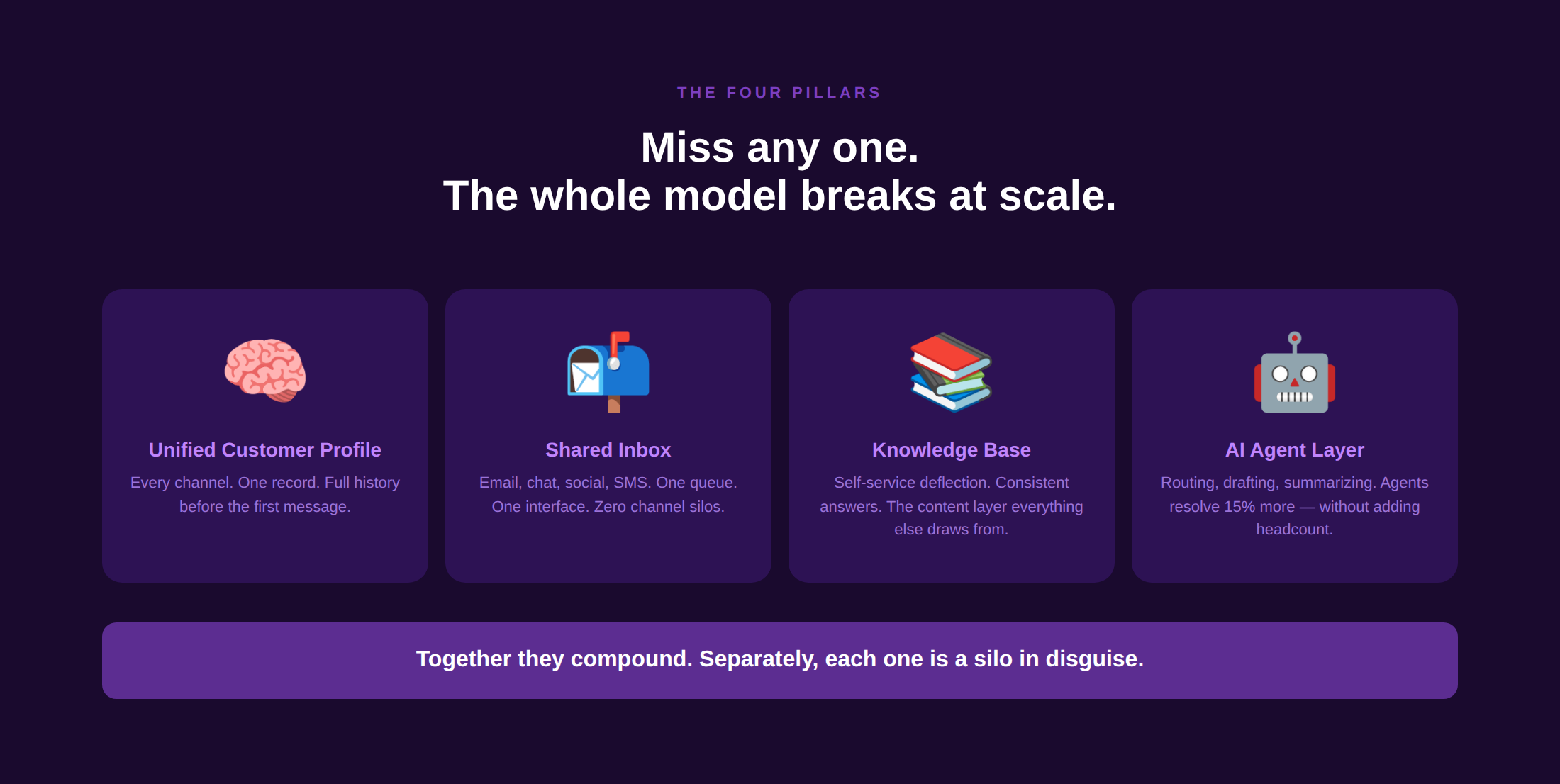
As you think about scaling your omnichannel customer support; think about the building blocks of your operations:
1. A unified customer profile
Every interaction, regardless of channel, must write to and read from the same customer record. This record should include: account details, full interaction history across all channels in chronological order, open tickets and their status, previous CSAT and CES scores, and any account-level notes from sales, success, or support. Without this layer, context-following is impossible, regardless of how many channels you add.
Kayako’s SingleView technology builds this profile automatically across every channel it handles, giving agents account context before the first message rather than after the customer re-explains.
2. A shared inbox across channels
A shared inbox that consolidates email, chat, social, and SMS into a single interface is the operational expression of the unified customer profile. Agents work from one queue rather than four. Routing logic determines which agent receives which ticket based on skill, availability, and issue type rather than which channel the customer happened to use. Agents do not need to switch between tools to handle different channel types; they work from one place with full visibility into the customer’s channel history.
3. A maintained knowledge base and self-service layer
Scale without self-service means linear growth in headcount for every linear growth in ticket volume. A well-maintained knowledge base deflects the questions that do not need an agent, reduces resolution time for agents who can retrieve accurate answers quickly, and creates consistent responses across all channels because agents are pulling from the same source. The knowledge base is not a support resource; it is the content layer that makes every other layer of the omnichannel stack more efficient.
4. An AI-assisted agent layer
AI operating on top of a unified customer profile changes what each agent is able to do per shift: response drafting, knowledge retrieval, ticket summarization, sentiment detection, and next-action suggestions all happen in the background while the agent focuses on the interaction. Agents using AI assistance resolve 15% more issues. The multiplier compounds: AI does not replace agents in omnichannel support; it raises the ceiling on what each agent can handle without the quality decline that typically accompanies scaling.
Step-by-Step: How to Plan an Omnichannel Rollout
Step 1: Audit your current channels
Before adding or connecting channels, map what you currently have. For each channel, document: ticket volume, response time, CSAT score, which team handles it, and what data is captured per interaction. This audit reveals which channels are performing, which are creating the most context-loss risk, and which have the highest ROI for unified integration.
Step 2: Map the customer journey across channels
Identify the sequences in which customers actually use your channels. A customer reporting a billing issue might email first, then call when the email response is delayed, then follow up on chat. Map those sequences and identify where context loss occurs in each transition. The context-loss points are your highest-priority unification targets.
Step 3: Pick the channels you will unify first
Do not attempt to unify all channels simultaneously. Start with your two or three highest-volume channels and achieve genuine context continuity between them before expanding. Integration complexity multiplies exponentially with each channel added in parallel, and a partially connected omnichannel setup is often worse than a clean multichannel one because it creates the appearance of continuity without the reality.
Step 4: Choose the platform
Evaluate platforms on four criteria: does it unify the specific channels your customers use; does it provide a shared inbox with real-time routing; does it integrate with your CRM and product data for customer context; and does it have an AI layer that operates on the unified data rather than a siloed add-on. The platform should be the central record of every customer interaction, not one of several systems that need to be manually reconciled.
Step 5: Migrate without losing history
Historical ticket data is not optional. An agent who can see a customer’s previous interactions from 18 months ago has context that changes the resolution path. Migration plans that lose historical data leave agents without the institutional memory that the previous system had accumulated. Confirm before migration that your historical data will be importable, searchable, and linked to the customer profiles in the new system.
Step 6: Train agents on context-handover, not just the tool
The most commonly skipped step in omnichannel rollouts is teaching agents how to use context rather than just how to access it. Picking up a conversation that started on a different channel, reading a prior interaction and building on it rather than starting fresh, and knowing when to suggest a channel switch with context carried forward, these are skills that need to be practiced, not assumed. Build them into your onboarding and QA process from day one.
Rollout checklist
Channel audit complete — volume, CSAT, and context-loss mapped per channel
Customer journey sequences documented across all active channels
Priority channels for initial unification identified (start with 2 to 3)
Platform evaluated against four criteria: channels, shared inbox, CRM integration, and AI layer
Historical data migration plan confirmed and tested
Agent training on context-handover is scheduled alongside tool training
Rollout KPIs defined: first-contact resolution, repeat-contact rate, CSAT by channel
Pilot group selected: one team or one channel pair before full deployment
Choosing the Right Channels
Channel selection should follow customer behavior, not vendor capability. The question is not which channels are available on your platform, but which channels your customers actually use and which create the most context-loss risk when they switch.
The highest-volume channel in most B2B support operations and a significant share of B2C. Email is asynchronous, which gives agents time to research but also creates the longest resolution cycles. It is the channel most likely to generate context loss when a customer switches to the phone for follow-up. Prioritize email-to-phone context continuity above all other transitions.
Live chat
The fastest-growing channel in customer preference and the highest-rated for satisfaction when done well. Live chat customer service enables agents to handle 4 to 6 concurrent conversations, making it the most cost-efficient synchronous channel. The context-loss risk is high when chat sessions end without a ticket record being created.
Voice and phone
Still the dominant channel for complex, high-urgency, and emotionally sensitive interactions. Phone generates the richest interaction context but is the hardest to carry forward because calls are not natively text-searchable. Call transcription and summarization, now standard in AI-enabled support platforms, closes this gap by creating searchable text records from every call.
WhatsApp, SMS, and messaging apps
Over 200 million businesses use WhatsApp Business globally (Meta). For support teams serving consumer audiences in markets where WhatsApp is the primary communication method, not integrating it creates a structural context-loss risk. Messaging app interactions handled outside the main support platform generate orphaned conversations that never connect to the customer’s unified record.
Social media
Public complaints on social media are visible to everyone watching. A customer who posts on X or Instagram expects acknowledgment within minutes, not hours. Social media contacts that are handled manually, disconnected from the support platform, create duplicate cases and prevent agents from seeing the full interaction history when the same customer follows up through a private channel.
The Role of AI and Automation in Scaling Omnichannel Support
AI in omnichannel support works best when it is operating on unified data rather than a siloed add-on. An AI that can see a customer’s full channel history, previous issue categories, account tier, and satisfaction scores can route, draft, and summarize far more accurately than one that sees only the current channel’s data.
Intelligent routing
AI routing assigns incoming contacts to the agent or team best positioned to resolve them, based on issue type, customer history, agent skill, and current queue load. Skill-based routing that understands which agents have resolved similar issues most efficiently reduces handle time and improves first-contact resolution without requiring manual queue management.
AI-assisted agent suggestions
Agent assist AI tools surface relevant knowledge base articles, customer history, and resolution suggestions in real time as the agent reads the customer’s message. The agent reviews, decides, and responds. This does not remove the human from the interaction; it removes the search time that currently consumes agent capacity before the interaction can begin.
Deflection and self-service
Gartner predicts that agentic AI will autonomously handle approximately 80% of standard customer service queries by 2029. The foundation for that capability is a clean, maintained customer self-service infrastructure: a knowledge base that is accurate and searchable, and an AI layer that can retrieve and apply it. Teams that invest in knowledge quality before deploying AI deflection see significantly higher deflection rates than those that deploy AI on top of poor content.
Where AI deployments fail
Here are 3 things you need to know
- AI deployed on top of siloed data produces confident, wrong answers.
- AI deployed without human escalation paths produces frustrated customers who cannot reach a person.
- AI that is not connected to the knowledge base generates responses inconsistent with your actual policies.
The pattern?: AI failures in omnichannel support are almost always data or design problems, not model problems.
Org Design: Team Structure, Routing, and Ownership
Tier-based vs. swarming models
Tier-based models route interactions through a hierarchy: tier-1 agents handle volume, tier-2 handles complexity, tier-3 handles escalation. The advantage is specialization and predictable staffing. The disadvantage is that every tier transition is a context-loss risk and a resolution delay. Swarming models route all interactions to a pool of generalists who pull in specialists as needed without transferring ownership. Swarming reduces resolution time and improves CSAT but requires agents with broader training and a platform that surfaces the right specialist quickly.
Skill-based routing
Skill-based routing assigns contacts based on agent competency profiles rather than simple queue assignment. A customer with a complex billing issue in French routes to the agent who has resolved billing disputes with French-speaking customers most efficiently. At scale, skill-based routing is the difference between a queue and an intelligent distribution system that minimizes handle time and maximizes first-contact resolution.
24/7 coverage without burning out the night shift
AI handles the tier-1 volume that would otherwise require overnight staffing for routine queries. Human agents cover complex interactions on a follow-the-sun model rather than a pure night shift. Combined, this approach provides 24/7 coverage for routine contacts and next-business-day coverage for complex ones, which matches actual customer expectations in most B2B contexts without requiring agents to work hours that damage retention.
Metrics That Actually Matter for Omnichannel CX
The trap in omnichannel metric design is optimizing for a single channel’s performance while degrading another. Reducing average handle time on phone by deflecting complex interactions to email improves the phone metric and worsens the email metric. Omnichannel metrics must be measured at the customer level, not the channel level.
- First-contact resolution (channel-agnostic). Measured across the full interaction, not per-channel. A customer who chats, emails, and calls about the same issue has not experienced first-contact resolution, even if each individual channel has closed their ticket.
- Repeat-contact rate. The percentage of customers who contact support more than once for the same underlying issue within a 30-day window. This is the most direct measure of context continuity success and is invisible in per-channel reporting.
- CSAT and CES at the customer level. A CSAT score measured per channel hides the variance that happens across channel transitions. A customer who rated a chat interaction 5 out of 5 and then rated a phone follow-up 2 out of 5 has a meaningful customer-level story that per-channel averages conceal.
- Channel mix and channel-switch rate. What percentage of customers use more than one channel for a single issue? That rate is your context-loss exposure. As omnichannel infrastructure improves, the channel-switch rate should stay the same or increase (more channels available) while the repeat-contact rate decreases (context follows the customer).
- NPS at the account level. Net Promoter Score measured at the account level, not the interaction level, reveals whether the cumulative support experience is building or eroding loyalty over time.
Common Scaling Pitfalls and How to Avoid Them
Channel proliferation
Adding a new channel because customers are present on it, without the infrastructure to unify it, creates a new context-loss risk rather than a new service capability. Every channel added to a fragmented setup increases the probability that a customer’s next contact will be seen by an agent who has no history of their previous one. Add channels only when your unification infrastructure can handle them.
Knowledge base drift
A knowledge base that is not actively maintained becomes a liability. Articles that reflect outdated policies, deprecated features, or incorrect procedures generate support interactions where AI or agents give customers wrong information. Assign content ownership, connect article review cycles to product release schedules, and track which articles generate the highest post-view ticket submission rate as the primary indicator of content gaps.
Metric gaming
Teams optimized on a single metric will improve that metric at the expense of others. Average handle time optimization leads to premature closes and higher repeat contacts. First-response time optimization leads to low-quality first responses that do not resolve the issue. Design your metric framework so that improving one metric cannot be achieved by degrading another, and monitor the full set rather than celebrating individual metric movement.
Agent burnout from poor tooling
Agents who work across four disconnected tools, manually switching context between them for every interaction, experience significantly higher cognitive load than those working from a unified interface. That cognitive load translates into error rates, lower job satisfaction, and higher turnover. The cost of agent replacement, typically 50 to 200% of annual salary, makes investment in a unified platform a retention strategy as much as an operational one.
Real-World Examples of Teams That Scaled Omnichannel Well
Here are some companies that have scaled their omnichannel customer support and how!
Kayako customer: Contently
Omnichannel at SaaS scale
Challenge: High ticket volume, slow response, agents lacking context.
After Kayako: 68% autonomous resolution rate. 91-second first response time.
$1.8M in avoided support costs.
The mechanism: unified customer context before every agent interaction eliminated the re-explanation loop that inflated handle time and degraded CSAT.
Read the full case study here
Disney: consistency as a competitive advantage
Disney’s support operation is built on a principle it applies across every customer touchpoint: the experience should feel the same regardless of where or how a customer engages. That consistency is not a brand principle only; it is an operational one. Every agent who handles a Disney customer interaction has the same context, the same authority to resolve, and the same standards for response. The result is a CSAT and brand loyalty performance that is consistently studied as a benchmark for the industry. See the broader case study in Kayako’s customer service case studies guide.
A user’s association with a company is directly proportional to how adequately their time has been respected. This is more prominent when they raise a ticket query. It’s at instances like these that a company might lose a bit of a plot for faster resolution by solely relying on multichannel support. We hope that by our educational material here, you are able to sort the chinks in your customer service support and invest in an omnichannel support system for better ticket management.
FAQs
What is omnichannel customer support?
Omnichannel customer support is a strategy that integrates all customer communication channels into a single, unified experience where context follows the customer across every interaction. Unlike multichannel support, which offers multiple contact options in separate silos, omnichannel support means that a customer who emails and then calls is treated as having one continuous conversation, not two separate cases handled by different agents with different information.
What is the difference between omnichannel and multichannel?
Multichannel offers multiple channels. Omnichannel connects them. The operative difference is context: in multichannel, each channel has its own queue and its own data. In omnichannel, every channel writes to and reads from the same customer record. The CSAT difference between them is 67% (omnichannel) versus 28% (disconnected multichannel), explained entirely by context continuity, not channel coverage. See the full breakdown in Kayako’s omnichannel customer service guide.
How do you build an omnichannel support strategy?
Six steps: (1) Audit your current channels for volume, CSAT, and context-loss points. (2) Map the customer journey sequences across channels. (3) Identify your highest-volume channel pairs for initial unification. (4) Choose a platform that unifies those channels with a shared inbox and CRM integration. (5) Migrate historical data before going live. (6) Train agents on context-handover skills, not just tool navigation. Start with two to three channels and expand after achieving genuine context continuity between them.
How does AI fit into omnichannel support?
AI works best in omnichannel when it operates on unified data: intelligent routing that assigns contacts based on customer history and agent skill; agent assist that surfaces knowledge base answers and resolution suggestions in real time; and deflection that handles tier-1 queries through a self-service layer before they reach the queue. AI deployed on siloed data or without human escalation paths fails predictably. The foundation is a unified customer record; the AI is the amplifier on top of it.
How should I structure my support team as we scale?
Two primary models: tier-based (specialists by complexity level, with escalation paths) and swarming (generalists who pull in specialists without transferring ownership). Tier-based scales more predictably; swarming reduces resolution time but requires broader agent training. At scale, combine them: AI handles tier-0 deflection, generalists handle tier-1 with AI assistance, specialists handle tier-2 escalations. 24/7 coverage comes from AI-handled overnight tier-0 volume plus a follow-the-sun model for human agents.
What metrics should I track for omnichannel CX?
Track metrics at the customer level, not the channel level. The five most important: first-contact resolution measured across the full interaction (not per channel), repeat-contact rate within 30 days, CSAT and CES at the customer level, channel-switch rate as a proxy for context-loss exposure, and NPS at the account level as the long-run loyalty signal. Avoid metric frameworks that make it possible to improve one channel’s score while degrading another.